Relational Algebra
Relational Query Languages
Query languages: Allow manipulation and retrieval of data from a database.
Relational model supports simple, powerful QLs:
◦ Strong formal foundation based on logic.
◦ Allows for much optimization.
Query Languages != programming languages!
◦ QLs not expected to be “Turing complete”.
◦ QLs not intended to be used for complex calculations.
◦ QLs support easy, efficient access to large data sets.
Formal Relational Query Languages
Two mathematical Query Languages form the basis for “real” languages
(e.g. SQL), and for implementation:
Relational Algebra: More operational, very useful for representing
execution plans.
Relational Calculus: Lets users describe what they want, rather than
how to compute it. (Non-operational, declarative.)
 Understanding Algebra & Calculus is key to
 understanding SQL, query processing!
Formal Relational Query Languages
Two mathematical Query Languages form the basis for “real” languages
(e.g. SQL), and for implementation:
Relational Algebra: More operational, very useful for representing
execution plans.
Relational Calculus: Lets users describe what they want, rather than
how to compute it. (Non-operational, declarative.)
 Understanding Algebra & Calculus is key to
 understanding SQL, query processing!
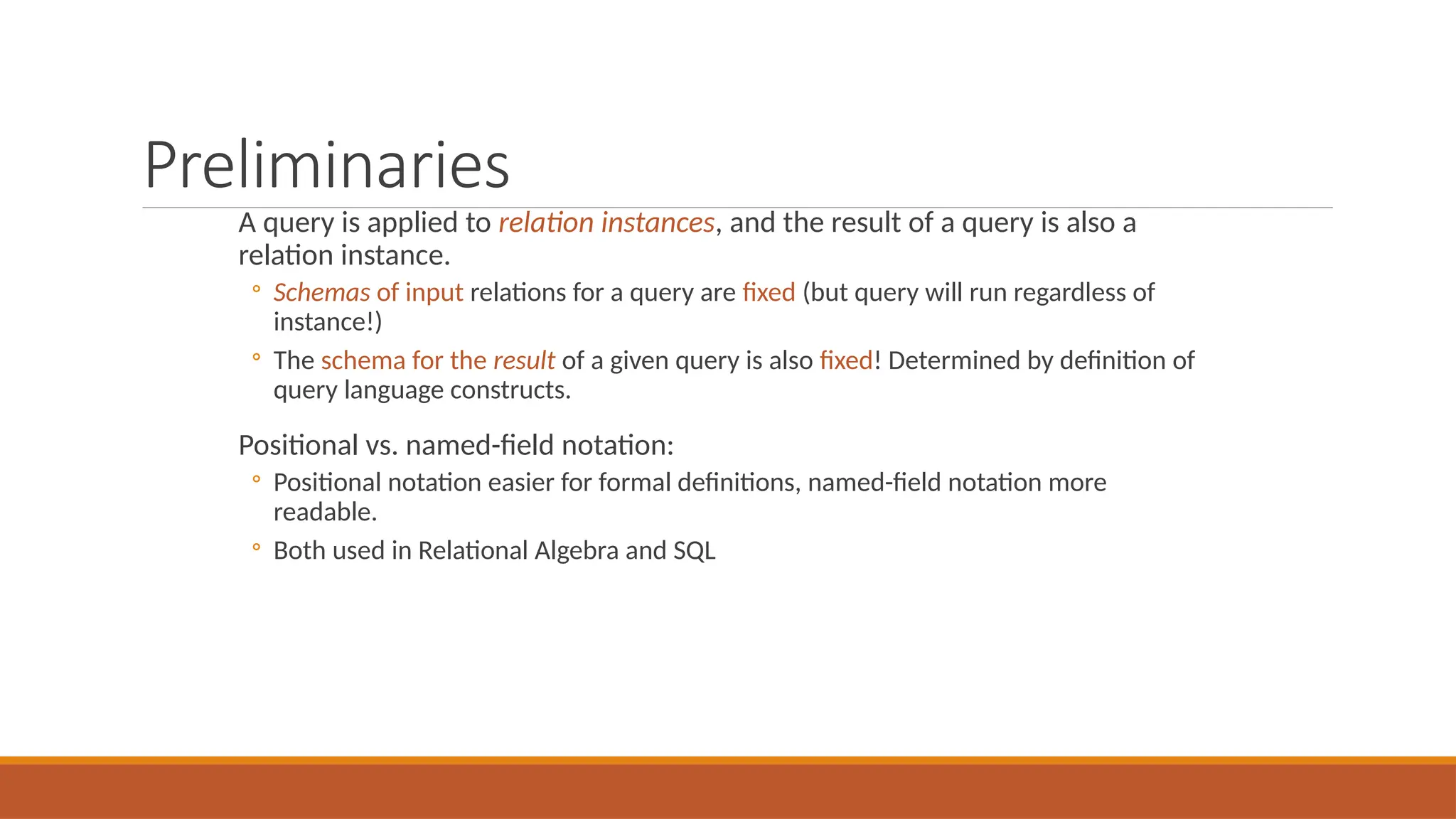
Preliminaries
A query is applied to relation instances, and the result of a query is also a
relation instance.
◦ Schemas of input relations for a query are fixed (but query will run regardless of
instance!)
◦ The schema for the result of a given query is also fixed! Determined by definition of
query language constructs.
Positional vs. named-field notation:
◦ Positional notation easier for formal definitions, named-field notation more
readable.
◦ Both used in Relational Algebra and SQL
Example Instances
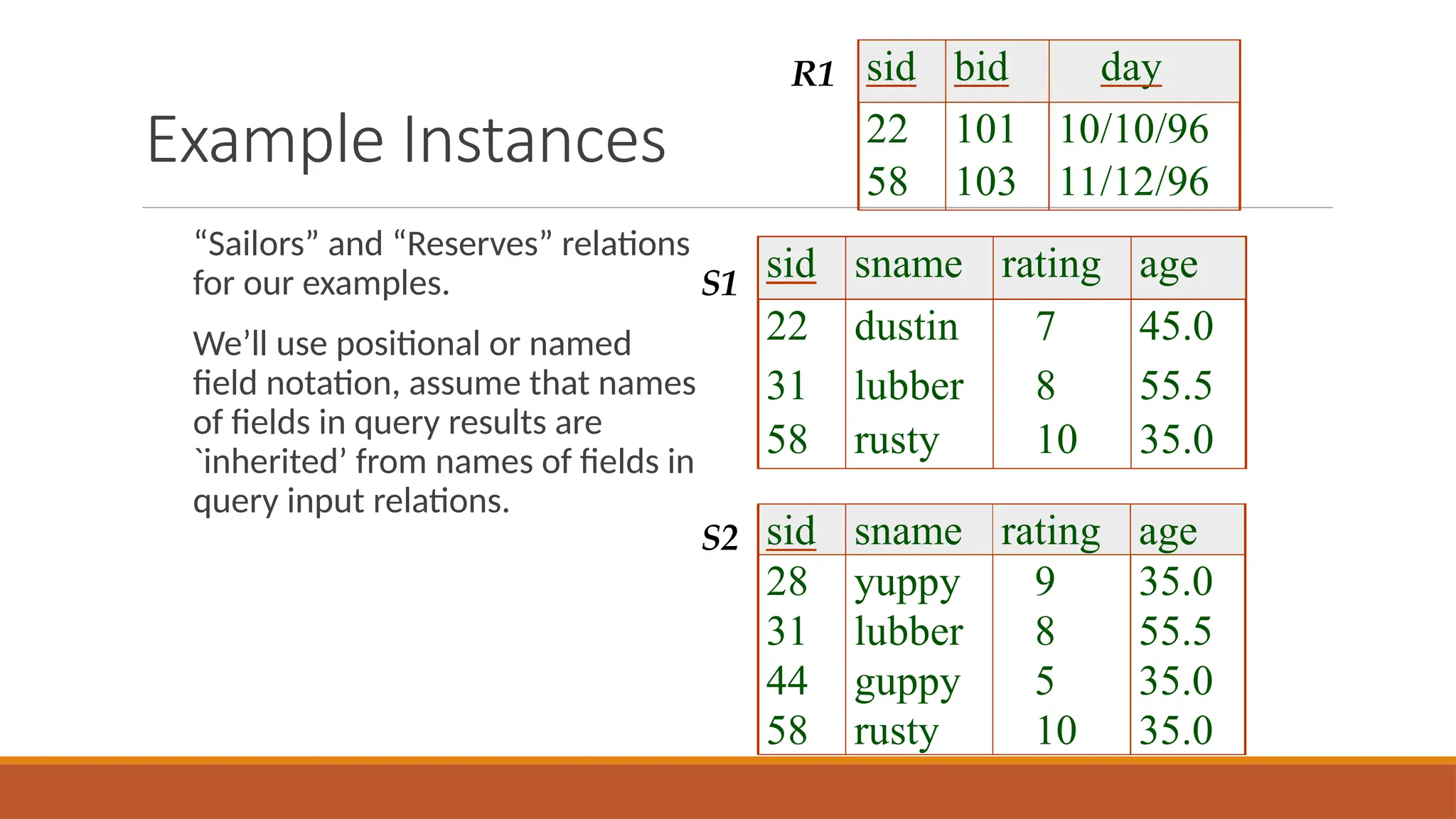
“Sailors” and “Reserves” relations
for our examples.
We’ll use positional or named
field notation, assume that names
of fields in query results are
`inherited’ from names of fields in
query input relations.
sid sname rating age
22 dustin 7 45.0
31 lubber 8 55.5
58 rusty 10 35.0
sid sname rating age
28 yuppy 9 35.0
31 lubber 8 55.5
44 guppy 5 35.0
58 rusty 10 35.0
sid bid day
22 101 10/10/96
58 103 11/12/96
R1
S1
S2
Relational Algebra
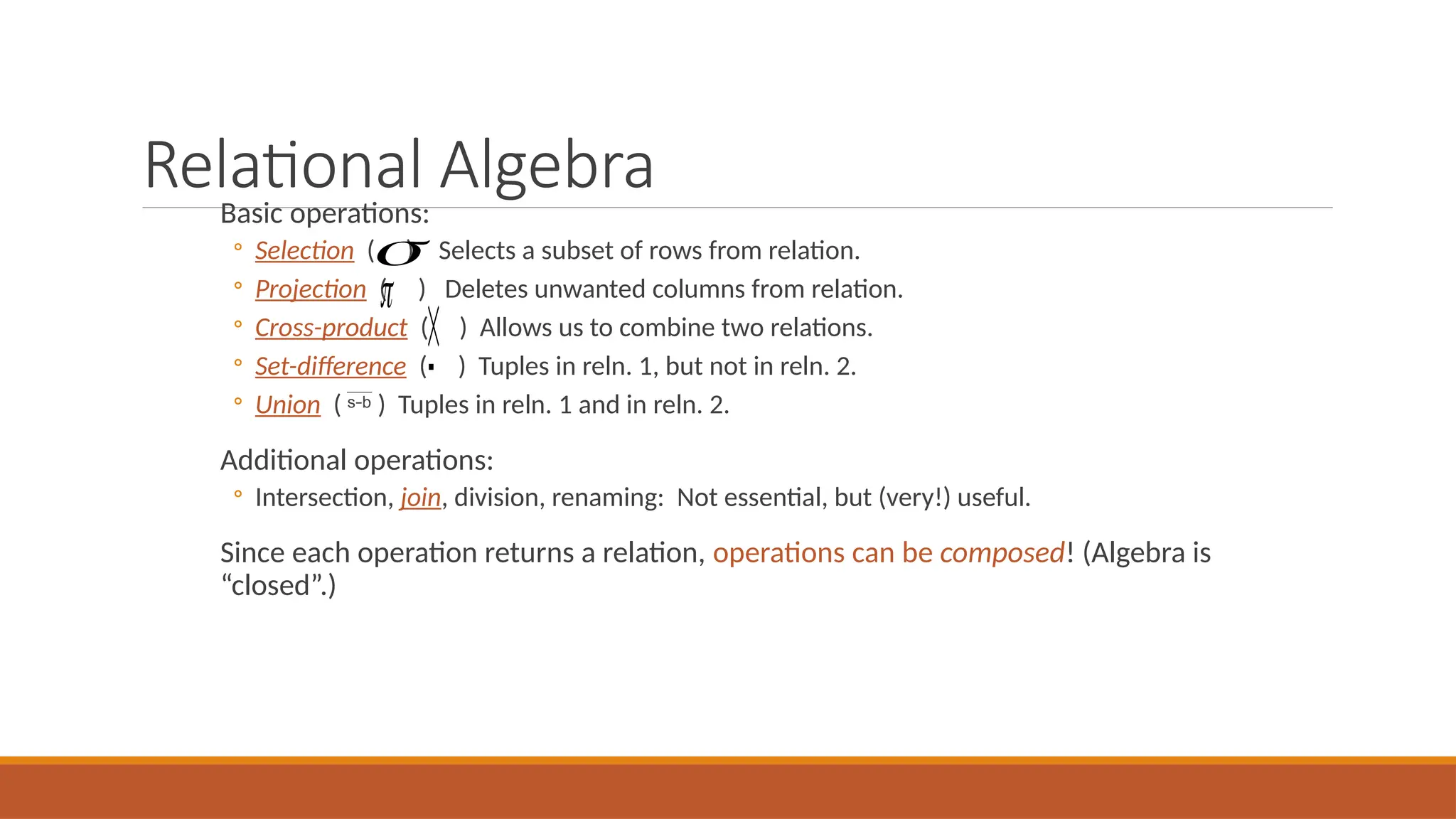
Basic operations:
◦ Selection ( ) Selects a subset of rows from relation.
◦ Projection ( ) Deletes unwanted columns from relation.
◦ Cross-product ( ) Allows us to combine two relations.
◦ Set-difference ( ) Tuples in reln. 1, but not in reln. 2.
◦ Union (  ) Tuples in reln. 1 and in reln. 2.
Additional operations:
◦ Intersection, join, division, renaming: Not essential, but (very!) useful.
Since each operation returns a relation, operations can be composed! (Algebra is
“closed”.)




Projection
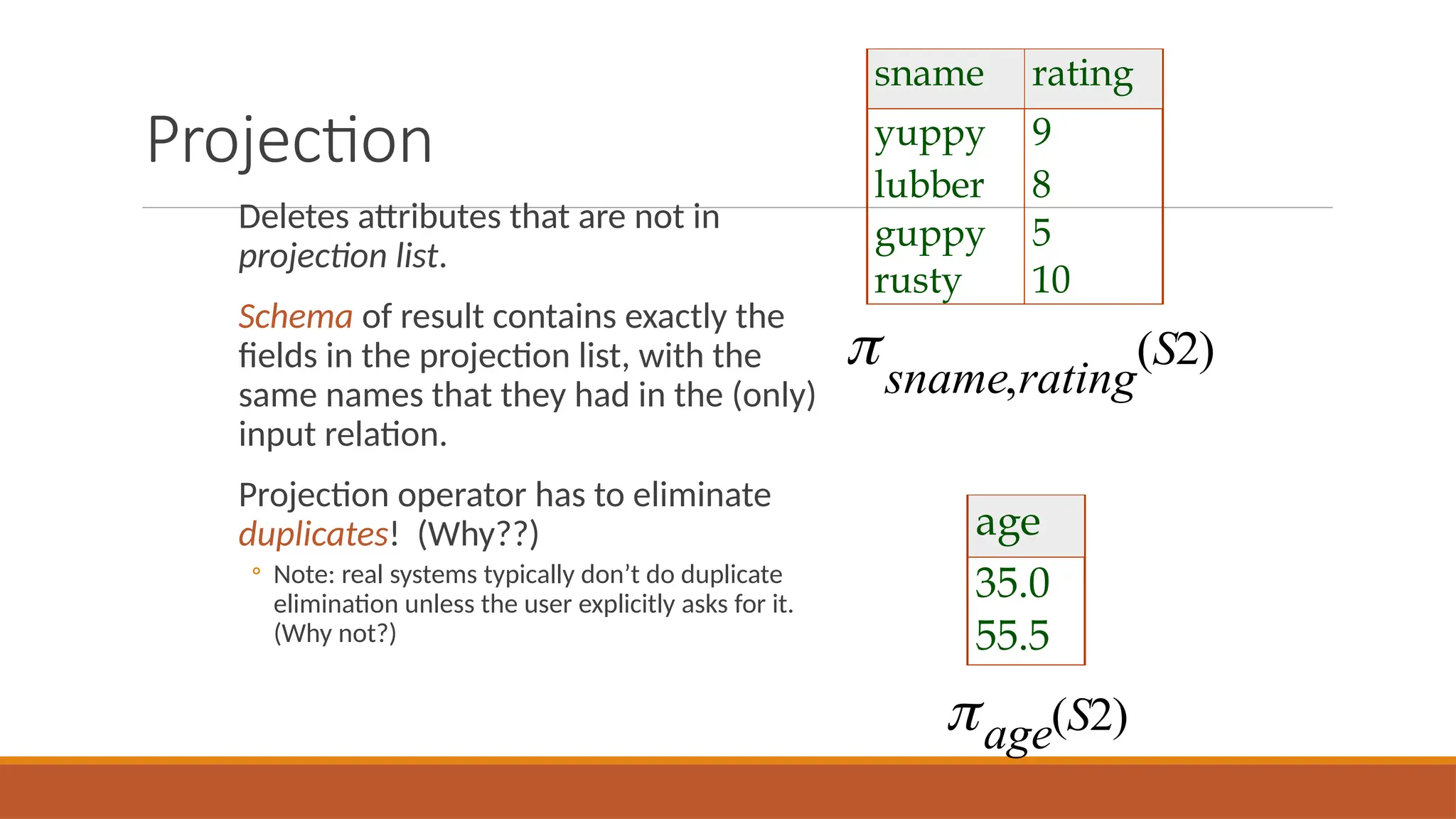
Deletes attributes that are not in
projection list.
Schema of result contains exactly the
fields in the projection list, with the
same names that they had in the (only)
input relation.
Projection operator has to eliminate
duplicates! (Why??)
◦ Note: real systems typically don’t do duplicate
elimination unless the user explicitly asks for it.
(Why not?)
sname rating
yuppy 9
lubber 8
guppy 5
rusty 10
sname rating
S
,
( )
2
age
35.0
55.5
age S
( )
2
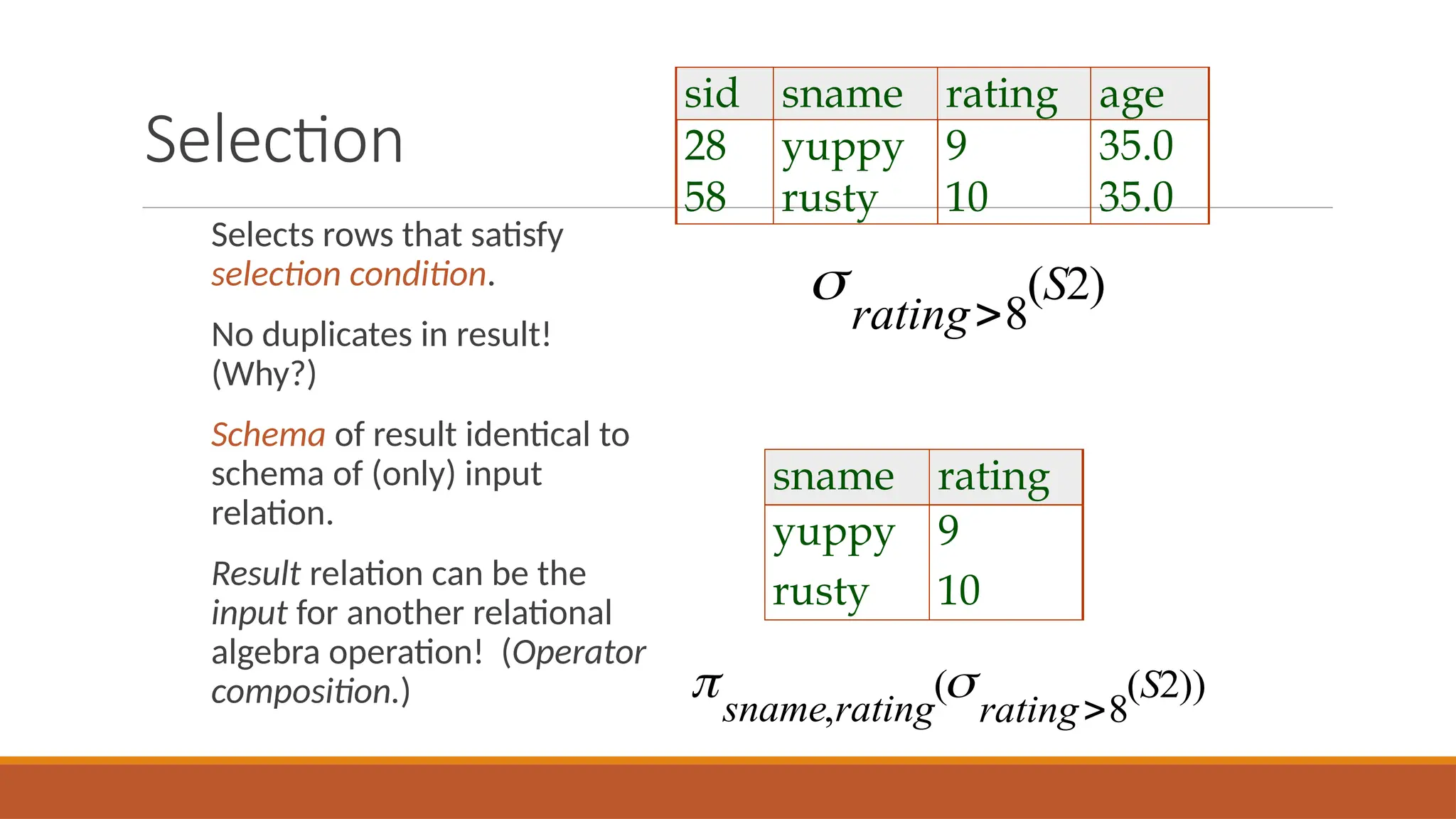
Selection
Selects rows that satisfy
selection condition.
No duplicates in result!
(Why?)
Schema of result identical to
schema of (only) input
relation.
Result relation can be the
input for another relational
algebra operation! (Operator
composition.)
rating
S
8
2
( )
sid sname rating age
28 yuppy 9 35.0
58 rusty 10 35.0
sname rating
yuppy 9
rusty 10
 
sname rating rating
S
,
( ( ))
8
2
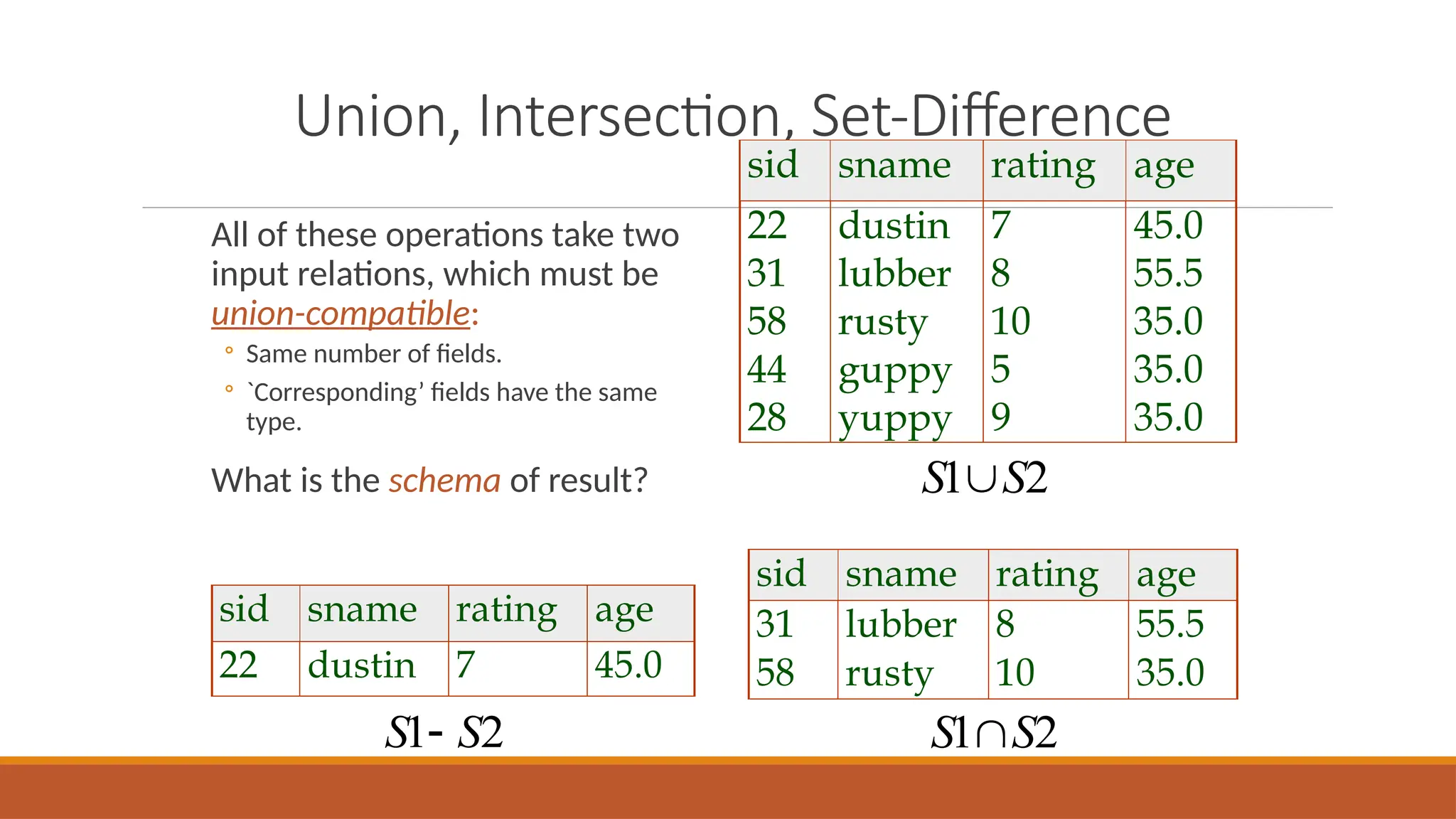
Union, Intersection, Set-Difference
All of these operations take two
input relations, which must be
union-compatible:
◦ Same number of fields.
◦ `Corresponding’ fields have the same
type.
What is the schema of result?
sid sname rating age
22 dustin 7 45.0
31 lubber 8 55.5
58 rusty 10 35.0
44 guppy 5 35.0
28 yuppy 9 35.0
sid sname rating age
31 lubber 8 55.5
58 rusty 10 35.0
S S
1 2

S S
1 2

sid sname rating age
22 dustin 7 45.0
S S
1 2

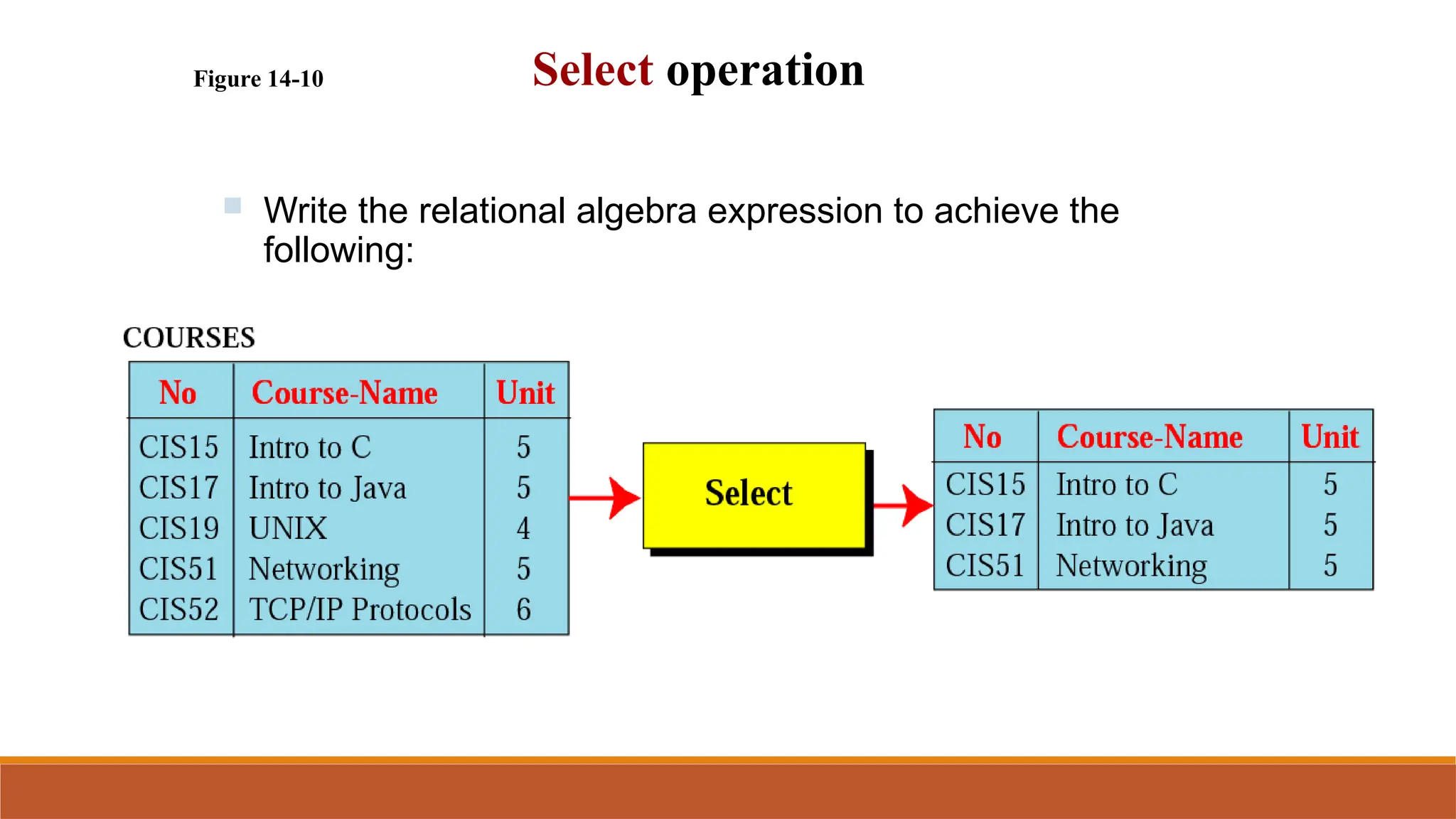
Figure 14-10 Select operation
 Write the relational algebra expression to achieve the
following:
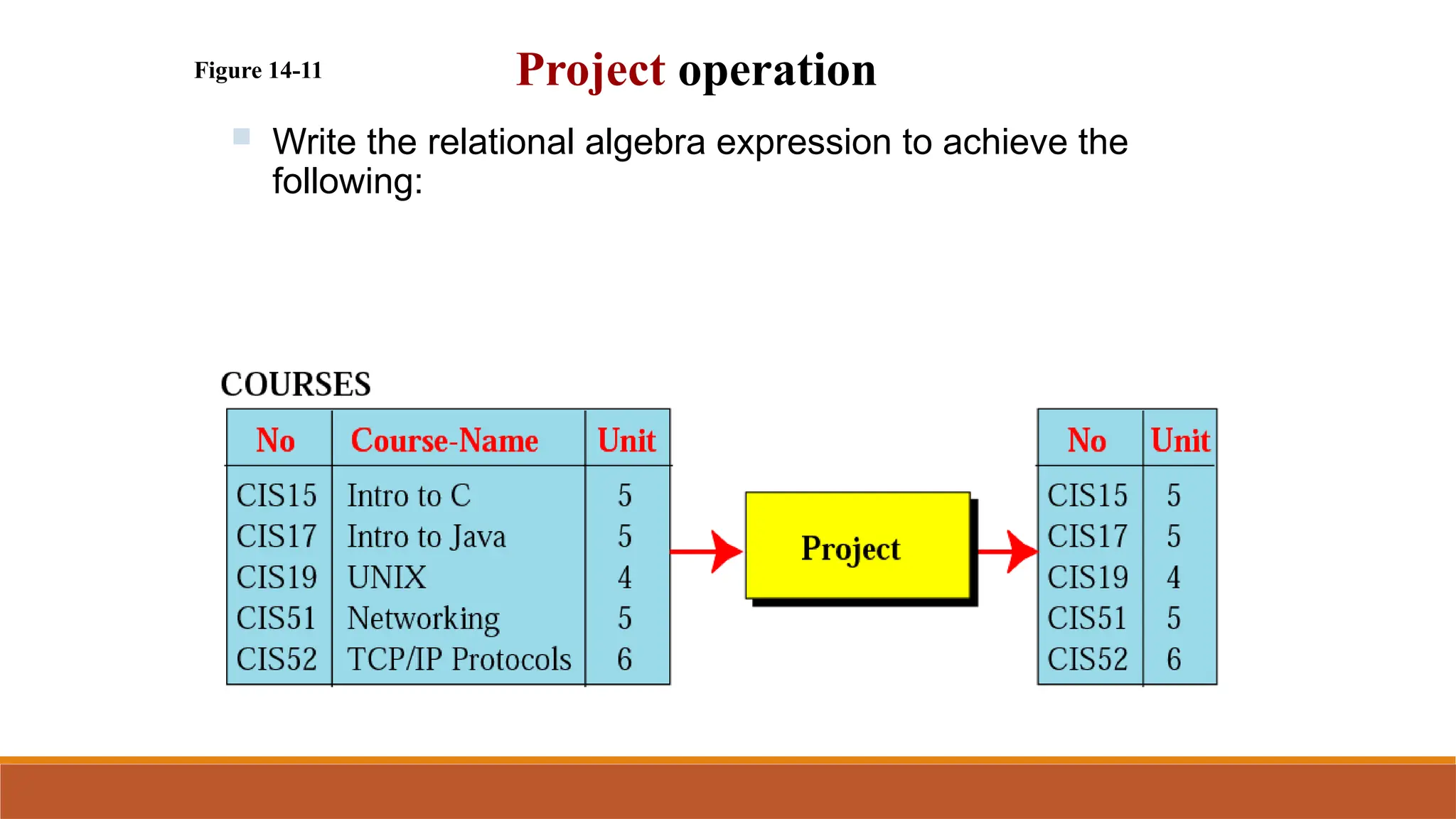
Figure 14-11 Project operation
 Write the relational algebra expression to achieve the
following:

DB LECTURE 7 Relational Algebra.pptx

  • 1.
  • 2.
    Relational Query Languages Querylanguages: Allow manipulation and retrieval of data from a database. Relational model supports simple, powerful QLs: ◦ Strong formal foundation based on logic. ◦ Allows for much optimization. Query Languages != programming languages! ◦ QLs not expected to be “Turing complete”. ◦ QLs not intended to be used for complex calculations. ◦ QLs support easy, efficient access to large data sets.
  • 3.
    Formal Relational QueryLanguages Two mathematical Query Languages form the basis for “real” languages (e.g. SQL), and for implementation: Relational Algebra: More operational, very useful for representing execution plans. Relational Calculus: Lets users describe what they want, rather than how to compute it. (Non-operational, declarative.)  Understanding Algebra & Calculus is key to  understanding SQL, query processing!
  • 4.
    Formal Relational QueryLanguages Two mathematical Query Languages form the basis for “real” languages (e.g. SQL), and for implementation: Relational Algebra: More operational, very useful for representing execution plans. Relational Calculus: Lets users describe what they want, rather than how to compute it. (Non-operational, declarative.)  Understanding Algebra & Calculus is key to  understanding SQL, query processing!
  • 5.
    Preliminaries A query isapplied to relation instances, and the result of a query is also a relation instance. ◦ Schemas of input relations for a query are fixed (but query will run regardless of instance!) ◦ The schema for the result of a given query is also fixed! Determined by definition of query language constructs. Positional vs. named-field notation: ◦ Positional notation easier for formal definitions, named-field notation more readable. ◦ Both used in Relational Algebra and SQL
  • 6.
    Example Instances “Sailors” and“Reserves” relations for our examples. We’ll use positional or named field notation, assume that names of fields in query results are `inherited’ from names of fields in query input relations. sid sname rating age 22 dustin 7 45.0 31 lubber 8 55.5 58 rusty 10 35.0 sid sname rating age 28 yuppy 9 35.0 31 lubber 8 55.5 44 guppy 5 35.0 58 rusty 10 35.0 sid bid day 22 101 10/10/96 58 103 11/12/96 R1 S1 S2
  • 7.
    Relational Algebra Basic operations: ◦Selection ( ) Selects a subset of rows from relation. ◦ Projection ( ) Deletes unwanted columns from relation. ◦ Cross-product ( ) Allows us to combine two relations. ◦ Set-difference ( ) Tuples in reln. 1, but not in reln. 2. ◦ Union (  ) Tuples in reln. 1 and in reln. 2. Additional operations: ◦ Intersection, join, division, renaming: Not essential, but (very!) useful. Since each operation returns a relation, operations can be composed! (Algebra is “closed”.)    
  • 8.
    Projection Deletes attributes thatare not in projection list. Schema of result contains exactly the fields in the projection list, with the same names that they had in the (only) input relation. Projection operator has to eliminate duplicates! (Why??) ◦ Note: real systems typically don’t do duplicate elimination unless the user explicitly asks for it. (Why not?) sname rating yuppy 9 lubber 8 guppy 5 rusty 10 sname rating S , ( ) 2 age 35.0 55.5 age S ( ) 2
  • 9.
    Selection Selects rows thatsatisfy selection condition. No duplicates in result! (Why?) Schema of result identical to schema of (only) input relation. Result relation can be the input for another relational algebra operation! (Operator composition.) rating S 8 2 ( ) sid sname rating age 28 yuppy 9 35.0 58 rusty 10 35.0 sname rating yuppy 9 rusty 10   sname rating rating S , ( ( )) 8 2
  • 10.
    Union, Intersection, Set-Difference Allof these operations take two input relations, which must be union-compatible: ◦ Same number of fields. ◦ `Corresponding’ fields have the same type. What is the schema of result? sid sname rating age 22 dustin 7 45.0 31 lubber 8 55.5 58 rusty 10 35.0 44 guppy 5 35.0 28 yuppy 9 35.0 sid sname rating age 31 lubber 8 55.5 58 rusty 10 35.0 S S 1 2  S S 1 2  sid sname rating age 22 dustin 7 45.0 S S 1 2 
  • 11.
    Figure 14-10 Selectoperation  Write the relational algebra expression to achieve the following:
  • 12.
    Figure 14-11 Projectoperation  Write the relational algebra expression to achieve the following: