MAGIC CAMP/ Summer 2018/DAY 1 (Credit for Patrick Woessner)
Programming with
Scratch
Lesson 1: Intro to Programming
D
A
Y
1
1
Computer Programming?
● What is programming?

● The process of writing, testing, and maintaining the
source code of computer programs.
Telling the computer what to do
● Why learn to program?



Develops logic and problem-solving skills
Improves attention to detail
It’s fun!
D
A
Y
1
2
Anyone Can Program!
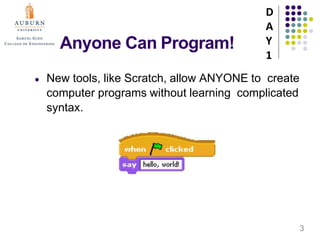
● New tools, like Scratch, allow ANYONE to create
computer programs without learning complicated
syntax.
D
A
Y
1
3
Programming with Scratch
START HERE
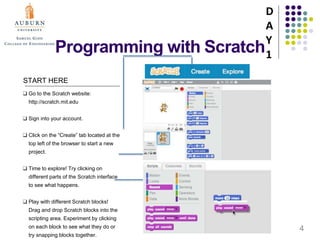
❑ Go to the Scratch website:
http://scratch.mit.edu
❑ Sign into your account.
❑ Click on the “Create” tab located at the
top left of the browser to start a new
project.
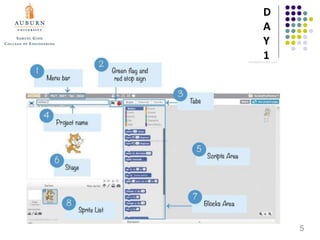
❑ Time to explore! Try clicking on
different parts of the Scratch interface
to see what happens.
❑ Play with different Scratch blocks!
Drag and drop Scratch blocks into the
scripting area. Experiment by clicking
on each block to see what they do or
try snapping blocks together.
D
A
Y
1
4
D
A
Y
1
5
In Class Assignment 1
● After introducing the Scheme of Scratch, students
will start with step-by-step projects on
https://scratch.mit.edu/projects/editor
● Students will try to experiment and explore a
dance video by the help of instructors and step-
by-step project guideline “Getting Started with
Scratch”.
D
A
Y
1
6
MAGIC CAMP/ Summer 2018/DAY 1 (Credit for Patrick Woessner)
Programming with
Scratch
Lesson 2: Scratch Syntax Part 1
D
A
Y
1
7
Statements
● In programming, a statement is simply a directive
that tells the computer to do something. Think of it
as a command or an instruction.
● In Scratch, any block whose label reads like a
command is a statement.
D
A
Y
1
8
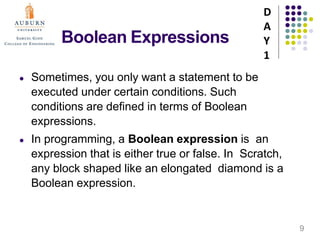
Boolean Expressions
● Sometimes, you only want a statement to be
executed under certain conditions. Such
conditions are defined in terms of Boolean
expressions.
● In programming, a Boolean expression is an
expression that is either true or false. In Scratch,
any block shaped like an elongated diamond is a
Boolean expression.
D
A
Y
1
9
Boolean Expressions
● One such block is:
After all, it is either true that the mouse button is
down or it is false.
● Another such block is:
After all, it is either true that some number is less
than another number or it is false.
● With Boolean expressions can we construct
conditions.
D
A
Y
1
10
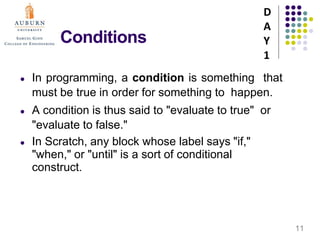
Conditions
● In programming, a condition is something that
must be true in order for something to happen.
● A condition is thus said to "evaluate to true" or
"evaluate to false."
● In Scratch, any block whose label says "if,"
"when," or "until" is a sort of conditional
construct.
D
A
Y
1
11
Conditions
● If Construct: Instruct a sprite to say hello only
if, say, the user has depressed the mouse
button:
● If-Else Construct: Instruct a sprite to say hello or
goodbye, depending on whether the user has
depressed the mouse button:
D
A
Y
1
12
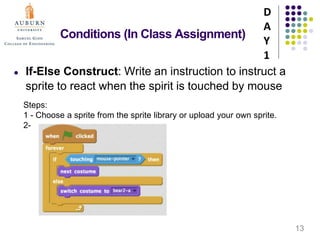
Conditions (In Class Assignment)
● If-Else Construct: Write an instruction to instruct a
sprite to react when the spirit is touched by mouse
D
A
Y
1
13
Steps:
1 - Choose a sprite from the sprite library or upload your own sprite.
2-
Conditions
● When Construct: Instruct a sprite to do
something when an event occurs:
● When Construct: Instruct a sprite to wait to
do something until a condition is true:
D
A
Y
1
14
Loops
● In programming, a loop can induce multiple
executions of statements.
● In Scratch, any block whose label begins with
"forever" or "repeat" is a looping construct.
D
A
Y
1
15
Loops (In Class assignment)
D
A
Y
1
16
Follow me
MAGIC CAMP/ Summer 2018/DAY 1 (Credit for Patrick Woessner)
Programming with
Scratch
Lesson 3: Scratch Syntax Part 2
D
A
Y
1
17
Variables
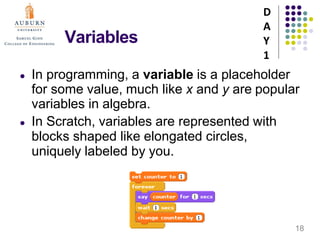
● In programming, a variable is a placeholder
for some value, much like x and y are popular
variables in algebra.
● In Scratch, variables are represented with
blocks shaped like elongated circles,
uniquely labeled by you.
D
A
Y
1
18
Variables(In Class Assignment)
D
A
Y
1
19
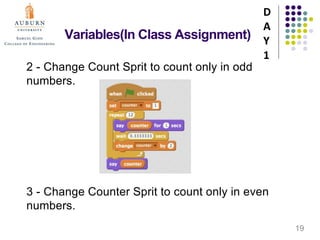
2 - Change Count Sprit to count only in odd
numbers.
3 - Change Counter Sprit to count only in even
numbers.
Variables(In Class Assignment)
D
A
Y
1
20
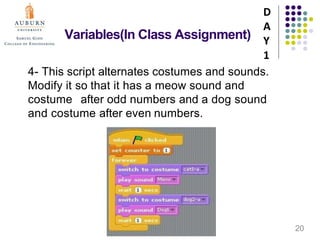
4- This script alternates costumes and sounds.
Modify it so that it has a meow sound and
costume after odd numbers and a dog sound
and costume after even numbers.
Threads
● In programming, a thread is like a mini- program within
a program that can execute at the same time as other
threads.
● In Scratch, any block whose label begins with "when"
essentially marks the start of a thread.
D
A
Y
1
21
Events
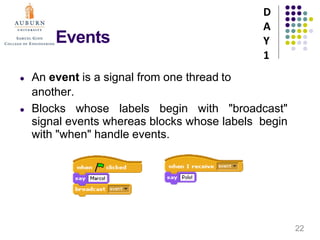
● An event is a signal from one thread to
another.
● Blocks whose labels begin with "broadcast"
signal events whereas blocks whose labels begin
with "when" handle events.
D
A
Y
1
22
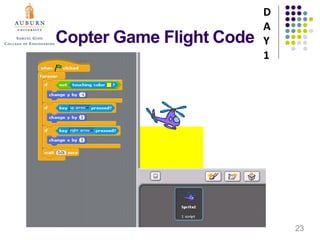
Copter Game Flight Code
D
A
Y
1
23
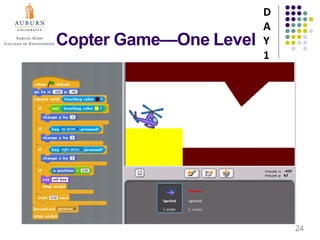
Copter Game—One Level
D
A
Y
1
24
Adding a Level
● Levels can be added using threads and
events.
D
A
Y
1
25
Homework
● Complete Your First Game Project
● You may wish to use the Copter Game and
Levels program as resources.
● Completed projects need to submitted to the
MAGIC CAMP website by the due date.
D
A
Y
1
26

Day 1( magic camp)(1)

  • 1.
    MAGIC CAMP/ Summer2018/DAY 1 (Credit for Patrick Woessner) Programming with Scratch Lesson 1: Intro to Programming D A Y 1 1
  • 2.
    Computer Programming? ● Whatis programming?  ● The process of writing, testing, and maintaining the source code of computer programs. Telling the computer what to do ● Why learn to program?    Develops logic and problem-solving skills Improves attention to detail It’s fun! D A Y 1 2
  • 3.
    Anyone Can Program! ●New tools, like Scratch, allow ANYONE to create computer programs without learning complicated syntax. D A Y 1 3
  • 4.
    Programming with Scratch STARTHERE ❑ Go to the Scratch website: http://scratch.mit.edu ❑ Sign into your account. ❑ Click on the “Create” tab located at the top left of the browser to start a new project. ❑ Time to explore! Try clicking on different parts of the Scratch interface to see what happens. ❑ Play with different Scratch blocks! Drag and drop Scratch blocks into the scripting area. Experiment by clicking on each block to see what they do or try snapping blocks together. D A Y 1 4
  • 5.
  • 6.
    In Class Assignment1 ● After introducing the Scheme of Scratch, students will start with step-by-step projects on https://scratch.mit.edu/projects/editor ● Students will try to experiment and explore a dance video by the help of instructors and step- by-step project guideline “Getting Started with Scratch”. D A Y 1 6
  • 7.
    MAGIC CAMP/ Summer2018/DAY 1 (Credit for Patrick Woessner) Programming with Scratch Lesson 2: Scratch Syntax Part 1 D A Y 1 7
  • 8.
    Statements ● In programming,a statement is simply a directive that tells the computer to do something. Think of it as a command or an instruction. ● In Scratch, any block whose label reads like a command is a statement. D A Y 1 8
  • 9.
    Boolean Expressions ● Sometimes,you only want a statement to be executed under certain conditions. Such conditions are defined in terms of Boolean expressions. ● In programming, a Boolean expression is an expression that is either true or false. In Scratch, any block shaped like an elongated diamond is a Boolean expression. D A Y 1 9
  • 10.
    Boolean Expressions ● Onesuch block is: After all, it is either true that the mouse button is down or it is false. ● Another such block is: After all, it is either true that some number is less than another number or it is false. ● With Boolean expressions can we construct conditions. D A Y 1 10
  • 11.
    Conditions ● In programming,a condition is something that must be true in order for something to happen. ● A condition is thus said to "evaluate to true" or "evaluate to false." ● In Scratch, any block whose label says "if," "when," or "until" is a sort of conditional construct. D A Y 1 11
  • 12.
    Conditions ● If Construct:Instruct a sprite to say hello only if, say, the user has depressed the mouse button: ● If-Else Construct: Instruct a sprite to say hello or goodbye, depending on whether the user has depressed the mouse button: D A Y 1 12
  • 13.
    Conditions (In ClassAssignment) ● If-Else Construct: Write an instruction to instruct a sprite to react when the spirit is touched by mouse D A Y 1 13 Steps: 1 - Choose a sprite from the sprite library or upload your own sprite. 2-
  • 14.
    Conditions ● When Construct:Instruct a sprite to do something when an event occurs: ● When Construct: Instruct a sprite to wait to do something until a condition is true: D A Y 1 14
  • 15.
    Loops ● In programming,a loop can induce multiple executions of statements. ● In Scratch, any block whose label begins with "forever" or "repeat" is a looping construct. D A Y 1 15
  • 16.
    Loops (In Classassignment) D A Y 1 16 Follow me
  • 17.
    MAGIC CAMP/ Summer2018/DAY 1 (Credit for Patrick Woessner) Programming with Scratch Lesson 3: Scratch Syntax Part 2 D A Y 1 17
  • 18.
    Variables ● In programming,a variable is a placeholder for some value, much like x and y are popular variables in algebra. ● In Scratch, variables are represented with blocks shaped like elongated circles, uniquely labeled by you. D A Y 1 18
  • 19.
    Variables(In Class Assignment) D A Y 1 19 2- Change Count Sprit to count only in odd numbers. 3 - Change Counter Sprit to count only in even numbers.
  • 20.
    Variables(In Class Assignment) D A Y 1 20 4-This script alternates costumes and sounds. Modify it so that it has a meow sound and costume after odd numbers and a dog sound and costume after even numbers.
  • 21.
    Threads ● In programming,a thread is like a mini- program within a program that can execute at the same time as other threads. ● In Scratch, any block whose label begins with "when" essentially marks the start of a thread. D A Y 1 21
  • 22.
    Events ● An eventis a signal from one thread to another. ● Blocks whose labels begin with "broadcast" signal events whereas blocks whose labels begin with "when" handle events. D A Y 1 22
  • 23.
    Copter Game FlightCode D A Y 1 23
  • 24.
  • 25.
    Adding a Level ●Levels can be added using threads and events. D A Y 1 25
  • 26.
    Homework ● Complete YourFirst Game Project ● You may wish to use the Copter Game and Levels program as resources. ● Completed projects need to submitted to the MAGIC CAMP website by the due date. D A Y 1 26