Datatable y Column Aurelio Martín Obando Távara Proyectos II [email_address]
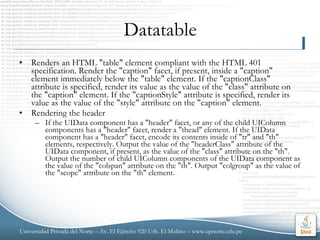
Datatable Renders an HTML "table" element compliant with the HTML 401 specification. Render the "caption" facet, if present, inside a "caption" element immediately below the "table" element. If the "captionClass" attribute is specified, render its value as the value of the "class" attribute on the "caption" element. If the "captionStyle" attribute is specified, render its value as the value of the "style" attribute on the "caption" element. Rendering the header If the UIData component has a "header" facet, or any of the child UIColumn components has a "header" facet, render a "thead" element. If the UIData component has a "header" facet, encode its contents inside of "tr" and "th" elements, respectively. Output the value of the "headerClass" attribute of the UIData component, if present, as the value of the "class" attribute on the "th". Output the number of child UIColumn components of the UIData component as the value of the "colspan" attribute on the "th". Output "colgroup" as the value of the "scope" attribute on the "th" element.
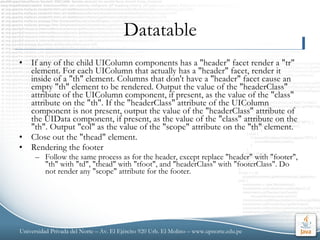
Datatable If any of the child UIColumn components has a "header" facet render a "tr" element. For each UIColumn that actually has a "header" facet, render it inside of a "th" element. Columns that don't have a "header" facet cause an empty "th" element to be rendered. Output the value of the "headerClass" attribute of the UIColumn component, if present, as the value of the "class" attribute on the "th". If the "headerClass" attribute of the UIColumn component is not present, output the value of the "headerClass" attribute of the UIData component, if present, as the value of the "class" attribute on the "th". Output "col" as the value of the "scope" attribute on the "th" element.  Close out the "thead" element. Rendering the footer Follow the same process as for the header, except replace "header" with "footer", "th" with "td", "thead" with "tfoot", and "headerClass" with "footerClass". Do not render any "scope" attribute for the footer.
Datatable Rendering the table body Render a "tbody" element. Keep track of the result of the "rows" property on the UIData component. Keep track of the number of rows we have rendered so far. Iterate through the rows. Set the "rowIndex" property of the UIData component to be correct as we iterate through the rows. Stop rendering children and close out the "tbody" element if the "rowAvailable" property of the UIData returned false. Output a "tr" element. Output the value of the "rowClasses" per the attribute description below. For each UIColumn child, output a "td" element, attaching the value of the "columnClasses" attribute of the UIData component per the attribute description below. Recursively encode each child of each UIColumn child. Close out the "td" element. When done with the row, close out the "tr" element. When done with all the rows, close out the "tbody" element. When done rendering all the rows, set the "rowIndex" property of the UIData to -1, and close out the "table" element.
Column Renders a UIComponent that represents a single column of data within a parent UIData component.
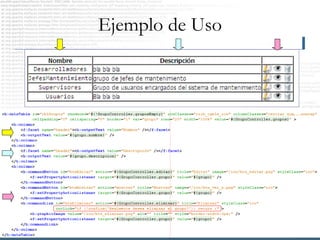
Uso de Datatable y Column En su forma más básica: < h:dataTable   id = &quot;tblGrupos“  width = &quot;100%&quot;    cellpadding = &quot;0&quot;   cellspacing = &quot;0&quot;       border = &quot;1&quot;   var = &quot;grupo&quot;     value = &quot;#{GrupoController.grupos}&quot;  > < h:column > < f:facet   name = &quot;header&quot; >< h:outputText   value = “Cabecera&quot;  /></ f:facet > </ h:column > </ h:dataTable >
Ejemplo de Uso

Datatable Y Column

  • 1.
    Datatable y ColumnAurelio Martín Obando Távara Proyectos II [email_address]
  • 2.
    Datatable Renders anHTML &quot;table&quot; element compliant with the HTML 401 specification. Render the &quot;caption&quot; facet, if present, inside a &quot;caption&quot; element immediately below the &quot;table&quot; element. If the &quot;captionClass&quot; attribute is specified, render its value as the value of the &quot;class&quot; attribute on the &quot;caption&quot; element. If the &quot;captionStyle&quot; attribute is specified, render its value as the value of the &quot;style&quot; attribute on the &quot;caption&quot; element. Rendering the header If the UIData component has a &quot;header&quot; facet, or any of the child UIColumn components has a &quot;header&quot; facet, render a &quot;thead&quot; element. If the UIData component has a &quot;header&quot; facet, encode its contents inside of &quot;tr&quot; and &quot;th&quot; elements, respectively. Output the value of the &quot;headerClass&quot; attribute of the UIData component, if present, as the value of the &quot;class&quot; attribute on the &quot;th&quot;. Output the number of child UIColumn components of the UIData component as the value of the &quot;colspan&quot; attribute on the &quot;th&quot;. Output &quot;colgroup&quot; as the value of the &quot;scope&quot; attribute on the &quot;th&quot; element.
  • 3.
    Datatable If anyof the child UIColumn components has a &quot;header&quot; facet render a &quot;tr&quot; element. For each UIColumn that actually has a &quot;header&quot; facet, render it inside of a &quot;th&quot; element. Columns that don't have a &quot;header&quot; facet cause an empty &quot;th&quot; element to be rendered. Output the value of the &quot;headerClass&quot; attribute of the UIColumn component, if present, as the value of the &quot;class&quot; attribute on the &quot;th&quot;. If the &quot;headerClass&quot; attribute of the UIColumn component is not present, output the value of the &quot;headerClass&quot; attribute of the UIData component, if present, as the value of the &quot;class&quot; attribute on the &quot;th&quot;. Output &quot;col&quot; as the value of the &quot;scope&quot; attribute on the &quot;th&quot; element. Close out the &quot;thead&quot; element. Rendering the footer Follow the same process as for the header, except replace &quot;header&quot; with &quot;footer&quot;, &quot;th&quot; with &quot;td&quot;, &quot;thead&quot; with &quot;tfoot&quot;, and &quot;headerClass&quot; with &quot;footerClass&quot;. Do not render any &quot;scope&quot; attribute for the footer.
  • 4.
    Datatable Rendering thetable body Render a &quot;tbody&quot; element. Keep track of the result of the &quot;rows&quot; property on the UIData component. Keep track of the number of rows we have rendered so far. Iterate through the rows. Set the &quot;rowIndex&quot; property of the UIData component to be correct as we iterate through the rows. Stop rendering children and close out the &quot;tbody&quot; element if the &quot;rowAvailable&quot; property of the UIData returned false. Output a &quot;tr&quot; element. Output the value of the &quot;rowClasses&quot; per the attribute description below. For each UIColumn child, output a &quot;td&quot; element, attaching the value of the &quot;columnClasses&quot; attribute of the UIData component per the attribute description below. Recursively encode each child of each UIColumn child. Close out the &quot;td&quot; element. When done with the row, close out the &quot;tr&quot; element. When done with all the rows, close out the &quot;tbody&quot; element. When done rendering all the rows, set the &quot;rowIndex&quot; property of the UIData to -1, and close out the &quot;table&quot; element.
  • 5.
    Column Renders aUIComponent that represents a single column of data within a parent UIData component.
  • 6.
    Uso de Datatabley Column En su forma más básica: < h:dataTable id = &quot;tblGrupos“ width = &quot;100%&quot; cellpadding = &quot;0&quot; cellspacing = &quot;0&quot; border = &quot;1&quot; var = &quot;grupo&quot; value = &quot;#{GrupoController.grupos}&quot; > < h:column > < f:facet name = &quot;header&quot; >< h:outputText value = “Cabecera&quot; /></ f:facet > </ h:column > </ h:dataTable >
  • 7.