HOW TO MAKE
DATA MODEL
December 2023
ABDUL AHAD
Data Modelling 101
GATHER BUSINESS REQUIREMENTS
1.
The first step is gathering business requirements for how your application will process data. At this stage, requirements
can be fairly general, and we don’t need to worry about specific variables just yet.
Essentially, gathering requirements means figuring out what your app will actually do, and a broad overview of what
data you’ll need to achieve this.
This means engaging with different business stakeholders, including end-users, decision-makers, clients, and technical
colleagues, to establish an overview of the app’s required functionality.
For example, if we were building an employee timesheet app, our high-level requirements would look something like
this:
Employees should be able to log hours against different projects.
Project owners should be able to monitor time usage.
Project owners should be able to query and approve timesheet submissions.
The application should offer integration with CRM and billing platforms.
1. GATHER BUSINESS REQUIREMENTS
2. DEFINE BUSINESS PROCESSES
We can start fleshing out our requirements into more specific processes. This means outlining what the application
should do in response to different events and triggers. This includes system processes, as well as responses to user
actions.
This step is also known as creating a logical data model.
For example, we could outline the following business processes for our timesheet example:
The application should calculate labor costs for all timesheet submissions.
Project managers should be notified when an employee submits a relevant timesheet.
Project managers should be able to view the status of each project, in terms of expenditure and time usage.
Employees should be able to edit only their own submissions. Project managers should be able to edit any relevant
submissions.
The system should integrate with external platforms to generate and send invoices, based on project timesheets.
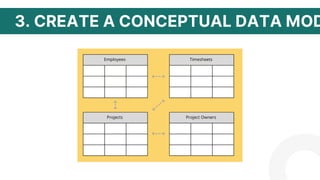
3. CREATE A CONCEPTUAL DATA MODEL
This is a more structured plan for the data we’ll need to implement the processes we identified in the previous step. For
now, we’ll carry on using non-technical, business terminology. The more specific technical details come later in other
types of data models.
Creating a conceptual model is all about figuring out how different kinds of data will be structured to meet our goals.
The first step here is to decide the broad entities our data will consist of.
in our timesheets app example, our entities would need to include:
Employees,
Projects,
Project owners,
Timesheets,
Users.
Depending on your business, you could add extra entities. For example, individual tasks within projects, or other
resources you need to implement them.
3. CREATE A CONCEPTUAL DATA MOD
4. DEFINE ENTITIES AND ATTRIBUTES
The most common way to do this is to translate each entity into a distinct database table. Here, the rows will represent
each individual instance of our entity, like a specific employee or project.
Each column will represent a specific attribute we want to store for each of our entities. This means we need to decide:
The specific variables we need to know,
How they’ll be formatted,
What we’ll call them,
And any rules we’ll apply to them.
If you decide that you need to create a new database for your application, this will form part of your schema. If you’re
going to rely on existing data, you’ll need to take this into account when choosing your sources.
4. DEFINE ENTITIES AND ATTRIBUTES
5. IDENTIFY DATA SOURCES
A large part of your data model is actually figuring out where values will come from, and how they should be stored for
your app to function properly. This means identifying your app’s data sources.
This can include:
Internal databases,
External databases,
APIs and web services,
Flat files,
Other existing business assets.
Note that these are the main sources of existing data that we can use. We can also add or update values within them
by sending queries from our finished app, depending on the data modeling techniques we want to use.
5. IDENTIFY DATA SOURCES
One of the key tasks here is deciding whether to create entirely new data sources or to rely on existing ones. Of
course, we can build our data model around a combination of both.
Often, there are different options available to achieve similar results.
Let’s think about the different ways we could structure the data sources for our employee timesheet.
The simplest option would be to build a dedicated internal database around the entities we already identified. This
would offer us the most control over how our attributes and entities are structured and stored, as we’d have to
create our own database schema from scratch.
We could also connect to an existing, external database, either directly, or using an API.
6. ESTABLISH RELATIONSHIPS BETWEEN ENTITIES
First of all, it’s important to choose the correct kind of relationship for each set of entities. There are a few options here:
One-to-one relationships.
Many-to-one relationships.
Many-to-many relationships.
We’ll also need to decide which columns in each table to build the relationships around. The specifics here will depend
on your DBMS.
For example, within a single SQL database, you’ll need to define primary keys for each row in a given table. These
are unique values, used by other tables to reference related rows. When a primary key appears in a related table,
it’s what’s known as a foreign key.
If your data model contains multiple databases, you’ll need to take additional steps to establish relationships. For
example, building an internal database, so you can query and store entities from different sources.
7. PHYSICAL MODELING
If you’re creating your own database design for your app, this means defining specific names for all of your attributes,
as well as their types, formats, integrity constraints, and any other rules governing them.
When working with external data sources, we’ll also have to think about how we connect these to our app. One way to
do this is to manually point to the source’s name, location, authentication details, and other information in our app’s
code.
8. NORMALIZATION AND ENSURING THE INTEGRITY OF DATA
One of your major goals, when you create a data model, is to ensure the long-term validity, reliability, and integrity
of your app’s data. This includes avoiding redundancy, conflicting values, formatting issues, and more.
One way to do this is through data normalization.
Normalization is a topic in itself. Essentially this is a set of strategies you can use to prevent redundancy and
anomalies as you maintain data.
There are many techniques available to you here.
The most common relates to how you structure your data in the first place. More specifically, the goal is to create
entities, that each deal with one specific theme or idea. If you’ve followed the advice we’ve given so far, this will
already be built into your data model.
The rule here is that any time a group of values could apply to more than one row on a table, you should consider
creating a dedicated entity for these, and using relationships to link it to the original table.
This improves performance, as well as lowering the storage space we need.
THANK YOU

Data Modeling 101: How to make Data model

  • 1.
    HOW TO MAKE DATAMODEL December 2023 ABDUL AHAD Data Modelling 101
  • 2.
    GATHER BUSINESS REQUIREMENTS 1. Thefirst step is gathering business requirements for how your application will process data. At this stage, requirements can be fairly general, and we don’t need to worry about specific variables just yet. Essentially, gathering requirements means figuring out what your app will actually do, and a broad overview of what data you’ll need to achieve this. This means engaging with different business stakeholders, including end-users, decision-makers, clients, and technical colleagues, to establish an overview of the app’s required functionality. For example, if we were building an employee timesheet app, our high-level requirements would look something like this: Employees should be able to log hours against different projects. Project owners should be able to monitor time usage. Project owners should be able to query and approve timesheet submissions. The application should offer integration with CRM and billing platforms.
  • 3.
    1. GATHER BUSINESSREQUIREMENTS
  • 4.
    2. DEFINE BUSINESSPROCESSES We can start fleshing out our requirements into more specific processes. This means outlining what the application should do in response to different events and triggers. This includes system processes, as well as responses to user actions. This step is also known as creating a logical data model. For example, we could outline the following business processes for our timesheet example: The application should calculate labor costs for all timesheet submissions. Project managers should be notified when an employee submits a relevant timesheet. Project managers should be able to view the status of each project, in terms of expenditure and time usage. Employees should be able to edit only their own submissions. Project managers should be able to edit any relevant submissions. The system should integrate with external platforms to generate and send invoices, based on project timesheets.
  • 5.
    3. CREATE ACONCEPTUAL DATA MODEL This is a more structured plan for the data we’ll need to implement the processes we identified in the previous step. For now, we’ll carry on using non-technical, business terminology. The more specific technical details come later in other types of data models. Creating a conceptual model is all about figuring out how different kinds of data will be structured to meet our goals. The first step here is to decide the broad entities our data will consist of. in our timesheets app example, our entities would need to include: Employees, Projects, Project owners, Timesheets, Users. Depending on your business, you could add extra entities. For example, individual tasks within projects, or other resources you need to implement them.
  • 6.
    3. CREATE ACONCEPTUAL DATA MOD
  • 7.
    4. DEFINE ENTITIESAND ATTRIBUTES The most common way to do this is to translate each entity into a distinct database table. Here, the rows will represent each individual instance of our entity, like a specific employee or project. Each column will represent a specific attribute we want to store for each of our entities. This means we need to decide: The specific variables we need to know, How they’ll be formatted, What we’ll call them, And any rules we’ll apply to them. If you decide that you need to create a new database for your application, this will form part of your schema. If you’re going to rely on existing data, you’ll need to take this into account when choosing your sources.
  • 8.
    4. DEFINE ENTITIESAND ATTRIBUTES
  • 9.
    5. IDENTIFY DATASOURCES A large part of your data model is actually figuring out where values will come from, and how they should be stored for your app to function properly. This means identifying your app’s data sources. This can include: Internal databases, External databases, APIs and web services, Flat files, Other existing business assets. Note that these are the main sources of existing data that we can use. We can also add or update values within them by sending queries from our finished app, depending on the data modeling techniques we want to use.
  • 10.
  • 11.
    5. IDENTIFY DATASOURCES One of the key tasks here is deciding whether to create entirely new data sources or to rely on existing ones. Of course, we can build our data model around a combination of both. Often, there are different options available to achieve similar results. Let’s think about the different ways we could structure the data sources for our employee timesheet. The simplest option would be to build a dedicated internal database around the entities we already identified. This would offer us the most control over how our attributes and entities are structured and stored, as we’d have to create our own database schema from scratch. We could also connect to an existing, external database, either directly, or using an API.
  • 12.
    6. ESTABLISH RELATIONSHIPSBETWEEN ENTITIES First of all, it’s important to choose the correct kind of relationship for each set of entities. There are a few options here: One-to-one relationships. Many-to-one relationships. Many-to-many relationships. We’ll also need to decide which columns in each table to build the relationships around. The specifics here will depend on your DBMS. For example, within a single SQL database, you’ll need to define primary keys for each row in a given table. These are unique values, used by other tables to reference related rows. When a primary key appears in a related table, it’s what’s known as a foreign key. If your data model contains multiple databases, you’ll need to take additional steps to establish relationships. For example, building an internal database, so you can query and store entities from different sources.
  • 13.
    7. PHYSICAL MODELING Ifyou’re creating your own database design for your app, this means defining specific names for all of your attributes, as well as their types, formats, integrity constraints, and any other rules governing them. When working with external data sources, we’ll also have to think about how we connect these to our app. One way to do this is to manually point to the source’s name, location, authentication details, and other information in our app’s code.
  • 14.
    8. NORMALIZATION ANDENSURING THE INTEGRITY OF DATA One of your major goals, when you create a data model, is to ensure the long-term validity, reliability, and integrity of your app’s data. This includes avoiding redundancy, conflicting values, formatting issues, and more. One way to do this is through data normalization. Normalization is a topic in itself. Essentially this is a set of strategies you can use to prevent redundancy and anomalies as you maintain data. There are many techniques available to you here. The most common relates to how you structure your data in the first place. More specifically, the goal is to create entities, that each deal with one specific theme or idea. If you’ve followed the advice we’ve given so far, this will already be built into your data model. The rule here is that any time a group of values could apply to more than one row on a table, you should consider creating a dedicated entity for these, and using relationships to link it to the original table. This improves performance, as well as lowering the storage space we need.
  • 15.