How do we research what we can’t see?
Dr Jonathon Hutchinson
University of Sydney
Jonathon.Hutchinson@Sydney.edu.au
@dhutchman
Steve Jones, 2014
The University of Sydney Page 3
The University of Sydney Page 4
The University of Sydney Page 5
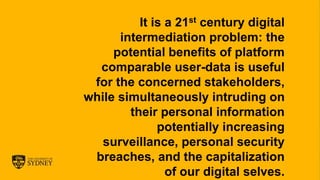
It is a 21st century digital
intermediation problem: the
potential benefits of platform
comparable user-data is useful
for the concerned stakeholders,
while simultaneously intruding on
their personal information
potentially increasing
surveillance, personal security
breaches, and the capitalization
of our digital selves.
The University of Sydney Page 6
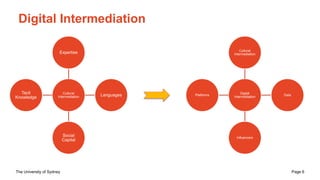
Digital Intermediation
Cultural
Intermediation
Expertise
Languages
Social
Capital
Tacit
Knowledge
Digital
Intermediation
Cultural
Intermediation
Data
Influencers
Platforms
The University of Sydney Page 7
Relational; Contextual; Temporal
The University of Sydney Page 9
The University of Sydney Page 10
The University of Sydney Page 11
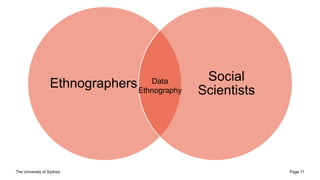
Ethnographers
Social
Scientists
Data
Ethnography
The University of Sydney Page 12
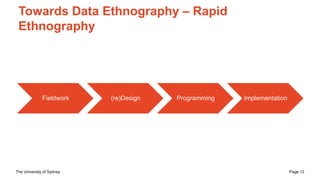
Towards Data Ethnography – Rapid
Ethnography
Fieldwork (re)Design Programming Implementation
The University of Sydney Page 13
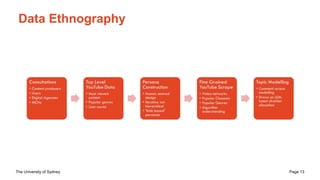
Data Ethnography
The University of Sydney Page 14
The University of Sydney Page 15
Discussion
– Interoperability is increasing across all sectors of society
– Some aspects are positive; unfortunately there are a
number of negative life issues for some misrepresented
members
– The enmeshed state/government stewardship of
interoperability complicates matters for public interest
researchers
– We need to be actively designing new methodologies in
these areas to continue our work.
The University of Sydney Page 17
https://drive.google.com/drive/folders/18G0eAK
Le108LegaOs-sf63bPqgRmbcbf?usp=sharing
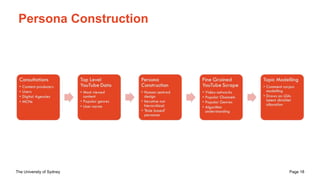
The University of Sydney Page 18
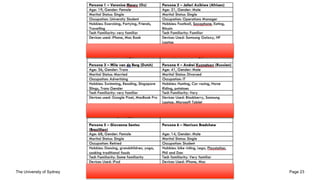
Persona Construction
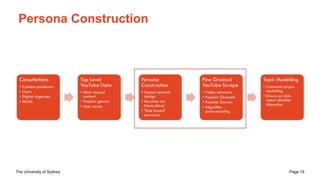
The University of Sydney Page 19
Persona Construction
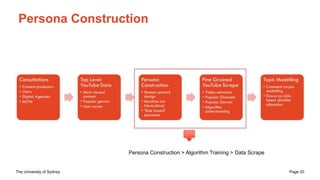
The University of Sydney Page 20
Persona Construction
Persona Construction > Algorithm Training > Data Scrape
The University of Sydney Page 21
Persona Construction
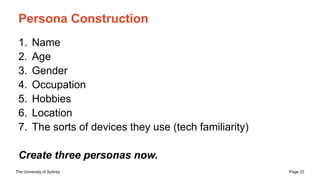
The University of Sydney Page 22
Persona Construction
1. Name
2. Age
3. Gender
4. Occupation
5. Hobbies
6. Location
7. The sorts of devices they use (tech familiarity)
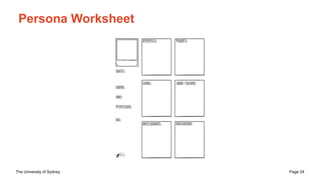
Create three personas now.
The University of Sydney Page 23
The University of Sydney Page 24
Persona Worksheet
The University of Sydney Page 25
Training Algorithms
The University of Sydney Page 26
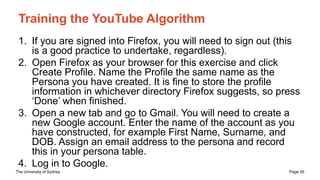
Training the YouTube Algorithm
1. If you are signed into Firefox, you will need to sign out (this
is a good practice to undertake, regardless).
2. Open Firefox as your browser for this exercise and click
Create Profile. Name the Profile the same name as the
Persona you have created. It is fine to store the profile
information in whichever directory Firefox suggests, so press
‘Done’ when finished.
3. Open a new tab and go to Gmail. You will need to create a
new Google account. Enter the name of the account as you
have constructed, for example First Name, Surname, and
DOB. Assign an email address to the persona and record
this in your persona table.
4. Log in to Google.
The University of Sydney Page 27
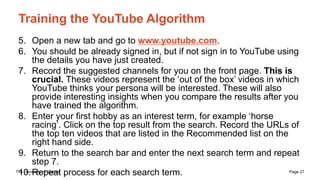
Training the YouTube Algorithm
5. Open a new tab and go to www.youtube.com.
6. You should be already signed in, but if not sign in to YouTube using
the details you have just created.
7. Record the suggested channels for you on the front page. This is
crucial. These videos represent the ‘out of the box’ videos in which
YouTube thinks your persona will be interested. These will also
provide interesting insights when you compare the results after you
have trained the algorithm.
8. Enter your first hobby as an interest term, for example ‘horse
racing’. Click on the top result from the search. Record the URLs of
the top ten videos that are listed in the Recommended list on the
right hand side.
9. Return to the search bar and enter the next search term and repeat
step 7.
10.Repeat process for each search term.
The University of Sydney Page 28
Observations
What are the videos?
What are the common genres?
Who are they aiming the videos toward?
Can you discern any economics or politics at play here?
The University of Sydney Page 29
Repeat the process
for each of your
personas
The University of Sydney Page 30
Data Scraping
The University of Sydney Page 31
Understanding the Network(s) – Comment
Threads
– We can now undertake a number of analyses with the trained
YouTube algorithms
– Look at the Digital Methods Initiative YouTube
[https://tools.digitalmethods.net/netvizz/youtube/]
– Launch the ‘Video Info and Comments’ tool
[https://tools.digitalmethods.net/netvizz/youtube/mod_video_i
nfo.php]
– We can now capture the comments and analyse them in
various ways
– If you are versed in Topic Modelling, this may work for you
– If you want to put them into a Word Cloud, that’s OK too
The University of Sydney Page 32
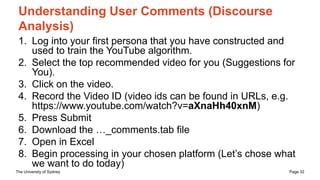
Understanding User Comments (Discourse
Analysis)
1. Log into your first persona that you have constructed and
used to train the YouTube algorithm.
2. Select the top recommended video for you (Suggestions for
You).
3. Click on the video.
4. Record the Video ID (video ids can be found in URLs, e.g.
https://www.youtube.com/watch?v=aXnaHh40xnM)
5. Press Submit
6. Download the …_comments.tab file
7. Open in Excel
8. Begin processing in your chosen platform (Let’s chose what
we want to do today)
The University of Sydney Page 33
Gephi – Shall we try this now?
– Many of the DMI tools provide us with a .gdf file
– These can be opened with and used in Gephi
[https://gephi.org/]
– I can provide additional info on how to do this if needed
– There is another SNA session later this week
The University of Sydney Page 34
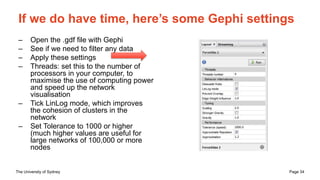
If we do have time, here’s some Gephi settings
– Open the .gdf file with Gephi
– See if we need to filter any data
– Apply these settings
– Threads: set this to the number of
processors in your computer, to
maximise the use of computing power
and speed up the network
visualisation
– Tick LinLog mode, which improves
the cohesion of clusters in the
network
– Set Tolerance to 1000 or higher
(much higher values are useful for
large networks of 100,000 or more
nodes
How do we research what we can’t see?
Dr Jonathon Hutchinson
University of Sydney
Jonathon.Hutchinson@Sydney.edu.au
@dhutchman

Data Ethnography

  • 1.
    How do weresearch what we can’t see? Dr Jonathon Hutchinson University of Sydney Jonathon.Hutchinson@Sydney.edu.au @dhutchman
  • 2.
  • 3.
    The University ofSydney Page 3
  • 4.
    The University ofSydney Page 4
  • 5.
    The University ofSydney Page 5 It is a 21st century digital intermediation problem: the potential benefits of platform comparable user-data is useful for the concerned stakeholders, while simultaneously intruding on their personal information potentially increasing surveillance, personal security breaches, and the capitalization of our digital selves.
  • 6.
    The University ofSydney Page 6 Digital Intermediation Cultural Intermediation Expertise Languages Social Capital Tacit Knowledge Digital Intermediation Cultural Intermediation Data Influencers Platforms
  • 7.
    The University ofSydney Page 7
  • 8.
  • 9.
    The University ofSydney Page 9
  • 10.
    The University ofSydney Page 10
  • 11.
    The University ofSydney Page 11 Ethnographers Social Scientists Data Ethnography
  • 12.
    The University ofSydney Page 12 Towards Data Ethnography – Rapid Ethnography Fieldwork (re)Design Programming Implementation
  • 13.
    The University ofSydney Page 13 Data Ethnography
  • 14.
    The University ofSydney Page 14
  • 15.
    The University ofSydney Page 15 Discussion – Interoperability is increasing across all sectors of society – Some aspects are positive; unfortunately there are a number of negative life issues for some misrepresented members – The enmeshed state/government stewardship of interoperability complicates matters for public interest researchers – We need to be actively designing new methodologies in these areas to continue our work.
  • 17.
    The University ofSydney Page 17 https://drive.google.com/drive/folders/18G0eAK Le108LegaOs-sf63bPqgRmbcbf?usp=sharing
  • 18.
    The University ofSydney Page 18 Persona Construction
  • 19.
    The University ofSydney Page 19 Persona Construction
  • 20.
    The University ofSydney Page 20 Persona Construction Persona Construction > Algorithm Training > Data Scrape
  • 21.
    The University ofSydney Page 21 Persona Construction
  • 22.
    The University ofSydney Page 22 Persona Construction 1. Name 2. Age 3. Gender 4. Occupation 5. Hobbies 6. Location 7. The sorts of devices they use (tech familiarity) Create three personas now.
  • 23.
    The University ofSydney Page 23
  • 24.
    The University ofSydney Page 24 Persona Worksheet
  • 25.
    The University ofSydney Page 25 Training Algorithms
  • 26.
    The University ofSydney Page 26 Training the YouTube Algorithm 1. If you are signed into Firefox, you will need to sign out (this is a good practice to undertake, regardless). 2. Open Firefox as your browser for this exercise and click Create Profile. Name the Profile the same name as the Persona you have created. It is fine to store the profile information in whichever directory Firefox suggests, so press ‘Done’ when finished. 3. Open a new tab and go to Gmail. You will need to create a new Google account. Enter the name of the account as you have constructed, for example First Name, Surname, and DOB. Assign an email address to the persona and record this in your persona table. 4. Log in to Google.
  • 27.
    The University ofSydney Page 27 Training the YouTube Algorithm 5. Open a new tab and go to www.youtube.com. 6. You should be already signed in, but if not sign in to YouTube using the details you have just created. 7. Record the suggested channels for you on the front page. This is crucial. These videos represent the ‘out of the box’ videos in which YouTube thinks your persona will be interested. These will also provide interesting insights when you compare the results after you have trained the algorithm. 8. Enter your first hobby as an interest term, for example ‘horse racing’. Click on the top result from the search. Record the URLs of the top ten videos that are listed in the Recommended list on the right hand side. 9. Return to the search bar and enter the next search term and repeat step 7. 10.Repeat process for each search term.
  • 28.
    The University ofSydney Page 28 Observations What are the videos? What are the common genres? Who are they aiming the videos toward? Can you discern any economics or politics at play here?
  • 29.
    The University ofSydney Page 29 Repeat the process for each of your personas
  • 30.
    The University ofSydney Page 30 Data Scraping
  • 31.
    The University ofSydney Page 31 Understanding the Network(s) – Comment Threads – We can now undertake a number of analyses with the trained YouTube algorithms – Look at the Digital Methods Initiative YouTube [https://tools.digitalmethods.net/netvizz/youtube/] – Launch the ‘Video Info and Comments’ tool [https://tools.digitalmethods.net/netvizz/youtube/mod_video_i nfo.php] – We can now capture the comments and analyse them in various ways – If you are versed in Topic Modelling, this may work for you – If you want to put them into a Word Cloud, that’s OK too
  • 32.
    The University ofSydney Page 32 Understanding User Comments (Discourse Analysis) 1. Log into your first persona that you have constructed and used to train the YouTube algorithm. 2. Select the top recommended video for you (Suggestions for You). 3. Click on the video. 4. Record the Video ID (video ids can be found in URLs, e.g. https://www.youtube.com/watch?v=aXnaHh40xnM) 5. Press Submit 6. Download the …_comments.tab file 7. Open in Excel 8. Begin processing in your chosen platform (Let’s chose what we want to do today)
  • 33.
    The University ofSydney Page 33 Gephi – Shall we try this now? – Many of the DMI tools provide us with a .gdf file – These can be opened with and used in Gephi [https://gephi.org/] – I can provide additional info on how to do this if needed – There is another SNA session later this week
  • 34.
    The University ofSydney Page 34 If we do have time, here’s some Gephi settings – Open the .gdf file with Gephi – See if we need to filter any data – Apply these settings – Threads: set this to the number of processors in your computer, to maximise the use of computing power and speed up the network visualisation – Tick LinLog mode, which improves the cohesion of clusters in the network – Set Tolerance to 1000 or higher (much higher values are useful for large networks of 100,000 or more nodes
  • 35.
    How do weresearch what we can’t see? Dr Jonathon Hutchinson University of Sydney Jonathon.Hutchinson@Sydney.edu.au @dhutchman