DATA ENTRY
STANDARDS
Guidelines and examples for entering data into your CRM systems.
Based on QGate's own data entry standards,
here are some factors that are worth
considering. These may not fit perfectly to
your own business but understanding the
reasoning behind the guidance should help
in the setup of your own data entry
standards.
1. Compulsory Fields
Consider the minimum information you require to be
able to process communications with a potential
customer.
Factors to consider
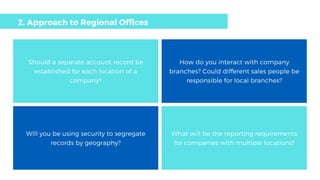
Should a separate account record be
established for each location of a
company?
How do you interact with company
branches? Could different sales people be
responsible for local branches?
Will you be using security to segregate
records by geography?
What will be the reporting requirements
for companies with multiple locations?
2. Approach to Regional Offices
3. Account Hierarchy
Is the legal relationship between
companies relevant to your own business?
Will you want to identify parent accounts
in any reporting?
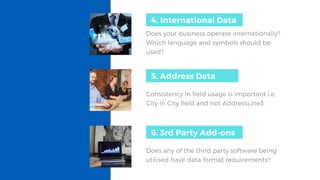
Does your business operate internationally?
Which language and symbols should be
used?
4. International Data
4. International data5. Address Data
Consistency in field usage is important i.e. 
City in City field and not AddressLine3.
6. 3rd Party Add-ons
Does any of the third party software being
utilised have data format requirements?
Checking the account does not already exist in new
name.
How to ensure users are aware of name change?
7. Managing Account Name Changes
9. Deleting Records
Are there any legal requirements to
maintain records? Who will have access to
delete records?
8. Managing Duplicates
Will the merge functionality be provided
to all users or will there be a designated
administrator responsible for merges?
Use full company name
Do not Abbreviate (e.g.
PWC)
Beware of spaces & hyphens.
Beware of case (e.g. QGate
not QGATE)
Beware of misspelling /
typing errors
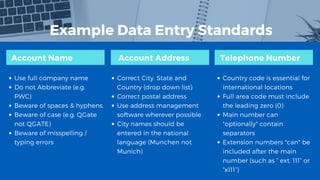
Example Data Entry Standards
Account Name Account Address Telephone Number 
Correct City, State and
Country (drop down list)
Correct postal address
Use address management
software wherever possible
City names should be
entered in the national
language (Munchen not
Munich)
Country code is essential for
international locations
Full area code must include
the leading zero (0)
Main number can
*optionally* contain
separators
Extension numbers *can* be
included after the main
number (such as “ ext. 111” or
“x111”)
Once you have established a set of data entry standards for
your business it is vital to educate all users of the rules they
need to adhere to.
Read the full article here.

Data Entry Standards: Keeping CRM Consistent

  • 1.
    DATA ENTRY STANDARDS Guidelines andexamples for entering data into your CRM systems.
  • 2.
    Based on QGate'sown data entry standards, here are some factors that are worth considering. These may not fit perfectly to your own business but understanding the reasoning behind the guidance should help in the setup of your own data entry standards.
  • 3.
    1. Compulsory Fields Considerthe minimum information you require to be able to process communications with a potential customer. Factors to consider
  • 4.
    Should a separateaccount record be established for each location of a company? How do you interact with company branches? Could different sales people be responsible for local branches? Will you be using security to segregate records by geography? What will be the reporting requirements for companies with multiple locations? 2. Approach to Regional Offices
  • 5.
    3. Account Hierarchy Isthe legal relationship between companies relevant to your own business? Will you want to identify parent accounts in any reporting?
  • 6.
    Does your businessoperate internationally? Which language and symbols should be used? 4. International Data 4. International data5. Address Data Consistency in field usage is important i.e.  City in City field and not AddressLine3. 6. 3rd Party Add-ons Does any of the third party software being utilised have data format requirements?
  • 7.
    Checking the accountdoes not already exist in new name. How to ensure users are aware of name change? 7. Managing Account Name Changes
  • 8.
    9. Deleting Records Arethere any legal requirements to maintain records? Who will have access to delete records? 8. Managing Duplicates Will the merge functionality be provided to all users or will there be a designated administrator responsible for merges?
  • 9.
    Use full companyname Do not Abbreviate (e.g. PWC) Beware of spaces & hyphens. Beware of case (e.g. QGate not QGATE) Beware of misspelling / typing errors Example Data Entry Standards Account Name Account Address Telephone Number  Correct City, State and Country (drop down list) Correct postal address Use address management software wherever possible City names should be entered in the national language (Munchen not Munich) Country code is essential for international locations Full area code must include the leading zero (0) Main number can *optionally* contain separators Extension numbers *can* be included after the main number (such as “ ext. 111” or “x111”)
  • 10.
    Once you haveestablished a set of data entry standards for your business it is vital to educate all users of the rules they need to adhere to. Read the full article here.