Cyber Security Classes
Author : Sainath Salla
Cybersecurity
CLASSES - NSIC
Cyber Security Classes
Author : Sainath Salla
WEEK - 01
Cyber Security Classes
Author : Sainath Salla
What you’ll learn in this program?
 Potential risks and vulnerabilities
 Definitions
 Your role in cyber security and protecting
privacy
 Best practices in security and privacy
Cyber Security Classes
Author : Sainath Salla
What is Cybersecurity?
 It refers to protecting systems connected to the internet from threats
in network. It involves protecting software, data, and hardware and
helps prevent cybercriminals from gaining access to devices or the
networks. Different parts of cybersecurity :
Application security
Cloud security
Data security
Endpoint security
Identity management
Cyber Security Classes
Author : Sainath Salla
 Information is considered sensitive if the loss of
Confidentiality, Integrity, or Availability could be
expected to have a serious, severe, or catastrophic
adverse effect on organizational operations,
organizational assets, or individuals.
 Types of sensitive information include:
 Personnel
 Financial
 Payroll
 Medical
Cyber Security Classes
Author : Sainath Salla
 Personal Privacy
 Public Wi-Fi
 Passwords
 Router
 Internet of Things (IOT)
 QR Codes
 Support & Resources
Threats:
Hacking
Malware
Phishing
Stay Secure
Internet Shopping
Internet Banking
Cyber Security Classes
Author : Sainath Salla
Awareness
 Cyber crime is a growing trend
 As with most crimes the police can’t tackle this problem
alone
 To encourage reporting
 Promote Government backed schemes
 Cyber crime is massively under reported.
Cyber Security Classes
Author : Sainath Salla
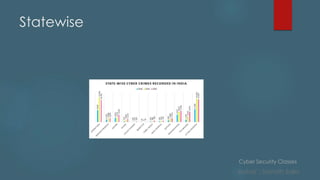
Trend Analysis (NCRB)
Cyber Security Classes
Author : Sainath Salla
Statewise
Cyber Security Classes
Author : Sainath Salla
Key Concepts of Cybersecurity
Types of cyber security threats
 There are dozens of types of cyber security threats, but the following are
some of the most common ones:
DDoS Attack
 A DDoS or Distributed Denial of Service Attack is when cybercriminals
overwhelm a network or its servers by sending too much traffic. This
prevents the network from handling valid requests and makes the entire
system unusable. It can completely stop organizations
Malware
 This malicious software can include computer viruses, spyware, Trojan
horses, worms, and any other program or file that can harm the
computer. Malware is commonly spread by downloads that seem
legitimate or attachments in emails.
Cyber Security Classes
Author : Sainath Salla
Key Concepts of Cybersecurity
 Within the category of malware, there are several types of cyber
security threats:
 Adware is advertising software that spreads malware.
 Botnets are numerous computers infected with malware that form a
network. Cybercriminals use them to perform online tasks without the
permission of the devices’ owners.
 Ransomware will lock data and files and threaten to leave the files
locked or delete them unless the victim sends payment.
 Spyware records the actions of a user, such as gathering credit card
information.
 Trojans are malware but disguised to appear as legitimate software.
After being uploaded, they collect data or cause damage
 Viruses are self-replicating. They attach themselves to a file, then spread
through the computer’s system.
Cyber Security Classes
Author : Sainath Salla
Key Concepts of Cybersecurity
Man-in-the-Middle Attack
 This type of attack involves the cybercriminal intercepting conversations or data
transmissions between multiple people. An example would be a cyber attack using an
unsecured Wi-Fi network to intercept the data that the victim sends from their
computer to the network.
Phishing
 This type of cyber security threat involves sending fake emails from seemingly legitimate
sources to get information such as credit card details or passwords.
Social Engineering
 This type of attack tricks users to break security procedures by using human
interactions. Cybercriminals commonly combine social engineering attacks with others,
such as phishing, to increase the chances of the victim clicking on a link or
downloading a file.
SQL Injection
 SQL stands for Structured Query Language. A SQL injection aims to perform actions on
data in a database and potentially steal it. It involves inserting malicious code via SQL
statements, taking advantage of data-driven applications’ vulnerabilities.
Cyber Security Classes
Author : Sainath Salla
Who is doing the hacking?
Cyber Security Classes
Author : Sainath Salla
 Financial (theft, fraud,
blackmail)
 Political /state (state level/
military)
 Fame(fun/ status)
 Hacktivism (cause)
 Pen testers (legal hacking)
Cyber Security Classes
Author : Sainath Salla
Ransomware
 Normally loaded onto a computer via a download/attachment/link
from an email or website.
 Will either lock the screen or encrypt your data.
 Once Ransomware is uploaded on your computer/tablet/phone it is
very difficult to remove without removing all of the data
 Wannacry attack 2017 - One of the biggest cyber attacks to occur.
 Is said to have hit 300,000 computers in 150 countries.
 Companies affected include; NHS, Renault, FedEx, Spanish telecoms
and gas companies, German railways.
Cyber Security Classes
Author : Sainath Salla
How to handle Ransomware?
 Back up- Keep a backed up copy of your data. Ensure its not
permanently connected to the network.
 Patch- Keep your software up to date. Wannacry was successful as
those affected computers hadn’t updated. The update contained
a fix for the problem.
 Attachments- Don’t click on links from emails/SMS as this could easily
be from an untrusted source and contain malware like Ransomware
Cyber Security Classes
Author : Sainath Salla
Phishing
• Is the attempt to obtain sensitive information by deception.
• They will be after your login credentials, payment card details or to
upload malware to your computer
• The email will normally impersonate a genuine company or person.
How to tackle the problem
• Don’t click any links on an email unless you can guarantee who
its from.
• Use a trusted method of contacting the company via a phone
number, app or website.
• Mark the email as spam and contact the organisation.
Cyber Security Classes
Author : Sainath Salla
OSI Models
 The open systems interconnection (OSI) model is a conceptual
model created by the International Organization for Standardization
which enables diverse communication systems to communicate
using standard protocols. In plain English, the OSI provides a
standard for different computer systems to be able to communicate
with each other.
 The OSI Model can be seen as a universal language for computer
networking. It’s based on the concept of splitting up a
communication system into seven abstract layers, each one
stacked upon the last.
Cyber Security Classes
Author : Sainath Salla
OSI Models
 Although the modern Internet doesn’t strictly follow the OSI Model (it
more closely follows the simpler Internet protocol suite), the OSI
Model is still very useful for troubleshooting network problems.
 Whether it’s one person who can’t get their laptop on the Internet,
or a web site being down for thousands of users, the OSI Model can
help to break down the problem and isolate the source of the
trouble.
 If the problem can be narrowed down to one specific layer of the
model, a lot of unnecessary work can be avoided.
Cyber Security Classes
Author : Sainath Salla
OSI MOdels
Cyber Security Classes
Author : Sainath Salla
OSI MODELS
 The seven OSI models are used for breaking down a problem for an
issue.
 Determine the required hardware and software to build their
network.
 Understand and communicate the process followed by
components communicating across a network.
 Perform troubleshooting, by identifying which network layer is
causing an issue and focusing efforts on that layer.
Cyber Security Classes
Author : Sainath Salla
7. Application layer
 This is the only layer that directly interacts with data from the user.
Software applications like web browsers and email clients rely on the
application layer to initiate communications.
 But it should be made clear that client software applications are
not part of the application layer; rather the application layer is
responsible for the protocols and data manipulation that the
software relies on to present meaningful data to the user.
 Application layer protocols include HTTP as well as SMTP (Simple Mail
Transfer Protocol is one of the protocols that enables email
communications).
Cyber Security Classes
Author : Sainath Salla
6. Presentation Layer
 This layer is primarily responsible for preparing data so that it can be used by the
application layer; in other words, layer 6 makes the data presentable for
applications to consume. The presentation layer is responsible for
translation, encryption and compression of data.
 Two communicating devices communicating may be using different encoding
methods, so layer 6 is responsible for translating incoming data into a syntax that
the application layer of the receiving device can understand.
 If the devices are communicating over an encrypted connection, layer 6 is
responsible for adding the encryption on the sender’s end as well as decoding
the encryption on the receiver's end so that it can present the application layer
with unencrypted, readable data.
 Finally the presentation layer is also responsible for compressing data it receives
from the application layer before delivering it to layer 5. This helps improve the
speed and efficiency of communication by minimizing the amount of data that
will be transferred.
Cyber Security Classes
Author : Sainath Salla
5 . Session Layer
 This is the layer responsible for opening and closing communication
between the two devices. The time between when the communication
is opened and closed is known as the session. The session layer ensures
that the session stays open long enough to transfer all the data being
exchanged, and then promptly closes the session in order to avoid
wasting resources.
 The session layer also synchronizes data transfer with checkpoints. For
example, if a 100 megabyte file is being transferred, the session layer
could set a checkpoint every 5 megabytes. In the case of a disconnect
or a crash after 52 megabytes have been transferred, the session could
be resumed from the last checkpoint, meaning only 50 more
megabytes of data need to be transferred. Without the checkpoints,
the entire transfer would have to begin again from scratch.
Cyber Security Classes
Author : Sainath Salla
4. Transport Layer
 Layer 4 is responsible for end-to-end communication between the
two devices. This includes taking data from the session layer and
breaking it up into chunks called segments before sending it to layer
3. The transport layer on the receiving device is responsible for
reassembling the segments into data the session layer can
consume.
 The transport layer is also responsible for flow control and error
control. Flow control determines an optimal speed of transmission to
ensure that a sender with a fast connection doesn’t overwhelm a
receiver with a slow connection. The transport layer performs error
control on the receiving end by ensuring that the data received is
complete, and requesting a retransmission if it isn’t.
Cyber Security Classes
Author : Sainath Salla
3. Network Layer
 The network layer is responsible for facilitating data transfer between
two different networks. If the two devices communicating are on
the same network, then the network layer is unnecessary.
 The network layer breaks up segments from the transport layer into
smaller units, called packets, on the sender’s device, and
reassembling these packets on the receiving device.
 The network layer also finds the best physical path for the data to
reach its destination; this is known as routing.
Cyber Security Classes
Author : Sainath Salla
2. The data link layer
 The data link layer is very similar to the network layer, except the
data link layer facilitates data transfer between two devices on the
SAME network.
 The data link layer takes packets from the network layer and breaks
them into smaller pieces called frames. Like the network layer, the
data link layer is also responsible for flow control and error control in
intra-network communication (The transport layer only does flow
control and error control for inter-network communications).
Cyber Security Classes
Author : Sainath Salla
1. The physical layer
 This layer includes the physical equipment involved in the data
transfer, such as the cables and switches.
 This is also the layer where the data gets converted into a bit stream,
which is a string of 1s and 0s. The physical layer of both devices must
also agree on a signal convention so that the 1s can be
distinguished from the 0s on both devices.
 P-lease D-o N-ot T-ouch S-ecret P-ersonal A-pplications
Cyber Security Classes
Author : Sainath Salla
Domain Name Server (DNS)
 A lookup mechanism for translating objects into other objects
 A globally distributed, loosely coherent, scalable, reliable, dynamic
database.
 Alternate name to the IP address (Eg : 192.168.2.1)
 Comprised of three components
 A “name space”.
 Servers making that name space available.
 Resolvers (clients) which query the servers about the name space
Cyber Security Classes
Author : Sainath Salla
WEEK - 02
Cyber Security Classes
Author : Sainath Salla
Steganography
 Steganography is the practice of hiding an image, message, or file within
something that isn't a secret.
 If you ever played with magic ink to bring secret notes to life, you've used it.
 There are literally dozens of ways to hide messages, and each one works
differently. But most steganography experts rely on the same principles to do
their work.
 Steganography relies on several pieces, including:
Payloads
Channels
Carriers
Packages
Key
Cyber Security Classes
Author : Sainath Salla
Steganography
Steps for making a steganography message :
 Payloads. What do you want to embed or hide?
 Carriers. What file or asset will hide your payload?
 Channels. What type of carrier will you use?
 Package. How will the carrier look or respond when buried with the
payload?
 Key. How will the recipient decode your message and find the
payload?
Cyber Security Classes
Author : Sainath Salla
Steganography
 Steganography is used in almost every type of file you can imagine,
including:
 Image files. A few pixels within the image are shifted, and each one
represents a letter of the alphabet. An outsider might not see the
changes, even when looking hard for them. But with the right key, a
recipient can decipher the change. Some artists use this
technique to prove ownership of their works.
 Sound files. A song or recorded sound could contain an image
that's only seen via spectrogram. A casual listener may not notice
the difference, but a few tiny bytes of the audible data have been
changed.
Cyber Security Classes
Author : Sainath Salla
Steganography
 Social media posts. Someone changes the title of a shared video or
image. People may also deliberately misspell words and phrases,
delivering secret messages to those with the key.
 Videos. A picture embedded within a video is only visible when the
file is played at a very slow or fast pace.
 You could use cryptography to tackle many of the same tasks.
Rather than changing a message and sending the code to your
recipient, you could just alter the entire message instead.
Cyber Security Classes
Author : Sainath Salla
Steganography
Tools for doing steganography:
 Stegosuite is a free steganography tool which is written in Java. With
Stegosuite you can easily hide confidential information in image
files.
 Steghide is an open source Steganography software that lets you
hide a secret file in image or audio file.
 Xiao Steganography is a free software that can be used to hide
data in BMP images or in WAV files.
 OpenPuff is a professional steganographic tool where you can store
files in image, audio, video or flash files
Cyber Security Classes
Author : Sainath Salla
Encryption and Decryption
 Encryption is the process of converting plain text into cipher text, i.e.
converting the text from readable format to nonreadable format to
secure the conversation between two parties or from the
unauthorized person.
 Decryption is the process of converting ciphertext into plain text, i.e.
converting the non-readable text into readable text which anyone
can understand. Both methods use secret keys to perform desired
operations.
 Reasons why Encryption vs Decryption Should be Used
 They also give the confidentiality of our private information.
Cyber Security Classes
Author : Sainath Salla
Encryption and Decryption
 They also help in ensuring that the documents haven’t been
changed.
 Encryption prevents plagiarism and also protects IP.
 They are quite helpful for using network communication such as the
internet and wherever hackers can access unencrypted data very
easily.
 They are important methods since they help us in securely
protecting our data that we don’t wish anyone else to get access
to.
 These processes help in the protection of our confidential data like
passwords.
Cyber Security Classes
Author : Sainath Salla
Encryption and Decryption
Key Types of Encryption vs Decryption
 Symmetric Key – It refers to those algorithms that use the same secret keys for the purpose of both the
encryption of plain text and the decryption of the ciphertext.
 Asymmetric Key – It refers to those algorithms that make use of 2 pairs of the key for the purpose of
encryption. The public key is made available to any random person, whereas the secret key is made
available only to the message’s receiver.
 Public Key – It is an asymmetric encryption system that uses two pairs of the key. The public keys are used
to encrypt the data or message that is sent to a receiver.
 Private Key – It is part of the public and private asymmetric pair of the key. This key is used in asymmetric
encryption since we use the same key to encrypt and decrypt data.
 Pre-Shared Key – It is referred to as a secret that is shared which earlier was shared between two of the
parties with the help of a secure channel before we can use it.
Cyber Security Classes
Author : Sainath Salla
Cryptography
 Cryptography is the practice and study of techniques for securing
communication and data in the presence of adversaries.
 Malicious third-parties—known as adversaries.
 Different encryption methods are used in cryptography.
 With symmetric cryptography, the same key is used for both
encryption and decryption. A sender and a recipient must already
have a shared key that is known to both.
Cyber Security Classes
Author : Sainath Salla
Cryptography
 With asymmetric crypto, two different keys are used for encryption and
decryption. Every user in an asymmetric cryptosystem has both a public
key and a private key.
 The private key is kept secret at all times, but the public key may be
freely distributed.
 Data encrypted with a public key may only be decrypted with the
corresponding private key.
 So, sending a message to Karan requires encrypting that message with
Karan’s public key.
Cyber Security Classes
Author : Sainath Salla
Cryptography
 Any data encrypted with a private key can only be decrypted with the
corresponding public key.
 Similarly, person A could digitally sign a message with her private key,
and anyone with A’s public key could decrypt the signed message and
verify that it was in fact A who sent it.
 Symmetric is generally very fast and ideal for encrypting large amounts
of data (e.g., an entire disk partition or database).
 Asymmetric is much slower and can only encrypt pieces of data that
are smaller than the key size (typically 2048 bits or smaller).
Cyber Security Classes
Author : Sainath Salla
Cryptography
 Software systems often have multiple endpoints, typically multiple
clients, and one or more back-end servers.
 These client/server communications take place over networks that
cannot be trusted. Communication occurs over open, public networks
such as the Internet, or private networks which may be compromised
by external attackers or malicious insiders.
 It can protect communications that traverse untrusted networks.
 There are two main types of attacks that an adversary may attempt to
carry out on a network.
Cyber Security Classes
Author : Sainath Salla
Cryptography
 Passive attacks involve an attacker simply listening on a network
segment and attempting to read sensitive information as it travels.
Passive attacks may be online (in which an attacker reads traffic in
real-time) or offline (in which an attacker simply captures traffic in
real-time and views it later—perhaps after spending some time
decrypting it).
 Active attacks involve an attacker impersonating a client or server,
intercepting communications in transit, and viewing and/or
modifying the contents before passing them on to their intended
destination (or dropping them entirely).
 The confidentiality and integrity protections offered by
cryptographic protocols such as SSL/TLS can protect
communications from malicious eavesdropping and tampering.
Cyber Security Classes
Author : Sainath Salla
Cryptography
Cyber Security Classes
Author : Sainath Salla
Steganography VS Cryptography
 Cryptography: change the data so it is not readable. Adversary can
see there is a data communicated but can’t understand it.
 Steganography: hide the very existence of the data. Adversary
doesn’t know of a secret communication.
 Watermarking, is a method to embed an identifier in some hidden
way in a file (typically in non text files) so that if you have the key
you can authenticate the existence of the watermark. The method
is typically hidden to the naked eye, but may be detectable. It's
goal is authentication of the source of the data.
Cyber Security Classes
Author : Sainath Salla
WEEK - 03
Cyber Security Classes
Author : Sainath Salla
Website Security
 Many sensitive tasks are done through web
 Online banking, online shopping
 Database access
 System administration
 Web applications and web users are targets of many attacks
 Cross site scripting
 SQL injection
 Cross site request forgery
 Information leakage
 Session hijacking
Cyber Security Classes
Author : Sainath Salla
Website Security
 Secure communications between client & server
 HTTPS (HTTP over Secure Socket Layer)
 User authentication & session management
 Cookies & other methods
 Active contents from different websites
 Protecting resources maintained by browsers
 Web application security
 Web site authentication (e.g., anti-phishing)
 Privacy concerns
Cyber Security Classes
Author : Sainath Salla
Website Security
 Browser sends HTTP requests to the server
 Methods: GET, POST, HEAD, …
 GET: to retrieve a resource (html, image, script, css,…)
 POST: to submit a form (login, register, …)
 HEAD
 Server replies with a HTTP response
 Stateless request/response protocol
 Each request is independent of previous requests
 Statelessness has a significant impact on design and implementation of
applications
Cyber Security Classes
Author : Sainath Salla
Website Security
 Stored by the browser
 Used by the web applications
 used for authenticating, tracking, and maintaining specific information
about users
 e.g., site preferences, contents of shopping carts
 data may be sensitive
 may be used to gather information about specific users
 Cookie ownership
 Once a cookie is saved on your computer, only the website that
created the cookie can read it
Cyber Security Classes
Author : Sainath Salla
Website Security
 An example cookie from my browser
 Name session-token
 Content "s7yZiOvFm4YymG….”
 Domain .amazon.com
 Send For Any type of connection
 Expires Monday, September 08, 2031 7:19:41 PM
This can be checked by opening the network tab and Headers sections on
any website
Cyber Security Classes
Author : Sainath Salla
Website Security
 Stored by the browser
 Used by the web applications
 used for authenticating, tracking, and maintaining specific information
about users
 e.g., site preferences, contents of shopping carts
 data may be sensitive
 may be used to gather information about specific users
 Cookie ownership
 Once a cookie is saved on your computer, only the website that
created the cookie can read it
Cyber Security Classes
Author : Sainath Salla
Website Security
 HTTP is stateless
 How does the server recognize a user who has signed in?
 Servers can use cookies to store state on client
 After client successfully authenticates, server computes an
authenticator and gives it to browser in a cookie
 Client cannot forge authenticator on his own (session id)
 With each request, browser presents the cookie
 Server verifies the authenticator
Cyber Security Classes
Author : Sainath Salla
Website Security
54
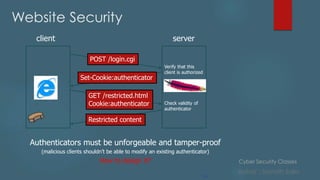
client server
POST /login.cgi
Set-Cookie:authenticator
GET /restricted.html
Cookie:authenticator
Restricted content
Verify that this
client is authorized
Check validity of
authenticator
Authenticators must be unforgeable and tamper-proof
(malicious clients shouldn’t be able to modify an existing authenticator)
How to design it?
Cyber Security Classes
Author : Sainath Salla
Website Security
Image Reference Site
:https://padakuu.com
Cyber Security Classes
Author : Sainath Salla
OWASP
 The Open Web Application Security Project, or OWASP, is an
international non-profit organization dedicated to web application
security. One of OWASP’s core principles is that all of their materials be
freely available and easily accessible on their website, making it
possible for anyone to improve their own web application security. The
materials they offer include documentation, tools, videos, and forums.
Perhaps their best-known project is the OWASP Top 10.
 Reference site and learning completely about OWASP :
https://www.hacksplaining.com/owasp
Cyber Security Classes
Author : Sainath Salla
Pentesting
 Penetration Testing is a legal, structured procedure to evaluate the
security posture of an organization. This practice simulates an attack
against the security infrastructure of the enterprise, such as its network,
applications, and users, to identify the exploitable vulnerabilities. It
determines the efficacy of the company’s security policies, controls,
and strategies.
 To strengthen the system, penetration testers proactively analyse for
design flaws, technical weaknesses, and other vulnerabilities.
Penetration testing Reference
https://www.crest-approved.org/wp-content/uploads/CREST-
Penetration-Testing-Guide.pdf
Cyber Security Classes
Author : Sainath Salla
WEEK - 04
Cyber Security Classes
Author : Sainath Salla
Wireless Hacking
 Wireless networks are based on IEEE 802.11 standards defined by the
Institute of Electrical and Electronics Engineers (IEEE ) for ad hoc
networks or infrastructure networks.
 Infrastructure networks have one or more access points that
coordinate the traffic between the nodes. But in ad hoc networks,
there is no access point; each node connects in a peer-to-peer
way.
 Two types of vulnerabilities can be found in the Wireless LAN. One is
poor configuration and the other is poor encryption.
Cyber Security Classes
Author : Sainath Salla
Wireless Hacking
 Poor configuration is caused by the network admin who manages
the network. It may include a weak password, a lack of security
settings, use of default configurations and other user-related issues.
 Poor encryption is related to security keys used to protect the
wireless network. These vulnerabilities exist because of issues in WEP
or WPA
 The problem is, if there's a lock next to the network name (AKA the
SSID, or service set identifier), that indicates security is activated.
Without a password or passphrase, you're not going to get access to
that network.
Cyber Security Classes
Author : Sainath Salla
Wireless Hacking
WEP AND WPA :-
 WEP and WPA are the two main security protocols used in Wi-Fi LAN.
WEP, or Wired Equivalent Privacy, is a deprecated security protocol
that was introduced back in 1997 as a part of the original 802.11
standards. However, it was weak, and several serious weaknesses
were found in the protocol. Now, this can be cracked within
minutes.
 A new Wi-Fi security protocol was introduced in 2003. This new
protocol was Wi-Fi Protected Access (WPA).
Cyber Security Classes
Author : Sainath Salla
Wireless Hacking
WEP AND WPA :-
 To get unauthorized access to a network, one needs to crack these
security protocols. Many tools can crack Wi-Fi encryption. These tools
can either take advantage of WEP weaknesses or use brute force
password guessing attacks on WPA/WPA2/WPA3.
 While most routers currently use WPA or WPA2, a third version called
WPA3 was certified a few years ago and is designed to replace the
existing protocols.
 WPA3 Personal is a static passphrase-based method. It provides better
security than what WPA2 previously provided, even when a non-
complex password is used, thanks to Simultaneous Authentication of
Equals (SAE), the personal authentication process of WPA3.
Cyber Security Classes
Author : Sainath Salla
Wireless Hacking - Tools
 Wireless hacking tools are of two types. One can be used to sniff the
network and monitor what is happening in the network.
 The other kind of tool is used to hack WEP/WPA keys.
 Aircrack-ng
 Wifite
 Kismet
 Wifiphisher
 Wireshark
Cyber Security Classes
Author : Sainath Salla
Wireless Hacking - Commands
 netsh wlan show profile
 The results will bring up a section called User Profiles—those are all the
Wi-Fi networks (WLANs, or wireless local area networks) you've
accessed.
 Pick the one you want to get the password for, highlight it, and copy it.
At the prompt below, type the following, but replace the Xs with the
network name you copied; you only need the quotation marks if the
network name has spaces in it.
Reference Site for testing : https://www.cyberithub.com/31-most-
useful-netsh-command-examples-in-windows/
Cyber Security Classes
Author : Sainath Salla
Wireless Hacking - Commands
Aircrack-ng :-
 Aircrack-ng is one of the most popular wireless password cracking tools that you
can use for 802.11a/b/g WEP and WPA cracking.
 Aircrack-ng uses the best algorithms to recover wireless passwords by capturing
packets.
 Once enough packets have been gathered, it tries to recover the password. To
make the attack faster, it implements a standard FMS attack with some
optimizations.
Cyber Security Classes
Author : Sainath Salla
Wireless Hacking - Commands
Wifite :-
 Wifite is a Python script designed to simplify wireless security auditing. It runs
existing wireless hacking tools for you, eliminating the need to memorize
and correctly use the different tools with their various options.
 Wifite2 is a complete rewrite of the original Wifite tool.
 It is designed to work on the Kali Linux and ParrotSec Linux distros.
Cyber Security Classes
Author : Sainath Salla
Wireless Hacking - Commands
Kismet :-
 Kismet is a wireless network sniffer that works for Wi-Fi, Bluetooth, software-
defined Radio (SDR) and other wireless protocols.
 It passively collects packets being broadcast in its vicinity and analyzes
them to detect even hidden Wi-Fi networks.
 Kismet is supported on all operating systems (using WSL on Windows) and is
actively supported.
Cyber Security Classes
Author : Sainath Salla
Wireless Hacking - Commands
WifiPhisher :-
 Wifiphisher is a tool designed to perform man-in-the-middle attacks by
exploiting Wi-Fi association.
 By convincing wireless users to connect to the rogue access point,
Wifiphisher provides an attacker with the ability to intercept and monitor or
modify their wireless traffic.
 Wifiphisher also enables an attacker to launch web phishing attacks. These
can be used to collect user credentials for third-party sites or Wi-Fi network
credentials.
Cyber Security Classes
Author : Sainath Salla
Wireless Hacking - Commands
inSSIDer :-
 inSSIDer is a popular Wi-Fi scanner for Microsoft Windows and OS X
operating systems.
 The inSSIDer wi-fi scanner can do various tasks, including finding open Wi-Fi
access points, tracking signal strength and saving logs with GPS records.
 inSSIDer works on a freemium model. Basic functionality is available for free,
but certain features require a paid membership.
Cyber Security Classes
Author : Sainath Salla
Wireless Hacking - Commands
Wireshark :-
 Wireshark is the network protocol analyzer. It lets you check what is
happening in your network. You can capture packets live and inspect them
at a high level or see the values of particular fields within a packet.
 It runs on Windows, Linux, OS X, Solaris, FreeBSD and others.
 Wireshark is designed to be user-friendly but has a great deal of
functionality under the hood.
 It is most useful if you have a strong understanding of network protocols and
can effectively interpret the traffic that you are seeing.
Cyber Security Classes
Author : Sainath Salla
Wireless Hacking
Frag Attack :-
 A frag (fragmentation and aggregation) attack either captures traffic
toward unsecured networks to then clone and impersonate servers, or
opens the network by injecting plaintext frames that look like handshake
messages.
 More simply, frag attacks trick your network devices into thinking they are
doing something safe.
 Research into the vulnerabilities showed that accessing networks through
these methods is even possible when Wi-Fi networks are secured using
WPA2 or WPA3 encryption.
Cyber Security Classes
Author : Sainath Salla
Wireless Hacking
Frag Attack :-
 When the victim next visits an unsecured website, the attacker’s DNS
server will send them to a copy of the intended website, allowing
the cybercriminal to capture keystrokes containing sensitive
information like usernames and passwords.
 Attackers can also inject malicious packets of data to “punch a
hole” in a router’s firewall if a connected device is vulnerable,
allowing the attacker to unmask IP addresses and destination ports
used to access the device. With this access, attackers can take
screenshots of the device, or execute programs on its interface.
Cyber Security Classes
Author : Sainath Salla
Wireless Hacking
Major issues with Frag Attack :-
1. Data Theft
 A Frag attack can be used by an attacker to steal and intercept
data from a Wi-Fi network. Most websites and applications
that employ HTTPS and other types of encryption are protected
against such attacks.
 However, if unencrypted data is sent over an encrypted Wi-Fi
connection, a Frag attack can potentially bypass the encryption
and cause data theft.
Cyber Security Classes
Author : Sainath Salla
Wireless Hacking
Major issues with Frag Attack :-
2. Attacks Against Vulnerable Devices
 Most smart home and IoT devices can be vulnerable to a Wi-Fi Frag
attack. Smart devices manufactured by unknown brands such as an
inexpensive smart plug or smart light bulbs might not offer the necessary
long-term support and updates, causing these devices to easily fall victim
to Frag attacks.
 In reality, it should not matter because every device, whether big or small, is
connected to a trusted home network. But since Frag attacks can bypass a
Wi-Fi network's encryption, any device can be targeted directly just as if it
was connected to the same network.
Cyber Security Classes
Author : Sainath Salla
IP Addresses and Subnetting
IP ADDRESS:
 IP (Internet Protocol) addresses are used to identify hardware
devices on a network. The addresses allow these devices to
connect to one another and transfer data on a local network or
over the internet.
 Each address is a string of numbers separated by periods. There are
four numbers in total and each number can range between 0 and
255. An example of an IP address would be: 506.457.14.512
 We need billions of IP addresses to identify every computer, router
and website on the internet. One day we’ll run out of unique
addresses and a new IPv6 protocol has been designed to meet this
need.
Cyber Security Classes
Author : Sainath Salla
IP Addresses and Subnetting
IP ADDRESS and conversion of decimal to binary:
 The method to do in converting decimal to binary numbers is to
understand the corresponding decimal digits of the byte. As stated
above, there are 8 bits in 1 byte or can also be known as an Octet,
and every bit corresponds to specific digits based on the most
significant bit (MSB) and the least significant bit (LSB).
 To convert decimal to binary, first, subtract the decimal value to the
MSB value of the octet and continue the process until you subtract
to the LSB value or your result is already zero. All the results with a
positive value or zero will be counted as a one and to be
subtracted to the next value and, if not, will be considered as 0.
Cyber Security Classes
Author : Sainath Salla
IP Addresses and Subnetting
Subnet Mask:
 An IP address is divided into two parts: network and host parts.
 The IP addresses has five classes of IP addresses, class A, B, C, D, and
E.
 For the IP addresses from Class A, the first 8 bits (the first decimal
number) represent the network part, while the remaining 24 bits
represent the host part. For Class B, the first 16 bits (the first two
numbers) represent the network part, while the remaining 16 bits
represent the host part. For Class C, the first 24 bits represent the
network part, while the remaining 8 bits represent the host par
Cyber Security Classes
Author : Sainath Salla
IP Addresses and Subnetting
Subnet Mask Classes :
Cyber Security Classes
Author : Sainath Salla
IP Address Conversion
1) IP Address decimal to binary conversion.
2) Wire Shark Example and Practical.
Cyber Security Classes
Author : Sainath Salla
Social Engineering
 In a social engineering attack, an attacker uses human interaction
(social skills) to obtain or compromise information about an
organization or its computer systems. possibly claiming to be a new
employee, or friend.
 By asking questions, he or she may be able to get enough
information to infiltrate anyone’s network. If an attacker is not able
to gather enough information from one source, he or she may
contact another source and rely on the information from the first
source to add to his or her credibility.
Cyber Security Classes
Author : Sainath Salla
Social Engineering - Types
 Baiting: An attacker leaves a malware-infected physical device,
such as a USB flash drive, in a place it is sure to be found. The target
then picks up the device and inserts it into their computer,
unintentionally installing the malware.
 Phishing: When a malicious party sends a fraudulent email disguised
as a legitimate email, often purporting to be from a trusted source.
The message is meant to trick the recipient into sharing financial or
personal information or clicking on a link that installs malware.
 Scareware. This involves tricking the victim into thinking their
computer is infected with malware or has inadvertently
downloaded illegal content. The attacker then offers the victim a
solution that will fix the bogus problem; in reality, the victim is simply
tricked into downloading and installing the attacker's malware.
Cyber Security Classes
Author : Sainath Salla
Social Engineering - Types
 Honey trap. In this attack, the social engineer pretends to be an
attractive person to interact with a person online, fake an online
relationship and gather sensitive information through that
relationship.
 Dumpster diving. This is a social engineering attack whereby a
person searches a company's trash to find information, such as
passwords or access codes written on sticky notes or scraps of
paper, that could be used to infiltrate the organization's network.
 Pharming. With this type of online fraud, a cybercriminal installs
malicious code on a computer or server that automatically directs
the user to a fake website, where the user may be tricked into
providing personal information.
Cyber Security Classes
Author : Sainath Salla
VPN :
 A virtual private network, or VPN, is an encrypted connection
over the Internet from a device to a network. The encrypted
connection helps ensure that sensitive data is safely transmitted.
It prevents unauthorized people from eavesdropping on the
traffic and allows the user to conduct work remotely.
 Your ISP usually sets up your connection when you connect to
the internet. It tracks you via an IP address.
 Your network traffic is routed through your ISP's servers, which
can log and display everything you do online.
Cyber Security Classes
Author : Sainath Salla
VPN :
 Your ISP may seem trustworthy, but it may share your browsing
history with advertisers, the police or government, and/or other
third parties. ISPs can also fall victim to attacks by cyber
criminals: If they are hacked, your personal and private data
can be compromised.
 This is especially important if you regularly connect to public Wi-Fi
networks. You never know who might be monitoring your
internet traffic and what they might steal from you, including
passwords, personal data, payment information, or even your
entire identity.
Cyber Security Classes
Author : Sainath Salla
VPN :
SSL VPN
 Often not all employees of a company have access to a company
laptop they can use to work from home. During the crisis In such cases,
use of a private device (PC, laptop, tablet, mobile phone) is often
resorted to.
 In this case, companies fall back on an SSL-VPN solution, which is usually
implemented via a corresponding hardware box.
Site-to-site VPN
 A site-to-site VPN is essentially a private network designed to hide
private intranets and allow users of these secure networks to access
each other's resources.
Cyber Security Classes
Author : Sainath Salla
VPN :
 A site-to-site VPN is useful if you have multiple locations in your
company, each with its own local area network (LAN) connected to
the WAN (Wide Area Network). Site-to-site VPNs are also useful if you
have two separate intranets between which you want to send files
without users from one intranet explicitly accessing the other.
 Site-to-site VPNs are mainly used in large companies. They are complex
to implement and do not offer the same flexibility as SSL VPNs. However,
they are the most effective way to ensure communication within and
between large departments.
Cyber Security Classes
Author : Sainath Salla
VPN :
Client-to-Server VPN
 Connecting via a VPN client can be imagined as if you were
connecting your home PC to the company with an extension cable.
 Employees can dial into the company network from their home office
via the secure connection and act as if they were sitting in the office.
However, a VPN client must first be installed and configured on the
computer.
Cyber Security Classes
Author : Sainath Salla
Reference Links for learning:
For netsh commands list :
1) https://www.ionos.com/digitalguide/server/tools/netsh/
For learning and creating a website for free :
2) https://www.000webhost.com
For trying out Encryption/Decryption methods :
3) https://www.online-toolz.com/tools/text-encryption-decryption.php
For findingout IP address:
4) https://www.whatismyip.com/dns-lookup/
Cyber Security Classes
Author : Sainath Salla
Disclaimer: Hacking without permission is illegal. This
course is strictly educational for learning about cyber-
security in the areas of ethical hacking and
penetration testing so that we can protect ourselves
against the real hackers.
Cyber Security Classes
Author : Sainath Salla
Thank you.

Cybersecurity-NSIC.pdf

  • 1.
    Cyber Security Classes Author: Sainath Salla Cybersecurity CLASSES - NSIC
  • 2.
    Cyber Security Classes Author: Sainath Salla WEEK - 01
  • 3.
    Cyber Security Classes Author: Sainath Salla What you’ll learn in this program?  Potential risks and vulnerabilities  Definitions  Your role in cyber security and protecting privacy  Best practices in security and privacy
  • 4.
    Cyber Security Classes Author: Sainath Salla What is Cybersecurity?  It refers to protecting systems connected to the internet from threats in network. It involves protecting software, data, and hardware and helps prevent cybercriminals from gaining access to devices or the networks. Different parts of cybersecurity : Application security Cloud security Data security Endpoint security Identity management
  • 5.
    Cyber Security Classes Author: Sainath Salla  Information is considered sensitive if the loss of Confidentiality, Integrity, or Availability could be expected to have a serious, severe, or catastrophic adverse effect on organizational operations, organizational assets, or individuals.  Types of sensitive information include:  Personnel  Financial  Payroll  Medical
  • 6.
    Cyber Security Classes Author: Sainath Salla  Personal Privacy  Public Wi-Fi  Passwords  Router  Internet of Things (IOT)  QR Codes  Support & Resources Threats: Hacking Malware Phishing Stay Secure Internet Shopping Internet Banking
  • 7.
    Cyber Security Classes Author: Sainath Salla Awareness  Cyber crime is a growing trend  As with most crimes the police can’t tackle this problem alone  To encourage reporting  Promote Government backed schemes  Cyber crime is massively under reported.
  • 8.
    Cyber Security Classes Author: Sainath Salla Trend Analysis (NCRB)
  • 9.
    Cyber Security Classes Author: Sainath Salla Statewise
  • 10.
    Cyber Security Classes Author: Sainath Salla Key Concepts of Cybersecurity Types of cyber security threats  There are dozens of types of cyber security threats, but the following are some of the most common ones: DDoS Attack  A DDoS or Distributed Denial of Service Attack is when cybercriminals overwhelm a network or its servers by sending too much traffic. This prevents the network from handling valid requests and makes the entire system unusable. It can completely stop organizations Malware  This malicious software can include computer viruses, spyware, Trojan horses, worms, and any other program or file that can harm the computer. Malware is commonly spread by downloads that seem legitimate or attachments in emails.
  • 11.
    Cyber Security Classes Author: Sainath Salla Key Concepts of Cybersecurity  Within the category of malware, there are several types of cyber security threats:  Adware is advertising software that spreads malware.  Botnets are numerous computers infected with malware that form a network. Cybercriminals use them to perform online tasks without the permission of the devices’ owners.  Ransomware will lock data and files and threaten to leave the files locked or delete them unless the victim sends payment.  Spyware records the actions of a user, such as gathering credit card information.  Trojans are malware but disguised to appear as legitimate software. After being uploaded, they collect data or cause damage  Viruses are self-replicating. They attach themselves to a file, then spread through the computer’s system.
  • 12.
    Cyber Security Classes Author: Sainath Salla Key Concepts of Cybersecurity Man-in-the-Middle Attack  This type of attack involves the cybercriminal intercepting conversations or data transmissions between multiple people. An example would be a cyber attack using an unsecured Wi-Fi network to intercept the data that the victim sends from their computer to the network. Phishing  This type of cyber security threat involves sending fake emails from seemingly legitimate sources to get information such as credit card details or passwords. Social Engineering  This type of attack tricks users to break security procedures by using human interactions. Cybercriminals commonly combine social engineering attacks with others, such as phishing, to increase the chances of the victim clicking on a link or downloading a file. SQL Injection  SQL stands for Structured Query Language. A SQL injection aims to perform actions on data in a database and potentially steal it. It involves inserting malicious code via SQL statements, taking advantage of data-driven applications’ vulnerabilities.
  • 13.
    Cyber Security Classes Author: Sainath Salla Who is doing the hacking?
  • 14.
    Cyber Security Classes Author: Sainath Salla  Financial (theft, fraud, blackmail)  Political /state (state level/ military)  Fame(fun/ status)  Hacktivism (cause)  Pen testers (legal hacking)
  • 15.
    Cyber Security Classes Author: Sainath Salla Ransomware  Normally loaded onto a computer via a download/attachment/link from an email or website.  Will either lock the screen or encrypt your data.  Once Ransomware is uploaded on your computer/tablet/phone it is very difficult to remove without removing all of the data  Wannacry attack 2017 - One of the biggest cyber attacks to occur.  Is said to have hit 300,000 computers in 150 countries.  Companies affected include; NHS, Renault, FedEx, Spanish telecoms and gas companies, German railways.
  • 16.
    Cyber Security Classes Author: Sainath Salla How to handle Ransomware?  Back up- Keep a backed up copy of your data. Ensure its not permanently connected to the network.  Patch- Keep your software up to date. Wannacry was successful as those affected computers hadn’t updated. The update contained a fix for the problem.  Attachments- Don’t click on links from emails/SMS as this could easily be from an untrusted source and contain malware like Ransomware
  • 17.
    Cyber Security Classes Author: Sainath Salla Phishing • Is the attempt to obtain sensitive information by deception. • They will be after your login credentials, payment card details or to upload malware to your computer • The email will normally impersonate a genuine company or person. How to tackle the problem • Don’t click any links on an email unless you can guarantee who its from. • Use a trusted method of contacting the company via a phone number, app or website. • Mark the email as spam and contact the organisation.
  • 18.
    Cyber Security Classes Author: Sainath Salla OSI Models  The open systems interconnection (OSI) model is a conceptual model created by the International Organization for Standardization which enables diverse communication systems to communicate using standard protocols. In plain English, the OSI provides a standard for different computer systems to be able to communicate with each other.  The OSI Model can be seen as a universal language for computer networking. It’s based on the concept of splitting up a communication system into seven abstract layers, each one stacked upon the last.
  • 19.
    Cyber Security Classes Author: Sainath Salla OSI Models  Although the modern Internet doesn’t strictly follow the OSI Model (it more closely follows the simpler Internet protocol suite), the OSI Model is still very useful for troubleshooting network problems.  Whether it’s one person who can’t get their laptop on the Internet, or a web site being down for thousands of users, the OSI Model can help to break down the problem and isolate the source of the trouble.  If the problem can be narrowed down to one specific layer of the model, a lot of unnecessary work can be avoided.
  • 20.
    Cyber Security Classes Author: Sainath Salla OSI MOdels
  • 21.
    Cyber Security Classes Author: Sainath Salla OSI MODELS  The seven OSI models are used for breaking down a problem for an issue.  Determine the required hardware and software to build their network.  Understand and communicate the process followed by components communicating across a network.  Perform troubleshooting, by identifying which network layer is causing an issue and focusing efforts on that layer.
  • 22.
    Cyber Security Classes Author: Sainath Salla 7. Application layer  This is the only layer that directly interacts with data from the user. Software applications like web browsers and email clients rely on the application layer to initiate communications.  But it should be made clear that client software applications are not part of the application layer; rather the application layer is responsible for the protocols and data manipulation that the software relies on to present meaningful data to the user.  Application layer protocols include HTTP as well as SMTP (Simple Mail Transfer Protocol is one of the protocols that enables email communications).
  • 23.
    Cyber Security Classes Author: Sainath Salla 6. Presentation Layer  This layer is primarily responsible for preparing data so that it can be used by the application layer; in other words, layer 6 makes the data presentable for applications to consume. The presentation layer is responsible for translation, encryption and compression of data.  Two communicating devices communicating may be using different encoding methods, so layer 6 is responsible for translating incoming data into a syntax that the application layer of the receiving device can understand.  If the devices are communicating over an encrypted connection, layer 6 is responsible for adding the encryption on the sender’s end as well as decoding the encryption on the receiver's end so that it can present the application layer with unencrypted, readable data.  Finally the presentation layer is also responsible for compressing data it receives from the application layer before delivering it to layer 5. This helps improve the speed and efficiency of communication by minimizing the amount of data that will be transferred.
  • 24.
    Cyber Security Classes Author: Sainath Salla 5 . Session Layer  This is the layer responsible for opening and closing communication between the two devices. The time between when the communication is opened and closed is known as the session. The session layer ensures that the session stays open long enough to transfer all the data being exchanged, and then promptly closes the session in order to avoid wasting resources.  The session layer also synchronizes data transfer with checkpoints. For example, if a 100 megabyte file is being transferred, the session layer could set a checkpoint every 5 megabytes. In the case of a disconnect or a crash after 52 megabytes have been transferred, the session could be resumed from the last checkpoint, meaning only 50 more megabytes of data need to be transferred. Without the checkpoints, the entire transfer would have to begin again from scratch.
  • 25.
    Cyber Security Classes Author: Sainath Salla 4. Transport Layer  Layer 4 is responsible for end-to-end communication between the two devices. This includes taking data from the session layer and breaking it up into chunks called segments before sending it to layer 3. The transport layer on the receiving device is responsible for reassembling the segments into data the session layer can consume.  The transport layer is also responsible for flow control and error control. Flow control determines an optimal speed of transmission to ensure that a sender with a fast connection doesn’t overwhelm a receiver with a slow connection. The transport layer performs error control on the receiving end by ensuring that the data received is complete, and requesting a retransmission if it isn’t.
  • 26.
    Cyber Security Classes Author: Sainath Salla 3. Network Layer  The network layer is responsible for facilitating data transfer between two different networks. If the two devices communicating are on the same network, then the network layer is unnecessary.  The network layer breaks up segments from the transport layer into smaller units, called packets, on the sender’s device, and reassembling these packets on the receiving device.  The network layer also finds the best physical path for the data to reach its destination; this is known as routing.
  • 27.
    Cyber Security Classes Author: Sainath Salla 2. The data link layer  The data link layer is very similar to the network layer, except the data link layer facilitates data transfer between two devices on the SAME network.  The data link layer takes packets from the network layer and breaks them into smaller pieces called frames. Like the network layer, the data link layer is also responsible for flow control and error control in intra-network communication (The transport layer only does flow control and error control for inter-network communications).
  • 28.
    Cyber Security Classes Author: Sainath Salla 1. The physical layer  This layer includes the physical equipment involved in the data transfer, such as the cables and switches.  This is also the layer where the data gets converted into a bit stream, which is a string of 1s and 0s. The physical layer of both devices must also agree on a signal convention so that the 1s can be distinguished from the 0s on both devices.  P-lease D-o N-ot T-ouch S-ecret P-ersonal A-pplications
  • 29.
    Cyber Security Classes Author: Sainath Salla Domain Name Server (DNS)  A lookup mechanism for translating objects into other objects  A globally distributed, loosely coherent, scalable, reliable, dynamic database.  Alternate name to the IP address (Eg : 192.168.2.1)  Comprised of three components  A “name space”.  Servers making that name space available.  Resolvers (clients) which query the servers about the name space
  • 30.
    Cyber Security Classes Author: Sainath Salla WEEK - 02
  • 31.
    Cyber Security Classes Author: Sainath Salla Steganography  Steganography is the practice of hiding an image, message, or file within something that isn't a secret.  If you ever played with magic ink to bring secret notes to life, you've used it.  There are literally dozens of ways to hide messages, and each one works differently. But most steganography experts rely on the same principles to do their work.  Steganography relies on several pieces, including: Payloads Channels Carriers Packages Key
  • 32.
    Cyber Security Classes Author: Sainath Salla Steganography Steps for making a steganography message :  Payloads. What do you want to embed or hide?  Carriers. What file or asset will hide your payload?  Channels. What type of carrier will you use?  Package. How will the carrier look or respond when buried with the payload?  Key. How will the recipient decode your message and find the payload?
  • 33.
    Cyber Security Classes Author: Sainath Salla Steganography  Steganography is used in almost every type of file you can imagine, including:  Image files. A few pixels within the image are shifted, and each one represents a letter of the alphabet. An outsider might not see the changes, even when looking hard for them. But with the right key, a recipient can decipher the change. Some artists use this technique to prove ownership of their works.  Sound files. A song or recorded sound could contain an image that's only seen via spectrogram. A casual listener may not notice the difference, but a few tiny bytes of the audible data have been changed.
  • 34.
    Cyber Security Classes Author: Sainath Salla Steganography  Social media posts. Someone changes the title of a shared video or image. People may also deliberately misspell words and phrases, delivering secret messages to those with the key.  Videos. A picture embedded within a video is only visible when the file is played at a very slow or fast pace.  You could use cryptography to tackle many of the same tasks. Rather than changing a message and sending the code to your recipient, you could just alter the entire message instead.
  • 35.
    Cyber Security Classes Author: Sainath Salla Steganography Tools for doing steganography:  Stegosuite is a free steganography tool which is written in Java. With Stegosuite you can easily hide confidential information in image files.  Steghide is an open source Steganography software that lets you hide a secret file in image or audio file.  Xiao Steganography is a free software that can be used to hide data in BMP images or in WAV files.  OpenPuff is a professional steganographic tool where you can store files in image, audio, video or flash files
  • 36.
    Cyber Security Classes Author: Sainath Salla Encryption and Decryption  Encryption is the process of converting plain text into cipher text, i.e. converting the text from readable format to nonreadable format to secure the conversation between two parties or from the unauthorized person.  Decryption is the process of converting ciphertext into plain text, i.e. converting the non-readable text into readable text which anyone can understand. Both methods use secret keys to perform desired operations.  Reasons why Encryption vs Decryption Should be Used  They also give the confidentiality of our private information.
  • 37.
    Cyber Security Classes Author: Sainath Salla Encryption and Decryption  They also help in ensuring that the documents haven’t been changed.  Encryption prevents plagiarism and also protects IP.  They are quite helpful for using network communication such as the internet and wherever hackers can access unencrypted data very easily.  They are important methods since they help us in securely protecting our data that we don’t wish anyone else to get access to.  These processes help in the protection of our confidential data like passwords.
  • 38.
    Cyber Security Classes Author: Sainath Salla Encryption and Decryption Key Types of Encryption vs Decryption  Symmetric Key – It refers to those algorithms that use the same secret keys for the purpose of both the encryption of plain text and the decryption of the ciphertext.  Asymmetric Key – It refers to those algorithms that make use of 2 pairs of the key for the purpose of encryption. The public key is made available to any random person, whereas the secret key is made available only to the message’s receiver.  Public Key – It is an asymmetric encryption system that uses two pairs of the key. The public keys are used to encrypt the data or message that is sent to a receiver.  Private Key – It is part of the public and private asymmetric pair of the key. This key is used in asymmetric encryption since we use the same key to encrypt and decrypt data.  Pre-Shared Key – It is referred to as a secret that is shared which earlier was shared between two of the parties with the help of a secure channel before we can use it.
  • 39.
    Cyber Security Classes Author: Sainath Salla Cryptography  Cryptography is the practice and study of techniques for securing communication and data in the presence of adversaries.  Malicious third-parties—known as adversaries.  Different encryption methods are used in cryptography.  With symmetric cryptography, the same key is used for both encryption and decryption. A sender and a recipient must already have a shared key that is known to both.
  • 40.
    Cyber Security Classes Author: Sainath Salla Cryptography  With asymmetric crypto, two different keys are used for encryption and decryption. Every user in an asymmetric cryptosystem has both a public key and a private key.  The private key is kept secret at all times, but the public key may be freely distributed.  Data encrypted with a public key may only be decrypted with the corresponding private key.  So, sending a message to Karan requires encrypting that message with Karan’s public key.
  • 41.
    Cyber Security Classes Author: Sainath Salla Cryptography  Any data encrypted with a private key can only be decrypted with the corresponding public key.  Similarly, person A could digitally sign a message with her private key, and anyone with A’s public key could decrypt the signed message and verify that it was in fact A who sent it.  Symmetric is generally very fast and ideal for encrypting large amounts of data (e.g., an entire disk partition or database).  Asymmetric is much slower and can only encrypt pieces of data that are smaller than the key size (typically 2048 bits or smaller).
  • 42.
    Cyber Security Classes Author: Sainath Salla Cryptography  Software systems often have multiple endpoints, typically multiple clients, and one or more back-end servers.  These client/server communications take place over networks that cannot be trusted. Communication occurs over open, public networks such as the Internet, or private networks which may be compromised by external attackers or malicious insiders.  It can protect communications that traverse untrusted networks.  There are two main types of attacks that an adversary may attempt to carry out on a network.
  • 43.
    Cyber Security Classes Author: Sainath Salla Cryptography  Passive attacks involve an attacker simply listening on a network segment and attempting to read sensitive information as it travels. Passive attacks may be online (in which an attacker reads traffic in real-time) or offline (in which an attacker simply captures traffic in real-time and views it later—perhaps after spending some time decrypting it).  Active attacks involve an attacker impersonating a client or server, intercepting communications in transit, and viewing and/or modifying the contents before passing them on to their intended destination (or dropping them entirely).  The confidentiality and integrity protections offered by cryptographic protocols such as SSL/TLS can protect communications from malicious eavesdropping and tampering.
  • 44.
    Cyber Security Classes Author: Sainath Salla Cryptography
  • 45.
    Cyber Security Classes Author: Sainath Salla Steganography VS Cryptography  Cryptography: change the data so it is not readable. Adversary can see there is a data communicated but can’t understand it.  Steganography: hide the very existence of the data. Adversary doesn’t know of a secret communication.  Watermarking, is a method to embed an identifier in some hidden way in a file (typically in non text files) so that if you have the key you can authenticate the existence of the watermark. The method is typically hidden to the naked eye, but may be detectable. It's goal is authentication of the source of the data.
  • 46.
    Cyber Security Classes Author: Sainath Salla WEEK - 03
  • 47.
    Cyber Security Classes Author: Sainath Salla Website Security  Many sensitive tasks are done through web  Online banking, online shopping  Database access  System administration  Web applications and web users are targets of many attacks  Cross site scripting  SQL injection  Cross site request forgery  Information leakage  Session hijacking
  • 48.
    Cyber Security Classes Author: Sainath Salla Website Security  Secure communications between client & server  HTTPS (HTTP over Secure Socket Layer)  User authentication & session management  Cookies & other methods  Active contents from different websites  Protecting resources maintained by browsers  Web application security  Web site authentication (e.g., anti-phishing)  Privacy concerns
  • 49.
    Cyber Security Classes Author: Sainath Salla Website Security  Browser sends HTTP requests to the server  Methods: GET, POST, HEAD, …  GET: to retrieve a resource (html, image, script, css,…)  POST: to submit a form (login, register, …)  HEAD  Server replies with a HTTP response  Stateless request/response protocol  Each request is independent of previous requests  Statelessness has a significant impact on design and implementation of applications
  • 50.
    Cyber Security Classes Author: Sainath Salla Website Security  Stored by the browser  Used by the web applications  used for authenticating, tracking, and maintaining specific information about users  e.g., site preferences, contents of shopping carts  data may be sensitive  may be used to gather information about specific users  Cookie ownership  Once a cookie is saved on your computer, only the website that created the cookie can read it
  • 51.
    Cyber Security Classes Author: Sainath Salla Website Security  An example cookie from my browser  Name session-token  Content "s7yZiOvFm4YymG….”  Domain .amazon.com  Send For Any type of connection  Expires Monday, September 08, 2031 7:19:41 PM This can be checked by opening the network tab and Headers sections on any website
  • 52.
    Cyber Security Classes Author: Sainath Salla Website Security  Stored by the browser  Used by the web applications  used for authenticating, tracking, and maintaining specific information about users  e.g., site preferences, contents of shopping carts  data may be sensitive  may be used to gather information about specific users  Cookie ownership  Once a cookie is saved on your computer, only the website that created the cookie can read it
  • 53.
    Cyber Security Classes Author: Sainath Salla Website Security  HTTP is stateless  How does the server recognize a user who has signed in?  Servers can use cookies to store state on client  After client successfully authenticates, server computes an authenticator and gives it to browser in a cookie  Client cannot forge authenticator on his own (session id)  With each request, browser presents the cookie  Server verifies the authenticator
  • 54.
    Cyber Security Classes Author: Sainath Salla Website Security 54 client server POST /login.cgi Set-Cookie:authenticator GET /restricted.html Cookie:authenticator Restricted content Verify that this client is authorized Check validity of authenticator Authenticators must be unforgeable and tamper-proof (malicious clients shouldn’t be able to modify an existing authenticator) How to design it?
  • 55.
    Cyber Security Classes Author: Sainath Salla Website Security Image Reference Site :https://padakuu.com
  • 56.
    Cyber Security Classes Author: Sainath Salla OWASP  The Open Web Application Security Project, or OWASP, is an international non-profit organization dedicated to web application security. One of OWASP’s core principles is that all of their materials be freely available and easily accessible on their website, making it possible for anyone to improve their own web application security. The materials they offer include documentation, tools, videos, and forums. Perhaps their best-known project is the OWASP Top 10.  Reference site and learning completely about OWASP : https://www.hacksplaining.com/owasp
  • 57.
    Cyber Security Classes Author: Sainath Salla Pentesting  Penetration Testing is a legal, structured procedure to evaluate the security posture of an organization. This practice simulates an attack against the security infrastructure of the enterprise, such as its network, applications, and users, to identify the exploitable vulnerabilities. It determines the efficacy of the company’s security policies, controls, and strategies.  To strengthen the system, penetration testers proactively analyse for design flaws, technical weaknesses, and other vulnerabilities. Penetration testing Reference https://www.crest-approved.org/wp-content/uploads/CREST- Penetration-Testing-Guide.pdf
  • 58.
    Cyber Security Classes Author: Sainath Salla WEEK - 04
  • 59.
    Cyber Security Classes Author: Sainath Salla Wireless Hacking  Wireless networks are based on IEEE 802.11 standards defined by the Institute of Electrical and Electronics Engineers (IEEE ) for ad hoc networks or infrastructure networks.  Infrastructure networks have one or more access points that coordinate the traffic between the nodes. But in ad hoc networks, there is no access point; each node connects in a peer-to-peer way.  Two types of vulnerabilities can be found in the Wireless LAN. One is poor configuration and the other is poor encryption.
  • 60.
    Cyber Security Classes Author: Sainath Salla Wireless Hacking  Poor configuration is caused by the network admin who manages the network. It may include a weak password, a lack of security settings, use of default configurations and other user-related issues.  Poor encryption is related to security keys used to protect the wireless network. These vulnerabilities exist because of issues in WEP or WPA  The problem is, if there's a lock next to the network name (AKA the SSID, or service set identifier), that indicates security is activated. Without a password or passphrase, you're not going to get access to that network.
  • 61.
    Cyber Security Classes Author: Sainath Salla Wireless Hacking WEP AND WPA :-  WEP and WPA are the two main security protocols used in Wi-Fi LAN. WEP, or Wired Equivalent Privacy, is a deprecated security protocol that was introduced back in 1997 as a part of the original 802.11 standards. However, it was weak, and several serious weaknesses were found in the protocol. Now, this can be cracked within minutes.  A new Wi-Fi security protocol was introduced in 2003. This new protocol was Wi-Fi Protected Access (WPA).
  • 62.
    Cyber Security Classes Author: Sainath Salla Wireless Hacking WEP AND WPA :-  To get unauthorized access to a network, one needs to crack these security protocols. Many tools can crack Wi-Fi encryption. These tools can either take advantage of WEP weaknesses or use brute force password guessing attacks on WPA/WPA2/WPA3.  While most routers currently use WPA or WPA2, a third version called WPA3 was certified a few years ago and is designed to replace the existing protocols.  WPA3 Personal is a static passphrase-based method. It provides better security than what WPA2 previously provided, even when a non- complex password is used, thanks to Simultaneous Authentication of Equals (SAE), the personal authentication process of WPA3.
  • 63.
    Cyber Security Classes Author: Sainath Salla Wireless Hacking - Tools  Wireless hacking tools are of two types. One can be used to sniff the network and monitor what is happening in the network.  The other kind of tool is used to hack WEP/WPA keys.  Aircrack-ng  Wifite  Kismet  Wifiphisher  Wireshark
  • 64.
    Cyber Security Classes Author: Sainath Salla Wireless Hacking - Commands  netsh wlan show profile  The results will bring up a section called User Profiles—those are all the Wi-Fi networks (WLANs, or wireless local area networks) you've accessed.  Pick the one you want to get the password for, highlight it, and copy it. At the prompt below, type the following, but replace the Xs with the network name you copied; you only need the quotation marks if the network name has spaces in it. Reference Site for testing : https://www.cyberithub.com/31-most- useful-netsh-command-examples-in-windows/
  • 65.
    Cyber Security Classes Author: Sainath Salla Wireless Hacking - Commands Aircrack-ng :-  Aircrack-ng is one of the most popular wireless password cracking tools that you can use for 802.11a/b/g WEP and WPA cracking.  Aircrack-ng uses the best algorithms to recover wireless passwords by capturing packets.  Once enough packets have been gathered, it tries to recover the password. To make the attack faster, it implements a standard FMS attack with some optimizations.
  • 66.
    Cyber Security Classes Author: Sainath Salla Wireless Hacking - Commands Wifite :-  Wifite is a Python script designed to simplify wireless security auditing. It runs existing wireless hacking tools for you, eliminating the need to memorize and correctly use the different tools with their various options.  Wifite2 is a complete rewrite of the original Wifite tool.  It is designed to work on the Kali Linux and ParrotSec Linux distros.
  • 67.
    Cyber Security Classes Author: Sainath Salla Wireless Hacking - Commands Kismet :-  Kismet is a wireless network sniffer that works for Wi-Fi, Bluetooth, software- defined Radio (SDR) and other wireless protocols.  It passively collects packets being broadcast in its vicinity and analyzes them to detect even hidden Wi-Fi networks.  Kismet is supported on all operating systems (using WSL on Windows) and is actively supported.
  • 68.
    Cyber Security Classes Author: Sainath Salla Wireless Hacking - Commands WifiPhisher :-  Wifiphisher is a tool designed to perform man-in-the-middle attacks by exploiting Wi-Fi association.  By convincing wireless users to connect to the rogue access point, Wifiphisher provides an attacker with the ability to intercept and monitor or modify their wireless traffic.  Wifiphisher also enables an attacker to launch web phishing attacks. These can be used to collect user credentials for third-party sites or Wi-Fi network credentials.
  • 69.
    Cyber Security Classes Author: Sainath Salla Wireless Hacking - Commands inSSIDer :-  inSSIDer is a popular Wi-Fi scanner for Microsoft Windows and OS X operating systems.  The inSSIDer wi-fi scanner can do various tasks, including finding open Wi-Fi access points, tracking signal strength and saving logs with GPS records.  inSSIDer works on a freemium model. Basic functionality is available for free, but certain features require a paid membership.
  • 70.
    Cyber Security Classes Author: Sainath Salla Wireless Hacking - Commands Wireshark :-  Wireshark is the network protocol analyzer. It lets you check what is happening in your network. You can capture packets live and inspect them at a high level or see the values of particular fields within a packet.  It runs on Windows, Linux, OS X, Solaris, FreeBSD and others.  Wireshark is designed to be user-friendly but has a great deal of functionality under the hood.  It is most useful if you have a strong understanding of network protocols and can effectively interpret the traffic that you are seeing.
  • 71.
    Cyber Security Classes Author: Sainath Salla Wireless Hacking Frag Attack :-  A frag (fragmentation and aggregation) attack either captures traffic toward unsecured networks to then clone and impersonate servers, or opens the network by injecting plaintext frames that look like handshake messages.  More simply, frag attacks trick your network devices into thinking they are doing something safe.  Research into the vulnerabilities showed that accessing networks through these methods is even possible when Wi-Fi networks are secured using WPA2 or WPA3 encryption.
  • 72.
    Cyber Security Classes Author: Sainath Salla Wireless Hacking Frag Attack :-  When the victim next visits an unsecured website, the attacker’s DNS server will send them to a copy of the intended website, allowing the cybercriminal to capture keystrokes containing sensitive information like usernames and passwords.  Attackers can also inject malicious packets of data to “punch a hole” in a router’s firewall if a connected device is vulnerable, allowing the attacker to unmask IP addresses and destination ports used to access the device. With this access, attackers can take screenshots of the device, or execute programs on its interface.
  • 73.
    Cyber Security Classes Author: Sainath Salla Wireless Hacking Major issues with Frag Attack :- 1. Data Theft  A Frag attack can be used by an attacker to steal and intercept data from a Wi-Fi network. Most websites and applications that employ HTTPS and other types of encryption are protected against such attacks.  However, if unencrypted data is sent over an encrypted Wi-Fi connection, a Frag attack can potentially bypass the encryption and cause data theft.
  • 74.
    Cyber Security Classes Author: Sainath Salla Wireless Hacking Major issues with Frag Attack :- 2. Attacks Against Vulnerable Devices  Most smart home and IoT devices can be vulnerable to a Wi-Fi Frag attack. Smart devices manufactured by unknown brands such as an inexpensive smart plug or smart light bulbs might not offer the necessary long-term support and updates, causing these devices to easily fall victim to Frag attacks.  In reality, it should not matter because every device, whether big or small, is connected to a trusted home network. But since Frag attacks can bypass a Wi-Fi network's encryption, any device can be targeted directly just as if it was connected to the same network.
  • 75.
    Cyber Security Classes Author: Sainath Salla IP Addresses and Subnetting IP ADDRESS:  IP (Internet Protocol) addresses are used to identify hardware devices on a network. The addresses allow these devices to connect to one another and transfer data on a local network or over the internet.  Each address is a string of numbers separated by periods. There are four numbers in total and each number can range between 0 and 255. An example of an IP address would be: 506.457.14.512  We need billions of IP addresses to identify every computer, router and website on the internet. One day we’ll run out of unique addresses and a new IPv6 protocol has been designed to meet this need.
  • 76.
    Cyber Security Classes Author: Sainath Salla IP Addresses and Subnetting IP ADDRESS and conversion of decimal to binary:  The method to do in converting decimal to binary numbers is to understand the corresponding decimal digits of the byte. As stated above, there are 8 bits in 1 byte or can also be known as an Octet, and every bit corresponds to specific digits based on the most significant bit (MSB) and the least significant bit (LSB).  To convert decimal to binary, first, subtract the decimal value to the MSB value of the octet and continue the process until you subtract to the LSB value or your result is already zero. All the results with a positive value or zero will be counted as a one and to be subtracted to the next value and, if not, will be considered as 0.
  • 77.
    Cyber Security Classes Author: Sainath Salla IP Addresses and Subnetting Subnet Mask:  An IP address is divided into two parts: network and host parts.  The IP addresses has five classes of IP addresses, class A, B, C, D, and E.  For the IP addresses from Class A, the first 8 bits (the first decimal number) represent the network part, while the remaining 24 bits represent the host part. For Class B, the first 16 bits (the first two numbers) represent the network part, while the remaining 16 bits represent the host part. For Class C, the first 24 bits represent the network part, while the remaining 8 bits represent the host par
  • 78.
    Cyber Security Classes Author: Sainath Salla IP Addresses and Subnetting Subnet Mask Classes :
  • 79.
    Cyber Security Classes Author: Sainath Salla IP Address Conversion 1) IP Address decimal to binary conversion. 2) Wire Shark Example and Practical.
  • 80.
    Cyber Security Classes Author: Sainath Salla Social Engineering  In a social engineering attack, an attacker uses human interaction (social skills) to obtain or compromise information about an organization or its computer systems. possibly claiming to be a new employee, or friend.  By asking questions, he or she may be able to get enough information to infiltrate anyone’s network. If an attacker is not able to gather enough information from one source, he or she may contact another source and rely on the information from the first source to add to his or her credibility.
  • 81.
    Cyber Security Classes Author: Sainath Salla Social Engineering - Types  Baiting: An attacker leaves a malware-infected physical device, such as a USB flash drive, in a place it is sure to be found. The target then picks up the device and inserts it into their computer, unintentionally installing the malware.  Phishing: When a malicious party sends a fraudulent email disguised as a legitimate email, often purporting to be from a trusted source. The message is meant to trick the recipient into sharing financial or personal information or clicking on a link that installs malware.  Scareware. This involves tricking the victim into thinking their computer is infected with malware or has inadvertently downloaded illegal content. The attacker then offers the victim a solution that will fix the bogus problem; in reality, the victim is simply tricked into downloading and installing the attacker's malware.
  • 82.
    Cyber Security Classes Author: Sainath Salla Social Engineering - Types  Honey trap. In this attack, the social engineer pretends to be an attractive person to interact with a person online, fake an online relationship and gather sensitive information through that relationship.  Dumpster diving. This is a social engineering attack whereby a person searches a company's trash to find information, such as passwords or access codes written on sticky notes or scraps of paper, that could be used to infiltrate the organization's network.  Pharming. With this type of online fraud, a cybercriminal installs malicious code on a computer or server that automatically directs the user to a fake website, where the user may be tricked into providing personal information.
  • 83.
    Cyber Security Classes Author: Sainath Salla VPN :  A virtual private network, or VPN, is an encrypted connection over the Internet from a device to a network. The encrypted connection helps ensure that sensitive data is safely transmitted. It prevents unauthorized people from eavesdropping on the traffic and allows the user to conduct work remotely.  Your ISP usually sets up your connection when you connect to the internet. It tracks you via an IP address.  Your network traffic is routed through your ISP's servers, which can log and display everything you do online.
  • 84.
    Cyber Security Classes Author: Sainath Salla VPN :  Your ISP may seem trustworthy, but it may share your browsing history with advertisers, the police or government, and/or other third parties. ISPs can also fall victim to attacks by cyber criminals: If they are hacked, your personal and private data can be compromised.  This is especially important if you regularly connect to public Wi-Fi networks. You never know who might be monitoring your internet traffic and what they might steal from you, including passwords, personal data, payment information, or even your entire identity.
  • 85.
    Cyber Security Classes Author: Sainath Salla VPN : SSL VPN  Often not all employees of a company have access to a company laptop they can use to work from home. During the crisis In such cases, use of a private device (PC, laptop, tablet, mobile phone) is often resorted to.  In this case, companies fall back on an SSL-VPN solution, which is usually implemented via a corresponding hardware box. Site-to-site VPN  A site-to-site VPN is essentially a private network designed to hide private intranets and allow users of these secure networks to access each other's resources.
  • 86.
    Cyber Security Classes Author: Sainath Salla VPN :  A site-to-site VPN is useful if you have multiple locations in your company, each with its own local area network (LAN) connected to the WAN (Wide Area Network). Site-to-site VPNs are also useful if you have two separate intranets between which you want to send files without users from one intranet explicitly accessing the other.  Site-to-site VPNs are mainly used in large companies. They are complex to implement and do not offer the same flexibility as SSL VPNs. However, they are the most effective way to ensure communication within and between large departments.
  • 87.
    Cyber Security Classes Author: Sainath Salla VPN : Client-to-Server VPN  Connecting via a VPN client can be imagined as if you were connecting your home PC to the company with an extension cable.  Employees can dial into the company network from their home office via the secure connection and act as if they were sitting in the office. However, a VPN client must first be installed and configured on the computer.
  • 88.
    Cyber Security Classes Author: Sainath Salla Reference Links for learning: For netsh commands list : 1) https://www.ionos.com/digitalguide/server/tools/netsh/ For learning and creating a website for free : 2) https://www.000webhost.com For trying out Encryption/Decryption methods : 3) https://www.online-toolz.com/tools/text-encryption-decryption.php For findingout IP address: 4) https://www.whatismyip.com/dns-lookup/
  • 89.
    Cyber Security Classes Author: Sainath Salla Disclaimer: Hacking without permission is illegal. This course is strictly educational for learning about cyber- security in the areas of ethical hacking and penetration testing so that we can protect ourselves against the real hackers.
  • 90.
    Cyber Security Classes Author: Sainath Salla Thank you.