K.S.R.COLLEGE
OF
ENGINEERING
CYBER SECURITY
PREPARED BY
DIVAKAR .P
(73152221010)
• Introduction of cyber security
• What is cyber security
• Cybersecurity domains
1)critical infrastructure security.
2)network security.
3)application security and cloud security &
information security.
4)storage security & mobile security.
5)information security.
• Dangerous cybersecurity myths
• Common cyber threats
• Do's and don'ts
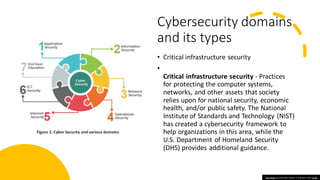
Cybersecurity domains
and its types
• Critical infrastructure security
•
Critical infrastructure security - Practices
for protecting the computer systems,
networks, and other assets that society
relies upon for national security, economic
health, and/or public safety. The National
Institute of Standards and Technology (NIST)
has created a cybersecurity framework to
help organizations in this area, while the
U.S. Department of Homeland Security
(DHS) provides additional guidance.
This Photo by Unknown author is licensed under CC BY.
• Network security - Security measures for protectinga computer network from intruders, includingboth wired and wireless (Wi-
Fi) connections.
There are various networksecuritytypes, and theyinclude:
• 1)Zero-trust security: This involves the principle of “never trust,always verify”when decidingwho and what can access your
networkand the methods to use to make sure people and systems are what theyclaim to be. Because it questionsall
connections, zero trust has become vital for network securityprotection.For example, a networksecurity key on a laptop is an
example ofzero-trust security.But what does networksecurity mean?It is the code or password to access a network.
• 2)Cybersecurity education: Organizations are realizingthat the best wayto wage war against cyberattackers is to equip their
“soldiers”with knowledge.This involves teachingall employees the red flags theyshould lookout for and what theycan do to
avoid threats.
• 3)Incorporating artificial intelligence (AI): AI systems can both detect and mitigate threats,as well as send automated alerts
regardingattacks.This takes some of the burden off the shoulders ofIT teams.
• APPLICATION SECURITY:
• Application security - Processes that help protect applications operatingon-premises and in the cloud.Security should be
built into applications at the design stage, with considerations forhowdata is handled,user authentication,etc.
Cloud security and
information security
• Application security - Processes
that help protect applications
operating on-premises and in the
cloud. Security should be
built into applications at the
design stage, with considerations
for how data is handled, user
authentication, etc.
Mobile
security &
storage
security
• The future of computers and communication lies with mobile
devices, such as laptops, tablets and smartphones with desktop-
computer capabilities. Their size, operating systems, applications
and processing power make them ideal to use from any place with
an internet connection. And with the expansion of ruggedized
devices, the Internet of Things (IoT) and operating systems, such as
Chrome OS, macos and Windows 10, every piece of hardware that's
enhanced with this software and capabilities becomes a mobile
computing device.
• Because mobile devices have become more affordable and portable,
organizations and users have preferred to buy and use them over
desktop computers. And with ubiquitous wireless internet access, all
varieties of mobile devices are becoming more vulnerable to attacks
and data breaches.
• Authentication and authorization across mobile devices offer
convenience, but increase risk by removing a secured enterprise
perimeter’s constraints. For example, a smartphone’s capabilities
are enhanced by multi-touch screens, gyroscopes, accelerometers,
GPS, microphones, multi-megapixel cameras and ports, allowing the
attachment of more devices. These new capabilities change the way
users are authenticated and how authorization is provided locally to
the device and the applications and services on a network. As a
result, the new capabilities are also increasing the number of
endpoints that need protection from cybersecurity threats.
Cloud security
• Cloud service providershave many methods to protect the data.
• Firewallis the central part of cloud architecture. The firewall protects
the network and the perimeter of end-users. It also protects traffic
between variousappsstored in the cloud.
• Access control protects data by allowingus to set access lists for various
assets. For example, you can allow the applicationof specific
employees while restricting others. It's a rule that employees can
access the equipment that they required. We can keep essential
documents which are stolen from malicious insiders or hackers to
maintainingstrict access control.
• Data protectionmethods include Virtual Private Networks (VPN),
encryption, or masking. It allowsremote employees to connect the
network. VPNaccommodatesthe tabletsand smartphone for remote
access. Data masking maintainsthe data'sintegrity by keeping
identifiableinformationprivate.A medicalcompany share data with
data masking without violatingthe HIPAA laws.
• For example, we are putting intelligenceinformation at risk in order of
the importance of security. It helpsto protect mission-criticalassets
from threats. Disaster recovery is vital for security because it helps to
recover lost or stolen data.
Common
cyber
security
myths
• Although cybersecurity professionals work hard to close security gaps,
attackers are always looking for new ways to escape IT notice, evade defense
measures, and exploit emerging weaknesses. The latest cybersecurity threats
are putting a new spin on “known” threats, taking advantage of work-from-
home environments, remote access tools, and new cloud services. These
evolving threats include:
• Malware
• The term “malware” refers to malicious software variants—such as worms,
viruses, Trojans, and spyware—that provide unauthorized access or cause
damage to a computer. Malware attacks are increasingly “fileless” and
designed to get around familiar detection methods, such as antivirus tools,
that scan for malicious file attachments.
• Ransomware
• Ransomware is a type of malware that locks down files, data or systems, and
threatens to erase or destroy the data - or make private or sensitive data to
the public - unless a ransom is paid to the cybercriminals who launched the
attack. Recent ransomware attacks have targeted state and local governments,
which are easier to breach than organizations and under pressure to pay
ransoms in order to restore applications and web sites on which citizens rely.
• Phishing / social engineering
• Phishing is a form of social engineering that tricks users into providing their
own PII or sensitive information. In phishing scams, emails or text messages
appear to be from a legitimate company asking for sensitive information, such
as credit card data or login information. The FBI has noted about a surge in
pandemic-related phishing, tied to the growth of remote work.
Insider threats:
• Current or former employees, business partners, contractors, or anyonewho has had access to systems or networks
in the past can be considered an insider threat if they abuse their access permissions. Insider threats can be invisible
to traditional securitysolutionslike firewallsand intrusiondetection systems, which focus on external threats.
• Distributeddenial-of-service (DDoS) attacks
• A DDoS attack attemptsto crash a server, website or network by overloadingit with traffic, usually from multiple
coordinatedsystems. DDoS attacks overwhelm enterprise networks via the simple network management protocol
(SNMP), used for modems, printers, switches, routers, and servers.
Advancedpersistent threats(APTs) :
• In an APT, an intruder or group of intruders infiltratea system and remain undetected for an extended period. The
intruder leaves networks and systems intact so that the intruder can spy on business activity and steal sensitive data
while avoidingthe activationof defensive countermeasures. The recent SolarWinds breach of United States
government systems is an example of an APT.
Man-in-the-middleattacks:
• Man-in-the-middleis an eavesdroppingattack, where a cybercriminal interceptsand relays messages between two
parties in order to steal data. For example, on an unsecure Wi-Fi network, an attacker can intercept databeing
passed between guest’s device and the network.
Dangerous
cyber
security
myths
• Cyber risk is a separate category of risk
• Cybersecurity is just an IT issue
• Protecting yourself is good enough
• Digitaland physicalsecurity are separate systems
• Going back to paper or disconnectingfrom the internet
minimizes risk
• Getting hacked is an embarrassment
• Using antivirussoftware is enough
• Cybersecurity is just a form of defense
• Cyber attackers do not target small and medium-sized
companies
• Only certain industries are vulnerableto cyber attacks
• Cyber threats come from outside
• Data breaches should be handledfirst by IT teams and
lawyers, and other key teams in the company should be
notified later
Do's and don'ts in cyber security
• Do adhere to company policies on usage of any device in the company.
• Do scan all emails before opening them, and make sure that you only open emails
from legitimate senders.
• Do make sure to use a firewall and have a strong antivirus program running on your
device.
• Do avoid making your personal information public on social media sites and the
Internet in general.
• Do avoid checking ‘Keep me logged in’ or ‘Remember me’ options on websites,
especially on public computers.
• Don't write down your password or give it out to anyone.
• Don't select the "Remember My Password" option.
• Don't purchase anything promoted in a spam message.
• Don't use your official email address for social media sites.
Presentation 10 (1).pdf

Presentation 10 (1).pdf

  • 1.
  • 2.
    • Introduction ofcyber security • What is cyber security • Cybersecurity domains 1)critical infrastructure security. 2)network security. 3)application security and cloud security & information security. 4)storage security & mobile security. 5)information security. • Dangerous cybersecurity myths • Common cyber threats • Do's and don'ts
  • 3.
    Cybersecurity domains and itstypes • Critical infrastructure security • Critical infrastructure security - Practices for protecting the computer systems, networks, and other assets that society relies upon for national security, economic health, and/or public safety. The National Institute of Standards and Technology (NIST) has created a cybersecurity framework to help organizations in this area, while the U.S. Department of Homeland Security (DHS) provides additional guidance. This Photo by Unknown author is licensed under CC BY.
  • 4.
    • Network security- Security measures for protectinga computer network from intruders, includingboth wired and wireless (Wi- Fi) connections. There are various networksecuritytypes, and theyinclude: • 1)Zero-trust security: This involves the principle of “never trust,always verify”when decidingwho and what can access your networkand the methods to use to make sure people and systems are what theyclaim to be. Because it questionsall connections, zero trust has become vital for network securityprotection.For example, a networksecurity key on a laptop is an example ofzero-trust security.But what does networksecurity mean?It is the code or password to access a network. • 2)Cybersecurity education: Organizations are realizingthat the best wayto wage war against cyberattackers is to equip their “soldiers”with knowledge.This involves teachingall employees the red flags theyshould lookout for and what theycan do to avoid threats. • 3)Incorporating artificial intelligence (AI): AI systems can both detect and mitigate threats,as well as send automated alerts regardingattacks.This takes some of the burden off the shoulders ofIT teams. • APPLICATION SECURITY: • Application security - Processes that help protect applications operatingon-premises and in the cloud.Security should be built into applications at the design stage, with considerations forhowdata is handled,user authentication,etc.
  • 5.
    Cloud security and informationsecurity • Application security - Processes that help protect applications operating on-premises and in the cloud. Security should be built into applications at the design stage, with considerations for how data is handled, user authentication, etc.
  • 6.
    Mobile security & storage security • Thefuture of computers and communication lies with mobile devices, such as laptops, tablets and smartphones with desktop- computer capabilities. Their size, operating systems, applications and processing power make them ideal to use from any place with an internet connection. And with the expansion of ruggedized devices, the Internet of Things (IoT) and operating systems, such as Chrome OS, macos and Windows 10, every piece of hardware that's enhanced with this software and capabilities becomes a mobile computing device. • Because mobile devices have become more affordable and portable, organizations and users have preferred to buy and use them over desktop computers. And with ubiquitous wireless internet access, all varieties of mobile devices are becoming more vulnerable to attacks and data breaches. • Authentication and authorization across mobile devices offer convenience, but increase risk by removing a secured enterprise perimeter’s constraints. For example, a smartphone’s capabilities are enhanced by multi-touch screens, gyroscopes, accelerometers, GPS, microphones, multi-megapixel cameras and ports, allowing the attachment of more devices. These new capabilities change the way users are authenticated and how authorization is provided locally to the device and the applications and services on a network. As a result, the new capabilities are also increasing the number of endpoints that need protection from cybersecurity threats.
  • 7.
    Cloud security • Cloudservice providershave many methods to protect the data. • Firewallis the central part of cloud architecture. The firewall protects the network and the perimeter of end-users. It also protects traffic between variousappsstored in the cloud. • Access control protects data by allowingus to set access lists for various assets. For example, you can allow the applicationof specific employees while restricting others. It's a rule that employees can access the equipment that they required. We can keep essential documents which are stolen from malicious insiders or hackers to maintainingstrict access control. • Data protectionmethods include Virtual Private Networks (VPN), encryption, or masking. It allowsremote employees to connect the network. VPNaccommodatesthe tabletsand smartphone for remote access. Data masking maintainsthe data'sintegrity by keeping identifiableinformationprivate.A medicalcompany share data with data masking without violatingthe HIPAA laws. • For example, we are putting intelligenceinformation at risk in order of the importance of security. It helpsto protect mission-criticalassets from threats. Disaster recovery is vital for security because it helps to recover lost or stolen data.
  • 8.
    Common cyber security myths • Although cybersecurityprofessionals work hard to close security gaps, attackers are always looking for new ways to escape IT notice, evade defense measures, and exploit emerging weaknesses. The latest cybersecurity threats are putting a new spin on “known” threats, taking advantage of work-from- home environments, remote access tools, and new cloud services. These evolving threats include: • Malware • The term “malware” refers to malicious software variants—such as worms, viruses, Trojans, and spyware—that provide unauthorized access or cause damage to a computer. Malware attacks are increasingly “fileless” and designed to get around familiar detection methods, such as antivirus tools, that scan for malicious file attachments. • Ransomware • Ransomware is a type of malware that locks down files, data or systems, and threatens to erase or destroy the data - or make private or sensitive data to the public - unless a ransom is paid to the cybercriminals who launched the attack. Recent ransomware attacks have targeted state and local governments, which are easier to breach than organizations and under pressure to pay ransoms in order to restore applications and web sites on which citizens rely. • Phishing / social engineering • Phishing is a form of social engineering that tricks users into providing their own PII or sensitive information. In phishing scams, emails or text messages appear to be from a legitimate company asking for sensitive information, such as credit card data or login information. The FBI has noted about a surge in pandemic-related phishing, tied to the growth of remote work.
  • 9.
    Insider threats: • Currentor former employees, business partners, contractors, or anyonewho has had access to systems or networks in the past can be considered an insider threat if they abuse their access permissions. Insider threats can be invisible to traditional securitysolutionslike firewallsand intrusiondetection systems, which focus on external threats. • Distributeddenial-of-service (DDoS) attacks • A DDoS attack attemptsto crash a server, website or network by overloadingit with traffic, usually from multiple coordinatedsystems. DDoS attacks overwhelm enterprise networks via the simple network management protocol (SNMP), used for modems, printers, switches, routers, and servers. Advancedpersistent threats(APTs) : • In an APT, an intruder or group of intruders infiltratea system and remain undetected for an extended period. The intruder leaves networks and systems intact so that the intruder can spy on business activity and steal sensitive data while avoidingthe activationof defensive countermeasures. The recent SolarWinds breach of United States government systems is an example of an APT. Man-in-the-middleattacks: • Man-in-the-middleis an eavesdroppingattack, where a cybercriminal interceptsand relays messages between two parties in order to steal data. For example, on an unsecure Wi-Fi network, an attacker can intercept databeing passed between guest’s device and the network.
  • 10.
    Dangerous cyber security myths • Cyber riskis a separate category of risk • Cybersecurity is just an IT issue • Protecting yourself is good enough • Digitaland physicalsecurity are separate systems • Going back to paper or disconnectingfrom the internet minimizes risk • Getting hacked is an embarrassment • Using antivirussoftware is enough • Cybersecurity is just a form of defense • Cyber attackers do not target small and medium-sized companies • Only certain industries are vulnerableto cyber attacks • Cyber threats come from outside • Data breaches should be handledfirst by IT teams and lawyers, and other key teams in the company should be notified later
  • 11.
    Do's and don'tsin cyber security • Do adhere to company policies on usage of any device in the company. • Do scan all emails before opening them, and make sure that you only open emails from legitimate senders. • Do make sure to use a firewall and have a strong antivirus program running on your device. • Do avoid making your personal information public on social media sites and the Internet in general. • Do avoid checking ‘Keep me logged in’ or ‘Remember me’ options on websites, especially on public computers. • Don't write down your password or give it out to anyone. • Don't select the "Remember My Password" option. • Don't purchase anything promoted in a spam message. • Don't use your official email address for social media sites.