This is a personal reference file on Cyber Security covering basics, online threats, malware, network protection, and safe computing practices. It provides an overview of how to secure data and stay safe while using the internet.
Introduction
• The techniqueof protecting internet-connected
systems such as computers, servers, mobile devices,
electronic systems, networks, and data from
malicious attacks is known as cybersecurity. We can
divide cybersecurity into two parts one is cyber, and
the other is security. Cyber refers to the technology
that includes systems, networks, programs, and data.
And security is concerned with the protection of
systems, networks, applications, and information. In
some cases, it is also called electronic information
security or information technology security.
3.
Definitions
• "Cyber Securityis the body of technologies,
processes, and practices designed to protect
networks, devices, programs, and data from
attack, theft, damage, modification or
unauthorized access."
• "Cyber Security is the set of principles and
practices designed to protect our computing
resources and online information against
threats."
4.
History
• In 1970's,Robert (Bob) Thomas who was a
researcher for BBN Technologies in Cambridge,
Massachusetts created the first computer worm
(virus). He realized that it was possible for a
computer program to move across a network,
leaving a small trail (series of signs) wherever it
went. He named the program Creeper, and
designed it to travel between Tenex terminals on
the early ARPANET, printing the message "I'M
THE CREEPER: CATCH ME IF YOU CAN."
Network Security
• Itinvolves implementing the hardware and
software to secure a computer network from
unauthorized access, intruders, attacks,
disruption, and misuse. This security helps an
organization to protect its assets against
external and internal threats.
7.
Application Security
• Itinvolves protecting the software and devices
from unwanted threats. This protection can be
done by constantly updating the apps to ensure
they are secure from attacks. Successful security
begins in the design stage, writing source code,
validation, threat modeling, etc., before a
program or device is deployed.
8.
Information or DataSecurity
• It involves implementing a strong data storage
mechanism to maintain the integrity and
privacy of data, both in storage and in transit.
9.
Mobile Security
• Itinvolves securing the organizational and
personal data stored on mobile devices such as
cell phones, computers, tablets, and other
similar devices against various malicious
threats. These threats are unauthorized access,
device loss or theft, malware, etc.
10.
Cloud Security
• Itinvolves in protecting the information stored
in the digital environment or cloud
architectures for the organization. It uses
various cloud service providers such as AWS,
Azure, Google, etc., to ensure security against
multiple threats.
11.
User Education
• Itdeals with the processes, monitoring, alerts,
and plans to how an organization responds
when any malicious activity is causing the loss
of operations or data. Its policies dictate
resuming the lost operations after any disaster
happens to the same operating capacity as
before the event.
12.
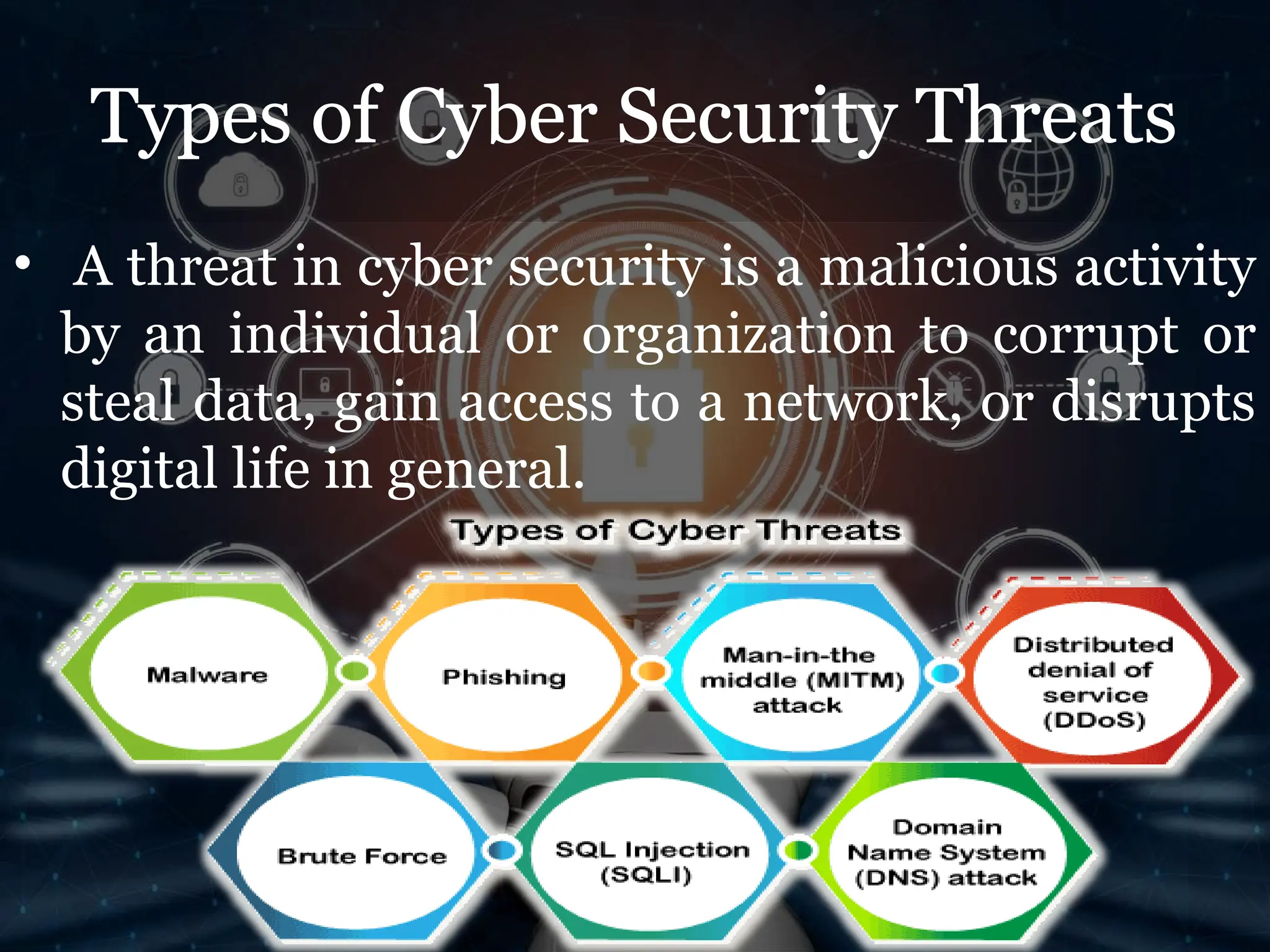
Types of CyberSecurity Threats
• A threat in cyber security is a malicious activity
by an individual or organization to corrupt or
steal data, gain access to a network, or disrupts
digital life in general.
13.
Malware
• Malware meansmalicious software, which is
the most common cyber attacking tool. It is
used by the cybercriminal or hacker to disrupt
or damage a legitimate user's system. The
following are the important types of malware
created by the hacker:
14.
• Virus: Itis a malicious piece of code that spreads from one
device to another. It can clean files and spreads throughout a
computer system, infecting files, stoles information, or
damage device.
• Spyware: It is a software that secretly records information
about user activities on their system. For example, spyware
could capture credit card details that can be used by the
cybercriminals for unauthorized shopping, money
withdrawing, etc.
• Trojans: It is a type of malware or code that appears as
legitimate software or file to fool us into downloading and
running. Its primary purpose is to corrupt or steal data from
our device or do other harmful activities on our network.
• Ransomware: It's a piece of software that encrypts a user's
files and data on a device, rendering them unusable or
erasing. Then, a monetary ransom is demanded by malicious
actors for decryption.
15.
• Worms: Itis a piece of software that spreads copies of
itself from device to device without human interaction.
It does not require them to attach themselves to any
program to steal or damage the data.
• Adware: It is an advertising software used to spread
malware and displays advertisements on our device. It
is an unwanted program that is installed without the
user's permission. The main objective of this program is
to generate revenue for its developer by showing the ads
on their browser.
• Botnets: It is a collection of internet-connected
malware-infected devices that allow cybercriminals to
control them. It enables cybercriminals to get
credentials leaks, unauthorized access, and data theft
without the user's permission.
16.
Phishing
• Phishing isa type of cybercrime in which a sender
seems to come from a genuine organization like
PayPal, eBay, financial institutions, or friends and co-
workers. They contact a target or targets via email,
phone, or text message with a link to persuade them to
click on that links. This link will redirect them to
fraudulent websites to provide sensitive data such as
personal information, banking and credit card
information, social security numbers, usernames, and
passwords. Clicking on the link will also install
malware on the target devices that allow hackers to
control devices remotely.
17.
Man-in-the-middle (MITM)
attack
• Aman-in-the-middle attack is a type of cyber threat (a
form of eavesdropping attack) in which a
cybercriminal intercepts a conversation or data
transfer between two individuals. Once the
cybercriminal places themselves in the middle of a two-
party communication, they seem like genuine
participants and can get sensitive information and
return different responses. The main objective of this
type of attack is to gain access to our business or
customer data. For example, a cybercriminal could
intercept data passing between the target device and
the network on an unprotected Wi-Fi network.
18.
Distributed denial ofservice
(DDoS)
• It is a type of cyber threat or malicious attempt
where cybercriminals disrupt targeted servers,
services, or network's regular traffic by fulfilling
legitimate requests to the target or its
surrounding infrastructure with Internet traffic.
Here the requests come from several IP addresses
that can make the system unusable, overload their
servers, slowing down significantly or temporarily
taking them offline, or preventing an organization
from carrying out its vital functions.
19.
Brute Force
• Abrute force attack is a cryptographic hack
that uses a trial-and-error method to
guess all possible combinations until the correct
information is discovered. Cybercriminals
usually use this attack to obtain personal
information about targeted passwords, login
info, encryption keys, and Personal
Identification Numbers (PINS).
20.
SQL Injection (SQLI)
•SQL injection is a common attack that occurs
when cybercriminals use malicious SQL scripts
for backend database manipulation to access
sensitive information. Once the attack is
successful, the malicious actor can view,
change, or delete sensitive company data, user
lists, or private customer details stored in the
SQL database.
21.
Domain Name System(DNS)
attack
• A DNS attack is a type of cyberattack in which
cyber criminals take advantage of flaws in the
Domain Name System to redirect site users to
malicious websites (DNS hijacking) and steal
data from affected computers. It is a severe
cybersecurity risk because the DNS system is an
essential element of the internet infrastructure.
22.
Benefits of CyberSecurity
• Cyberattacks and data breach protection for
businesses.
• Data and network security are both protected.
• Unauthorized user access is avoided.
• End-user and endpoint device protection.
• Developers, partners, consumers, stakeholders,
and workers have more faith in the company's
reputation and trust.
23.
Disadvantages
High Costs
• Implementingrobust cybersecurity systems,
tools, and protocols can be expensive.
• Ongoing maintenance, updates, and hiring
skilled professionals add to the cost.
Complexity
• Cybersecurity systems can be complex to set up
and manage, requiring significant expertise.
• Small businesses or individuals may struggle
with implementing advanced measures.
24.
Performance Impact
• Securitysoftware (e.g., firewalls, antivirus
programs) can slow down system performance.
• Extra authentication steps or encryption can
increase processing time.
Privacy Concerns
• Some cybersecurity measures, such as
monitoring and surveillance, may infringe on
user privacy.
• Collecting and storing large amounts of data for
security purposes can create ethical concerns.
25.
User Inconvenience
• Multi-factorauthentication, password
complexity requirements, and frequent updates
can frustrate users.
Skills Gap
• A shortage of qualified cybersecurity
professionals makes it difficult for
organizations to find and retain skilled staff.
• Training employees in cybersecurity best
practices requires time and effor
26.
Potential for Misuse
•Cybersecurity tools and techniques can be misused
by malicious actors, such as hackers or
authoritarian regimes, to suppress freedom or
conduct cyber warfare.
• Ethical dilemmas arise in using tools for
monitoring or data collection.
• Difficult to Measure ROI
• It’s challenging to quantify the return on
investment (ROI) for cybersecurity because it
focuses on preventing incidents rather than
generating revenue.
• Companies may hesitate to allocate resources
without visible immediate benefits
27.
How to Protectourselves
Use Strong and Unique Passwords
• Create complex passwords with a mix of
uppercase, lowercase, numbers, and special
characters.
• Avoid using the same password for multiple
accounts.
• Use a password manager to generate and
store passwords securely.
28.
Enable Multi-Factor Authentication(MFA)
• Add an extra layer of security by requiring a
second form of verification (e.g., a text message,
authentication app, or biometric scan).
Keep Software and Systems Updated
• Regularly update operating systems, software,
and apps to patch vulnerabilities.
• Enable automatic updates where possible.
29.
Install and UpdateSecurity Software
• Use reputable antivirus and anti-malware tools
to detect and block threats.
• Set up firewalls to protect networks from
unauthorized access.
Be Cautious with Emails and Links
• Avoid opening suspicious emails or clicking on
links from unknown sources.
• Watch for phishing attempts, such as emails
that ask for personal or financial information.
30.
Secure Your Network
•Use a Virtual Private Network (VPN) to
encrypt internet traffic, especially on public Wi-
Fi.
• Change default passwords on routers and IoT
devices.
• Ensure your Wi-Fi network is encrypted with
WPA3 or WPA2 security protocols.
• Back Up Data Regularly
• Perform regular backups of critical data and
store it securely (e.g., offline or in the cloud).
• Verify backup integrity and ensure recovery
processes are functional.
31.
Limit Access andPermissions
• Grant access to sensitive data or systems only to
authorized individuals.
• Use the principle of least privilege (PoLP) to
restrict user permissions to what's necessary for
their role.
Educate and Train
• Teach employees or household members about
cybersecurity risks and safe online practices.
• Conduct regular phishing simulations and
security awareness training.
32.
Monitor Systems andNetworks
• Use tools to monitor network traffic and detect
unusual behavior.
• Set up alerts for suspicious activities or
unauthorized access attempts.
Use Encryption
• Encrypt sensitive files and communications to
protect data during transmission.
• Ensure websites you visit use HTTPS for secure
connections.
33.
• Avoid OversharingOnline
• Limit the amount of personal information
shared on social media or public platforms.
• Be cautious about answering seemingly
harmless security questions online.
Use Trusted Sources for Downloads
• Only download apps, software, and files from
reputable sources or official websites.
• Verify the authenticity of apps before installing
them.
34.
• Regularly Auditand Assess Security
• Conduct vulnerability assessments and
penetration testing to identify weak spots.
• Review security policies and adjust as threats
evolve.