Seminar
on
By
BHARAT BHUSHAN
Asst. Professor, Department of Computer Sc.
RLSY College, Ranchi
Ram Lakhan Singh Yadav College, Ranchi
www.rlsycollege.ac.in
CYBER SECURITY
Bharat Bhushan, Assistant Professor, RLSY College, Ranchi
Cyber Security
Presentation Contents
Cyber Security , Goal & It’s Importance
Threats
 Hacking
 Malware
 Phishing
Stay Secure
 Internet Shopping
 Internet Banking
Personal Privacy
 Public Wi-Fi
 Stay safe on public Wi-Fi
Tips to keep your computer safe
Bharat Bhushan, Assistant Professor, RLSY College, Ranchi
Cyber Security
Cyber Security
Cyber security is the practice of defending
Computers, Servers, Mobile Devices,
Electronic Systems, Networks, and Data
from malicious attacks.
Cyber Security’s goal
Protect our information and information
systems
Bharat Bhushan, Assistant Professor, RLSY College, Ranchi
Cyber Security
The Importance of Cyber Security
Cyber security is important because smart
phones, computers and the internet are now
such a fundamental part of modern life, that it's
difficult to imagine how we'd function without
them.
From online banking and shopping, to email
and social media, it's more important than ever
to take steps that can prevent cyber criminals
getting hold of our accounts, data, and devices.
Bharat Bhushan, Assistant Professor, RLSY College, Ranchi
Cyber Security
Threats
Threat is a malicious act performed by
hackers to intentionally steal data or other
assets, misuse them, or simply cause
disruption in digital life in general.
Hacking
Hacking is the act of identifying and then
exploiting weaknesses in a computer system
or network, usually to gain unauthorized
access to personal or organizational data.
Bharat Bhushan, Assistant Professor, RLSY College, Ranchi
Cyber Security
Malware
Malware is intrusive software that is designed to damage
and destroy computers and computer systems.
Bharat Bhushan, Assistant Professor, RLSY College, Ranchi
Cyber Security
Phishing
Phishing is the activity of creating a fraud
web page looking exactly the same as
another website and collecting user’s private
information such as username, email,
password, credit card information through
that fraud web page as the user, in most
cases, will think this fraud web page is their
desired web page.
Bharat Bhushan, Assistant Professor, RLSY College, Ranchi
Cyber Security
Stay Secure
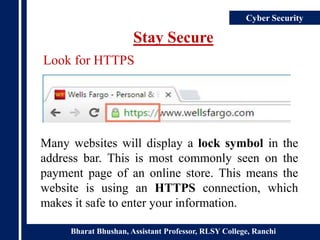
Many websites will display a lock symbol in the
address bar. This is most commonly seen on the
payment page of an online store. This means the
website is using an HTTPS connection, which
makes it safe to enter your information.
Look for HTTPS
Bharat Bhushan, Assistant Professor, RLSY College, Ranchi
Cyber Security
Stay Secure
Online shopping is a convenient way to buy
almost anything from the comfort of your
home. And while there are some risks with
shopping online, there are also many ways to
protect yourself and your financial
information.
Internet Shopping
Bharat Bhushan, Assistant Professor, RLSY College, Ranchi
Cyber Security
Stay Secure
 Avoid using internet banking on shared
computers and public places like cafés and
libraries.
 Always remember to log-off on internet banking
and close your browser when you have finished
your online banking.
 Disable the 'AutoComplete' function within your
browser..
Internet Banking
Bharat Bhushan, Assistant Professor, RLSY College, Ranchi
Cyber Security
Personal Privacy
Personal privacy is the protection of personal data
from those who should not have access to it and the
ability of individuals to determine who can access
their personal information.
Public Wi-Fi
One of the biggest threats with free Wi-Fi is the
ability for hackers to position themselves between
you and the connection point. So, instead of talking
directly with the hotspot, you end up sending your
information to the hacker.
Bharat Bhushan, Assistant Professor, RLSY College, Ranchi
Cyber Security
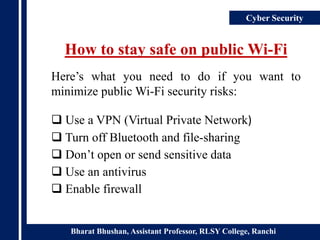
How to stay safe on public Wi-Fi
Here’s what you need to do if you want to
minimize public Wi-Fi security risks:
 Use a VPN (Virtual Private Network)
 Turn off Bluetooth and file-sharing
 Don’t open or send sensitive data
 Use an antivirus
 Enable firewall
Bharat Bhushan, Assistant Professor, RLSY College, Ranchi
Cyber Security
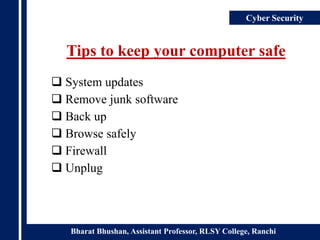
Tips to keep your computer safe
 System updates
 Remove junk software
 Back up
 Browse safely
 Firewall
 Unplug
Bharat Bhushan, Assistant Professor, RLSY College, Ranchi
Cyberbullying

Cyber Security

  • 1.
    Seminar on By BHARAT BHUSHAN Asst. Professor,Department of Computer Sc. RLSY College, Ranchi Ram Lakhan Singh Yadav College, Ranchi www.rlsycollege.ac.in CYBER SECURITY
  • 2.
    Bharat Bhushan, AssistantProfessor, RLSY College, Ranchi Cyber Security Presentation Contents Cyber Security , Goal & It’s Importance Threats  Hacking  Malware  Phishing Stay Secure  Internet Shopping  Internet Banking Personal Privacy  Public Wi-Fi  Stay safe on public Wi-Fi Tips to keep your computer safe
  • 3.
    Bharat Bhushan, AssistantProfessor, RLSY College, Ranchi Cyber Security Cyber Security Cyber security is the practice of defending Computers, Servers, Mobile Devices, Electronic Systems, Networks, and Data from malicious attacks. Cyber Security’s goal Protect our information and information systems
  • 4.
    Bharat Bhushan, AssistantProfessor, RLSY College, Ranchi Cyber Security The Importance of Cyber Security Cyber security is important because smart phones, computers and the internet are now such a fundamental part of modern life, that it's difficult to imagine how we'd function without them. From online banking and shopping, to email and social media, it's more important than ever to take steps that can prevent cyber criminals getting hold of our accounts, data, and devices.
  • 5.
    Bharat Bhushan, AssistantProfessor, RLSY College, Ranchi Cyber Security Threats Threat is a malicious act performed by hackers to intentionally steal data or other assets, misuse them, or simply cause disruption in digital life in general. Hacking Hacking is the act of identifying and then exploiting weaknesses in a computer system or network, usually to gain unauthorized access to personal or organizational data.
  • 6.
    Bharat Bhushan, AssistantProfessor, RLSY College, Ranchi Cyber Security Malware Malware is intrusive software that is designed to damage and destroy computers and computer systems.
  • 7.
    Bharat Bhushan, AssistantProfessor, RLSY College, Ranchi Cyber Security Phishing Phishing is the activity of creating a fraud web page looking exactly the same as another website and collecting user’s private information such as username, email, password, credit card information through that fraud web page as the user, in most cases, will think this fraud web page is their desired web page.
  • 8.
    Bharat Bhushan, AssistantProfessor, RLSY College, Ranchi Cyber Security Stay Secure Many websites will display a lock symbol in the address bar. This is most commonly seen on the payment page of an online store. This means the website is using an HTTPS connection, which makes it safe to enter your information. Look for HTTPS
  • 9.
    Bharat Bhushan, AssistantProfessor, RLSY College, Ranchi Cyber Security Stay Secure Online shopping is a convenient way to buy almost anything from the comfort of your home. And while there are some risks with shopping online, there are also many ways to protect yourself and your financial information. Internet Shopping
  • 10.
    Bharat Bhushan, AssistantProfessor, RLSY College, Ranchi Cyber Security Stay Secure  Avoid using internet banking on shared computers and public places like cafés and libraries.  Always remember to log-off on internet banking and close your browser when you have finished your online banking.  Disable the 'AutoComplete' function within your browser.. Internet Banking
  • 11.
    Bharat Bhushan, AssistantProfessor, RLSY College, Ranchi Cyber Security Personal Privacy Personal privacy is the protection of personal data from those who should not have access to it and the ability of individuals to determine who can access their personal information. Public Wi-Fi One of the biggest threats with free Wi-Fi is the ability for hackers to position themselves between you and the connection point. So, instead of talking directly with the hotspot, you end up sending your information to the hacker.
  • 12.
    Bharat Bhushan, AssistantProfessor, RLSY College, Ranchi Cyber Security How to stay safe on public Wi-Fi Here’s what you need to do if you want to minimize public Wi-Fi security risks:  Use a VPN (Virtual Private Network)  Turn off Bluetooth and file-sharing  Don’t open or send sensitive data  Use an antivirus  Enable firewall
  • 13.
    Bharat Bhushan, AssistantProfessor, RLSY College, Ranchi Cyber Security Tips to keep your computer safe  System updates  Remove junk software  Back up  Browse safely  Firewall  Unplug
  • 14.
    Bharat Bhushan, AssistantProfessor, RLSY College, Ranchi Cyberbullying