CUSTOMER ENGAGEMENT
MANAGEMENT
TABLE OF CONTENT
▪Customer Relationship Management (CRM)
▪Customer Experience Management (CEM)
▪CRM VS CEM
▪Why Customer Engagement Management?
▪Steps to set up a CEM System
▪Customer Experience Tech Stack
▪CEM Platforms
BY JOUD KHATTAB 2
GENERAL QUESTIONS
1. What are the best growth management tools?
2. What is the customer experience tech stack?
3. What are the reviews for CRM and CEM?
4. What are the different kind of CEM?
5. What is the best CEM for VOD?
6. How to integrate CEM with application?
7. What goes into CEM setup?
8. What are CEM best practices?
9. Is there a framework to follow?
BY JOUD KHATTAB 3
A COMPARISON FOR GROWTH
MANAGEMENT, CUSTOMER ENGAGEMENT
AND RELATIONSHIP PLATFORM
Goal
BY JOUD KHATTAB 4
CUSTOMER RELATIONSHIP MANAGEMENT
(CRM)
▪CRM is a model for managing a company’s interactions with current and future customers.
▪It involves using technology to organize, automate, and synchronize sales, marketing, customer
service, and technical support.
▪CRM is essentially a database that enables the company to use it to collect interactions with
the customer to log them and link them to a single customer view. Each “customer card”
includes logged hotline conversations, emails, served invoices, payments made or noted,
service requests, products used, and solutions delivered by ticketing systems.
▪The systems essentially help companies to manage integrations and improve service levels.
Another important aspect is the ability to automate the sales processes so that the sales
management processes can be easily streamlined to increase lead conversions for clients. It
includes functions like lead assignment, building opportunities, and keeping track of them, etc.
BY JOUD KHATTAB 5
CUSTOMER EXPERIENCE MANAGEMENT
(CEM)
▪Customer experience/engagement management (CEM or CXM) is the practice of designing and
reacting to customer interactions to meet or exceed customer expectations and, thus, increase
customer satisfaction, loyalty, and advocacy.
▪It means getting to know customers well by collecting data from all touchpoints, analyzing the data,
and using it to deliver personalized engagement back to those touchpoints. This can work to
increase loyalty to your brand, result in increased revenues, and decreased churn.
▪Some standard models of these platforms include multi-channel automation, big data that connect
all data sources, and robust data visualization and algorithms that analyze and score customer
content preferences on different channels.
▪CEM is the collection of processes a company uses to track, oversee and organize every interaction
between a customer and the organization throughout the customer lifecycle.
▪The goal of CEM is to optimize interactions from the customer's perspective and foster customer
loyalty. To manage the customer experience, a company needs to create a customer-centric
strategy that encompasses all interactions.
BY JOUD KHATTAB 6
CRM VS CEM
▪CRM is how a customer looks to a company, while CEM is really how the company
looks to the customer.
▪CRM comes after the experience, and CEM works hard on anticipating it.
BY JOUD KHATTAB
CRM
“Left Brain”
Customer’s Value
to Enterprise
Systems and
Transactions
Functional Value
CEM
“Right Brain”
Enterprise to
Value
People and
Interactions
Emotional Value
7
CRM VS CEM
CRM CEM
Targeted Users Sales Marketing
What It Does
Manage and automate the sales
pipeline, store interactions with
customers and prospects
Understands the customer life cycle
and provides personalized experience
in all touchpoints
Effect On
Customers
Increases satisfaction by providing
better services
Increases loyalty and advocacy, ROI
and reduces churn
Customer
Information
Mostly a singular viewpoint, the
customer card
Gives a general overview of the
customer life time-value
BY JOUD KHATTAB 8
CRM VS CEM
BY JOUD KHATTAB 9
WHY CUSTOMER ENGAGEMENT MANAGEMENT?
BY JOUD KHATTAB 10
WHY CUSTOMER ENGAGEMENT MANAGEMENT?
▪To create an active and engaged online user-base, resulting in more value for users
and better monetization.
Conversion
+37%
Retention
+15%
CLTV
+109%
BY JOUD KHATTAB
50% of Users are not using the service they paid for; 90% of
which will eventually cancel
11
THE CUSTOMER ADOPTION MODEL
▪The first step is adopting a model that is
inline with the value delivered to the
customer.
▪As a customer evolves, their usage tells
us what’s going on:
 More usage, more value
 Less usage, less value
ONBOARD
FAILED
NOT USING
DECREASE
START
FIRST
VALUE
USERS
USAGE
FUNCTIONALITY
GROW
BY JOUD KHATTAB 12
TOP REQUESTED CRM SOFTWARE FEATURES
BY JOUD KHATTAB 13
HOW TO CREATE A GOOD CUSTOMER EXPERIENCE
▪CEM/CXM requires companies have a 360-degree view of customers, with
integrated, up-to-date data on customer accounts.
▪There are 4 critical steps to creating a successful customer experience strategy:
1. Understand your customer:
 The first step is understanding customers' needs and behaviors and creating customer segmentation based on these factors.
2. Create a customer vision:
 Once the target audience is identified, the next step is to create a customer journey map. This helps identify customer touchpoints
and anticipate how customers will interact with the product or service and could help customer retention down the road.
3. Develop an emotional connection:
 This step involves creating a brand personality that evokes emotions and connections for a customer and helps establish a
relationship betweencustomerand company.
4. Capture customer feedback:
 It is important to measure customer satisfaction in real time. Customer feedback can help the company track customer perceptions,
enable quality monitoring and measure the success of the customer experience strategy.
BY JOUD KHATTAB 14
CEM MANAGEMENT TECHNIQUES
▪Companies rely on business intelligence and customer data analytics tools to learn
how to market and sell to customers in a more personalized, one-to-one fashion.
▪Personalization strategies include new technologies, such as:
 mobile marketing, location-based services and beacons, which help companies identify where
customers are and market to them in real time. In some cases, the data can help companies give
consumers pointed information that may or may not be related to a discrete purchase. For example, a
stadium might use location-based services to inform consumers about which concession stand is proximal
and less-busy.
▪There is more incoming data to process from more sources than ever before, and this
data needs to be integrated with existing customer account data. The ability to
combine CEM system data with financials, ERP and inventory management, as well as
real-time data on social platforms, can be challenging.
BY JOUD KHATTAB 15
CEM MANAGEMENT TECHNIQUES
▪Companies also use emotional analytics to gauge whether customers benefit from
their interactions with the brand. Emotional analytics software can help analyze the
success of a variety of operations that are related to customer service.
▪Knowledge management systems are also important tools for seamless customer
service. Agents can use these systems to look up product information and customer
interactions with other products. Agents can also combine this information with
customer data and inventory information to provide customers with account
information, product education and inventory.
BY JOUD KHATTAB 16
CEM SEGMENT
▪Grand View Research has segmented the global CEM market on the basis of:
 CEM Analytical Tools Outlook
 EFM software, Speechanalytics, Text analytics, Web analytics & content management, Other analytics
 CEM Touch Point Type Outlook
 Stores, branches, Call Centers, Social Media Platform, Web Services
 CEM Deployment Outlook
 Cloud, On-Premises
 CEM End-user Outlook
 BFSI, Retail, Healthcare, IT & Telecom,Manufacturing, Government,Energy & utilities
BY JOUD KHATTAB 17
WHAT ARE THE FEATURES OF CEM SOFTWARE?
1. Map Customer Journey and Managing customers.
2. Design, Optimize and Test CX strategy.
3. Ticket management.
4. Managing inventory.
5. Partnership and teamwork.
6. Integrate people, processes and systems.
7. Customer self-service.
8. Reporting and analytics.
BY JOUD KHATTAB 18
6-STEP TO SET UP A CRM SYSTEM
BY JOUD KHATTAB 19
6-STEP TO SET UP A CRM SYSTEM
1. Map your customer journey
2. Define your business and sales processes
3. Create custom fields, stages, and pipelines
4. Migrate your customer information
5. Integrate your tools and automate manual processes
6. Add users and set permissions
BY JOUD KHATTAB 20
STEP 1: MAP YOUR CUSTOMER JOURNEY
BY JOUD KHATTAB 21
STEP 1: MAP YOUR CUSTOMER JOURNEY
▪How you setup your CRM strategy depends on what you need your CRM to do for
you. And what you need your CRM to do for you depends on how your business gets
customers.
▪key questions you need to answer:
1) How do people find out about you?
2) How do you know when they’re ready to buy?
3) How do you close deals?
BY JOUD KHATTAB 22
STEP 1: MAP YOUR CUSTOMER JOURNEY
1) HOW DO PEOPLE FIND OUT ABOUT YOU?
▪Understanding where they come from makes it easier to find more of them.
▪Ask yourself:
 How do potential customers find out about you?
 How do you know?
 What’s your first moment of contact with a new customer?
 What actions do people usually take before they buy from you?
 What information does a lead need to have before they become a customer?
▪To answer these questionsyou can:
 Send your current customers a survey asking how they heard about you.
 Look at Google Analytics to see organic and paid traffic to your website or app.
 View the results of your Facebook ad campaigns.
 Identify things your customers have in common.
BY JOUD KHATTAB 23
STEP 1: MAP YOUR CUSTOMER JOURNEY
2) HOW DO YOU KNOW WHEN THEY’RE READY TO BUY?
▪How do you know if someone is ready to subscribe? What takes a lead from “I’m just
exploring”to “I might want to buy this?”
▪Answer these questions:
 When does a prospect become a lead?
 How do you measure engagement?
 Where is the handoff from marketing to sales?
 How is that handoff managed?
 At what point is the lead contacted by sales?
▪Find the moments where potential customers begin to show interest in your service. They could
be:
 Downloading content.
 Submitting a form.
 Signing up for your email list.
BY JOUD KHATTAB 24
STEP 1: MAP YOUR CUSTOMER JOURNEY
3) HOW DO YOU CLOSE DEALS?
▪Interview you current customers
 Ask about the problems they solved by using your service.
 Determine the benefits your business has given them.
 Find out if they had any hesitations or objections before buying.
 See if they were looking at any competitors or alternatives.
▪Survey your target audience
 Email a survey to your email list.
 Post your survey in places they hang out online (social media, forums, etc.).
 Add a pop-up form to your website.
▪Mine reviews on web of similar products and pay attention to
 Language used in positive reviews.
 Language used in negative reviews.
 Common problems with the service.
 Benefits of the product.
BY JOUD KHATTAB 25
STEP 2: DEFINE YOUR BUSINESS AND SALES
PROCESSES
▪Once you’ve answered your key business/marketing questions, all you have to do is go
through them one at a time.
▪That’s the stuff you’ll use your CRM to manage.
▪What does this look like?
 How do potential customers find out about you?
 How do you know?
 What customer actions usually happen before they move to the next stage?
 What customer actions need to happen before they move to the next stage?
 How does a prospect become a lead?
 How do you measure engagement?
 What makes a customer a good fit?
 What do your customers have to go through before they convert?
 What are the biggest obstaclesto conversion?
 How could the deal fall apart?
BY JOUD KHATTAB 26
STEP 3: CREATE CUSTOM FIELDS, STAGES, AND
PIPELINES
▪What are custom fields, pipelines, and stages?
 Custom fields: are a means for storing and showing data that is unique to each contact.
 Stages: are the steps of your sales process.
 Pipelines: are groups of stages for one sales process.
BY JOUD KHATTAB 27
STEP 4: MIGRATE YOUR CUSTOMER INFORMATION
▪It’s important to map out your custom fields before you put your information into a
new CRM.
▪You’ll also want to map out the pipelines that your leads and prospects go into.
▪Depending on your CRM, you can do contact migration in a few ways. Active
Campaign's migration services take care of most of the migration for you.
▪You can also import contacts with a .csv file. This makes it possible for you to import
segmented groups of your contact list at the same time. That lets you ‘tag’ contacts as
they come in, so you don’t have to sift through your list and manually tag them later.
BY JOUD KHATTAB 28
STEP 5: INTEGRATE YOUR OTHER TOOLS AND
AUTOMATE MANUAL PROCESSES
BY JOUD KHATTAB 29
STEP 5: INTEGRATE YOUR OTHER TOOLS AND
AUTOMATE MANUAL PROCESSES
▪What contact information do you gather from outside sources?
 Social media interactions
 Online purchases.
 Membership signups.
 Website tracking.
▪Integration Methods:
1. Native or Direct Integrations
 Connections that have been built by the creators of the CRM, or creators of the other tool. These can be used right from the platform.
2. 3rd Party or Middleware Integrations
 Connections made using a middleman that acts as a bridge connecting the two tools that otherwise wouldn’t be able to communicate.
3. Application Programming Interface (API) Integrations
 Connections made custom by using the code of the platform. These integrations can be the most specialized, but also require specialized
technical knowledge.
BY JOUD KHATTAB 30
STEP 5: INTEGRATE YOUR OTHER TOOLS AND
AUTOMATE MANUAL PROCESSES
▪Automating the flow of data to and from your CRM can free up 23% of your day work.
▪What types of steps can you automate?
 Contact capture & creation
 Marketing and email automation
 Engagement tracking
 Lead Scoring
 List clean-up
 Contact segmentation
 Status changes
 Lead Routing
 Deal creation
 Task creation
 Reporting
▪Today’s CRMs automate these processes, and make sure the information you add is both accurate
and formatted correctly.
BY JOUD KHATTAB 31
STEP 6: ADD USERS AND SET PERMISSIONS
▪Set up user permissions to grant access in some areas, but restrict access to others.
Think about each user’s role and what is needed.
 Marketing should have access to email automations and subscription forms, but probably won’t need
access to sales pipelines.
 Sales will need access to their pipelines, but shouldn’t be messing with the marketing automations that
nurture their leads.
 Support will want to view contact information to help them resolve issues but won’t benefit from
accessing your integrations.
BY JOUD KHATTAB 32
OMNICHANNEL
▪Omnichannel is a cross-channel content strategy that organizations use to improve
their user experience and drive better relationships with their audience across points
of contact.
▪Rather than working in parallel, communication channels and their supporting
resources are designed and orchestrated to cooperate. Omnichannel implies
integration and orchestration of channels such that the experience of engaging across
all the channels someone chooses to use is as, or even more, efficient or pleasant than
using single channels in isolation.
BY JOUD KHATTAB 33
OMNICHANNEL
BY JOUD KHATTAB 34
CUSTOMER EXPERIENCE TECH STACK
BY JOUD KHATTAB 35
WHY DO YOU NEED A CUSTOMER EXPERIENCE
TECH STACK?
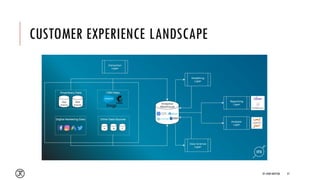
▪A marketing technology stack is a collection of technologies marketers use to conduct
and optimize their marketing activities.
▪These “MarTech” tools support, simplify, and unify the collection, organization, and
utilization of user activity data across paid and owned channels.
▪Some examples of how these benefits play out include:
 Integrating disparate systems
 e.g. data storage, partner integrations, data enrichment for cross-channel analytics, building audiences, etc.
 Activation and campaign orchestration
 e.g. audience and messaging segmentation, link/creative deployment, A/B testing, email, push, etc.
 Advanced insights to improve decision making and ROI
 e.g. data visualization, cohort analysis, mobile attribution, etc.
 User flow optimization
 e.g. A/B testing, deep linking, web-to-app banners, etc.
BY JOUD KHATTAB 36
CUSTOMER EXPERIENCE LANDSCAPE
BY JOUD KHATTAB 37
CUSTOMER EXPERIENCE TECH STACK
BY JOUD KHATTAB 38
CUSTOMER EXPERIENCE TECH STACK
BY JOUD KHATTAB 39
CUSTOMER EXPERIENCE TECH STACK
BY JOUD KHATTAB 40
CEM TOOL DEMONSTRATION
CUSTOMER CAMPAIGN EXAMPLE
BY JOUD KHATTAB 41
MOBILE ANALYSIS TOOL DEMONSTRATION
CUSTOMER FUNNEL EXAMPLE
BY JOUD KHATTAB 42
CUSTOMERS
BY JOUD KHATTAB 43
CUSTOMERS
BY JOUD KHATTAB 44
FEATURES
▪Analyze
 How your users are using your apps/website. Get deep user behavior insights
▪Segment
 Use the power of live user segments and messageusers in real-time based on their app/web behavior
▪Engage
 Interact with your users via personalized push notifications, in-app notifications, emails, web, SMS, browser
notifications and pre-built campaigns that auto engage users based on their lifecycle stage
▪Measure
 Evaluate performance of these campaigns on our reporting interface or export data for external analysis to
your CRM, business intelligence or any other platform
▪Track
 Follow KPIs that matter the most and keep a tab on the outcome. For e.g.: trace app uninstalls with the ability
to email those users who've uninstalled your app
BY JOUD KHATTAB 45
CUSTOMERS
BY JOUD KHATTAB 46
CUSTOMERS
BY JOUD KHATTAB 47
MIXPANEL
BY JOUD KHATTAB 48
CUSTOMERS
BY JOUD KHATTAB 49
CUSTOMERS
BY JOUD KHATTAB 50
CUSTOMERS
BY JOUD KHATTAB 51
THANK YOU

Customer Engagement Management

  • 1.
  • 2.
    TABLE OF CONTENT ▪CustomerRelationship Management (CRM) ▪Customer Experience Management (CEM) ▪CRM VS CEM ▪Why Customer Engagement Management? ▪Steps to set up a CEM System ▪Customer Experience Tech Stack ▪CEM Platforms BY JOUD KHATTAB 2
  • 3.
    GENERAL QUESTIONS 1. Whatare the best growth management tools? 2. What is the customer experience tech stack? 3. What are the reviews for CRM and CEM? 4. What are the different kind of CEM? 5. What is the best CEM for VOD? 6. How to integrate CEM with application? 7. What goes into CEM setup? 8. What are CEM best practices? 9. Is there a framework to follow? BY JOUD KHATTAB 3
  • 4.
    A COMPARISON FORGROWTH MANAGEMENT, CUSTOMER ENGAGEMENT AND RELATIONSHIP PLATFORM Goal BY JOUD KHATTAB 4
  • 5.
    CUSTOMER RELATIONSHIP MANAGEMENT (CRM) ▪CRMis a model for managing a company’s interactions with current and future customers. ▪It involves using technology to organize, automate, and synchronize sales, marketing, customer service, and technical support. ▪CRM is essentially a database that enables the company to use it to collect interactions with the customer to log them and link them to a single customer view. Each “customer card” includes logged hotline conversations, emails, served invoices, payments made or noted, service requests, products used, and solutions delivered by ticketing systems. ▪The systems essentially help companies to manage integrations and improve service levels. Another important aspect is the ability to automate the sales processes so that the sales management processes can be easily streamlined to increase lead conversions for clients. It includes functions like lead assignment, building opportunities, and keeping track of them, etc. BY JOUD KHATTAB 5
  • 6.
    CUSTOMER EXPERIENCE MANAGEMENT (CEM) ▪Customerexperience/engagement management (CEM or CXM) is the practice of designing and reacting to customer interactions to meet or exceed customer expectations and, thus, increase customer satisfaction, loyalty, and advocacy. ▪It means getting to know customers well by collecting data from all touchpoints, analyzing the data, and using it to deliver personalized engagement back to those touchpoints. This can work to increase loyalty to your brand, result in increased revenues, and decreased churn. ▪Some standard models of these platforms include multi-channel automation, big data that connect all data sources, and robust data visualization and algorithms that analyze and score customer content preferences on different channels. ▪CEM is the collection of processes a company uses to track, oversee and organize every interaction between a customer and the organization throughout the customer lifecycle. ▪The goal of CEM is to optimize interactions from the customer's perspective and foster customer loyalty. To manage the customer experience, a company needs to create a customer-centric strategy that encompasses all interactions. BY JOUD KHATTAB 6
  • 7.
    CRM VS CEM ▪CRMis how a customer looks to a company, while CEM is really how the company looks to the customer. ▪CRM comes after the experience, and CEM works hard on anticipating it. BY JOUD KHATTAB CRM “Left Brain” Customer’s Value to Enterprise Systems and Transactions Functional Value CEM “Right Brain” Enterprise to Value People and Interactions Emotional Value 7
  • 8.
    CRM VS CEM CRMCEM Targeted Users Sales Marketing What It Does Manage and automate the sales pipeline, store interactions with customers and prospects Understands the customer life cycle and provides personalized experience in all touchpoints Effect On Customers Increases satisfaction by providing better services Increases loyalty and advocacy, ROI and reduces churn Customer Information Mostly a singular viewpoint, the customer card Gives a general overview of the customer life time-value BY JOUD KHATTAB 8
  • 9.
    CRM VS CEM BYJOUD KHATTAB 9
  • 10.
    WHY CUSTOMER ENGAGEMENTMANAGEMENT? BY JOUD KHATTAB 10
  • 11.
    WHY CUSTOMER ENGAGEMENTMANAGEMENT? ▪To create an active and engaged online user-base, resulting in more value for users and better monetization. Conversion +37% Retention +15% CLTV +109% BY JOUD KHATTAB 50% of Users are not using the service they paid for; 90% of which will eventually cancel 11
  • 12.
    THE CUSTOMER ADOPTIONMODEL ▪The first step is adopting a model that is inline with the value delivered to the customer. ▪As a customer evolves, their usage tells us what’s going on:  More usage, more value  Less usage, less value ONBOARD FAILED NOT USING DECREASE START FIRST VALUE USERS USAGE FUNCTIONALITY GROW BY JOUD KHATTAB 12
  • 13.
    TOP REQUESTED CRMSOFTWARE FEATURES BY JOUD KHATTAB 13
  • 14.
    HOW TO CREATEA GOOD CUSTOMER EXPERIENCE ▪CEM/CXM requires companies have a 360-degree view of customers, with integrated, up-to-date data on customer accounts. ▪There are 4 critical steps to creating a successful customer experience strategy: 1. Understand your customer:  The first step is understanding customers' needs and behaviors and creating customer segmentation based on these factors. 2. Create a customer vision:  Once the target audience is identified, the next step is to create a customer journey map. This helps identify customer touchpoints and anticipate how customers will interact with the product or service and could help customer retention down the road. 3. Develop an emotional connection:  This step involves creating a brand personality that evokes emotions and connections for a customer and helps establish a relationship betweencustomerand company. 4. Capture customer feedback:  It is important to measure customer satisfaction in real time. Customer feedback can help the company track customer perceptions, enable quality monitoring and measure the success of the customer experience strategy. BY JOUD KHATTAB 14
  • 15.
    CEM MANAGEMENT TECHNIQUES ▪Companiesrely on business intelligence and customer data analytics tools to learn how to market and sell to customers in a more personalized, one-to-one fashion. ▪Personalization strategies include new technologies, such as:  mobile marketing, location-based services and beacons, which help companies identify where customers are and market to them in real time. In some cases, the data can help companies give consumers pointed information that may or may not be related to a discrete purchase. For example, a stadium might use location-based services to inform consumers about which concession stand is proximal and less-busy. ▪There is more incoming data to process from more sources than ever before, and this data needs to be integrated with existing customer account data. The ability to combine CEM system data with financials, ERP and inventory management, as well as real-time data on social platforms, can be challenging. BY JOUD KHATTAB 15
  • 16.
    CEM MANAGEMENT TECHNIQUES ▪Companiesalso use emotional analytics to gauge whether customers benefit from their interactions with the brand. Emotional analytics software can help analyze the success of a variety of operations that are related to customer service. ▪Knowledge management systems are also important tools for seamless customer service. Agents can use these systems to look up product information and customer interactions with other products. Agents can also combine this information with customer data and inventory information to provide customers with account information, product education and inventory. BY JOUD KHATTAB 16
  • 17.
    CEM SEGMENT ▪Grand ViewResearch has segmented the global CEM market on the basis of:  CEM Analytical Tools Outlook  EFM software, Speechanalytics, Text analytics, Web analytics & content management, Other analytics  CEM Touch Point Type Outlook  Stores, branches, Call Centers, Social Media Platform, Web Services  CEM Deployment Outlook  Cloud, On-Premises  CEM End-user Outlook  BFSI, Retail, Healthcare, IT & Telecom,Manufacturing, Government,Energy & utilities BY JOUD KHATTAB 17
  • 18.
    WHAT ARE THEFEATURES OF CEM SOFTWARE? 1. Map Customer Journey and Managing customers. 2. Design, Optimize and Test CX strategy. 3. Ticket management. 4. Managing inventory. 5. Partnership and teamwork. 6. Integrate people, processes and systems. 7. Customer self-service. 8. Reporting and analytics. BY JOUD KHATTAB 18
  • 19.
    6-STEP TO SETUP A CRM SYSTEM BY JOUD KHATTAB 19
  • 20.
    6-STEP TO SETUP A CRM SYSTEM 1. Map your customer journey 2. Define your business and sales processes 3. Create custom fields, stages, and pipelines 4. Migrate your customer information 5. Integrate your tools and automate manual processes 6. Add users and set permissions BY JOUD KHATTAB 20
  • 21.
    STEP 1: MAPYOUR CUSTOMER JOURNEY BY JOUD KHATTAB 21
  • 22.
    STEP 1: MAPYOUR CUSTOMER JOURNEY ▪How you setup your CRM strategy depends on what you need your CRM to do for you. And what you need your CRM to do for you depends on how your business gets customers. ▪key questions you need to answer: 1) How do people find out about you? 2) How do you know when they’re ready to buy? 3) How do you close deals? BY JOUD KHATTAB 22
  • 23.
    STEP 1: MAPYOUR CUSTOMER JOURNEY 1) HOW DO PEOPLE FIND OUT ABOUT YOU? ▪Understanding where they come from makes it easier to find more of them. ▪Ask yourself:  How do potential customers find out about you?  How do you know?  What’s your first moment of contact with a new customer?  What actions do people usually take before they buy from you?  What information does a lead need to have before they become a customer? ▪To answer these questionsyou can:  Send your current customers a survey asking how they heard about you.  Look at Google Analytics to see organic and paid traffic to your website or app.  View the results of your Facebook ad campaigns.  Identify things your customers have in common. BY JOUD KHATTAB 23
  • 24.
    STEP 1: MAPYOUR CUSTOMER JOURNEY 2) HOW DO YOU KNOW WHEN THEY’RE READY TO BUY? ▪How do you know if someone is ready to subscribe? What takes a lead from “I’m just exploring”to “I might want to buy this?” ▪Answer these questions:  When does a prospect become a lead?  How do you measure engagement?  Where is the handoff from marketing to sales?  How is that handoff managed?  At what point is the lead contacted by sales? ▪Find the moments where potential customers begin to show interest in your service. They could be:  Downloading content.  Submitting a form.  Signing up for your email list. BY JOUD KHATTAB 24
  • 25.
    STEP 1: MAPYOUR CUSTOMER JOURNEY 3) HOW DO YOU CLOSE DEALS? ▪Interview you current customers  Ask about the problems they solved by using your service.  Determine the benefits your business has given them.  Find out if they had any hesitations or objections before buying.  See if they were looking at any competitors or alternatives. ▪Survey your target audience  Email a survey to your email list.  Post your survey in places they hang out online (social media, forums, etc.).  Add a pop-up form to your website. ▪Mine reviews on web of similar products and pay attention to  Language used in positive reviews.  Language used in negative reviews.  Common problems with the service.  Benefits of the product. BY JOUD KHATTAB 25
  • 26.
    STEP 2: DEFINEYOUR BUSINESS AND SALES PROCESSES ▪Once you’ve answered your key business/marketing questions, all you have to do is go through them one at a time. ▪That’s the stuff you’ll use your CRM to manage. ▪What does this look like?  How do potential customers find out about you?  How do you know?  What customer actions usually happen before they move to the next stage?  What customer actions need to happen before they move to the next stage?  How does a prospect become a lead?  How do you measure engagement?  What makes a customer a good fit?  What do your customers have to go through before they convert?  What are the biggest obstaclesto conversion?  How could the deal fall apart? BY JOUD KHATTAB 26
  • 27.
    STEP 3: CREATECUSTOM FIELDS, STAGES, AND PIPELINES ▪What are custom fields, pipelines, and stages?  Custom fields: are a means for storing and showing data that is unique to each contact.  Stages: are the steps of your sales process.  Pipelines: are groups of stages for one sales process. BY JOUD KHATTAB 27
  • 28.
    STEP 4: MIGRATEYOUR CUSTOMER INFORMATION ▪It’s important to map out your custom fields before you put your information into a new CRM. ▪You’ll also want to map out the pipelines that your leads and prospects go into. ▪Depending on your CRM, you can do contact migration in a few ways. Active Campaign's migration services take care of most of the migration for you. ▪You can also import contacts with a .csv file. This makes it possible for you to import segmented groups of your contact list at the same time. That lets you ‘tag’ contacts as they come in, so you don’t have to sift through your list and manually tag them later. BY JOUD KHATTAB 28
  • 29.
    STEP 5: INTEGRATEYOUR OTHER TOOLS AND AUTOMATE MANUAL PROCESSES BY JOUD KHATTAB 29
  • 30.
    STEP 5: INTEGRATEYOUR OTHER TOOLS AND AUTOMATE MANUAL PROCESSES ▪What contact information do you gather from outside sources?  Social media interactions  Online purchases.  Membership signups.  Website tracking. ▪Integration Methods: 1. Native or Direct Integrations  Connections that have been built by the creators of the CRM, or creators of the other tool. These can be used right from the platform. 2. 3rd Party or Middleware Integrations  Connections made using a middleman that acts as a bridge connecting the two tools that otherwise wouldn’t be able to communicate. 3. Application Programming Interface (API) Integrations  Connections made custom by using the code of the platform. These integrations can be the most specialized, but also require specialized technical knowledge. BY JOUD KHATTAB 30
  • 31.
    STEP 5: INTEGRATEYOUR OTHER TOOLS AND AUTOMATE MANUAL PROCESSES ▪Automating the flow of data to and from your CRM can free up 23% of your day work. ▪What types of steps can you automate?  Contact capture & creation  Marketing and email automation  Engagement tracking  Lead Scoring  List clean-up  Contact segmentation  Status changes  Lead Routing  Deal creation  Task creation  Reporting ▪Today’s CRMs automate these processes, and make sure the information you add is both accurate and formatted correctly. BY JOUD KHATTAB 31
  • 32.
    STEP 6: ADDUSERS AND SET PERMISSIONS ▪Set up user permissions to grant access in some areas, but restrict access to others. Think about each user’s role and what is needed.  Marketing should have access to email automations and subscription forms, but probably won’t need access to sales pipelines.  Sales will need access to their pipelines, but shouldn’t be messing with the marketing automations that nurture their leads.  Support will want to view contact information to help them resolve issues but won’t benefit from accessing your integrations. BY JOUD KHATTAB 32
  • 33.
    OMNICHANNEL ▪Omnichannel is across-channel content strategy that organizations use to improve their user experience and drive better relationships with their audience across points of contact. ▪Rather than working in parallel, communication channels and their supporting resources are designed and orchestrated to cooperate. Omnichannel implies integration and orchestration of channels such that the experience of engaging across all the channels someone chooses to use is as, or even more, efficient or pleasant than using single channels in isolation. BY JOUD KHATTAB 33
  • 34.
  • 35.
    CUSTOMER EXPERIENCE TECHSTACK BY JOUD KHATTAB 35
  • 36.
    WHY DO YOUNEED A CUSTOMER EXPERIENCE TECH STACK? ▪A marketing technology stack is a collection of technologies marketers use to conduct and optimize their marketing activities. ▪These “MarTech” tools support, simplify, and unify the collection, organization, and utilization of user activity data across paid and owned channels. ▪Some examples of how these benefits play out include:  Integrating disparate systems  e.g. data storage, partner integrations, data enrichment for cross-channel analytics, building audiences, etc.  Activation and campaign orchestration  e.g. audience and messaging segmentation, link/creative deployment, A/B testing, email, push, etc.  Advanced insights to improve decision making and ROI  e.g. data visualization, cohort analysis, mobile attribution, etc.  User flow optimization  e.g. A/B testing, deep linking, web-to-app banners, etc. BY JOUD KHATTAB 36
  • 37.
  • 38.
    CUSTOMER EXPERIENCE TECHSTACK BY JOUD KHATTAB 38
  • 39.
    CUSTOMER EXPERIENCE TECHSTACK BY JOUD KHATTAB 39
  • 40.
    CUSTOMER EXPERIENCE TECHSTACK BY JOUD KHATTAB 40
  • 41.
    CEM TOOL DEMONSTRATION CUSTOMERCAMPAIGN EXAMPLE BY JOUD KHATTAB 41
  • 42.
    MOBILE ANALYSIS TOOLDEMONSTRATION CUSTOMER FUNNEL EXAMPLE BY JOUD KHATTAB 42
  • 43.
  • 44.
  • 45.
    FEATURES ▪Analyze  How yourusers are using your apps/website. Get deep user behavior insights ▪Segment  Use the power of live user segments and messageusers in real-time based on their app/web behavior ▪Engage  Interact with your users via personalized push notifications, in-app notifications, emails, web, SMS, browser notifications and pre-built campaigns that auto engage users based on their lifecycle stage ▪Measure  Evaluate performance of these campaigns on our reporting interface or export data for external analysis to your CRM, business intelligence or any other platform ▪Track  Follow KPIs that matter the most and keep a tab on the outcome. For e.g.: trace app uninstalls with the ability to email those users who've uninstalled your app BY JOUD KHATTAB 45
  • 46.
  • 47.
  • 48.
  • 49.
  • 50.
  • 51.
  • 52.