A BRIEF INTRODUCTION
ABOUT CSS LEVEL 4
Diego Eis
tableless.com.br
Diego Eis
I love work with web.
And I lost 37 pounds. ;-)
@diegoeis
@tableless
http://tableless.com.br
http://medium.com/@diegoeis
http://slideshare.net/diegoeis
CSS Level 3
Was all about shadows, borders, backgrounds, 3D,
transitions and animations.
This was awesome!
Because this solved many problems.
Do you remember when you created rounded borders with
four images, or created opacity background with PNG, or
even used many DIVs to produce multiple backgrounds?
CSS Level 4
Is all about select and detect things.
Sure, CSS Level 4 can do more
than that, but most important
is select and detect things.
#IMHO
Selectors
New selectors are coming.
Parent selector
Select a parent element based on its child.
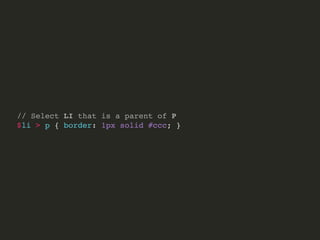
// Select LI that is a parent of P
$li > p { border: 1px solid #ccc; }
Logical Combinators
Select a collection of elements.
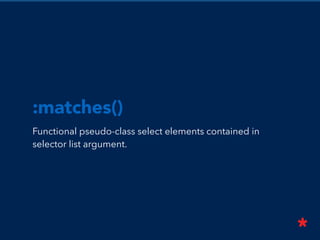
:matches()
Functional pseudo-class select elements contained in
selector list argument.
// Old way
section h1,
header h1,
article h1 {
color: blue;
}
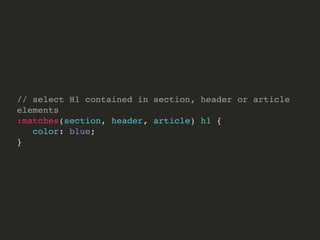
// select H1 contained in section, header or article elements
:matches(section, header, article) h1 {
color: blue;
}
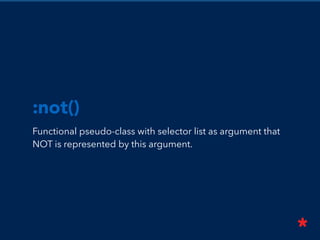
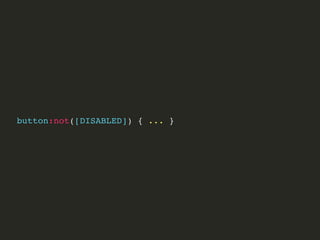
:not()
Functional pseudo-class with selector list as argument that
NOT is represented by this argument.
button:not([DISABLED]) { ... }
div:not(.container) { margin-top: 50px; }
Functional pseudo-class that taking a relative selector list as
an argument.
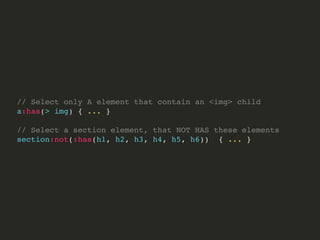
:has()
// Select only A element that contain an <img> child
a:has(> img) { ... }
// Select a section element, that NOT HAS these elements
section:not(:has(h1, h2, h3, h4, h5, h6)) { ... }
New Pseudo-Classes
A bunch of new pseudo-classes to make our life easier.
Linguistic Pseudo-Class
Identify language direction. Select an element that have
your content with a specific value of attribute lang.
@eshiota
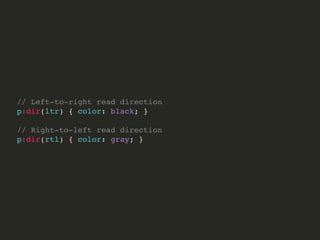
:dir()
Select element based on language direction of read.
// Left-to-right read direction
p:dir(ltr) { color: black; }
// Right-to-left read direction
p:dir(rtl) { color: gray; }
:lang()
Select element based on language attribute.
// Paragraph with lang=“pt-br" defined
p:lang(pt-br) { color: blue; }
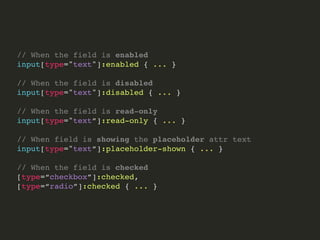
The Input Pseudo-classes
The pseudo-classes applied to elements that take user
input, like form fields.
// When the field is enabled
input[type="text"]:enabled { ... }
// When the field is disabled
input[type="text"]:disabled { ... }
// When the field is read-only
input[type="text”]:read-only { ... }
// When field is showing the placeholder attr text
input[type="text”]:placeholder-shown { ... }
// When the field is checked
[type=“checkbox”]:checked,
[type=“radio”]:checked { ... }
Selecting Highlighted
Content
Style a portion of document that have been highlighted by
the user in some way.
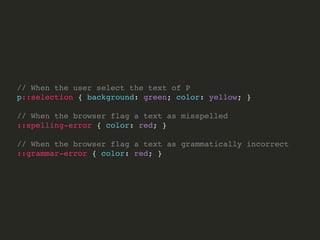
// When the user select the text of P
p::selection { background: green; color: yellow; }
// When the browser flag a text as misspelled
::spelling-error { color: red; }
// When the browser flag a text as grammatically incorrect
::grammar-error { color: red; }
Time-dimensional
Pseudo-classes
selects elements that will be or have been spoken or
displayed, like in screen readers or even subtitles.
// Select paragraph that is showing on screen or are spoken
p:current { background: black; color: white; }
// Grouping many elements
:current(p, li, dt, dd) { color: white; }
p:future { color: gray; }
p:past { color: red; }
Work Draft of Selectors 4
http://www.w3.org/TR/selectors4/
All about Media Queries
The Responsive Web Design is 90% based on Media
Queries, but Media Queries is very limited. Media Queries
Level 4 promise change that.
Media Features
Media Features test a single specific feature of user agent
or display device.
We divided in two types: discrete or range.
Environment Media Features
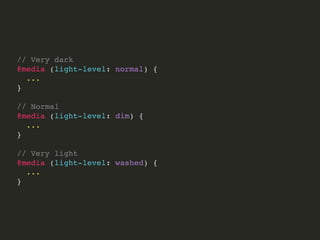
Light-level use the ambient light to determine what style
you will apply.
// Very dark
@media (light-level: normal) {
...
}
// Normal
@media (light-level: dim) {
...
}
// Very light
@media (light-level: washed) {
...
}
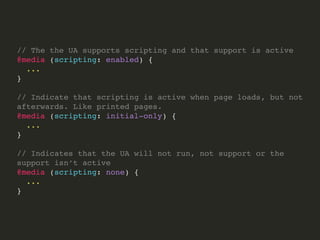
Scripting Media Features
Detect if the actual UA support script languages on the
current document.
// The the UA supports scripting and that support is active
@media (scripting: enabled) {
...
}
// Indicate that scripting is active when page loads, but not
afterwards. Like printed pages.
@media (scripting: initial-only) {
...
}
// Indicates that the UA will not run, not support or the
support isn’t active
@media (scripting: none) {
...
}
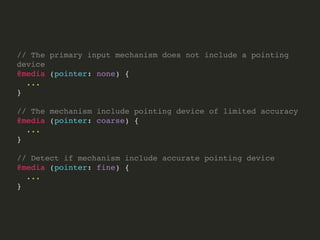
Interaction Media Features
Detect the presence and accuracy of the pointing device,
such as a mouse.
// The primary input mechanism does not include a pointing
device
@media (pointer: none) {
...
}
// The mechanism include pointing device of limited accuracy
@media (pointer: coarse) {
...
}
// Detect if mechanism include accurate pointing device
@media (pointer: fine) {
...
}
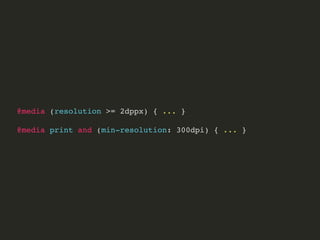
resolution
Detect the resolution of output device.
@media (resolution >= 2dppx) { ... }
@media print and (min-resolution: 300dpi) { ... }
Color Media Features
Analyse the color ability of device.
color
Detect the number of bits per color component of the
output device.
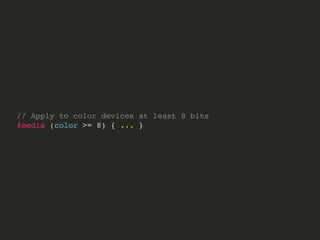
// Apply to color devices at least 8 bits
@media (color >= 8) { ... }
// This device support at least 256 color
monochrome
Detect the number of bits per pixel in a monochrome frame
buffer.
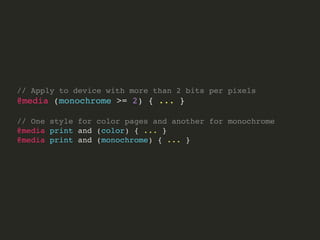
// Apply to device with more than 2 bits per pixels
@media (monochrome >= 2) { ... }
// One style for color pages and another for monochrome
@media print and (color) { ... }
@media print and (monochrome) { ... }
Work Draft of
Media Queries 4
http://www.w3.org/TR/mediaqueries-4/
Goodbye!
Let me know what you think!
@diegoeis
@tableless
http://tableless.com.br
http://medium.com/@diegoeis
http://slideshare.net/diegoeis

CSS 4 - What's coming up

  • 1.
    A BRIEF INTRODUCTION ABOUTCSS LEVEL 4 Diego Eis tableless.com.br
  • 2.
    Diego Eis I lovework with web. And I lost 37 pounds. ;-) @diegoeis @tableless http://tableless.com.br http://medium.com/@diegoeis http://slideshare.net/diegoeis
  • 5.
    CSS Level 3 Wasall about shadows, borders, backgrounds, 3D, transitions and animations.
  • 6.
    This was awesome! Becausethis solved many problems. Do you remember when you created rounded borders with four images, or created opacity background with PNG, or even used many DIVs to produce multiple backgrounds?
  • 7.
    CSS Level 4 Isall about select and detect things.
  • 8.
    Sure, CSS Level4 can do more than that, but most important is select and detect things. #IMHO
  • 9.
  • 10.
    Parent selector Select aparent element based on its child.
  • 12.
    // Select LIthat is a parent of P $li > p { border: 1px solid #ccc; }
  • 13.
    Logical Combinators Select acollection of elements.
  • 14.
    :matches() Functional pseudo-class selectelements contained in selector list argument.
  • 15.
    // Old way sectionh1, header h1, article h1 { color: blue; }
  • 16.
    // select H1contained in section, header or article elements :matches(section, header, article) h1 { color: blue; }
  • 17.
    :not() Functional pseudo-class withselector list as argument that NOT is represented by this argument.
  • 18.
    button:not([DISABLED]) { ...} div:not(.container) { margin-top: 50px; }
  • 19.
    Functional pseudo-class thattaking a relative selector list as an argument. :has()
  • 20.
    // Select onlyA element that contain an <img> child a:has(> img) { ... } // Select a section element, that NOT HAS these elements section:not(:has(h1, h2, h3, h4, h5, h6)) { ... }
  • 21.
    New Pseudo-Classes A bunchof new pseudo-classes to make our life easier.
  • 22.
    Linguistic Pseudo-Class Identify languagedirection. Select an element that have your content with a specific value of attribute lang.
  • 23.
  • 24.
    :dir() Select element basedon language direction of read.
  • 25.
    // Left-to-right readdirection p:dir(ltr) { color: black; } // Right-to-left read direction p:dir(rtl) { color: gray; }
  • 26.
    :lang() Select element basedon language attribute.
  • 27.
    // Paragraph withlang=“pt-br" defined p:lang(pt-br) { color: blue; }
  • 28.
    The Input Pseudo-classes Thepseudo-classes applied to elements that take user input, like form fields.
  • 29.
    // When thefield is enabled input[type="text"]:enabled { ... } // When the field is disabled input[type="text"]:disabled { ... } // When the field is read-only input[type="text”]:read-only { ... } // When field is showing the placeholder attr text input[type="text”]:placeholder-shown { ... } // When the field is checked [type=“checkbox”]:checked, [type=“radio”]:checked { ... }
  • 30.
    Selecting Highlighted Content Style aportion of document that have been highlighted by the user in some way.
  • 31.
    // When theuser select the text of P p::selection { background: green; color: yellow; } // When the browser flag a text as misspelled ::spelling-error { color: red; } // When the browser flag a text as grammatically incorrect ::grammar-error { color: red; }
  • 32.
    Time-dimensional Pseudo-classes selects elements thatwill be or have been spoken or displayed, like in screen readers or even subtitles.
  • 33.
    // Select paragraphthat is showing on screen or are spoken p:current { background: black; color: white; } // Grouping many elements :current(p, li, dt, dd) { color: white; } p:future { color: gray; } p:past { color: red; }
  • 34.
    Work Draft ofSelectors 4 http://www.w3.org/TR/selectors4/
  • 35.
    All about MediaQueries The Responsive Web Design is 90% based on Media Queries, but Media Queries is very limited. Media Queries Level 4 promise change that.
  • 36.
    Media Features Media Featurestest a single specific feature of user agent or display device. We divided in two types: discrete or range.
  • 37.
    Environment Media Features Light-leveluse the ambient light to determine what style you will apply.
  • 38.
    // Very dark @media(light-level: normal) { ... } // Normal @media (light-level: dim) { ... } // Very light @media (light-level: washed) { ... }
  • 39.
    Scripting Media Features Detectif the actual UA support script languages on the current document.
  • 40.
    // The theUA supports scripting and that support is active @media (scripting: enabled) { ... } // Indicate that scripting is active when page loads, but not afterwards. Like printed pages. @media (scripting: initial-only) { ... } // Indicates that the UA will not run, not support or the support isn’t active @media (scripting: none) { ... }
  • 41.
    Interaction Media Features Detectthe presence and accuracy of the pointing device, such as a mouse.
  • 42.
    // The primaryinput mechanism does not include a pointing device @media (pointer: none) { ... } // The mechanism include pointing device of limited accuracy @media (pointer: coarse) { ... } // Detect if mechanism include accurate pointing device @media (pointer: fine) { ... }
  • 43.
  • 44.
    @media (resolution >=2dppx) { ... } @media print and (min-resolution: 300dpi) { ... }
  • 45.
    Color Media Features Analysethe color ability of device.
  • 46.
    color Detect the numberof bits per color component of the output device.
  • 47.
    // Apply tocolor devices at least 8 bits @media (color >= 8) { ... } // This device support at least 256 color
  • 48.
    monochrome Detect the numberof bits per pixel in a monochrome frame buffer.
  • 49.
    // Apply todevice with more than 2 bits per pixels @media (monochrome >= 2) { ... } // One style for color pages and another for monochrome @media print and (color) { ... } @media print and (monochrome) { ... }
  • 52.
    Work Draft of MediaQueries 4 http://www.w3.org/TR/mediaqueries-4/
  • 53.
    Goodbye! Let me knowwhat you think! @diegoeis @tableless http://tableless.com.br http://medium.com/@diegoeis http://slideshare.net/diegoeis