CSS3 for web designers
                A hands-on introduction to visually appealing web design


                                     by Mario Hernandez
                                     web: http://designsdrive.com
                                     twitter: @designsdrive


Southern California Code Camp 2011
Agenda
• Intro to 960 Grid System
• Elements of great design
• Supported CSS3 properties
• Hands-on web design
• Additional resources
960 Grid System
What is a grid system?
     A series of columns working as guides to
     streamline web development workflow by
     providing commonly used dimensions, based on
     a fixed width of 960 pixels.


Source: Wikipedia
Why use a grid system?
 • Saves time
 • Saves money
 • Reduces frustration
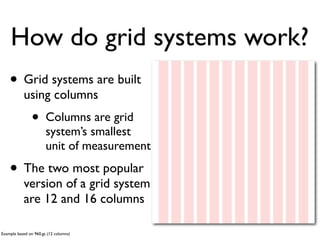
How do grid systems work?
    • Grid systems are built
           using columns
               •       Columns are grid
                       system’s smallest
                       unit of measurement

    • The two most popular
           version of a grid system
           are 12 and 16 columns

Example based on 960.gs (12 columns)
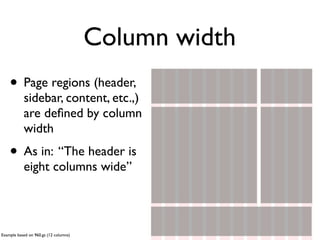
Column width
    • Page regions (header,
           sidebar, content, etc.,)
           are defined by column
           width
    • As in: “The header is
           eight columns wide”


Example based on 960.gs (12 columns)
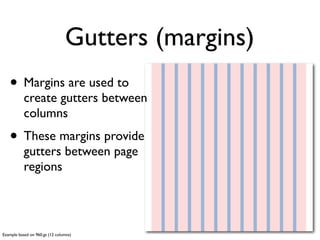
Gutters (margins)
   • Margins are used to
           create gutters between
           columns
   • These margins provide
           gutters between page
           regions


Example based on 960.gs (12 columns)
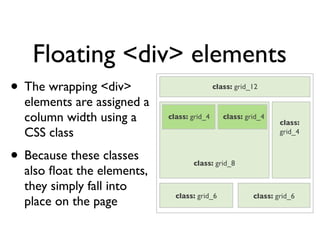
Floating <div> elements
•   The wrapping <div>                        class: grid_12

    elements are assigned a
    column width using a      class: grid_4      class: grid_4
                                                                  class:
    CSS class                                                     grid_4


• Because these classes              class: grid_8
    also float the elements,
    they simply fall into
                                class: grid_6             class: grid_6
    place on the page
What is 960.gs?
   • 960.gs — also known as the 960 Grid System — was
          created by Nathan Smith in order to “streamline
          web development workflow”
   • It’s both a prototyping and development framework
   • Download it from http://960.gs

Source: 960.gs
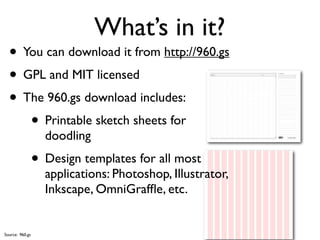
What’s in it?
  • You can download it from http://960.gs
  • GPL and MIT licensed
  • The 960.gs download includes:
     • Printable sketch sheets for
                   doodling
                 • Design templates for all most
                   applications: Photoshop, Illustrator,
                   Inkscape, OmniGraffle, etc.


Source: 960.gs
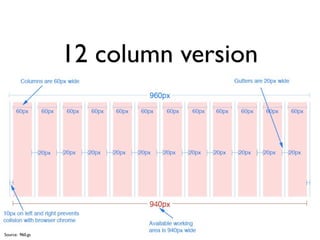
12 column version


Source: 960.gs
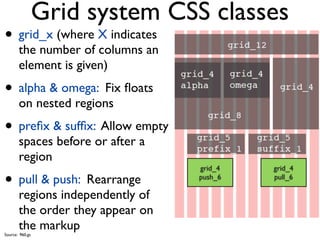
Grid system CSS classes
• grid_x (where X indicates
       the number of columns an
       element is given)
• alpha & omega: Fix floats
       on nested regions
• prefix & suffix: Allow empty
       spaces before or after a
       region
                                  grid_4   grid_4

• pull & push: Rearrange          push_6   pull_6

       regions independently of
       the order they appear on
       the markup
Source: 960.gs
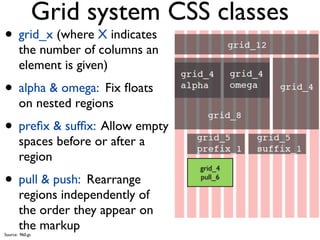
Grid system CSS classes
• grid_x (where X indicates
       the number of columns an
       element is given)
• alpha & omega: Fix floats
       on nested regions
• prefix & suffix: Allow empty
       spaces before or after a
       region
                                  grid_4

• pull & push: Rearrange          push_6
                                  pull_6

       regions independently of
       the order they appear on
       the markup
Source: 960.gs
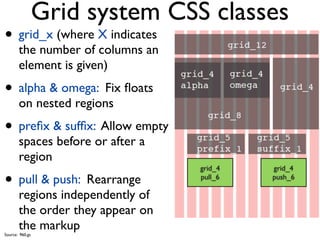
Grid system CSS classes
• grid_x (where X indicates
       the number of columns an
       element is given)
• alpha & omega: Fix floats
       on nested regions
• prefix & suffix: Allow empty
       spaces before or after a
       region
                                  grid_4   grid_4

• pull & push: Rearrange          pull_6   push_6

       regions independently of
       the order they appear on
       the markup
Source: 960.gs
Design with CSS3
Great design
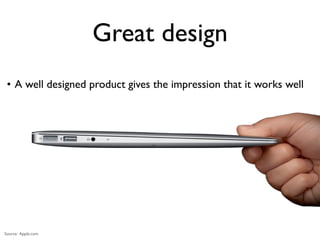
 • A well designed product gives the impression that it works well


Source: Apple.com
Great design
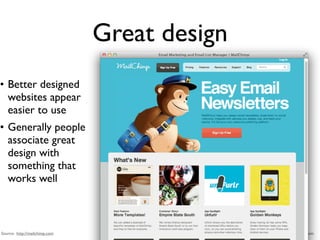
• Better designed
  websites appear
  easier to use
• Generally people
  associate great
  design with
  something that
  works well


Source: http://mailchimp.com                  Source: MailChimp.com
Elements of great web design
COLOR
Texture
white space
Typography
CSS3
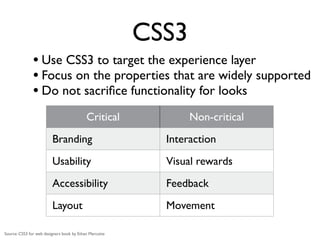
               • Use CSS3 to target the experience layer
               • Focus on the properties that are widely supported
               • Do not sacrifice functionality for looks
                                           Critical            Non-critical
                         Branding                         Interaction
                         Usability                        Visual rewards
                         Accessibility                    Feedback
                         Layout                           Movement

Source: CSS3 for web designers book by Ethan Marcotte
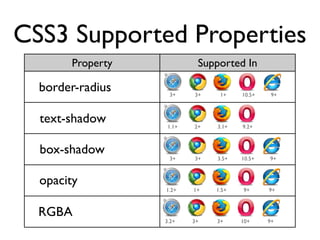
CSS3 Supported Properties
       Property            Supported In

  border-radius    3+     3+    1+    10.5+    9+


  text-shadow      1.1+   2+   3.1+   9.2+


  box-shadow
                   3+     3+   3.5+   10.5+   9+


  opacity
                  1.2+    1+   1.5+   9+      9+


  RGBA
                  3.2+    3+   3+     10+     9+
Let’s do this!
Resources
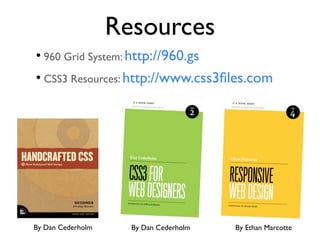
• 960 Grid System: http://960.gs
• CSS3 Resources: http://www.css3files.com


By Dan Cederholm     By Dan Cederholm   By Ethan Marcotte
Contact me
• Web: http://designsdrive.com

• Email: designsdrive@gmail.com

• Twitter: @designsdrive

CSS3 for web designer - How to design a visually appealing website

  • 1.
    CSS3 for webdesigners A hands-on introduction to visually appealing web design by Mario Hernandez web: http://designsdrive.com twitter: @designsdrive Southern California Code Camp 2011
  • 2.
    Agenda • Intro to960 Grid System • Elements of great design • Supported CSS3 properties • Hands-on web design • Additional resources
  • 3.
  • 4.
    What is agrid system? A series of columns working as guides to streamline web development workflow by providing commonly used dimensions, based on a fixed width of 960 pixels. Source: Wikipedia
  • 5.
    Why use agrid system? • Saves time • Saves money • Reduces frustration
  • 6.
    How do gridsystems work? • Grid systems are built using columns • Columns are grid system’s smallest unit of measurement • The two most popular version of a grid system are 12 and 16 columns Example based on 960.gs (12 columns)
  • 7.
    Column width • Page regions (header, sidebar, content, etc.,) are defined by column width • As in: “The header is eight columns wide” Example based on 960.gs (12 columns)
  • 8.
    Gutters (margins) • Margins are used to create gutters between columns • These margins provide gutters between page regions Example based on 960.gs (12 columns)
  • 9.
    Floating <div> elements • The wrapping <div> class: grid_12 elements are assigned a column width using a class: grid_4 class: grid_4 class: CSS class grid_4 • Because these classes class: grid_8 also float the elements, they simply fall into class: grid_6 class: grid_6 place on the page
  • 10.
    What is 960.gs? • 960.gs — also known as the 960 Grid System — was created by Nathan Smith in order to “streamline web development workflow” • It’s both a prototyping and development framework • Download it from http://960.gs Source: 960.gs
  • 11.
    What’s in it? • You can download it from http://960.gs • GPL and MIT licensed • The 960.gs download includes: • Printable sketch sheets for doodling • Design templates for all most applications: Photoshop, Illustrator, Inkscape, OmniGraffle, etc. Source: 960.gs
  • 12.
  • 13.
    Grid system CSSclasses • grid_x (where X indicates the number of columns an element is given) • alpha & omega: Fix floats on nested regions • prefix & suffix: Allow empty spaces before or after a region grid_4 grid_4 • pull & push: Rearrange push_6 pull_6 regions independently of the order they appear on the markup Source: 960.gs
  • 14.
    Grid system CSSclasses • grid_x (where X indicates the number of columns an element is given) • alpha & omega: Fix floats on nested regions • prefix & suffix: Allow empty spaces before or after a region grid_4 • pull & push: Rearrange push_6 pull_6 regions independently of the order they appear on the markup Source: 960.gs
  • 15.
    Grid system CSSclasses • grid_x (where X indicates the number of columns an element is given) • alpha & omega: Fix floats on nested regions • prefix & suffix: Allow empty spaces before or after a region grid_4 grid_4 • pull & push: Rearrange pull_6 push_6 regions independently of the order they appear on the markup Source: 960.gs
  • 16.
  • 17.
    Great design •A well designed product gives the impression that it works well Source: Apple.com
  • 18.
    Great design • Betterdesigned websites appear easier to use • Generally people associate great design with something that works well Source: http://mailchimp.com Source: MailChimp.com
  • 19.
  • 20.
  • 21.
  • 22.
  • 23.
  • 24.
    CSS3 • Use CSS3 to target the experience layer • Focus on the properties that are widely supported • Do not sacrifice functionality for looks Critical Non-critical Branding Interaction Usability Visual rewards Accessibility Feedback Layout Movement Source: CSS3 for web designers book by Ethan Marcotte
  • 25.
    CSS3 Supported Properties Property Supported In border-radius 3+ 3+ 1+ 10.5+ 9+ text-shadow 1.1+ 2+ 3.1+ 9.2+ box-shadow 3+ 3+ 3.5+ 10.5+ 9+ opacity 1.2+ 1+ 1.5+ 9+ 9+ RGBA 3.2+ 3+ 3+ 10+ 9+
  • 27.
  • 28.
    Resources • 960 GridSystem: http://960.gs • CSS3 Resources: http://www.css3files.com By Dan Cederholm By Dan Cederholm By Ethan Marcotte
  • 29.
    Contact me • Web:http://designsdrive.com • Email: designsdrive@gmail.com • Twitter: @designsdrive

Editor's Notes

  • #2 I have been designing website for about 10 years. For the past 6-7 years I have been doing it as a full time web developer for the federal government. During all this time, I have also been running my own independent freelance business and that&amp;#x2019;s where I get to be a little more creative.\n
  • #3 \n
  • #4 \n
  • #5 This definition is specifically for the type of grid system we&amp;#x2019;ll be discussing today. As you will see, there are other grid systems for different functions.\n
  • #6 You no longer need to spend time hacking IE.\nNot every project lends itself to a grid system. So if you are having difficulties with a grid system I would suggest you take a closer look at your project&amp;#x2019;s requirements and ask yourself whether the grid system is the right tool for this particular project.\n\nA GRID SYSTEM IS NOT A SILVER BULLET.\n
  • #7 There is a 24 column but it&amp;#x2019;s not widely used as the 12 or 16 columns version. There is also a fluid version which is gaining a lot of traction especially when it comes to responsive web design which allows for the grid to be resized automatically based on the size screen it&amp;#x2019;s being looked at.\n
  • #8 You no longer measure your regions in pixels. You use columns as the measurements unit\n
  • #9 You don&amp;#x2019;t have to do the math yourself. All the calculations have already been made for you so you can focus on design.\n
  • #10 All elements float to the left by default. If you know a little about floating elements you&amp;#x2019;ll know that floating elements to the left automatically aligns everything horizontally.\n
  • #11 \n
  • #12 \n
  • #13 In the 16 column version each column is 40px wide. Everything else remains the same\n
  • #14 \n
  • #15 \n
  • #16 \n
  • #17 The premise of this session is not to teach you all there is to know about great web design, first of all because I don&amp;#x2019;t know everything there is to know about great web design. The idea is to introduce you to principles and techniques that will help you become a better designer. \n
  • #18 Example of this are apple products. The other side of the coin is also true. Personally when I visit a poorly designed website, I become skeptical or suspicious whether it works well or I make a pre-assumption that this website may not work well. Better yet, I question the company&amp;#x2019;s reputation or trust if I am about to do business with them.\n
  • #19 Example of this are apple products. The other side of the coin is also true. Personally when I visit a poorly designed website, I become skeptical or suspicious whether it works well or I make a pre-assumption that this website may not work well. Better yet, I question the company&amp;#x2019;s reputation or trust if I am about to do business with them.\n
  • #20 Using helvetica font. Talk about the helvetica documentary.\n
  • #21 \n
  • #22 \n
  • #23 \n
  • #24 Using helvetica font. Talk about the helvetica documentary.\n
  • #25 Before we get into it. I would recommend you get a hold of the following 3 books. Start with HandCrafted CSS then to get a good foundation on CSS in general. Then move on to CSS3 for web designers and finally, Responsive web design. You will become a better designer after you have gone through these books.\n
  • #26 Talk about the fact that css3 is a series of modules that run independently from each other. This is a good thing. This means you can implement only those properties that are widely supported.\n
  • #27 \n
  • #28 \n
  • #29 \n
  • #30 \n
  • #31 \n
  • #32 \n
  • #33 \n
  • #34 \n