This project has received funding from the European Union’s Horizon 2020 research and innovation programme under grant agreement No 101017529.
Copernicus - eoSC AnaLytics Engine
C-SCALE tutorial: Slurm
Sebastian Luna-Valero, EGI Foundation
sebastian.luna.valero@egi.eu
C-SCALE tutorial: Slurm | 24th February 2023 | Online
Outline
• Why using batch schedulers?
• Why Slurm?
• Get to know your computational jobs
• Get to know your computational cluster
• Running workloads with Slurm
2
C-SCALE tutorial: Slurm | 24th February 2023 | Online
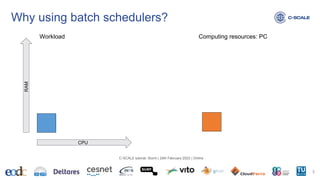
Why using batch schedulers?
3
C-SCALE tutorial: Slurm | 24th February 2023 | Online
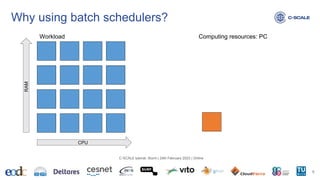
Workload Computing resources: PC
CPU
RAM
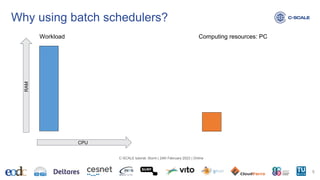
Why using batch schedulers?
4
C-SCALE tutorial: Slurm | 24th February 2023 | Online
Workload Computing resources: PC
CPU
RAM
Why using batch schedulers?
5
C-SCALE tutorial: Slurm | 24th February 2023 | Online
Workload Computing resources: PC
CPU
RAM
Why using batch schedulers?
6
C-SCALE tutorial: Slurm | 24th February 2023 | Online
Workload Computing resources: PC
CPU
RAM
Why using batch schedulers?
7
C-SCALE tutorial: Slurm | 24th February 2023 | Online
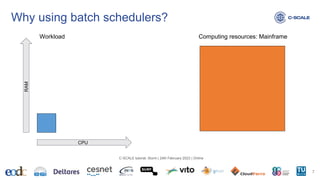
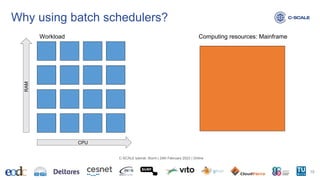
Workload Computing resources: Mainframe
CPU
RAM
Why using batch schedulers?
8
C-SCALE tutorial: Slurm | 24th February 2023 | Online
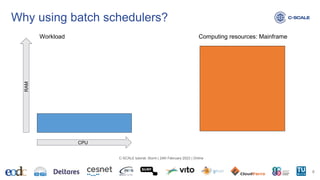
Workload Computing resources: Mainframe
CPU
RAM
Why using batch schedulers?
9
C-SCALE tutorial: Slurm | 24th February 2023 | Online
Workload Computing resources: Mainframe
CPU
RAM
Why using batch schedulers?
10
C-SCALE tutorial: Slurm | 24th February 2023 | Online
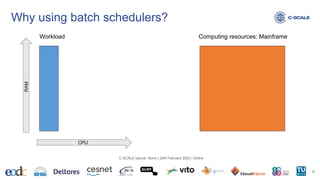
Workload Computing resources: Mainframe
CPU
RAM
Why using batch schedulers?
11
C-SCALE tutorial: Slurm | 24th February 2023 | Online
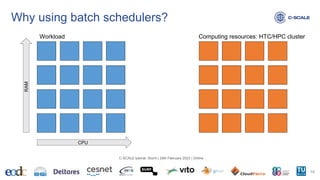
Workload
CPU
RAM
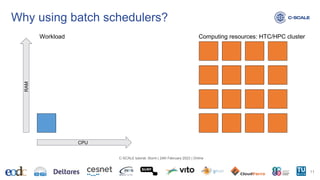
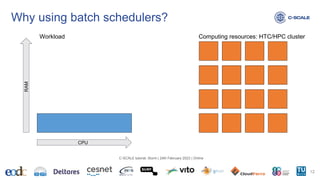
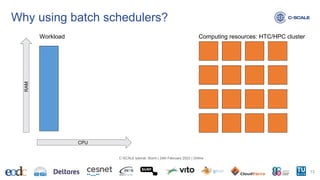
Computing resources: HTC/HPC cluster
Why using batch schedulers?
12
C-SCALE tutorial: Slurm | 24th February 2023 | Online
Workload
CPU
RAM
Computing resources: HTC/HPC cluster
Why using batch schedulers?
13
C-SCALE tutorial: Slurm | 24th February 2023 | Online
Workload
CPU
RAM
Computing resources: HTC/HPC cluster
Why using batch schedulers?
14
C-SCALE tutorial: Slurm | 24th February 2023 | Online
Workload
CPU
RAM
Computing resources: HTC/HPC cluster
Why using batch schedulers?
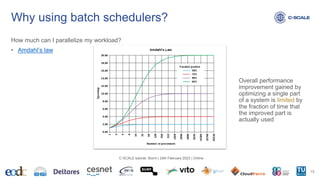
How much can I parallelize my workload?
• Amdahl’s law
15
C-SCALE tutorial: Slurm | 24th February 2023 | Online
Overall performance
improvement gained by
optimizing a single part
of a system is limited by
the fraction of time that
the improved part is
actually used
Why using batch schedulers?
How much can I parallelize my workload?
• In theory: Amdahl’s law
• In practice:
• It depends on the problem you are solving
• e.g. by region
• Parallelising code can be complex
• We think sequentially
• Dependency among subtasks are difficult to debug
• Focus today: embarrassingly parallel workloads
• Worth it when time(subtask) >> time(overheads)
16
C-SCALE tutorial: Slurm | 24th February 2023 | Online
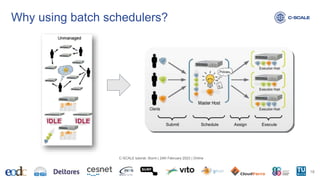
Why using batch schedulers?
Motivations
• Resources required to execute your workload >> Resources available on your PC
• Symptoms when running code on the PC
• It takes ages to finish
• Executing the code freezes the PC
• Executing the code eats all the memory or disk on your PC
17
C-SCALE tutorial: Slurm | 24th February 2023 | Online
Why using batch schedulers?
18
C-SCALE tutorial: Slurm | 24th February 2023 | Online
Why using batch schedulers?
Disclaimer
• Using a batch scheduler comes with its own issues!
19
C-SCALE tutorial: Slurm | 24th February 2023 | Online
Why Slurm?
Reasons to use Slurm
• Developed in the open since 2000
• Commercial support available
• Widespread use at government laboratories, universities and companies worldwide and
performs workload management for over half of the top 10 systems in the TOP500.
• The job scheduler of choice across C-SCALE HTC/HPC clusters
20
C-SCALE tutorial: Slurm | 24th February 2023 | Online
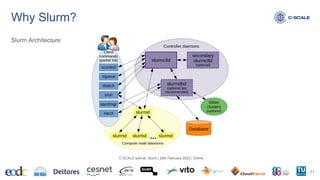
Why Slurm?
Slurm Architecture
21
C-SCALE tutorial: Slurm | 24th February 2023 | Online
Why Slurm?
Goals
• It allocates exclusive and/or non-exclusive access to resources (compute nodes) to users
for some duration of time so they can perform work
• It provides a framework for starting, executing, and monitoring work (normally a parallel
job) on the set of allocated nodes
• It arbitrates contention for resources by managing a queue of pending work.
22
C-SCALE tutorial: Slurm | 24th February 2023 | Online
Get to know your computational jobs
Questions:
• How many threads (CPU/cores)?
• How much memory (RAM)?
• How much disk (HDD)?
• What’s the estimated runtime?
• How many jobs per experiment?
• Can it be easily broken down into subtasks?
23
C-SCALE tutorial: Slurm | 24th February 2023 | Online
Get to know your computational jobs
Profiling
• Iterative process
• Run first a smaller instance of the experiment
• Quantify computational resources: time, CPU used, RAM used, disk used.
• Increase the size of the experiment and repeat
• Basic tools to start with:
• Linux: use top to see your program in action
• Linux: /usr/bin/time -o profile.out -v ./code
• Slurm: sacct -j <id> --format=JobID,JobName,AveCPU,MaxRSS,Elapsed
• Check language-specific tools (e.g. https://pypi.org/project/py-spy/, thanks Bernhard!)
24
C-SCALE tutorial: Slurm | 24th February 2023 | Online
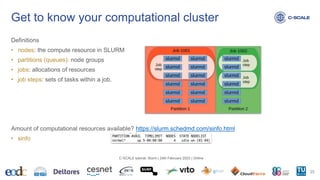
Definitions
• nodes: the compute resource in SLURM
• partitions (queues): node groups
• jobs: allocations of resources
• job steps: sets of tasks within a job.
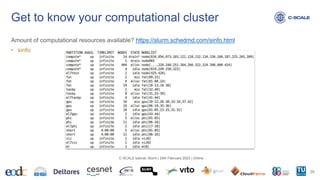
Amount of computational resources available? https://slurm.schedmd.com/sinfo.html
• sinfo
Get to know your computational cluster
25
C-SCALE tutorial: Slurm | 24th February 2023 | Online
Amount of computational resources available? https://slurm.schedmd.com/sinfo.html
• sinfo
Get to know your computational cluster
26
C-SCALE tutorial: Slurm | 24th February 2023 | Online
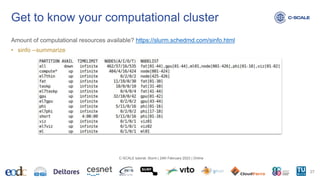
Amount of computational resources available? https://slurm.schedmd.com/sinfo.html
• sinfo --summarize
Get to know your computational cluster
27
C-SCALE tutorial: Slurm | 24th February 2023 | Online
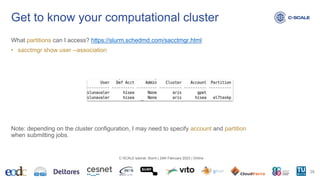
What partitions can I access? https://slurm.schedmd.com/sacctmgr.html
• sacctmgr show user --association
Note: depending on the cluster configuration, I may need to specify account and partition
when submitting jobs.
Get to know your computational cluster
28
C-SCALE tutorial: Slurm | 24th February 2023 | Online
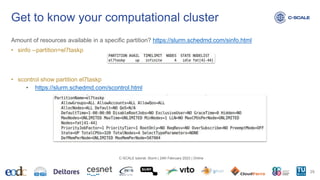
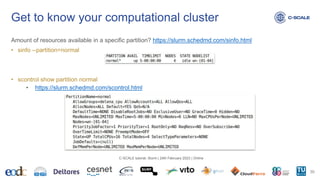
Amount of resources available in a specific partition? https://slurm.schedmd.com/sinfo.html
• sinfo --partition=el7taskp
• scontrol show partition el7taskp
• https://slurm.schedmd.com/scontrol.html
Get to know your computational cluster
29
C-SCALE tutorial: Slurm | 24th February 2023 | Online
Amount of resources available in a specific partition? https://slurm.schedmd.com/sinfo.html
• sinfo --partition=normal
• scontrol show partition normal
• https://slurm.schedmd.com/scontrol.html
Get to know your computational cluster
30
C-SCALE tutorial: Slurm | 24th February 2023 | Online
Amount of resources available in a specific partition? https://slurm.schedmd.com/scontrol.html
• scontrol show node wn-01
• scontrol show node fat[41-44]
Get to know your computational cluster
31
C-SCALE tutorial: Slurm | 24th February 2023 | Online
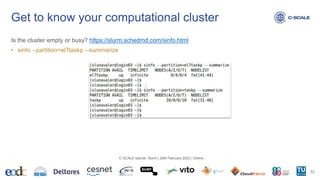
Is the cluster empty or busy? https://slurm.schedmd.com/sinfo.html
• sinfo --partition=el7taskp --summarize
Get to know your computational cluster
32
C-SCALE tutorial: Slurm | 24th February 2023 | Online
Is the cluster empty of busy? https://slurm.schedmd.com/squeue.html
• squeue
• squeue -u $USER
• squeue --partition=el7taskp
• squeue --nodelist=fat[41-44]
Get to know your computational cluster
33
C-SCALE tutorial: Slurm | 24th February 2023 | Online
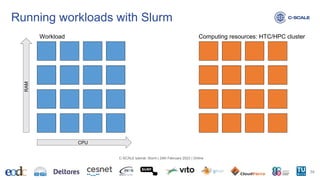
Running workloads with Slurm
34
C-SCALE tutorial: Slurm | 24th February 2023 | Online
Workload
CPU
RAM
Computing resources: HTC/HPC cluster
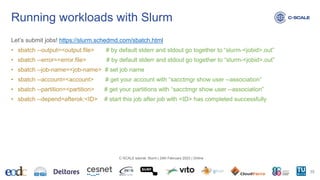
Let’s submit jobs! https://slurm.schedmd.com/sbatch.html
• sbatch --output=<output.file> # by default stderr and stdout go together to “slurm-<jobid>.out”
• sbatch --error=<error.file> # by default stderr and stdout go together to “slurm-<jobid>.out”
• sbatch --job-name=<job-name> # set job name
• sbatch --account=<account> # get your account with “sacctmgr show user --association”
• sbatch --partition=<partition> # get your partitions with “sacctmgr show user --association”
• sbatch --depend=afterok:<ID> # start this job after job with <ID> has completed successfully
Running workloads with Slurm
35
C-SCALE tutorial: Slurm | 24th February 2023 | Online
Let’s submit jobs! https://slurm.schedmd.com/sbatch.html
• sbatch --ntasks=<number> # number of tasks
• sbatch --nodes=<number> # number of nodes requested
• sbatch --ntasks-per-node=<ntasks> # number of tasks per node
• sbatch --cpus-per-task=<number> # threads per task
• sbatch --mem=<size>[units] # amount of memory per node. Units: [K|M(default)|G|T]
Following examples based on: https://doc.aris.grnet.gr/run/job_submission/
• Check out example MPI and OpenMP jobs
Running workloads with Slurm
36
C-SCALE tutorial: Slurm | 24th February 2023 | Online
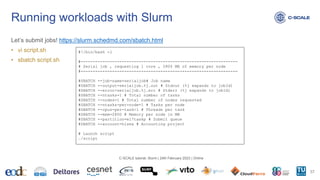
Let’s submit jobs! https://slurm.schedmd.com/sbatch.html
• vi script.sh
• sbatch script.sh
Running workloads with Slurm
37
C-SCALE tutorial: Slurm | 24th February 2023 | Online
#!/bin/bash -l
#-----------------------------------------------------------------
# Serial job , requesting 1 core , 2800 MB of memory per node
#-----------------------------------------------------------------
#SBATCH --job-name=serialjob# Job name
#SBATCH --output=serialjob.%j.out # Stdout (%j expands to jobId)
#SBATCH --error=serialjob.%j.err # Stderr (%j expands to jobId)
#SBATCH --ntasks=1 # Total number of tasks
#SBATCH --nodes=1 # Total number of nodes requested
#SBATCH --ntasks-per-node=1 # Tasks per node
#SBATCH --cpus-per-task=1 # Threads per task
#SBATCH --mem=2800 # Memory per node in MB
#SBATCH --partition=el7taskp # Submit queue
#SBATCH --account=hisea # Accounting project
# Launch script
./script
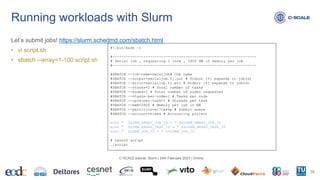
Let’s submit jobs! https://slurm.schedmd.com/sbatch.html
• vi script.sh
• sbatch --array=1-100 script.sh
Running workloads with Slurm
38
C-SCALE tutorial: Slurm | 24th February 2023 | Online
#!/bin/bash -l
#-----------------------------------------------------------------
# Serial job , requesting 1 core , 2800 MB of memory per job
#-----------------------------------------------------------------
#SBATCH --job-name=seraljob# Job name
#SBATCH --output=serialjob.%j.out # Stdout (%j expands to jobId)
#SBATCH --error=serialjob.%j.err # Stderr (%j expands to jobId)
#SBATCH --ntasks=1 # Total number of tasks
#SBATCH --nodes=1 # Total number of nodes requested
#SBATCH --ntasks-per-node=1 # Tasks per node
#SBATCH --cpus-per-task=1 # Threads per task
#SBATCH --mem=2800 # Memory per job in MB
#SBATCH --partition=el7taskp # Submit queue
#SBATCH --account=hisea # Accounting project
echo " SLURM_ARRAY_JOB_ID = " $SLURM_ARRAY_JOB_ID
echo " SLURM_ARRAY_TASK_ID = " $SLURM_ARRAY_TASK_ID
echo " SLURM_JOB_ID = " $SLURM_JOB_ID
# Launch script
./script
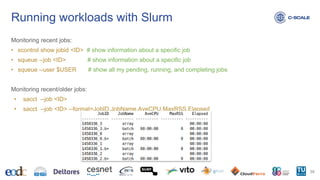
Monitoring recent jobs:
• scontrol show jobid <ID> # show information about a specific job
• squeue --job <ID> # show information about a specific job
• squeue --user $USER # show all my pending, running, and completing jobs
Monitoring recent/older jobs:
• sacct --job <ID>
• sacct --job <ID> --format=JobID,JobName,AveCPU,MaxRSS,Elapsed
Running workloads with Slurm
39
C-SCALE tutorial: Slurm | 24th February 2023 | Online
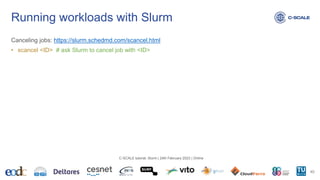
Canceling jobs: https://slurm.schedmd.com/scancel.html
• scancel <ID> # ask Slurm to cancel job with <ID>
Running workloads with Slurm
40
C-SCALE tutorial: Slurm | 24th February 2023 | Online
Interactive, you said?
• srun --pty bash # get an interactive shell on a worker node; not available on GRNET
Running interactive workloads with Slurm
41
C-SCALE tutorial: Slurm | 24th February 2023 | Online
Thank you for your attention.
This project has received funding from the European Union’s Horizon 2020 research and innovation programme under grant agreement No 101017529.
Copernicus - eoSC AnaLytics Engine
contact@c-scale.eu
https://c-scale.eu
@C_SCALE_EU
C-SCALE tutorial: Slurm | 24th February 2023 | Online
Sebastian Luna-Valero, EGI Foundation
sebastian.luna.valero@egi.eu
Further material
• Slurm: Scheduling jobs on ARCHER2
Bonus
43
C-SCALE tutorial: Slurm | 24th February 2023 | Online

C-SCALE Tutorial: Slurm

  • 1.
    This project hasreceived funding from the European Union’s Horizon 2020 research and innovation programme under grant agreement No 101017529. Copernicus - eoSC AnaLytics Engine C-SCALE tutorial: Slurm Sebastian Luna-Valero, EGI Foundation sebastian.luna.valero@egi.eu C-SCALE tutorial: Slurm | 24th February 2023 | Online
  • 2.
    Outline • Why usingbatch schedulers? • Why Slurm? • Get to know your computational jobs • Get to know your computational cluster • Running workloads with Slurm 2 C-SCALE tutorial: Slurm | 24th February 2023 | Online
  • 3.
    Why using batchschedulers? 3 C-SCALE tutorial: Slurm | 24th February 2023 | Online Workload Computing resources: PC CPU RAM
  • 4.
    Why using batchschedulers? 4 C-SCALE tutorial: Slurm | 24th February 2023 | Online Workload Computing resources: PC CPU RAM
  • 5.
    Why using batchschedulers? 5 C-SCALE tutorial: Slurm | 24th February 2023 | Online Workload Computing resources: PC CPU RAM
  • 6.
    Why using batchschedulers? 6 C-SCALE tutorial: Slurm | 24th February 2023 | Online Workload Computing resources: PC CPU RAM
  • 7.
    Why using batchschedulers? 7 C-SCALE tutorial: Slurm | 24th February 2023 | Online Workload Computing resources: Mainframe CPU RAM
  • 8.
    Why using batchschedulers? 8 C-SCALE tutorial: Slurm | 24th February 2023 | Online Workload Computing resources: Mainframe CPU RAM
  • 9.
    Why using batchschedulers? 9 C-SCALE tutorial: Slurm | 24th February 2023 | Online Workload Computing resources: Mainframe CPU RAM
  • 10.
    Why using batchschedulers? 10 C-SCALE tutorial: Slurm | 24th February 2023 | Online Workload Computing resources: Mainframe CPU RAM
  • 11.
    Why using batchschedulers? 11 C-SCALE tutorial: Slurm | 24th February 2023 | Online Workload CPU RAM Computing resources: HTC/HPC cluster
  • 12.
    Why using batchschedulers? 12 C-SCALE tutorial: Slurm | 24th February 2023 | Online Workload CPU RAM Computing resources: HTC/HPC cluster
  • 13.
    Why using batchschedulers? 13 C-SCALE tutorial: Slurm | 24th February 2023 | Online Workload CPU RAM Computing resources: HTC/HPC cluster
  • 14.
    Why using batchschedulers? 14 C-SCALE tutorial: Slurm | 24th February 2023 | Online Workload CPU RAM Computing resources: HTC/HPC cluster
  • 15.
    Why using batchschedulers? How much can I parallelize my workload? • Amdahl’s law 15 C-SCALE tutorial: Slurm | 24th February 2023 | Online Overall performance improvement gained by optimizing a single part of a system is limited by the fraction of time that the improved part is actually used
  • 16.
    Why using batchschedulers? How much can I parallelize my workload? • In theory: Amdahl’s law • In practice: • It depends on the problem you are solving • e.g. by region • Parallelising code can be complex • We think sequentially • Dependency among subtasks are difficult to debug • Focus today: embarrassingly parallel workloads • Worth it when time(subtask) >> time(overheads) 16 C-SCALE tutorial: Slurm | 24th February 2023 | Online
  • 17.
    Why using batchschedulers? Motivations • Resources required to execute your workload >> Resources available on your PC • Symptoms when running code on the PC • It takes ages to finish • Executing the code freezes the PC • Executing the code eats all the memory or disk on your PC 17 C-SCALE tutorial: Slurm | 24th February 2023 | Online
  • 18.
    Why using batchschedulers? 18 C-SCALE tutorial: Slurm | 24th February 2023 | Online
  • 19.
    Why using batchschedulers? Disclaimer • Using a batch scheduler comes with its own issues! 19 C-SCALE tutorial: Slurm | 24th February 2023 | Online
  • 20.
    Why Slurm? Reasons touse Slurm • Developed in the open since 2000 • Commercial support available • Widespread use at government laboratories, universities and companies worldwide and performs workload management for over half of the top 10 systems in the TOP500. • The job scheduler of choice across C-SCALE HTC/HPC clusters 20 C-SCALE tutorial: Slurm | 24th February 2023 | Online
  • 21.
    Why Slurm? Slurm Architecture 21 C-SCALEtutorial: Slurm | 24th February 2023 | Online
  • 22.
    Why Slurm? Goals • Itallocates exclusive and/or non-exclusive access to resources (compute nodes) to users for some duration of time so they can perform work • It provides a framework for starting, executing, and monitoring work (normally a parallel job) on the set of allocated nodes • It arbitrates contention for resources by managing a queue of pending work. 22 C-SCALE tutorial: Slurm | 24th February 2023 | Online
  • 23.
    Get to knowyour computational jobs Questions: • How many threads (CPU/cores)? • How much memory (RAM)? • How much disk (HDD)? • What’s the estimated runtime? • How many jobs per experiment? • Can it be easily broken down into subtasks? 23 C-SCALE tutorial: Slurm | 24th February 2023 | Online
  • 24.
    Get to knowyour computational jobs Profiling • Iterative process • Run first a smaller instance of the experiment • Quantify computational resources: time, CPU used, RAM used, disk used. • Increase the size of the experiment and repeat • Basic tools to start with: • Linux: use top to see your program in action • Linux: /usr/bin/time -o profile.out -v ./code • Slurm: sacct -j <id> --format=JobID,JobName,AveCPU,MaxRSS,Elapsed • Check language-specific tools (e.g. https://pypi.org/project/py-spy/, thanks Bernhard!) 24 C-SCALE tutorial: Slurm | 24th February 2023 | Online
  • 25.
    Definitions • nodes: thecompute resource in SLURM • partitions (queues): node groups • jobs: allocations of resources • job steps: sets of tasks within a job. Amount of computational resources available? https://slurm.schedmd.com/sinfo.html • sinfo Get to know your computational cluster 25 C-SCALE tutorial: Slurm | 24th February 2023 | Online
  • 26.
    Amount of computationalresources available? https://slurm.schedmd.com/sinfo.html • sinfo Get to know your computational cluster 26 C-SCALE tutorial: Slurm | 24th February 2023 | Online
  • 27.
    Amount of computationalresources available? https://slurm.schedmd.com/sinfo.html • sinfo --summarize Get to know your computational cluster 27 C-SCALE tutorial: Slurm | 24th February 2023 | Online
  • 28.
    What partitions canI access? https://slurm.schedmd.com/sacctmgr.html • sacctmgr show user --association Note: depending on the cluster configuration, I may need to specify account and partition when submitting jobs. Get to know your computational cluster 28 C-SCALE tutorial: Slurm | 24th February 2023 | Online
  • 29.
    Amount of resourcesavailable in a specific partition? https://slurm.schedmd.com/sinfo.html • sinfo --partition=el7taskp • scontrol show partition el7taskp • https://slurm.schedmd.com/scontrol.html Get to know your computational cluster 29 C-SCALE tutorial: Slurm | 24th February 2023 | Online
  • 30.
    Amount of resourcesavailable in a specific partition? https://slurm.schedmd.com/sinfo.html • sinfo --partition=normal • scontrol show partition normal • https://slurm.schedmd.com/scontrol.html Get to know your computational cluster 30 C-SCALE tutorial: Slurm | 24th February 2023 | Online
  • 31.
    Amount of resourcesavailable in a specific partition? https://slurm.schedmd.com/scontrol.html • scontrol show node wn-01 • scontrol show node fat[41-44] Get to know your computational cluster 31 C-SCALE tutorial: Slurm | 24th February 2023 | Online
  • 32.
    Is the clusterempty or busy? https://slurm.schedmd.com/sinfo.html • sinfo --partition=el7taskp --summarize Get to know your computational cluster 32 C-SCALE tutorial: Slurm | 24th February 2023 | Online
  • 33.
    Is the clusterempty of busy? https://slurm.schedmd.com/squeue.html • squeue • squeue -u $USER • squeue --partition=el7taskp • squeue --nodelist=fat[41-44] Get to know your computational cluster 33 C-SCALE tutorial: Slurm | 24th February 2023 | Online
  • 34.
    Running workloads withSlurm 34 C-SCALE tutorial: Slurm | 24th February 2023 | Online Workload CPU RAM Computing resources: HTC/HPC cluster
  • 35.
    Let’s submit jobs!https://slurm.schedmd.com/sbatch.html • sbatch --output=<output.file> # by default stderr and stdout go together to “slurm-<jobid>.out” • sbatch --error=<error.file> # by default stderr and stdout go together to “slurm-<jobid>.out” • sbatch --job-name=<job-name> # set job name • sbatch --account=<account> # get your account with “sacctmgr show user --association” • sbatch --partition=<partition> # get your partitions with “sacctmgr show user --association” • sbatch --depend=afterok:<ID> # start this job after job with <ID> has completed successfully Running workloads with Slurm 35 C-SCALE tutorial: Slurm | 24th February 2023 | Online
  • 36.
    Let’s submit jobs!https://slurm.schedmd.com/sbatch.html • sbatch --ntasks=<number> # number of tasks • sbatch --nodes=<number> # number of nodes requested • sbatch --ntasks-per-node=<ntasks> # number of tasks per node • sbatch --cpus-per-task=<number> # threads per task • sbatch --mem=<size>[units] # amount of memory per node. Units: [K|M(default)|G|T] Following examples based on: https://doc.aris.grnet.gr/run/job_submission/ • Check out example MPI and OpenMP jobs Running workloads with Slurm 36 C-SCALE tutorial: Slurm | 24th February 2023 | Online
  • 37.
    Let’s submit jobs!https://slurm.schedmd.com/sbatch.html • vi script.sh • sbatch script.sh Running workloads with Slurm 37 C-SCALE tutorial: Slurm | 24th February 2023 | Online #!/bin/bash -l #----------------------------------------------------------------- # Serial job , requesting 1 core , 2800 MB of memory per node #----------------------------------------------------------------- #SBATCH --job-name=serialjob# Job name #SBATCH --output=serialjob.%j.out # Stdout (%j expands to jobId) #SBATCH --error=serialjob.%j.err # Stderr (%j expands to jobId) #SBATCH --ntasks=1 # Total number of tasks #SBATCH --nodes=1 # Total number of nodes requested #SBATCH --ntasks-per-node=1 # Tasks per node #SBATCH --cpus-per-task=1 # Threads per task #SBATCH --mem=2800 # Memory per node in MB #SBATCH --partition=el7taskp # Submit queue #SBATCH --account=hisea # Accounting project # Launch script ./script
  • 38.
    Let’s submit jobs!https://slurm.schedmd.com/sbatch.html • vi script.sh • sbatch --array=1-100 script.sh Running workloads with Slurm 38 C-SCALE tutorial: Slurm | 24th February 2023 | Online #!/bin/bash -l #----------------------------------------------------------------- # Serial job , requesting 1 core , 2800 MB of memory per job #----------------------------------------------------------------- #SBATCH --job-name=seraljob# Job name #SBATCH --output=serialjob.%j.out # Stdout (%j expands to jobId) #SBATCH --error=serialjob.%j.err # Stderr (%j expands to jobId) #SBATCH --ntasks=1 # Total number of tasks #SBATCH --nodes=1 # Total number of nodes requested #SBATCH --ntasks-per-node=1 # Tasks per node #SBATCH --cpus-per-task=1 # Threads per task #SBATCH --mem=2800 # Memory per job in MB #SBATCH --partition=el7taskp # Submit queue #SBATCH --account=hisea # Accounting project echo " SLURM_ARRAY_JOB_ID = " $SLURM_ARRAY_JOB_ID echo " SLURM_ARRAY_TASK_ID = " $SLURM_ARRAY_TASK_ID echo " SLURM_JOB_ID = " $SLURM_JOB_ID # Launch script ./script
  • 39.
    Monitoring recent jobs: •scontrol show jobid <ID> # show information about a specific job • squeue --job <ID> # show information about a specific job • squeue --user $USER # show all my pending, running, and completing jobs Monitoring recent/older jobs: • sacct --job <ID> • sacct --job <ID> --format=JobID,JobName,AveCPU,MaxRSS,Elapsed Running workloads with Slurm 39 C-SCALE tutorial: Slurm | 24th February 2023 | Online
  • 40.
    Canceling jobs: https://slurm.schedmd.com/scancel.html •scancel <ID> # ask Slurm to cancel job with <ID> Running workloads with Slurm 40 C-SCALE tutorial: Slurm | 24th February 2023 | Online
  • 41.
    Interactive, you said? •srun --pty bash # get an interactive shell on a worker node; not available on GRNET Running interactive workloads with Slurm 41 C-SCALE tutorial: Slurm | 24th February 2023 | Online
  • 42.
    Thank you foryour attention. This project has received funding from the European Union’s Horizon 2020 research and innovation programme under grant agreement No 101017529. Copernicus - eoSC AnaLytics Engine contact@c-scale.eu https://c-scale.eu @C_SCALE_EU C-SCALE tutorial: Slurm | 24th February 2023 | Online Sebastian Luna-Valero, EGI Foundation sebastian.luna.valero@egi.eu
  • 43.
    Further material • Slurm:Scheduling jobs on ARCHER2 Bonus 43 C-SCALE tutorial: Slurm | 24th February 2023 | Online