Joining a Learning Program
As officially enrolled student in the identified
subjects, you will be invited to join in the
UNC learning program which you will receive
through your registered email address (the email you
used during enrolment).
You'll need to follow the link in the email to begin
setting up your account with this learning program.
You'll also need to confirm your email address before
you will be able to join groups and programs.
Creating a New Coursera Account
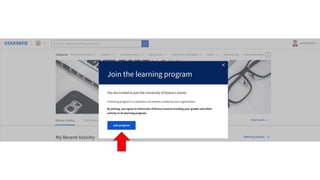
1. Click the link JOIN PROGRAM/JOIN
NOW in the UNC’s invitation.
2. click SIGN UP (not Log In). Fill out the
form for your name, email address and
password.
3. click Join Program
Find Courses to Take
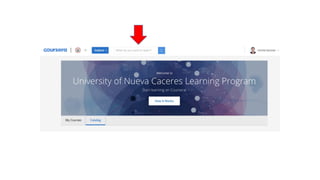
qYou can use the Coursera's catalog or the search
tool to find courses that fit your interests.
qYour Professor will recommend or require you to
take a certain course by giving the title of the course
and the institution offering that course.
qWhen you found the recommended course or
specialization you're interested in, click the title to
learn more about the course and see upcoming
sessions. From the information page, you can enroll
in that course or Specialization.
Enroll in
a Course
To take a course on Coursera, you'll need to
enroll.
To enroll in a course:
1. Open the course information page by
clicking on the course title from the Coursera
catalog.
2. Click Enroll.
3. Follow the instructions to enroll in the
course.
When you enroll in a course, you'll be able to
start right away.
Enrolling in a Course
To take a course on Coursera, you'll need to enroll.
To enroll in a course:
1. Open the course information page by clicking on the
course title from the Coursera catalog.
2. Click Enroll.
3. Follow the instructions to enroll in the course.
When you enroll in a course, you'll be able to start right
away.
Example Only
Creating-Coursera-Account-1.pdf

Creating-Coursera-Account-1.pdf

  • 3.
    Joining a LearningProgram As officially enrolled student in the identified subjects, you will be invited to join in the UNC learning program which you will receive through your registered email address (the email you used during enrolment). You'll need to follow the link in the email to begin setting up your account with this learning program. You'll also need to confirm your email address before you will be able to join groups and programs.
  • 6.
    Creating a NewCoursera Account 1. Click the link JOIN PROGRAM/JOIN NOW in the UNC’s invitation. 2. click SIGN UP (not Log In). Fill out the form for your name, email address and password. 3. click Join Program
  • 10.
    Find Courses toTake qYou can use the Coursera's catalog or the search tool to find courses that fit your interests. qYour Professor will recommend or require you to take a certain course by giving the title of the course and the institution offering that course. qWhen you found the recommended course or specialization you're interested in, click the title to learn more about the course and see upcoming sessions. From the information page, you can enroll in that course or Specialization.
  • 13.
    Enroll in a Course Totake a course on Coursera, you'll need to enroll. To enroll in a course: 1. Open the course information page by clicking on the course title from the Coursera catalog. 2. Click Enroll. 3. Follow the instructions to enroll in the course. When you enroll in a course, you'll be able to start right away.
  • 14.
    Enrolling in aCourse To take a course on Coursera, you'll need to enroll. To enroll in a course: 1. Open the course information page by clicking on the course title from the Coursera catalog. 2. Click Enroll. 3. Follow the instructions to enroll in the course. When you enroll in a course, you'll be able to start right away.
  • 15.