Creating truly accessible forms
Service Design in Government 2024
Caroline Jarrett
CJ on LinkedIn
@cjforms
Vicky Teinaki
VT on LinkedIn
@vickytnz
Caroline Jarrett Effortmark.co.uk @cjforms (CC) BY SA-4.0
2
Let’s introduce ourselves
• We are Caroline and Vicky
• Say hello to the people on your table
Caroline Jarrett Effortmark.co.uk @cjforms (CC) BY SA-4.0
3
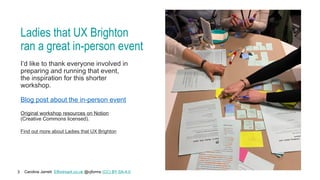
Ladies that UX Brighton
ran a great in-person event
I’d like to thank everyone involved in
preparing and running that event,
the inspiration for this shorter
workshop.
Blog post about the in-person event
Original workshop resources on Notion
(Creative Commons licensed).
Find out more about Ladies that UX Brighton
Caroline Jarrett Effortmark.co.uk @cjforms (CC) BY SA-4.0
4
Agenda
Introduction
Challenge 1: Think about types of disability
Challenge 2: Use the Web Content Accessibility Guidelines
Challenge 3: Use a Web Design System
Challenge 4: Think about why we ask for a phone number
Challenge 5: Make a question protocol
Challenge 6: Make a prototype
Challenge 7: Think about implementation (and code)
Wrap up
Caroline Jarrett Effortmark.co.uk @cjforms (CC) BY SA-4.0
5
We’re going to try a form
Before we try it, we’ll think about:
• Whether to be yourself or someone else
• If yourself:
Are you likely to fill in this form?
• If someone else:
How well do you know this person?
• Whoever you choose to be, does that
person represent real users?
Image credit: Steffen Lemmerzahl on Unsplash
Caroline Jarrett Effortmark.co.uk @cjforms (CC) BY SA-4.0
6
Before we look at any form, decide on a person
Write a ‘once upon a time’ story, filling in these blanks
Today ____________ (name of a person)
decided to ____________ (do a task)
because ____________ (reason for the task)
Optional: add an adjective about how they felt about it
Caroline Jarrett Effortmark.co.uk @cjforms (CC) BY SA-4.0
7
Today we are all going to be Pat
Today Pat
decided to find out how to pay a parking ticket in Edinburgh
because the actual ticket has gone missing
Optional: what adjective would you guess applies to Pat?
Caroline Jarrett Effortmark.co.uk @cjforms (CC) BY SA-4.0
8
Now let’s try the task
• Follow along as Pat tries to pay without the ticket
• Keep a note of which page(s) on the website are the form
Caroline Jarrett Effortmark.co.uk @cjforms (CC) BY SA-4.0
9
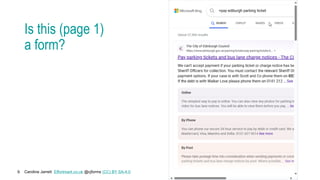
Is this (page 1)
a form?
Caroline Jarrett Effortmark.co.uk @cjforms (CC) BY SA-4.0
10
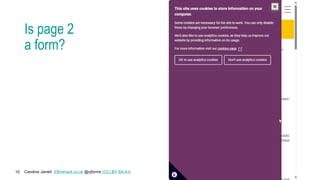
Is page 2
a form?
Caroline Jarrett Effortmark.co.uk @cjforms (CC) BY SA-4.0
11
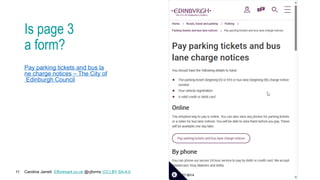
Is page 3
a form?
Pay parking tickets and bus la
ne charge notices – The City of
Edinburgh Council
Caroline Jarrett Effortmark.co.uk @cjforms (CC) BY SA-4.0
12
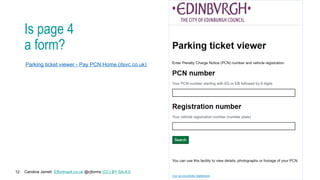
Is page 4
a form?
Parking ticket viewer - Pay PCN Home (itsvc.co.uk)
Caroline Jarrett Effortmark.co.uk @cjforms (CC) BY SA-4.0
13
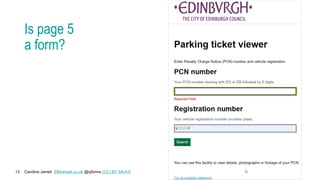
Is page 5
a form?
Caroline Jarrett Effortmark.co.uk @cjforms (CC) BY SA-4.0
14
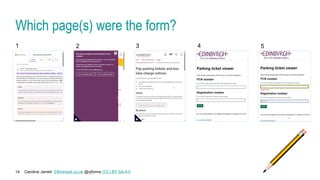
Which page(s) were the form?
1 3 4 5
2
Caroline Jarrett Effortmark.co.uk @cjforms (CC) BY SA-4.0
15
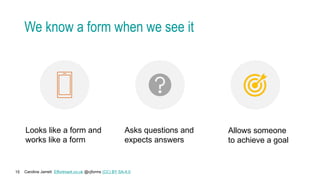
We know a form when we see it
Looks like a form and
works like a form
Asks questions and
expects answers
Allows someone
to achieve a goal
Caroline Jarrett Effortmark.co.uk @cjforms (CC) BY SA-4.0
16
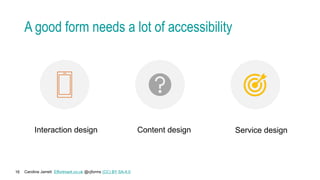
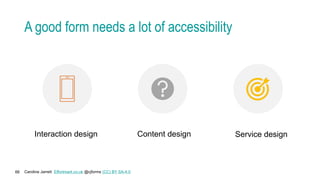
A good form needs a lot of accessibility
Interaction design Content design Service design
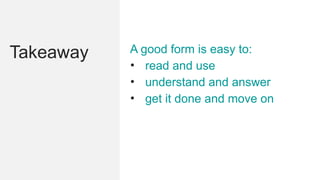
Takeaway A good form is easy to:
• read and use
• understand and answer
• get it done and move on
Caroline Jarrett Effortmark.co.uk @cjforms (CC) BY SA-4.0
18
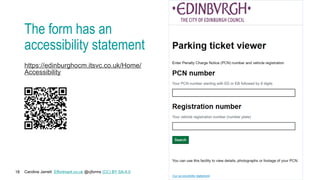
The form has an
accessibility statement
https://edinburghocm.itsvc.co.uk/Home/
Accessibility
Caroline Jarrett Effortmark.co.uk @cjforms (CC) BY SA-4.0
19
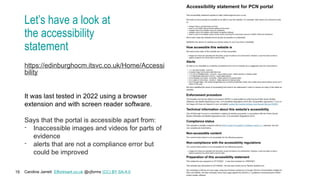
Let’s have a look at
the accessibility
statement
https://edinburghocm.itsvc.co.uk/Home/Accessi
bility
It was last tested in 2022 using a browser
extension and with screen reader software.
Says that the portal is accessible apart from:
- Inaccessible images and videos for parts of
evidence
- alerts that are not a compliance error but
could be improved
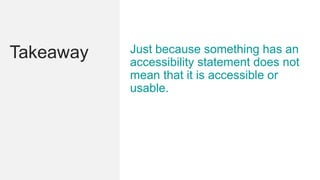
Takeaway Just because something has an
accessibility statement does not
mean that it is accessible or
usable.
Caroline Jarrett Effortmark.co.uk @cjforms (CC) BY SA-4.0
21
Today’s focus is one specific question
Scenario
You have been asked to develop a digital version of a paper-based
form. One of the form fields is ‘phone number’ - today we’ll focus on
this field in our design backlog.
We’ll think about
“What’s the best way to ask for a phone number?”
What could possibly go wrong?
Caroline Jarrett Effortmark.co.uk @cjforms (CC) BY SA-4.0
22
Think about services and phone numbers
If you have designed or worked on a service that
included a question about a phone number,
please raise your hand
Caroline Jarrett Effortmark.co.uk @cjforms (CC) BY SA-4.0
23
Share your thoughts about phones
• Have a look at your phone
• Is there only one or do you have several?
• Consider calls received and messages
• What did you get and why?
• How did you react?
• Any extra thoughts?
Caroline Jarrett Effortmark.co.uk @cjforms (CC) BY SA-4.0
24
Agenda
 Introduction
Challenge 1: Think about types of disability
Challenge 2: Use the Web Content Accessibility Guidelines
Challenge 3: Use a Web Design System
Challenge 4: Think about why we ask for a phone number
Challenge 5: Make a question protocol
Challenge 6: Make a prototype
Challenge 7: Think about implementation (and code)
Wrap up
Caroline Jarrett Effortmark.co.uk @cjforms (CC) BY SA-4.0
25
Challenge 1:
Think about types of disability
• Think about someone you know, maybe in your family,
who has a different experience to you with their phone
• Share your stories on your table (2 minutes)
• Feedback
• Did any story from your table include a disabled person or someone
with a disability?
Caroline Jarrett Effortmark.co.uk @cjforms (CC) BY SA-4.0
26
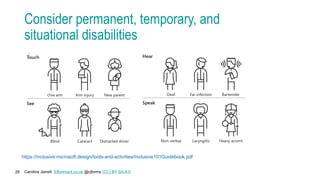
Consider permanent, temporary, and
situational disabilities
https://inclusive.microsoft.design/tools-and-activities/Inclusive101Guidebook.pdf
Caroline Jarrett Effortmark.co.uk @cjforms (CC) BY SA-4.0
27
Keep ONE person in mind for this workshop
• Please choose one person who has a permanent, temporary, or
situational disability that affects how they use a phone
• Share your choice with your table
• You may want to change your choice when you hear the others
https://inclusive.microsoft.design/tools-and-activities/Inclusive101Guidebook.pdf
Caroline Jarrett Effortmark.co.uk @cjforms (CC) BY SA-4.0
28
Agenda
 Introduction
 Challenge 1: Think about types of disability
Challenge 2: Use the Web Content Accessibility Guidelines
Challenge 3: Use a Web Design System
Challenge 4: Think about why we ask for a phone number
Challenge 5: Make a question protocol
Challenge 6: Make a prototype
Challenge 7: Think about implementation (and code)
Wrap up
Caroline Jarrett Effortmark.co.uk @cjforms (CC) BY SA-4.0
29
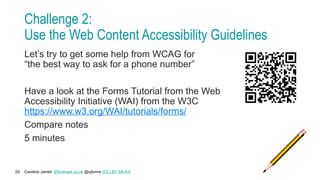
Challenge 2:
Use the Web Content Accessibility Guidelines
Let’s try to get some help from WCAG for
“the best way to ask for a phone number”
Have a look at the Forms Tutorial from the Web
Accessibility Initiative (WAI) from the W3C
https://www.w3.org/WAI/tutorials/forms/
Compare notes
5 minutes
Caroline Jarrett Effortmark.co.uk @cjforms (CC) BY SA-4.0
30
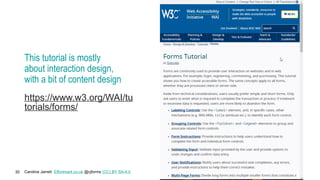
This tutorial is mostly
about interaction design,
with a bit of content design
https://www.w3.org/WAI/tu
torials/forms/
Caroline Jarrett Effortmark.co.uk @cjforms (CC) BY SA-4.0
31
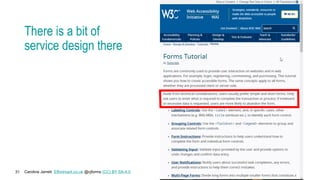
There is a bit of
service design there
Caroline Jarrett Effortmark.co.uk @cjforms (CC) BY SA-4.0
32
Agenda
 Introduction
 Challenge 1: Think about types of disability
 Challenge 2: Use the Web Content Accessibility Guidelines
Challenge 3: Use a Web Design System
Challenge 4: Think about why we ask for a phone number
Challenge 5: Make a question protocol
Challenge 6: Make a prototype
Challenge 7: Think about implementation (and code)
Wrap up
Caroline Jarrett Effortmark.co.uk @cjforms (CC) BY SA-4.0
33
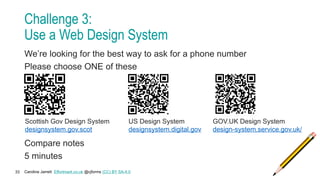
Challenge 3:
Use a Web Design System
We’re looking for the best way to ask for a phone number
Please choose ONE of these
Compare notes
5 minutes
US Design System
designsystem.digital.gov
Scottish Gov Design System
designsystem.gov.scot
GOV.UK Design System
design-system.service.gov.uk/
Caroline Jarrett Effortmark.co.uk @cjforms (CC) BY SA-4.0
34
What did you find in the design systems?
Did the design system you chose have guidance that helped?
Caroline Jarrett Effortmark.co.uk @cjforms (CC) BY SA-4.0
35
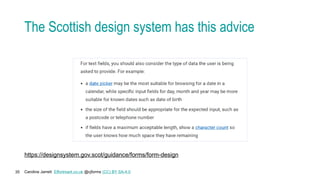
The Scottish design system has this advice
https://designsystem.gov.scot/guidance/forms/form-design
Caroline Jarrett Effortmark.co.uk @cjforms (CC) BY SA-4.0
36
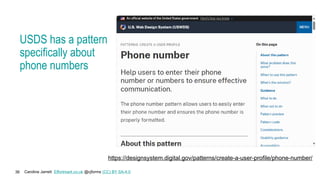
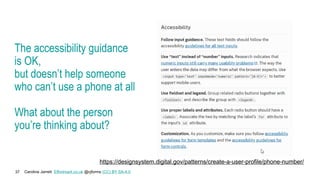
USDS has a pattern
specifically about
phone numbers
https://designsystem.digital.gov/patterns/create-a-user-profile/phone-number/
Caroline Jarrett Effortmark.co.uk @cjforms (CC) BY SA-4.0
37
The accessibility guidance
is OK,
but doesn’t help someone
who can’t use a phone at all
What about the person
you’re thinking about?
https://designsystem.digital.gov/patterns/create-a-user-profile/phone-number/
Caroline Jarrett Effortmark.co.uk @cjforms (CC) BY SA-4.0
38
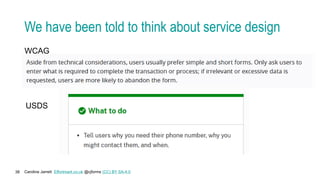
We have been told to think about service design
WCAG
USDS
Caroline Jarrett Effortmark.co.uk @cjforms (CC) BY SA-4.0
39
Agenda
 Introduction
 Challenge 1: Think about types of disability
 Challenge 2: Use the Web Content Accessibility Guidelines
 Challenge 3: Use a Web Design System
Challenge 4: Think about why we ask for a phone number
Challenge 5: Make a question protocol
Challenge 6: Make a prototype
Challenge 7: Think about implementation (and code)
Wrap up
Caroline Jarrett Effortmark.co.uk @cjforms (CC) BY SA-4.0
40
Challenge 4:
Think about why we ask for a phone number
• Any stories to share about:
• Why organisations ask for a phone number?
• How will they use the number?
• When might they use it?
• Does that use of the phone number cause any difficulties for
the person that you are thinking about?
• Choose a story from your table to share with the room
Caroline Jarrett Effortmark.co.uk @cjforms (CC) BY SA-4.0
41
Phone numbers are for more than conversation
• Calling someone to talk to them
• Text (SMS) messages about the progress of an order or task
• Two factor authentication
• Helping to identify someone, maybe as a recovery mechanism
• … maybe some other things too
Caroline Jarrett Effortmark.co.uk @cjforms (CC) BY SA-4.0
42
Agenda
 Introduction
 Challenge 1: Think about types of disability
 Challenge 2: Use the Web Content Accessibility Guidelines
 Challenge 3: Use a Web Design System
 Challenge 4: Think about why we ask for a phone number
Challenge 5: Make a question protocol
Challenge 6: Make a prototype
Challenge 7: Think about implementation (and code)
Wrap up
Caroline Jarrett Effortmark.co.uk @cjforms (CC) BY SA-4.0
43
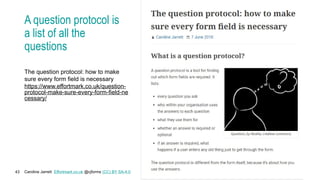
A question protocol is
a list of all the
questions
The question protocol: how to make
sure every form field is necessary
https://www.effortmark.co.uk/question-
protocol-make-sure-every-form-field-ne
cessary/
Caroline Jarrett Effortmark.co.uk @cjforms (CC) BY SA-4.0
44
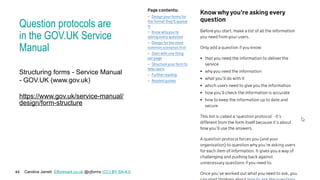
Question protocols are
in the GOV.UK Service
Manual
Structuring forms - Service Manual
- GOV.UK (www.gov.uk)
https://www.gov.uk/service-manual/
design/form-structure
Caroline Jarrett Effortmark.co.uk @cjforms (CC) BY SA-4.0
45
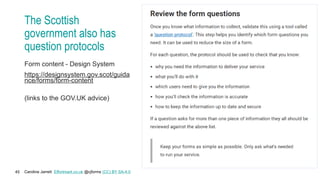
The Scottish
government also has
question protocols
Form content - Design System
https://designsystem.gov.scot/guida
nce/forms/form-content
(links to the GOV.UK advice)
Caroline Jarrett Effortmark.co.uk @cjforms (CC) BY SA-4.0
46
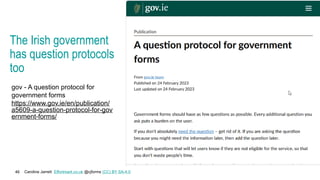
The Irish government
has question protocols
too
gov - A question protocol for
government forms
https://www.gov.ie/en/publication/
a5609-a-question-protocol-for-gov
ernment-forms/
Caroline Jarrett Effortmark.co.uk @cjforms (CC) BY SA-4.0
47
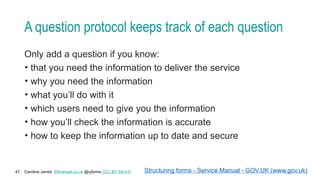
A question protocol keeps track of each question
Only add a question if you know:
• that you need the information to deliver the service
• why you need the information
• what you’ll do with it
• which users need to give you the information
• how you’ll check the information is accurate
• how to keep the information up to date and secure
Structuring forms - Service Manual - GOV.UK (www.gov.uk)
Caroline Jarrett Effortmark.co.uk @cjforms (CC) BY SA-4.0
48
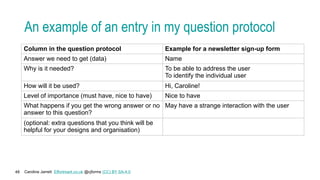
An example of an entry in my question protocol
Column in the question protocol Example for a newsletter sign-up form
Answer we need to get (data) Name
Why is it needed? To be able to address the user
To identify the individual user
How will it be used? Hi, Caroline!
Level of importance (must have, nice to have) Nice to have
What happens if you get the wrong answer or no
answer to this question?
May have a strange interaction with the user
(optional: extra questions that you think will be
helpful for your designs and organisation)
Caroline Jarrett Effortmark.co.uk @cjforms (CC) BY SA-4.0
49
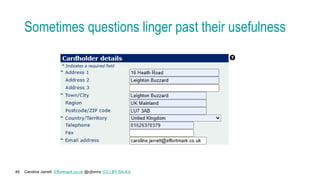
Sometimes questions linger past their usefulness
Caroline Jarrett Effortmark.co.uk @cjforms (CC) BY SA-4.0
50
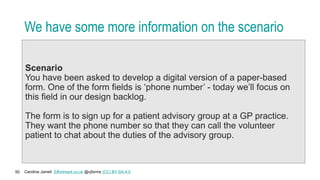
We have some more information on the scenario
Scenario
You have been asked to develop a digital version of a paper-based
form. One of the form fields is ‘phone number’ - today we’ll focus on
this field in our design backlog.
The form is to sign up for a patient advisory group at a GP practice.
They want the phone number so that they can call the volunteer
patient to chat about the duties of the advisory group.
Caroline Jarrett Effortmark.co.uk @cjforms (CC) BY SA-4.0
51
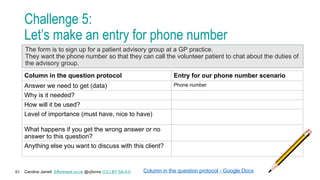
Challenge 5:
Let’s make an entry for phone number
Column in the question protocol Entry for our phone number scenario
Answer we need to get (data) Phone number
Why is it needed?
How will it be used?
Level of importance (must have, nice to have)
What happens if you get the wrong answer or no
answer to this question?
Anything else you want to discuss with this client?
Column in the question protocol - Google Docs
The form is to sign up for a patient advisory group at a GP practice.
They want the phone number so that they can call the volunteer patient to chat about the duties of
the advisory group.
Caroline Jarrett Effortmark.co.uk @cjforms (CC) BY SA-4.0
52
Agenda
 Introduction
 Challenge 1: Think about types of disability
 Challenge 2: Use the Web Content Accessibility Guidelines
 Challenge 3: Use a Web Design System
 Challenge 4: Think about why we ask for a phone number
 Challenge 5: Make a question protocol
Challenge 6: Make a prototype
Challenge 7: Think about implementation (and code)
Wrap up
Caroline Jarrett Effortmark.co.uk @cjforms (CC) BY SA-4.0
53
Challenge 6:
Make a prototype – in pairs or threes
Design a truly accessible question for asking for a phone number
for the scenario
Your question must:
• Obtain a phone number
• Be ready for testing in 5 minutes!
HINT
Allow for some sort of choice about method of contact
Caroline Jarrett Effortmark.co.uk @cjforms (CC) BY SA-4.0
54
Challenge 6:
Test your prototypes
Decide which person in your pair/three will be the participant for
another team
Swap participants and test
Caroline Jarrett Effortmark.co.uk @cjforms (CC) BY SA-4.0
55
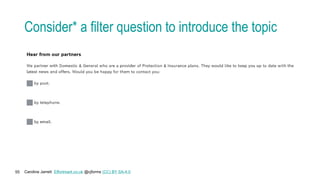
Consider* a filter question to introduce the topic
Caroline Jarrett Effortmark.co.uk @cjforms (CC) BY SA-4.0
56
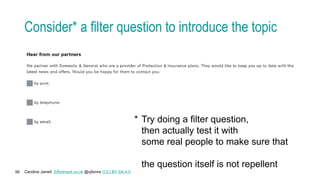
Consider* a filter question to introduce the topic
* Try doing a filter question,
then actually test it with
some real people to make sure that
the question itself is not repellent
Caroline Jarrett Effortmark.co.uk @cjforms (CC) BY SA-4.0
57
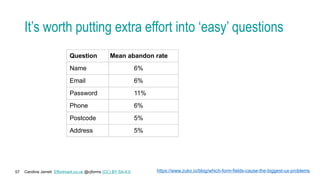
It’s worth putting extra effort into ‘easy’ questions
Question Mean abandon rate
Name 6%
Email 6%
Password 11%
Phone 6%
Postcode 5%
Address 5%
https://www.zuko.io/blog/which-form-fields-cause-the-biggest-ux-problems
Caroline Jarrett Effortmark.co.uk @cjforms (CC) BY SA-4.0
58
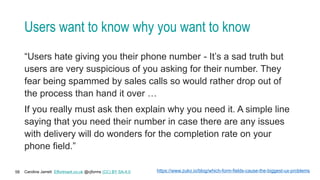
Users want to know why you want to know
“Users hate giving you their phone number - It’s a sad truth but
users are very suspicious of you asking for their number. They
fear being spammed by sales calls so would rather drop out of
the process than hand it over …
If you really must ask then explain why you need it. A simple line
saying that you need their number in case there are any issues
with delivery will do wonders for the completion rate on your
phone field.”
https://www.zuko.io/blog/which-form-fields-cause-the-biggest-ux-problems
Caroline Jarrett Effortmark.co.uk @cjforms (CC) BY SA-4.0
59
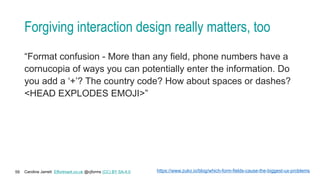
Forgiving interaction design really matters, too
“Format confusion - More than any field, phone numbers have a
cornucopia of ways you can potentially enter the information. Do
you add a ‘+’? The country code? How about spaces or dashes?
<HEAD EXPLODES EMOJI>”
https://www.zuko.io/blog/which-form-fields-cause-the-biggest-ux-problems
Caroline Jarrett Effortmark.co.uk @cjforms (CC) BY SA-4.0
60
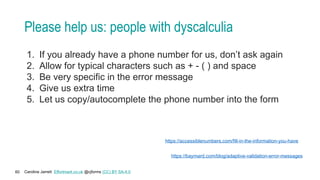
Please help us: people with dyscalculia
1. If you already have a phone number for us, don’t ask again
2. Allow for typical characters such as + - ( ) and space
3. Be very specific in the error message
4. Give us extra time
5. Let us copy/autocomplete the phone number into the form
https://accessiblenumbers.com/fill-in-the-information-you-have
https://baymard.com/blog/adaptive-validation-error-messages
Takeaway Include disabled people and
people with disabilities in
your team
Diversity wins
Caroline Jarrett Effortmark.co.uk @cjforms (CC) BY SA-4.0
62
Agenda
 Introduction
 Challenge 1: Think about types of disability
 Challenge 2: Use the Web Content Accessibility Guidelines
 Challenge 3: Use a Web Design System
 Challenge 4: Think about why we ask for a phone number
 Challenge 5: Make a question protocol
 Challenge 6: Make a prototype
Challenge 7: Think about implementation (and code)
Wrap up
Caroline Jarrett Effortmark.co.uk @cjforms (CC) BY SA-4.0
63
Code must work correctly, too
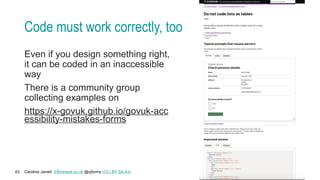
Even if you design something right,
it can be coded in an inaccessible
way
There is a community group
collecting examples on
https://x-govuk.github.io/govuk-acc
essibility-mistakes-forms
Caroline Jarrett Effortmark.co.uk @cjforms (CC) BY SA-4.0
64
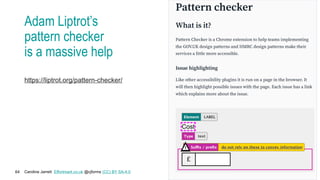
Adam Liptrot’s
pattern checker
is a massive help
https://liptrot.org/pattern-checker/
Caroline Jarrett Effortmark.co.uk @cjforms (CC) BY SA-4.0
65
Agenda
 Introduction
 Challenge 1: Think about types of disability
 Challenge 2: Use the Web Content Accessibility Guidelines
 Challenge 3: Use a Web Design System
 Challenge 4: Think about why we ask for a phone number
 Challenge 5: Make a question protocol
 Challenge 6: Make a prototype
 Challenge 7: Think about implementation (and code)
Wrap up
Caroline Jarrett Effortmark.co.uk @cjforms (CC) BY SA-4.0
66
A good form needs a lot of accessibility
Interaction design Content design Service design
Caroline Jarrett Effortmark.co.uk @cjforms (CC) BY SA-4.0
67
Ask us questions: Caroline Jarrett and Vicky Teinaki
Social media @cjforms
caroline.jarrett@effortmark.co.uk
www.effortmark.co.uk
Social media @vickytnz
Vicky@VickyTeinaki.com
www.VickyTeinaki.com

Creating truly accessible forms: workshop at SDinGov 2024.pptx

  • 1.
    Creating truly accessibleforms Service Design in Government 2024 Caroline Jarrett CJ on LinkedIn @cjforms Vicky Teinaki VT on LinkedIn @vickytnz
  • 2.
    Caroline Jarrett Effortmark.co.uk@cjforms (CC) BY SA-4.0 2 Let’s introduce ourselves • We are Caroline and Vicky • Say hello to the people on your table
  • 3.
    Caroline Jarrett Effortmark.co.uk@cjforms (CC) BY SA-4.0 3 Ladies that UX Brighton ran a great in-person event I’d like to thank everyone involved in preparing and running that event, the inspiration for this shorter workshop. Blog post about the in-person event Original workshop resources on Notion (Creative Commons licensed). Find out more about Ladies that UX Brighton
  • 4.
    Caroline Jarrett Effortmark.co.uk@cjforms (CC) BY SA-4.0 4 Agenda Introduction Challenge 1: Think about types of disability Challenge 2: Use the Web Content Accessibility Guidelines Challenge 3: Use a Web Design System Challenge 4: Think about why we ask for a phone number Challenge 5: Make a question protocol Challenge 6: Make a prototype Challenge 7: Think about implementation (and code) Wrap up
  • 5.
    Caroline Jarrett Effortmark.co.uk@cjforms (CC) BY SA-4.0 5 We’re going to try a form Before we try it, we’ll think about: • Whether to be yourself or someone else • If yourself: Are you likely to fill in this form? • If someone else: How well do you know this person? • Whoever you choose to be, does that person represent real users? Image credit: Steffen Lemmerzahl on Unsplash
  • 6.
    Caroline Jarrett Effortmark.co.uk@cjforms (CC) BY SA-4.0 6 Before we look at any form, decide on a person Write a ‘once upon a time’ story, filling in these blanks Today ____________ (name of a person) decided to ____________ (do a task) because ____________ (reason for the task) Optional: add an adjective about how they felt about it
  • 7.
    Caroline Jarrett Effortmark.co.uk@cjforms (CC) BY SA-4.0 7 Today we are all going to be Pat Today Pat decided to find out how to pay a parking ticket in Edinburgh because the actual ticket has gone missing Optional: what adjective would you guess applies to Pat?
  • 8.
    Caroline Jarrett Effortmark.co.uk@cjforms (CC) BY SA-4.0 8 Now let’s try the task • Follow along as Pat tries to pay without the ticket • Keep a note of which page(s) on the website are the form
  • 9.
    Caroline Jarrett Effortmark.co.uk@cjforms (CC) BY SA-4.0 9 Is this (page 1) a form?
  • 10.
    Caroline Jarrett Effortmark.co.uk@cjforms (CC) BY SA-4.0 10 Is page 2 a form?
  • 11.
    Caroline Jarrett Effortmark.co.uk@cjforms (CC) BY SA-4.0 11 Is page 3 a form? Pay parking tickets and bus la ne charge notices – The City of Edinburgh Council
  • 12.
    Caroline Jarrett Effortmark.co.uk@cjforms (CC) BY SA-4.0 12 Is page 4 a form? Parking ticket viewer - Pay PCN Home (itsvc.co.uk)
  • 13.
    Caroline Jarrett Effortmark.co.uk@cjforms (CC) BY SA-4.0 13 Is page 5 a form?
  • 14.
    Caroline Jarrett Effortmark.co.uk@cjforms (CC) BY SA-4.0 14 Which page(s) were the form? 1 3 4 5 2
  • 15.
    Caroline Jarrett Effortmark.co.uk@cjforms (CC) BY SA-4.0 15 We know a form when we see it Looks like a form and works like a form Asks questions and expects answers Allows someone to achieve a goal
  • 16.
    Caroline Jarrett Effortmark.co.uk@cjforms (CC) BY SA-4.0 16 A good form needs a lot of accessibility Interaction design Content design Service design
  • 17.
    Takeaway A goodform is easy to: • read and use • understand and answer • get it done and move on
  • 18.
    Caroline Jarrett Effortmark.co.uk@cjforms (CC) BY SA-4.0 18 The form has an accessibility statement https://edinburghocm.itsvc.co.uk/Home/ Accessibility
  • 19.
    Caroline Jarrett Effortmark.co.uk@cjforms (CC) BY SA-4.0 19 Let’s have a look at the accessibility statement https://edinburghocm.itsvc.co.uk/Home/Accessi bility It was last tested in 2022 using a browser extension and with screen reader software. Says that the portal is accessible apart from: - Inaccessible images and videos for parts of evidence - alerts that are not a compliance error but could be improved
  • 20.
    Takeaway Just becausesomething has an accessibility statement does not mean that it is accessible or usable.
  • 21.
    Caroline Jarrett Effortmark.co.uk@cjforms (CC) BY SA-4.0 21 Today’s focus is one specific question Scenario You have been asked to develop a digital version of a paper-based form. One of the form fields is ‘phone number’ - today we’ll focus on this field in our design backlog. We’ll think about “What’s the best way to ask for a phone number?” What could possibly go wrong?
  • 22.
    Caroline Jarrett Effortmark.co.uk@cjforms (CC) BY SA-4.0 22 Think about services and phone numbers If you have designed or worked on a service that included a question about a phone number, please raise your hand
  • 23.
    Caroline Jarrett Effortmark.co.uk@cjforms (CC) BY SA-4.0 23 Share your thoughts about phones • Have a look at your phone • Is there only one or do you have several? • Consider calls received and messages • What did you get and why? • How did you react? • Any extra thoughts?
  • 24.
    Caroline Jarrett Effortmark.co.uk@cjforms (CC) BY SA-4.0 24 Agenda  Introduction Challenge 1: Think about types of disability Challenge 2: Use the Web Content Accessibility Guidelines Challenge 3: Use a Web Design System Challenge 4: Think about why we ask for a phone number Challenge 5: Make a question protocol Challenge 6: Make a prototype Challenge 7: Think about implementation (and code) Wrap up
  • 25.
    Caroline Jarrett Effortmark.co.uk@cjforms (CC) BY SA-4.0 25 Challenge 1: Think about types of disability • Think about someone you know, maybe in your family, who has a different experience to you with their phone • Share your stories on your table (2 minutes) • Feedback • Did any story from your table include a disabled person or someone with a disability?
  • 26.
    Caroline Jarrett Effortmark.co.uk@cjforms (CC) BY SA-4.0 26 Consider permanent, temporary, and situational disabilities https://inclusive.microsoft.design/tools-and-activities/Inclusive101Guidebook.pdf
  • 27.
    Caroline Jarrett Effortmark.co.uk@cjforms (CC) BY SA-4.0 27 Keep ONE person in mind for this workshop • Please choose one person who has a permanent, temporary, or situational disability that affects how they use a phone • Share your choice with your table • You may want to change your choice when you hear the others https://inclusive.microsoft.design/tools-and-activities/Inclusive101Guidebook.pdf
  • 28.
    Caroline Jarrett Effortmark.co.uk@cjforms (CC) BY SA-4.0 28 Agenda  Introduction  Challenge 1: Think about types of disability Challenge 2: Use the Web Content Accessibility Guidelines Challenge 3: Use a Web Design System Challenge 4: Think about why we ask for a phone number Challenge 5: Make a question protocol Challenge 6: Make a prototype Challenge 7: Think about implementation (and code) Wrap up
  • 29.
    Caroline Jarrett Effortmark.co.uk@cjforms (CC) BY SA-4.0 29 Challenge 2: Use the Web Content Accessibility Guidelines Let’s try to get some help from WCAG for “the best way to ask for a phone number” Have a look at the Forms Tutorial from the Web Accessibility Initiative (WAI) from the W3C https://www.w3.org/WAI/tutorials/forms/ Compare notes 5 minutes
  • 30.
    Caroline Jarrett Effortmark.co.uk@cjforms (CC) BY SA-4.0 30 This tutorial is mostly about interaction design, with a bit of content design https://www.w3.org/WAI/tu torials/forms/
  • 31.
    Caroline Jarrett Effortmark.co.uk@cjforms (CC) BY SA-4.0 31 There is a bit of service design there
  • 32.
    Caroline Jarrett Effortmark.co.uk@cjforms (CC) BY SA-4.0 32 Agenda  Introduction  Challenge 1: Think about types of disability  Challenge 2: Use the Web Content Accessibility Guidelines Challenge 3: Use a Web Design System Challenge 4: Think about why we ask for a phone number Challenge 5: Make a question protocol Challenge 6: Make a prototype Challenge 7: Think about implementation (and code) Wrap up
  • 33.
    Caroline Jarrett Effortmark.co.uk@cjforms (CC) BY SA-4.0 33 Challenge 3: Use a Web Design System We’re looking for the best way to ask for a phone number Please choose ONE of these Compare notes 5 minutes US Design System designsystem.digital.gov Scottish Gov Design System designsystem.gov.scot GOV.UK Design System design-system.service.gov.uk/
  • 34.
    Caroline Jarrett Effortmark.co.uk@cjforms (CC) BY SA-4.0 34 What did you find in the design systems? Did the design system you chose have guidance that helped?
  • 35.
    Caroline Jarrett Effortmark.co.uk@cjforms (CC) BY SA-4.0 35 The Scottish design system has this advice https://designsystem.gov.scot/guidance/forms/form-design
  • 36.
    Caroline Jarrett Effortmark.co.uk@cjforms (CC) BY SA-4.0 36 USDS has a pattern specifically about phone numbers https://designsystem.digital.gov/patterns/create-a-user-profile/phone-number/
  • 37.
    Caroline Jarrett Effortmark.co.uk@cjforms (CC) BY SA-4.0 37 The accessibility guidance is OK, but doesn’t help someone who can’t use a phone at all What about the person you’re thinking about? https://designsystem.digital.gov/patterns/create-a-user-profile/phone-number/
  • 38.
    Caroline Jarrett Effortmark.co.uk@cjforms (CC) BY SA-4.0 38 We have been told to think about service design WCAG USDS
  • 39.
    Caroline Jarrett Effortmark.co.uk@cjforms (CC) BY SA-4.0 39 Agenda  Introduction  Challenge 1: Think about types of disability  Challenge 2: Use the Web Content Accessibility Guidelines  Challenge 3: Use a Web Design System Challenge 4: Think about why we ask for a phone number Challenge 5: Make a question protocol Challenge 6: Make a prototype Challenge 7: Think about implementation (and code) Wrap up
  • 40.
    Caroline Jarrett Effortmark.co.uk@cjforms (CC) BY SA-4.0 40 Challenge 4: Think about why we ask for a phone number • Any stories to share about: • Why organisations ask for a phone number? • How will they use the number? • When might they use it? • Does that use of the phone number cause any difficulties for the person that you are thinking about? • Choose a story from your table to share with the room
  • 41.
    Caroline Jarrett Effortmark.co.uk@cjforms (CC) BY SA-4.0 41 Phone numbers are for more than conversation • Calling someone to talk to them • Text (SMS) messages about the progress of an order or task • Two factor authentication • Helping to identify someone, maybe as a recovery mechanism • … maybe some other things too
  • 42.
    Caroline Jarrett Effortmark.co.uk@cjforms (CC) BY SA-4.0 42 Agenda  Introduction  Challenge 1: Think about types of disability  Challenge 2: Use the Web Content Accessibility Guidelines  Challenge 3: Use a Web Design System  Challenge 4: Think about why we ask for a phone number Challenge 5: Make a question protocol Challenge 6: Make a prototype Challenge 7: Think about implementation (and code) Wrap up
  • 43.
    Caroline Jarrett Effortmark.co.uk@cjforms (CC) BY SA-4.0 43 A question protocol is a list of all the questions The question protocol: how to make sure every form field is necessary https://www.effortmark.co.uk/question- protocol-make-sure-every-form-field-ne cessary/
  • 44.
    Caroline Jarrett Effortmark.co.uk@cjforms (CC) BY SA-4.0 44 Question protocols are in the GOV.UK Service Manual Structuring forms - Service Manual - GOV.UK (www.gov.uk) https://www.gov.uk/service-manual/ design/form-structure
  • 45.
    Caroline Jarrett Effortmark.co.uk@cjforms (CC) BY SA-4.0 45 The Scottish government also has question protocols Form content - Design System https://designsystem.gov.scot/guida nce/forms/form-content (links to the GOV.UK advice)
  • 46.
    Caroline Jarrett Effortmark.co.uk@cjforms (CC) BY SA-4.0 46 The Irish government has question protocols too gov - A question protocol for government forms https://www.gov.ie/en/publication/ a5609-a-question-protocol-for-gov ernment-forms/
  • 47.
    Caroline Jarrett Effortmark.co.uk@cjforms (CC) BY SA-4.0 47 A question protocol keeps track of each question Only add a question if you know: • that you need the information to deliver the service • why you need the information • what you’ll do with it • which users need to give you the information • how you’ll check the information is accurate • how to keep the information up to date and secure Structuring forms - Service Manual - GOV.UK (www.gov.uk)
  • 48.
    Caroline Jarrett Effortmark.co.uk@cjforms (CC) BY SA-4.0 48 An example of an entry in my question protocol Column in the question protocol Example for a newsletter sign-up form Answer we need to get (data) Name Why is it needed? To be able to address the user To identify the individual user How will it be used? Hi, Caroline! Level of importance (must have, nice to have) Nice to have What happens if you get the wrong answer or no answer to this question? May have a strange interaction with the user (optional: extra questions that you think will be helpful for your designs and organisation)
  • 49.
    Caroline Jarrett Effortmark.co.uk@cjforms (CC) BY SA-4.0 49 Sometimes questions linger past their usefulness
  • 50.
    Caroline Jarrett Effortmark.co.uk@cjforms (CC) BY SA-4.0 50 We have some more information on the scenario Scenario You have been asked to develop a digital version of a paper-based form. One of the form fields is ‘phone number’ - today we’ll focus on this field in our design backlog. The form is to sign up for a patient advisory group at a GP practice. They want the phone number so that they can call the volunteer patient to chat about the duties of the advisory group.
  • 51.
    Caroline Jarrett Effortmark.co.uk@cjforms (CC) BY SA-4.0 51 Challenge 5: Let’s make an entry for phone number Column in the question protocol Entry for our phone number scenario Answer we need to get (data) Phone number Why is it needed? How will it be used? Level of importance (must have, nice to have) What happens if you get the wrong answer or no answer to this question? Anything else you want to discuss with this client? Column in the question protocol - Google Docs The form is to sign up for a patient advisory group at a GP practice. They want the phone number so that they can call the volunteer patient to chat about the duties of the advisory group.
  • 52.
    Caroline Jarrett Effortmark.co.uk@cjforms (CC) BY SA-4.0 52 Agenda  Introduction  Challenge 1: Think about types of disability  Challenge 2: Use the Web Content Accessibility Guidelines  Challenge 3: Use a Web Design System  Challenge 4: Think about why we ask for a phone number  Challenge 5: Make a question protocol Challenge 6: Make a prototype Challenge 7: Think about implementation (and code) Wrap up
  • 53.
    Caroline Jarrett Effortmark.co.uk@cjforms (CC) BY SA-4.0 53 Challenge 6: Make a prototype – in pairs or threes Design a truly accessible question for asking for a phone number for the scenario Your question must: • Obtain a phone number • Be ready for testing in 5 minutes! HINT Allow for some sort of choice about method of contact
  • 54.
    Caroline Jarrett Effortmark.co.uk@cjforms (CC) BY SA-4.0 54 Challenge 6: Test your prototypes Decide which person in your pair/three will be the participant for another team Swap participants and test
  • 55.
    Caroline Jarrett Effortmark.co.uk@cjforms (CC) BY SA-4.0 55 Consider* a filter question to introduce the topic
  • 56.
    Caroline Jarrett Effortmark.co.uk@cjforms (CC) BY SA-4.0 56 Consider* a filter question to introduce the topic * Try doing a filter question, then actually test it with some real people to make sure that the question itself is not repellent
  • 57.
    Caroline Jarrett Effortmark.co.uk@cjforms (CC) BY SA-4.0 57 It’s worth putting extra effort into ‘easy’ questions Question Mean abandon rate Name 6% Email 6% Password 11% Phone 6% Postcode 5% Address 5% https://www.zuko.io/blog/which-form-fields-cause-the-biggest-ux-problems
  • 58.
    Caroline Jarrett Effortmark.co.uk@cjforms (CC) BY SA-4.0 58 Users want to know why you want to know “Users hate giving you their phone number - It’s a sad truth but users are very suspicious of you asking for their number. They fear being spammed by sales calls so would rather drop out of the process than hand it over … If you really must ask then explain why you need it. A simple line saying that you need their number in case there are any issues with delivery will do wonders for the completion rate on your phone field.” https://www.zuko.io/blog/which-form-fields-cause-the-biggest-ux-problems
  • 59.
    Caroline Jarrett Effortmark.co.uk@cjforms (CC) BY SA-4.0 59 Forgiving interaction design really matters, too “Format confusion - More than any field, phone numbers have a cornucopia of ways you can potentially enter the information. Do you add a ‘+’? The country code? How about spaces or dashes? <HEAD EXPLODES EMOJI>” https://www.zuko.io/blog/which-form-fields-cause-the-biggest-ux-problems
  • 60.
    Caroline Jarrett Effortmark.co.uk@cjforms (CC) BY SA-4.0 60 Please help us: people with dyscalculia 1. If you already have a phone number for us, don’t ask again 2. Allow for typical characters such as + - ( ) and space 3. Be very specific in the error message 4. Give us extra time 5. Let us copy/autocomplete the phone number into the form https://accessiblenumbers.com/fill-in-the-information-you-have https://baymard.com/blog/adaptive-validation-error-messages
  • 61.
    Takeaway Include disabledpeople and people with disabilities in your team Diversity wins
  • 62.
    Caroline Jarrett Effortmark.co.uk@cjforms (CC) BY SA-4.0 62 Agenda  Introduction  Challenge 1: Think about types of disability  Challenge 2: Use the Web Content Accessibility Guidelines  Challenge 3: Use a Web Design System  Challenge 4: Think about why we ask for a phone number  Challenge 5: Make a question protocol  Challenge 6: Make a prototype Challenge 7: Think about implementation (and code) Wrap up
  • 63.
    Caroline Jarrett Effortmark.co.uk@cjforms (CC) BY SA-4.0 63 Code must work correctly, too Even if you design something right, it can be coded in an inaccessible way There is a community group collecting examples on https://x-govuk.github.io/govuk-acc essibility-mistakes-forms
  • 64.
    Caroline Jarrett Effortmark.co.uk@cjforms (CC) BY SA-4.0 64 Adam Liptrot’s pattern checker is a massive help https://liptrot.org/pattern-checker/
  • 65.
    Caroline Jarrett Effortmark.co.uk@cjforms (CC) BY SA-4.0 65 Agenda  Introduction  Challenge 1: Think about types of disability  Challenge 2: Use the Web Content Accessibility Guidelines  Challenge 3: Use a Web Design System  Challenge 4: Think about why we ask for a phone number  Challenge 5: Make a question protocol  Challenge 6: Make a prototype  Challenge 7: Think about implementation (and code) Wrap up
  • 66.
    Caroline Jarrett Effortmark.co.uk@cjforms (CC) BY SA-4.0 66 A good form needs a lot of accessibility Interaction design Content design Service design
  • 67.
    Caroline Jarrett Effortmark.co.uk@cjforms (CC) BY SA-4.0 67 Ask us questions: Caroline Jarrett and Vicky Teinaki Social media @cjforms caroline.jarrett@effortmark.co.uk www.effortmark.co.uk Social media @vickytnz Vicky@VickyTeinaki.com www.VickyTeinaki.com