Conversations as a
Platform
Joshua.Drew@Microsoft.com
“BOTS are like new APPLICATIONS that you can CONVERSE with”
Conversations as a Platform
Your bots - wherever your users are talking.
Build and connect intelligent bots to interact with your
users naturally wherever they are, from text/sms to Skype,
Slack, Office 365 mail and other popular services
Bot Framework
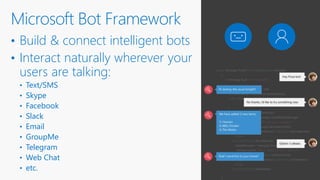
• Build & connect intelligent bots
• Interact naturally wherever your
users are talking:
• Text/SMS
• Skype
• Facebook
• Slack
• Email
• GroupMe
• Telegram
• Web Chat
• etc.
Microsoft Bot Framework
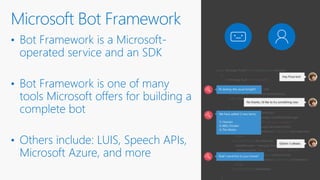
• Bot Framework is a Microsoft-
operated service and an SDK
• Bot Framework is one of many
tools Microsoft offers for building a
complete bot
• Others include: LUIS, Speech APIs,
Microsoft Azure, and more
Microsoft Bot Framework
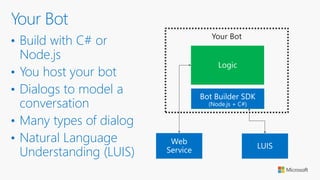
Your conversation logic
Logic
Web
Service
Your Bot
LUIS
• Build with C# or
Node.js
• You host your bot
• Dialogs to model a
conversation
• Many types of dialog
• Natural Language
Understanding (LUIS)
Your Bot
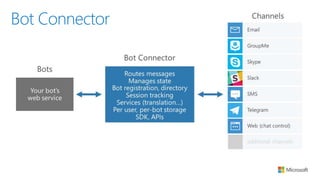
Bot Connector
DEMO
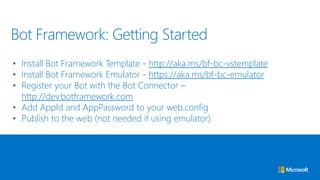
• Install Bot Framework Template - http://aka.ms/bf-bc-vstemplate
• Install Bot Framework Emulator - https://aka.ms/bf-bc-emulator
• Register your Bot with the Bot Connector –
http://dev.botframework.com
• Add AppId and AppPassword to your web.config
• Publish to the web (not needed if using emulator)
Bot Framework: Getting Started
Bot Framework: ApiController
[BotAuthentication]
public class MessagesController : ApiController
{
public async Task<HttpResponseMessage> Post([FromBody]Activity activity)
{
ConnectorClient connector = new ConnectorClient(new Uri(activity.ServiceUrl));
if (activity.Type == ActivityTypes.Message)
{
int length = (activity.Text ?? string.Empty).Length;
Activity reply = activity.CreateReply($"You sent {activity.Text} which was {length} characters");
await connector.Conversations.ReplyToActivityAsync(reply);
}
else
{
HandleSystemMessage(activity);
}
var response = Request.CreateResponse(HttpStatusCode.OK);
return response;
}
}
Bot Framework: Dialog
[Serializable]
public class DemoDialog : IDialog<IMessageActivity>
{
public async Task StartAsync(IDialogContext context)
{
context.Wait(ConversationStartedAsync);
}
public async Task ConversationStartedAsync(IDialogContext context, IAwaitable<IMessageActivity> argument)
{
IMessageActivity message = await argument;
await context.PostAsync(message.Text);
PromptDialog.Text(
context: context,
resume: ResumeAndPromptMethodAsync,
prompt: "Hi there I am a bot. What can I help with?",
retry: "I didn't understand. Please try again.");
}
Put intelligence APIs to work
Tap into the power of machine learning with easy-to-use REST APIs.
Cognitive Services
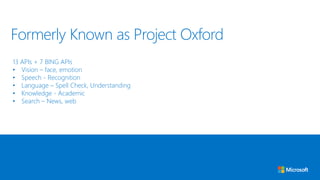
13 APIs + 7 BING APIs
• Vision – face, emotion
• Speech - Recognition
• Language – Spell Check, Understanding
• Knowledge - Academic
• Search – News, web
Formerly Known as Project Oxford
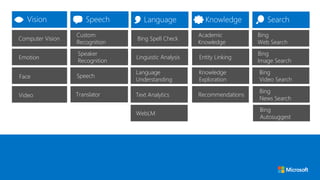
Emotion
Speaker
Recognition
Speech
Custom
Recognition
Computer Vision
Face
Video
Linguistic Analysis
Language
Understanding
Bing Spell Check
Entity Linking
Knowledge
Exploration
Academic
Knowledge
Bing
Image Search
Bing
Video Search
Bing
Web Search
WebLM
Text Analytics Recommendations
Bing
Autosuggest
Bing
News Search
Translator
DEMO
Connectors for Outlook
Office 365 Connectors are a great way to get useful
information and content into your Office 365 Group.
Office 365 Connectors
Get information and content into your Outlook Group
Subscribe to your teams progress or follow important changes
Currently over 50 connectors
Outlook Group Connectors
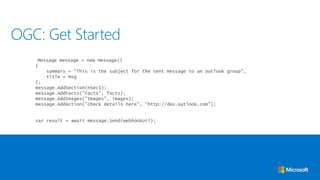
OGC: Get Started
• //dev.outlook.com and Register your OGC
• Grab your OGC Web Hook URL
• Post to the Web Hook your OGC Cards and Sections
Message message = new Message()
{
summary = "This is the subject for the sent message to an outlook group",
title = msg
};
message.AddSection(nSec1);
message.AddFacts("Facts", facts);
message.AddImages("Images", images);
message.AddAction("check details here", "http://dev.outlook.com");
var result = await message.Send(webhookUrl);
OGC: Get Started
Resources
• Bot Framework Home Page
• https://dev.botframework.com/
• Bot Builder SDK on GitHub
• https://github.com/Microsoft/BotBuilder
• Bot Framework Blog
• https://blog.botframework.com/
• Building a Conversational Bot: From 0 to 60
• https://channel9.msdn.com/Events/Build/2016/B821
Bot Framework: Resources
• Microsoft Cognitive Services
• https://www.microsoft.com/cognitive-services
• Microsoft Cognitive Services Samples & SDK
• https://www.microsoft.com/cognitive-services/en-us/SDK-Sample
• Microsoft Cognitive Services: Give Your Apps a Human Side
• https://channel9.msdn.com/Events/Build/2016/B878
• Microsoft Cognitive Services: Build smarter and more engaging experiences
• https://channel9.msdn.com/Events/Build/2016/B855
Cognitive Services: Resources
• Outlook Group Connector
• https://dev.outlook.com/Connectors
• Outlook Developer Portal
• http://dev.outlook.com/
• Outlook Group Connector API Sample
• https://github.com/jdruid/OutlookGroupConnectorAPI
Office 365 Connector: Resources
Joshua Drew
Joshua.Drew@Microsoft.com
//Drew5.net
//jdruid.github.io
@jdruid

Conversations as a Platform

  • 1.
  • 4.
    “BOTS are likenew APPLICATIONS that you can CONVERSE with” Conversations as a Platform
  • 8.
    Your bots -wherever your users are talking. Build and connect intelligent bots to interact with your users naturally wherever they are, from text/sms to Skype, Slack, Office 365 mail and other popular services Bot Framework
  • 9.
    • Build &connect intelligent bots • Interact naturally wherever your users are talking: • Text/SMS • Skype • Facebook • Slack • Email • GroupMe • Telegram • Web Chat • etc. Microsoft Bot Framework
  • 10.
    • Bot Frameworkis a Microsoft- operated service and an SDK • Bot Framework is one of many tools Microsoft offers for building a complete bot • Others include: LUIS, Speech APIs, Microsoft Azure, and more Microsoft Bot Framework
  • 11.
    Your conversation logic Logic Web Service YourBot LUIS • Build with C# or Node.js • You host your bot • Dialogs to model a conversation • Many types of dialog • Natural Language Understanding (LUIS) Your Bot
  • 12.
  • 13.
  • 14.
    • Install BotFramework Template - http://aka.ms/bf-bc-vstemplate • Install Bot Framework Emulator - https://aka.ms/bf-bc-emulator • Register your Bot with the Bot Connector – http://dev.botframework.com • Add AppId and AppPassword to your web.config • Publish to the web (not needed if using emulator) Bot Framework: Getting Started
  • 15.
    Bot Framework: ApiController [BotAuthentication] publicclass MessagesController : ApiController { public async Task<HttpResponseMessage> Post([FromBody]Activity activity) { ConnectorClient connector = new ConnectorClient(new Uri(activity.ServiceUrl)); if (activity.Type == ActivityTypes.Message) { int length = (activity.Text ?? string.Empty).Length; Activity reply = activity.CreateReply($"You sent {activity.Text} which was {length} characters"); await connector.Conversations.ReplyToActivityAsync(reply); } else { HandleSystemMessage(activity); } var response = Request.CreateResponse(HttpStatusCode.OK); return response; } }
  • 16.
    Bot Framework: Dialog [Serializable] publicclass DemoDialog : IDialog<IMessageActivity> { public async Task StartAsync(IDialogContext context) { context.Wait(ConversationStartedAsync); } public async Task ConversationStartedAsync(IDialogContext context, IAwaitable<IMessageActivity> argument) { IMessageActivity message = await argument; await context.PostAsync(message.Text); PromptDialog.Text( context: context, resume: ResumeAndPromptMethodAsync, prompt: "Hi there I am a bot. What can I help with?", retry: "I didn't understand. Please try again."); }
  • 18.
    Put intelligence APIsto work Tap into the power of machine learning with easy-to-use REST APIs. Cognitive Services
  • 19.
    13 APIs +7 BING APIs • Vision – face, emotion • Speech - Recognition • Language – Spell Check, Understanding • Knowledge - Academic • Search – News, web Formerly Known as Project Oxford
  • 20.
    Emotion Speaker Recognition Speech Custom Recognition Computer Vision Face Video Linguistic Analysis Language Understanding BingSpell Check Entity Linking Knowledge Exploration Academic Knowledge Bing Image Search Bing Video Search Bing Web Search WebLM Text Analytics Recommendations Bing Autosuggest Bing News Search Translator
  • 21.
  • 22.
    Connectors for Outlook Office365 Connectors are a great way to get useful information and content into your Office 365 Group. Office 365 Connectors
  • 23.
    Get information andcontent into your Outlook Group Subscribe to your teams progress or follow important changes Currently over 50 connectors Outlook Group Connectors
  • 24.
    OGC: Get Started •//dev.outlook.com and Register your OGC • Grab your OGC Web Hook URL • Post to the Web Hook your OGC Cards and Sections
  • 25.
    Message message =new Message() { summary = "This is the subject for the sent message to an outlook group", title = msg }; message.AddSection(nSec1); message.AddFacts("Facts", facts); message.AddImages("Images", images); message.AddAction("check details here", "http://dev.outlook.com"); var result = await message.Send(webhookUrl); OGC: Get Started
  • 26.
  • 27.
    • Bot FrameworkHome Page • https://dev.botframework.com/ • Bot Builder SDK on GitHub • https://github.com/Microsoft/BotBuilder • Bot Framework Blog • https://blog.botframework.com/ • Building a Conversational Bot: From 0 to 60 • https://channel9.msdn.com/Events/Build/2016/B821 Bot Framework: Resources
  • 28.
    • Microsoft CognitiveServices • https://www.microsoft.com/cognitive-services • Microsoft Cognitive Services Samples & SDK • https://www.microsoft.com/cognitive-services/en-us/SDK-Sample • Microsoft Cognitive Services: Give Your Apps a Human Side • https://channel9.msdn.com/Events/Build/2016/B878 • Microsoft Cognitive Services: Build smarter and more engaging experiences • https://channel9.msdn.com/Events/Build/2016/B855 Cognitive Services: Resources
  • 29.
    • Outlook GroupConnector • https://dev.outlook.com/Connectors • Outlook Developer Portal • http://dev.outlook.com/ • Outlook Group Connector API Sample • https://github.com/jdruid/OutlookGroupConnectorAPI Office 365 Connector: Resources
  • 30.

Editor's Notes

  • #9 Imagine a platform where language is the new UI layer. When we talk about conversations as a platform, there are three parts: -There are people talking to people. The new Skype Translator is a great example of this. -There is presence, or being able to enhance your conversations by the ability to be present and interact remotely. - And then there are personal assistants and bots.
  • #10 This new platform includes a personal digital assistant who knows you, knows about your world and is always with you across all your devices, helping you with your everyday tasks. And bots, with the capability to take the power of human conversations, and apply it to everything. We imagine a rich ecosystem of conversations, ones that include: people to people, people to your personal digital assistant, people to bots, and even personal digital assistants calling on bots on your behalf. That's the world that you're going to get to see in the years to come.
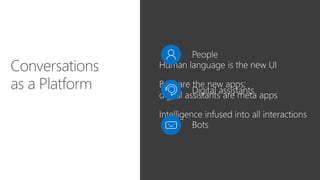
  • #11 Think of bots as new applications that you converse with. Instead of looking through multiple apps, or pages and pages of websites, you can call on any application as a bot within this conversational canvas. Bots are the new ‘apps,’ and digital assistants are meta apps, or like the new browsers that act as the windows into a world of smart bots. In this way, intelligence is infused into all of your interactions.
  • #14 Bot Framework is a Microsoft-operated service and an open source SDK.
  • #15 First, you have to build your bot. Your bot lives in the cloud and you host it yourself. You write it just like another web service component, using Node.js or C#, like an ASP.NET Web API component. The Microsoft Bot Builder SDK is Open Source, so you’ll see more languages and web stacks get supported over time. Your bot will have its own logic. [CLICK] but you’ll also need a conversation logic, suing dialogs to model a conversation. The Bot Builder SDK gives you facilities for this, and there are many types of dialogs included, from simple yes/no questions, to full Natural Language Understanding – or LUIS, one of the APIs provided in Microsoft Cognitive Services.
  • #16 The Bot Connector is hosted and operated by Microsoft. Think of it as the central router between your bots and the many channels available to communicate with your bots.