
Building Intelligent
Apps with Microsoft
Cognitive Services
Joshua Drew
Microsoft for Startups
joshua.drew@microsoft.com
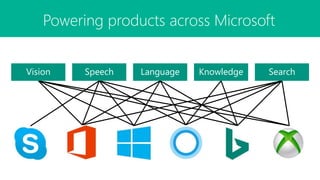
SpeechVision Language SearchKnowledge
Powering products across Microsoft
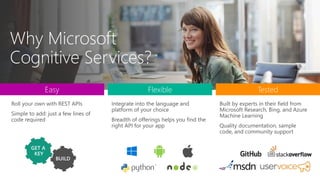
Roll your own with REST APIs
Simple to add: just a few lines of
code required
Integrate into the language and
platform of your choice
Breadth of offerings helps you find the
right API for your app
Built by experts in their field from
Microsoft Research, Bing, and Azure
Machine Learning
Quality documentation, sample
code, and community support
Easy Flexible Tested
GET A
KEY
Microsoft
Cognitive
Services
Give your apps
a human side
Cognitive Services API Collection
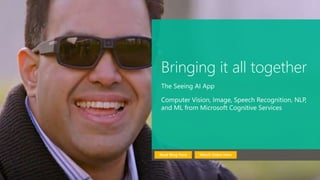
Bringing it all together
The Seeing AI App
Computer Vision, Image, Speech Recognition, NLP,
and ML from Microsoft Cognitive Services
Watch Video HereRead Blog Here
Computer Vision API
Distill actionable
information from
images
Video API
Analyze, edit, and
process videos within
your app
Face API
Detect, identify,
analyze, organize, and
tag faces in photos
Emotion API
Personalize
experiences with
emotion recognition
Vision
VisionSpeech
Bing Speech API
Convert speech to text
and back again, and
understand its intent
Speaker Recognition API
Give your app the ability
to know who's talking
Custom Recognition
Intelligent Service
Fine-tune speech
recognition for anyone,
anywhere
Speech
Bing Spell
Check API
Detect and correct
spelling mistakes
within your app
Language Understanding
Intelligent Service
Teach your apps to
understand
commands from
your users
Web Language
Model API
Leverage the power
of language models
trained on web-scale
data
Linguistic
Analysis API
Easily parse complex
text with language
analysis
Text Analytics
API
Detect sentiment,
key phrases, topics,
and language from
your text
Language
LanguageKnowledge
Academic Knowledge
API
Explore relationships
among academic papers,
journals, and authors
Recommendations
API
Provide personalized
product
recommendations for
your customers
Knowledge
Exploration Service
Add interactive search
over structured data to
your project
Entity Linking
Service
Contextually extend
knowledge of people,
locations, and events
KnowledgeSearch
Bing Web
Search API
Connect powerful
search to your apps
Bing Video
Search API
Trending videos,
detailed metadata,
and rich results
Bing Autosuggest
API
Give your app
intelligent autosuggest
options for searches
Bing Image
Search API
Bring advanced
image and metadata
search to your app
Bing News
Search API
Link your users to
robust and timely
news searches
APIs in action
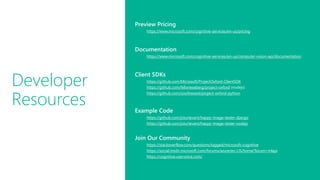
Developer
Resources
Preview Pricing
https://www.microsoft.com/cognitive-services/en-us/pricing
Documentation
https://www.microsoft.com/cognitive-services/en-us/computer-vision-api/documentation
Client SDKs
https://github.com/Microsoft/ProjectOxford-ClientSDK
https://github.com/felixrieseberg/project-oxford (nodejs)
https://github.com/southwood/project-oxford-python
Example Code
https://github.com/jsturtevant/happy-image-tester-django
https://github.com/jsturtevant/happy-image-tester-nodejs
Join Our Community
https://stackoverflow.com/questions/tagged/microsoft-cognitive
https://social.msdn.microsoft.com/forums/azure/en-US/home?forum=mlapi
https://cognitive.uservoice.com/
Easy
Flexible
Quality
Why Microsoft
Cognitive Services?
Get started for free at
microsoft.com/Cognitive
Joshua Drew
Joshua.Drew@Microsoft.com

Microsoft Cognitive Services

Editor's Notes

  • #2 So, what are Cognitive Services? Cognitive Services are a collection of artificial intelligence APIs, and we believe in democratizing artificial intelligence. So what that means is, regardless of your skill level -- whether you're a high school student running your first program or working in industry or in a giant enterprise -- that you should be able to use our APIs incredibly quickly in a matter of minutes.   And regardless of your platform -- whether you're on Android or IOS or Windows, or making a website -- all of our APIs are rest APIs, which means you can call them as long as you have an Internet connection. And so that's pretty huge because what we're doing is making it so that everyone can build these smarter, more context-aware applications.   The technology used in our APIs is the same technology that powers our products today. And so, when you think of things like the Bing search APIs, it's the same technology from Bing.   Today I’m going to talk with you about the entire collection spanning vision, speech, language, knowledge, and search.   The other things that I want to point out is that you can get started for free with all of the APIs, but we do have pricing available for a number of them, which are in public preview on Azure.   The other piece is the developer resources. So, all of our documentation is on the website and actually in GitHub as well, so we do welcome community submissions. We have a set of SBKs that are also available on GitHub where we welcome poll requests and post everything on there. The SBKs vary from API to API, but they are all included in this one repository for people to see.   And then we have three different communities that we support. We have our MSDN forums, our Stack Overflow, and we have User Voice that we use for feedback requests.  
  • #4 Why choose these APIs? They work, and it’s easy. Easy:  The APIs are easy to implement because of the simple REST calls.  Being REST APIs, there’s a common way to implement and you can get started with all of them for free simply by going to one place, one website, www.microsoft.com/cognitive.  (You don’t have to hunt around to different places.)  Flexible:  We’ve got a breadth of intelligence and knowledge APIs so developers will be able to find what intelligence feature they need; and importantly, they all work on whatever language, framework, or platform developers choose. So, devs can integrated into their apps—iOS, Android, Windows—using their own tools they know and love (such as python or node.js, etc.). Tested: Tap into an ever-growing collection of powerful AI algorithms developed by experts. Developers can trust the quality and expertise build into each API by experts in their field from Microsoft’s Research organization, Bing, and Azure machine learning and these capabilities are used across many Microsoft first party products such as Cortana, Bing and Skype. 
  • #5 At Microsoft, we’ve been offering APIs for a very long time across the company.  In delivering Microsoft Cognitive Services API, we started with 4 last year at /build (2015); added 7 more last December, and today (May 2016) we have 22 APIs in our collection.      Cognitive Services are available individually or as a part of the Cortana Intelligence Suite, formerly known as Cortana Analytics, which provides a comprehensive collection of services powered by cutting-edge research into machine learning, perception, analytics and social bots. These APIs are powered by Microsoft Azure. Developers and businesses can use this suite of services and tools to create apps that learn about our world and interact with people and customers in personalized, intelligent ways.  
  • #6 Here’s a preview of the Seeing AI app, which started as a research project that helps people who are visually impaired or blind to understand who and what is around them. The app will use computer vision, image & speech recognition, natural language processing and machine learning from Microsoft Cognitive Services. The app is under development and is not available today but it shows what’s possible with the APIs.
  • #7 Vision Computer Vision API: as a free trial on the website microsoft.com/cognitive. There are also SDKs and Samples available on GitHub or through NuGet, Maven, and Cocoapods for select platforms to make development easier. It’s important to note here that it’s not client side running code, but light wrappers around the REST calls to make integration easy. A photo app would use this as a way to tag user photos and make it easier for users to search through their collections. An assistive app would use this as a way to describe the surroundings to visually-impaired users. Works really well on both indoor or outdoor images; it can recognize common household objects, and it can describe outdoor scenes. However, we did not train on aerial images (say from drones), or on many close ups (so pictures where we zoomed in extremely on the subject won't do well). We also do really well recognizing celebrities (as long as most of the face is visible, and they were facing the camera). Face API: Some potential uses for this technology include facial login, photo tagging, and home monitoring. Or attribute detection to know age, gender, facial hair, etc. Emotion API: is available in the Azure marketplace, as a free trial on the website microsoft.com/cognitive. See Computer Vision description. Build an app that responds to moods. Using facial expressions, this cloud-based API can detect happiness, neutrality, sadness, contempt, anger, disgust, fear, and surprise. The AI understands these emotions based on universal facial expressions, and it functions cross-culturally, so your app will work around the world. Some use cases would be an advertising company wants to test user response to an ad, a tv studio wants to track responses to a pilot. Video API: as a free trial on the website microsoft.com/cognitive. See Computer Vision description. It brings Microsoft state of the art video processing algorithms to developers. With Video API, developers can analyze and automatically edit videos, including stabilize videos, create motion thumbnails, track faces, and detect motion. Use cases: For Stabilization: If you have multiple action videos, you can use the stabilization algorithm to make them less shaky and easier to watch. You can also use the stabilization algorithm as a first step in performing other video APIs. For Face Tracking: You can track faces in a video to do A/B testing in a retail setting. You can combine Video API Face Tracking with capabilities in Face API to search through surveillance, crime, or media footage to look for certain person. For Motion Detection: Instead of having to watch long clips of surveillance footage, the API will let you know what time motion occurred and its duration. For Video Thumbnail: Take a long video, such as a keynote presentation, and automatically create a short preview clip of the talk. For Face Tracking: Works best for frontal faces. Currently cannot detect small faces, side or partial faces. For Motion Detection: Detects motion on a stationary background (e.g. fixed camera). Current limitations of the algorithms include night vision videos, semi-transparent objects, and small objects. For Video Thumbnail: Take a long video, such as a keynote presentation, and automatically create a short preview clip of the talk.
  • #8 Speech APIs provide state-of-the-art algorithms to process spoken language powered by Bing. This also includes speech synthesis for a subset of languages supported by speech recognition. With these APIs developers can easily include the ability to add speech driven actions into their applications. In certain cases, the APIs allow for real-time interaction with the user as well. Additional capabilities include voice recognition and speaker identification as well as providing partial transcription, meaning that for supported languages the developer can get partial results before the user has finished speaking. The initial release supports 7 languages. Bing Speech API: At the time of publication, this data was not available. Please email Rebecca Duffy, reduffy@microsoft.com, if you would like more information. We also have SDKs available for Speech. CRIS: The Custom Recognition Intelligent Service (CRIS) enables you to create customized language models and acoustic models tailored to your application and your users. By uploading speech and/or text data to CRIS that reflects your application and your users, you can create custom models that can be used in conjunction with Microsoft’s existing state-of-the-art speech models. To customize the acoustic model to a particular domain, a collection of speech data is required. This collection consists of a set of audio files of speech data, and a text file of transcriptions of each audio file. The audio data should be representative of the scenario in which you would like to use the recognizer. If you were building an app to search MSDN by voice, it’s likely that terms like “object-oriented” or “namespace” or “dot net” will appear more frequently than in typical voice applications. Customizing the language model will enable the system to learn this. CRIS uses acoustic or language model adaptation to enable the speech recognizer to learn the characteristics of the customer’s data while still getting the benefits of all the data and expertise that went into creating the base models that power the Speech API. For acoustic model adaptation, the technology is described in this paper: http://research.microsoft.com/pubs/194346/0007893.pdf Works well when the data is uploaded to CRIS is truly representative of the user population and the expected usage of the application. For language model adaptation, it works best when the data uploaded reflects what people would actually say. Uploading simply a list of new terms is better than nothing but will not be as effective. For acoustic model adaptation, if you want to adapt to elderly speech, you need to upload the speech from many different elderly users, not just one or two. If you upload just one person’s voice, CRIS will learn to do a great job on that voice but will not necessarily learn to generalize to other elderly voices. Similarly, if you want to adapt to a new environment, like a factory, you should upload speech data from many speakers in the factory, not just one. Speaker Recognition API: Microsoft's state-of-the-art cloud-based speaker recognition algorithms to recognize a human's voice in audio streams. It comprises two components: speaker verification and speaker identification. Speaker Verification can automatically verify and authenticate users from their voice or speech. It is tightly related to authentication scenarios and is often associated with a pass phrase. Hence, we opt for text-dependent approach, which means speakers need to choose a specific pass phrase to use during both enrollment and verification phases. Speaker Identification can automatically identify the person speaking in an audio file given a group of prospective speakers. The input audio is paired against the provided group of speakers, and in case there is a match found, the speaker’s identity is returned. It is text-independent, which means that there are no restrictions on what the speaker says during the enrollment and recognition phases.  A use case is biometric authentication using voice. https://blogs.technet.microsoft.com/machinelearning/2015/12/14/now-available-speaker-video-apis-from-microsoft-project-oxford/ We also have SDKs available for Speaker Reco
  • #9 Bing Spell Check API: Microsoft’s state-of-the-art cloud-based spelling algorithms to detect a wide variety of spelling errors and provide accurate suggestions. Using Bing Spell Check, your mobile and PC apps will be powered with state-of-the-art spelling capabilities. Our service is trained on a massive corpus of data gleaned from billions of web pages. There is no need to train your own models. The speller model is updated regularly and incorporates new terms and brands almost as quickly as they appear on the web. This API is available through Microsoft Cognitive Services for customers with low-volume and high-latency jobs. For high-volume and low-latency we have an internal API which may be more suitable. Contact donaldbr directly for more information. Use cases: 1) Improve the quality of a website's product search 2) provide spell correction for a keyboard app 3) provide spell correction for text fields in an app or web page 4) detect errors in UI text and user data. See https://blogs.msdn.microsoft.com/msr_er/2010/12/15/building-a-better-speller-bing-and-microsoft-research-offer-prizes-for-best-search-engine-spelling-alteration-services/ The speller is exceptional at common spelling errors with low edit-distance (such as febuary->February) but a lot of other spellers are good at that as well. We Do a very good job with word breaking, proper names in context (try "director stephen spielberg") and fictional character names, just a few examples. Areas that are a challenge are capitalization (we don't know what to do with "March" for example, even with context) and consistency (there are times when we will flag a word only intermittently based on the context). Web Language Model API: Web Language API indexes the web and Bing queries to allow users to calculate the probabilities of natural language expressions and estimate a list of most likely words to follow an existing sequence of words. Use this API to insert spaces into a string of words without spaces, like a hashtag or URL. Use this API to rerank machine translation/speech recognition candidate sentences based on probability of the sentence. Use this API for academic research. http://research.microsoft.com/apps/pubs/default.aspx?id=130762 We also have SDKs available for WebLM Linguistic Analysis API: The Linguistic Analysis API helps you gain insights from text. Given a natural language parse, it’s easy to identify the concepts and entities (noun phrases), actions (verbs and verb phrases), descriptive words, and more. The processed text can provide useful features for classification tasks such as sentiment analysis. We also have SDKs available for Linguistic Analysis. LUIS: Language Understanding Intelligent Service (LUIS) allows developers to build a model that understands natural language and commands tailored to their application.  Example: You can say “turn down the thermostat in the living room,” send it to a LUIS model, and instead of just returning the text that represents what was said, LUIS will return: the action is “turn down,” the location is “living room,” and the target is “thermostat.” LUIS allows developers to iteratively build on these models and take speech or text input and return a structured representation of what the person said.   Not only that but by build LUIS will help developers create and train smart conversational bot (Intercom or Slack) with a single button. LUIS will also offer action fulfillment capabilities by simple integration with webhooks. LUIS works pretty well it comes to intents. For the entities, the learning curve is slower especially when the number of entities increases. LUIS only supports 20 intents & 10 entities yet by build each entities can have up to 10 children. Text Analytics API: At the time of publication, this data was not available. Please email Rebecca Duffy, reduffy@microsoft.com, if you would like more information.
  • #10 Academic Knowledge API: The Academic Knowledge API enable developers to interpret user queries for academic intent and retrieve rich entity information about research papers, authors, journals, conferences, and universities from the Microsoft Academic Graph (MAG). 1. Developers can use this API to build search features such as the knowledge-based query auto-suggest and search results at  http://academic.microsoft.com.  2. Universities can retrieve analytics data about their researchers' publications, topics, and venues. 3. Conference organizers can analyze the citation patterns of their conference papers. 4. Data scientists and computer science researchers can develop new ranking and analysis approaches over a large heterogeneous network. A publication about our approach can be found here: http://research.microsoft.com/apps/pubs/default.aspx?id=246609 The underlying data graph (Microsoft Academic Graph) is constructed over discovered academic papers on the web. The data is largely unstructured, of variable quality, and ambiguous. We are constantly working to improve this data quality and to correctly aggregate the multiple instances of authors, papers, etc. into a single representative entity in the graph.    Knowledge Exploration Service API: Enable interactive search experience over structured data via natural language.  Indexes customer's structured data (BYOD) with support for prefix completion.  Generates annotated interpretations/completions of natural language queries. Publishers/libraries can use this to create interactive search over their publications similar to academic.microsoft.com.  Merchants can create interactive search experience to help users find and discover products.  Data owners can create systems that answer natural language user questions. It works best when the structured data is clean and the natural language structure is simple and predictable. Otherwise, customers will have to invest a bit of work to generate the structured data and author the grammar. We are working on future components to simplify both authoring aspects. Entity Linking Service API:  Given a specific paragraph of text within a document, the Entity Linking will recognize and identify each separate entity based on the context and linking the entity to wikipedia. Use cases: A news agency would use this to analysis their news article to create relations between articles, a news agency would use this to generate tags for article and make recommendation for reader, a company would use this to track the PR articles mentioned it and product comments to track customer feedback. We also have SDKs available for Entity Linking. Recommendations API: At the time of publication, this data was not available. Please email Rebecca Duffy, reduffy@microsoft.com, if you would like more information.
  • #11 The Search APIs provide access to the search technology that power Bing.com and a long list of 1st-party (Office, Cortana, Xbox, Edge) and 3rd-party (AOL, Apple, Amazon, Yahoo etc.) partners. In total, we have 4 Search APIs for web, image, video and news search. In addition we provide access to our Autosuggest (type-ahead) and Spell Check services. Bing Web Search API: is the main Search API. With one programmatic call, the user can get back relevant webpage, image, video, and news results. It's equivalent to searching in the web vertical in bing.com. The Search APIs provide the power of the Bing Search engine to developers. You get access to many of the latest and greatest capabilities the bing.com site has to offer, in the form of an API. It's the same architecture stack so it's a powerful way to bring the knowledge and intelligence of the search engine to your own experience. The API is built directly on top of the entire Bing stack- you get the quality, relevance, performance and continuous improvements that the rest of the site gets. Similar to Bing.com- tail queries, or obscure terms may have limited results. We're always working to improve the edge cases though and API users will benefit from that. Bing Autosuggest API: At the time of publication, this data was not available. Please email Rebecca Duffy, reduffy@microsoft.com, if you would like more information. Bing Image Search API: At the time of publication, this data was not available. Please email Rebecca Duffy, reduffy@microsoft.com, if you would like more information. Bing Video Search API: At the time of publication, this data was not available. Please email Rebecca Duffy, reduffy@microsoft.com, if you would like more information. Bing News Search API: At the time of publication, this data was not available. Please email Rebecca Duffy, reduffy@microsoft.com, if you would like more information.
  • #12 A question that you will get is to demo the APIs. This is a good place to show a demo from our website www.microsoft.com/cognitive or do show one that you create using your favorite APIs.
  • #13 Access to strong documentation, sample code and community resources is critical for developers to be able to understand and become users of Cognitive Services. Customize these links based on your own resources or use the ones listed here.
  • #14 In conclusion, why should you try Microsoft Cognitive Services?