Connecting to Database(MySQL)
in PHP
Create a Connection with DB:
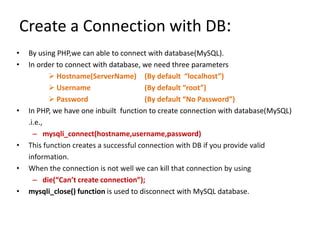
• By using PHP,we can able to connect with database(MySQL).
• In order to connect with database, we need three parameters
 Hostname(ServerName) (By default “localhost”)
 Username (By default “root”)
 Password (By default “No Password”)
• In PHP, we have one inbuilt function to create connection with database(MySQL)
.i.e.,
– mysqli_connect(hostname,username,password)
• This function creates a successful connection with DB if you provide valid
information.
• When the connection is not well we can kill that connection by using
– die(“Can’t create connection”);
• mysqli_close() function is used to disconnect with MySQL database.
Example:
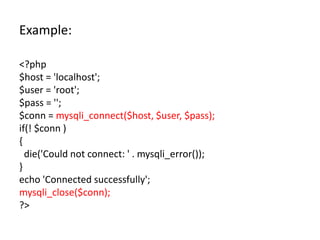
<?php
$host = 'localhost';
$user = 'root';
$pass = '';
$conn = mysqli_connect($host, $user, $pass);
if(! $conn )
{
die('Could not connect: ' . mysqli_error());
}
echo 'Connected successfully';
mysqli_close($conn);
?>
Execute Queries:
Create a Database:
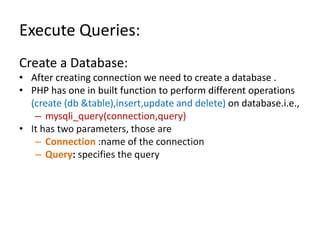
• After creating connection we need to create a database .
• PHP has one in built function to perform different operations
(create (db &table),insert,update and delete) on database.i.e.,
– mysqli_query(connection,query)
• It has two parameters, those are
– Connection :name of the connection
– Query: specifies the query
Example:
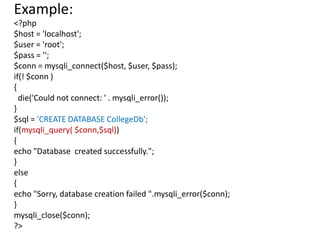
<?php
$host = 'localhost';
$user = 'root';
$pass = '';
$conn = mysqli_connect($host, $user, $pass);
if(! $conn )
{
die('Could not connect: ' . mysqli_error());
}
$sql = 'CREATE DATABASE CollegeDb';
if(mysqli_query( $conn,$sql))
{
echo "Database created successfully.";
}
else
{
echo "Sorry, database creation failed ".mysqli_error($conn);
}
mysqli_close($conn);
?>
Creating a Table
• After creating database, we need to create
table.
• In PHP, mysqli_query() function is used to
create a table.
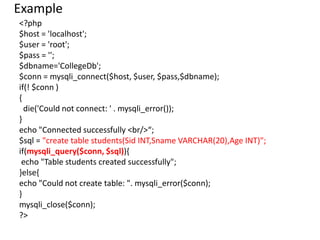
Example
<?php
$host = 'localhost';
$user = 'root';
$pass = '';
$dbname='CollegeDb';
$conn = mysqli_connect($host, $user, $pass,$dbname);
if(! $conn )
{
die('Could not connect: ' . mysqli_error());
}
echo "Connected successfully <br/>“;
$sql = "create table students(Sid INT,Sname VARCHAR(20),Age INT)";
if(mysqli_query($conn, $sql)){
echo "Table students created successfully";
}else{
echo "Could not create table: ". mysqli_error($conn);
}
mysqli_close($conn);
?>
Insert Record into Table
• After creating table, we need to insert
data(records) into table.
• In PHP, mysqli_query() function is used to
insert record into table.
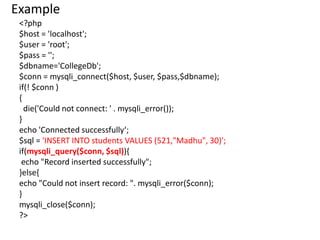
Example
<?php
$host = 'localhost';
$user = 'root';
$pass = '';
$dbname='CollegeDb';
$conn = mysqli_connect($host, $user, $pass,$dbname);
if(! $conn )
{
die('Could not connect: ' . mysqli_error());
}
echo 'Connected successfully‘;
$sql = 'INSERT INTO students VALUES (521,"Madhu", 30)';
if(mysqli_query($conn, $sql)){
echo "Record inserted successfully";
}else{
echo "Could not insert record: ". mysqli_error($conn);
}
mysqli_close($conn);
?>
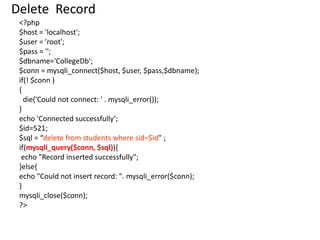
Delete Record
<?php
$host = 'localhost';
$user = 'root';
$pass = '';
$dbname='CollegeDb';
$conn = mysqli_connect($host, $user, $pass,$dbname);
if(! $conn )
{
die('Could not connect: ' . mysqli_error());
}
echo 'Connected successfully‘;
$id=521;
$sql = “delete from students where sid=$id" ;
if(mysqli_query($conn, $sql)){
echo "Record inserted successfully";
}else{
echo "Could not insert record: ". mysqli_error($conn);
}
mysqli_close($conn);
?>
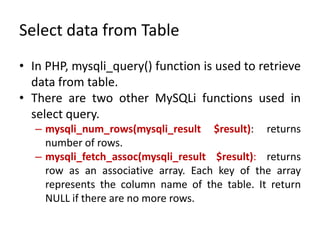
Select data from Table
• In PHP, mysqli_query() function is used to retrieve
data from table.
• There are two other MySQLi functions used in
select query.
– mysqli_num_rows(mysqli_result $result): returns
number of rows.
– mysqli_fetch_assoc(mysqli_result $result): returns
row as an associative array. Each key of the array
represents the column name of the table. It return
NULL if there are no more rows.
Example:
$sql = 'SELECT * FROM students';
$retval=mysqli_query($conn, $sql);
if(mysqli_num_rows($retval) > 0)
{
while($row = mysqli_fetch_assoc($retval))
{
echo "Student ID :".$row['sid']."<br> ";
echo "Student NAME :". $row['sname']."<br> ";
echo "Student Age :". $row['age']." <br> ";
echo "--------------------------------<br>";
} //end of while
}
else
{
echo "0 results";
}
mysqli_close($conn);

Connecting_to_Database(MySQL)_in_PHP.pptx

  • 1.
  • 2.
    Create a Connectionwith DB: • By using PHP,we can able to connect with database(MySQL). • In order to connect with database, we need three parameters  Hostname(ServerName) (By default “localhost”)  Username (By default “root”)  Password (By default “No Password”) • In PHP, we have one inbuilt function to create connection with database(MySQL) .i.e., – mysqli_connect(hostname,username,password) • This function creates a successful connection with DB if you provide valid information. • When the connection is not well we can kill that connection by using – die(“Can’t create connection”); • mysqli_close() function is used to disconnect with MySQL database.
  • 3.
    Example: <?php $host = 'localhost'; $user= 'root'; $pass = ''; $conn = mysqli_connect($host, $user, $pass); if(! $conn ) { die('Could not connect: ' . mysqli_error()); } echo 'Connected successfully'; mysqli_close($conn); ?>
  • 4.
    Execute Queries: Create aDatabase: • After creating connection we need to create a database . • PHP has one in built function to perform different operations (create (db &table),insert,update and delete) on database.i.e., – mysqli_query(connection,query) • It has two parameters, those are – Connection :name of the connection – Query: specifies the query
  • 5.
    Example: <?php $host = 'localhost'; $user= 'root'; $pass = ''; $conn = mysqli_connect($host, $user, $pass); if(! $conn ) { die('Could not connect: ' . mysqli_error()); } $sql = 'CREATE DATABASE CollegeDb'; if(mysqli_query( $conn,$sql)) { echo "Database created successfully."; } else { echo "Sorry, database creation failed ".mysqli_error($conn); } mysqli_close($conn); ?>
  • 6.
    Creating a Table •After creating database, we need to create table. • In PHP, mysqli_query() function is used to create a table.
  • 7.
    Example <?php $host = 'localhost'; $user= 'root'; $pass = ''; $dbname='CollegeDb'; $conn = mysqli_connect($host, $user, $pass,$dbname); if(! $conn ) { die('Could not connect: ' . mysqli_error()); } echo "Connected successfully <br/>“; $sql = "create table students(Sid INT,Sname VARCHAR(20),Age INT)"; if(mysqli_query($conn, $sql)){ echo "Table students created successfully"; }else{ echo "Could not create table: ". mysqli_error($conn); } mysqli_close($conn); ?>
  • 8.
    Insert Record intoTable • After creating table, we need to insert data(records) into table. • In PHP, mysqli_query() function is used to insert record into table.
  • 9.
    Example <?php $host = 'localhost'; $user= 'root'; $pass = ''; $dbname='CollegeDb'; $conn = mysqli_connect($host, $user, $pass,$dbname); if(! $conn ) { die('Could not connect: ' . mysqli_error()); } echo 'Connected successfully‘; $sql = 'INSERT INTO students VALUES (521,"Madhu", 30)'; if(mysqli_query($conn, $sql)){ echo "Record inserted successfully"; }else{ echo "Could not insert record: ". mysqli_error($conn); } mysqli_close($conn); ?>
  • 10.
    Delete Record <?php $host ='localhost'; $user = 'root'; $pass = ''; $dbname='CollegeDb'; $conn = mysqli_connect($host, $user, $pass,$dbname); if(! $conn ) { die('Could not connect: ' . mysqli_error()); } echo 'Connected successfully‘; $id=521; $sql = “delete from students where sid=$id" ; if(mysqli_query($conn, $sql)){ echo "Record inserted successfully"; }else{ echo "Could not insert record: ". mysqli_error($conn); } mysqli_close($conn); ?>
  • 11.
    Select data fromTable • In PHP, mysqli_query() function is used to retrieve data from table. • There are two other MySQLi functions used in select query. – mysqli_num_rows(mysqli_result $result): returns number of rows. – mysqli_fetch_assoc(mysqli_result $result): returns row as an associative array. Each key of the array represents the column name of the table. It return NULL if there are no more rows.
  • 12.
    Example: $sql = 'SELECT* FROM students'; $retval=mysqli_query($conn, $sql); if(mysqli_num_rows($retval) > 0) { while($row = mysqli_fetch_assoc($retval)) { echo "Student ID :".$row['sid']."<br> "; echo "Student NAME :". $row['sname']."<br> "; echo "Student Age :". $row['age']." <br> "; echo "--------------------------------<br>"; } //end of while } else { echo "0 results"; } mysqli_close($conn);