INTRODUCTION TO INFORMATION
AND COMMUNICATION TECHNOLOGY
(ICT)
Lab 01
Computer Hardware and its usability
Course
repository
• http://elearning.iba-suk.edu.pk/
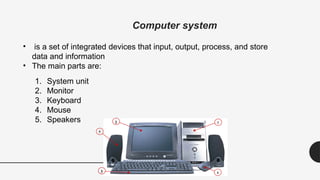
Computer system
• is a set of integrated devices that input, output, process, and store
data and information
• The main parts are:
1. System unit
2. Monitor
3. Keyboard
4. Mouse
5. Speakers 2
3 4
5
1
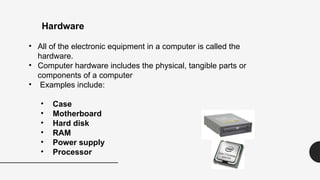
• All of the electronic equipment in a computer is called the
hardware.
• Computer hardware includes the physical, tangible parts or
components of a computer
• Examples include:
• Case
• Motherboard
• Hard disk
• RAM
• Power supply
• Processor
Hardware
Peripherals
• Peripherals are devices that connect to the system unit using
cables or wireless technologies. Typical peripherals include:
• Monitor
• Keyboard
• Printer
• Scanner
• Speakers
• Mouse
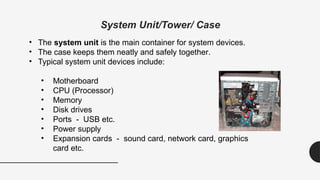
System Unit/Tower/ Case
• The system unit is the main container for system devices.
• The case keeps them neatly and safely together.
• Typical system unit devices include:
• Motherboard
• CPU (Processor)
• Memory
• Disk drives
• Ports - USB etc.
• Power supply
• Expansion cards - sound card, network card, graphics
card etc.
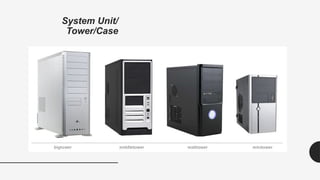
System Unit/
Tower/Case
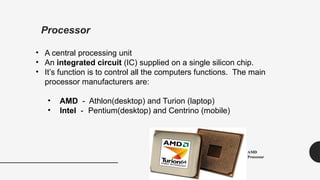
Processor
• A central processing unit
• An integrated circuit (IC) supplied on a single silicon chip.
• It’s function is to control all the computers functions. The main
processor manufacturers are:
• AMD - Athlon(desktop) and Turion (laptop)
• Intel - Pentium(desktop) and Centrino (mobile)
AMD
Processor
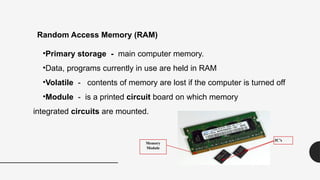
•Primary storage - main computer memory.
•Data, programs currently in use are held in RAM
•Volatile - contents of memory are lost if the computer is turned off
•Module - is a printed circuit board on which memory
integrated circuits are mounted.
Random Access Memory (RAM)
IC’s
Memory
Module
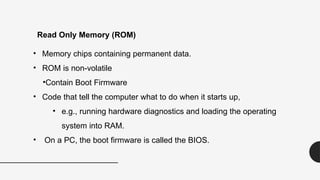
• Memory chips containing permanent data.
• ROM is non-volatile
•Contain Boot Firmware
• Code that tell the computer what to do when it starts up,
• e.g., running hardware diagnostics and loading the operating
system into RAM.
• On a PC, the boot firmware is called the BIOS.
Read Only Memory (ROM)
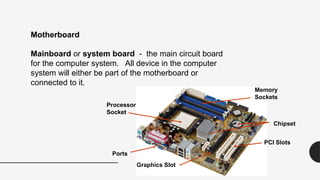
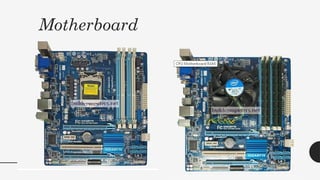
Mainboard or system board - the main circuit board
for the computer system. All device in the computer
system will either be part of the motherboard or
connected to it.
Motherboard
Processor
Socket
Memory
Sockets
Ports
PCI Slots
Graphics Slot
Chipset
Motherboard
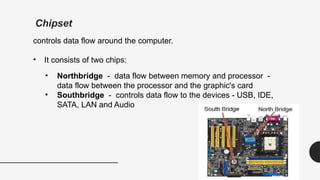
Chipset
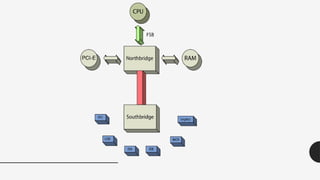
controls data flow around the computer.
• It consists of two chips:
• Northbridge - data flow between memory and processor -
data flow between the processor and the graphic's card
• Southbridge - controls data flow to the devices - USB, IDE,
SATA, LAN and Audio
IDE , SATA and PCI
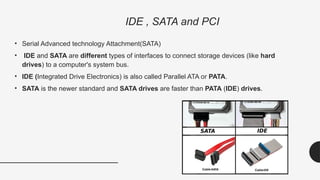
• Serial Advanced technology Attachment(SATA)
• IDE and SATA are different types of interfaces to connect storage devices (like hard
drives) to a computer's system bus.
• IDE (Integrated Drive Electronics) is also called Parallel ATA or PATA.
• SATA is the newer standard and SATA drives are faster than PATA (IDE) drives.
PCI • Peripheral Component Interconnect (PCI)
• used to connect sound cards and network cards.
• PCI was also used to connect video cards to the
motherboard, but graphics demand from gaming
made it inadequate for that use
• Latest version- PCIe-express
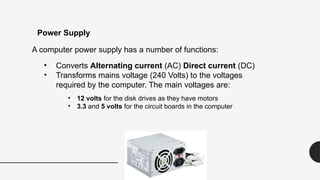
A computer power supply has a number of functions:
• Converts Alternating current (AC) Direct current (DC)
• Transforms mains voltage (240 Volts) to the voltages
required by the computer. The main voltages are:
• 12 volts for the disk drives as they have motors
• 3.3 and 5 volts for the circuit boards in the computer
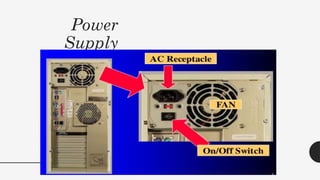
Power Supply
Power
Supply
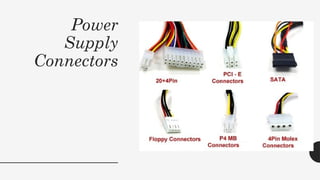
Power
Supply
Connectors
Let’s have
some
practical!

Computer system Inside the System Unit Processor

  • 1.
    INTRODUCTION TO INFORMATION ANDCOMMUNICATION TECHNOLOGY (ICT) Lab 01 Computer Hardware and its usability
  • 2.
  • 3.
    Computer system • isa set of integrated devices that input, output, process, and store data and information • The main parts are: 1. System unit 2. Monitor 3. Keyboard 4. Mouse 5. Speakers 2 3 4 5 1
  • 4.
    • All ofthe electronic equipment in a computer is called the hardware. • Computer hardware includes the physical, tangible parts or components of a computer • Examples include: • Case • Motherboard • Hard disk • RAM • Power supply • Processor Hardware
  • 5.
    Peripherals • Peripherals aredevices that connect to the system unit using cables or wireless technologies. Typical peripherals include: • Monitor • Keyboard • Printer • Scanner • Speakers • Mouse
  • 6.
    System Unit/Tower/ Case •The system unit is the main container for system devices. • The case keeps them neatly and safely together. • Typical system unit devices include: • Motherboard • CPU (Processor) • Memory • Disk drives • Ports - USB etc. • Power supply • Expansion cards - sound card, network card, graphics card etc.
  • 7.
  • 8.
    Processor • A centralprocessing unit • An integrated circuit (IC) supplied on a single silicon chip. • It’s function is to control all the computers functions. The main processor manufacturers are: • AMD - Athlon(desktop) and Turion (laptop) • Intel - Pentium(desktop) and Centrino (mobile) AMD Processor
  • 9.
    •Primary storage -main computer memory. •Data, programs currently in use are held in RAM •Volatile - contents of memory are lost if the computer is turned off •Module - is a printed circuit board on which memory integrated circuits are mounted. Random Access Memory (RAM) IC’s Memory Module
  • 10.
    • Memory chipscontaining permanent data. • ROM is non-volatile •Contain Boot Firmware • Code that tell the computer what to do when it starts up, • e.g., running hardware diagnostics and loading the operating system into RAM. • On a PC, the boot firmware is called the BIOS. Read Only Memory (ROM)
  • 12.
    Mainboard or systemboard - the main circuit board for the computer system. All device in the computer system will either be part of the motherboard or connected to it. Motherboard Processor Socket Memory Sockets Ports PCI Slots Graphics Slot Chipset
  • 13.
  • 14.
    Chipset controls data flowaround the computer. • It consists of two chips: • Northbridge - data flow between memory and processor - data flow between the processor and the graphic's card • Southbridge - controls data flow to the devices - USB, IDE, SATA, LAN and Audio
  • 16.
    IDE , SATAand PCI • Serial Advanced technology Attachment(SATA) • IDE and SATA are different types of interfaces to connect storage devices (like hard drives) to a computer's system bus. • IDE (Integrated Drive Electronics) is also called Parallel ATA or PATA. • SATA is the newer standard and SATA drives are faster than PATA (IDE) drives.
  • 17.
    PCI • PeripheralComponent Interconnect (PCI) • used to connect sound cards and network cards. • PCI was also used to connect video cards to the motherboard, but graphics demand from gaming made it inadequate for that use • Latest version- PCIe-express
  • 18.
    A computer powersupply has a number of functions: • Converts Alternating current (AC) Direct current (DC) • Transforms mains voltage (240 Volts) to the voltages required by the computer. The main voltages are: • 12 volts for the disk drives as they have motors • 3.3 and 5 volts for the circuit boards in the computer Power Supply
  • 19.
  • 20.
  • 21.

Editor's Notes

  • #10 What is boot firmware? Often, the term firmware is used to refer specifically to boot firmware, which controls a computer from the time that it is turned on until the primary operating system has taken over. Boot firmware's main function is to initialize the hardware and then to boot (load and execute) the primary operating system.
  • #12 Chipset: It relays communications between the CPU and the many connected storage and expansion devices. Peripheral Component Interconnect: network cards, sound cards, modems, extra ports such as Universal Serial Bus (USB
  • #15 FSB: front side bus