Your Interactive Guide
to the Digital World
Discovering
Computers 2012
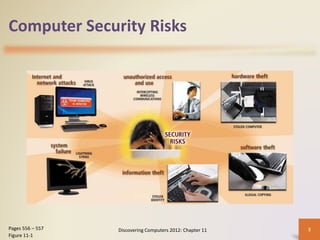
Computer Security Risks
• A computer security risk is any event or action that could
cause a loss of or damage to computer hardware,
software, data, information, or processing capability
• A cybercrime is an online or Internet-based illegal act
Discovering Computers 2012: Chapter 11 2
Pages 556 - 557
Hackers Crackers Script Kiddies Corporate Spies
Unethical
Employees
Cyberextortionists Cyberterrorists
Computer Security Risks
Discovering Computers 2012: Chapter 11 3
Pages 556 – 557
Figure 11-1
Discovering Computers 2012: Chapter 11 4
Computer Security Risks
Internet and Network Attacks
• Information transmitted over networks has a higher
degree of security risk than information kept on an
organization’s premises
• An online security service is a Web site that evaluates
your computer to check for Internet and e-mail
vulnerabilities
Discovering Computers 2012: Chapter 11 5
Page 558
Figure 11-2
Internet and Network Attacks
Computer
Virus
• Affects a
computer
negatively by
altering the
way the
computer
works
Worm
• Copies itself
repeatedly,
using up
resources
and possibly
shutting
down the
computer or
network
Trojan Horse
• A malicious
program that
hides within
or looks like
a legitimate
program
Rootkit
• Program that
hides in a
computer
and allows
someone
from a
remote
location to
take full
control
Discovering Computers 2012: Chapter 11 6
Page 558
Internet and Network Attacks
Discovering Computers 2012: Chapter 11 7
Internet and Network Attacks
• An infected computer has one or more of the
following symptoms:
Discovering Computers 2012: Chapter 11 8
Pages 558 - 559
Operating system
runs much slower
than usual
Available memory
is less than
expected
Files become
corrupted
Screen displays
unusual message
or image
Music or unusual
sound plays
randomly
Existing programs
and files disappear
Programs or files
do not work
properly
Unknown
programs or files
mysteriously
appear
System properties
change
Operating system
does not start up
Operating system
shuts down
unexpectedly
Internet and Network Attacks
Discovering Computers 2012: Chapter 11 9
Page 559
Figure 11-3
Internet and Network Attacks
Discovering Computers 2012: Chapter 11 10
Page 561
Figure 11-6
Internet and Network Attacks
• Users can take several
precautions to protect
their home and work
computers and mobile
devices from these
malicious infections
Discovering Computers 2012: Chapter 11 11
Page 560 – 561
Figure 11-7
Internet and Network Attacks
• A botnet is a group of compromised computers connected to a
network
– A compromised computer is known as a zombie
• A denial of service attack (DoS attack) disrupts computer access to
Internet services
– Distributed DoS (DDoS)
• A back door is a program or set of instructions in a program that
allow users to bypass security controls
• Spoofing is a technique intruders use to make their network or
Internet transmission appear legitimate
Discovering Computers 2012: Chapter 11 12
Pages 562 - 563
Internet and Network Attacks
• A firewall is hardware and/or software that
protects a network’s resources from intrusion
Discovering Computers 2012: Chapter 11 13
Pages 563 - 564
Figure 11-8
Internet and Network Attacks
Intrusion detection software
• Analyzes all network traffic
• Assesses system vulnerabilities
• Identifies any unauthorized intrusions
• Notifies network administrators of suspicious behavior
patterns or system breaches
Honeypot
• Vulnerable computer that is set up to entice an intruder to
break into it
Discovering Computers 2012: Chapter 11 14
Page 564
Unauthorized Access and Use
Unauthorized access is
the use of a computer or
network without
permission
Unauthorized use is the
use of a computer or its
data for unapproved or
possibly illegal activities
Discovering Computers 2012: Chapter 11 15
Page 564
Unauthorized Access and Use
• Organizations take
several measures to
help prevent
unauthorized access
and use
– Acceptable use policy
– Disable file and printer
sharing
– Firewalls
– Intrusion detection
software
Discovering Computers 2012: Chapter 11 16
Page 565
Figure 11-10
Unauthorized Access and Use
• Access controls define who can access a
computer, when they can access it, and what
actions they can take
– Two-phase processes called identification and
authentication
– User name
– Password
– Passphrase
– CAPTCHA
Discovering Computers 2012: Chapter 11 17
Pages 565 – 567
Figure 11-11
Unauthorized Access and Use
• A possessed object is any
item that you must carry to
gain access to a computer
or computer facility
– Often are used in
combination with a personal
identification number (PIN)
• A biometric device
authenticates a person’s
identity by translating a
personal characteristic into
a digital code that is
compared with a digital
code in a computer
Discovering Computers 2012: Chapter 11 18
Page 568
Figure 11-14
Unauthorized Access and Use
• Digital forensics is the discovery, collection, and
analysis of evidence found on computers and
networks
• Many areas use digital forensics
Discovering Computers 2012: Chapter 11 19
Page 569
Law
enforcement
Criminal
prosecutors
Military
intelligence
Insurance
agencies
Information
security
departments
Unauthorized Access and Use
Discovering Computers 2012: Chapter 11 20
QUESTIONS SW 1
Discovering Computers 2012: Chapter 11 21
1. Define the term computer security risks, and briefly describe
the 7 types of cybercrime perpetrators.
2. Describe the 4 types of Internet and network attacks.
3. Discuss 4 techniques to prevent unauthorized computer
access and use.
Hardware Theft and Vandalism
Hardware theft is the
act of stealing
computer equipment
Hardware vandalism
is the act of defacing
or destroying
computer equipment
Discovering Computers 2012: Chapter 11 22
Page 570
Hardware Theft and Vandalism
• To help reduce the of chances of theft, companies
and schools use a variety of security measures
Discovering Computers 2012: Chapter 11 23
Page 570
Figure 11-15
Physical access controls Alarm systems
Cables to lock
equipment
Real time location
system
Passwords, possessed
objects, and biometrics
Software Theft
• Software theft occurs when someone:
Discovering Computers 2012: Chapter 11 24
Page 571
Steals software
media
Intentionally
erases programs
Illegally copies a
program
Illegally
registers and/or
activates a
program
Software Theft
• A single-user license agreement typically contains the
following conditions:
Discovering Computers 2012: Chapter 11 25
Page 571
Permitted to
• Install the software on one computer
• Make one copy of the software
• Remove the software from your computer before giving it away or selling it
Not permitted to
• Install the software on a network
• Give copies to friends or colleagues while continuing to use the software
• Export the software
• Rent or lease the software
Software Theft
• Copying, loaning,
borrowing, renting, or
distributing software
can be a violation of
copyright law
• Some software requires
product activation to
function fully
Discovering Computers 2012: Chapter 11 26
Pages 571 – 572
Figure 11-16
Information Theft
• Information theft occurs when someone steals
personal or confidential information
• Encryption is a process of converting readable
data into unreadable characters to prevent
unauthorized access
Discovering Computers 2012: Chapter 11 27
Pages 572 - 573
Figure 11-17
Information Theft
Discovering Computers 2012: Chapter 11 28
Page 573
Figure 11-18
Information Theft
Discovering Computers 2012: Chapter 11 29
Information Theft
• A digital signature is an encrypted code that a
person, Web site, or organization attaches to an
electronic message to verify the identity of the
sender
– Often used to ensure that an impostor is not
participating in an Internet transaction
• Web browsers and Web sites use encryption
techniques
Discovering Computers 2012: Chapter 11 30
Page 574
Information Theft
• Popular security techniques include
Discovering Computers 2012: Chapter 11 31
Pages 574 - 575
Digital
Certificates
Transport Layer
Security (TLS)
Secure HTTP VPN
Information Theft
Discovering Computers 2012: Chapter 11 32
Pages 574 - 575
Figures 11-19 – 11-20
QUESTIONS SW 2
Discovering Computers 2012: Chapter 11 33
QUESTIONS
1. Identify 4 safeguards against hardware theft and vandalism.
2. Explain 1 way how software manufacturers protect against
software piracy.
3. Discuss how encryption works, and explain why it is necessary.
System Failure
• A system failure is the prolonged malfunction of a
computer
• A variety of factors can lead to system failure,
including:
– Aging hardware
– Natural disasters
– Electrical power problems
• Noise, undervoltages, and overvoltages
– Errors in computer programs
Discovering Computers 2012: Chapter 11 34
Page 575
System Failure
• Two ways to protect from system failures caused
by electrical power variations include surge
protectors and uninterruptable power supplies
(UPS)
Discovering Computers 2012: Chapter 11 35
Page 576
Figures 11-21 – 11-22
Backing Up – The Ultimate Safeguard
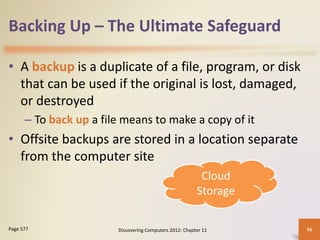
• A backup is a duplicate of a file, program, or disk
that can be used if the original is lost, damaged,
or destroyed
– To back up a file means to make a copy of it
• Offsite backups are stored in a location separate
from the computer site
Discovering Computers 2012: Chapter 11 36
Page 577
Cloud
Storage
Backing Up – The Ultimate Safeguard
• Two categories of
backups:
– Full backup
– Selective backup
• Three-generation
backup policy
Discovering Computers 2012: Chapter 11 37
Page 577
Grandparent
Parent
Child
Wireless Security
• Wireless access poses additional security risks
– About 80 percent of wireless networks have no security
protection
• War driving allows individuals to detect wireless
networks while driving a vehicle through the area
Discovering Computers 2012: Chapter 11 38
Page 578
Figure 11-23
Wireless Security
• In additional to using firewalls, some safeguards
improve security of wireless networks:
Discovering Computers 2012: Chapter 11 39
Page 578
A wireless access
point should not
broadcast an SSID
Change the default
SSID
Configure a WAP
so that only
certain devices can
access it
Use WPA or WPA2
security standards
Health Concerns of Computer Use
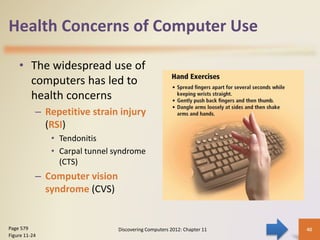
• The widespread use of
computers has led to
health concerns
– Repetitive strain injury
(RSI)
• Tendonitis
• Carpal tunnel syndrome
(CTS)
– Computer vision
syndrome (CVS)
Discovering Computers 2012: Chapter 11 40
Page 579
Figure 11-24
Health Concerns of Computer Use
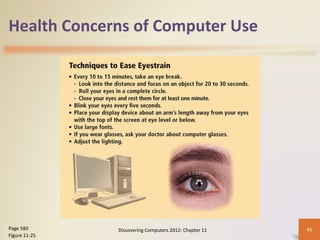
Discovering Computers 2012: Chapter 11 41
Page 580
Figure 11-25
Health Concerns of Computer Use
• Ergonomics is an
applied science devoted
to incorporating
comfort, efficiency, and
safety into the design of
items in the workplace
Discovering Computers 2012: Chapter 11 42
Page 580
Figure 11-26
Health Concerns of Computer Use
Discovering Computers 2012: Chapter 11 43
Health Concerns of Computer Use
• Computer addiction occurs when the computer
consumes someone’s entire social life
• Symptoms of users include:
Discovering Computers 2012: Chapter 11 44
Page 581
Craves
computer
time
Overjoyed
when at the
computer
Unable to stop
computer
activity
Irritable when
not at the
computer
Neglects
family and
friends
Problems at
work or
school
QUESTIONS SW 3
Discovering Computers 2012: Chapter 11 45
1. Discuss 2 types of devices available that protect computers
from system failure.
2. Explain 2 options available for backing up computer
resources.
3. Identify 1 risk associated with wireless communications
4. Discuss 3 ways to prevent health-related injuries due to
computer use.
Ethics and Society
• Computer ethics are
the moral guidelines
that govern the use of
computers and
information systems
• Information accuracy is
a concern
– Not all information on
the Web is correct
Discovering Computers 2012: Chapter 11 46
Pages 581 – 582
Figure 11-28
Ethics and Society
Discovering Computers 2012: Chapter 11 47
Ethics and Society
Intellectual property rights are the rights to
which creators are entitled for their work
• A copyright protects any tangible form of expression
An IT code of conduct is a written guideline
that helps determine whether a specific
computer action is ethical or unethical
Discovering Computers 2012: Chapter 11 48
Page 582
Ethics and Society
Discovering Computers 2012: Chapter 11 49
Page 583
Figure 11-29
Ethics and Society
• Green computing involves reducing the electricity
and environmental waste while using a computer
Discovering Computers 2012: Chapter 11 50
Pages 583 – 584
Figure 11-30
Ethics and Society
• Information privacy refers to the right of
individuals and companies to deny or restrict the
collection and use of information about them
• Huge databases store data online
• It is important to safeguard your information
Discovering Computers 2012: Chapter 11 51
Page 584
Ethics and Society
• When you fill out a
form, the merchant that
receives the form
usually enters it into a
database
• Many companies today
allow people to specify
whether they want
their personal
information distributed
Discovering Computers 2012: Chapter 11 52
Page 585
Figure 11-32
Ethics and Society
• Spam is an unsolicited
e-mail message or
newsgroup posting
• E-mail filtering blocks
e-mail messages from
designated sources
• Anti-spam programs
attempt to remove
spam before it reaches
your inbox
Discovering Computers 2012: Chapter 11 53
Page 587
Figure 11-34
Ethics and Society
• Phishing is a scam in
which a perpetrator sends
an official looking e-mail
message that attempts to
obtain your personal and
financial information
• Pharming is a scam
where a perpetrator
attempts to obtain your
personal and financial
information via spoofing
Discovering Computers 2012: Chapter 11 54
Pages 587 - 588
Figure 11-35
Ethics and Society
• Content filtering is the
process of restricting
access to certain material
on the Web
• Many businesses use
content filtering
• Internet Content Rating
Association (ICRA)
• Web filtering software
restricts access to
specified Web sites
Discovering Computers 2012: Chapter 11 55
Pages 590 – 591
Figure 11-37
QUESTIONS SW 4
Discovering Computers 2012: Chapter 11 56
1. Differentiate “Intellectual property right”
from “copyright.”
2. Give 2 Green computing suggestions and
explain briefly.
3. Differentiate “phishing” from “pharming.”

Computer security and safety.pptx

  • 1.
    Your Interactive Guide tothe Digital World Discovering Computers 2012
  • 2.
    Computer Security Risks •A computer security risk is any event or action that could cause a loss of or damage to computer hardware, software, data, information, or processing capability • A cybercrime is an online or Internet-based illegal act Discovering Computers 2012: Chapter 11 2 Pages 556 - 557 Hackers Crackers Script Kiddies Corporate Spies Unethical Employees Cyberextortionists Cyberterrorists
  • 3.
    Computer Security Risks DiscoveringComputers 2012: Chapter 11 3 Pages 556 – 557 Figure 11-1
  • 4.
    Discovering Computers 2012:Chapter 11 4 Computer Security Risks
  • 5.
    Internet and NetworkAttacks • Information transmitted over networks has a higher degree of security risk than information kept on an organization’s premises • An online security service is a Web site that evaluates your computer to check for Internet and e-mail vulnerabilities Discovering Computers 2012: Chapter 11 5 Page 558 Figure 11-2
  • 6.
    Internet and NetworkAttacks Computer Virus • Affects a computer negatively by altering the way the computer works Worm • Copies itself repeatedly, using up resources and possibly shutting down the computer or network Trojan Horse • A malicious program that hides within or looks like a legitimate program Rootkit • Program that hides in a computer and allows someone from a remote location to take full control Discovering Computers 2012: Chapter 11 6 Page 558
  • 7.
    Internet and NetworkAttacks Discovering Computers 2012: Chapter 11 7
  • 8.
    Internet and NetworkAttacks • An infected computer has one or more of the following symptoms: Discovering Computers 2012: Chapter 11 8 Pages 558 - 559 Operating system runs much slower than usual Available memory is less than expected Files become corrupted Screen displays unusual message or image Music or unusual sound plays randomly Existing programs and files disappear Programs or files do not work properly Unknown programs or files mysteriously appear System properties change Operating system does not start up Operating system shuts down unexpectedly
  • 9.
    Internet and NetworkAttacks Discovering Computers 2012: Chapter 11 9 Page 559 Figure 11-3
  • 10.
    Internet and NetworkAttacks Discovering Computers 2012: Chapter 11 10 Page 561 Figure 11-6
  • 11.
    Internet and NetworkAttacks • Users can take several precautions to protect their home and work computers and mobile devices from these malicious infections Discovering Computers 2012: Chapter 11 11 Page 560 – 561 Figure 11-7
  • 12.
    Internet and NetworkAttacks • A botnet is a group of compromised computers connected to a network – A compromised computer is known as a zombie • A denial of service attack (DoS attack) disrupts computer access to Internet services – Distributed DoS (DDoS) • A back door is a program or set of instructions in a program that allow users to bypass security controls • Spoofing is a technique intruders use to make their network or Internet transmission appear legitimate Discovering Computers 2012: Chapter 11 12 Pages 562 - 563
  • 13.
    Internet and NetworkAttacks • A firewall is hardware and/or software that protects a network’s resources from intrusion Discovering Computers 2012: Chapter 11 13 Pages 563 - 564 Figure 11-8
  • 14.
    Internet and NetworkAttacks Intrusion detection software • Analyzes all network traffic • Assesses system vulnerabilities • Identifies any unauthorized intrusions • Notifies network administrators of suspicious behavior patterns or system breaches Honeypot • Vulnerable computer that is set up to entice an intruder to break into it Discovering Computers 2012: Chapter 11 14 Page 564
  • 15.
    Unauthorized Access andUse Unauthorized access is the use of a computer or network without permission Unauthorized use is the use of a computer or its data for unapproved or possibly illegal activities Discovering Computers 2012: Chapter 11 15 Page 564
  • 16.
    Unauthorized Access andUse • Organizations take several measures to help prevent unauthorized access and use – Acceptable use policy – Disable file and printer sharing – Firewalls – Intrusion detection software Discovering Computers 2012: Chapter 11 16 Page 565 Figure 11-10
  • 17.
    Unauthorized Access andUse • Access controls define who can access a computer, when they can access it, and what actions they can take – Two-phase processes called identification and authentication – User name – Password – Passphrase – CAPTCHA Discovering Computers 2012: Chapter 11 17 Pages 565 – 567 Figure 11-11
  • 18.
    Unauthorized Access andUse • A possessed object is any item that you must carry to gain access to a computer or computer facility – Often are used in combination with a personal identification number (PIN) • A biometric device authenticates a person’s identity by translating a personal characteristic into a digital code that is compared with a digital code in a computer Discovering Computers 2012: Chapter 11 18 Page 568 Figure 11-14
  • 19.
    Unauthorized Access andUse • Digital forensics is the discovery, collection, and analysis of evidence found on computers and networks • Many areas use digital forensics Discovering Computers 2012: Chapter 11 19 Page 569 Law enforcement Criminal prosecutors Military intelligence Insurance agencies Information security departments
  • 20.
    Unauthorized Access andUse Discovering Computers 2012: Chapter 11 20
  • 21.
    QUESTIONS SW 1 DiscoveringComputers 2012: Chapter 11 21 1. Define the term computer security risks, and briefly describe the 7 types of cybercrime perpetrators. 2. Describe the 4 types of Internet and network attacks. 3. Discuss 4 techniques to prevent unauthorized computer access and use.
  • 22.
    Hardware Theft andVandalism Hardware theft is the act of stealing computer equipment Hardware vandalism is the act of defacing or destroying computer equipment Discovering Computers 2012: Chapter 11 22 Page 570
  • 23.
    Hardware Theft andVandalism • To help reduce the of chances of theft, companies and schools use a variety of security measures Discovering Computers 2012: Chapter 11 23 Page 570 Figure 11-15 Physical access controls Alarm systems Cables to lock equipment Real time location system Passwords, possessed objects, and biometrics
  • 24.
    Software Theft • Softwaretheft occurs when someone: Discovering Computers 2012: Chapter 11 24 Page 571 Steals software media Intentionally erases programs Illegally copies a program Illegally registers and/or activates a program
  • 25.
    Software Theft • Asingle-user license agreement typically contains the following conditions: Discovering Computers 2012: Chapter 11 25 Page 571 Permitted to • Install the software on one computer • Make one copy of the software • Remove the software from your computer before giving it away or selling it Not permitted to • Install the software on a network • Give copies to friends or colleagues while continuing to use the software • Export the software • Rent or lease the software
  • 26.
    Software Theft • Copying,loaning, borrowing, renting, or distributing software can be a violation of copyright law • Some software requires product activation to function fully Discovering Computers 2012: Chapter 11 26 Pages 571 – 572 Figure 11-16
  • 27.
    Information Theft • Informationtheft occurs when someone steals personal or confidential information • Encryption is a process of converting readable data into unreadable characters to prevent unauthorized access Discovering Computers 2012: Chapter 11 27 Pages 572 - 573 Figure 11-17
  • 28.
    Information Theft Discovering Computers2012: Chapter 11 28 Page 573 Figure 11-18
  • 29.
  • 30.
    Information Theft • Adigital signature is an encrypted code that a person, Web site, or organization attaches to an electronic message to verify the identity of the sender – Often used to ensure that an impostor is not participating in an Internet transaction • Web browsers and Web sites use encryption techniques Discovering Computers 2012: Chapter 11 30 Page 574
  • 31.
    Information Theft • Popularsecurity techniques include Discovering Computers 2012: Chapter 11 31 Pages 574 - 575 Digital Certificates Transport Layer Security (TLS) Secure HTTP VPN
  • 32.
    Information Theft Discovering Computers2012: Chapter 11 32 Pages 574 - 575 Figures 11-19 – 11-20
  • 33.
    QUESTIONS SW 2 DiscoveringComputers 2012: Chapter 11 33 QUESTIONS 1. Identify 4 safeguards against hardware theft and vandalism. 2. Explain 1 way how software manufacturers protect against software piracy. 3. Discuss how encryption works, and explain why it is necessary.
  • 34.
    System Failure • Asystem failure is the prolonged malfunction of a computer • A variety of factors can lead to system failure, including: – Aging hardware – Natural disasters – Electrical power problems • Noise, undervoltages, and overvoltages – Errors in computer programs Discovering Computers 2012: Chapter 11 34 Page 575
  • 35.
    System Failure • Twoways to protect from system failures caused by electrical power variations include surge protectors and uninterruptable power supplies (UPS) Discovering Computers 2012: Chapter 11 35 Page 576 Figures 11-21 – 11-22
  • 36.
    Backing Up –The Ultimate Safeguard • A backup is a duplicate of a file, program, or disk that can be used if the original is lost, damaged, or destroyed – To back up a file means to make a copy of it • Offsite backups are stored in a location separate from the computer site Discovering Computers 2012: Chapter 11 36 Page 577 Cloud Storage
  • 37.
    Backing Up –The Ultimate Safeguard • Two categories of backups: – Full backup – Selective backup • Three-generation backup policy Discovering Computers 2012: Chapter 11 37 Page 577 Grandparent Parent Child
  • 38.
    Wireless Security • Wirelessaccess poses additional security risks – About 80 percent of wireless networks have no security protection • War driving allows individuals to detect wireless networks while driving a vehicle through the area Discovering Computers 2012: Chapter 11 38 Page 578 Figure 11-23
  • 39.
    Wireless Security • Inadditional to using firewalls, some safeguards improve security of wireless networks: Discovering Computers 2012: Chapter 11 39 Page 578 A wireless access point should not broadcast an SSID Change the default SSID Configure a WAP so that only certain devices can access it Use WPA or WPA2 security standards
  • 40.
    Health Concerns ofComputer Use • The widespread use of computers has led to health concerns – Repetitive strain injury (RSI) • Tendonitis • Carpal tunnel syndrome (CTS) – Computer vision syndrome (CVS) Discovering Computers 2012: Chapter 11 40 Page 579 Figure 11-24
  • 41.
    Health Concerns ofComputer Use Discovering Computers 2012: Chapter 11 41 Page 580 Figure 11-25
  • 42.
    Health Concerns ofComputer Use • Ergonomics is an applied science devoted to incorporating comfort, efficiency, and safety into the design of items in the workplace Discovering Computers 2012: Chapter 11 42 Page 580 Figure 11-26
  • 43.
    Health Concerns ofComputer Use Discovering Computers 2012: Chapter 11 43
  • 44.
    Health Concerns ofComputer Use • Computer addiction occurs when the computer consumes someone’s entire social life • Symptoms of users include: Discovering Computers 2012: Chapter 11 44 Page 581 Craves computer time Overjoyed when at the computer Unable to stop computer activity Irritable when not at the computer Neglects family and friends Problems at work or school
  • 45.
    QUESTIONS SW 3 DiscoveringComputers 2012: Chapter 11 45 1. Discuss 2 types of devices available that protect computers from system failure. 2. Explain 2 options available for backing up computer resources. 3. Identify 1 risk associated with wireless communications 4. Discuss 3 ways to prevent health-related injuries due to computer use.
  • 46.
    Ethics and Society •Computer ethics are the moral guidelines that govern the use of computers and information systems • Information accuracy is a concern – Not all information on the Web is correct Discovering Computers 2012: Chapter 11 46 Pages 581 – 582 Figure 11-28
  • 47.
    Ethics and Society DiscoveringComputers 2012: Chapter 11 47
  • 48.
    Ethics and Society Intellectualproperty rights are the rights to which creators are entitled for their work • A copyright protects any tangible form of expression An IT code of conduct is a written guideline that helps determine whether a specific computer action is ethical or unethical Discovering Computers 2012: Chapter 11 48 Page 582
  • 49.
    Ethics and Society DiscoveringComputers 2012: Chapter 11 49 Page 583 Figure 11-29
  • 50.
    Ethics and Society •Green computing involves reducing the electricity and environmental waste while using a computer Discovering Computers 2012: Chapter 11 50 Pages 583 – 584 Figure 11-30
  • 51.
    Ethics and Society •Information privacy refers to the right of individuals and companies to deny or restrict the collection and use of information about them • Huge databases store data online • It is important to safeguard your information Discovering Computers 2012: Chapter 11 51 Page 584
  • 52.
    Ethics and Society •When you fill out a form, the merchant that receives the form usually enters it into a database • Many companies today allow people to specify whether they want their personal information distributed Discovering Computers 2012: Chapter 11 52 Page 585 Figure 11-32
  • 53.
    Ethics and Society •Spam is an unsolicited e-mail message or newsgroup posting • E-mail filtering blocks e-mail messages from designated sources • Anti-spam programs attempt to remove spam before it reaches your inbox Discovering Computers 2012: Chapter 11 53 Page 587 Figure 11-34
  • 54.
    Ethics and Society •Phishing is a scam in which a perpetrator sends an official looking e-mail message that attempts to obtain your personal and financial information • Pharming is a scam where a perpetrator attempts to obtain your personal and financial information via spoofing Discovering Computers 2012: Chapter 11 54 Pages 587 - 588 Figure 11-35
  • 55.
    Ethics and Society •Content filtering is the process of restricting access to certain material on the Web • Many businesses use content filtering • Internet Content Rating Association (ICRA) • Web filtering software restricts access to specified Web sites Discovering Computers 2012: Chapter 11 55 Pages 590 – 591 Figure 11-37
  • 56.
    QUESTIONS SW 4 DiscoveringComputers 2012: Chapter 11 56 1. Differentiate “Intellectual property right” from “copyright.” 2. Give 2 Green computing suggestions and explain briefly. 3. Differentiate “phishing” from “pharming.”