Namaste
Today’s objective
• Program Development Cycle
• This means the steps that are followed during the development/
writing of a program.
CFU-1.
What is a program?
Why do we need PDC?
A computer solves any problem using a program.  To solve the problem the
instructions must be clear and correct.  Clear instructions can be written only
if we properly plan the program.
What is PDC?
Keyword:
Series of steps in process of program development.
The series of steps that is followed while writing a program is called as
program development cycle.
Question: 1. Is PDC universal and concrete?
2. Can program be developed without PDC?
Basic steps of PDC
• Analyze or define the problem
• Design the solution
• Code the program(using programming language)
• Testing and debugging the program
• Documentation of program
• Implementation and maintenance
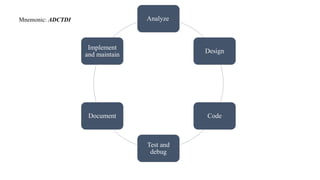
Analyze
Design
Code
Test and
debug
Document
Implement
and maintain
Mnemonic: ADCTDI
Analyze
Understand and disect the nature of problem.
Collect the required data and information.
This phase must explain what the problem is and how the program intends
to solve the problem.
Design Tools:
• Focus on program logic rather than syntaxes concerned in
programming.
• Algorithm:
Sequential Steps for solving a problem.
• Flowchart:
Diagrammatic representation of the steps involved in solving a
problem.
Code
• Choose a programming language based on the design and suitablity for
the program development.
• Keep the program simple and avoid complex logic.
• Program must be so simple that it can be communicated and easily
understood by other programmers.
• Comments are helpful in understanding the program.
[Most codes are either compiled or translated based on the programming
language.]
What is compilation/ interpretion?
• Translation of high-level language to machine codes.
Test and Debug
Programs may have errors. The programs must be tested and
debugged(removing the errors).
Types of errors:
• Syntax errors- error in the syntax of programming language.
• Runtime errors- error while execution of program.
Example: entering floating point data in int data type.
• Logic errors- error in the logic of program made by
programmer.
Document
• Keeping the record of all the steps and procedures.
• Includes algorithms, flowcharts, program mannuals, test reports, bug
reports etc.
• For the portability of the program.(To be used by another progammer.)
Implement and Maintenance
• Installation of program in users computer.
• A program should contain documentation which contains:
Program verification document.
Outlining the checking
Testing and Correction procedures along with test data.
Why maintenance? (update)
Change in tools that program runs on. Example: OS update may make a
program incompatible.
Thank You!

computer science presentation on program development cycle

  • 1.
  • 2.
    Today’s objective • ProgramDevelopment Cycle • This means the steps that are followed during the development/ writing of a program. CFU-1. What is a program?
  • 3.
    Why do weneed PDC? A computer solves any problem using a program.  To solve the problem the instructions must be clear and correct.  Clear instructions can be written only if we properly plan the program.
  • 4.
    What is PDC? Keyword: Seriesof steps in process of program development. The series of steps that is followed while writing a program is called as program development cycle. Question: 1. Is PDC universal and concrete? 2. Can program be developed without PDC?
  • 5.
    Basic steps ofPDC • Analyze or define the problem • Design the solution • Code the program(using programming language) • Testing and debugging the program • Documentation of program • Implementation and maintenance
  • 6.
  • 7.
    Analyze Understand and disectthe nature of problem. Collect the required data and information. This phase must explain what the problem is and how the program intends to solve the problem.
  • 8.
    Design Tools: • Focuson program logic rather than syntaxes concerned in programming. • Algorithm: Sequential Steps for solving a problem. • Flowchart: Diagrammatic representation of the steps involved in solving a problem.
  • 9.
    Code • Choose aprogramming language based on the design and suitablity for the program development. • Keep the program simple and avoid complex logic. • Program must be so simple that it can be communicated and easily understood by other programmers. • Comments are helpful in understanding the program. [Most codes are either compiled or translated based on the programming language.]
  • 10.
    What is compilation/interpretion? • Translation of high-level language to machine codes.
  • 11.
    Test and Debug Programsmay have errors. The programs must be tested and debugged(removing the errors). Types of errors: • Syntax errors- error in the syntax of programming language. • Runtime errors- error while execution of program. Example: entering floating point data in int data type. • Logic errors- error in the logic of program made by programmer.
  • 12.
    Document • Keeping therecord of all the steps and procedures. • Includes algorithms, flowcharts, program mannuals, test reports, bug reports etc. • For the portability of the program.(To be used by another progammer.)
  • 13.
    Implement and Maintenance •Installation of program in users computer. • A program should contain documentation which contains: Program verification document. Outlining the checking Testing and Correction procedures along with test data. Why maintenance? (update) Change in tools that program runs on. Example: OS update may make a program incompatible.
  • 14.