Computer Program
and
Programming Language
CSE Department
01 Introduction
02 Steps to Solve Problems
03 Algorithm (Flowchart/Pseudo code)
04 Representation of Algorithm
Agenda
C. V. Raman Global University, Odisha
10/5/2023 2
Programming Basics
Introduction
• Number of problems in our daily life.
• Suppose we have to add to number.
• Suppose we have to calculate Simple Interest.
• Suppose we have to book a Train Ticket.
• A computer is a DUMB machine without software i.e. Program.
10/5/2023 3
C. V. Raman Global University, Odisha
Introduction
• A software is a set of programs written to solve a particular problem.
• Software is a set of instructions on the basis of which computer gives
output/result.
• If the instructions are not correct, the computer gives wrong result.
• Just writing code is not sufficient to solve a problem.
• There are many activities to be done during the solving the problem.
10/5/2023 4
C. V. Raman Global University, Odisha
Stages involved in problem solving
using a computer
• Analysing the Problem
• Developing an Algorithm
– Flow chart and Pseudo code
• Coding
• Testing and Debugging
10/5/2023 5
C. V. Raman Global University, Odisha
Analysing the Problem
• Process of becoming familiar with the problem.
• We need to analyze and understand it well before solving.
• Understanding the problem is : Half the solution
• Inadequate identification of problem may cause program less useful
and insufficient.
• Example: Banking Solution, Hospital Management, University
Management System
10/5/2023 6
C. V. Raman Global University, Odisha
Developing an Algorithm
• A finite number of step-by-step procedure to solve a given problem called
algorithm
• Every algorithm should have the following 5 characteristic features:
– Definiteness — the steps are precisely stated or defined
– Uniqueness — results of each step are uniquely defined and only depend on the
input and the result of the preceding steps.
– Finiteness — the algorithm always stops after a finite number of steps.
– Output — the algorithm produces at least one output.
– Input − An algorithm should have 0 or more well-defined inputs.
10/5/2023 7
C. V. Raman Global University, Odisha
Algorithm Control Structure
• Sequence
– Steps are executed one after another sequentially.
• Conditional (Branching)
– Based on the condition steps are executed(processed) or not executed
• Iterative (Looping/Repetitive)
– Certain steps are executed repeatedly based on condition
10/5/2023 8
C. V. Raman Global University, Odisha
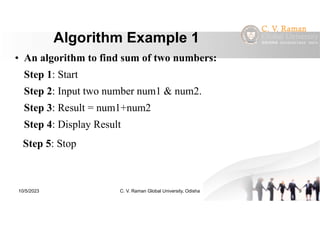
Algorithm Example 1
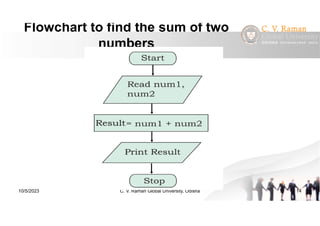
• An algorithm to find sum of two numbers:
Step 1: Start
Step 2: Input two number num1 & num2.
Step 3: Result = num1+num2
Step 4: Display Result
Step 5: Stop
10/5/2023 9
C. V. Raman Global University, Odisha
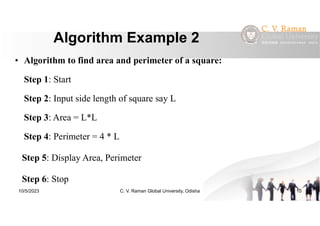
Algorithm Example 2
• Algorithm to find area and perimeter of a square:
Step 1: Start
Step 2: Input side length of square say L
Step 3: Area = L*L
Step 4: Perimeter = 4 * L
Step 5: Display Area, Perimeter
Step 6: Stop
10/5/2023 10
C. V. Raman Global University, Odisha
Representation of Algorithm
• There are two common methods of representing an algorithm :
– Flowchart
– Pseudocode
10/5/2023 11
C. V. Raman Global University, Odisha
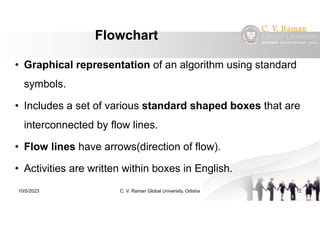
Flowchart
• Graphical representation of an algorithm using standard
symbols.
• Includes a set of various standard shaped boxes that are
interconnected by flow lines.
• Flow lines have arrows(direction of flow).
• Activities are written within boxes in English.
10/5/2023 12
C. V. Raman Global University, Odisha
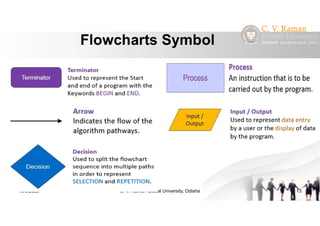
Flowcharts Symbol
10/5/2023 13
C. V. Raman Global University, Odisha
Flowchart to find the sum of two
numbers
10/5/2023 14
C. V. Raman Global University, Odisha
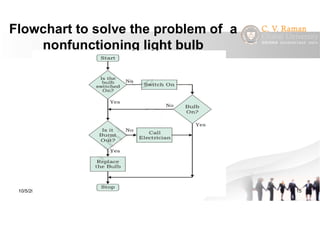
Flowchart to solve the problem of a
nonfunctioning light bulb
10/5/2023 15
C. V. Raman Global University, Odisha
www.youtube.com/c/powerupwithpowerpoint
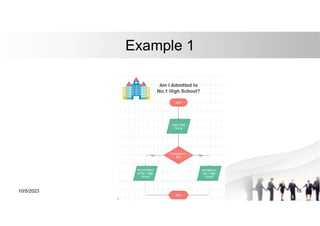
Example 1
10/5/2023 C. V. Raman Global University, Odisha 16
www.youtube.com/c/powerupwithpowerpoint
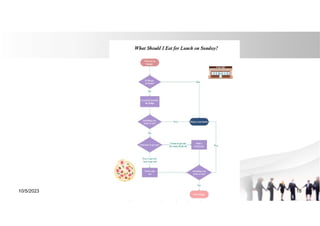
What should i eat for lunch?
10/5/2023 17
www.youtube.com/c/powerupwithpowerpoint
10/5/2023 C. V. Raman Global University, Odisha 18
Pseudocode
• Pronounced as Soo-doh-kohd
• Artificial, informal language that helps us develop algorithms
• Similar to everyday English
• Not actually executed on computers
• Helps us “think out” a program before writing it
– Easy to convert into a corresponding program
– Consists only of executable statements
10/5/2023 16
C. V. Raman Global University, Odisha
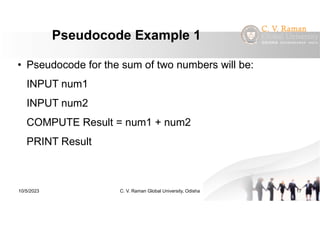
Pseudocode Example 1
• Pseudocode for the sum of two numbers will be:
INPUT num1
INPUT num2
COMPUTE Result = num1 + num2
PRINT Result
10/5/2023 17
C. V. Raman Global University, Odisha
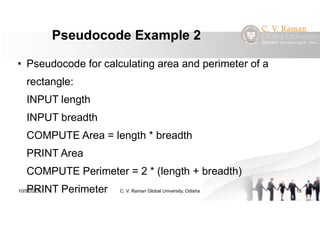
Pseudocode Example 2
• Pseudocode for calculating area and perimeter of a
rectangle:
INPUT length
INPUT breadth
COMPUTE Area = length * breadth
PRINT Area
COMPUTE Perimeter = 2 * (length + breadth)
PRINT Perimeter
10/5/2023 18
C. V. Raman Global University, Odisha
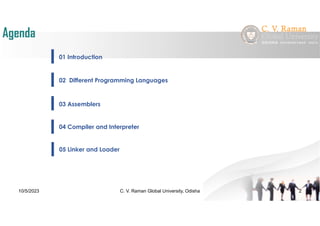
01 Introduction
02 Different Programming Languages
03 Assemblers
04 Compiler and Interpreter
Agenda
C. V. Raman Global University, Odisha
10/5/2023 2
05 Linker and Loader
Computer Program
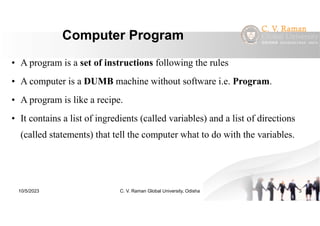
• A program is a set of instructions following the rules
• A computer is a DUMB machine without software i.e. Program.
• A program is like a recipe.
• It contains a list of ingredients (called variables) and a list of directions
(called statements) that tell the computer what to do with the variables.
10/5/2023 3
C. V. Raman Global University, Odisha
Programming Language
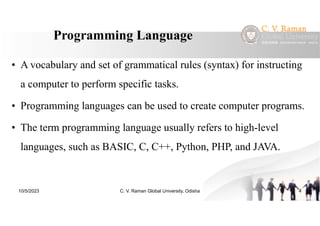
• A vocabulary and set of grammatical rules (syntax) for instructing
a computer to perform specific tasks.
• Programming languages can be used to create computer programs.
• The term programming language usually refers to high-level
languages, such as BASIC, C, C++, Python, PHP, and JAVA.
10/5/2023 4
C. V. Raman Global University, Odisha
Types of Programming Language
• There are three types of programming language:
– Machine language (Low-level language)
– Assembly language (Low-level language)
– High-level language
• Low-level languages are closer to the language used by a computer, while high-level
languages are closer to human languages
• Low-level languages are machine dependent , while high-level languages are machine
independent.
10/5/2023 5
C. V. Raman Global University, Odisha
Machine Language
• Machine language is a collection of binary digits or bits that the
computer reads and interprets.
• Machine languages are the only languages understood by computers.
• While easily understood by computers, machine languages are almost
impossible for humans to use because they consist entirely of numbers.
• It executes fast as computer don’t need any translation
• Example:- 00010001001, 1110000111
10/5/2023 6
C. V. Raman Global University, Odisha
Assembly Language
• Symbolic representation(mnemonics) of machine code.
• Close to machine code but the computer cannot understand
• Must be translated into machine code by a separate program called an
assembler.
• Example:
– Assembly language :
mov a1, #061h (Move the hexadecimal value 61 (97 decimal) into the
processor register named "a1".)
10/5/2023 7
C. V. Raman Global University, Odisha
High Level Language
• User friendly, Similar to natural languages.

• Platform independent.
• Easy to write, learn and work.
• It enables a user to write programs in a language which resembles
English words and familiar mathematical symbols.
• Programs written in a high-level language need to be translated into
machine language before they can be executed.
• Example: C, C++, Python, Java etc.
10/5/2023 8
C. V. Raman Global University, Odisha
Assembler
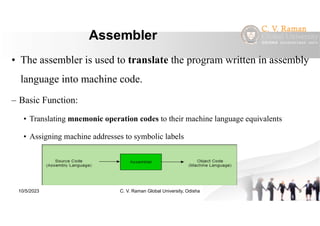
• The assembler is used to translate the program written in assembly
language into machine code.
– Basic Function:
• Translating mnemonic operation codes to their machine language equivalents
• Assigning machine addresses to symbolic labels
10/5/2023 9
C. V. Raman Global University, Odisha
Compiler
• A high level source program must be translated into a form machine
can understand. This done by software called the compiler.
• Source code => Machine language code(Object code)
• During the process of translation, the compiler reads the source programs
statement-wise and checks for syntax errors.
• In case of any error, the computer generates message about the error.
– Ex: C, C++, Java etc.
10/5/2023 10
C. V. Raman Global University, Odisha
Interpreter
• Like compiler, Interpreter is also a translator which translates high
level to machine level language.
• Translates and executes the program line by line.
• Each line is checked for syntax error and then converted to the equivalent
machine code.
• Ex. QBASIC, PERL, PHP, ASP, PYTHON, RUBY
10/5/2023 11
C. V. Raman Global University, Odisha
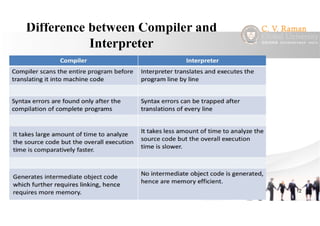
Difference between Compiler and
Interpreter
10/5/2023 12
C. V. Raman Global University, Odisha
Linker
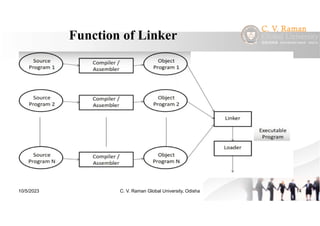
• A linker is special program that combines the object files, generated by
compiler/assembler, and other pieces of codes to make an executable file
have .exe extension.
• In the object file, linker searches and append all libraries needed for
execution of file.
• It also merges two or more separate object programs and establishes link
among them.
10/5/2023 13
C. V. Raman Global University, Odisha
Function of Linker
10/5/2023 14
C. V. Raman Global University, Odisha
Loader
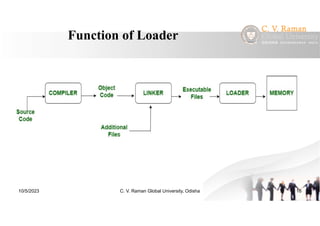
• The loader is special program that takes input of object code from
linker, loads it to main memory, and prepares this code for
execution by computer.
• It allocates the addresses to an executable module in main memory
for execution.
• It in charge of loading programs and libraries in operating system.
10/5/2023 15
C. V. Raman Global University, Odisha
Function of Loader
10/5/2023 16
C. V. Raman Global University, Odisha
Thank You
10/5/2023 C. V. Raman Global University, Odisha 37

Computer program and programming language

  • 1.
  • 2.
    01 Introduction 02 Stepsto Solve Problems 03 Algorithm (Flowchart/Pseudo code) 04 Representation of Algorithm Agenda C. V. Raman Global University, Odisha 10/5/2023 2 Programming Basics
  • 3.
    Introduction • Number ofproblems in our daily life. • Suppose we have to add to number. • Suppose we have to calculate Simple Interest. • Suppose we have to book a Train Ticket. • A computer is a DUMB machine without software i.e. Program. 10/5/2023 3 C. V. Raman Global University, Odisha
  • 4.
    Introduction • A softwareis a set of programs written to solve a particular problem. • Software is a set of instructions on the basis of which computer gives output/result. • If the instructions are not correct, the computer gives wrong result. • Just writing code is not sufficient to solve a problem. • There are many activities to be done during the solving the problem. 10/5/2023 4 C. V. Raman Global University, Odisha
  • 5.
    Stages involved inproblem solving using a computer • Analysing the Problem • Developing an Algorithm – Flow chart and Pseudo code • Coding • Testing and Debugging 10/5/2023 5 C. V. Raman Global University, Odisha
  • 6.
    Analysing the Problem •Process of becoming familiar with the problem. • We need to analyze and understand it well before solving. • Understanding the problem is : Half the solution • Inadequate identification of problem may cause program less useful and insufficient. • Example: Banking Solution, Hospital Management, University Management System 10/5/2023 6 C. V. Raman Global University, Odisha
  • 7.
    Developing an Algorithm •A finite number of step-by-step procedure to solve a given problem called algorithm • Every algorithm should have the following 5 characteristic features: – Definiteness — the steps are precisely stated or defined – Uniqueness — results of each step are uniquely defined and only depend on the input and the result of the preceding steps. – Finiteness — the algorithm always stops after a finite number of steps. – Output — the algorithm produces at least one output. – Input − An algorithm should have 0 or more well-defined inputs. 10/5/2023 7 C. V. Raman Global University, Odisha
  • 8.
    Algorithm Control Structure •Sequence – Steps are executed one after another sequentially. • Conditional (Branching) – Based on the condition steps are executed(processed) or not executed • Iterative (Looping/Repetitive) – Certain steps are executed repeatedly based on condition 10/5/2023 8 C. V. Raman Global University, Odisha
  • 9.
    Algorithm Example 1 •An algorithm to find sum of two numbers: Step 1: Start Step 2: Input two number num1 & num2. Step 3: Result = num1+num2 Step 4: Display Result Step 5: Stop 10/5/2023 9 C. V. Raman Global University, Odisha
  • 10.
    Algorithm Example 2 •Algorithm to find area and perimeter of a square: Step 1: Start Step 2: Input side length of square say L Step 3: Area = L*L Step 4: Perimeter = 4 * L Step 5: Display Area, Perimeter Step 6: Stop 10/5/2023 10 C. V. Raman Global University, Odisha
  • 11.
    Representation of Algorithm •There are two common methods of representing an algorithm : – Flowchart – Pseudocode 10/5/2023 11 C. V. Raman Global University, Odisha
  • 12.
    Flowchart • Graphical representationof an algorithm using standard symbols. • Includes a set of various standard shaped boxes that are interconnected by flow lines. • Flow lines have arrows(direction of flow). • Activities are written within boxes in English. 10/5/2023 12 C. V. Raman Global University, Odisha
  • 13.
    Flowcharts Symbol 10/5/2023 13 C.V. Raman Global University, Odisha
  • 14.
    Flowchart to findthe sum of two numbers 10/5/2023 14 C. V. Raman Global University, Odisha
  • 15.
    Flowchart to solvethe problem of a nonfunctioning light bulb 10/5/2023 15 C. V. Raman Global University, Odisha
  • 16.
  • 17.
  • 18.
  • 19.
    Pseudocode • Pronounced asSoo-doh-kohd • Artificial, informal language that helps us develop algorithms • Similar to everyday English • Not actually executed on computers • Helps us “think out” a program before writing it – Easy to convert into a corresponding program – Consists only of executable statements 10/5/2023 16 C. V. Raman Global University, Odisha
  • 20.
    Pseudocode Example 1 •Pseudocode for the sum of two numbers will be: INPUT num1 INPUT num2 COMPUTE Result = num1 + num2 PRINT Result 10/5/2023 17 C. V. Raman Global University, Odisha
  • 21.
    Pseudocode Example 2 •Pseudocode for calculating area and perimeter of a rectangle: INPUT length INPUT breadth COMPUTE Area = length * breadth PRINT Area COMPUTE Perimeter = 2 * (length + breadth) PRINT Perimeter 10/5/2023 18 C. V. Raman Global University, Odisha
  • 22.
    01 Introduction 02 DifferentProgramming Languages 03 Assemblers 04 Compiler and Interpreter Agenda C. V. Raman Global University, Odisha 10/5/2023 2 05 Linker and Loader
  • 23.
    Computer Program • Aprogram is a set of instructions following the rules • A computer is a DUMB machine without software i.e. Program. • A program is like a recipe. • It contains a list of ingredients (called variables) and a list of directions (called statements) that tell the computer what to do with the variables. 10/5/2023 3 C. V. Raman Global University, Odisha
  • 24.
    Programming Language • Avocabulary and set of grammatical rules (syntax) for instructing a computer to perform specific tasks. • Programming languages can be used to create computer programs. • The term programming language usually refers to high-level languages, such as BASIC, C, C++, Python, PHP, and JAVA. 10/5/2023 4 C. V. Raman Global University, Odisha
  • 25.
    Types of ProgrammingLanguage • There are three types of programming language: – Machine language (Low-level language) – Assembly language (Low-level language) – High-level language • Low-level languages are closer to the language used by a computer, while high-level languages are closer to human languages • Low-level languages are machine dependent , while high-level languages are machine independent. 10/5/2023 5 C. V. Raman Global University, Odisha
  • 26.
    Machine Language • Machinelanguage is a collection of binary digits or bits that the computer reads and interprets. • Machine languages are the only languages understood by computers. • While easily understood by computers, machine languages are almost impossible for humans to use because they consist entirely of numbers. • It executes fast as computer don’t need any translation • Example:- 00010001001, 1110000111 10/5/2023 6 C. V. Raman Global University, Odisha
  • 27.
    Assembly Language • Symbolicrepresentation(mnemonics) of machine code. • Close to machine code but the computer cannot understand • Must be translated into machine code by a separate program called an assembler. • Example: – Assembly language : mov a1, #061h (Move the hexadecimal value 61 (97 decimal) into the processor register named "a1".) 10/5/2023 7 C. V. Raman Global University, Odisha
  • 28.
    High Level Language •User friendly, Similar to natural languages. • Platform independent. • Easy to write, learn and work. • It enables a user to write programs in a language which resembles English words and familiar mathematical symbols. • Programs written in a high-level language need to be translated into machine language before they can be executed. • Example: C, C++, Python, Java etc. 10/5/2023 8 C. V. Raman Global University, Odisha
  • 29.
    Assembler • The assembleris used to translate the program written in assembly language into machine code. – Basic Function: • Translating mnemonic operation codes to their machine language equivalents • Assigning machine addresses to symbolic labels 10/5/2023 9 C. V. Raman Global University, Odisha
  • 30.
    Compiler • A highlevel source program must be translated into a form machine can understand. This done by software called the compiler. • Source code => Machine language code(Object code) • During the process of translation, the compiler reads the source programs statement-wise and checks for syntax errors. • In case of any error, the computer generates message about the error. – Ex: C, C++, Java etc. 10/5/2023 10 C. V. Raman Global University, Odisha
  • 31.
    Interpreter • Like compiler,Interpreter is also a translator which translates high level to machine level language. • Translates and executes the program line by line. • Each line is checked for syntax error and then converted to the equivalent machine code. • Ex. QBASIC, PERL, PHP, ASP, PYTHON, RUBY 10/5/2023 11 C. V. Raman Global University, Odisha
  • 32.
    Difference between Compilerand Interpreter 10/5/2023 12 C. V. Raman Global University, Odisha
  • 33.
    Linker • A linkeris special program that combines the object files, generated by compiler/assembler, and other pieces of codes to make an executable file have .exe extension. • In the object file, linker searches and append all libraries needed for execution of file. • It also merges two or more separate object programs and establishes link among them. 10/5/2023 13 C. V. Raman Global University, Odisha
  • 34.
    Function of Linker 10/5/202314 C. V. Raman Global University, Odisha
  • 35.
    Loader • The loaderis special program that takes input of object code from linker, loads it to main memory, and prepares this code for execution by computer. • It allocates the addresses to an executable module in main memory for execution. • It in charge of loading programs and libraries in operating system. 10/5/2023 15 C. V. Raman Global University, Odisha
  • 36.
    Function of Loader 10/5/202316 C. V. Raman Global University, Odisha
  • 37.
    Thank You 10/5/2023 C.V. Raman Global University, Odisha 37