NAME:-SHIVANGI
DEPT:- COMPUTER SCIENCE & ENGINEERING
ROLL NO:- ‘9’
GROUP:- ”X”
TOPIC NAME:- “Computer
Networking”
SUBMITTED TO:-
Communication between applications on
different computers.
Must understand application needs/demands.
Traffic data rate.
Traffic pattern (bursty or constant bit rate).
Traffic target (multipoint or single destination,
mobile or fixed).
Delay sensitivity.
Loss sensitivity.
What is the Objective of
Networking
Four Steps to Networking
Communicating across a link.
Connecting together multiple links
(internetworking).
Finding and routing data to nodes on
internetwork.
Matching application requirements.
A First Step
Creating a link between nodes.
Link: path followed by bits.
•Wired or wireless.
•Broadcast or point-to-point (or
both).
Node: any device connected to a
link.
5
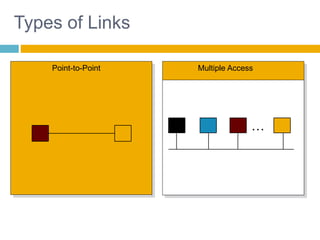
Types of Links
Point-to-Point Multiple Access
…
6
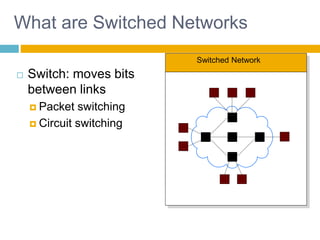
Switched Network
What are Switched Networks
 Switch: moves bits
between links
 Packet switching
 Circuit switching
7
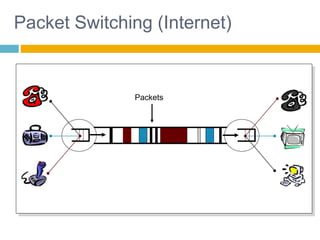
Packet Switching (Internet)
Packets
8
Packet Switching
 Interleave packets from different sources.
 Efficient: resources used on demand.
 Statistical multiplexing
 General
 Multiple types of applications.
 Accommodates bursty traffic.
 Addition of queues.
1-9
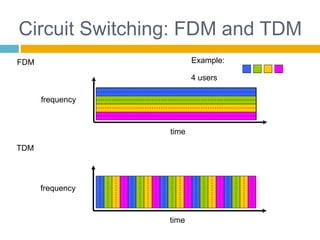
Circuit Switching: FDM and TDM
FDM
frequency
time
TDM
frequency
time
4 users
Example:
10
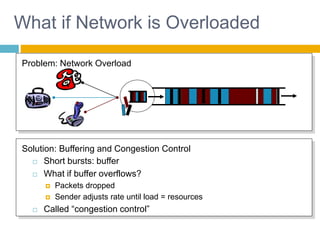
What if Network is Overloaded
Problem: Network Overload
 Short bursts: buffer
 What if buffer overflows?
 Packets dropped
 Sender adjusts rate until load = resources
 Called “congestion control”
Solution: Buffering and Congestion Control
1-11
Why layering
Dealing with complex systems:
 explicit structure allows identification, relationship of
complex system’s pieces
 layered reference model for discussion
 modularization eases maintenance, updating of
system
 change of implementation of layer’s service
transparent to rest of system
 e.g., change in gate procedure doesn’t affect
rest of system
 layering considered harmful
1-12
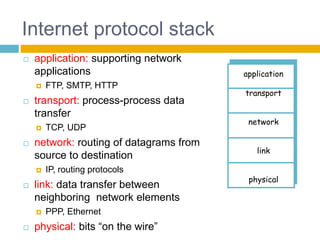
Internet protocol stack
 application: supporting network
applications
 FTP, SMTP, HTTP
 transport: process-process data
transfer
 TCP, UDP
 network: routing of datagrams from
source to destination
 IP, routing protocols
 link: data transfer between
neighboring network elements
 PPP, Ethernet
 physical: bits “on the wire”
application
transport
network
link
physical
1-13
Network Security
 The field of network security is about:
 how bad guys can attack computer networks
 how we can defend networks against attacks
 how to design architectures that are immune to
attacks
 Internet not originally designed with (much)
security in mind
 original vision: “a group of mutually trusting
users attached to a transparent network” 
 Internet protocol designers playing “catch-up”
 Security considerations in all layers!
Computer networking

Computer networking

  • 1.
    NAME:-SHIVANGI DEPT:- COMPUTER SCIENCE& ENGINEERING ROLL NO:- ‘9’ GROUP:- ”X” TOPIC NAME:- “Computer Networking” SUBMITTED TO:-
  • 2.
    Communication between applicationson different computers. Must understand application needs/demands. Traffic data rate. Traffic pattern (bursty or constant bit rate). Traffic target (multipoint or single destination, mobile or fixed). Delay sensitivity. Loss sensitivity. What is the Objective of Networking
  • 3.
    Four Steps toNetworking Communicating across a link. Connecting together multiple links (internetworking). Finding and routing data to nodes on internetwork. Matching application requirements.
  • 4.
    A First Step Creatinga link between nodes. Link: path followed by bits. •Wired or wireless. •Broadcast or point-to-point (or both). Node: any device connected to a link.
  • 5.
  • 6.
    6 Switched Network What areSwitched Networks  Switch: moves bits between links  Packet switching  Circuit switching
  • 7.
  • 8.
    8 Packet Switching  Interleavepackets from different sources.  Efficient: resources used on demand.  Statistical multiplexing  General  Multiple types of applications.  Accommodates bursty traffic.  Addition of queues.
  • 9.
    1-9 Circuit Switching: FDMand TDM FDM frequency time TDM frequency time 4 users Example:
  • 10.
    10 What if Networkis Overloaded Problem: Network Overload  Short bursts: buffer  What if buffer overflows?  Packets dropped  Sender adjusts rate until load = resources  Called “congestion control” Solution: Buffering and Congestion Control
  • 11.
    1-11 Why layering Dealing withcomplex systems:  explicit structure allows identification, relationship of complex system’s pieces  layered reference model for discussion  modularization eases maintenance, updating of system  change of implementation of layer’s service transparent to rest of system  e.g., change in gate procedure doesn’t affect rest of system  layering considered harmful
  • 12.
    1-12 Internet protocol stack application: supporting network applications  FTP, SMTP, HTTP  transport: process-process data transfer  TCP, UDP  network: routing of datagrams from source to destination  IP, routing protocols  link: data transfer between neighboring network elements  PPP, Ethernet  physical: bits “on the wire” application transport network link physical
  • 13.
    1-13 Network Security  Thefield of network security is about:  how bad guys can attack computer networks  how we can defend networks against attacks  how to design architectures that are immune to attacks  Internet not originally designed with (much) security in mind  original vision: “a group of mutually trusting users attached to a transparent network”   Internet protocol designers playing “catch-up”  Security considerations in all layers!