Ben tubbs
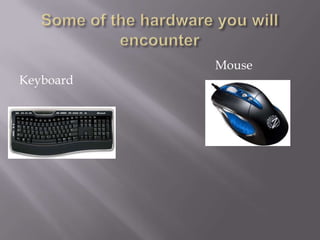
Mouse
Keyboard
   The mouse will be used to click on stuff you
    want to open or do with the computer.
   The keyboard will be used to type in programs
    where you can type letters, e-mail ect.
   This is the main program you have on your
    computer. Today windows 7 is the newest so
    you will want to make sure it has windows 7
    or vista. These are the newest an can be
    upgraded as the older ones they don’t make
    upgrades for as this will be a monthly thing
    you will need to do.
   This is where you turn your computer on at it.
    It will depend weather or not you have a
    laptop or a desk top. Lap tops are movable to
    where u can take easly from place to place.
    Desk tops are to be kept on a desk as you can’t
    take them just anywhere or use them
    anywhere. (see next 2 slides)
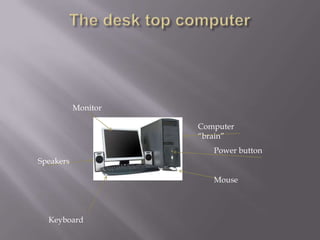
Monitor

                     Computer
                     “brain”
                        Power button
Speakers

                        Mouse


  Keyboard
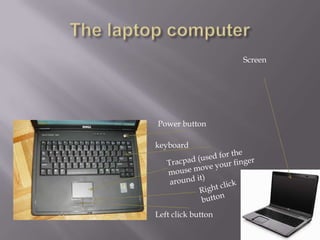
Screen


Power button

keyboard


Left click button
   Software is programs that are installed or can
    be installed on your computer. Some of the
    software are Microsoft word, power point or
    any kind of messenger program such as yahoo
    or aim messenger.
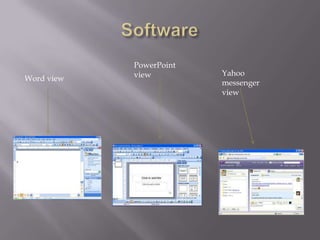
PowerPoint
            view         Yahoo
Word view
                         messenger
                         view
This is what you save your files that you create to.
  This can be done either in your computer or a
  external hard drive or disk. It is better to save
  them to a external one just in case your
  computer crashes.
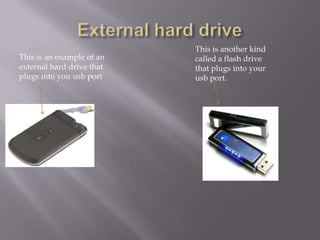
This is another kind
This is an example of an   called a flash drive
external hard drive that   that plugs into your
plugs into you usb port    usb port.
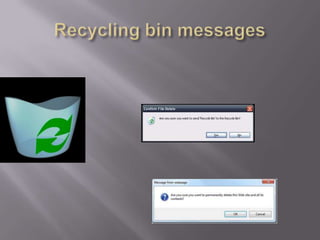
   This is important because. When you delet a
    file an send it to the recyling bin an then empty
    it it asked you “ are you sure you wnt to
    peremilty deleat this files yes or no. you would
    think you click yes there gone right? wrong.
    Files need to be deleated by somene that knows
    wht there doing I say this because it is illagal
    for someone to go thought your files while you
    own the computer however (next slide)
   Once you sell or give away your computer
    away they are no longer yours an they are legal
    for someone to go though. And they can do a
    lot of damage if they get any personal
    information like bank accounts passwords that
    u had saved in a file.
   You will want to get an anti virus program.
    There are a lot of them out there. There is trend
    micro, avg, and Norton. These will tell you if
    you go to open a file if it has a virus or not an
    will get rid of it before it attacks your
    computer. If you try to run a program it will
    automatically shut it down. Norton is the best
    there is right now it comes down to you get
    what you pay for. Countines on next slide
   This will also need updated once a week if not
    daily. You can set them to update daily an most
    wont slow down your computer like Norton, it
    will run an you won’t be able to tell its
    downloading updates. This will save your
    computer as there are new virus made
    everyday.
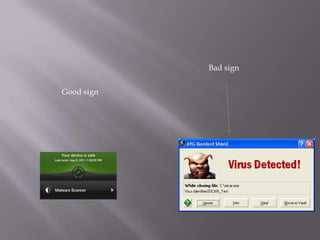
Bad sign


Good sign
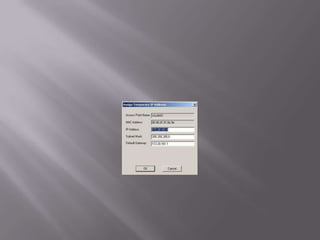
   Yes if you try to do something bad on the
    internet you will get caught. They all have
    there own ip address. This is an id tag of your
    computer. If you send virus o purpose or try to
    hack into someone’s computer an they have a
    ip address catcher and they get it there is a
    program that you can put it into an it will tell
    them your name address what internet
    provider you have.
   Hyper links are links that can be clicked an
    takes you to a web page. These are usually in
    blue. They can come in an e-mail or if your on a
    web site like (staples.com) and you click on
    laptop computers it will take you to a page
    with just them. This is also a hyper link. They
    are basically a short cut to another site.
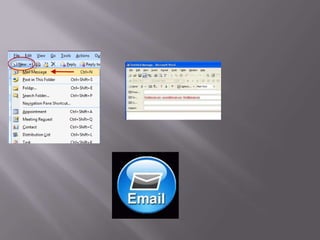
   Email is pretty simple. This is how people talk to
    each other if they can’t call them. This is almost
    like a chat program but you usually don’t get a
    respond right away. You can email companies
    about products or family that don’t live in the
    same state there are a lot of free sites that offer it
    free just like the chat windows. Yahoo, aol, hotmail
    are just a few of them. You will need to create a
    name. then you will need to make a password with
    at least 8-10 letters. A good password will contain
    letters and numbers. This make it harder for
    someone to hack into.
Computer class final

Computer class final

  • 1.
  • 2.
  • 3.
    The mouse will be used to click on stuff you want to open or do with the computer.  The keyboard will be used to type in programs where you can type letters, e-mail ect.
  • 4.
    This is the main program you have on your computer. Today windows 7 is the newest so you will want to make sure it has windows 7 or vista. These are the newest an can be upgraded as the older ones they don’t make upgrades for as this will be a monthly thing you will need to do.
  • 5.
    This is where you turn your computer on at it. It will depend weather or not you have a laptop or a desk top. Lap tops are movable to where u can take easly from place to place. Desk tops are to be kept on a desk as you can’t take them just anywhere or use them anywhere. (see next 2 slides)
  • 6.
    Monitor Computer “brain” Power button Speakers Mouse Keyboard
  • 7.
  • 8.
    Software is programs that are installed or can be installed on your computer. Some of the software are Microsoft word, power point or any kind of messenger program such as yahoo or aim messenger.
  • 9.
    PowerPoint view Yahoo Word view messenger view
  • 10.
    This is whatyou save your files that you create to. This can be done either in your computer or a external hard drive or disk. It is better to save them to a external one just in case your computer crashes.
  • 11.
    This is anotherkind This is an example of an called a flash drive external hard drive that that plugs into your plugs into you usb port usb port.
  • 12.
    This is important because. When you delet a file an send it to the recyling bin an then empty it it asked you “ are you sure you wnt to peremilty deleat this files yes or no. you would think you click yes there gone right? wrong. Files need to be deleated by somene that knows wht there doing I say this because it is illagal for someone to go thought your files while you own the computer however (next slide)
  • 13.
    Once you sell or give away your computer away they are no longer yours an they are legal for someone to go though. And they can do a lot of damage if they get any personal information like bank accounts passwords that u had saved in a file.
  • 15.
    You will want to get an anti virus program. There are a lot of them out there. There is trend micro, avg, and Norton. These will tell you if you go to open a file if it has a virus or not an will get rid of it before it attacks your computer. If you try to run a program it will automatically shut it down. Norton is the best there is right now it comes down to you get what you pay for. Countines on next slide
  • 16.
    This will also need updated once a week if not daily. You can set them to update daily an most wont slow down your computer like Norton, it will run an you won’t be able to tell its downloading updates. This will save your computer as there are new virus made everyday.
  • 17.
  • 18.
    Yes if you try to do something bad on the internet you will get caught. They all have there own ip address. This is an id tag of your computer. If you send virus o purpose or try to hack into someone’s computer an they have a ip address catcher and they get it there is a program that you can put it into an it will tell them your name address what internet provider you have.
  • 20.
    Hyper links are links that can be clicked an takes you to a web page. These are usually in blue. They can come in an e-mail or if your on a web site like (staples.com) and you click on laptop computers it will take you to a page with just them. This is also a hyper link. They are basically a short cut to another site.
  • 21.
    Email is pretty simple. This is how people talk to each other if they can’t call them. This is almost like a chat program but you usually don’t get a respond right away. You can email companies about products or family that don’t live in the same state there are a lot of free sites that offer it free just like the chat windows. Yahoo, aol, hotmail are just a few of them. You will need to create a name. then you will need to make a password with at least 8-10 letters. A good password will contain letters and numbers. This make it harder for someone to hack into.