Computer Architecture
and Organization
Instructor: Col Dr. Khawar Mehmood
You can revolutionize the way computers are built, if you understand both the
hardware and the software and change each accordingly
Introduction
• Why Do We Have Computers?
• To Solve Problems
• How Does a Computer Solve Problems?
• Orchestrating Electrons
• How Do Problems Get Solved by Electrons?
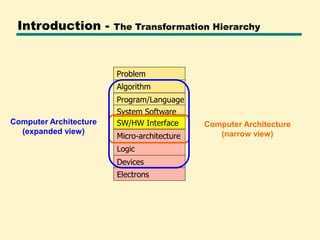
Introduction - The Transformation Hierarchy
Micro-architecture
SW/HW Interface
Program/Language
Algorithm
Problem
Logic
Devices
System Software
Electrons
Computer Architecture
(narrow view)
Computer Architecture
(expanded view)
Computer Organization
vs.
Architecture
Computer Architecture vs. Organization
• Architecture:
—Logical aspects of computer hardware that are
visible to the programmer
– What instruction a computer understands!
– Instruction Set Architecture (ISA)
—Example: Architectural design issue is
whether a computer will have multiply
instruction or not.
5
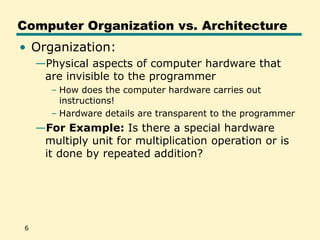
Computer Organization vs. Architecture
• Organization:
—Physical aspects of computer hardware that
are invisible to the programmer
– How does the computer hardware carries out
instructions!
– Hardware details are transparent to the programmer
—For Example: Is there a special hardware
multiply unit for multiplication operation or is
it done by repeated addition?
6
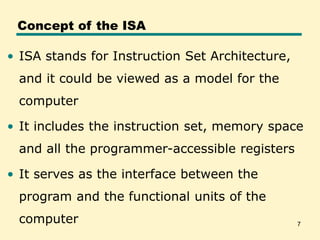
7
Concept of the ISA
• ISA stands for Instruction Set Architecture,
and it could be viewed as a model for the
computer
• It includes the instruction set, memory space
and all the programmer-accessible registers
• It serves as the interface between the
program and the functional units of the
computer
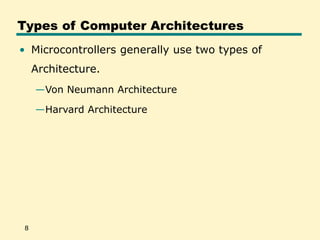
Types of Computer Architectures
• Microcontrollers generally use two types of
Architecture.
—Von Neumann Architecture
—Harvard Architecture
8
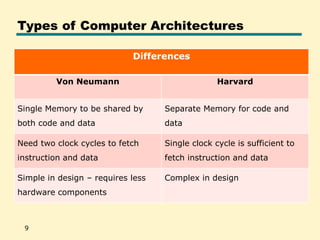
Types of Computer Architectures
9
Differences
Von Neumann Harvard
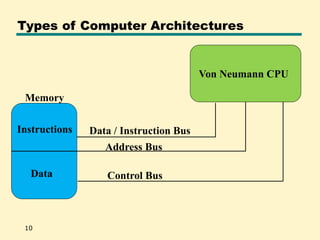
Single Memory to be shared by
both code and data
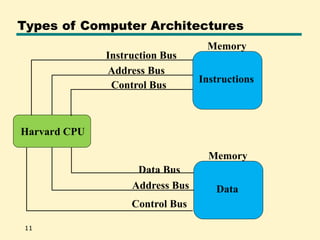
Separate Memory for code and
data
Need two clock cycles to fetch
instruction and data
Single clock cycle is sufficient to
fetch instruction and data
Simple in design – requires less
hardware components
Complex in design
Types of Computer Architectures
10
Von Neumann CPU
Data
Instructions Data / Instruction Bus
Address Bus
Control Bus
Memory
Types of Computer Architectures
11
Harvard CPU
Instructions
Memory
Data
Memory
Instruction Bus
Address Bus
Control Bus
Data Bus
Address Bus
Control Bus
Why Learn Assembly
Language?
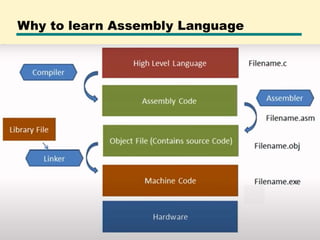
Why to learn Assembly Language
• There is a general impression that assembly
language is difficult to learn
• In fact if you are not an expert, you will learn
assembly language quickly, as non-experts see
things with simplicity and the basic beauty of
assembly language is that it is exceptionally
simple.
• Do not ever try to find a complication, as one will
not be there.
• In assembly language what is written in the
program is all that is there, no less and no more.
15
Why to learn Assembly Language
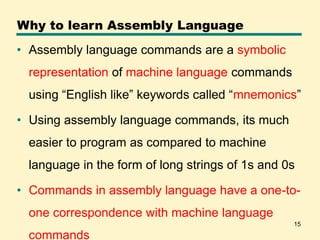
• Assembly language commands are a symbolic
representation of machine language commands
using “English like” keywords called “mnemonics”
• Using assembly language commands, its much
easier to program as compared to machine
language in the form of long strings of 1s and 0s
• Commands in assembly language have a one-to-
one correspondence with machine language
commands
16
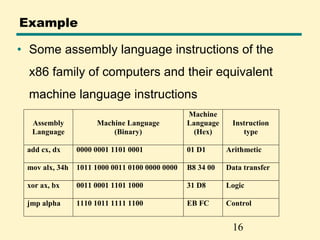
Example
• Some assembly language instructions of the
x86 family of computers and their equivalent
machine language instructions
Assembly
Language
Machine Language
(Binary)
Machine
Language
(Hex)
Instruction
type
add cx, dx 0000 0001 1101 0001 01 D1 Arithmetic
mov alx, 34h 1011 1000 0011 0100 0000 0000 B8 34 00 Data transfer
xor ax, bx 0011 0001 1101 1000 31 D8 Logic
jmp alpha 1110 1011 1111 1100 EB FC Control
Why to learn Assembly Language
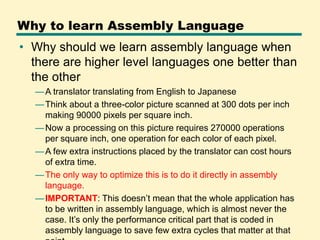
• Why should we learn assembly language when
there are higher level languages one better than
the other
—A translator translating from English to Japanese
—Think about a three-color picture scanned at 300 dots per inch
making 90000 pixels per square inch.
—Now a processing on this picture requires 270000 operations
per square inch, one operation for each color of each pixel.
—A few extra instructions placed by the translator can cost hours
of extra time.
—The only way to optimize this is to do it directly in assembly
language.
—IMPORTANT: This doesn’t mean that the whole application has
to be written in assembly language, which is almost never the
case. It’s only the performance critical part that is coded in
assembly language to save few extra cycles that matter at that
Why to learn Assembly Language
• Time Critical / Real time systems
—Real time systems have time bound responses
—For such precise timing requirement, we must keep
the instructions in our total control.
—In higher level languages we cannot even tell how
many computer instructions were actually used
—In assembly language we have precise control over
them
• No assembly language, no optimization
• Sometimes a useful application becomes
useless just because it is not optimized
Why to learn Assembly Language
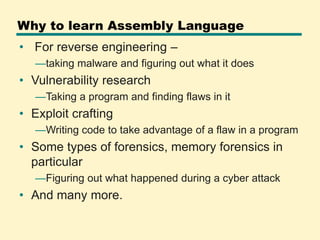
• For reverse engineering –
—taking malware and figuring out what it does
• Vulnerability research
—Taking a program and finding flaws in it
• Exploit crafting
—Writing code to take advantage of a flaw in a program
• Some types of forensics, memory forensics in
particular
—Figuring out what happened during a cyber attack
• And many more.
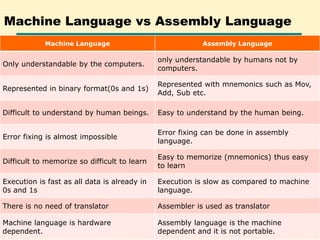
Machine Language vs Assembly Language
Machine Language Assembly Language
Only understandable by the computers.
only understandable by humans not by
computers.
Represented in binary format(0s and 1s)
Represented with mnemonics such as Mov,
Add, Sub etc.
Difficult to understand by human beings. Easy to understand by the human being.
Error fixing is almost impossible
Error fixing can be done in assembly
language.
Difficult to memorize so difficult to learn
Easy to memorize (mnemonics) thus easy
to learn
Execution is fast as all data is already in
0s and 1s
Execution is slow as compared to machine
language.
There is no need of translator Assembler is used as translator
Machine language is hardware
dependent.
Assembly language is the machine
dependent and it is not portable.
computer architecture and organization.ppt

computer architecture and organization.ppt

  • 1.
    Computer Architecture and Organization Instructor:Col Dr. Khawar Mehmood You can revolutionize the way computers are built, if you understand both the hardware and the software and change each accordingly
  • 2.
    Introduction • Why DoWe Have Computers? • To Solve Problems • How Does a Computer Solve Problems? • Orchestrating Electrons • How Do Problems Get Solved by Electrons?
  • 3.
    Introduction - TheTransformation Hierarchy Micro-architecture SW/HW Interface Program/Language Algorithm Problem Logic Devices System Software Electrons Computer Architecture (narrow view) Computer Architecture (expanded view)
  • 4.
  • 5.
    Computer Architecture vs.Organization • Architecture: —Logical aspects of computer hardware that are visible to the programmer – What instruction a computer understands! – Instruction Set Architecture (ISA) —Example: Architectural design issue is whether a computer will have multiply instruction or not. 5
  • 6.
    Computer Organization vs.Architecture • Organization: —Physical aspects of computer hardware that are invisible to the programmer – How does the computer hardware carries out instructions! – Hardware details are transparent to the programmer —For Example: Is there a special hardware multiply unit for multiplication operation or is it done by repeated addition? 6
  • 7.
    7 Concept of theISA • ISA stands for Instruction Set Architecture, and it could be viewed as a model for the computer • It includes the instruction set, memory space and all the programmer-accessible registers • It serves as the interface between the program and the functional units of the computer
  • 8.
    Types of ComputerArchitectures • Microcontrollers generally use two types of Architecture. —Von Neumann Architecture —Harvard Architecture 8
  • 9.
    Types of ComputerArchitectures 9 Differences Von Neumann Harvard Single Memory to be shared by both code and data Separate Memory for code and data Need two clock cycles to fetch instruction and data Single clock cycle is sufficient to fetch instruction and data Simple in design – requires less hardware components Complex in design
  • 10.
    Types of ComputerArchitectures 10 Von Neumann CPU Data Instructions Data / Instruction Bus Address Bus Control Bus Memory
  • 11.
    Types of ComputerArchitectures 11 Harvard CPU Instructions Memory Data Memory Instruction Bus Address Bus Control Bus Data Bus Address Bus Control Bus
  • 12.
  • 13.
    Why to learnAssembly Language
  • 14.
    Why to learnAssembly Language • There is a general impression that assembly language is difficult to learn • In fact if you are not an expert, you will learn assembly language quickly, as non-experts see things with simplicity and the basic beauty of assembly language is that it is exceptionally simple. • Do not ever try to find a complication, as one will not be there. • In assembly language what is written in the program is all that is there, no less and no more.
  • 15.
    15 Why to learnAssembly Language • Assembly language commands are a symbolic representation of machine language commands using “English like” keywords called “mnemonics” • Using assembly language commands, its much easier to program as compared to machine language in the form of long strings of 1s and 0s • Commands in assembly language have a one-to- one correspondence with machine language commands
  • 16.
    16 Example • Some assemblylanguage instructions of the x86 family of computers and their equivalent machine language instructions Assembly Language Machine Language (Binary) Machine Language (Hex) Instruction type add cx, dx 0000 0001 1101 0001 01 D1 Arithmetic mov alx, 34h 1011 1000 0011 0100 0000 0000 B8 34 00 Data transfer xor ax, bx 0011 0001 1101 1000 31 D8 Logic jmp alpha 1110 1011 1111 1100 EB FC Control
  • 17.
    Why to learnAssembly Language • Why should we learn assembly language when there are higher level languages one better than the other —A translator translating from English to Japanese —Think about a three-color picture scanned at 300 dots per inch making 90000 pixels per square inch. —Now a processing on this picture requires 270000 operations per square inch, one operation for each color of each pixel. —A few extra instructions placed by the translator can cost hours of extra time. —The only way to optimize this is to do it directly in assembly language. —IMPORTANT: This doesn’t mean that the whole application has to be written in assembly language, which is almost never the case. It’s only the performance critical part that is coded in assembly language to save few extra cycles that matter at that
  • 18.
    Why to learnAssembly Language • Time Critical / Real time systems —Real time systems have time bound responses —For such precise timing requirement, we must keep the instructions in our total control. —In higher level languages we cannot even tell how many computer instructions were actually used —In assembly language we have precise control over them • No assembly language, no optimization • Sometimes a useful application becomes useless just because it is not optimized
  • 19.
    Why to learnAssembly Language • For reverse engineering – —taking malware and figuring out what it does • Vulnerability research —Taking a program and finding flaws in it • Exploit crafting —Writing code to take advantage of a flaw in a program • Some types of forensics, memory forensics in particular —Figuring out what happened during a cyber attack • And many more.
  • 20.
    Machine Language vsAssembly Language Machine Language Assembly Language Only understandable by the computers. only understandable by humans not by computers. Represented in binary format(0s and 1s) Represented with mnemonics such as Mov, Add, Sub etc. Difficult to understand by human beings. Easy to understand by the human being. Error fixing is almost impossible Error fixing can be done in assembly language. Difficult to memorize so difficult to learn Easy to memorize (mnemonics) thus easy to learn Execution is fast as all data is already in 0s and 1s Execution is slow as compared to machine language. There is no need of translator Assembler is used as translator Machine language is hardware dependent. Assembly language is the machine dependent and it is not portable.