ENGG08002: Computer aided Design
Computer Aided Design
CAD
Learning Outcomes
ENGG08002: Computer aided Design
At the end of this module the student will be able to:
L1. Characterise and employ appropriate advanced solid geometry feature creation
methods and techniques.
L2. Develop basic parametric relationships in the model creation process.
L3. Configure product assembly using various assembly constraints.
L4. Produce drawings, describing various product design details.
Module Introduction
ENGG08002: Computer aided Design
Assessment Summary
Assessment Category 1: Coursework - 2 @ 50% each
•A minimum of 30% must be obtained for each element of
assessment.
•A minimum of 40% is required to achieve a pass in the
module.
Element Release date Submission Date Weighting
Course work 1 50%
Course work 2 50%
100%
Introduction to Facilities and Pro/ENGINEER Concepts
ENGG08002: Computer aided Design
Module Introduction
Introduction to Facilities
Pro/ENGINEER Concepts
Creating Sketcher Geometry
Pro/ENGINEER Concepts
Solid Models:
Are realistic visual representation of designs.
Contain properties such as mass, volume,
and center of gravity.
Can also be used to check for interferences
in an assembly.
ENGG08002: Computer aided Design
Pro/ENGINEER Concepts
Feature-Based Concepts:
Build one simple feature at a time.
Each new feature can reference
previous features.
ENGG08002: Computer aided Design
Pro/ENGINEER Concepts
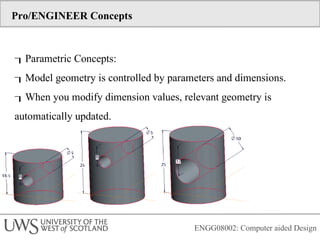
Parametric Concepts:
Model geometry is controlled by parameters and dimensions.
When you modify dimension values, relevant geometry is
automatically updated.
ENGG08002: Computer aided Design
Pro/ENGINEER Concepts
Associative Concepts:
Bi-directional associativity means that all
changes made to an object in any mode of
Pro/ENGINEER are automatically reflected in
every related mode.
For example, a change made in a drawing
is reflected in the part being documented in
the drawing. That same change is also
reflected in every assembly using that part
model.
ENGG08002: Computer aided Design
Pro/ENGINEER Concepts
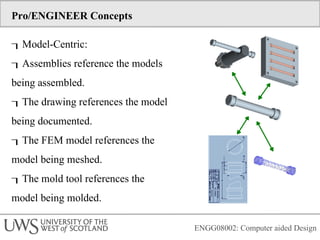
Model-Centric:
Assemblies reference the models
being assembled.
The drawing references the model
being documented.
The FEM model references the
model being meshed.
The mold tool references the
model being molded.
ENGG08002: Computer aided Design
Pro/ENGINEER Concepts
Pro/ENGINEER file extensions:
 .prt - Part File
 .asm - Assembly File
 .drw - Drawing File
ENGG08002: Computer aided Design
Pro/ENGINEER Concepts
Main Interface:
s Window — The working area of
Pro/ENGINEER
Main Menu
Toolbars
Message Window
Dashboard
Dialog Boxes
Menu Manager
Drawing Ribbon — A context-sensitive menu
ENGG08002: Computer aided Design
Pro/ENGINEER Concepts
Folder Browser is divided into:
Common Folders, Folder Tree
A window must be active to use all applicable
Pro/ENGINEER features.
The word Active appears on the title bar of
the active window next to the model name.
The active model has a dot next to its name in the
Window menu.
ENGG08002: Computer aided Design
Pro/ENGINEER Concepts
Setting the Working Directory:
Pro/ENGINEER is started in the default working
directory.
Different working directories can be set.
New working directory locations are not
saved upon exiting Pro/ENGINEER.
ENGG08002: Computer aided Design
Pro/ENGINEER Concepts
Basic Display
Options
 Datum Planes
 Datum Axes
 Datum Points
 Coordinate Systems
 Shaded
 No Hidden
 Hidden Line
 Wireframe
ENGG08002: Computer aided Design
Pro/ENGINEER Concepts
Manipulate the 3-D
orientation
 Spin
 Pan
 Zoom
 Turn
 Wheel Zoom
ENGG08002: Computer aided Design
Pro/ENGINEER Concepts
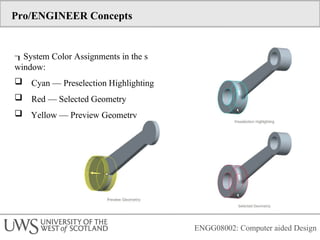
System Color Assignments in the s
window:
 Cyan — Preselection Highlighting
 Red — Selected Geometry
 Yellow — Preview Geometry
ENGG08002: Computer aided Design
Pro/ENGINEER Concepts
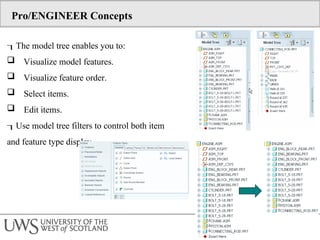
The model tree enables you to:
 Visualize model features.
 Visualize feature order.
 Select items.
 Edit items.
Use model tree filters to control both item
and feature type display
Pro/ENGINEER Concepts
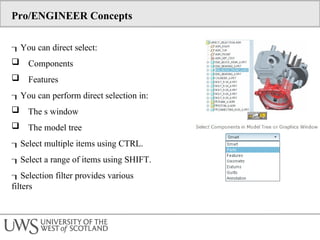
You can direct select:
 Components
 Features
You can perform direct selection in:
 The s window
 The model tree
Select multiple items using CTRL.
Select a range of items using SHIFT.
Selection filter provides various
filters
Pro/ENGINEER Concepts
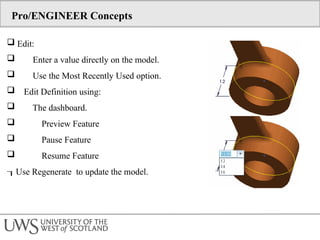
 Edit:
 Enter a value directly on the model.
 Use the Most Recently Used option.
 Edit Definition using:
 The dashboard.
 Preview Feature
 Pause Feature
 Resume Feature
Use Regenerate to update the model.
Pro/ENGINEER Concepts
 Deleting and Suppressing Items:
 Delete:
 Is permanent.
 Follows Parent/Child Rels.
 Suppress:
 Items can be restored via Resume.
 Follows Parent/Child Rels.
 Resume:
 Selected items.
 All items.
Pro/ENGINEER Concepts
 Editing Feature and Component Visibility:
Hide/Unhide:
 Components in an assembly
 Datum features
 Solid features
Does not affect parent/child relationships.
Changes are not saved by default.
Creating Sketcher Geometry
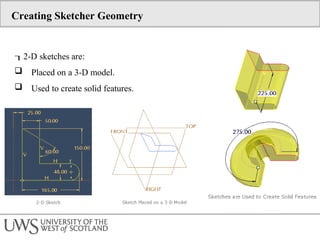
2-D sketches are:
 Placed on a 3-D model.
 Used to create solid features.
Creating Sketcher Geometry
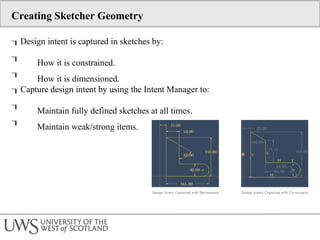
Design intent is captured in sketches by:


How it is constrained.
How it is dimensioned.
Capture design intent by using the Intent Manager to:


Maintain fully defined sketches at all times.
Maintain weak/strong items.
Creating Sketcher Geometry
 The following display options are available in Sketcher:
 Dimensions
 Constraints
 Grid
 Section vertices
 Sketch Orientation reorients parallel to the screen.
Creating Sketcher Geometry
Constraint types
include:
 Vertical
 Horizontal
 Perpendicular
 Tangent
 Midpoint
 Coincident
 Symmetric
 Equal
 Parallel
Creating Sketcher Geometry
Sketching Lines
Sketching Centerlines
Sketching Rectangles and
Parallelograms
Sketching Circles
Sketching Arcs
Sketching Circular Fillets
Sketching Chamfers

Computer Aided Design Introduction Lecture

  • 1.
    ENGG08002: Computer aidedDesign Computer Aided Design CAD
  • 2.
    Learning Outcomes ENGG08002: Computeraided Design At the end of this module the student will be able to: L1. Characterise and employ appropriate advanced solid geometry feature creation methods and techniques. L2. Develop basic parametric relationships in the model creation process. L3. Configure product assembly using various assembly constraints. L4. Produce drawings, describing various product design details.
  • 3.
    Module Introduction ENGG08002: Computeraided Design Assessment Summary Assessment Category 1: Coursework - 2 @ 50% each •A minimum of 30% must be obtained for each element of assessment. •A minimum of 40% is required to achieve a pass in the module. Element Release date Submission Date Weighting Course work 1 50% Course work 2 50% 100%
  • 4.
    Introduction to Facilitiesand Pro/ENGINEER Concepts ENGG08002: Computer aided Design Module Introduction Introduction to Facilities Pro/ENGINEER Concepts Creating Sketcher Geometry
  • 5.
    Pro/ENGINEER Concepts Solid Models: Arerealistic visual representation of designs. Contain properties such as mass, volume, and center of gravity. Can also be used to check for interferences in an assembly. ENGG08002: Computer aided Design
  • 6.
    Pro/ENGINEER Concepts Feature-Based Concepts: Buildone simple feature at a time. Each new feature can reference previous features. ENGG08002: Computer aided Design
  • 7.
    Pro/ENGINEER Concepts Parametric Concepts: Modelgeometry is controlled by parameters and dimensions. When you modify dimension values, relevant geometry is automatically updated. ENGG08002: Computer aided Design
  • 8.
    Pro/ENGINEER Concepts Associative Concepts: Bi-directionalassociativity means that all changes made to an object in any mode of Pro/ENGINEER are automatically reflected in every related mode. For example, a change made in a drawing is reflected in the part being documented in the drawing. That same change is also reflected in every assembly using that part model. ENGG08002: Computer aided Design
  • 9.
    Pro/ENGINEER Concepts Model-Centric: Assemblies referencethe models being assembled. The drawing references the model being documented. The FEM model references the model being meshed. The mold tool references the model being molded. ENGG08002: Computer aided Design
  • 10.
    Pro/ENGINEER Concepts Pro/ENGINEER fileextensions:  .prt - Part File  .asm - Assembly File  .drw - Drawing File ENGG08002: Computer aided Design
  • 11.
    Pro/ENGINEER Concepts Main Interface: sWindow — The working area of Pro/ENGINEER Main Menu Toolbars Message Window Dashboard Dialog Boxes Menu Manager Drawing Ribbon — A context-sensitive menu ENGG08002: Computer aided Design
  • 12.
    Pro/ENGINEER Concepts Folder Browseris divided into: Common Folders, Folder Tree A window must be active to use all applicable Pro/ENGINEER features. The word Active appears on the title bar of the active window next to the model name. The active model has a dot next to its name in the Window menu. ENGG08002: Computer aided Design
  • 13.
    Pro/ENGINEER Concepts Setting theWorking Directory: Pro/ENGINEER is started in the default working directory. Different working directories can be set. New working directory locations are not saved upon exiting Pro/ENGINEER. ENGG08002: Computer aided Design
  • 14.
    Pro/ENGINEER Concepts Basic Display Options Datum Planes  Datum Axes  Datum Points  Coordinate Systems  Shaded  No Hidden  Hidden Line  Wireframe ENGG08002: Computer aided Design
  • 15.
    Pro/ENGINEER Concepts Manipulate the3-D orientation  Spin  Pan  Zoom  Turn  Wheel Zoom ENGG08002: Computer aided Design
  • 16.
    Pro/ENGINEER Concepts System ColorAssignments in the s window:  Cyan — Preselection Highlighting  Red — Selected Geometry  Yellow — Preview Geometry ENGG08002: Computer aided Design
  • 17.
    ENGG08002: Computer aidedDesign Pro/ENGINEER Concepts The model tree enables you to:  Visualize model features.  Visualize feature order.  Select items.  Edit items. Use model tree filters to control both item and feature type display
  • 18.
    Pro/ENGINEER Concepts You candirect select:  Components  Features You can perform direct selection in:  The s window  The model tree Select multiple items using CTRL. Select a range of items using SHIFT. Selection filter provides various filters
  • 19.
    Pro/ENGINEER Concepts  Edit: Enter a value directly on the model.  Use the Most Recently Used option.  Edit Definition using:  The dashboard.  Preview Feature  Pause Feature  Resume Feature Use Regenerate to update the model.
  • 20.
    Pro/ENGINEER Concepts  Deletingand Suppressing Items:  Delete:  Is permanent.  Follows Parent/Child Rels.  Suppress:  Items can be restored via Resume.  Follows Parent/Child Rels.  Resume:  Selected items.  All items.
  • 21.
    Pro/ENGINEER Concepts  EditingFeature and Component Visibility: Hide/Unhide:  Components in an assembly  Datum features  Solid features Does not affect parent/child relationships. Changes are not saved by default.
  • 22.
    Creating Sketcher Geometry 2-Dsketches are:  Placed on a 3-D model.  Used to create solid features.
  • 23.
    Creating Sketcher Geometry Designintent is captured in sketches by:   How it is constrained. How it is dimensioned. Capture design intent by using the Intent Manager to:   Maintain fully defined sketches at all times. Maintain weak/strong items.
  • 24.
    Creating Sketcher Geometry The following display options are available in Sketcher:  Dimensions  Constraints  Grid  Section vertices  Sketch Orientation reorients parallel to the screen.
  • 25.
    Creating Sketcher Geometry Constrainttypes include:  Vertical  Horizontal  Perpendicular  Tangent  Midpoint  Coincident  Symmetric  Equal  Parallel
  • 26.
    Creating Sketcher Geometry SketchingLines Sketching Centerlines Sketching Rectangles and Parallelograms Sketching Circles Sketching Arcs Sketching Circular Fillets Sketching Chamfers