GOOD POSTURE WHEN USING
DISPLAY SCREEN EQUIPMENT
SUBTITLE
Good posture when using display screen equipment
• Standard workstation setup
• Laptop setup
STANDARD WORKSTATION SETUP
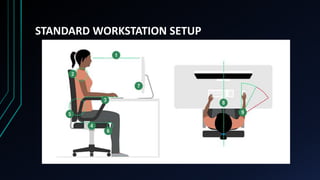
1. Top of screen level with eyes, about an arm's
length away
2. Relax your shoulders - try to position yourself high
enough so you don't need to shrug your shoulders
3. Keyboard just below elbow height
4. Seat height equally supports front and back of
thighs (or use cushion to raise seated position)
STANDARD WORKSTATION SETUP
5. Back of the seat provides good lower back support (or
use cushion, to provide additional back support)
6. Gap of 2-3 cm between front of seat bottom and back
of knee
7. Computer and screen directly in front of you on desk
or other surface
8. Screen and keyboard central - don't twist your back
9. Mouse in line with elbow
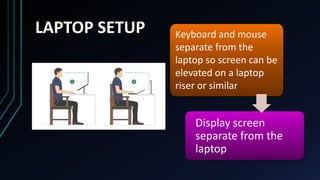
LAPTOP SETUP
Display screen
separate from the
laptop
Keyboard and mouse
separate from the
laptop so screen can be
elevated on a laptop
riser or similar
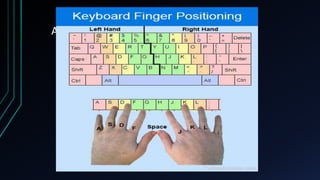
PROPER HANDPLACEMENT
ON THE KEYBOARD
Add a Slide Title - 2
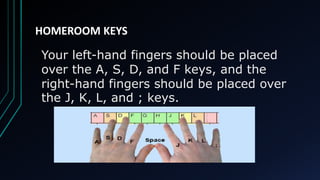
HOMEROOM KEYS
Your left-hand fingers should be placed
over the A, S, D, and F keys, and the
right-hand fingers should be placed over
the J, K, L, and ; keys.
HOMEROOM KEYS
LEFT FINGERS RIGHT FINGERS
ADD A SLIDE TITLE - 4
ADD A SLIDE TITLE - 5

COMPUTER 7.pptx - Proper Posture When Using Computer