September 30th, 2013 | English Version
The new way of collaboration
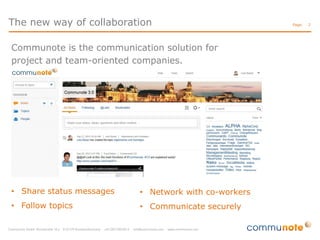
Communote is the communication solution for
project and team-oriented companies.

• Share status messages

• Network with co-workers

• Follow topics

• Communicate securely

Page:

2
The new way of collaboration

Page:

Applications?
• corporate communication
• project communication
• innovation management
• sales and marketing

Benefit?
• increased communication quality
• satisfied employees
• high quality results

3
Content

Page:

Overview
Profile Settings
Write a Note
Create a Blog
Find a Note
Communote Bookmarklet
Desktop Client
Mobile Access

4
Overview | Profile Settings | Write a Note | Create a Topic | Find a Note | Bookmarklet | Desktop Client | Mobile Access

Overview

Page:

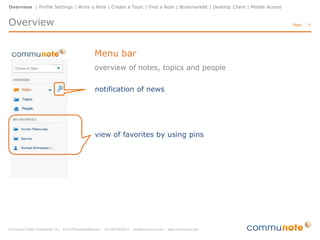
Menu bar
overview of notes, topics and people
notification of news

view of favorites by using pins

5
Overview | Profile Settings | Write a Note | Create a Topic | Find a Note | Bookmarklet | Desktop Client | Mobile Access

Overview

Page:

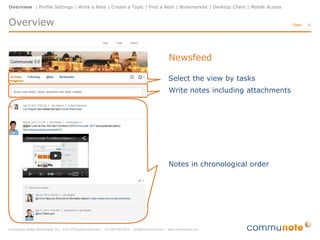
Newsfeed
Select the view by tasks
Write notes including attachments

Notes in chronological order

6
Overview | Profile Settings | Write a Note | Create a Topic | Find a Note | Bookmarklet | Desktop Client | Mobile Access

Overview
Profile Settings
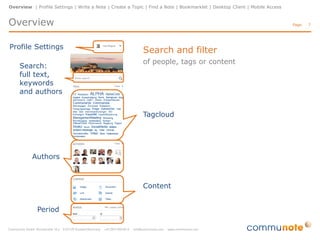
Search:
full text,
keywords
and authors

Page:

Search and filter
of people, tags or content

Tagcloud

Authors

Content
Period

7
Overview | Profile Settings | Write a Note | Create a Topic | Find a Note | Bookmarklet | Desktop Client | Mobile Access

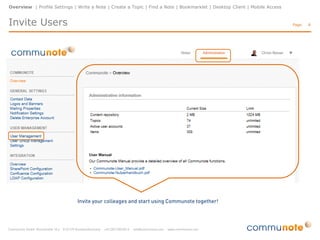
Invite Users

Page:

8
Overview | Profile Settings | Write a Note | Create a Topic | Find a Note | Bookmarklet | Desktop Client | Mobile Access

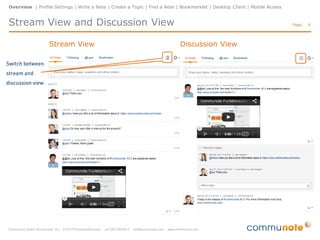
Stream View and Discussion View
Stream View

Page:

Discussion View

9
Overview | Profile Settings | Write a Note | Create a Topic | Find a Note | Bookmarklet | Desktop Client | Mobile Access

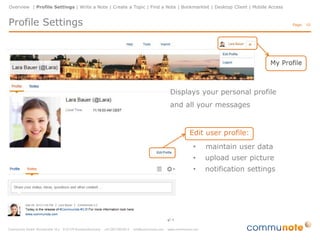
Profile Settings

Page: 10

Displays your personal profile
and all your messages

Edit user profile:
•

maintain user data

•

upload user picture

•

notification settings
Overview | Profile Settings | Write a Note | Create a Topic | Find a Note | Bookmarklet | Desktop Client | Mobile Access

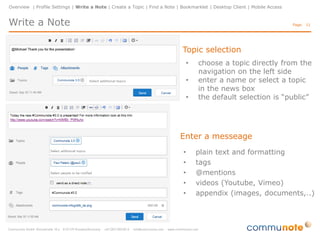
Write a Note

Page: 11

Topic selection
•
•
•

choose a topic directly from the
navigation on the left side
enter a name or select a topic
in the news box
the default selection is “public”

Enter a messeage
•
•
•
•
•

plain text and formatting
tags
@mentions
videos (Youtube, Vimeo)
appendix (images, documents,..)
Overview | Profile Settings | Write a Note | Create a Topic | Find a Note | Bookmarklet | Desktop Client | Mobile Access

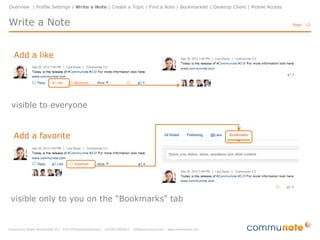
Write a Note
Add a like

visible to everyone

Add a favorite

visible only to you on the “Bookmarks" tab

Page: 12
Overview | Profile Settings | Write a Note | Create a Topic | Find a Note | Bookmarklet | Desktop Client | Mobile Access

Write a Note

Page: 13

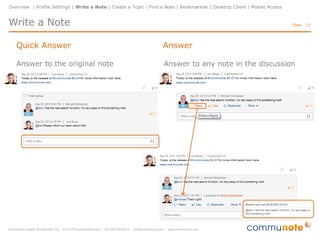
Quick Answer

Answer

Answer to the original note

Answer to any note in the discussion
Overview | Profile Settings | Write a Note | Create a Topic | Find a Note | Bookmarklet | Desktop Client | Mobile Access

Create a Blog

Page: 14

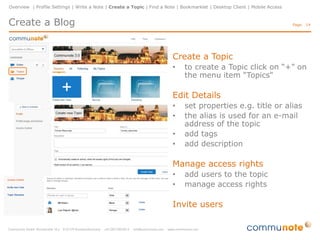
Create a Topic
•

to create a Topic click on “+” on
the menu item “Topics"

Edit Details
•
•
•
•

set properties e.g. title or alias
the alias is used for an e-mail
address of the topic
add tags
add description

Manage access rights
•
•

add users to the topic
manage access rights

Invite users
Overview | Profile Settings | Write a Note | Create a Topic | Find a Note | Bookmarklet | Desktop Client | Mobile Access

Follow a Topic

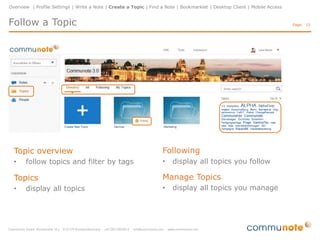
Topic overview
•

follow topics and filter by tags

Topics
•

display all topics

Page: 15

Following
•

display all topics you follow

Manage Topics
•

display all topics you manage
Overview | Profile Settings | Write a Note | Create a Topic | Find a Note | Bookmarklet | Desktop Client | Mobile Access

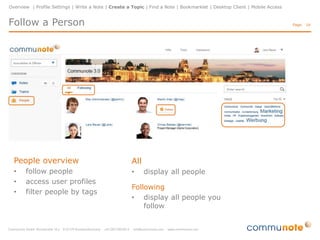
Follow a Person

People overview
•
•
•

follow people
access user profiles
filter people by tags

Page: 16

All
•

display all people

Following
• display all people you
follow
Overview | Profile Settings | Write a Note | Create a Topic | Find a Note | Bookmarklet | Desktop Client | Mobile Access

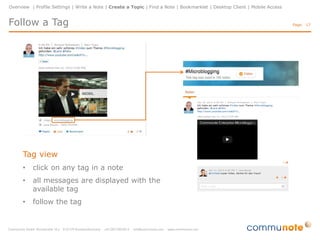
Follow a Tag

Tag view
•

click on any tag in a note

•

all messages are displayed with the
available tag

•

follow the tag

Page: 17
Overview | Profile Settings | Write a Note | Create a Topic | Find a Note | Bookmarklet | Desktop Client | Mobile Access

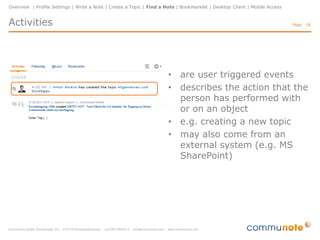
Activities

Page: 18

• are user triggered events
• describes the action that the
person has performed with
or on an object
• e.g. creating a new topic
• may also come from an
external system (e.g. MS
SharePoint)
Overview | Profile Settings | Write a Note | Create a Topic | Find a Note | Bookmarklet | Desktop Client | Mobile Access

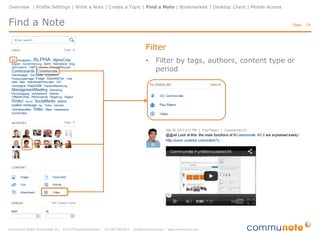
Find a Note

Page: 19

Filter
•

Filter by tags, authors, content type or
period
Overview | Profile Settings | Write a Note | Create a Topic | Find a Note | Bookmarklet | Desktop Client | Mobile Access

Communote Bookmarklet

Page: 20

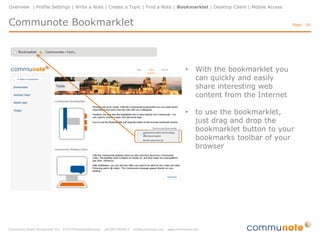
•

With the bookmarklet you
can quickly and easily
share interesting web
content from the Internet

•

to use the bookmarklet,
just drag and drop the
bookmarklet button to your
bookmarks toolbar of your
browser
Overview | Profile Settings | Write a Note | Create a Topic | Find a Note | Bookmarklet | Desktop Client | Mobile Access

Communote Bookmarklet

Page: 21

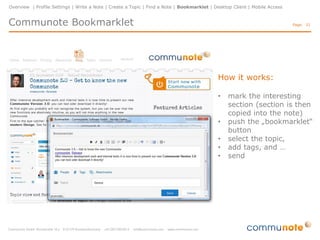
How it works:
•
•

•
•
•

mark the interesting
section (section is then
copied into the note)
push the „bookmarklet“
button
select the topic,
add tags, and …
send
Overview | Profile Settings | Write a Note | Create a Topic | Find a Note | Bookmarklet | Desktop Client | Mobile Access

Communote Desktop Client

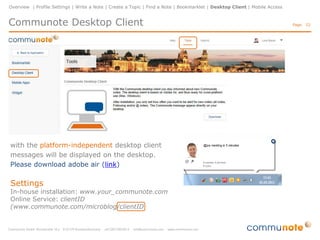
with the platform-independent desktop client
messages will be displayed on the desktop.
Please download adobe air (link)

Settings

In-house installation: www.your_communote.com
Online Service: clientID
(www.communote.com/microblog/clientID

Page: 22
Overview | Profile Settings | Write a Note | Create a Topic | Find a Note | Bookmarklet | Desktop Client | Mobile Access

Mobile Access

Page: 23

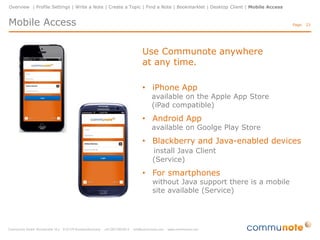
Use Communote anywhere
at any time.
• iPhone App

available on the Apple App Store
(iPad compatible)

• Android App

available on Goolge Play Store

• Blackberry and Java-enabled devices
install Java Client
(Service)

• For smartphones

without Java support there is a mobile
site available (Service)
The new way of collaboration
www.communote.com
twitter.com/communote
facebook.com/communote
youtube.com/communoteCom
slideshare.net/communote

Quick Start Guide Communote 3.0 English

  • 1.
    September 30th, 2013| English Version
  • 2.
    The new wayof collaboration Communote is the communication solution for project and team-oriented companies. • Share status messages • Network with co-workers • Follow topics • Communicate securely Page: 2
  • 3.
    The new wayof collaboration Page: Applications? • corporate communication • project communication • innovation management • sales and marketing Benefit? • increased communication quality • satisfied employees • high quality results 3
  • 4.
    Content Page: Overview Profile Settings Write aNote Create a Blog Find a Note Communote Bookmarklet Desktop Client Mobile Access 4
  • 5.
    Overview | ProfileSettings | Write a Note | Create a Topic | Find a Note | Bookmarklet | Desktop Client | Mobile Access Overview Page: Menu bar overview of notes, topics and people notification of news view of favorites by using pins 5
  • 6.
    Overview | ProfileSettings | Write a Note | Create a Topic | Find a Note | Bookmarklet | Desktop Client | Mobile Access Overview Page: Newsfeed Select the view by tasks Write notes including attachments Notes in chronological order 6
  • 7.
    Overview | ProfileSettings | Write a Note | Create a Topic | Find a Note | Bookmarklet | Desktop Client | Mobile Access Overview Profile Settings Search: full text, keywords and authors Page: Search and filter of people, tags or content Tagcloud Authors Content Period 7
  • 8.
    Overview | ProfileSettings | Write a Note | Create a Topic | Find a Note | Bookmarklet | Desktop Client | Mobile Access Invite Users Page: 8
  • 9.
    Overview | ProfileSettings | Write a Note | Create a Topic | Find a Note | Bookmarklet | Desktop Client | Mobile Access Stream View and Discussion View Stream View Page: Discussion View 9
  • 10.
    Overview | ProfileSettings | Write a Note | Create a Topic | Find a Note | Bookmarklet | Desktop Client | Mobile Access Profile Settings Page: 10 Displays your personal profile and all your messages Edit user profile: • maintain user data • upload user picture • notification settings
  • 11.
    Overview | ProfileSettings | Write a Note | Create a Topic | Find a Note | Bookmarklet | Desktop Client | Mobile Access Write a Note Page: 11 Topic selection • • • choose a topic directly from the navigation on the left side enter a name or select a topic in the news box the default selection is “public” Enter a messeage • • • • • plain text and formatting tags @mentions videos (Youtube, Vimeo) appendix (images, documents,..)
  • 12.
    Overview | ProfileSettings | Write a Note | Create a Topic | Find a Note | Bookmarklet | Desktop Client | Mobile Access Write a Note Add a like visible to everyone Add a favorite visible only to you on the “Bookmarks" tab Page: 12
  • 13.
    Overview | ProfileSettings | Write a Note | Create a Topic | Find a Note | Bookmarklet | Desktop Client | Mobile Access Write a Note Page: 13 Quick Answer Answer Answer to the original note Answer to any note in the discussion
  • 14.
    Overview | ProfileSettings | Write a Note | Create a Topic | Find a Note | Bookmarklet | Desktop Client | Mobile Access Create a Blog Page: 14 Create a Topic • to create a Topic click on “+” on the menu item “Topics" Edit Details • • • • set properties e.g. title or alias the alias is used for an e-mail address of the topic add tags add description Manage access rights • • add users to the topic manage access rights Invite users
  • 15.
    Overview | ProfileSettings | Write a Note | Create a Topic | Find a Note | Bookmarklet | Desktop Client | Mobile Access Follow a Topic Topic overview • follow topics and filter by tags Topics • display all topics Page: 15 Following • display all topics you follow Manage Topics • display all topics you manage
  • 16.
    Overview | ProfileSettings | Write a Note | Create a Topic | Find a Note | Bookmarklet | Desktop Client | Mobile Access Follow a Person People overview • • • follow people access user profiles filter people by tags Page: 16 All • display all people Following • display all people you follow
  • 17.
    Overview | ProfileSettings | Write a Note | Create a Topic | Find a Note | Bookmarklet | Desktop Client | Mobile Access Follow a Tag Tag view • click on any tag in a note • all messages are displayed with the available tag • follow the tag Page: 17
  • 18.
    Overview | ProfileSettings | Write a Note | Create a Topic | Find a Note | Bookmarklet | Desktop Client | Mobile Access Activities Page: 18 • are user triggered events • describes the action that the person has performed with or on an object • e.g. creating a new topic • may also come from an external system (e.g. MS SharePoint)
  • 19.
    Overview | ProfileSettings | Write a Note | Create a Topic | Find a Note | Bookmarklet | Desktop Client | Mobile Access Find a Note Page: 19 Filter • Filter by tags, authors, content type or period
  • 20.
    Overview | ProfileSettings | Write a Note | Create a Topic | Find a Note | Bookmarklet | Desktop Client | Mobile Access Communote Bookmarklet Page: 20 • With the bookmarklet you can quickly and easily share interesting web content from the Internet • to use the bookmarklet, just drag and drop the bookmarklet button to your bookmarks toolbar of your browser
  • 21.
    Overview | ProfileSettings | Write a Note | Create a Topic | Find a Note | Bookmarklet | Desktop Client | Mobile Access Communote Bookmarklet Page: 21 How it works: • • • • • mark the interesting section (section is then copied into the note) push the „bookmarklet“ button select the topic, add tags, and … send
  • 22.
    Overview | ProfileSettings | Write a Note | Create a Topic | Find a Note | Bookmarklet | Desktop Client | Mobile Access Communote Desktop Client with the platform-independent desktop client messages will be displayed on the desktop. Please download adobe air (link) Settings In-house installation: www.your_communote.com Online Service: clientID (www.communote.com/microblog/clientID Page: 22
  • 23.
    Overview | ProfileSettings | Write a Note | Create a Topic | Find a Note | Bookmarklet | Desktop Client | Mobile Access Mobile Access Page: 23 Use Communote anywhere at any time. • iPhone App available on the Apple App Store (iPad compatible) • Android App available on Goolge Play Store • Blackberry and Java-enabled devices install Java Client (Service) • For smartphones without Java support there is a mobile site available (Service)
  • 24.
    The new wayof collaboration www.communote.com twitter.com/communote facebook.com/communote youtube.com/communoteCom slideshare.net/communote