Coding Standards
Whatare
coding
standards?
 Set of rules/guidelines for writing a program.
 Makes a program easier to understand.
 Helps reduces error and makes program better.
Coding
standardsin
naming.
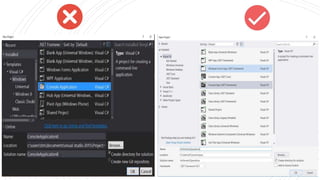
 Provide a unique name to the project or a program in
such a way that justifies the program.
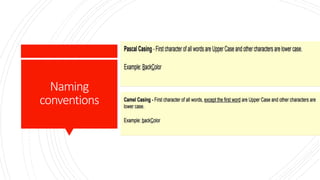
Naming
conventions
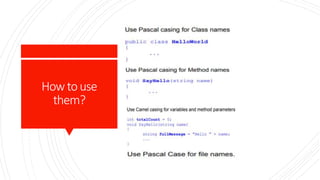
How touse
them?
Naminga
variable:
 Use meaningful and descriptive words to
name variables.
 Try best not using abbreviations.
Example
Naminga
variable:
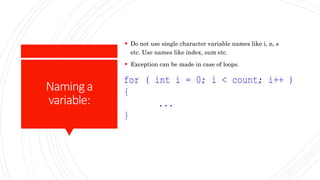
 Do not use single character variable names like i, n, s
etc. Use names like index, sum etc.
 Exception can be made in case of loops.
Naminga
variable
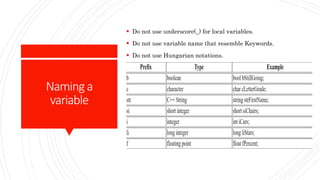
 Do not use underscore(_) for local variables.
 Do not use variable name that resemble Keywords.
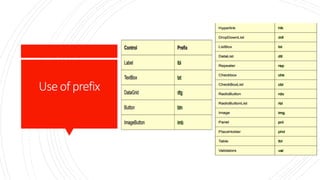
 Do not use Hungarian notations.
Useof prefix
Indentation
and
Spacing
 Indentation means the placement of text(code) farther
to left, or to right, to separate it from surrounding
text(code).
 Spacing simply means adjusting space between codes,
lines, comments etc.
Guidelines
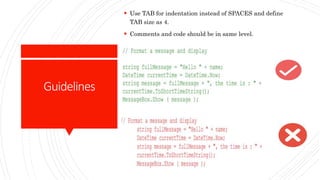
 Use TAB for indentation instead of SPACES and define
TAB size as 4.
 Comments and code should be in same level.
Guidelines:
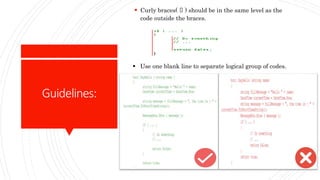
 Curly braces( {} ) should be in the same level as the
code outside the braces.
 Use one blank line to separate logical group of codes.
Guidelines:
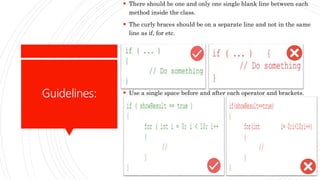
 There should be one and only one single blank line between each
method inside the class.
 The curly braces should be on a separate line and not in the same
line as if, for etc.
 Use a single space before and after each operator and brackets.
Coding Standards
in
Exception
Handling
 Never do a 'catch exception and do nothing'. If you hide an exception,
you will never know if the exception happened or not.
 In case of exceptions, give a friendly message to the user, but log the
actual error with all possible details about the error, including the
time it occurred, method and class name etc.
Guidelines:
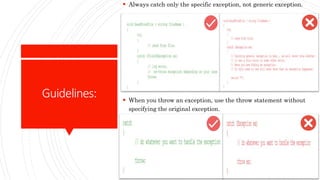
 Always catch only the specific exception, not generic exception.
 When you throw an exception, use the throw statement without
specifying the original exception.
Guidelines:
 Do not write very large try-catch blocks. If required, write
separate try-catch for each task you perform and enclose only the
specific piece of code inside the try-catch.
 Write your own custom exception classes if required in your
application.
Coding
Standardsin
Commenting:
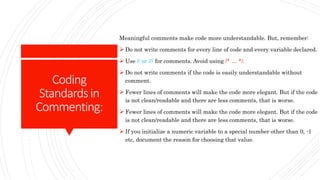
Meaningful comments make code more understandable. But, remember:
 Do not write comments for every line of code and every variable declared.
 Use // or /// for comments. Avoid using /* … */.
 Do not write comments if the code is easily understandable without
comment.
 Fewer lines of comments will make the code more elegant. But if the code
is not clean/readable and there are less comments, that is worse.
 Fewer lines of comments will make the code more elegant. But if the code
is not clean/readable and there are less comments, that is worse.
 If you initialize a numeric variable to a special number other than 0, -1
etc, document the reason for choosing that value.
Otherfew
guidelines:
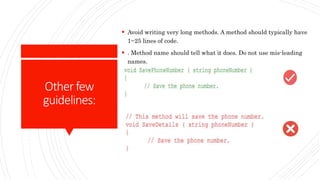
 Avoid writing very long methods. A method should typically have
1~25 lines of code.
 . Method name should tell what it does. Do not use mis-leading
names.
Other
Guidelines:
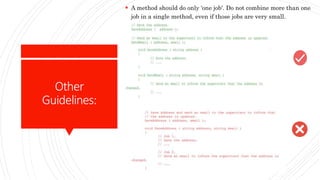
 A method should do only 'one job'. Do not combine more than one
job in a single method, even if those jobs are very small.
Other
Guidelines:
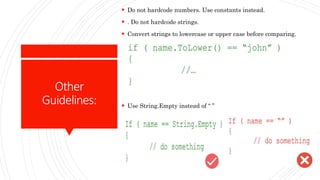
 Do not hardcode numbers. Use constants instead.
 . Do not hardcode strings.
 Convert strings to lowercase or upper case before comparing.
 Use String.Empty instead of “ ”
Other
Guidelines:
 In the application start up, do some kind of "self check" and ensure
all required files and dependencies are available in the expected
locations. Check for database connection in start up, if required
 Error messages should help the user to solve the problem. Never
give error messages like "Error in Application", "There is an error"
etc.
 . Avoid having very large files. If a single file has more than 1000
lines of code, it is a good candidate for refactoring. Split them
logically into two or more classes.
 . Avoid passing too many parameters to a method. If you have more
than 4~5 parameters, it is a good candidate to define a class or
structure.
 . Logically organize all your files within appropriate folders.
Thankyou!

Coding standards

  • 1.
  • 2.
    Whatare coding standards?  Set ofrules/guidelines for writing a program.  Makes a program easier to understand.  Helps reduces error and makes program better.
  • 3.
    Coding standardsin naming.  Provide aunique name to the project or a program in such a way that justifies the program.
  • 5.
  • 6.
  • 7.
    Naminga variable:  Use meaningfuland descriptive words to name variables.  Try best not using abbreviations.
  • 8.
  • 9.
    Naminga variable:  Do notuse single character variable names like i, n, s etc. Use names like index, sum etc.  Exception can be made in case of loops.
  • 10.
    Naminga variable  Do notuse underscore(_) for local variables.  Do not use variable name that resemble Keywords.  Do not use Hungarian notations.
  • 11.
  • 12.
    Indentation and Spacing  Indentation meansthe placement of text(code) farther to left, or to right, to separate it from surrounding text(code).  Spacing simply means adjusting space between codes, lines, comments etc.
  • 13.
    Guidelines  Use TABfor indentation instead of SPACES and define TAB size as 4.  Comments and code should be in same level.
  • 14.
    Guidelines:  Curly braces({} ) should be in the same level as the code outside the braces.  Use one blank line to separate logical group of codes.
  • 15.
    Guidelines:  There shouldbe one and only one single blank line between each method inside the class.  The curly braces should be on a separate line and not in the same line as if, for etc.  Use a single space before and after each operator and brackets.
  • 16.
    Coding Standards in Exception Handling  Neverdo a 'catch exception and do nothing'. If you hide an exception, you will never know if the exception happened or not.  In case of exceptions, give a friendly message to the user, but log the actual error with all possible details about the error, including the time it occurred, method and class name etc.
  • 17.
    Guidelines:  Always catchonly the specific exception, not generic exception.  When you throw an exception, use the throw statement without specifying the original exception.
  • 18.
    Guidelines:  Do notwrite very large try-catch blocks. If required, write separate try-catch for each task you perform and enclose only the specific piece of code inside the try-catch.  Write your own custom exception classes if required in your application.
  • 19.
    Coding Standardsin Commenting: Meaningful comments makecode more understandable. But, remember:  Do not write comments for every line of code and every variable declared.  Use // or /// for comments. Avoid using /* … */.  Do not write comments if the code is easily understandable without comment.  Fewer lines of comments will make the code more elegant. But if the code is not clean/readable and there are less comments, that is worse.  Fewer lines of comments will make the code more elegant. But if the code is not clean/readable and there are less comments, that is worse.  If you initialize a numeric variable to a special number other than 0, -1 etc, document the reason for choosing that value.
  • 20.
    Otherfew guidelines:  Avoid writingvery long methods. A method should typically have 1~25 lines of code.  . Method name should tell what it does. Do not use mis-leading names.
  • 21.
    Other Guidelines:  A methodshould do only 'one job'. Do not combine more than one job in a single method, even if those jobs are very small.
  • 22.
    Other Guidelines:  Do nothardcode numbers. Use constants instead.  . Do not hardcode strings.  Convert strings to lowercase or upper case before comparing.  Use String.Empty instead of “ ”
  • 23.
    Other Guidelines:  In theapplication start up, do some kind of "self check" and ensure all required files and dependencies are available in the expected locations. Check for database connection in start up, if required  Error messages should help the user to solve the problem. Never give error messages like "Error in Application", "There is an error" etc.  . Avoid having very large files. If a single file has more than 1000 lines of code, it is a good candidate for refactoring. Split them logically into two or more classes.  . Avoid passing too many parameters to a method. If you have more than 4~5 parameters, it is a good candidate to define a class or structure.  . Logically organize all your files within appropriate folders.
  • 24.