Codes
-
DLCA Bharati Ingale (bharatijingale@gmail.com)
Objective
 Binary Codes
 Weighted codes
 Binary Coded Decimal (BCD)
 Non-weighted codes
 Excess – 3 code,
 Gray code,
 Alphanumeric codes – ASCII Code, EBCDIC, ISCII Code,
 Error detection
DLCA Bharati Ingale (bharatijingale@gmail.com)
Binary Codes
 Computers and digital circuits processes information in the binary
format.
 Each character is assigned 7 or 8 bit binary code to indicate its
character which may be numeric, alphabet or special symbol.
DLCA Bharati Ingale (bharatijingale@gmail.com)
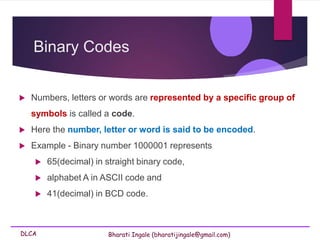
Binary Codes
 Numbers, letters or words are represented by a specific group of
symbols is called a code.
 Here the number, letter or word is said to be encoded.
 Example - Binary number 1000001 represents
 65(decimal) in straight binary code,
 alphabet A in ASCII code and
 41(decimal) in BCD code.
DLCA Bharati Ingale (bharatijingale@gmail.com)
Binary Codes
 The digital data is represented, stored and transmitted as group of
binary bits.
 This group is also called as binary code.
 The binary code is represented by the number as well as
alphanumeric letter.
DLCA Bharati Ingale (bharatijingale@gmail.com)
Advantages of Binary Code
 Binary codes are suitable for both
 the computer applications.
 the digital communications.
 Binary codes make the analysis and designing of digital circuits
easier if binary codes are used.
 Since only 0 & 1 are being used, implementation becomes
easy.
DLCA Bharati Ingale (bharatijingale@gmail.com)
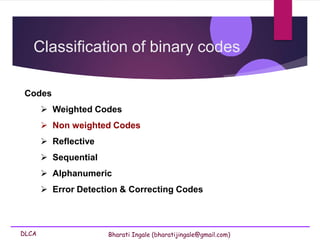
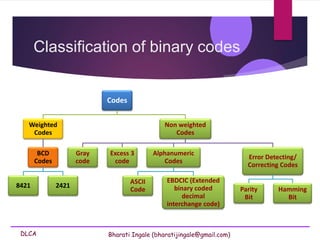
Classification of binary codes
Codes
 Weighted Codes
 Non weighted Codes
 Reflective
 Sequential
 Alphanumeric
 Error Detection & Correcting Codes
DLCA Bharati Ingale (bharatijingale@gmail.com)
Classification of binary codes
Codes
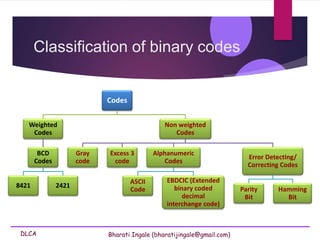
Weighted
Codes
BCD
Codes
8421 2421
Non weighted
Codes
Gray
code
Excess 3
code
Alphanumeric
Codes
ASCII
Code
EBDCIC (Extended
binary coded
decimal
interchange code)
Error Detecting/
Correcting Codes
Parity
Bit
Hamming
Bit
DLCA Bharati Ingale (bharatijingale@gmail.com)
Classification of binary codes
Codes
Weighted
Codes
BCD
Codes
8421 2421
Non weighted
Codes
Gray
code
Excess 3
code
Alphanumeric
Codes
ASCII
Code
EBDCIC (Extended
binary coded
decimal
interchange code)
Error Detecting/
Correcting Codes
Parity
Bit
Hamming
Bit
DLCA Bharati Ingale (bharatijingale@gmail.com)
Weighted Codes
 Weighted binary codes are those binary codes which obey the positional
weight principle.
 Each position of the number represents a specific weight.
 Several systems of the codes are used to express the decimal digits 0
through 9.
 Eg: 8421 & 2421
 In these codes each decimal digit is represented by a group of four bits.
DLCA Bharati Ingale (bharatijingale@gmail.com)
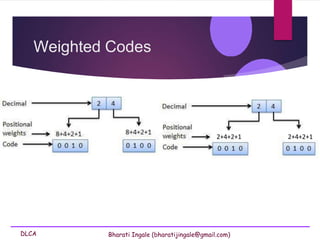
Weighted Codes
2+4+2+1 2+4+2+1
DLCA Bharati Ingale (bharatijingale@gmail.com)
Classification of binary codes
Codes
Weighted
Codes
BCD
Codes
8421 2421
Non weighted
Codes
Gray
code
Excess 3
code
Alphanumeric
Codes
ASCII
Code
EBDCIC (Extended
binary coded
decimal
interchange code)
Error Detecting/
Correcting Codes
Parity
Bit
Hamming
Bit
DLCA Bharati Ingale (bharatijingale@gmail.com)
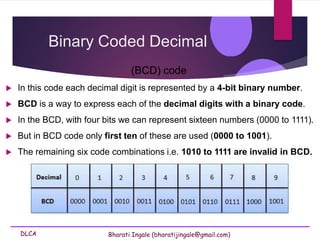
Binary Coded Decimal
(BCD) code
 In this code each decimal digit is represented by a 4-bit binary number.
 BCD is a way to express each of the decimal digits with a binary code.
 In the BCD, with four bits we can represent sixteen numbers (0000 to 1111).
 But in BCD code only first ten of these are used (0000 to 1001).
 The remaining six code combinations i.e. 1010 to 1111 are invalid in BCD.
DLCA Bharati Ingale (bharatijingale@gmail.com)
Binary Coded Decimal
(BCD) code
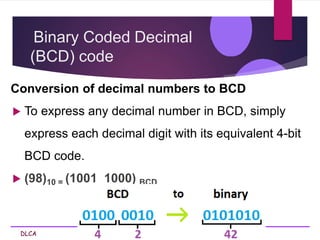
Conversion of decimal numbers to BCD
 To express any decimal number in BCD, simply
express each decimal digit with its equivalent 4-bit
BCD code.
 (98)10 = (1001 1000) BCD
DLCA Bharati Ingale (bharatijingale@gmail.com)
Smallest and Largest Digit in BCD
 The smallest digit in BCD is 0000 i.e 0 and
 The largest digit in BCD is 1001 i.e 9
Codes
DLCA Bharati Ingale (bharatijingale@gmail.com)
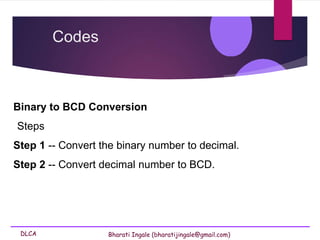
Binary to BCD Conversion
Steps
Step 1 -- Convert the binary number to decimal.
Step 2 -- Convert decimal number to BCD.
Codes
DLCA Bharati Ingale (bharatijingale@gmail.com)
Binary to BCD Conversion
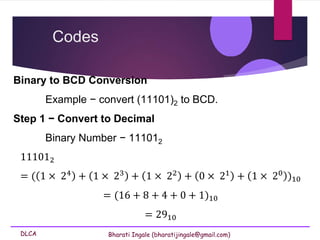
Example − convert (11101)2 to BCD.
Step 1 − Convert to Decimal
Binary Number − 111012
111012
= ( 1 × 24 + 1 × 23 + 1 × 22 + 0 × 21 + 1 × 20 )10
= (16 + 8 + 4 + 0 + 1)10
= 2910
Codes
DLCA Bharati Ingale (bharatijingale@gmail.com)
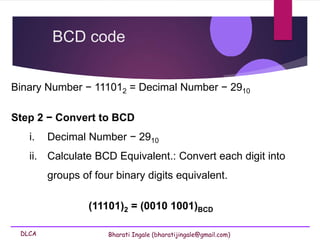
BCD code
Binary Number − 111012 = Decimal Number − 2910
Step 2 − Convert to BCD
i. Decimal Number − 2910
ii. Calculate BCD Equivalent.: Convert each digit into
groups of four binary digits equivalent.
(11101)2 = (0010 1001)BCD
DLCA Bharati Ingale (bharatijingale@gmail.com)
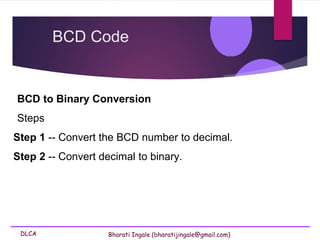
BCD to Binary Conversion
Steps
Step 1 -- Convert the BCD number to decimal.
Step 2 -- Convert decimal to binary.
BCD Code
DLCA Bharati Ingale (bharatijingale@gmail.com)
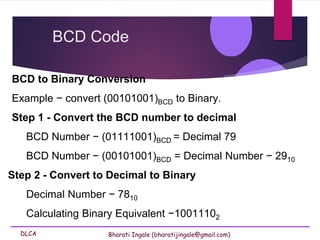
BCD to Binary Conversion
Example − convert (00101001)BCD to Binary.
Step 1 - Convert the BCD number to decimal
BCD Number − (01111001)BCD = Decimal 79
BCD Number − (00101001)BCD = Decimal Number − 2910
Step 2 - Convert to Decimal to Binary
Decimal Number − 7810
Calculating Binary Equivalent −10011102
BCD Code
DLCA Bharati Ingale (bharatijingale@gmail.com)
Binary Coded Decimal
(BCD) code
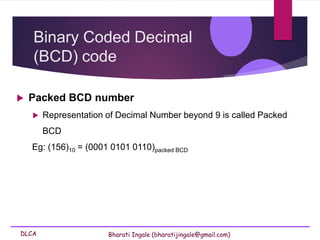
 Packed BCD number
 Representation of Decimal Number beyond 9 is called Packed
BCD
Eg: (156)10 = (0001 0101 0110)packed BCD
DLCA Bharati Ingale (bharatijingale@gmail.com)
Binary Coded Decimal
(BCD) code
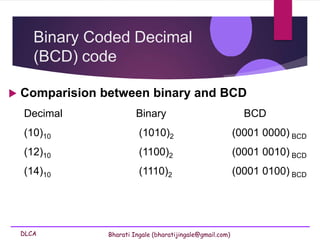
 Comparision between binary and BCD
Decimal Binary BCD
(10)10 (1010)2 (0001 0000) BCD
(12)10 (1100)2 (0001 0010) BCD
(14)10 (1110)2 (0001 0100) BCD
DLCA Bharati Ingale (bharatijingale@gmail.com)
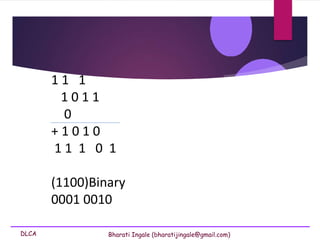
1 1 1
1 0 1 1
0
+ 1 0 1 0
1 1 1 0 1
(1100)Binary
0001 0010
DLCA Bharati Ingale (bharatijingale@gmail.com)
Binary Coded Decimal
(BCD) code
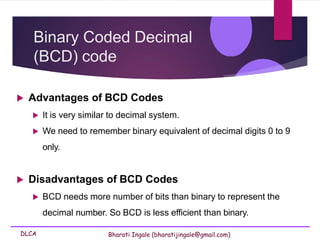
 Advantages of BCD Codes
 It is very similar to decimal system.
 We need to remember binary equivalent of decimal digits 0 to 9
only.
 Disadvantages of BCD Codes
 BCD needs more number of bits than binary to represent the
decimal number. So BCD is less efficient than binary.
DLCA Bharati Ingale (bharatijingale@gmail.com)
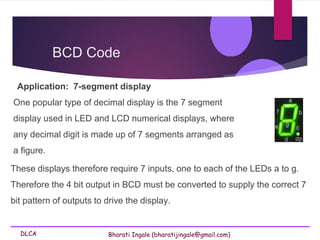
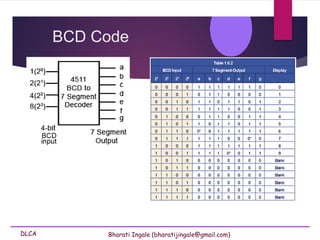
Application: 7-segment display
One popular type of decimal display is the 7 segment
display used in LED and LCD numerical displays, where
any decimal digit is made up of 7 segments arranged as
a figure.
BCD Code
These displays therefore require 7 inputs, one to each of the LEDs a to g.
Therefore the 4 bit output in BCD must be converted to supply the correct 7
bit pattern of outputs to drive the display.
DLCA Bharati Ingale (bharatijingale@gmail.com)
BCD Code
DLCA Bharati Ingale (bharatijingale@gmail.com)
Non-Weighted Codes
 In this type of binary codes, the positional weights are not
assigned.
 The examples of non-weighted codes are
 Excess-3 code
 Gray code
Excess-3 code
DLCA Bharati Ingale (bharatijingale@gmail.com)
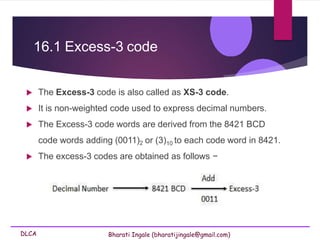
16.1 Excess-3 code
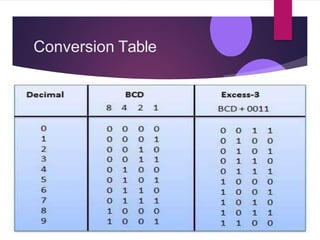
 The Excess-3 code is also called as XS-3 code.
 It is non-weighted code used to express decimal numbers.
 The Excess-3 code words are derived from the 8421 BCD
code words adding (0011)2 or (3)10 to each code word in 8421.
 The excess-3 codes are obtained as follows −
Conversion Table
DLCA Bharati Ingale (bharatijingale@gmail.com)
Binary Coded Decimal
(BCD) code
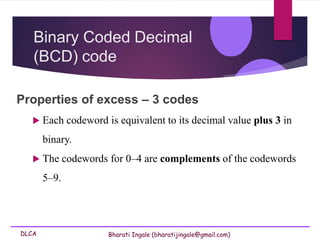
Properties of excess – 3 codes
 Each codeword is equivalent to its decimal value plus 3 in
binary.
 The codewords for 0–4 are complements of the codewords
5–9.
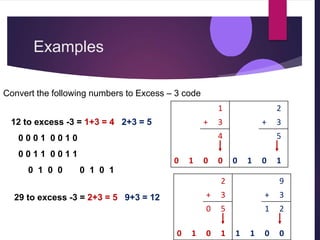
Examples
12 to excess -3 = 1+3 = 4 2+3 = 5
0 0 0 1 0 0 1 0
0 0 1 1 0 0 1 1
0 1 0 0 0 1 0 1
29 to excess -3 = 2+3 = 5 9+3 = 12
1
+ 3
4
0 1 0 0
2
+ 3
5
0 1 0 1
2
+ 3
0 5
0 1 0 1
9
+ 3
1 2
1 1 0 0
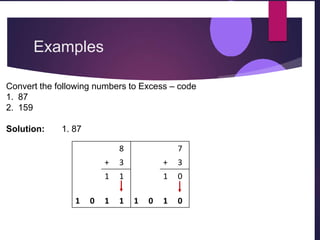
Convert the following numbers to Excess – 3 code
Examples
8
+ 3
1 1
1 0 1 1
7
+ 3
1 0
1 0 1 0
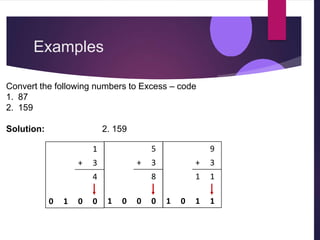
Convert the following numbers to Excess – code
1. 87
2. 159
Solution: 1. 87
Examples
5
+ 3
8
1 0 0 0
9
+ 3
1 1
1 0 1 1
1
+ 3
4
0 1 0 0
Convert the following numbers to Excess – code
1. 87
2. 159
Solution: 2. 159
DLCA Bharati Ingale (bharatijingale@gmail.com)
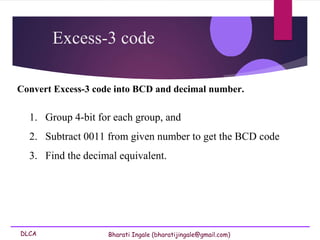
Convert Excess-3 code into BCD and decimal number.
1. Group 4-bit for each group, and
2. Subtract 0011 from given number to get the BCD code
3. Find the decimal equivalent.
Excess-3 code
DLCA Bharati Ingale (bharatijingale@gmail.com)
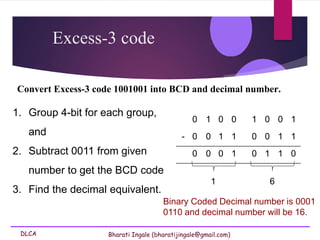
Convert Excess-3 code 1001001 into BCD and decimal number.
Excess-3 code
1. Group 4-bit for each group,
and
2. Subtract 0011 from given
number to get the BCD code
3. Find the decimal equivalent.
0 1 0 0 1 0 0 1
- 0 0 1 1 0 0 1 1
0 0 0 1 0 1 1 0
1 6
Binary Coded Decimal number is 0001
0110 and decimal number will be 16.
Gray Code
DLCA Bharati Ingale (bharatijingale@gmail.com)
Gray Code
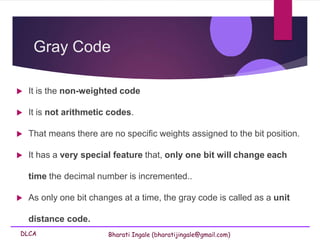
 It is the non-weighted code
 It is not arithmetic codes.
 That means there are no specific weights assigned to the bit position.
 It has a very special feature that, only one bit will change each
time the decimal number is incremented..
 As only one bit changes at a time, the gray code is called as a unit
distance code.
DLCA Bharati Ingale (bharatijingale@gmail.com)
Gray Code
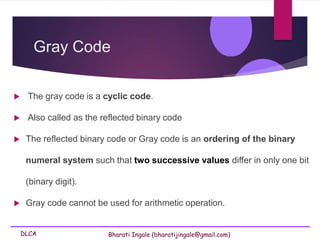
 The gray code is a cyclic code.
 Also called as the reflected binary code
 The reflected binary code or Gray code is an ordering of the binary
numeral system such that two successive values differ in only one bit
(binary digit).
 Gray code cannot be used for arithmetic operation.
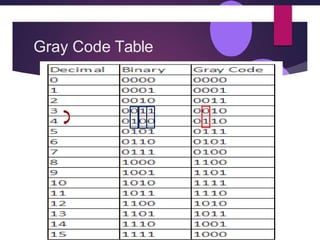
Gray Code Table
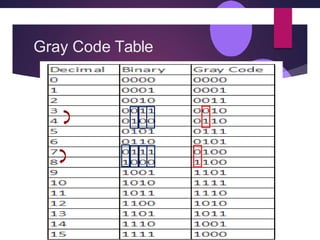
Gray Code Table
DLCA Bharati Ingale (bharatijingale@gmail.com)
 Gray code also known as reflected binary code,
because the first (n/2) values compare with those of
the last (n/2) values, but in reverse order.
Gray code
DLCA Bharati Ingale (bharatijingale@gmail.com)
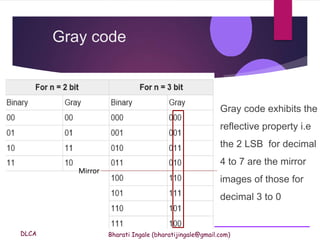
Gray code exhibits the
reflective property i.e
the 2 LSB for decimal
4 to 7 are the mirror
images of those for
decimal 3 to 0
Gray code
Mirror
DLCA Bharati Ingale (bharatijingale@gmail.com)
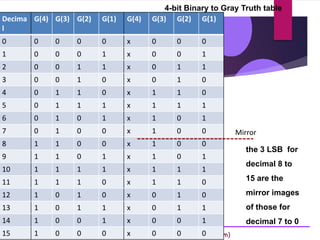
Decima
l
G(4) G(3) G(2) G(1) G(4) G(3) G(2) G(1)
0 0 0 0 0 x 0 0 0
1 0 0 0 1 x 0 0 1
2 0 0 1 1 x 0 1 1
3 0 0 1 0 x 0 1 0
4 0 1 1 0 x 1 1 0
5 0 1 1 1 x 1 1 1
6 0 1 0 1 x 1 0 1
7 0 1 0 0 x 1 0 0
8 1 1 0 0 x 1 0 0
9 1 1 0 1 x 1 0 1
10 1 1 1 1 x 1 1 1
11 1 1 1 0 x 1 1 0
12 1 0 1 0 x 0 1 0
13 1 0 1 1 x 0 1 1
14 1 0 0 1 x 0 0 1
15 1 0 0 0 x 0 0 0
4-bit Binary to Gray Truth table
Mirror
the 3 LSB for
decimal 8 to
15 are the
mirror images
of those for
decimal 7 to 0
DLCA Bharati Ingale (bharatijingale@gmail.com)
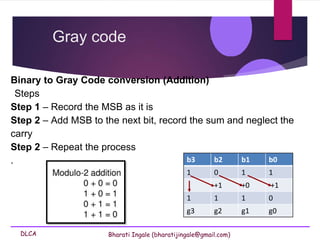
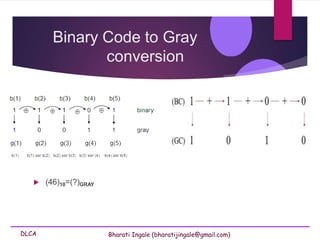
Binary to Gray Code conversion (Addition)
Steps
Step 1 – Record the MSB as it is
Step 2 – Add MSB to the next bit, record the sum and neglect the
carry
Step 2 – Repeat the process
.
Gray code
b3 b2 b1 b0
1 0 1 1
+1 +0 +1
1 1 1 0
g3 g2 g1 g0
DLCA Bharati Ingale (bharatijingale@gmail.com)
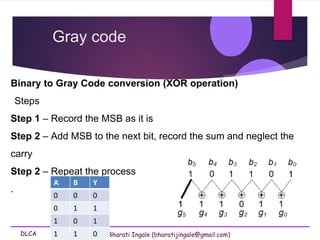
Binary to Gray Code conversion (XOR operation)
Steps
Step 1 – Record the MSB as it is
Step 2 – Add MSB to the next bit, record the sum and neglect the
carry
Step 2 – Repeat the process
.
Gray code
A B Y
0 0 0
0 1 1
1 0 1
1 1 0
DLCA Bharati Ingale (bharatijingale@gmail.com)
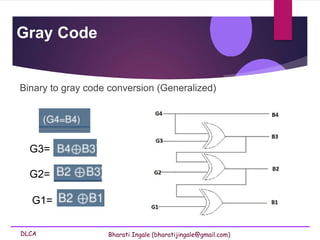
Binary to gray code conversion (Generalized)
Gray Code
G3=
G2=
G1=
DLCA Bharati Ingale (bharatijingale@gmail.com)
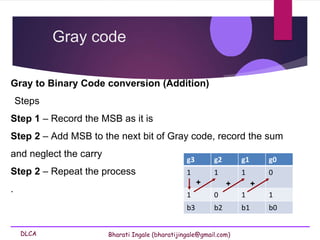
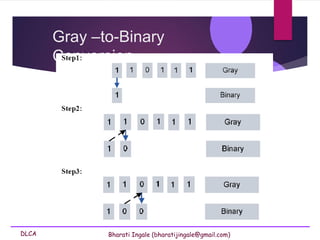
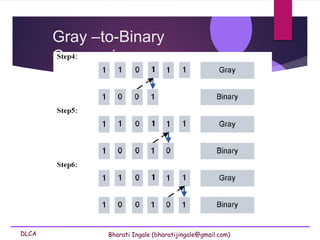
Gray to Binary Code conversion (Addition)
Steps
Step 1 – Record the MSB as it is
Step 2 – Add MSB to the next bit of Gray code, record the sum
and neglect the carry
Step 2 – Repeat the process
.
Gray code
g3 g2 g1 g0
1 1 1 0
1 0 1 1
b3 b2 b1 b0
+ + +
DLCA Bharati Ingale (bharatijingale@gmail.com)
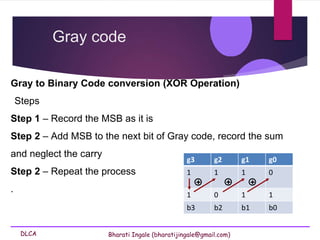
Gray to Binary Code conversion (XOR Operation)
Steps
Step 1 – Record the MSB as it is
Step 2 – Add MSB to the next bit of Gray code, record the sum
and neglect the carry
Step 2 – Repeat the process
.
Gray code
g3 g2 g1 g0
1 1 1 0
1 0 1 1
b3 b2 b1 b0
+ + +
DLCA Bharati Ingale (bharatijingale@gmail.com)
Gray –to-Binary
Conversion
DLCA Bharati Ingale (bharatijingale@gmail.com)
Gray –to-Binary
Conversion
DLCA Bharati Ingale (bharatijingale@gmail.com)
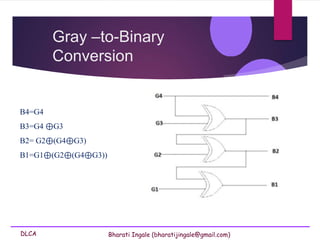
Gray –to-Binary
Conversion
B4=G4
B3=G4 ⊕G3
B2= G2⊕(G4⊕G3)
B1=G1⊕(G2⊕(G4⊕G3))
DLCA Bharati Ingale (bharatijingale@gmail.com)
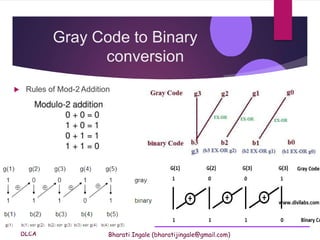
Gray Code to Binary
conversion
 Rules of Mod-2 Addition
DLCA Bharati Ingale (bharatijingale@gmail.com)
Binary Code to Gray
conversion
 (46)10=(?)GRAY
Alphanumeric
Code
DLCA Bharati Ingale (bharatijingale@gmail.com)
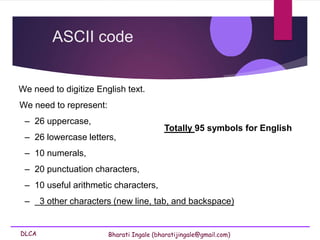
We need to digitize English text.
We need to represent:
– 26 uppercase,
– 26 lowercase letters,
– 10 numerals,
– 20 punctuation characters,
– 10 useful arithmetic characters,
– 3 other characters (new line, tab, and backspace)
ASCII code
Totally 95 symbols for English
DLCA Bharati Ingale (bharatijingale@gmail.com)
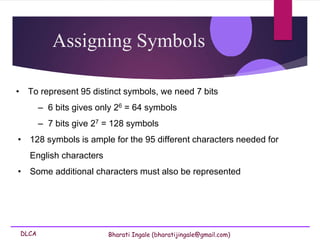
Assigning Symbols
• To represent 95 distinct symbols, we need 7 bits
– 6 bits gives only 26 = 64 symbols
– 7 bits give 27 = 128 symbols
• 128 symbols is ample for the 95 different characters needed for
English characters
• Some additional characters must also be represented
DLCA Bharati Ingale (bharatijingale@gmail.com)
ASCII
 ASCII is an acronym for American Standard Code for Information
Interchange.
 This is standard set of characters understood by all computers,
 Mostly consists of
i. letters ,
ii. numbers and
iii. few basic symbols.
 It is a code that uses numbers to represent characters.
DLCA Bharati Ingale (bharatijingale@gmail.com)
ASCII
 ASCII is a widely used 7-bit (27) code
 Each letter is assigned a number between 0 and 127.
 There are 128 standard ASCII codes, each of which can be
represented by a 7-digit binary number: 0000000 through 1111111.
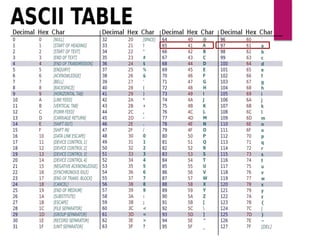
 Eg: the character A is assigned the decimal number 65, while a is
assigned decimal 97 as shown below in the ASCII table.
DLCA Bharati Ingale (bharatijingale@gmail.com)
ASCII
Advantages of a “standard”:
 It is relatively easy to exchange information between different programs,
different operating systems, and different computers.
 Computer parts built by different manufacturers can be connected
 Programs can create data and store it so that other programs can
process it later, and so forth
DLCA Bharati Ingale (bharatijingale@gmail.com)
EBCDIC
 EBCDIC, in full extended binary-coded decimal interchange
code.
 It was developed and used by IBM.
 EBCDIC) is an 8-bit binary code for numeric and alphanumeric
characters.
 It can represent a total of 256 (28) different characters.
DLCA Bharati Ingale (bharatijingale@gmail.com)
EBCDIC
 It is a coding representation in which symbols, letters and
numbers are presented in binary language.
 Provide a larger set of codes thanASCII.
 Less common thanASCII
 Rarely used today
 It is use by IBM mainframes today
DLCA Bharati Ingale (bharatijingale@gmail.com)
Error detection and
correction
DLCA Bharati Ingale (bharatijingale@gmail.com)
What is an error?
 An error is an action which is inaccurate or incorrect.
 An error is a deviation from accuracy or correctness.
 The condition of having incorrect or false knowledge
 Error is a condition when the output information does not match with
the input information.
DLCA Bharati Ingale (bharatijingale@gmail.com)
Need of error detection and
error correction
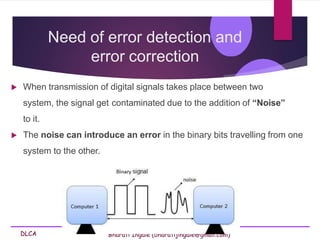
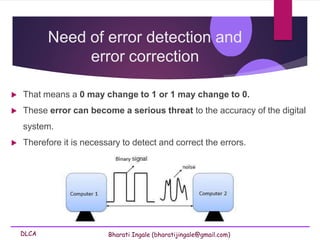
 When transmission of digital signals takes place between two
system, the signal get contaminated due to the addition of “Noise”
to it.
 The noise can introduce an error in the binary bits travelling from one
system to the other.
DLCA Bharati Ingale (bharatijingale@gmail.com)
Need of error detection and
error correction
 That means a 0 may change to 1 or 1 may change to 0.
 These error can become a serious threat to the accuracy of the digital
system.
 Therefore it is necessary to detect and correct the errors.
DLCA Bharati Ingale (bharatijingale@gmail.com)
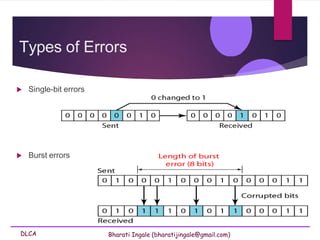
Types of Errors
 Single-bit errors
 Burst errors
DLCA Bharati Ingale (bharatijingale@gmail.com)
How to detect and correct
error?
 One or more bits are added to data for error detection /correction.
 These extra bits are called Parity bits.
 The data bits along with the parity bits form a code word.
 Error detection methods:
 Parity checking
 Checksum error detection
 Cyclic redundancy code (CRC)
DLCA Bharati Ingale (bharatijingale@gmail.com)
Parity bit
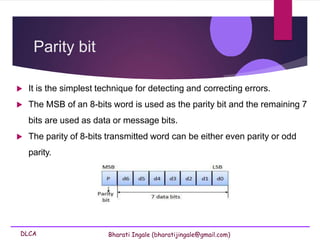
 It is the simplest technique for detecting and correcting errors.
 The MSB of an 8-bits word is used as the parity bit and the remaining 7
bits are used as data or message bits.
 The parity of 8-bits transmitted word can be either even parity or odd
parity.
DLCA Bharati Ingale (bharatijingale@gmail.com)
Parity bit
 Even parity -- Even parity means the number of 1's in the given word
including the parity bit should be even (2,4,6,....).
 Odd parity -- Odd parity means the number of 1's in the given word
including the parity bit should be odd (1,3,5,....).
DLCA Bharati Ingale (bharatijingale@gmail.com)
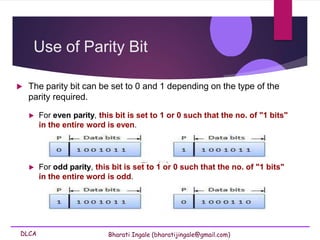
 For even parity, this bit is set to 1 or 0 such that the no. of "1 bits"
in the entire word is even.
 For odd parity, this bit is set to 1 or 0 such that the no. of "1 bits"
in the entire word is odd.
Use of Parity Bit
 The parity bit can be set to 0 and 1 depending on the type of the
parity required.
DLCA Bharati Ingale (bharatijingale@gmail.com)
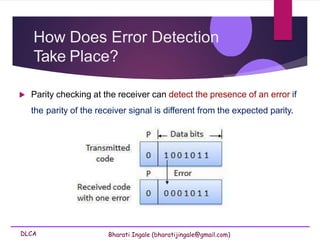
How Does Error Detection
Take Place?
 Parity checking at the receiver can detect the presence of an error if
the parity of the receiver signal is different from the expected parity.
DLCA Bharati Ingale (bharatijingale@gmail.com)
Hamming Code
 Hamming code is error detection and correction (single bit error) method.
 It was developed by R.W. Hamming for error correction.
 In this coding method, the source encodes the message by inserting
redundant bits within the message.
 These redundant bits are extra bits that are generated and inserted at
specific positions in the message .
 When the destination receives this message, it performs recalculations
to detect errors and find the bit position that has error.
DLCA Bharati Ingale (bharatijingale@gmail.com)
Hamming Code contd…
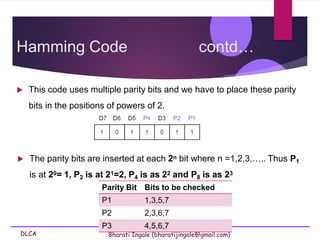
 This code uses multiple parity bits and we have to place these parity
bits in the positions of powers of 2.
 The parity bits are inserted at each 2n bit where n =1,2,3,….. Thus P1
is at 20= 1, P2 is at 21=2, P4 is as 22 and P8 is as 23
Parity Bit Bits to be checked
P1 1,3,5,7
P2 2,3,6,7
P3 4,5,6,7
DLCA Bharati Ingale (bharatijingale@gmail.com)
Hamming Bit example
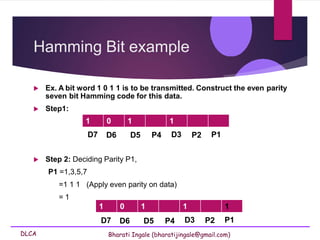
 Ex. A bit word 1 0 1 1 is to be transmitted. Construct the even parity
seven bit Hamming code for this data.
 Step1:
1 0 1 1
D7 D6 D5 P4 D3 P2 P1
1 0 1 1 1
 Step 2: Deciding Parity P1,
P1 =1,3,5,7
=1 1 1 (Apply even parity on data)
= 1
D7 D6 D5 P4 D3 P2 P1
DLCA Bharati Ingale (bharatijingale@gmail.com)
Hamming Bit example contd..
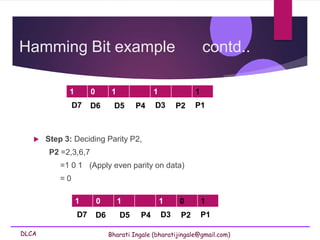
 Step 3: Deciding Parity P2,
P2 =2,3,6,7
=1 0 1 (Apply even parity on data)
= 0
1 0 1 1 1
D7 D6 D5 P4 D3 P2 P1
1 0 1 1 0 1
D7 D6 D5 P4 D3 P2 P1
DLCA Bharati Ingale (bharatijingale@gmail.com)
Hamming Bit example contd..
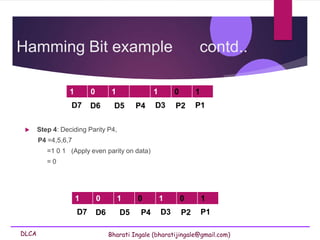
 Step 4: Deciding Parity P4,
P4 =4,5,6,7
=1 0 1 (Apply even parity on data)
= 0
1 0 1 1 0 1
D7 D6 D5 P4 D3 P2 P1
1 0 1 0 1 0 1
D7 D6 D5 P4 D3 P2 P1
DLCA Bharati Ingale (bharatijingale@gmail.com)
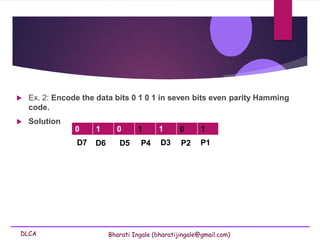
 Ex. 2: Encode the data bits 0 1 0 1 in seven bits even parity Hamming
code.
 Solution
0 1 0 1 1 0 1
D7 D6 D5 P4 D3 P2 P1
DLCA Bharati Ingale (bharatijingale@gmail.com)
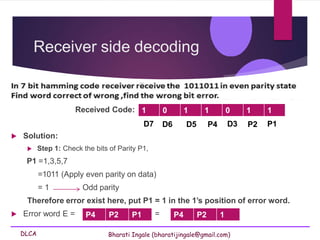
Receiver side decoding
Received Code:
 Solution:
 Step 1: Check the bits of Parity P1,
P1 =1,3,5,7
=1011 (Apply even parity on data)
= 1 Odd parity
Therefore error exist here, put P1 = 1 in the 1’s position of error word.
 Error word E = =
1 0 1 1 0 1 1
D7 D6 D5 P4 D3 P2 P1
P4 P2 P1 P4 P2 1
DLCA Bharati Ingale (bharatijingale@gmail.com)
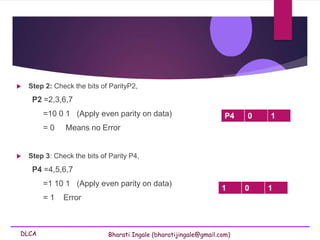
 Step 2: Check the bits of ParityP2,
P2 =2,3,6,7
=10 0 1 (Apply even parity on data)
= 0 Means no Error
 Step 3: Check the bits of Parity P4,
P4 =4,5,6,7
=1 10 1 (Apply even parity on data)
= 1 Error
1 0 1
P4 0 1
DLCA Bharati Ingale (bharatijingale@gmail.com)
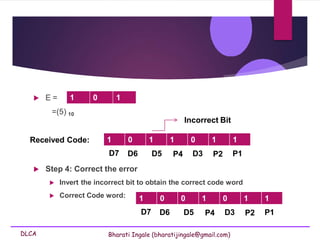
 E =
=(5) 10
1 0 1
1 0 1 1 0 1 1
Received Code:
D7 D6 D5 P4 D3 P2 P1
 Step 4: Correct the error
 Invert the incorrect bit to obtain the correct code word
 Correct Code word:
Incorrect Bit
P4 D3 P2 P1
1 0 0 1 0 1 1
D7 D6 D5
DLCA Bharati Ingale (bharatijingale@gmail.com)
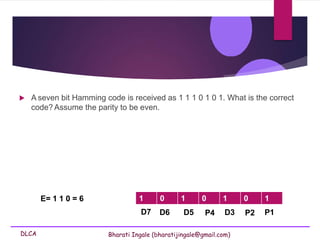
 A seven bit Hamming code is received as 1 1 1 0 1 0 1. What is the correct
code? Assume the parity to be even.
P4 D3 P2 P1
D7 D6 D5
1 0 1 0 1 0 1
E= 1 1 0 = 6
DLCA Bharati Ingale (bharatijingale@gmail.com)
Limitation of Hamming Code
 The main limitation of Hamming code is that it can detect
and correct only one error
DLCA Bharati Ingale (bharatijingale@gmail.com)
Codes

Codes: Binary Codes Weighted codes Binary Coded Decimal (BCD) Non-weighted codes Excess – 3 code, Gray code, Alphanumeric codes – ASCII Code, EBCDIC, ISCII Code, Error detectionCodes.pdf

  • 1.
  • 2.
    DLCA Bharati Ingale(bharatijingale@gmail.com) Objective  Binary Codes  Weighted codes  Binary Coded Decimal (BCD)  Non-weighted codes  Excess – 3 code,  Gray code,  Alphanumeric codes – ASCII Code, EBCDIC, ISCII Code,  Error detection
  • 3.
    DLCA Bharati Ingale(bharatijingale@gmail.com) Binary Codes  Computers and digital circuits processes information in the binary format.  Each character is assigned 7 or 8 bit binary code to indicate its character which may be numeric, alphabet or special symbol.
  • 4.
    DLCA Bharati Ingale(bharatijingale@gmail.com) Binary Codes  Numbers, letters or words are represented by a specific group of symbols is called a code.  Here the number, letter or word is said to be encoded.  Example - Binary number 1000001 represents  65(decimal) in straight binary code,  alphabet A in ASCII code and  41(decimal) in BCD code.
  • 5.
    DLCA Bharati Ingale(bharatijingale@gmail.com) Binary Codes  The digital data is represented, stored and transmitted as group of binary bits.  This group is also called as binary code.  The binary code is represented by the number as well as alphanumeric letter.
  • 6.
    DLCA Bharati Ingale(bharatijingale@gmail.com) Advantages of Binary Code  Binary codes are suitable for both  the computer applications.  the digital communications.  Binary codes make the analysis and designing of digital circuits easier if binary codes are used.  Since only 0 & 1 are being used, implementation becomes easy.
  • 7.
    DLCA Bharati Ingale(bharatijingale@gmail.com) Classification of binary codes Codes  Weighted Codes  Non weighted Codes  Reflective  Sequential  Alphanumeric  Error Detection & Correcting Codes
  • 8.
    DLCA Bharati Ingale(bharatijingale@gmail.com) Classification of binary codes Codes Weighted Codes BCD Codes 8421 2421 Non weighted Codes Gray code Excess 3 code Alphanumeric Codes ASCII Code EBDCIC (Extended binary coded decimal interchange code) Error Detecting/ Correcting Codes Parity Bit Hamming Bit
  • 9.
    DLCA Bharati Ingale(bharatijingale@gmail.com) Classification of binary codes Codes Weighted Codes BCD Codes 8421 2421 Non weighted Codes Gray code Excess 3 code Alphanumeric Codes ASCII Code EBDCIC (Extended binary coded decimal interchange code) Error Detecting/ Correcting Codes Parity Bit Hamming Bit
  • 10.
    DLCA Bharati Ingale(bharatijingale@gmail.com) Weighted Codes  Weighted binary codes are those binary codes which obey the positional weight principle.  Each position of the number represents a specific weight.  Several systems of the codes are used to express the decimal digits 0 through 9.  Eg: 8421 & 2421  In these codes each decimal digit is represented by a group of four bits.
  • 11.
    DLCA Bharati Ingale(bharatijingale@gmail.com) Weighted Codes 2+4+2+1 2+4+2+1
  • 12.
    DLCA Bharati Ingale(bharatijingale@gmail.com) Classification of binary codes Codes Weighted Codes BCD Codes 8421 2421 Non weighted Codes Gray code Excess 3 code Alphanumeric Codes ASCII Code EBDCIC (Extended binary coded decimal interchange code) Error Detecting/ Correcting Codes Parity Bit Hamming Bit
  • 13.
    DLCA Bharati Ingale(bharatijingale@gmail.com) Binary Coded Decimal (BCD) code  In this code each decimal digit is represented by a 4-bit binary number.  BCD is a way to express each of the decimal digits with a binary code.  In the BCD, with four bits we can represent sixteen numbers (0000 to 1111).  But in BCD code only first ten of these are used (0000 to 1001).  The remaining six code combinations i.e. 1010 to 1111 are invalid in BCD.
  • 14.
    DLCA Bharati Ingale(bharatijingale@gmail.com) Binary Coded Decimal (BCD) code Conversion of decimal numbers to BCD  To express any decimal number in BCD, simply express each decimal digit with its equivalent 4-bit BCD code.  (98)10 = (1001 1000) BCD
  • 15.
    DLCA Bharati Ingale(bharatijingale@gmail.com) Smallest and Largest Digit in BCD  The smallest digit in BCD is 0000 i.e 0 and  The largest digit in BCD is 1001 i.e 9 Codes
  • 16.
    DLCA Bharati Ingale(bharatijingale@gmail.com) Binary to BCD Conversion Steps Step 1 -- Convert the binary number to decimal. Step 2 -- Convert decimal number to BCD. Codes
  • 17.
    DLCA Bharati Ingale(bharatijingale@gmail.com) Binary to BCD Conversion Example − convert (11101)2 to BCD. Step 1 − Convert to Decimal Binary Number − 111012 111012 = ( 1 × 24 + 1 × 23 + 1 × 22 + 0 × 21 + 1 × 20 )10 = (16 + 8 + 4 + 0 + 1)10 = 2910 Codes
  • 18.
    DLCA Bharati Ingale(bharatijingale@gmail.com) BCD code Binary Number − 111012 = Decimal Number − 2910 Step 2 − Convert to BCD i. Decimal Number − 2910 ii. Calculate BCD Equivalent.: Convert each digit into groups of four binary digits equivalent. (11101)2 = (0010 1001)BCD
  • 19.
    DLCA Bharati Ingale(bharatijingale@gmail.com) BCD to Binary Conversion Steps Step 1 -- Convert the BCD number to decimal. Step 2 -- Convert decimal to binary. BCD Code
  • 20.
    DLCA Bharati Ingale(bharatijingale@gmail.com) BCD to Binary Conversion Example − convert (00101001)BCD to Binary. Step 1 - Convert the BCD number to decimal BCD Number − (01111001)BCD = Decimal 79 BCD Number − (00101001)BCD = Decimal Number − 2910 Step 2 - Convert to Decimal to Binary Decimal Number − 7810 Calculating Binary Equivalent −10011102 BCD Code
  • 21.
    DLCA Bharati Ingale(bharatijingale@gmail.com) Binary Coded Decimal (BCD) code  Packed BCD number  Representation of Decimal Number beyond 9 is called Packed BCD Eg: (156)10 = (0001 0101 0110)packed BCD
  • 22.
    DLCA Bharati Ingale(bharatijingale@gmail.com) Binary Coded Decimal (BCD) code  Comparision between binary and BCD Decimal Binary BCD (10)10 (1010)2 (0001 0000) BCD (12)10 (1100)2 (0001 0010) BCD (14)10 (1110)2 (0001 0100) BCD
  • 23.
    DLCA Bharati Ingale(bharatijingale@gmail.com) 1 1 1 1 0 1 1 0 + 1 0 1 0 1 1 1 0 1 (1100)Binary 0001 0010
  • 24.
    DLCA Bharati Ingale(bharatijingale@gmail.com) Binary Coded Decimal (BCD) code  Advantages of BCD Codes  It is very similar to decimal system.  We need to remember binary equivalent of decimal digits 0 to 9 only.  Disadvantages of BCD Codes  BCD needs more number of bits than binary to represent the decimal number. So BCD is less efficient than binary.
  • 25.
    DLCA Bharati Ingale(bharatijingale@gmail.com) Application: 7-segment display One popular type of decimal display is the 7 segment display used in LED and LCD numerical displays, where any decimal digit is made up of 7 segments arranged as a figure. BCD Code These displays therefore require 7 inputs, one to each of the LEDs a to g. Therefore the 4 bit output in BCD must be converted to supply the correct 7 bit pattern of outputs to drive the display.
  • 26.
    DLCA Bharati Ingale(bharatijingale@gmail.com) BCD Code
  • 27.
    DLCA Bharati Ingale(bharatijingale@gmail.com) Non-Weighted Codes  In this type of binary codes, the positional weights are not assigned.  The examples of non-weighted codes are  Excess-3 code  Gray code
  • 28.
  • 29.
    DLCA Bharati Ingale(bharatijingale@gmail.com) 16.1 Excess-3 code  The Excess-3 code is also called as XS-3 code.  It is non-weighted code used to express decimal numbers.  The Excess-3 code words are derived from the 8421 BCD code words adding (0011)2 or (3)10 to each code word in 8421.  The excess-3 codes are obtained as follows −
  • 30.
  • 31.
    DLCA Bharati Ingale(bharatijingale@gmail.com) Binary Coded Decimal (BCD) code Properties of excess – 3 codes  Each codeword is equivalent to its decimal value plus 3 in binary.  The codewords for 0–4 are complements of the codewords 5–9.
  • 32.
    Examples 12 to excess-3 = 1+3 = 4 2+3 = 5 0 0 0 1 0 0 1 0 0 0 1 1 0 0 1 1 0 1 0 0 0 1 0 1 29 to excess -3 = 2+3 = 5 9+3 = 12 1 + 3 4 0 1 0 0 2 + 3 5 0 1 0 1 2 + 3 0 5 0 1 0 1 9 + 3 1 2 1 1 0 0 Convert the following numbers to Excess – 3 code
  • 33.
    Examples 8 + 3 1 1 10 1 1 7 + 3 1 0 1 0 1 0 Convert the following numbers to Excess – code 1. 87 2. 159 Solution: 1. 87
  • 34.
    Examples 5 + 3 8 1 00 0 9 + 3 1 1 1 0 1 1 1 + 3 4 0 1 0 0 Convert the following numbers to Excess – code 1. 87 2. 159 Solution: 2. 159
  • 35.
    DLCA Bharati Ingale(bharatijingale@gmail.com) Convert Excess-3 code into BCD and decimal number. 1. Group 4-bit for each group, and 2. Subtract 0011 from given number to get the BCD code 3. Find the decimal equivalent. Excess-3 code
  • 36.
    DLCA Bharati Ingale(bharatijingale@gmail.com) Convert Excess-3 code 1001001 into BCD and decimal number. Excess-3 code 1. Group 4-bit for each group, and 2. Subtract 0011 from given number to get the BCD code 3. Find the decimal equivalent. 0 1 0 0 1 0 0 1 - 0 0 1 1 0 0 1 1 0 0 0 1 0 1 1 0 1 6 Binary Coded Decimal number is 0001 0110 and decimal number will be 16.
  • 37.
  • 38.
    DLCA Bharati Ingale(bharatijingale@gmail.com) Gray Code  It is the non-weighted code  It is not arithmetic codes.  That means there are no specific weights assigned to the bit position.  It has a very special feature that, only one bit will change each time the decimal number is incremented..  As only one bit changes at a time, the gray code is called as a unit distance code.
  • 39.
    DLCA Bharati Ingale(bharatijingale@gmail.com) Gray Code  The gray code is a cyclic code.  Also called as the reflected binary code  The reflected binary code or Gray code is an ordering of the binary numeral system such that two successive values differ in only one bit (binary digit).  Gray code cannot be used for arithmetic operation.
  • 40.
  • 41.
  • 42.
    DLCA Bharati Ingale(bharatijingale@gmail.com)  Gray code also known as reflected binary code, because the first (n/2) values compare with those of the last (n/2) values, but in reverse order. Gray code
  • 43.
    DLCA Bharati Ingale(bharatijingale@gmail.com) Gray code exhibits the reflective property i.e the 2 LSB for decimal 4 to 7 are the mirror images of those for decimal 3 to 0 Gray code Mirror
  • 44.
    DLCA Bharati Ingale(bharatijingale@gmail.com) Decima l G(4) G(3) G(2) G(1) G(4) G(3) G(2) G(1) 0 0 0 0 0 x 0 0 0 1 0 0 0 1 x 0 0 1 2 0 0 1 1 x 0 1 1 3 0 0 1 0 x 0 1 0 4 0 1 1 0 x 1 1 0 5 0 1 1 1 x 1 1 1 6 0 1 0 1 x 1 0 1 7 0 1 0 0 x 1 0 0 8 1 1 0 0 x 1 0 0 9 1 1 0 1 x 1 0 1 10 1 1 1 1 x 1 1 1 11 1 1 1 0 x 1 1 0 12 1 0 1 0 x 0 1 0 13 1 0 1 1 x 0 1 1 14 1 0 0 1 x 0 0 1 15 1 0 0 0 x 0 0 0 4-bit Binary to Gray Truth table Mirror the 3 LSB for decimal 8 to 15 are the mirror images of those for decimal 7 to 0
  • 45.
    DLCA Bharati Ingale(bharatijingale@gmail.com) Binary to Gray Code conversion (Addition) Steps Step 1 – Record the MSB as it is Step 2 – Add MSB to the next bit, record the sum and neglect the carry Step 2 – Repeat the process . Gray code b3 b2 b1 b0 1 0 1 1 +1 +0 +1 1 1 1 0 g3 g2 g1 g0
  • 46.
    DLCA Bharati Ingale(bharatijingale@gmail.com) Binary to Gray Code conversion (XOR operation) Steps Step 1 – Record the MSB as it is Step 2 – Add MSB to the next bit, record the sum and neglect the carry Step 2 – Repeat the process . Gray code A B Y 0 0 0 0 1 1 1 0 1 1 1 0
  • 47.
    DLCA Bharati Ingale(bharatijingale@gmail.com) Binary to gray code conversion (Generalized) Gray Code G3= G2= G1=
  • 48.
    DLCA Bharati Ingale(bharatijingale@gmail.com) Gray to Binary Code conversion (Addition) Steps Step 1 – Record the MSB as it is Step 2 – Add MSB to the next bit of Gray code, record the sum and neglect the carry Step 2 – Repeat the process . Gray code g3 g2 g1 g0 1 1 1 0 1 0 1 1 b3 b2 b1 b0 + + +
  • 49.
    DLCA Bharati Ingale(bharatijingale@gmail.com) Gray to Binary Code conversion (XOR Operation) Steps Step 1 – Record the MSB as it is Step 2 – Add MSB to the next bit of Gray code, record the sum and neglect the carry Step 2 – Repeat the process . Gray code g3 g2 g1 g0 1 1 1 0 1 0 1 1 b3 b2 b1 b0 + + +
  • 50.
    DLCA Bharati Ingale(bharatijingale@gmail.com) Gray –to-Binary Conversion
  • 51.
    DLCA Bharati Ingale(bharatijingale@gmail.com) Gray –to-Binary Conversion
  • 52.
    DLCA Bharati Ingale(bharatijingale@gmail.com) Gray –to-Binary Conversion B4=G4 B3=G4 ⊕G3 B2= G2⊕(G4⊕G3) B1=G1⊕(G2⊕(G4⊕G3))
  • 53.
    DLCA Bharati Ingale(bharatijingale@gmail.com) Gray Code to Binary conversion  Rules of Mod-2 Addition
  • 54.
    DLCA Bharati Ingale(bharatijingale@gmail.com) Binary Code to Gray conversion  (46)10=(?)GRAY
  • 55.
  • 56.
    DLCA Bharati Ingale(bharatijingale@gmail.com) We need to digitize English text. We need to represent: – 26 uppercase, – 26 lowercase letters, – 10 numerals, – 20 punctuation characters, – 10 useful arithmetic characters, – 3 other characters (new line, tab, and backspace) ASCII code Totally 95 symbols for English
  • 57.
    DLCA Bharati Ingale(bharatijingale@gmail.com) Assigning Symbols • To represent 95 distinct symbols, we need 7 bits – 6 bits gives only 26 = 64 symbols – 7 bits give 27 = 128 symbols • 128 symbols is ample for the 95 different characters needed for English characters • Some additional characters must also be represented
  • 58.
    DLCA Bharati Ingale(bharatijingale@gmail.com) ASCII  ASCII is an acronym for American Standard Code for Information Interchange.  This is standard set of characters understood by all computers,  Mostly consists of i. letters , ii. numbers and iii. few basic symbols.  It is a code that uses numbers to represent characters.
  • 59.
    DLCA Bharati Ingale(bharatijingale@gmail.com) ASCII  ASCII is a widely used 7-bit (27) code  Each letter is assigned a number between 0 and 127.  There are 128 standard ASCII codes, each of which can be represented by a 7-digit binary number: 0000000 through 1111111.  Eg: the character A is assigned the decimal number 65, while a is assigned decimal 97 as shown below in the ASCII table.
  • 61.
    DLCA Bharati Ingale(bharatijingale@gmail.com) ASCII Advantages of a “standard”:  It is relatively easy to exchange information between different programs, different operating systems, and different computers.  Computer parts built by different manufacturers can be connected  Programs can create data and store it so that other programs can process it later, and so forth
  • 62.
    DLCA Bharati Ingale(bharatijingale@gmail.com) EBCDIC  EBCDIC, in full extended binary-coded decimal interchange code.  It was developed and used by IBM.  EBCDIC) is an 8-bit binary code for numeric and alphanumeric characters.  It can represent a total of 256 (28) different characters.
  • 63.
    DLCA Bharati Ingale(bharatijingale@gmail.com) EBCDIC  It is a coding representation in which symbols, letters and numbers are presented in binary language.  Provide a larger set of codes thanASCII.  Less common thanASCII  Rarely used today  It is use by IBM mainframes today
  • 64.
    DLCA Bharati Ingale(bharatijingale@gmail.com)
  • 65.
  • 66.
    DLCA Bharati Ingale(bharatijingale@gmail.com) What is an error?  An error is an action which is inaccurate or incorrect.  An error is a deviation from accuracy or correctness.  The condition of having incorrect or false knowledge  Error is a condition when the output information does not match with the input information.
  • 67.
    DLCA Bharati Ingale(bharatijingale@gmail.com) Need of error detection and error correction  When transmission of digital signals takes place between two system, the signal get contaminated due to the addition of “Noise” to it.  The noise can introduce an error in the binary bits travelling from one system to the other.
  • 68.
    DLCA Bharati Ingale(bharatijingale@gmail.com) Need of error detection and error correction  That means a 0 may change to 1 or 1 may change to 0.  These error can become a serious threat to the accuracy of the digital system.  Therefore it is necessary to detect and correct the errors.
  • 69.
    DLCA Bharati Ingale(bharatijingale@gmail.com) Types of Errors  Single-bit errors  Burst errors
  • 70.
    DLCA Bharati Ingale(bharatijingale@gmail.com) How to detect and correct error?  One or more bits are added to data for error detection /correction.  These extra bits are called Parity bits.  The data bits along with the parity bits form a code word.  Error detection methods:  Parity checking  Checksum error detection  Cyclic redundancy code (CRC)
  • 71.
    DLCA Bharati Ingale(bharatijingale@gmail.com) Parity bit  It is the simplest technique for detecting and correcting errors.  The MSB of an 8-bits word is used as the parity bit and the remaining 7 bits are used as data or message bits.  The parity of 8-bits transmitted word can be either even parity or odd parity.
  • 72.
    DLCA Bharati Ingale(bharatijingale@gmail.com) Parity bit  Even parity -- Even parity means the number of 1's in the given word including the parity bit should be even (2,4,6,....).  Odd parity -- Odd parity means the number of 1's in the given word including the parity bit should be odd (1,3,5,....).
  • 73.
    DLCA Bharati Ingale(bharatijingale@gmail.com)  For even parity, this bit is set to 1 or 0 such that the no. of "1 bits" in the entire word is even.  For odd parity, this bit is set to 1 or 0 such that the no. of "1 bits" in the entire word is odd. Use of Parity Bit  The parity bit can be set to 0 and 1 depending on the type of the parity required.
  • 74.
    DLCA Bharati Ingale(bharatijingale@gmail.com) How Does Error Detection Take Place?  Parity checking at the receiver can detect the presence of an error if the parity of the receiver signal is different from the expected parity.
  • 75.
    DLCA Bharati Ingale(bharatijingale@gmail.com) Hamming Code  Hamming code is error detection and correction (single bit error) method.  It was developed by R.W. Hamming for error correction.  In this coding method, the source encodes the message by inserting redundant bits within the message.  These redundant bits are extra bits that are generated and inserted at specific positions in the message .  When the destination receives this message, it performs recalculations to detect errors and find the bit position that has error.
  • 76.
    DLCA Bharati Ingale(bharatijingale@gmail.com) Hamming Code contd…  This code uses multiple parity bits and we have to place these parity bits in the positions of powers of 2.  The parity bits are inserted at each 2n bit where n =1,2,3,….. Thus P1 is at 20= 1, P2 is at 21=2, P4 is as 22 and P8 is as 23 Parity Bit Bits to be checked P1 1,3,5,7 P2 2,3,6,7 P3 4,5,6,7
  • 77.
    DLCA Bharati Ingale(bharatijingale@gmail.com) Hamming Bit example  Ex. A bit word 1 0 1 1 is to be transmitted. Construct the even parity seven bit Hamming code for this data.  Step1: 1 0 1 1 D7 D6 D5 P4 D3 P2 P1 1 0 1 1 1  Step 2: Deciding Parity P1, P1 =1,3,5,7 =1 1 1 (Apply even parity on data) = 1 D7 D6 D5 P4 D3 P2 P1
  • 78.
    DLCA Bharati Ingale(bharatijingale@gmail.com) Hamming Bit example contd..  Step 3: Deciding Parity P2, P2 =2,3,6,7 =1 0 1 (Apply even parity on data) = 0 1 0 1 1 1 D7 D6 D5 P4 D3 P2 P1 1 0 1 1 0 1 D7 D6 D5 P4 D3 P2 P1
  • 79.
    DLCA Bharati Ingale(bharatijingale@gmail.com) Hamming Bit example contd..  Step 4: Deciding Parity P4, P4 =4,5,6,7 =1 0 1 (Apply even parity on data) = 0 1 0 1 1 0 1 D7 D6 D5 P4 D3 P2 P1 1 0 1 0 1 0 1 D7 D6 D5 P4 D3 P2 P1
  • 80.
    DLCA Bharati Ingale(bharatijingale@gmail.com)  Ex. 2: Encode the data bits 0 1 0 1 in seven bits even parity Hamming code.  Solution 0 1 0 1 1 0 1 D7 D6 D5 P4 D3 P2 P1
  • 81.
    DLCA Bharati Ingale(bharatijingale@gmail.com) Receiver side decoding Received Code:  Solution:  Step 1: Check the bits of Parity P1, P1 =1,3,5,7 =1011 (Apply even parity on data) = 1 Odd parity Therefore error exist here, put P1 = 1 in the 1’s position of error word.  Error word E = = 1 0 1 1 0 1 1 D7 D6 D5 P4 D3 P2 P1 P4 P2 P1 P4 P2 1
  • 82.
    DLCA Bharati Ingale(bharatijingale@gmail.com)  Step 2: Check the bits of ParityP2, P2 =2,3,6,7 =10 0 1 (Apply even parity on data) = 0 Means no Error  Step 3: Check the bits of Parity P4, P4 =4,5,6,7 =1 10 1 (Apply even parity on data) = 1 Error 1 0 1 P4 0 1
  • 83.
    DLCA Bharati Ingale(bharatijingale@gmail.com)  E = =(5) 10 1 0 1 1 0 1 1 0 1 1 Received Code: D7 D6 D5 P4 D3 P2 P1  Step 4: Correct the error  Invert the incorrect bit to obtain the correct code word  Correct Code word: Incorrect Bit P4 D3 P2 P1 1 0 0 1 0 1 1 D7 D6 D5
  • 84.
    DLCA Bharati Ingale(bharatijingale@gmail.com)  A seven bit Hamming code is received as 1 1 1 0 1 0 1. What is the correct code? Assume the parity to be even. P4 D3 P2 P1 D7 D6 D5 1 0 1 0 1 0 1 E= 1 1 0 = 6
  • 85.
    DLCA Bharati Ingale(bharatijingale@gmail.com) Limitation of Hamming Code  The main limitation of Hamming code is that it can detect and correct only one error
  • 86.
    DLCA Bharati Ingale(bharatijingale@gmail.com) Codes