CONTENT MANAGEMENT SYSTEM
INTRODUCTION
• Lets start with
HOW IT WAS
BORN…????
INTRODUCTION
HOW IT WAS
BORN…????
• Roxen (1994) and Blitzen (mid
90s), Ingeniux (1999) and Vignette.
The main features were a very
structured development
environment and you had to use
tags and templates because there
was no WYSIWYG.
WHAT IS CONTENT MANAGEMENT
SYSTEM (CMS)
 CMS is a system used to manage content on a
web site.
 It covers complete life cycle of pages on web site.
 Content can be anything..!!
 It requires almost no technical skill or
knowledge .
 It keeps the track of every piece of content on
our website.
TWO ELEMENTS OF CMS
1. Content Management Application (CMA)
2. Content Delivery Application (CDA)
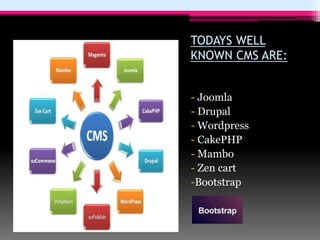
TODAYS WELL
KNOWN CMS ARE:
- Joomla
- Drupal
- Wordpress
- CakePHP
- Mambo
- Zen cart
-Bootstrap
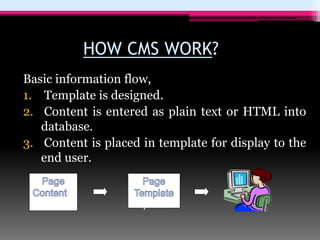
HOW CMS WORK?
Basic information flow,
1. Template is designed.
2. Content is entered as plain text or HTML into
database.
3. Content is placed in template for display to the
end user.
plate
C
ontent
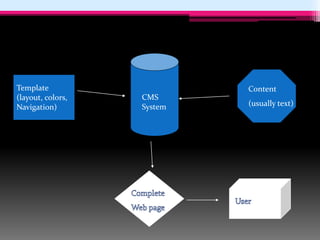
CMS
System
CMS
System
Content
(usually text)
Template
(layout, colors,
Navigation)
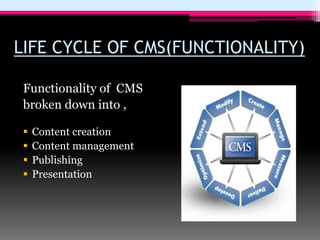
LIFE CYCLE OF CMS(FUNCTIONALITY)
Functionality of CMS
broken down into ,
 Content creation
 Content management
 Publishing
 Presentation
WHY THIS IS A GOOD THING??
 It’s puts user in control.
 Don’t have to be expertise.
WHY TO LEARN HTML WHEN CMS
AVAILABLE..!!
 Large scale changes can be made to site much
easier.
 Structured content and content reuse.
 Security and control.
 Saves money and time.
 Open source so, it is WIN-WIN condition for user.
MY ADVICE
• There is no “one size fits
all” solution.
• By allocating sufficient
time and resources we
can have best possible
solution.
“ Take time to determine
requirements and select
accordingly ”
“CONTENT MANAGEMENT SYSTEM”
By Jaime Delgado
@delgadotj
linkedin.com/in/delgadotj/en
Copyrights:
“CONTENT MANAGEMENT SYSTEM” is an adaptation of
Gourav Harvande orginal’s document.
cms_presentation.pdf

cms_presentation.pdf

  • 1.
  • 2.
    INTRODUCTION • Lets startwith HOW IT WAS BORN…????
  • 3.
    INTRODUCTION HOW IT WAS BORN…???? •Roxen (1994) and Blitzen (mid 90s), Ingeniux (1999) and Vignette. The main features were a very structured development environment and you had to use tags and templates because there was no WYSIWYG.
  • 4.
    WHAT IS CONTENTMANAGEMENT SYSTEM (CMS)  CMS is a system used to manage content on a web site.  It covers complete life cycle of pages on web site.  Content can be anything..!!  It requires almost no technical skill or knowledge .  It keeps the track of every piece of content on our website.
  • 5.
    TWO ELEMENTS OFCMS 1. Content Management Application (CMA) 2. Content Delivery Application (CDA)
  • 6.
    TODAYS WELL KNOWN CMSARE: - Joomla - Drupal - Wordpress - CakePHP - Mambo - Zen cart -Bootstrap
  • 7.
    HOW CMS WORK? Basicinformation flow, 1. Template is designed. 2. Content is entered as plain text or HTML into database. 3. Content is placed in template for display to the end user. plate C ontent
  • 8.
  • 10.
    LIFE CYCLE OFCMS(FUNCTIONALITY) Functionality of CMS broken down into ,  Content creation  Content management  Publishing  Presentation
  • 11.
    WHY THIS ISA GOOD THING??  It’s puts user in control.  Don’t have to be expertise. WHY TO LEARN HTML WHEN CMS AVAILABLE..!!  Large scale changes can be made to site much easier.  Structured content and content reuse.  Security and control.  Saves money and time.  Open source so, it is WIN-WIN condition for user.
  • 12.
    MY ADVICE • Thereis no “one size fits all” solution. • By allocating sufficient time and resources we can have best possible solution. “ Take time to determine requirements and select accordingly ”
  • 13.
    “CONTENT MANAGEMENT SYSTEM” ByJaime Delgado @delgadotj linkedin.com/in/delgadotj/en Copyrights: “CONTENT MANAGEMENT SYSTEM” is an adaptation of Gourav Harvande orginal’s document.