3
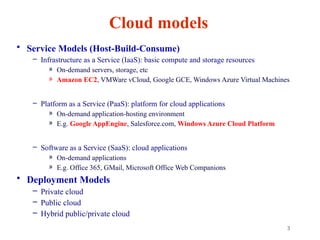
Cloud models
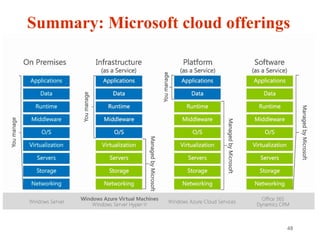
• ServiceModels (Host-Build-Consume)
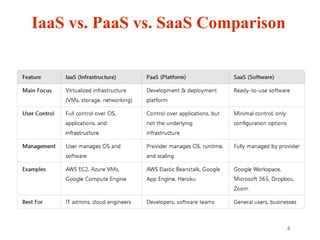
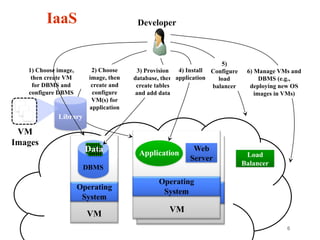
– Infrastructure as a Service (IaaS): basic compute and storage resources
» On-demand servers, storage, etc
» Amazon EC2, VMWare vCloud, Google GCE, Windows Azure Virtual Machines
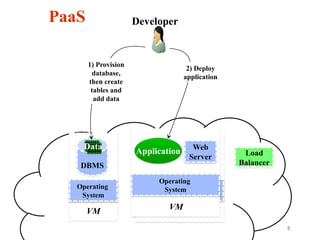
– Platform as a Service (PaaS): platform for cloud applications
» On-demand application-hosting environment
» E.g. Google AppEngine, Salesforce.com, Windows Azure Cloud Platform
– Software as a Service (SaaS): cloud applications
» On-demand applications
» E.g. Office 365, GMail, Microsoft Office Web Companions
• Deployment Models
– Private cloud
– Public cloud
– Hybrid public/private cloud
6
VM
Web
Server
VM
DBMS
2) Choose
image, then
createand
configure
VM(s) for
application
IaaS
Library
VM
Images
Developer
Application
Data
Load
Balancer
5)
Configure
load
balancer
6) Manage VMs and
DBMS (e.g.,
deploying new OS
images in VMs)
3) Provision
database, then
create tables
and add data
4) Install
application
1) Choose image,
then create VM
for DBMS and
configure DBMS
7.
7
Google Cloud (https://cloud.google.com)
•A wide range of services: compute, app, storage,
database, gmail, photos, etc
– Google AppEngine (GAE): PaaS
» https://cloud.google.com/appengine
– Google Compute Engine (GCE): IaaS (equivalent to AWS EC2)
» https://cloud.google.com/compute
– Google Apps: Gmail, photos, sheets, etc: SaaS
8.
8
What is GoogleAppEngine?
• A platform for developing and hosting web applications on
Google's infrastructure
– First released as a beta version in April 2008
• It’s a PAAS (Platform As A Service)
• Widely advertised with GWT (Google Web ToolKit):
http://www.gwtproject.org/
• Any user with a Google account can access AppEngine (
https://cloud.google.com/appengine/)
– No need to put your credit card info initially
– Can deploy 10 applications for free
» Each can use up to 1GB of code storage and enough CPU, bandwidth to
serve around 5 million page views a month
9.
9
AppEngine programming
Java
Example application structure: Java Web Service (using servlets) + a GWT
client running in the browser
For server-side, all Java functionality can be used (with some restrictions that
would be described later)
For client side (in GWT), UI is written in Java, but it is compiled into
JavaScript (to run in all browsers)
Also, as extensions, languages dependent on JVM: Groovy, JRuby, Scala,
Clojure, Jython and special version of Quercus
◦ These languages have interpreters that translate their code into Java bytecode
Python, Go, PhP
Use Eclipse plugin
Create a web project with GWT and deploy it to the App Engine using this plugin
10.
10
How to usethe AppEngine
• Create a Google account (if you don’t have one)
• Download and install the JDK (1.5 or higher), Eclipse (3.5 or
higher)
• Set up the Google plugin for Eclipse (
https://developers.google.com/appengine/docs/java/tools/eclipse)
• Download the App Engine SDK and optionally the GWT SDK (
http://www.gwtproject.org/download.html)
• Login to https://cloud.google.com/appengine/ with your Google
account
• You are now ready to develop and deploy your web applications
to Google App Engine
11.
11
Client-service communication
• TheGWT client is deployed as JavaScript client and the server
side code is deployed as java servlets
• Client can communicate with the service using:
– HTTP GET/POST requests
– GWT-RPC (Remote Procedure Call)
» More manageable
» Can use asynchronous callback functions in client code
» Can pass any Java serializable object
» RPC done over HTTP
• For GWT-RPC, user needs to create 2 client side interfaces and one server side
implementation class
– Public interface GreetingService extends RemoteService: synchronous interface
– Public interface GreetingServiceAsync: asynchronous interface
– Public class GreetingServiceImpl extends RemoteServiceServlet implements
GreetingService
12.
12
• More detailson how to manage Google cloud
projects:
• https://cloud.google.com/appengine/docs/standard/py
thon/console#instances
13.
13
GCE Instances andauto scaling
• Instances are computing units used by App Engine
to automatically scale apps
– GCE: Google compute engines
• Each instance has its own queue for incoming
requests
– App Engine monitors the number of requests waiting in each
instance's queue
– If queue for instance is getting too long, it automatically
creates a new instance.
14.
14
Storage
• DataStore
– Worksas a schema-less object storage
• Google Cloud SQL
– Provides a relational SQL database
– Based on MySQL RDBMS
• Google Cloud Storage
– RESTful (https://restfulapi.net/) service for storing and accessing
data on Google's infrastructure
• BigTable
– NoSQL Big Data database service. It's the same database that
powers many core Google services, including Search, Analytics,
Maps, and Gmail.
15.
15
DataStore
• Datastore servesas “database” for apps
– Implemented over Google BigTable distributed data structure (which is
implemented over the distributed Google File System)
– Independent of apps
• Schema-less object datastore, with a query engine and atomic
transactions
• GQL: query language similar to SQL
• Can be accessed from Java
– Java SDK includes implementations of Java Data Objects (JDO) and Java
Persistence API (JPA) interfaces and a low-level datastore API
• High Replication datastore (Paxos based) provides a more reliable
storage with no planned downtime, higher availability of reads
and writes
16.
16
Google cloud storage
•Multiple layers of redundancy; all data replicated to
multiple data centers (US, Europe)
• Read-your-writes (RYW) data consistency
– RYW consistency is achieved when the system guarantees that, once a record
has been updated, any attempt to read the record will return the updated value
• Objects can be terabytes in size, with resumable uploads
and downloads, and range read support
• Using REST service
17.
17
REST (https://restfulapi.net/)
REpresentational StateTransfer
• REST is an architectural style based on web standards and the
HTTP protocol. All resources are identified by global IDs
(URIs/URLs).
• Client/Server
• Stateless: Each request from client to server is self contained, i.e., it
must contain all of the information necessary to understand the
request, and cannot take advantage of any stored context on the server.
• Simple operations/methods:
– POST: Add a resource
– PUT: Override/modify an existing resource
– GET: Fetch a resource
– DELETE: Remove a resource
18.
18
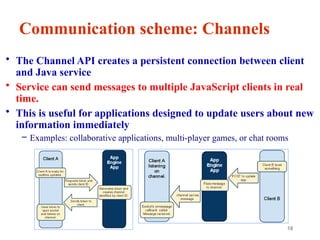
Communication scheme: Channels
•The Channel API creates a persistent connection between client
and Java service
• Service can send messages to multiple JavaScript clients in real
time.
• This is useful for applications designed to update users about new
information immediately
– Examples: collaborative applications, multi-player games, or chat rooms
19.
19
Communication: TaskQueue
• Twotypes – Push Queue and Pull Queue
• Services can create tasks
Tasks are extra-services (not available from the outside world)
If an app needs to execute some background work, it may use the Task
Queue API to organize that work into tasks
Tasks inserted into one or more queues
• App Engine automatically detects new tasks and executes them
when system resources permit
5 tasks/min can be started (each can run for up to 10 min)
Tasks are invoked sequentially but can be run in parallel
20.
20
Cloud tasks
• Newservices (compared to task queues).
• Queue management via the API: You can create, delete,
pause, and perform other queue management tasks using the API, through
the Console, or via the gcloud command.
– List Queues command: list all the queues you have set up in your project.
– List Tasks command: list all the tasks in any of your queues.
• Migrate from TaskQueue to Cloud Tasks:
https://cloud.google.com/tasks/docs/migrating
21.
21
MemoryStore
• For highperformance, web applications often use a distributed
in-memory data cache in front of or in place of robust
persistent storage
App Engine uses MemoryStore for this purpose
One use of MemoryStore is to speed up common datastore queries
• It is different from the system cache
Can cache data in any format like (e.g. , as Database Views)
• Documentation:
• https://cloud.google.com/appengine/docs/standard/java/using-m
emorystore
22.
22
Open source GAE
•An Open Source implementation of Google AppEngine
cloud computing interface:
https://github.com/AppScale/appscale
– AppScale is an easy-to-manage serverless platform for
building and running scalable web and mobile applications
on any infrastructure.
23.
23
Google Cloud (https://cloud.google.com)
•A wide range of services: compute, app, storage,
database, Gmail, photos, etc
– Google AppEngine (GAE): PaaS
» https://cloud.google.com/appengine
– Google Compute Engine (GCE): IaaS (equivalent to AWS EC2)
» https://cloud.google.com/compute
– Google Apps: Gmail, photos, sheets, etc: SaaS
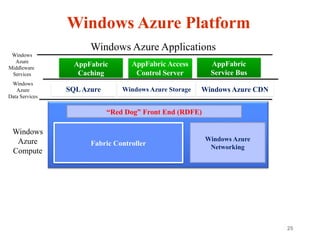
25
Windows Azure Platform
FabricController
Windows Azure
Networking
AppFabric
Caching
SQLAzure
AppFabric
Service Bus
“Red Dog” Front End (RDFE)
Windows
Azure
Compute
Windows
Azure
Middleware
Services
Windows Azure Applications
Windows Azure Storage Windows Azure CDN
Windows
Azure
Data Services
26.
26
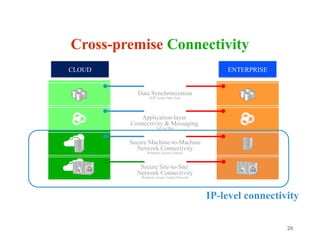
Cross-premise Connectivity
IP-level connectivity
DataSynchronization
SQL Azure Data Sync
Application-layer
Connectivity & Messaging
Service Bus
Secure Machine-to-Machine
Network Connectivity
Windows Azure Connect
Secure Site-to-Site
Network Connectivity
Windows Azure Virtual Network
CLOUD ENTERPRISE
27.
27
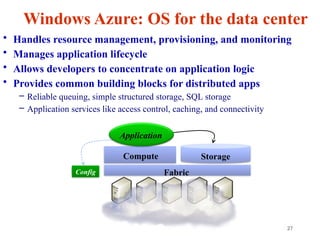
Windows Azure: OSfor the data center
• Handles resource management, provisioning, and monitoring
• Manages application lifecycle
• Allows developers to concentrate on application logic
• Provides common building blocks for distributed apps
– Reliable queuing, simple structured storage, SQL storage
– Application services like access control, caching, and connectivity
Fabric
Storage
Config
Compute
Application
28.
28
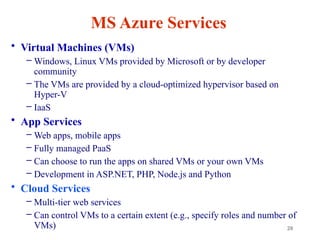
MS Azure Services
•Virtual Machines (VMs)
– Windows, Linux VMs provided by Microsoft or by developer
community
– The VMs are provided by a cloud-optimized hypervisor based on
Hyper-V
– IaaS
• App Services
– Web apps, mobile apps
– Fully managed PaaS
– Can choose to run the apps on shared VMs or your own VMs
– Development in ASP.NET, PHP, Node.js and Python
• Cloud Services
– Multi-tier web services
– Can control VMs to a certain extent (e.g., specify roles and number of
VMs)
31
Introducing Microsoft AzureStorage
• Cloud Storage - Anywhere and anytime access
– Blobs, Disks, Tables, Queues and Files
• Highly Durable, Available and Massively Scalable
– Easily build “Internet scale” applications
– More than 35 tril+ Million requests/sec on average
• Pay only for what you use
• Exposed via easy and open REST APIs (
https://restfulapi.net/)
• Rich Client Libraries and Tools
32.
32
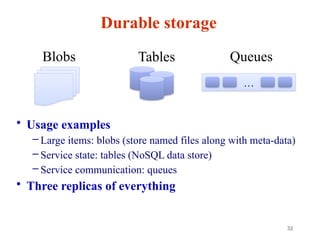
Durable storage
• Usageexamples
– Large items: blobs (store named files along with meta-data)
– Service state: tables (NoSQL data store)
– Service communication: queues
• Three replicas of everything
Blobs Tables
…
Queues
33.
33
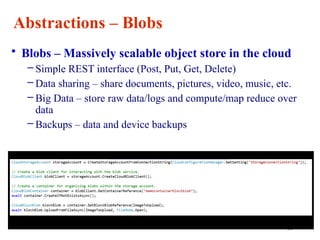
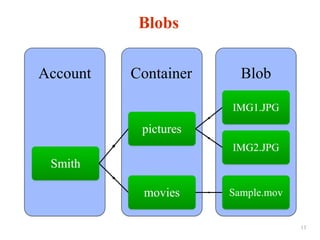
Abstractions – Blobs
•Blobs – Massively scalable object store in the cloud
– Simple REST interface (Post, Put, Get, Delete)
– Data sharing – share documents, pictures, video, music, etc.
– Big Data – store raw data/logs and compute/map reduce over
data
– Backups – data and device backups
34.
34
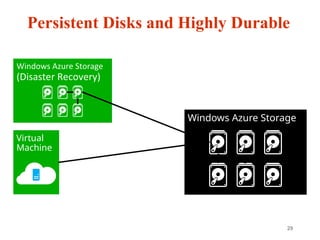
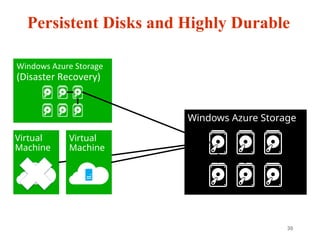
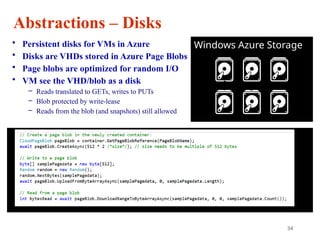
Abstractions – Disks
•Persistent disks for VMs in Azure
• Disks are VHDs stored in Azure Page Blobs
• Page blobs are optimized for random I/O
• VM see the VHD/blob as a disk
– Reads translated to GETs, writes to PUTs
– Blob protected by write-lease
– Reads from the blob (and snapshots) still allowed
Windows Azure Storage
35.
35
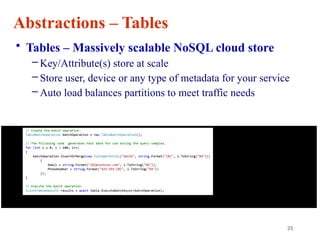
Abstractions – Tables
•Tables – Massively scalable NoSQL cloud store
– Key/Attribute(s) store at scale
– Store user, device or any type of metadata for your service
– Auto load balances partitions to meet traffic needs
36.
36
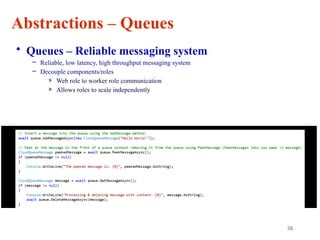
Abstractions – Queues
•Queues – Reliable messaging system
– Reliable, low latency, high throughput messaging system
– Decouple components/roles
» Web role to worker role communication
» Allows roles to scale independently
37.
37
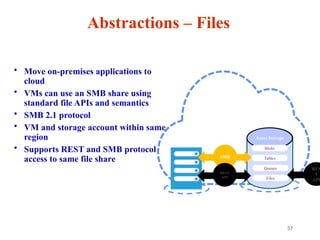
Abstractions – Files
•Move on-premises applications to
cloud
• VMs can use an SMB share using
standard file APIs and semantics
• SMB 2.1 protocol
• VM and storage account within same
region
• Supports REST and SMB protocol
access to same file share
Azure Storage
Blobs
Tables
Queues
Files
Share data stored in Azure Files among
Azure VMs via SMB
Microsoft Azure
SMB
REST
API
RES
T
API
38.
38
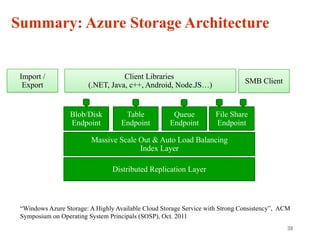
Summary: Azure StorageArchitecture
Distributed Replication Layer
Blob/Disk
Endpoint
Queue
Endpoint
Table
Endpoint
File Share
Endpoint
“Windows Azure Storage: A Highly Available Cloud Storage Service with Strong Consistency”, ACM
Symposium on Operating System Principals (SOSP), Oct. 2011
Client Libraries
(.NET, Java, c++, Android, Node.JS…)
SMB Client
Import /
Export
REST REST REST REST SMB 2.1
Stream Layer
Partition Layer
Front End Layer
40
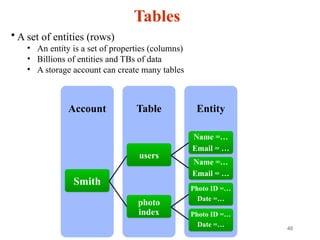
Tables
Entity
Table
Account
Smith
users
Name =…
Email =…
Name =…
Email = …
photo
index
Photo ID =…
Date =…
Photo ID =…
Date =…
• A set of entities (rows)
• An entity is a set of properties (columns)
• Billions of entities and TBs of data
• A storage account can create many tables
41.
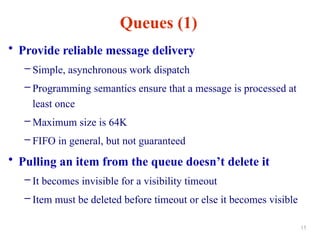
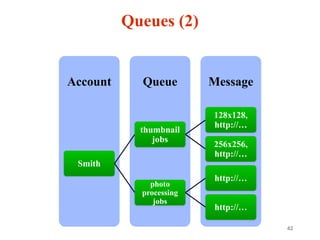
Queues (1)
• Providereliable message delivery
– Simple, asynchronous work dispatch
– Programming semantics ensure that a message is processed at
least once
– Maximum size is 64K
– FIFO in general, but not guaranteed
• Pulling an item from the queue doesn’t delete it
– It becomes invisible for a visibility timeout
– Item must be deleted before timeout or else it becomes visible
15
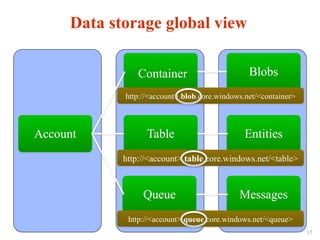
Account
Container Blobs
Table Entities
QueueMessages
Data storage global view
http://<account>.blob.core.windows.net/<container>
http://<account>.table.core.windows.net/<table>
http://<account>.queue.core.windows.net/<queue>
17
44.
44
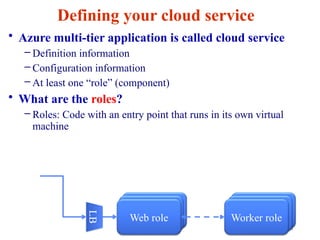
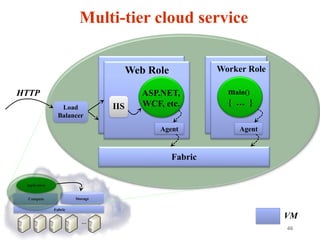
Defining your cloudservice
• Azure multi-tier application is called cloud service
– Definition information
– Configuration information
– At least one “role” (component)
• What are the roles?
– Roles: Code with an entry point that runs in its own virtual
machine
Web role
Web role Worker role
Worker role
Web role Worker role
LB
45.
45
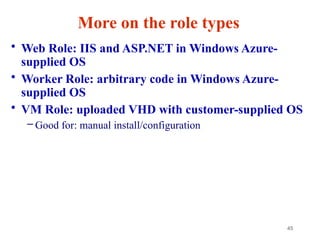
More on therole types
• Web Role: IIS and ASP.NET in Windows Azure-
supplied OS
• Worker Role: arbitrary code in Windows Azure-
supplied OS
• VM Role: uploaded VHD with customer-supplied OS
– Good for: manual install/configuration
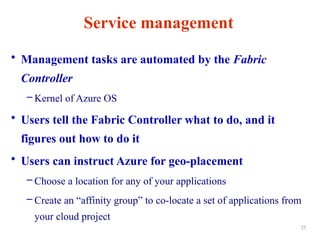
Service management
• Managementtasks are automated by the Fabric
Controller
– Kernel of Azure OS
• Users tell the Fabric Controller what to do, and it
figures out how to do it
• Users can instruct Azure for geo-placement
– Choose a location for any of your applications
– Create an “affinity group” to co-locate a set of applications from
your cloud project
25
#25 Fabric Controller: A set of modified virtual Windows Server 2008 images running across Azure that control provisioning and management, kernel of the OS
Role: Microsoft’s name for a specific configuration of Azure virtual machine. The terminology is from Hyper-V.
Service: Azure lets users run Services, which then run virtual machine instances in a few pre-configured types, like Web or Worker Roles. A Service is a batch of instances that are all governed by the Service parameters and policy.
RDFE serves as the front end for all Windows Azure services
Subscription management
Billing
User access
Service management
RDFE is responsible for picking clusters to deploy services and storage accounts
First datacenter region
Then affinity group or cluster load
Normalized VIP and core utilization
#26 Microsoft think about the stack to provide connectivity between on-premise and cloud.
Specifically this deck focuses on the last two layers
Servicebus vs connect – SB requires app code change, Connect/Virtual Networks do not.
Virtual Networks are the net new here. They provide site to site connectivity where Connect provided server to server connectivity.
Virtual Networks are the more flexible and powerful option.
#29 The OS and Data Disks are stored in Windows Azure storage. So in addition to the data being persistent you also get the benefits of storage which means your VHD is replicated 3X’s locally and also 3X’s in a separate data center in the same region (geo-replication)
#30 This slide simply highlights that if the physical hardware backing your VM goes down a new server will start and pick up the same VHD.



![Java Web Programming on Google Cloud Platform [1/3] : Google App Engine](https://cdn.slidesharecdn.com/ss_thumbnails/gae-chapter1-130106064147-phpapp01-thumbnail.jpg?width=640&height=640&fit=bounds)


