©2008–18 New Relic, Inc. All rights reserved
Acceptance Testing
You’re Ready to Migrate,
but How Will You Prove Success?
©2008–18 New Relic, Inc. All rights reserved 2
Safe Harbor
This presentation and the information herein (including any information that may be incorporated by reference) is provided for informational
purposes only and should not be construed as an offer, commitment, promise or obligation on behalf of New Relic, Inc. (“New Relic”) to sell
securities or deliver any product, material, code, functionality, or other feature. Any information provided hereby is proprietary to New Relic and
may not be replicated or disclosed without New Relic’s express written permission.
Such information may contain forward-looking statements within the meaning of federal securities laws. Any statement that is not a historical fact or
refers to expectations, projections, future plans, objectives, estimates, goals, or other characterizations of future events is a forward-looking
statement. These forward-looking statements can often be identified as such because the context of the statement will include words such as
“believes,” “anticipates,” “expects” or words of similar import.
Actual results may differ materially from those expressed in these forward-looking statements, which speak only as of the date hereof, and are
subject to change at any time without notice. Existing and prospective investors, customers and other third parties transacting business with New
Relic are cautioned not to place undue reliance on this forward-looking information. The achievement or success of the matters covered by such
forward-looking statements are based on New Relic’s current assumptions, expectations, and beliefs and are subject to substantial risks,
uncertainties, assumptions, and changes in circumstances that may cause the actual results, performance, or achievements to differ materially
from those expressed or implied in any forward-looking statement. Further information on factors that could affect such forward-looking statements
is included in the filings New Relic makes with the SEC from time to time. Copies of these documents may be obtained by visiting New Relic’s
Investor Relations website at ir.newrelic.com or the SEC’s website at www.sec.gov.
New Relic assumes no obligation and does not intend to update these forward-looking statements, except as required by law. New Relic makes no
warranties, expressed or implied, in this presentation or otherwise, with respect to the information provided.
©2008–18 New Relic, Inc. All rights reserved 3
Who Am I?
Kevin Downs
Principal Cloud Strategist
21 years in industry
Specializing in:
SaaS
Cloud Adoption
12 years as a Solutions Architect
Infrastructure & Application Monitoring
Had apps in both MacOS and iOS stores
linkedin.com/in/kevin-downs@kupsand
©2008–18 New Relic, Inc. All rights reserved
Let’s Start at the End
©2008–18 New Relic, Inc. All rights reserved 5
©2008–18 New Relic, Inc. All rights reserved
Identification
©2008–18 New Relic, Inc. All rights reserved 7
©2008–18 New Relic, Inc. All rights reserved
What KPIs Are Important?
©2008–18 New Relic, Inc. All rights reserved 9
Metrics – Key Performance Indicators
Ops
Technical User Business
©2008–18 New Relic, Inc. All rights reserved 10
KPIs Model Example
Corporate KPIs
• Perceived Load Time
• Apdex
• Error %
• Mobile Crash Rate
• Route Searches
• Segments
• Check Ins
• Fare Class
• Promotions
• Point Redemptions
• Complementary
Services
• Travel Packages
• Loyalty Program
Sample KPI Facets
• Geography
• XYZ Business Unit
• XYZ Product
• Device Type
• Os Type
• Mobile Platform
• Carrier
• Website Name
• Page Name
• Browser Type
• Error Type
• Application Name
• Cloud Provider
• Host
• Success/Fail Reason
Application / Infra
• ApDex
• Availability
• Throughput
• App/API/DB
Response Times
• Error %
• Memory Footprint
• CPU Workload
• Disk Workload
• Network Throughput
DevOps
• Builds
• Commits
• Deploys
• Defects
Web
• Session Count
• Session Duration
• Page Views
• DOM Readiness
• Page Render
• Perceived Load Time
• Error %
• ApDex
Trends
• Active Users
• Response Times
• Session Durations
Mobile
• App Launches
• User Counts
• Load Time
• Response Time
• Crash Rates
• Crash Locations
• Error Rates (HTTP,
Network)
• API Errors
• Session Duration
Support
• Support Incidents
• MTTI
• MTTR
• Cost per Incident
©2008–18 New Relic, Inc. All rights reserved
Instrument On-prem
©2008–18 New Relic, Inc. All rights reserved 12
How Low Can You Go?
©2008–18 New Relic, Inc. All rights reserved
On-prem Baseline
©2008–18 New Relic, Inc. All rights reserved 14
Establish Current State Baseline
©2008–18 New Relic, Inc. All rights reserved
Migrate
©2008–18 New Relic, Inc. All rights reserved 16
This One’s on You…
…but New Relic can help you
monitor your migration!
Be sure to check out our other
Lightning Talks throughout this
week.
©2008–18 New Relic, Inc. All rights reserved
Instrument Cloud
©2008–18 New Relic, Inc. All rights reserved 18
Repeat Same Instrumentation
©2008–18 New Relic, Inc. All rights reserved
Cloud Baseline
©2008–18 New Relic, Inc. All rights reserved 20
Establish Cloud Baseline
©2008–18 New Relic, Inc. All rights reserved
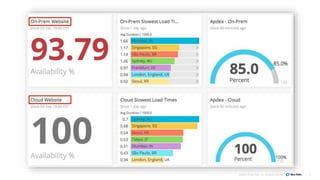
Comparison Dashboard
©2008–18 New Relic, Inc. All rights reserved 22
Prove Success
©2008–18 New Relic, Inc. All rights reserved 23
Cloud Adoption Solution Guide - Overview
Plan Migrate Run
Validate that
cloud service
use is
successful
Compare
on-prem
performance
to cloud
performance
Detect errors
or possible
issues
Establish
baseline and
validate
existing
performance
Understand
impact of
application
migration
Verify and
ensure that
application is
ready for
cloud
Deploy,
visualize,
modernize,
and optimize
faster
Right size
usage and
optimize
cloud spend
Re-architect
or refactor a
cloud
application
Improve end-
user
experience
for cloud
application
Identify Issues
& Roadblocks
Validate Cloud
Improvements
Acceptance
Testing
Modern & Cloud
Services
Application
Refactoring
Optimize
Customer’s
Experience
Prioritize
Migration
Order
Application
Baseline
Identify
Application
Dependencies
& Inventory
Cloud Spend
Optimization
KPIs
Performance, Capacity, Compute,
Availability
KPIs
Application Error Rates and Response
Times, % of Migrated Infrastructure and
Apps
KPIs
Compute Consumption, End-user QoS,
Instance and Herd Health
©2008–18 New Relic, Inc. All rights reserved 24
Visit Our Booths
Venetian – 1220
Aria – Q200
Thank You
©2008–18 New Relic, Inc. All rights reserved
linkedin.com/in/kevin-downs
@kupsand

Cloud Migration Acceptance Testing - Prove Success

  • 1.
    ©2008–18 New Relic,Inc. All rights reserved Acceptance Testing You’re Ready to Migrate, but How Will You Prove Success?
  • 2.
    ©2008–18 New Relic,Inc. All rights reserved 2 Safe Harbor This presentation and the information herein (including any information that may be incorporated by reference) is provided for informational purposes only and should not be construed as an offer, commitment, promise or obligation on behalf of New Relic, Inc. (“New Relic”) to sell securities or deliver any product, material, code, functionality, or other feature. Any information provided hereby is proprietary to New Relic and may not be replicated or disclosed without New Relic’s express written permission. Such information may contain forward-looking statements within the meaning of federal securities laws. Any statement that is not a historical fact or refers to expectations, projections, future plans, objectives, estimates, goals, or other characterizations of future events is a forward-looking statement. These forward-looking statements can often be identified as such because the context of the statement will include words such as “believes,” “anticipates,” “expects” or words of similar import. Actual results may differ materially from those expressed in these forward-looking statements, which speak only as of the date hereof, and are subject to change at any time without notice. Existing and prospective investors, customers and other third parties transacting business with New Relic are cautioned not to place undue reliance on this forward-looking information. The achievement or success of the matters covered by such forward-looking statements are based on New Relic’s current assumptions, expectations, and beliefs and are subject to substantial risks, uncertainties, assumptions, and changes in circumstances that may cause the actual results, performance, or achievements to differ materially from those expressed or implied in any forward-looking statement. Further information on factors that could affect such forward-looking statements is included in the filings New Relic makes with the SEC from time to time. Copies of these documents may be obtained by visiting New Relic’s Investor Relations website at ir.newrelic.com or the SEC’s website at www.sec.gov. New Relic assumes no obligation and does not intend to update these forward-looking statements, except as required by law. New Relic makes no warranties, expressed or implied, in this presentation or otherwise, with respect to the information provided.
  • 3.
    ©2008–18 New Relic,Inc. All rights reserved 3 Who Am I? Kevin Downs Principal Cloud Strategist 21 years in industry Specializing in: SaaS Cloud Adoption 12 years as a Solutions Architect Infrastructure & Application Monitoring Had apps in both MacOS and iOS stores linkedin.com/in/kevin-downs@kupsand
  • 4.
    ©2008–18 New Relic,Inc. All rights reserved Let’s Start at the End
  • 5.
    ©2008–18 New Relic,Inc. All rights reserved 5
  • 6.
    ©2008–18 New Relic,Inc. All rights reserved Identification
  • 7.
    ©2008–18 New Relic,Inc. All rights reserved 7
  • 8.
    ©2008–18 New Relic,Inc. All rights reserved What KPIs Are Important?
  • 9.
    ©2008–18 New Relic,Inc. All rights reserved 9 Metrics – Key Performance Indicators Ops Technical User Business
  • 10.
    ©2008–18 New Relic,Inc. All rights reserved 10 KPIs Model Example Corporate KPIs • Perceived Load Time • Apdex • Error % • Mobile Crash Rate • Route Searches • Segments • Check Ins • Fare Class • Promotions • Point Redemptions • Complementary Services • Travel Packages • Loyalty Program Sample KPI Facets • Geography • XYZ Business Unit • XYZ Product • Device Type • Os Type • Mobile Platform • Carrier • Website Name • Page Name • Browser Type • Error Type • Application Name • Cloud Provider • Host • Success/Fail Reason Application / Infra • ApDex • Availability • Throughput • App/API/DB Response Times • Error % • Memory Footprint • CPU Workload • Disk Workload • Network Throughput DevOps • Builds • Commits • Deploys • Defects Web • Session Count • Session Duration • Page Views • DOM Readiness • Page Render • Perceived Load Time • Error % • ApDex Trends • Active Users • Response Times • Session Durations Mobile • App Launches • User Counts • Load Time • Response Time • Crash Rates • Crash Locations • Error Rates (HTTP, Network) • API Errors • Session Duration Support • Support Incidents • MTTI • MTTR • Cost per Incident
  • 11.
    ©2008–18 New Relic,Inc. All rights reserved Instrument On-prem
  • 12.
    ©2008–18 New Relic,Inc. All rights reserved 12 How Low Can You Go?
  • 13.
    ©2008–18 New Relic,Inc. All rights reserved On-prem Baseline
  • 14.
    ©2008–18 New Relic,Inc. All rights reserved 14 Establish Current State Baseline
  • 15.
    ©2008–18 New Relic,Inc. All rights reserved Migrate
  • 16.
    ©2008–18 New Relic,Inc. All rights reserved 16 This One’s on You… …but New Relic can help you monitor your migration! Be sure to check out our other Lightning Talks throughout this week.
  • 17.
    ©2008–18 New Relic,Inc. All rights reserved Instrument Cloud
  • 18.
    ©2008–18 New Relic,Inc. All rights reserved 18 Repeat Same Instrumentation
  • 19.
    ©2008–18 New Relic,Inc. All rights reserved Cloud Baseline
  • 20.
    ©2008–18 New Relic,Inc. All rights reserved 20 Establish Cloud Baseline
  • 21.
    ©2008–18 New Relic,Inc. All rights reserved Comparison Dashboard
  • 22.
    ©2008–18 New Relic,Inc. All rights reserved 22 Prove Success
  • 23.
    ©2008–18 New Relic,Inc. All rights reserved 23 Cloud Adoption Solution Guide - Overview Plan Migrate Run Validate that cloud service use is successful Compare on-prem performance to cloud performance Detect errors or possible issues Establish baseline and validate existing performance Understand impact of application migration Verify and ensure that application is ready for cloud Deploy, visualize, modernize, and optimize faster Right size usage and optimize cloud spend Re-architect or refactor a cloud application Improve end- user experience for cloud application Identify Issues & Roadblocks Validate Cloud Improvements Acceptance Testing Modern & Cloud Services Application Refactoring Optimize Customer’s Experience Prioritize Migration Order Application Baseline Identify Application Dependencies & Inventory Cloud Spend Optimization KPIs Performance, Capacity, Compute, Availability KPIs Application Error Rates and Response Times, % of Migrated Infrastructure and Apps KPIs Compute Consumption, End-user QoS, Instance and Herd Health
  • 24.
    ©2008–18 New Relic,Inc. All rights reserved 24 Visit Our Booths Venetian – 1220 Aria – Q200
  • 25.
    Thank You ©2008–18 NewRelic, Inc. All rights reserved linkedin.com/in/kevin-downs @kupsand

Editor's Notes

  • #4 TASKS: [ ] Replace this card with your name, title [ ] Show what’s distinctive about you (relevant experience, specialties, etc.) [ ] Replace your Twitter and LinkedIn handles
  • #10 Technical Give understanding on how your services function internally Understand infrastructure needs for your application User Experiential Are your users seeing valid/reasonable content? Is their performance acceptable? Are they getting errors or encountering problems? Business Are you converting customers? What’s your conversion rate? Is your revenue inline with your costs? Are you accomplishing what you want to accomplish?
  • #13 Expert tip: with Infrastructure you can right size right now Expert tip: fix any issues
  • #17 Expert tip: use baselines as milestones throughout the migration
  • #19 Expert tip: with Infrastructure you can right size right now Expert tip: fix any issues
  • #24 We get that there are a number of different migration methodologies from each of your cloud partners. This does not align to that perfectly - instead,  we’re presenting you a simple approach that maps a couple of essential patterns to a Plan-Migrate-Run framework. This framework is designed to be used by you regardless of where you are in your migration and adoption maturity. We also understand that you might be running through this motion as you migrate additional applications or as new BUs think about adoption the cloud as well.