UNIT – III Cloud Computing
technologies and Virtualization
Contents:
3.1 Cloud Computing Technologies: Virtualization,
Service-Oriented Architecture (SOA), Grid
Computing, Utility Computing.
3.2 Use of Virtualization technology, Load Balancing
and Virtualization,
3.3 Virtualization benefits,
3.4 Hypervisors, porting application,
3.5 Defining cloud capacity by defining baselines
and Metrics
Cloud Computing Technologies
• To make cloud computing flexible, reliable, and
usable following technologies are listed
1. Virtualization
2. Service Oriented Architecture
3. Grid Computing
4. Utility Computing
1. Virtualization
 Virtualization is a technique, which allows to share single
physical instance of an application or resource among multiple
organizations or tenants (customers).
Or
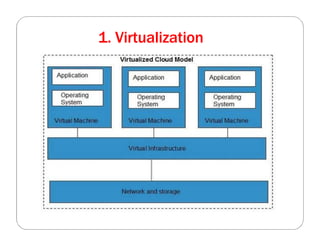
 Virtualization is a computer architecture technology by which
multiple virtual machines (VMs) are multiplexed in the same
hardware machine. The purpose of a VM is to enhance resource
sharing by many users and improve computer performance in
terms of resource utilization and application flexibility.
 It does this by assigning a logical name to a physical resource and
providing a pointer to that physical resource when demanded.
1. Virtualization
1. Virtualization
Benefits of Virtualization
1. More flexible and efficient allocation of resources.
2. Enhance development productivity.
3. It lowers the cost of IT infrastructure.
4. Remote access and rapid scalability.
5. High availability and disaster recovery.
6. Pay peruse of the IT infrastructure on demand.
7. Enables running multiple operating systems.
1. Virtualization
Uses of Virtualization
• Data-integration
• Business-integration
• Service-oriented architecture data-services
• Searching organizational data
2. Service Oriented Architecture
 Service-Oriented Architecture (SOA) allows organizations
to access on-demand cloud-based computing solutions
according to the change of business needs.
 It can work without or with cloud computing.
 The advantages of using SOA is that it is easy to maintain,
platform independent, and highly scalable.
 There are two major roles within SOA
1.Service provider- Develop and Provide Services Service
2. Service consumer- Accessing Services Over Internet
 Applications:
1. It is used in the healthcare industry.
2. It is used to create many mobile applications and
games.
Conti.. Service Oriented Architecture
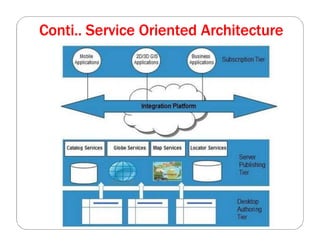
 Service Oriented Architecture (SOA) is a specification
and a methodology for providing platform and language-
independent services for use in distributed applications.
 Service-Oriented Architecture helps to use applications as
a service for other applications regardless the type of
vendor, product or technology.
 It is possible to exchange the data between applications
of different vendors without additional programming or
making changes to services
Conti.. Service Oriented Architecture
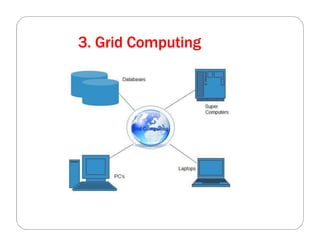
3. Grid Computing
 Grid Computing refers to distributed computing,
in which a group of computers from multiple
locations are connected with each other to achieve a
common objective.
 These computer resources are heterogeneous and
geographically dispersed.
 Grid Computing breaks complex task into smaller
pieces, which are distributed to CPUs that reside
within the grid.
 Mainly, grid computing is used in the ATMs, back-
end infrastructures, and marketing research.
3. Grid Computing
4. Utility Computing
 Utility computing is the most trending IT service model.
It provides on-demand computing resources
(computation, storage, and programming services via
API) and infrastructure based on the pay per use
method.
 It minimizes the associated costs and maximizes the
efficient use of resources.
 The advantage of utility computing is that it reduced the
IT cost, provides greater flexibility, and easier to
manage.
 Large organizations such
as Google and Amazon established their own utility
services for computing storage and application.
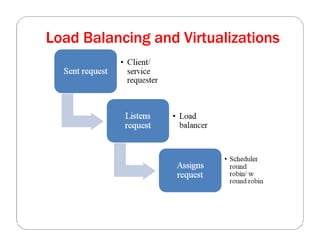
Load Balancing and Virtualizations
 The technology used to distribute service requests to
resources is referred to as load balancing.
 Load balancing can be implemented in hardware or in
software
 Load balancing is an optimization technique which is used
to:
* increase utilization and throughput
* lower latency
* reduce response time
* avoid system overload
The following network resources can be load balanced:
Network interfaces and services such as DNS, FTP, and
HTTP
Load Balancing and Virtualizations
The following network resources can be load balanced:
Network interfaces and services such as DNS, FTP, and
HTTP
 Connections through intelligent switches
 Processing through computer system assignment
Storage resources
Access to application instances
Load Balancing and Virtualizations
• A session ticket is created by the load balancer so that
traffic from the client can be properly routed to
requested resource.
• Without this session record or persistence, a load
balancer would not be able to correctly failover a
request from one resource to another.
• Persistence can be enforced using session data stored in
a database and replicated across multiple load balancers.
• a session cookie stored on the client has the least
amount of overhead for a load balancer because it
allows the load balancer an independent selection of
resources
Advanced Load Balancing
Features:
 the response time, the work queue length, connection
latency and capacity,
 the ability to bring standby servers online (priority
activation)
 workload weighting based on a resource’s capacity
(asymmetric loading),
 HTTP traffic compression, TCP offload and buffering,
 security and authentication,
 Packet shaping using content filtering and priority
queuing.
Application Delivery Controller
 An Application Delivery Controller (ADC) is a
combination load balancer and application server
 It is a server placed between a firewall or router and a
server farm providing Web services.
 Application Delivery Controller is assigned a virtual IP
address (VIP) that it maps to a pool of servers based on
application specific criteria.
 An ADC is a combination network and application layer
device.
 ADCs referred to as a content switch, multilayer switch, or
Web switch
Features of ADC
 ADC include data compression, content caching.
 server health monitoring, security, SSL offload and
advanced routing based on current conditions.
 network optimization, and an application or framework
optimization.
Hypervisors
 The hypervisor is generally a program or a combination of
software and hardware that allows the abstraction of the
underlyingphysicalhardware.
 Hypervisors is a fundamental element of hardware
virtualization is the hypervisor, or virtual machine
manager/Monitor(VMM).
Understanding Hypervisors
 Given a computer system with a certain set of resources, you
can set aside portions of those resources to create a virtual
machine.
 From the standpoint of applications or users, a virtual machine
has all the attributes and characteristics of a physical system but
is strictly software that emulates a physical machine.
 Asystem virtual machine (or a hardware virtual machine)
has its own address space in memory, its own processor
resource allocation, and its own device I/O using its own
virtual device drivers.
 Some virtual machines are designed to run only a single
application or process and are referred to as process
virtual machines.
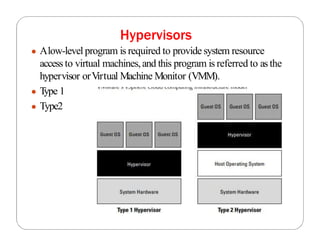
Hypervisors
● Alow-level program is required to provide system resource
access to virtual machines,and this program is referred to as the
hypervisor orV
irtual Machine Monitor (VMM).
● T
ype 1
● Type2
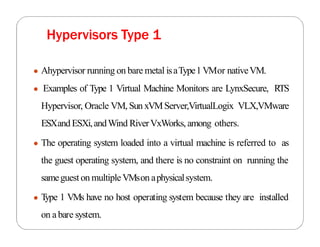
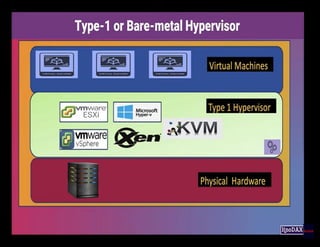
● Ahypervisor running on bare metal isaType1VMor nativeVM.
● Examples of Type 1 Virtual Machine Monitors are LynxSecure, RTS
Hypervisor, Oracle VM, Sun xVMServer,VirtualLogix VLX,VMware
ESXandESXi,andWind RiverVxWorks, among others.
● The operating system loaded into a virtual machine is referred to as
the guest operating system, and there is no constraint on running the
sameguest on multipleVMson aphysicalsystem.
● T
ype 1 VMs have no host operating system because they are installed
on a bare system.
Hypervisors Type 1
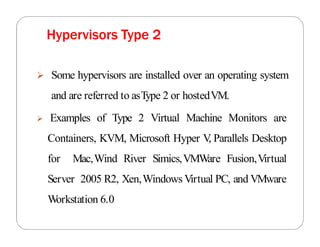
 Some hypervisors are installed over an operating system
and are referred to asType 2 or hostedVM.
 Examples of Type 2 Virtual Machine Monitors are
Containers, KVM, Microsoft Hyper V
, Parallels Desktop
for Mac,Wind River Simics,VMWare Fusion,Virtual
Server 2005 R2, Xen,Windows Virtual PC, and VMware
Workstation 6.0
Hypervisors Type 2
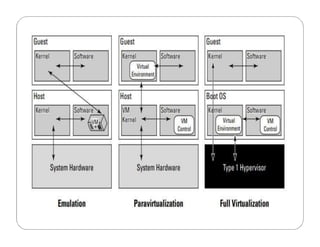
Emulation, paravirtualization, and full
virtualization types
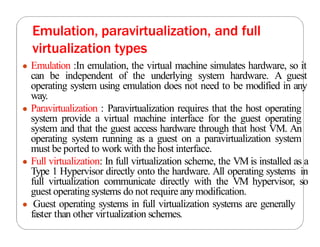
● Emulation :In emulation, the virtual machine simulates hardware, so it
can be independent of the underlying system hardware. A guest
operating system using emulation does not need to be modified in any
way.
● Paravirtualization : Paravirtualization requires that the host operating
system provide a virtual machine interface for the guest operating
system and that the guest access hardware through that host VM. An
operating system running as a guest on a paravirtualization system
must be ported to work with the host interface.
● Full virtualization: In full virtualization scheme, the VM is installed as a
Type 1 Hypervisor directly onto the hardware. All operating systems in
full virtualization communicate directly with the VM hypervisor, so
guest operating systems do not require anymodification.
● Guest operating systems in full virtualization systems are generally
faster than other virtualization schemes.
Porting application,
● Cloudcomputingapplicationshavethe abilityto run on virtual systems and
for these systems to be moved asneeded to respond to demand.
● Developers who write software to run in the cloud will undoubtedly want
the ability to port their applicationsfromone cloud vendor to another, but
that isamuch more difficult proposition.
● Portability means that youcanmove an application from one host
environment to another,including cloud to cloud such asfromAmazon
Web Servicesto MicrosoftAzure.
● The work needed to complete the porting of an applicationfrom one
platform to another dependsupon the specific circumstances.
● Containersare one technologymeant to make suchporting easier,by
encapsulating the applicationand operating systemsinto abundle that can
be run on aplatform that supports that container standard like Dockers or
Kubernetes.
● The cloud computing portability and interoperability
categoriesto consider are :
● DataPortability
● Application Portability
● PlatformPortability
Data Portability
● Data portability enables re-use of data components across different
applications.
● Suppose that an enterprise uses a SaaS product for Customer Relations
Management (CRM), for example, and the commercial terms for use of
that product become unattractive compared with other SaaS products
or with use of an in-house CRM solution.The customer data held by the
SaaS product may be crucial to the enterprise's operation. How easy
will it be to move that data to another CRM solution?
● In many cases, it will be very difficult.The structure of the data is often
designed to fit a particular form of application processing, and a
significant transformation is needed to produce data that can be handled
byadifferent product.
● This is no different from the difficulty of moving data between different
products in a traditional environment. But, in a traditional
environment, the customer is more often able to do nothing; to stay
with an old version of a product, for example, rather than upgrading to
a newer, more expensive one.With SaaS, the vendor can more easily
force the customer to paymore or lose the service altogether.
Application Portability
● Application portability enables the re-use of application
components across cloud PaaSservices and traditional computing
platforms.
● Suppose that an enterprise has an application built on a particular
cloud PaaS service and, for cost, performance, or other reasons,
wishes to move it to another PaaSservice or to in-house systems.
How easywill thisbe?
● If the application uses features that are specific to the platform, or
if the platform interface is non-standard,then it will not be easy.
● Application portability requires a standard interface exposed by
the supportingplatform.
● Aparticular application portability issue that arises with cloud
computing is portability between development and operational
environments.
● Cloud PaaSisparticularlyattractive for development environments
from afinancialperspective, becauseit avoidsthe need for investment
in expensive systems that will be unused once the development is
complete.
● But, where adifferent environmentisto be usedat run time – either on
in-house systems or on different cloud services – it is essential that the
applications can be moved unchanged between the two environments.
● Cloud computing is bringing development and operations closer
together, and indeed increasinglyleading to the two being integrated
asdevops.
● This can only work if the same environment is used for development
and operation,or if there is application portability between
development and operation environments.
Platform Portability
 There are two kinds of platform portability:
 Re-use of platform components across cloud IaaS services and non-
cloud infrastructure – platform source portability.
 Re-use of bundles containing applications and data with their
supportingplatforms– machine image portability.
 The UNIX operating system provides an example of platform source
portability. It is mostly written in the C programming language, and can
be implemented on different hardware by re-compiling it and re-
writing a few small hardware-dependent sections that are not coded in
C.
 Some other operating systems can be ported in a similar way.This is the
traditional approach to platform portability. It enables applications
portability because applications that use the standard operating system
interface can similarly be re-compiled and run on systems that have
different hardware.
 Machine image portability gives enterprises and
applicationvendorsanewwayofachievingapplications
portability, by bundling the application with its platform
and porting the resultingbundle.
 It requires astandard program representation that can be
deployed in different IaaSuse environments.
Conti…
The Simple Cloud API
● Ifyoubuild anapplicationon aplatform suchasMicrosoftAzure, porting
that applicationto AmazonWebServicesor GoogleAppsmaybe difficult, if
not impossible.
● In an effort to create an interoperability standard, ZendTechnologies has
started an open source initiative to create a common application program
interface that will allow applicationsto be portable.The initiative iscalled
the SimpleAPIfor CloudApplicationServices, andthe effort hasdrawn
interest from several major cloud computing companies.
● Amongthe foundingsupporters are IBM,Microsoft, Nivanix,Rackspace,
and GoGrid.
● Simple CloudAPI has asits goal aset of common interfaces for:
● File Storage Services: CurrentlyAmazonS3,WindowsAzureBlob
Storage,Nirvanix, andLocalstorage issupported bythe StorageAPI.There
are plans to extend thisAPIto Rackspace Cloud Files and GoGrid Cloud
Storage.
● Document Storage Services: AmazonSimpleDBandWindowsAzure
TableStorage are currently supported. Local document storage is planned.
● Simple Queue Services: AmazonSQS,WindowsAzureQueue Storage,
and Local queue services are supported.
Capacity Planning
 Capacity planning for a cloud computing system offers
you many enhanced capabilities and some new
challenges over a purely physical system.
 A capacity planner seeks to meet the future demands on
a system by providing the additional capacity to fulfill
those demands.
 Capacity planning measures the maximum amount of
work that can be done using the current technology and
then adds resources to do more work as needed.
• Capacity planning is an iterative process with the following steps:
1. Determine the characteristics of the present system.
2. Measure the workload for the different resources in the system: CPU,
RAM, disk, network, and so forth.
3. Load the system until it is overloaded, determine when it breaks, and
specify what is required to maintain acceptable performance. Knowing
when systems fail under load and what factor(s) is responsible for the
failure is the critical step in capacity planning.
4. Predict the future based on historical trends and other factors.
5. Deploy or tear down resources to meet your predictions.
6. Iterate Steps 1 through 5 repeatedly.
Defining Baseline and Metrics
• The first item of business is to determine the current system capacity or workload as
a measurable quantity over time.
• Because many developers create cloud-based applications and Web sites based on a
LAMP solution stack.
• LAMP stands for:
 Linux, the operating system
 Apache HTTP Server, the Web server based on the work of the Apache
Software Foundation
 MySQL, the database server developed by the Swedish company MySQL AB,
owned by Oracle Corporation through its acquisition of Sun Microsystems
 PHP, the Hypertext Preprocessor scripting language developed by The PHP Group
Baseline measurements
• Let’s assume that a capacity planner is working with a system that
has a Web site based on APACHE, and let’s assume the site is
processing database transactions using MySQL.
• There are two important overall workload metrics in this LAMP
system:
– Page views or hits on the Web site, as measured in hits per
second.
– Transactions completed on the database server, as measured by
transactions per second or perhaps by queries per second
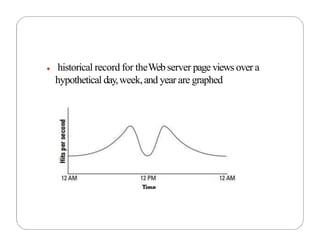
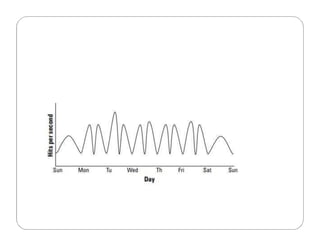
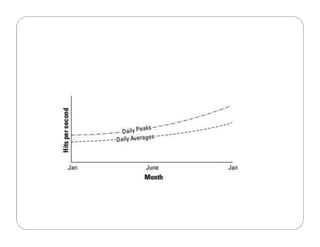
● historical record for theWebserver page views over a
hypothetical day,week,and year are graphed
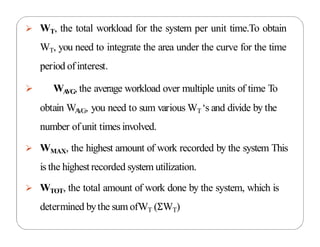
 WT, the total workload for the system per unit time.To obtain
WT, you need to integrate the area under the curve for the time
period ofinterest.
 WA
VG, the average workload over multiple units of time To
obtain WA
VG, you need to sum various WT‘s and divide by the
number of unit times involved.
 WMAX, the highest amount of work recorded by the system This
is the highest recorded system utilization.
 WTOT, the total amount of work done by the system, which is
determined bythe sum ofWT (ΣWT)
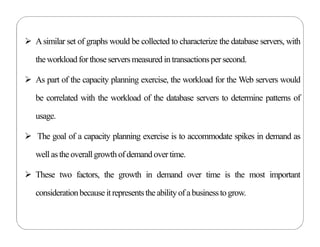
 Asimilar set of graphs would be collected to characterize the database servers, with
theworkloadfor thoseserversmeasured in transactionspersecond.
 As part of the capacity planning exercise, the workload for the Web servers would
be correlated with the workload of the database servers to determine patterns of
usage.
 The goal of a capacity planning exercise is to accommodate spikes in demand as
well astheoverallgrowth ofdemand overtime.
 These two factors, the growth in demand over time is the most important
considerationbecauseitrepresentstheabilityof abusinessto grow.
System Metrics
 Capacity planning must measure system-level
statistics, determining what each system is capable of,
and how resources of a system affect system-level
performance.
 A machine instance (physical or virtual) is primarily
defined by four essential resources: CPU, Memory
(RAM), Disk, Network connectivity.
 Each of these resources can be measured by tools that
are operating-system-specific.
Load Testing
• Examining your server under load for system metrics isn’t going to give
you enough information to do meaningful capacity planning.
• You need to know what happens to a system when the load increases.
• Load testing seeks to answer the following questions:
› What is the maximum load that my current system can support?
› Which resource(s) represents the bottleneck in the current system that limits the
system’s performance? This parameter is referred to as the resource ceiling. Depending
upon a server’s configuration, any resource can have a bottleneck removed, and the
resource ceiling then passes onto another resource.
› Can I alter the configuration of my server in order to increase capacity?
› How does this server’s performance relate to your other servers that might have
different characteristics?

Cloud computing technologies and virtualization

  • 1.
    UNIT – IIICloud Computing technologies and Virtualization
  • 2.
    Contents: 3.1 Cloud ComputingTechnologies: Virtualization, Service-Oriented Architecture (SOA), Grid Computing, Utility Computing. 3.2 Use of Virtualization technology, Load Balancing and Virtualization, 3.3 Virtualization benefits, 3.4 Hypervisors, porting application, 3.5 Defining cloud capacity by defining baselines and Metrics
  • 3.
    Cloud Computing Technologies •To make cloud computing flexible, reliable, and usable following technologies are listed 1. Virtualization 2. Service Oriented Architecture 3. Grid Computing 4. Utility Computing
  • 4.
    1. Virtualization  Virtualizationis a technique, which allows to share single physical instance of an application or resource among multiple organizations or tenants (customers). Or  Virtualization is a computer architecture technology by which multiple virtual machines (VMs) are multiplexed in the same hardware machine. The purpose of a VM is to enhance resource sharing by many users and improve computer performance in terms of resource utilization and application flexibility.  It does this by assigning a logical name to a physical resource and providing a pointer to that physical resource when demanded.
  • 5.
  • 6.
    1. Virtualization Benefits ofVirtualization 1. More flexible and efficient allocation of resources. 2. Enhance development productivity. 3. It lowers the cost of IT infrastructure. 4. Remote access and rapid scalability. 5. High availability and disaster recovery. 6. Pay peruse of the IT infrastructure on demand. 7. Enables running multiple operating systems.
  • 7.
    1. Virtualization Uses ofVirtualization • Data-integration • Business-integration • Service-oriented architecture data-services • Searching organizational data
  • 8.
    2. Service OrientedArchitecture  Service-Oriented Architecture (SOA) allows organizations to access on-demand cloud-based computing solutions according to the change of business needs.  It can work without or with cloud computing.  The advantages of using SOA is that it is easy to maintain, platform independent, and highly scalable.  There are two major roles within SOA 1.Service provider- Develop and Provide Services Service 2. Service consumer- Accessing Services Over Internet  Applications: 1. It is used in the healthcare industry. 2. It is used to create many mobile applications and games.
  • 9.
    Conti.. Service OrientedArchitecture  Service Oriented Architecture (SOA) is a specification and a methodology for providing platform and language- independent services for use in distributed applications.  Service-Oriented Architecture helps to use applications as a service for other applications regardless the type of vendor, product or technology.  It is possible to exchange the data between applications of different vendors without additional programming or making changes to services
  • 10.
  • 11.
    3. Grid Computing Grid Computing refers to distributed computing, in which a group of computers from multiple locations are connected with each other to achieve a common objective.  These computer resources are heterogeneous and geographically dispersed.  Grid Computing breaks complex task into smaller pieces, which are distributed to CPUs that reside within the grid.  Mainly, grid computing is used in the ATMs, back- end infrastructures, and marketing research.
  • 12.
  • 13.
    4. Utility Computing Utility computing is the most trending IT service model. It provides on-demand computing resources (computation, storage, and programming services via API) and infrastructure based on the pay per use method.  It minimizes the associated costs and maximizes the efficient use of resources.  The advantage of utility computing is that it reduced the IT cost, provides greater flexibility, and easier to manage.  Large organizations such as Google and Amazon established their own utility services for computing storage and application.
  • 14.
    Load Balancing andVirtualizations  The technology used to distribute service requests to resources is referred to as load balancing.  Load balancing can be implemented in hardware or in software  Load balancing is an optimization technique which is used to: * increase utilization and throughput * lower latency * reduce response time * avoid system overload The following network resources can be load balanced: Network interfaces and services such as DNS, FTP, and HTTP
  • 15.
    Load Balancing andVirtualizations The following network resources can be load balanced: Network interfaces and services such as DNS, FTP, and HTTP  Connections through intelligent switches  Processing through computer system assignment Storage resources Access to application instances
  • 16.
    Load Balancing andVirtualizations
  • 17.
    Load Balancing andVirtualizations • A session ticket is created by the load balancer so that traffic from the client can be properly routed to requested resource. • Without this session record or persistence, a load balancer would not be able to correctly failover a request from one resource to another. • Persistence can be enforced using session data stored in a database and replicated across multiple load balancers. • a session cookie stored on the client has the least amount of overhead for a load balancer because it allows the load balancer an independent selection of resources
  • 18.
    Advanced Load Balancing Features: the response time, the work queue length, connection latency and capacity,  the ability to bring standby servers online (priority activation)  workload weighting based on a resource’s capacity (asymmetric loading),  HTTP traffic compression, TCP offload and buffering,  security and authentication,  Packet shaping using content filtering and priority queuing.
  • 19.
    Application Delivery Controller An Application Delivery Controller (ADC) is a combination load balancer and application server  It is a server placed between a firewall or router and a server farm providing Web services.  Application Delivery Controller is assigned a virtual IP address (VIP) that it maps to a pool of servers based on application specific criteria.  An ADC is a combination network and application layer device.  ADCs referred to as a content switch, multilayer switch, or Web switch
  • 20.
    Features of ADC ADC include data compression, content caching.  server health monitoring, security, SSL offload and advanced routing based on current conditions.  network optimization, and an application or framework optimization.
  • 21.
    Hypervisors  The hypervisoris generally a program or a combination of software and hardware that allows the abstraction of the underlyingphysicalhardware.  Hypervisors is a fundamental element of hardware virtualization is the hypervisor, or virtual machine manager/Monitor(VMM).
  • 22.
    Understanding Hypervisors  Givena computer system with a certain set of resources, you can set aside portions of those resources to create a virtual machine.  From the standpoint of applications or users, a virtual machine has all the attributes and characteristics of a physical system but is strictly software that emulates a physical machine.  Asystem virtual machine (or a hardware virtual machine) has its own address space in memory, its own processor resource allocation, and its own device I/O using its own virtual device drivers.  Some virtual machines are designed to run only a single application or process and are referred to as process virtual machines.
  • 23.
    Hypervisors ● Alow-level programis required to provide system resource access to virtual machines,and this program is referred to as the hypervisor orV irtual Machine Monitor (VMM). ● T ype 1 ● Type2
  • 24.
    ● Ahypervisor runningon bare metal isaType1VMor nativeVM. ● Examples of Type 1 Virtual Machine Monitors are LynxSecure, RTS Hypervisor, Oracle VM, Sun xVMServer,VirtualLogix VLX,VMware ESXandESXi,andWind RiverVxWorks, among others. ● The operating system loaded into a virtual machine is referred to as the guest operating system, and there is no constraint on running the sameguest on multipleVMson aphysicalsystem. ● T ype 1 VMs have no host operating system because they are installed on a bare system. Hypervisors Type 1
  • 26.
     Some hypervisorsare installed over an operating system and are referred to asType 2 or hostedVM.  Examples of Type 2 Virtual Machine Monitors are Containers, KVM, Microsoft Hyper V , Parallels Desktop for Mac,Wind River Simics,VMWare Fusion,Virtual Server 2005 R2, Xen,Windows Virtual PC, and VMware Workstation 6.0 Hypervisors Type 2
  • 27.
    Emulation, paravirtualization, andfull virtualization types ● Emulation :In emulation, the virtual machine simulates hardware, so it can be independent of the underlying system hardware. A guest operating system using emulation does not need to be modified in any way. ● Paravirtualization : Paravirtualization requires that the host operating system provide a virtual machine interface for the guest operating system and that the guest access hardware through that host VM. An operating system running as a guest on a paravirtualization system must be ported to work with the host interface. ● Full virtualization: In full virtualization scheme, the VM is installed as a Type 1 Hypervisor directly onto the hardware. All operating systems in full virtualization communicate directly with the VM hypervisor, so guest operating systems do not require anymodification. ● Guest operating systems in full virtualization systems are generally faster than other virtualization schemes.
  • 29.
    Porting application, ● Cloudcomputingapplicationshavetheabilityto run on virtual systems and for these systems to be moved asneeded to respond to demand. ● Developers who write software to run in the cloud will undoubtedly want the ability to port their applicationsfromone cloud vendor to another, but that isamuch more difficult proposition. ● Portability means that youcanmove an application from one host environment to another,including cloud to cloud such asfromAmazon Web Servicesto MicrosoftAzure. ● The work needed to complete the porting of an applicationfrom one platform to another dependsupon the specific circumstances. ● Containersare one technologymeant to make suchporting easier,by encapsulating the applicationand operating systemsinto abundle that can be run on aplatform that supports that container standard like Dockers or Kubernetes.
  • 30.
    ● The cloudcomputing portability and interoperability categoriesto consider are : ● DataPortability ● Application Portability ● PlatformPortability
  • 31.
    Data Portability ● Dataportability enables re-use of data components across different applications. ● Suppose that an enterprise uses a SaaS product for Customer Relations Management (CRM), for example, and the commercial terms for use of that product become unattractive compared with other SaaS products or with use of an in-house CRM solution.The customer data held by the SaaS product may be crucial to the enterprise's operation. How easy will it be to move that data to another CRM solution? ● In many cases, it will be very difficult.The structure of the data is often designed to fit a particular form of application processing, and a significant transformation is needed to produce data that can be handled byadifferent product. ● This is no different from the difficulty of moving data between different products in a traditional environment. But, in a traditional environment, the customer is more often able to do nothing; to stay with an old version of a product, for example, rather than upgrading to a newer, more expensive one.With SaaS, the vendor can more easily force the customer to paymore or lose the service altogether.
  • 32.
    Application Portability ● Applicationportability enables the re-use of application components across cloud PaaSservices and traditional computing platforms. ● Suppose that an enterprise has an application built on a particular cloud PaaS service and, for cost, performance, or other reasons, wishes to move it to another PaaSservice or to in-house systems. How easywill thisbe? ● If the application uses features that are specific to the platform, or if the platform interface is non-standard,then it will not be easy. ● Application portability requires a standard interface exposed by the supportingplatform.
  • 33.
    ● Aparticular applicationportability issue that arises with cloud computing is portability between development and operational environments. ● Cloud PaaSisparticularlyattractive for development environments from afinancialperspective, becauseit avoidsthe need for investment in expensive systems that will be unused once the development is complete. ● But, where adifferent environmentisto be usedat run time – either on in-house systems or on different cloud services – it is essential that the applications can be moved unchanged between the two environments. ● Cloud computing is bringing development and operations closer together, and indeed increasinglyleading to the two being integrated asdevops. ● This can only work if the same environment is used for development and operation,or if there is application portability between development and operation environments.
  • 34.
    Platform Portability  Thereare two kinds of platform portability:  Re-use of platform components across cloud IaaS services and non- cloud infrastructure – platform source portability.  Re-use of bundles containing applications and data with their supportingplatforms– machine image portability.  The UNIX operating system provides an example of platform source portability. It is mostly written in the C programming language, and can be implemented on different hardware by re-compiling it and re- writing a few small hardware-dependent sections that are not coded in C.  Some other operating systems can be ported in a similar way.This is the traditional approach to platform portability. It enables applications portability because applications that use the standard operating system interface can similarly be re-compiled and run on systems that have different hardware.
  • 35.
     Machine imageportability gives enterprises and applicationvendorsanewwayofachievingapplications portability, by bundling the application with its platform and porting the resultingbundle.  It requires astandard program representation that can be deployed in different IaaSuse environments. Conti…
  • 36.
    The Simple CloudAPI ● Ifyoubuild anapplicationon aplatform suchasMicrosoftAzure, porting that applicationto AmazonWebServicesor GoogleAppsmaybe difficult, if not impossible. ● In an effort to create an interoperability standard, ZendTechnologies has started an open source initiative to create a common application program interface that will allow applicationsto be portable.The initiative iscalled the SimpleAPIfor CloudApplicationServices, andthe effort hasdrawn interest from several major cloud computing companies. ● Amongthe foundingsupporters are IBM,Microsoft, Nivanix,Rackspace, and GoGrid. ● Simple CloudAPI has asits goal aset of common interfaces for: ● File Storage Services: CurrentlyAmazonS3,WindowsAzureBlob Storage,Nirvanix, andLocalstorage issupported bythe StorageAPI.There are plans to extend thisAPIto Rackspace Cloud Files and GoGrid Cloud Storage. ● Document Storage Services: AmazonSimpleDBandWindowsAzure TableStorage are currently supported. Local document storage is planned. ● Simple Queue Services: AmazonSQS,WindowsAzureQueue Storage, and Local queue services are supported.
  • 37.
    Capacity Planning  Capacityplanning for a cloud computing system offers you many enhanced capabilities and some new challenges over a purely physical system.  A capacity planner seeks to meet the future demands on a system by providing the additional capacity to fulfill those demands.  Capacity planning measures the maximum amount of work that can be done using the current technology and then adds resources to do more work as needed.
  • 38.
    • Capacity planningis an iterative process with the following steps: 1. Determine the characteristics of the present system. 2. Measure the workload for the different resources in the system: CPU, RAM, disk, network, and so forth. 3. Load the system until it is overloaded, determine when it breaks, and specify what is required to maintain acceptable performance. Knowing when systems fail under load and what factor(s) is responsible for the failure is the critical step in capacity planning. 4. Predict the future based on historical trends and other factors. 5. Deploy or tear down resources to meet your predictions. 6. Iterate Steps 1 through 5 repeatedly.
  • 39.
    Defining Baseline andMetrics • The first item of business is to determine the current system capacity or workload as a measurable quantity over time. • Because many developers create cloud-based applications and Web sites based on a LAMP solution stack. • LAMP stands for:  Linux, the operating system  Apache HTTP Server, the Web server based on the work of the Apache Software Foundation  MySQL, the database server developed by the Swedish company MySQL AB, owned by Oracle Corporation through its acquisition of Sun Microsystems  PHP, the Hypertext Preprocessor scripting language developed by The PHP Group
  • 40.
    Baseline measurements • Let’sassume that a capacity planner is working with a system that has a Web site based on APACHE, and let’s assume the site is processing database transactions using MySQL. • There are two important overall workload metrics in this LAMP system: – Page views or hits on the Web site, as measured in hits per second. – Transactions completed on the database server, as measured by transactions per second or perhaps by queries per second
  • 41.
    ● historical recordfor theWebserver page views over a hypothetical day,week,and year are graphed
  • 44.
     WT, thetotal workload for the system per unit time.To obtain WT, you need to integrate the area under the curve for the time period ofinterest.  WA VG, the average workload over multiple units of time To obtain WA VG, you need to sum various WT‘s and divide by the number of unit times involved.  WMAX, the highest amount of work recorded by the system This is the highest recorded system utilization.  WTOT, the total amount of work done by the system, which is determined bythe sum ofWT (ΣWT)
  • 45.
     Asimilar setof graphs would be collected to characterize the database servers, with theworkloadfor thoseserversmeasured in transactionspersecond.  As part of the capacity planning exercise, the workload for the Web servers would be correlated with the workload of the database servers to determine patterns of usage.  The goal of a capacity planning exercise is to accommodate spikes in demand as well astheoverallgrowth ofdemand overtime.  These two factors, the growth in demand over time is the most important considerationbecauseitrepresentstheabilityof abusinessto grow.
  • 46.
    System Metrics  Capacityplanning must measure system-level statistics, determining what each system is capable of, and how resources of a system affect system-level performance.  A machine instance (physical or virtual) is primarily defined by four essential resources: CPU, Memory (RAM), Disk, Network connectivity.  Each of these resources can be measured by tools that are operating-system-specific.
  • 47.
    Load Testing • Examiningyour server under load for system metrics isn’t going to give you enough information to do meaningful capacity planning. • You need to know what happens to a system when the load increases. • Load testing seeks to answer the following questions: › What is the maximum load that my current system can support? › Which resource(s) represents the bottleneck in the current system that limits the system’s performance? This parameter is referred to as the resource ceiling. Depending upon a server’s configuration, any resource can have a bottleneck removed, and the resource ceiling then passes onto another resource. › Can I alter the configuration of my server in order to increase capacity? › How does this server’s performance relate to your other servers that might have different characteristics?