LM12 Cloud (Computing) Security
Dr. Liang Zhao
2
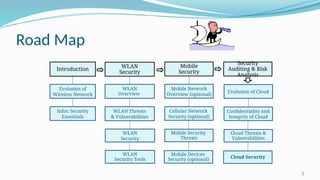
Road Map
Introduction
Security
Auditing & Risk
Analysis
Evolution of
Wireless Network
WLAN
Security
WLAN
Overview
WLAN Threats
& Vulnerabilities
Infor. Security
Essentials
WLAN
Security
WLAN
Security Tools
Mobile
Security
Mobile Network
Overview (optional)
Cellular Network
Security (optional)
Mobile Security
Threats
Mobile Devices
Security (optional)
Evolution of Cloud
Confidentiality and
Integrity of Cloud
Cloud Threats &
Vulnerabilities
Cloud Security
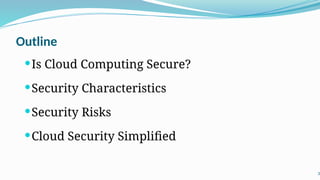
Outline
Is Cloud Computing Secure?
Security Characteristics
Security Risks
Cloud Security Simplified
3
Is Cloud Computing Secure?
 For most organizations, the journey to cloud is no longer a question
of “if” but rather “when”, and a large number of enterprises have
already travelled some way down this path.
 Is cloud computing secure?
 A simple answer is: Yes, if you approach cloud in the right way,
with the correct checks and balances to ensure all necessary
security and risk management measures are covered.
4
Is Cloud Computing Secure?
 Companies ready to adopt cloud services are right to place security at the
top of their agendas.
 the consequences of getting your cloud security strategy wrong could not be
more serious.
 As many unwary businesses have found to their cost in recent high-profile
cases, a single cloud-related security breach can result in an organization
severely damaging its reputation – or, worse, the entire business being put at
risk.
5
Is Cloud Computing Secure?
 Those further along their cloud path are finding that, like all forms of
information security, the question boils down to effective risk
management.
we outlined the different layers in the cloud services stack:
 Infrastructure-as-a-Service (IaaS)
 Platform-as-a-Service (PaaS)
 Software-as-a-Service (SaaS)
 Business Process-as-a-Service (BPaaS).
 These layers – and their associated standards, requirements and
solutions – are all at different levels of maturity.
6
Is Cloud Computing Secure?
 The world of business is becoming more uncertain, as with new system
architectures come new cyber threats. No longer can the mechanisms
deployed in the past be relied on for protection”
--Nick Gaines, Group IS Director, Volkswagen UK
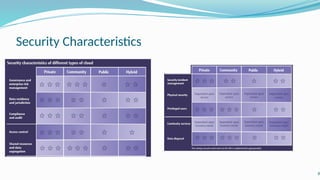
 Different types of cloud have different security characteristics. The table
in next page shows a simple comparison. (The number of stars indicates
how suitable each type of cloud is for each area.)
 We choose to characterize these types as private, public and community
clouds – or “hybrid” to refer to a combination of approaches.
7
Security Characteristics
8
Security Risks
 Organizations with defined controls for externally sourced services or access to IT risk-
assessment capabilities should still apply these to aspects of cloud services where appropriate.
 But while many of the security risks of cloud overlap with those of outsourcing and
offshoring, there are also differences that organizations need to understand and manage.
“When adopting cloud services, there are four key considerations:
1. Where is my data?
2. How does it integrate?
3. What is my exit strategy?
4. What are the new security issues?”
--Tony Mather, CIO, Clear Channel International
9
Security Risks
 Processing sensitive or business-critical data outside the enterprise introduces a level
of risk because any outsourced service bypasses an organization's in-house security
controls. With cloud, however, it is possible to establish compatible controls if the provider
offers a dedicated service. An organisation should ascertain a provider’s position by
asking for information about the control and supervision of privileged administrators.
 Organizations using cloud services remain responsible for the security and integrity of
their own data, even when it is held by a service provider. Traditional service providers
are subject to external audits and security certifications. Cloud providers may not be
prepared to undergo the same level of scrutiny.
 When an organisation uses a cloud service, it may not know exactly where its data
resides or have any ability to influence changes to the location of data.
10
Security Risks
 Most providers store data in a shared environment. Although this may be segregated
from other customers’ data while it’s in that environment, it may be combined in backup
and archive copies. This could especially be the case in multi-tenanted environments.
 Companies should not assume service providers will be able to support electronic
discovery, or internal investigations of inappropriate or illegal activity. Cloud services
are especially difficult to investigate because logs and data for multiple customers may be
either co-located or spread across an ill-defined and changing set of hosts.
 Organisations need to evaluate the long-term viability of any cloud provider. They
should consider the consequences to service should the provider fail or be acquired,
since there will be far fewer readily identifiable assets that can easily be transferred in-
house or to another provider.
11
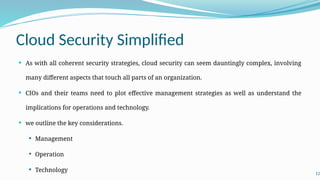
Cloud Security Simplified
 As with all coherent security strategies, cloud security can seem dauntingly complex, involving
many different aspects that touch all parts of an organization.
 CIOs and their teams need to plot effective management strategies as well as understand the
implications for operations and technology.
 we outline the key considerations.
 Management
 Operation
 Technology 12
Cloud Security Simplified
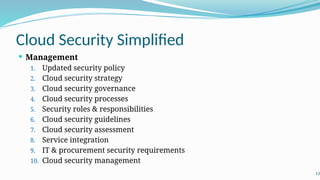
 Management
1. Updated security policy
2. Cloud security strategy
3. Cloud security governance
4. Cloud security processes
5. Security roles & responsibilities
6. Cloud security guidelines
7. Cloud security assessment
8. Service integration
9. IT & procurement security requirements
10. Cloud security management
13
Cloud Security Simplified
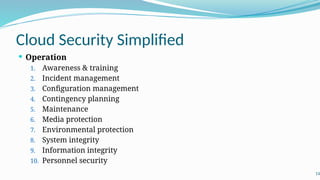
 Operation
1. Awareness & training
2. Incident management
3. Configuration management
4. Contingency planning
5. Maintenance
6. Media protection
7. Environmental protection
8. System integrity
9. Information integrity
10. Personnel security
14
Cloud Security Simplified
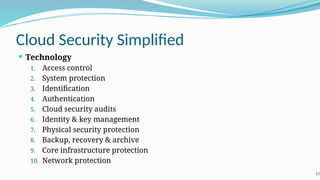
 Technology
1. Access control
2. System protection
3. Identification
4. Authentication
5. Cloud security audits
6. Identity & key management
7. Physical security protection
8. Backup, recovery & archive
9. Core infrastructure protection
10. Network protection
15
Acknowledgement
 This course is developed in non-textbook mode.
 We acknowledge the idea, content, and structure from:
 The white book of cloud Adoption
 The white book of cloud Security
 Mobile security for the rest of us
 Mobile Security for Dummies
https://www.sfh-tr.nhs.uk/media/4866/information-security-mobile-security-f
or-dummies-ebook.pdf
16
17

Cloud Computing Security Essentials for beginners

  • 1.
    LM12 Cloud (Computing)Security Dr. Liang Zhao
  • 2.
    2 Road Map Introduction Security Auditing &Risk Analysis Evolution of Wireless Network WLAN Security WLAN Overview WLAN Threats & Vulnerabilities Infor. Security Essentials WLAN Security WLAN Security Tools Mobile Security Mobile Network Overview (optional) Cellular Network Security (optional) Mobile Security Threats Mobile Devices Security (optional) Evolution of Cloud Confidentiality and Integrity of Cloud Cloud Threats & Vulnerabilities Cloud Security
  • 3.
    Outline Is Cloud ComputingSecure? Security Characteristics Security Risks Cloud Security Simplified 3
  • 4.
    Is Cloud ComputingSecure?  For most organizations, the journey to cloud is no longer a question of “if” but rather “when”, and a large number of enterprises have already travelled some way down this path.  Is cloud computing secure?  A simple answer is: Yes, if you approach cloud in the right way, with the correct checks and balances to ensure all necessary security and risk management measures are covered. 4
  • 5.
    Is Cloud ComputingSecure?  Companies ready to adopt cloud services are right to place security at the top of their agendas.  the consequences of getting your cloud security strategy wrong could not be more serious.  As many unwary businesses have found to their cost in recent high-profile cases, a single cloud-related security breach can result in an organization severely damaging its reputation – or, worse, the entire business being put at risk. 5
  • 6.
    Is Cloud ComputingSecure?  Those further along their cloud path are finding that, like all forms of information security, the question boils down to effective risk management. we outlined the different layers in the cloud services stack:  Infrastructure-as-a-Service (IaaS)  Platform-as-a-Service (PaaS)  Software-as-a-Service (SaaS)  Business Process-as-a-Service (BPaaS).  These layers – and their associated standards, requirements and solutions – are all at different levels of maturity. 6
  • 7.
    Is Cloud ComputingSecure?  The world of business is becoming more uncertain, as with new system architectures come new cyber threats. No longer can the mechanisms deployed in the past be relied on for protection” --Nick Gaines, Group IS Director, Volkswagen UK  Different types of cloud have different security characteristics. The table in next page shows a simple comparison. (The number of stars indicates how suitable each type of cloud is for each area.)  We choose to characterize these types as private, public and community clouds – or “hybrid” to refer to a combination of approaches. 7
  • 8.
  • 9.
    Security Risks  Organizationswith defined controls for externally sourced services or access to IT risk- assessment capabilities should still apply these to aspects of cloud services where appropriate.  But while many of the security risks of cloud overlap with those of outsourcing and offshoring, there are also differences that organizations need to understand and manage. “When adopting cloud services, there are four key considerations: 1. Where is my data? 2. How does it integrate? 3. What is my exit strategy? 4. What are the new security issues?” --Tony Mather, CIO, Clear Channel International 9
  • 10.
    Security Risks  Processingsensitive or business-critical data outside the enterprise introduces a level of risk because any outsourced service bypasses an organization's in-house security controls. With cloud, however, it is possible to establish compatible controls if the provider offers a dedicated service. An organisation should ascertain a provider’s position by asking for information about the control and supervision of privileged administrators.  Organizations using cloud services remain responsible for the security and integrity of their own data, even when it is held by a service provider. Traditional service providers are subject to external audits and security certifications. Cloud providers may not be prepared to undergo the same level of scrutiny.  When an organisation uses a cloud service, it may not know exactly where its data resides or have any ability to influence changes to the location of data. 10
  • 11.
    Security Risks  Mostproviders store data in a shared environment. Although this may be segregated from other customers’ data while it’s in that environment, it may be combined in backup and archive copies. This could especially be the case in multi-tenanted environments.  Companies should not assume service providers will be able to support electronic discovery, or internal investigations of inappropriate or illegal activity. Cloud services are especially difficult to investigate because logs and data for multiple customers may be either co-located or spread across an ill-defined and changing set of hosts.  Organisations need to evaluate the long-term viability of any cloud provider. They should consider the consequences to service should the provider fail or be acquired, since there will be far fewer readily identifiable assets that can easily be transferred in- house or to another provider. 11
  • 12.
    Cloud Security Simplified As with all coherent security strategies, cloud security can seem dauntingly complex, involving many different aspects that touch all parts of an organization.  CIOs and their teams need to plot effective management strategies as well as understand the implications for operations and technology.  we outline the key considerations.  Management  Operation  Technology 12
  • 13.
    Cloud Security Simplified Management 1. Updated security policy 2. Cloud security strategy 3. Cloud security governance 4. Cloud security processes 5. Security roles & responsibilities 6. Cloud security guidelines 7. Cloud security assessment 8. Service integration 9. IT & procurement security requirements 10. Cloud security management 13
  • 14.
    Cloud Security Simplified Operation 1. Awareness & training 2. Incident management 3. Configuration management 4. Contingency planning 5. Maintenance 6. Media protection 7. Environmental protection 8. System integrity 9. Information integrity 10. Personnel security 14
  • 15.
    Cloud Security Simplified Technology 1. Access control 2. System protection 3. Identification 4. Authentication 5. Cloud security audits 6. Identity & key management 7. Physical security protection 8. Backup, recovery & archive 9. Core infrastructure protection 10. Network protection 15
  • 16.
    Acknowledgement  This courseis developed in non-textbook mode.  We acknowledge the idea, content, and structure from:  The white book of cloud Adoption  The white book of cloud Security  Mobile security for the rest of us  Mobile Security for Dummies https://www.sfh-tr.nhs.uk/media/4866/information-security-mobile-security-f or-dummies-ebook.pdf 16
  • 17.

Editor's Notes

  • #13 l Updated security policy Amendments to the organisation’s overarching security policy. l Cloud security strategy The organisation’s strategy for security with respect to cloud. This should complement or be part of the organisation’s existing overarching security strategy. l Cloud security governance The process for ensuring cloud security strategy and policy updates are adhered to. l Cloud security processes The security processes associated specifically with cloud and/or the amendments required to existing security processes in order to incorporate cloud. l Security roles & responsibilities Who is responsible for what with respect to ensuring the different elements of cloud security are implemented effectively. l Cloud security guidelines Advice and guidance provided to both business and IT teams regarding all aspects of security that affect them. l Cloud security assessment The ability to objectively measure the effectiveness of a given cloud service provider’s security. l Service integration The integration of several cloud services at a management level. l IT & procurement security requirements Specific cloud security requirements that would need to be included in any procurement and/or IT project’s overall requirements. l Cloud security management The overall day-to-day management of cloud security.
  • #14 Operation l Awareness & training Educating employees about the security impact of cloud on their individual functions and roles. l Incident management Managing cloud-related problems and incidents. l Configuration management Ensuring the configuration of an organisation’s service is appropriate and secure. l Contingency planning A pre-planned approach to business continuity, disaster recovery and the ongoing management (up and down) of cloud usage. l Maintenance The processes ensuring that anything in a cloud environment (or consumed from a cloud environment) is properly maintained and up to date. l Media protection Ensuring any data stored in a cloud environment is managed appropriately. l Environmental protection Ensuring an organisation’s cloud service provider (and using that provider rather than internal IT) improves that organisation’s environmental credentials. l System integrity Ensuring all cloud systems remain secure. l Information integrity Ensuring all information stored in a cloud environment is secure. l Personnel security Ensuring all personnel (both internal staff and employees of the cloud provider) are trustworthy and do not have the ability to compromise the service.
  • #15 Technology l Access control Technology and software (including its configuration) that ensures the right person has access to the right data (and only the right data) for them. l System protection Technology to protect individual cloud systems from security risks such as distributed denial-of-service (DDoS) attacks. l Identification Technology to identify employees and other authorised personnel accessing a cloud service. l Authentication Technology to verify that an individual accessing a cloud system is who they claim to be. l Cloud security audits The tools and processes by which organisations ensure security (and associated systems and processes) are adequately maintained. l Identity & key management The management of security keys (e.g. encryption keys, SSL keys) and identities of the organisation’s personnel. l Physical security protection Ensuring a provider has appropriate security controls for access to its buildings. l Backup, recovery & archive The tools and procedures for ensuring that data stored in a cloud system is available in the event of a catastrophic failure on the part of the provider. l Core infrastructure protection Protection of servers and other core infrastructure. l Network protection Protection of the internal network and the boundary of the network (where it connects to a cloud environment).