Cloud Computing – Fundamentals
Introduction to Internet of Things
1
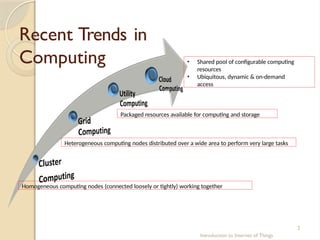
Recent Trends in
Computing • Shared pool of configurable computing
resources
• Ubiquitous, dynamic & on-demand
access
Introduction to Internet of Things
2
Homogeneous computing nodes (connected loosely or tightly) working together
Heterogeneous computing nodes distributed over a wide area to perform very large tasks
Packaged resources available for computing and storage
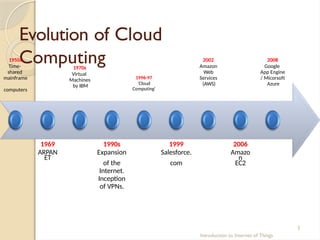
Evolution of Cloud
Computing
1950s
Time-
shared
mainframe
computers
1970s
Virtual
Machines
by IBM
Introduction to Internet of Things
3
1996-97
‘Cloud
Computing'
2002
Amazon
Web
Services
(AWS)
1969 1990s 1999 2006
ARPAN
ET
Expansion Salesforce. Amazo
n
of the com EC2
Internet.
Inception
of VPNs.
2008
Google
App Engine
/ Micorsoft
Azure
Cloud
Computing
Introduction to Internet of Things
4
 It can be envisioned as step on from Utility Computing
 It provides high level generalization (abstraction) of computation and storage
model
 It can be rapidly allocated and released with low management effort
 It has some essential characteristics, service models, and deployment
models
 It provides on-demand services, that can be accessed from any place and at
anytime
Source: Rajkumar Buyya, “Mastering Cloud Computing: Foundations and Applications Programming”, Tata McGraw-Hill Education, 2013
“Cloud computing is a model for enabling convenient, on-demand network access to a
shared pool of configurable computing resources (e.g., network infrastructures,
servers, storage, applications, etc.)” – NIST
Source: P Mell & T Grance, “A NIST Notional Definition of Cloud Computing”, version 15, 2009.
NIST Visual Model of Cloud
Computing
Essential Characteristics Service Models Deployment Models
Source: NIST
Broad
Network
Access
Rapid Elasticity
Measured Services
On-demand
Self- services
Resource Pooling
Introduction to Internet of Things
5
(SaaS)
(PaaS)
(IaaS)
Public
Private
Hybrid
Community
Business
Advantages
Introduction to Internet of Things
6
 Nearly zero cost for upfront infrastructure investment
 Real-time Infrastructure availability
 More efficient resource utilization
 Usage-based costing
 Reduced time to market
General
Characteristics
Introduction to Internet of Things
7
 Improved agility in resource provisioning.
 Ubiquitous – independent of device or location
 Multitenancy – sharing of resources and costs across a large pool of users
 Dynamic load balancing
 Highly reliable and scalable
 Low cost and low maintenance
 Improved security and access control
Essential
Characteristics
Introduction to Internet of Things
8
 Broad network access
 Cloud resources should be available over the network
 Should support standard mechanisms for information retrieval using
traditional interfaces
 Supported clients: heterogeneous thin or thick client platforms (e.g.,
mobile phones, laptops, and PDAs)
Source: P Mell & T Grance, “A NIST Notional Definition of Cloud Computing”, version 15, 2009.
Essential
Characteristics
Introduction to Internet of Things
9
 Rapid elasticity
 Cloud resource allocation should be rapid, elastic and automatic
 Dynamic allocation/release facility for scale-out and scale-in
 Consumers should feel infinite resources
 Facility for add/remove of quantity should be there
Source: P Mell & T Grance, “A NIST Notional Definition of Cloud Computing”, version 15, 2009.
Essential
Characteristics
Introduction to Internet of Things 10
 Measured service
 Resource usage should be recorded and monitored
 Facility to dynamically control and optimize the resource usage
 This facility should be transparent between the service provider and
consumer.
Source: P Mell & T Grance, “A NIST Notional Definition of Cloud Computing”, version 15, 2009.
Essential
Characteristics
Introduction to Internet of Things 11
 On-demand self-service
 Provide server time and network storage to users automatically
 This facility should be available as a self-service
Source: P Mell & T Grance, “A NIST Notional Definition of Cloud Computing”, version 15, 2009.
Essential
Characteristics
Introduction to Internet of Things 12
 Resource pooling
 Automatically pool the whole available resources
 Serve multiple end-users using a multi-tenant model
 Resources should be allocated according to user’s demand
Source: P Mell & T Grance, “A NIST Notional Definition of Cloud Computing”, version 15, 2009.
Components of Cloud
Computing
Introduction to Internet of Things 13
 Clients /end-users: Thick, Thin, Mobile
 Services: Products & solutions (Identity, Mapping, Search, etc.)
 Applications: Web apps, SaaS, etc.
 Platform: Apps/Web hosting using PaaS
 Storage: Database, Data-Storage-as-a-Service (DSaaS)
 Infrastructure: Virtualization, IaaS, EC2
Clients
Services
Applications
Platform
Storage
Infrastructure
Source: Wikipedia
Service
Models
 Software-as-a-Service (SaaS)
 Platform-as-a-Service (PaaS)
 Infrastructure-as-a-Service (IaaS)
Source: Wikipedia
Clients
User Interface
Machine
Interface
Application
Components Services
Platform
Compute Network Storage
Infrastructure
Servers
Introduction to Internet of Things 14
Software- as-a-
Service (SaaS)
Introduction to Internet of Things 15
 Facility to execute service provider’s applications at user’s end
 Applications are available as ‘services’
 Services can be accessed via different types of client devices (e.g.
web browser, app)
 End-users do not posses the control of the cloud infrastructure
Examples: Google Apps, Salesforce, Learn.com.
Source: P Mell & T Grance, “A NIST Notional Definition of Cloud Computing”, version 15, 2009.
Platform- as-a-
Service (PaaS)
Introduction to Internet of Things 16
 Facility for the consumer to execute consumer-created or acquired
applications onto cloud infrastructure
 Support for deployment of such applications
 The user does not control the cloud infrastructure
 User can control the deployed applications using given
configurations
Examples: Windows Azure, Google App Engine
Source: P Mell & T Grance, “A NIST Notional Definition of Cloud Computing”, version 15, 2009.
Infrastructure - as-a-
Service (IaaS)
Introduction to Internet of Things 17
 Facility to access computing resources such as network, storage,
and operating system
 User can deploy, execute and control any software (Operating
systems and other applications)
 In some case, the user can control selected networking components
(e.g., host firewalls).
Examples: Amazon EC2, GoGrid, iland, Rackspace Cloud Servers.
Source: P Mell & T Grance, “A NIST Notional Definition of Cloud Computing”, version 15, 2009.
Deployment
Models
 Public cloud
 Private cloud
 Hybrid cloud
 Others:
 Community cloud
 Distributed cloud
 Multi-cloud
 Inter-cloud
Private/
Internal
Off-premise
cloud service
Source: https://en.wikipedia.org/wiki/Cloud_computing
Public/
Hosted
On-premise
cloud service
Hybrid
Introduction to Internet of Things 18
Public Cloud
Introduction to Internet of Things 19
 Cloud set-up for the use of any person or industry
 Typically owned by an organization who offers the cloud service.
 Examples: Amazon Web Service (AWS), Google Compute Engine, Microsoft
Azure
 Advantages:
 Easy to set-up at low cost, as provider covers the hardware, application and
bandwidth costs.
 Scalability to meet needs.
 Pay-per-use ensures that from user’s perspective no resources wasted.
Source: Christian Baun and Marcel Kunze, "A Taxonomy Study on Cloud Computing Systems and Technologies“, Cloud Computing - Methodology, Systems, and Applications, L Wang et al. (Eds),
CRC Press, 2012
Private Cloud
Introduction to Internet of Things 20
 Cloud set-up functioned only for a single organization
 Typically managed by the organization itself (on-premises) or a third party
(off-premises)
 Advantages:
 Total control over the system and data
 Minimum security concerns
 Disadvantages:
 Regular maintenance
Source: Christian Baun and Marcel Kunze, "A Taxonomy Study on Cloud Computing Systems and Technologies“, Cloud Computing - Methodology, Systems, and Applications, L Wang et al. (Eds),
CRC Press, 2012
Public Cloud vs Private Cloud
Introduction to Internet of Things 21
Public Cloud Private Cloud
Virtualized
resources
Publicly shared Privately shared
Customer types Multiple Limited
Connectivity Over Internet Over Internet/private
network
Security Low High
Source: Christian Baun and Marcel Kunze, "A Taxonomy Study on Cloud Computing Systems and Technologies“, Cloud Computing - Methodology, Systems, and Applications, L Wang et al. (Eds),
CRC Press, 2012
Hybrid Cloud
Introduction to Internet of Things 22
 Cloud set-up constructed by two or more unique cloud set-up (private,
community, or public)
 Pooled together by standardized tools
 Supports data and application portability (e.g., facility for load-balancing
between clouds)
 Provides multiple deployment models
Source: Christian Baun and Marcel Kunze, "A Taxonomy Study on Cloud Computing Systems and Technologies“, Cloud Computing - Methodology, Systems, and Applications, L Wang et al. (Eds),
CRC Press, 2012
Other Types of Cloud
Introduction to Internet of Things 23
 Community cloud
 Shared set-up between several organizations having common concerns (security, compliance,
jurisdiction, etc.)
 Managed by internally or by third party
 Distributed Cloud
 Collection of scattered set of computing devices in different locations, however, connected to
a single network
 Two types – Public-resource Computing and Volunteer Cloud.
Source: Christian Baun and Marcel Kunze, "A Taxonomy Study on Cloud Computing Systems and Technologies“, Cloud Computing - Methodology, Systems, and Applications, L Wang et al. (Eds),
CRC Press, 2012
Other Types of Cloud
Introduction to Internet of Things 24
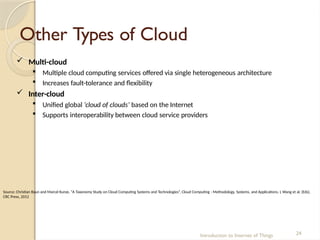
 Multi-cloud
 Multiple cloud computing services offered via single heterogeneous architecture
 Increases fault-tolerance and flexibility
 Inter-cloud
 Unified global ‘cloud of clouds’ based on the Internet
 Supports interoperability between cloud service providers
Source: Christian Baun and Marcel Kunze, "A Taxonomy Study on Cloud Computing Systems and Technologies“, Cloud Computing - Methodology, Systems, and Applications, L Wang et al. (Eds),
CRC Press, 2012
Comparison of Different
Deployment Models
Introduction to Internet of Things 25
On-premise Off-premise
Dedicated
Access
Private cloud Hosted private cloud
Shared Access Community cloud Public cloud
Source: Christian Baun and Marcel Kunze, "A Taxonomy Study on Cloud Computing Systems and Technologies“, Cloud Computing - Methodology, Systems, and Applications, L Wang et al. (Eds),
CRC Press, 2012
Thank you
Introduction to Internet of Things 26
Cloud Computing –
Service Models
Introduction to Internet of Things
1
Service
Models
PaaS Self-service Interface
Application
Grid
UI Services
Database
Grid
Security
Identify
Integration
Workflow
IaaS Self-service Interface
Virtual
Grid
Virtual
Machine
Virtual
Storage
Admin Service
- Packaging
- Configuration
- Deployment
- Scaling
- Lifecycle
Management
- Utilization
- User
Management
Source: NIST (2011)
SaaS
PaaS
IaaS
Admin
Service
Application 1 Application 2
Introduction to Internet of Things
2
Comparison of Different
Service Models
Traditional
Source: NIST (2011)
Applications
Data
Runtime
Middleware
OS
Virtualization
Servers
Storage
Networking
By
Service
Provider
By
User
Applications
Data
Runtime
Middleware
OS
Virtualization
Servers
Storage
Networking
By
Service
Provider
Applications
Data
Runtime
Middleware
OS
Virtualization
Servers
Storage
Networking
By
User
By
Service
Provider
IaaS PaaS SaaS
Applications
Data
Runtime
Middleware
OS
Virtualization
Servers
Storage
Networking
By
User
Introduction to Internet of Things
3
Infrastructure - as-a-
Service (IaaS)
Introduction to Internet of Things
4
 On-demand delivery of computing infrastructure
 IaaS provides the following:
 Servers- Compute, machines
 Storage
 Network
 Operating system
“Infrastructure-as-a-Service, abbreviated as IaaS, contains the basic building blocks for
cloud IT and typically provide access to networking features, computers (virtual or
dedicated hardware), and data storage space.” – Amazon
Source: https://aws.amazon.com/types-of-cloud-computing/
Source: Rajkumar Buyya, “Mastering Cloud Computing: Foundations and Applications Programming”, Tata McGraw-Hill Education, 2013
Working
Methodology
Application
Operating
System
Hardware Hypervisor
Application
Operating
System
VM1
H
a
r
d
w
a
r
e
Application
Operating
System
VM2
Introduction to Internet of Things
5
• The user rents servers,
software, data center space
or network equipment
• Cloud service provider offers
resource management
• Outsourced service on-
demand model
Physical Server Virtualized Server
Source: Wikipedia, Hardware Virtualization
Why IaaS?
Introduction to Internet of Things
6
 New businesses can operate without investing on computer hardware.
 Scalable for rapidly growing businesses. (Organizations that experience
huge success immediately)
 Suitable for serving fluctuating computing demands. (Ex. Flipkart, Amazon
during festival seasons)
 Suitable for new business model trials.
 Helps in minimizing the capital expenses. (entrepreneurs starting on a
shoestring budget)
Essential
Characteristics
Introduction to Internet of Things
7
 Scalability and elasticity:
 Dynamic scaling of required infrastructure resources
 Large amount of resource allocation/release in a short span of time
 No variation in system performance while scale in or out
Essential
Characteristics
Introduction to Internet of Things
8
 Manageability and interoperability
 Clients have total control of the virtualized infrastructure resources
 Pre-configured facility for allocation of virtualized resources
 The virtualized resources are to be monitored for their running status
 The Usage and Billing system records the use of infrastructure
resources and accordingly calculate payment
Essential
Characteristics
Introduction to Internet of Things
9
 Availability and reliability
 Stored data can be retrieved at any time without failure
 The clients should be able to access the computational resources
without failure
 Uninterrupted facility for computation and communication
Essential
Characteristics
Introduction to Internet of Things 10
 Performance and optimization
 High utilization of physical resources among different clients
 To enable high computing power with the large pool of physical
resources using parallel processing
 To optimize the deployment of physical resources by dynamic
configuration of virtual infrastructure resources
Essential
Characteristics
Introduction to Internet of Things 11
 Accessibility and portability
 Facility for client to ease various tasks – control, manage and access
infrastructure resources
 To facilitate easy reallocation and duplication of allocated
infrastructure resources
IaaS
Categories
Introduction to Internet of Things 12
 IaaS can be obtained as:
 Public Cloud
 Shared infrastructure resources
 Available for self-service basis
 Private Cloud
 Private infrastructure resources
 Access control
 Hybrid Cloud: A blend of public and private
IaaS – Challenges and
Limitations
Introduction to Internet of Things 13
 Sometimes the regulatory approval does not allow
outsourcing the storage and processing of sensitive data.(Ex.:
Medical records)
 Network latency may degrade the level of expected
performance
IaaS – Challenges and
Limitations (contd.)
Introduction to Internet of Things 14
 Users may require automated decision making of job
scheduling to available resources
 Seamless scaling of services independent of traffic
variation
 Developers have to focus on low level system details
Platform- as-a-
Service (PaaS)
Introduction to Internet of Things 15
“Platform-as-a-service remove the need for organizations to manage the underlying
infrastructure (usually hardware and operating systems) and allow you to focus on the
deployment and management of your applications.” – Amazon
Source: https://aws.amazon.com/types-of-cloud-computing/
 PaaS provides the platform which allows developers to create applications
which can be offered as services via Internet
 Simplifies the application development and deploy providing the cloud-
aware feature
 PaaS is an application middleware offered as a service to developers
 Provides abstraction and security for deployed applications.
Source: Rajkumar Buyya, “Mastering Cloud Computing: Foundations and Applications Programming”, Tata McGraw-Hill Education, 2013
PaaS
(contd.)
Introduction to Internet of Things 16
 Facilitates development and managing applications without
the complexity of maintaining the underlying infrastructure
 Allows customers to rent virtualized servers and associated
services
 Provides elastic scaling of the user’s deployed application
Features of PaaS
Offering
Introduction to Internet of Things 17
 Operating system
 Server-side scripting environment
 Database management system
 Server Software
 Support
 Storage
 Network access
 Tools for design and development
 Hosting
PaaS Working
Model
Introduction to Internet of Things 18
 Allows users to create software applications using offered
tools
 Provides preconfigured features that customers can
subscribe
 Support available for managing the infrastructure and
applications for customers
 Services are regularly updated with new features
Business
Advantages
Introduction to Internet of Things 19
 Facility for accessing key middleware services without
worrying about the underlying complexities of managing
individual hardware and software elements
 Ease of access for the development and deployment
tools
 Freedom from managing development and deployment tools
individually
Software- as-a-
Service (SaaS)
Introduction to Internet of Things 20
“Software as a Service provides you with a completed product that is run and
managed by the service provider. In most cases, people referring to Software as a
Service are referring to end-user applications.” – Amazon
Source: https://aws.amazon.com/types-of-cloud-computing/
 SaaS is a simplified model of software delivery over Internet
 Operation, maintenance and technical support is provided by the
service provider
 Typically offered via web browser working as a thin-client
 Supports a fully pay-as-you-go model
Source: Software Services for e-Business and e-Society: Proceedings of 9th IFIP WG 6.1 Conference on e-Business, e-Services and e-Society, I3E 2009, Nancy,
France, September 23-25, 2009.
SaaS
(contd.)
Introduction to Internet of Things 21
 Remote access of software via Internet where web-browser
acts as a thin-client
 Facility for access and control of commercial software via
Internet
 Multi-tenant application delivery in a one-to-many
model
Advantages
Introduction to Internet of Things 22
Traditional Software SaaS
Customers install, manage & maintain Customers uses over the Internet
Runs on individual organization
on dedicated instantiation
Runs on multiple
customers
simultaneously
Cross platform support required No concerns for cross platform support
Less frequent version
updates & purchased
separately
More frequent updates for enhanced
user satisfaction
Separate costs incurred for upgrades No separate cost
Vulnerable to software piracy Less vulnerable to software piracy
SaaS Architecture
Introduction to Internet of Things 23
 Scalability
 To maximize application concurrency
 To optimize the shared pool of resources such as threads and network
connections
 Multi-tenancy
 Important architectural shift from designing isolated, single-tenant
applications
 Ability to accommodate users from multiple companies at the same
time
 Transparency to all the users
 Maximize the sharing of resources across tenants while distinguishing user’s
individual data
SaaS Architecture
(contd.)
Introduction to Internet of Things 24
 Configurability
 To facilitate parallel allocation of a single application on a single server to
several users
 To customize the application for one customer will change the application
for other customers as well
 Separate data space for different users
Limitations of
SaaS
Introduction to Internet of Things 25
 Centralized control
 Switching cost
 Limited flexibility
 Data security and privacy
T
h
a
n
k
y
o
u
Introduction to Internet of Things 26
Introduction to Internet of Things
1
Cloud Computing – Service Management and Security
Introduction
Introduction to Internet of Things
2
 Deals with the world of cloud computing and service
management, ensuring optimal performance and efficiency in
on-demand, virtual environments
 Aims to provide equal importance to desired outcomes of
customers
 Management of services at no cost and risk
Objectives
Introduction to Internet of Things
3
 To provide standard services
 Clear & complete description of services
 Usage monitoring and billing
 High availability of networks and connectivity
 Ease of access
 Portals for service selection
 Rapid fulfillment/decommissioning of resources
 Service guarantees
 Secure computing and storage
Source : IBM Global Technology, Integrated Service Management and Cloud Computing: More than Just Technology Best Friends, White Paper, IBM Global Technology
Services, 2010
Service Level Agreement
Introduction to Internet of Things
4
 Defines the non functional requirements expected from the
service provider
 Provides a roadmap with clearly defined deliverables
 Describes the quality, utility and warranty of services
expected by the customer
Note: Depending on the service provider exact metric for each SLA varies, however
areas covered remain unchanged like volume and quality of work, speed, efficiency
Source: K.T. Kearney, F. Torelli, "The SLA Model". In Wieder, P.; Butler, J.M.; Theilmann, W.; Yahyapour, R. Service Level Agreements for Cloud Computing. Springer Science+Business Media, LLC. pp.
43–68, 2011. ISBN 9781461416142.
Accounting and Billing
Introduction to Internet of Things
5
 Service Accounting
 Aims to obtain resource usage information, typically in the form of records
 Depends on infrastructure and service monitoring, as usage information is
obtained from metric measurements
 Billing
 Service provider calculates billing information using
 Accounting records
 Resource prices
 Billing rules
Source : M. Lindner, F. Marquez, C. Chapman, S. Clayman, D. Henriksson, and E. Elmroth. The cloud supply chain: A framework for information, monitoring, accounting and
billing. In 2nd International ICST Conference on Cloud Computing (CloudComp 2010). Springer Verlag, 2010
Comparing Scaling Hardware: Traditional vs. Cloud
Introduction to Internet of Things
6
 Traditional data centers
 Heterogeneous hardware
 Networked computing
 Remote server
 Cloud Computing
 Off-premises
 Virtual hosting solution
 Heterogeneous hardware, software and networks on the cloud
Source : Wikipedia – Cloud Computing
Comparison between Traditional vs. Cloud (contd.)
Introduction to Internet of Things
7
 Major differences include
 Resilience and Elasticity
 Flexibility and Scalability
 Automation
 Running Costs
 Security
Source : Wikipedia – Cloud Computing
Economics of scaling: Benefitting
enormously
Introduction to Internet of Things
8
 Economics depends on four customer population metrics
 Number of unique customer sets
 Duty cycles of customer set
 Relative displacement duty cycle
 Load of customer set
Source : Kevin L. Jackson, 2011, "The Economic Benefit of Cloud Computing", Forbes
Economics of scaling
(contd.)
Introduction to Internet of Things
9
 Economic incentives
 Lower cost
 Cap-Ex free Computing
 Deploy projects faster; foster innovation
 Scale as needed
 Lower maintenance costs
 Resiliency and redundancy
Source : Jackson, Kevin L., 2011, "The Economic Benefit of Cloud Computing", Forbes
Managing Data in Cloud
Introduction to Internet of Things 10
 Steps in evaluating database manager
 Define the type of application that will be served like data asset
protection, business intelligence, e-commerce
 Determine how suitable these apps are for public or private
clouds
 Factors affecting easy development process
Managing Data in Cloud
(Contd.)
Introduction to Internet of Things 11
 Demands of cloud database management system
 Efficiency
 Fault-Tolerance
 Adaptive to heterogeneity
 Operational comfort on encrypted data
 Capable of interfacing with other products/solutions
Source : D. Abadi. Data management in the cloud: Limitations and opportunities. IEEE Data Eng. Bull., 32(1):3–12, 2009.
Managing Data in Cloud
(Contd.)
Introduction to Internet of Things 12
 Database-as-a-Service (DBaaS)
 MicrosoftAzure/SQLDatabase
 AmazonWebServices/DynamoDB/RelationalDatabaseService
 GoogleCloudSQL/GoogleAppEngine Datastore
 ClearDB
 Database.com
Source : Wikipedia – Cloud Database
Cloud Security - Introduction
Introduction to Internet of Things 13
 Problem: User loses control of information available on
public cloud
 Security concerns:
 Loss of data
 Account seizing
 Service traffic hindrance
 Vulnerable APIs
 Solution: Protection from theft, leakage and deletion by
providing secure policies
Source: D.Velev and P.Zlateva "Cloud infrastructure security" in Open Research Problems in Network Security vol.6555 J.Camenisch V.Kisimov and
M.Dubovitskaya Eds.Berlin Heidelberg: Springer 2011 pp.140-148.
Infrastructure
Security
Introduction to Internet of Things 14
 Security of cloud infrastructure must be implicitly assured
 For public or private cloud
 For services SaaS, PaaS, IaaS
 Building Levels for viewing, evaluating and executing
infrastructure security are
 Network level security
 Host level security
 Application level security
Source: D.Velev and P.Zlateva "Cloud infrastructure security" in Open Research Problems in Network Security vol.6555 J.Camenisch V.Kisimov and M.Dubovitskaya Eds.Berlin Heidelberg:
Springer 2011 pp.140-148.
Network Level
Security
Introduction to Internet of Things 15
 Public clouds
 Small change severely affects the network topology
 Proper access control for using resources
 Achieving confidentiality and integrity of
data-in-transit to and from the cloud
service provider
 Availability of internet
resources correctly to genuine
 users from cloud service provider
Source: D.Velev and P.Zlateva "Cloud infrastructure security" in Open Research Problems in Network Security vol.6555 J.Camenisch V.Kisimov and M.Dubovitskaya
Eds.Berlin Heidelberg: Springer 2011 pp.140-148.
Host Level
Security
Introduction to Internet of Things 16
 Host security at PaaS and SaaS Level:
 Hide the host operating system from end-users
 Security responsibilities are transferred to Cloud service
providers
 Host security at IaaS Level:
 Primary objective is to secure the allocated hosts
 Example of threats: Blue Pill attack on hypervisor
Source: D.Velev and P.Zlateva "Cloud infrastructure security" in Open Research Problems in Network Security vol.6555 J.Camenisch V.Kisimov and M.Dubovitskaya Eds.Berlin Heidelberg:
Springer 2011 pp.140-148.
Application Level
Security
 Both CSP and the customer are responsible for security
at application level
SaaS Providers
• Security of deliverable
applications
PaaS providers
• Security of
• PaaS platform
• Deployed
customer
applications
IaaS Providers
• Application
level security is
not provided by
IaaS
• Customers arrange for
security mechanism
Introduction to Internet of Things 17
Data
Security
Aspects of
Data Security
Data in transit
Data at rest
Data
including
Multitenancy
Data Lineage
Data
Remanence
Data
Provenance
Introduction to Internet of Things 18
 Objectives:
 Confidentiality
 Integrity
 Availability
 Solution:
 Identity management
 Encryption
 Access control
Source: L. Grandinetti; O. Pisacane; M. Sheikhalishahi; “Cloud Security” in 1st Edition, Pervasive Cloud Computing Technologies: Future Outlooks and Interdisciplinary Perspectives, IGI
Global, 31-Oct-2013.
Identity and Access
Management (IAM)
Introduction to Internet of Things 19
 A branch of cloud security that allows the legitimate persons
to retrieve the legitimate resources at the legitimate time for
the legitimate reasons
 User identities and access permissions are instigated, caught,
administered and recorded by IAM
 Authentication, authorization and evaluation of all users are
done according to the terms and conditions and the roles of
users
Source: Wikipedia – Identity Management
Features of
IAM
Introduction to Internet of Things 20
 Single Access Control Interface
 Increased security
 Access Control over Resource-level
 Improvement of operational efficiency
 Organizations attain access control and operational security
using IAM
 Improvement of regulatory compliance management
Source: Wikipedia – Identity Management
Access
Control
Introduction to Internet of Things 21
 Access control layers in cloud include:
 Cloud access
 Server access
 Service access
 Database access (direct and queries via web services)
 VM access
 Access to objects within a VM
 Management of these layers
depends
on provider or
consumer, based on the deployment model
Trust and
Reputation
Introduction to Internet of Things 22
 Trust: Independent expectancy between two entities for
any specific context at a given time
 Reputation: Belief of an entity’s standing by the
community
 These concepts are needed by the customer to
select appropriate cloud provider
Source: Z. Raghebi and M. R. Hashemi, "A New Trust Evaluation Method based on Reliability of Customer Feedback for Cloud Computing", in Proc. Information Security and Cryptology
Conference, pp. 1-6, Iran, 2013.
Source: S. M. Habib; S. Hauke; S. Ries; M. Muhlhauser , "Trust as a facilitator in cloud computing: a survey", Journal of Cloud Computing, vol. 1 (1), pp. 1-18, 2012.
Trust and Reputation
Contd.
Introduction to Internet of Things 23
 Different modes of trust establishment include
 Accomplishment of Service Level Agreement
 Application of audit standards
 Measuring and ratings
 Questionnaires for self-assessment
Source: Z. Raghebi and M. R. Hashemi, "A New Trust Evaluation Method based on Reliability of Customer Feedback for Cloud Computing", in Proc. Information Security and Cryptology
Conference, pp. 1-6, Iran, 2013.
Source: S. M. Habib; S. Hauke; S. Ries; M. Muhlhauser , "Trust as a facilitator in cloud computing: a survey", Journal of Cloud Computing, vol. 1 (1), pp. 1-18, 2012.
Risk
Assessment
Introduction to Internet of Things 24
 Categorization of different assessment methodology
 Formal versus informal procedures
 Qualitative (high/moderate/low) versus quantitative (numbers)
techniques
 Consequence versus cause analysis
 Inductive versus deductive techniques
Source: E. Cayirci, A. Garaga, A. S. De Oliveira, Y. Roudier, "A Cloud Adoption Risk Assessment Model", IEEE/ACM International Conference on Utility and Cloud Computing (UCC), 8-11 Dec.
2014, London, UK, pp. 908 – 913.
Authentication in Cloud
Computing
Introduction to Internet of Things 25
 User Authentication
 What: User authentication process between new users and service
provider
 When: During the authentication, the properties and safety of process
can be invaded by attack causing severe damages
 Where: User authentication is done at PaaS layer
 Consequence: Threat to authentication process can lead to divulge of
confidential data to a fake user
Source: H. Chang; E. Choi ,"User authentication in cloud computing" ,Proc. UCMA CCIS,vol. 151 pp. 338-342 2011
T
h
a
n
k
Y
o
u
Introduction to Internet of Things 26
Cloud Computing – Case Studies
1
Introduction to Internet of Things
Introduction
2
Introduction to Internet of Things
 Simulation tools provide reliable, scalable and
repeatable environment for performance evaluation
 The simulators facilitate pre-deployment tests of services
 As the demand of cloud computing is growing everyday, the
simulators and technologies are needed to be studied
Introduction
(contd.)
3
Introduction to Internet of Things
 Cloud simulators allow customers to
 Evaluate the services
 Testing at no cost
 Enable repeatable evaluation
 Control the environment
 Pre-detection of issues affecting performance
 Design of countermeasures
Cloud
Simulators
4
Introduction to Internet of Things
 Different Cloud Simulators are:
 CloudSim
 CloudAnalyst
 GreenCloud
 iCanCloud
 GroudSim
 DCSim
CloudSim
5
Introduction to Internet of Things
 A simulation framework
 Models cloud computing environments – Data
Center, VM, applications, users, network topology
 Written on Java-based environment
 Allows to examine the performance of application services
 Dynamic addition/removal of resources during simulation
 Developed at CLOUDS Lab. of University of Melbourne
Source : Calheiros RN, Ranjan R, Beloglazov A, Rose CAFD, Buyya R. CloudSim: A toolkit for modeling and simulation of cloud computing environments and evaluation of resource
provisioning algorithms. Software: Practice and Experience 2011; 41(1):23–50
Advantages of CloudSim
6
Introduction to Internet of Things
 Time effectiveness: Cloud-based application implementation in
 Minimum time
 Minimum effort
 Flexibility and applicability:
 Support for diverse cloud environments
 Enables modelling of application services in any environment
Source : Calheiros RN, Ranjan R, Beloglazov A, Rose CAFD, Buyya R. CloudSim: A toolkit for modeling and simulation of cloud computing environments and evaluation of resource
provisioning algorithms. Software: Practice and Experience 2011; 41(1):23–50
Features of
CloudSim
7
Introduction to Internet of Things
 Various cloud computing data centers
 Different data center network topologies
 Message-passing applications
 Virtualization of server hosts
 Allocation of virtual machines (VMs)
 User defined policies for allocation of host resources to VMs
 Energy-aware computational resources
 Dynamic addition/removal of simulation components
 Stop and resume of simulation
Source : Calheiros RN, Ranjan R, Beloglazov A, Rose CAFD, Buyya R. CloudSim: A toolkit for modeling and simulation of cloud computing environments and evaluation of resource
provisioning algorithms. Software: Practice and Experience 2011; 41(1):23–50
CloudSim
Architecture
8
Introduction to Internet of Things
 User Code: Top most layer
 Presents different machine and application
specifications
 CloudSim: Middle layer
 Provides cloud environment
 Enables modelling and simulation
 Core Simulation Engine: Bottom most
layer
 Event scheduling
 Entity creation
 Interaction between components
 Clock management
Source : Calheiros RN, Ranjan R, Beloglazov A, Rose CAFD, Buyya R. CloudSim: A toolkit for modeling and simulation of cloud computing environments and evaluation of resource
provisioning algorithms. Software: Practice and Experience 2011; 41(1):23–50
Top Layer: User Code
 Basic entities:
 Users
 Physical Machines
 Virtual Machines
 Applications & services
 Scheduling policies
Fig: Functionalities at top layer
Simulation
Specification
Scheduling
Policy
User
Code
Cloud
Scenario
User
Requirement
Application
Configuration
User Broker
Data Center
Broker
Source : Calheiros RN, Ranjan R, Beloglazov A, Rose CAFD, Buyya R. CloudSim: A toolkit for modeling and simulation of cloud computing environments and evaluation of resource
provisioning algorithms. Software: Practice and Experience 2011; 41(1):23–50
9
Introduction to Internet of Things
Middle Layer: CloudSim
10
Introduction to Internet of Things
 Creation and simulation of
 Dedicated management interfaces
 Memory, storage, bandwidth and VMs
 Helps in solving issues like
 Hosts provisioning to VMs
 Application execution management
 Dynamic system state monitoring
 Allows a cloud service provider to
 Implement customized strategies
 Evaluating the efficiency of different policies in VM provisioning
User Interface Structure
VM Services
Cloud Services
Cloud Resources
Network
CloudSim
Architecture
VM
Management
Cloudlet
Execution
Cloudlet
Virtual
Machine
VM Provisioning
Storage
Allocation
CPU Allocation
Memory
Allocation
Bandwidth
Allocation
Network
Topolog
y
Message Delay
Calculation
Event
Handling Sensor
Cloud
Coordinator Data Center
Source : Calheiros RN, Ranjan R, Beloglazov A, Rose CAFD, Buyya R. CloudSim: A toolkit for modeling and simulation of cloud computing environments and evaluation of resource provisioning
algorithms. Software: Practice and Experience 2011; 41(1):23–50
11
Introduction to Internet of Things
CloudAnalyst
12
Introduction to Internet of Things
 Simulation tool designed based on CloudSim
 Provides GUI
 Supports geographically distributed large-scale Cloud
applications
 The purpose is to study the behavior of such applications
under various deployment configurations
Source: B. Wickremasinghe, R. N. Calheiros, R. Buyya, “CloudAnalyst: A CloudSim-Based Visual Modeller for Analysing Cloud Computing Environments and Applications”, in Proc. of IEEE Intl.
Conf. on Advanced Information Networking and Applications (AINA), pp. 446-452, Perth, 2010.
Features of
CloudAnalyst
13
Introduction to Internet of Things
 Easy to use due to Graphical User Interface (GUI)
 High level of configurability
 Flexibility of adding components
 Repeatability of experiments
 Graphical output (e.g. charts, tables)
 Easy to extend (Java Swing) and uses blended technology
Source: B. Wickremasinghe, R. N. Calheiros, R. Buyya, “CloudAnalyst: A CloudSim-Based Visual Modeller for Analysing Cloud Computing Environments and Applications”, in Proc. of IEEE Intl.
Conf. on Advanced Information Networking and Applications (AINA), pp. 446-452, Perth, 2010.
CloudAnalyst Design
Fig: CloudAnalyst Architecture
Source: R. Buyya, CloudAnalyst: A CloudSim-based Tool for Modelling and Analysis of Large Scale Cloud Computing Environments, Distributed computing project, CSSE Dept., University of
Melbourne, 433-659, Jun 22, 2009
CloudSim Toolkit
CloudSim
Extensions GUI
CloudAnalyst
14
Introduction to Internet of Things
Main components
• GUI Package: Front end
• Simulation: Create, execute, hold
• UserBase: User traffic generation
• DataCenterController: Events of data center
• Internet: Internetworking & routing
• InternetCharacteristics: Properties of Internet (delay,
Bandwidth, throughput, etc.)
• VmLoadBalancer: Policies for load balancing
• CloudAppServiceBroker: Entities for routing between
UserBase & data center.
GreenCloud
15
Introduction to Internet of Things
 Why:
 The computing capacity has increased the cost and operational expenses of data centers
 Energy consumption by data center is the major factor driving the operational expense
 What:
 Operational cost is the energy utilized by computing and communication units within
a data center
 How:
 GreenCloud monitors the energy consumption of servers, switches, etc.
 Developed as an extension of a packet-level network simulator NS2
Source: D. Kliazovich, P. Bouvry, S. U. Khan, "GreenCloud: A packet-level simulator of energy-aware cloud computing data centers", J. Supercomput., vol. 62, no. 3, pp. 1263-1283, Dec. 2012
Features of GreenCloud
16
Introduction to Internet of Things
 User-friendly GUI
 Open source
 Facility for monitoring energy consumption of network
& devices
 Supports simulation of cloud network components
 Supports monitoring of energy consumption of
individual components
 Enables improved power management schemes
 Dynamic management and configuration of devices
Open Source and Commercial
Clouds
17
Introduction to Internet of Things
Open Source Clouds Commercial Clouds
Examples OpenStack,
CloudStack,
Eucalyptus
Amazon Web Services
(AWS), Microsoft Azure,
Google App Engine
Facility Mostly offers IaaS IaaS, PaaS, SaaS
Services on
subscription
Security Implemented by user Implemented by service
provider
Type Private/On-premise Public/Off-premise/Hosted-
private
OpenStack
 Collection of open source technologies
 Managed by the OpenStack Foundation
 Supports vastly scalable cloud system
 Preconfigured software suit
 Different services available for users
 Considered Infrastructure as a Service (IaaS).
 Ease of use: add new instances quickly to run other
cloud components
 Provides a platform to create software applications
 Developed software applications can be used by
the end users
Source: OpenStack Website www.openstack.org/software
VM
Container
Storage
Dashboard GUI
Monitoring
Tools
Apps Apps
Common Network
18
Introduction to Internet of Things
User’
s
Apps
OpenStack Components and
Features
19
Introduction to Internet of Things
 Components:
 Compute (Nova)
 Networking (Neutron)
 Block storage (Cinder)
 Identity (Keystone)
 Image (Glance)
 Object storage (Swift)
 Dashboard (Horizon)
 Database (Trove)
 Elastic map reduce (Sahara)
 Shared file system (Manila)
 DNS (Designate)
 Search (Searchlight)
 Key manager (Barbican)
Source : opensource.com Website www.openstack.org/software/
 Features
 Allows users to create and deploy virtual
machines
 Allows set up of cloud management
environment
 Supports easy horizontal scaling – dynamic
addition/removal of instances to support
more users in real-time
 Open source software – free to access the
source code and share their own code to
community
Microsoft Azure
20
Introduction to Internet of Things
 Previously Windows Azure
 Supports Iaas and PaaS
 Supports extensive set of services to quickly create, deploy
and manage applications
 Many programming languages and frameworks are
supported
 Available across a worldwide Microsoft-managed
datacenters
Source URL: https://azure.microsoft.com/en-in/overview/what-is-azure
Azure Services
21
Introduction to Internet of Things
 Compute
 Mobile services
 Storage services
 Data management
 Messaging
 Media services
 Content Delivery Network (CDN)
 Developer
 Management
 Machine Learning
Azure as PaaS (Platform as a Service )
22
Introduction to Internet of Things
 Platform is provided to clients to develop and deploy software
 Clients focus on application development rather than
worry about hardware and infrastructure
 Low Cost
 less vulnerable to security attacks
 Ease to move on to new tools
 Solves the issues related to most of the operating systems,
servers and networking.
Source URL : https://azure.microsoft.com/en-in/overview/what-is-paas/
Azure as IaaS (Infrastructure as a
Service )
23
Introduction to Internet of Things
 Offers total control of the OS and application stack
 Features to access, manage and monitor the data centers
 Ideal for the application where complete control is required
 Facility for loading of custom configurations
Source URL: https://blogs.msdn.microsoft.com/hanuk/2013/12/03/which-windows-azure-cloud-architecture-paas-or-iaas
Amazon Elastic Compute Cloud (EC2)
24
Introduction to Internet of Things
A web service for users to launch and manage
server instances in Amazon’s data centers
Provides various APIs, tools and utilities
Facilitate dynamic computation scaling in the
Amazon Web Services (AWS) cloud
Supports pay-per-use billing rather than making
large and expensive hardware purchases
Source: amazon web services Website https://aws.amazon.com/ec2/
Amazon EC2 Instances
25
Introduction to Internet of Things
 Virtual computing environments
 Instance templates of different configurations – CPU, memory, storage,
networking capacity
 Dynamic instance allocation by AWS according to user demand
 Instance types
 General purpose: T2, M4, M3
 Compute optimized: C4, C3
 Memory optimized: X1, R4, R3
 Accelerated computing instances: P2, G2, F1
Source URL: https://aws.amazon.com/ec2/
Features of Amazon EC2
26
Introduction to Internet of Things
 Operating system:
 Supports all OS types
 Custom distribution: Amazon Linux AMI/Amazon Machine Images
 Persistent storage:
 Temporary: Local ‘Instance Store’
 Amazon Elastic Block Store (EBS)
 Simple Storage Service (S3)
 Automated scaling: Rule based / Schedule based
 Different “availability zones” in data centers increases fault-tolerance
Features of Amazon EC2
27
Introduction to Internet of Things
 Firewall Rules/Security Groups: Only predefined protocols, ports, and
source IP ranges reach the instances
 Elastic IP address: Mapping between IP and any VM of user
 Amazon CloudWatch: CPU, disk, network resource utilization
monitoring
 Enhanced security for instances using public-private key pair
 Virtual private clouds (VPCs):
 Logically separate from the rest of the AWS cloud
 Optionally connected to user’s own network
T
h
a
n
k
Y
o
u
28
Introduction to Internet of Things

Cloud Computing. – Fundamentals.pptx

  • 1.
    Cloud Computing –Fundamentals Introduction to Internet of Things 1
  • 2.
    Recent Trends in Computing• Shared pool of configurable computing resources • Ubiquitous, dynamic & on-demand access Introduction to Internet of Things 2 Homogeneous computing nodes (connected loosely or tightly) working together Heterogeneous computing nodes distributed over a wide area to perform very large tasks Packaged resources available for computing and storage
  • 3.
    Evolution of Cloud Computing 1950s Time- shared mainframe computers 1970s Virtual Machines byIBM Introduction to Internet of Things 3 1996-97 ‘Cloud Computing' 2002 Amazon Web Services (AWS) 1969 1990s 1999 2006 ARPAN ET Expansion Salesforce. Amazo n of the com EC2 Internet. Inception of VPNs. 2008 Google App Engine / Micorsoft Azure
  • 4.
    Cloud Computing Introduction to Internetof Things 4  It can be envisioned as step on from Utility Computing  It provides high level generalization (abstraction) of computation and storage model  It can be rapidly allocated and released with low management effort  It has some essential characteristics, service models, and deployment models  It provides on-demand services, that can be accessed from any place and at anytime Source: Rajkumar Buyya, “Mastering Cloud Computing: Foundations and Applications Programming”, Tata McGraw-Hill Education, 2013 “Cloud computing is a model for enabling convenient, on-demand network access to a shared pool of configurable computing resources (e.g., network infrastructures, servers, storage, applications, etc.)” – NIST Source: P Mell & T Grance, “A NIST Notional Definition of Cloud Computing”, version 15, 2009.
  • 5.
    NIST Visual Modelof Cloud Computing Essential Characteristics Service Models Deployment Models Source: NIST Broad Network Access Rapid Elasticity Measured Services On-demand Self- services Resource Pooling Introduction to Internet of Things 5 (SaaS) (PaaS) (IaaS) Public Private Hybrid Community
  • 6.
    Business Advantages Introduction to Internetof Things 6  Nearly zero cost for upfront infrastructure investment  Real-time Infrastructure availability  More efficient resource utilization  Usage-based costing  Reduced time to market
  • 7.
    General Characteristics Introduction to Internetof Things 7  Improved agility in resource provisioning.  Ubiquitous – independent of device or location  Multitenancy – sharing of resources and costs across a large pool of users  Dynamic load balancing  Highly reliable and scalable  Low cost and low maintenance  Improved security and access control
  • 8.
    Essential Characteristics Introduction to Internetof Things 8  Broad network access  Cloud resources should be available over the network  Should support standard mechanisms for information retrieval using traditional interfaces  Supported clients: heterogeneous thin or thick client platforms (e.g., mobile phones, laptops, and PDAs) Source: P Mell & T Grance, “A NIST Notional Definition of Cloud Computing”, version 15, 2009.
  • 9.
    Essential Characteristics Introduction to Internetof Things 9  Rapid elasticity  Cloud resource allocation should be rapid, elastic and automatic  Dynamic allocation/release facility for scale-out and scale-in  Consumers should feel infinite resources  Facility for add/remove of quantity should be there Source: P Mell & T Grance, “A NIST Notional Definition of Cloud Computing”, version 15, 2009.
  • 10.
    Essential Characteristics Introduction to Internetof Things 10  Measured service  Resource usage should be recorded and monitored  Facility to dynamically control and optimize the resource usage  This facility should be transparent between the service provider and consumer. Source: P Mell & T Grance, “A NIST Notional Definition of Cloud Computing”, version 15, 2009.
  • 11.
    Essential Characteristics Introduction to Internetof Things 11  On-demand self-service  Provide server time and network storage to users automatically  This facility should be available as a self-service Source: P Mell & T Grance, “A NIST Notional Definition of Cloud Computing”, version 15, 2009.
  • 12.
    Essential Characteristics Introduction to Internetof Things 12  Resource pooling  Automatically pool the whole available resources  Serve multiple end-users using a multi-tenant model  Resources should be allocated according to user’s demand Source: P Mell & T Grance, “A NIST Notional Definition of Cloud Computing”, version 15, 2009.
  • 13.
    Components of Cloud Computing Introductionto Internet of Things 13  Clients /end-users: Thick, Thin, Mobile  Services: Products & solutions (Identity, Mapping, Search, etc.)  Applications: Web apps, SaaS, etc.  Platform: Apps/Web hosting using PaaS  Storage: Database, Data-Storage-as-a-Service (DSaaS)  Infrastructure: Virtualization, IaaS, EC2 Clients Services Applications Platform Storage Infrastructure Source: Wikipedia
  • 14.
    Service Models  Software-as-a-Service (SaaS) Platform-as-a-Service (PaaS)  Infrastructure-as-a-Service (IaaS) Source: Wikipedia Clients User Interface Machine Interface Application Components Services Platform Compute Network Storage Infrastructure Servers Introduction to Internet of Things 14
  • 15.
    Software- as-a- Service (SaaS) Introductionto Internet of Things 15  Facility to execute service provider’s applications at user’s end  Applications are available as ‘services’  Services can be accessed via different types of client devices (e.g. web browser, app)  End-users do not posses the control of the cloud infrastructure Examples: Google Apps, Salesforce, Learn.com. Source: P Mell & T Grance, “A NIST Notional Definition of Cloud Computing”, version 15, 2009.
  • 16.
    Platform- as-a- Service (PaaS) Introductionto Internet of Things 16  Facility for the consumer to execute consumer-created or acquired applications onto cloud infrastructure  Support for deployment of such applications  The user does not control the cloud infrastructure  User can control the deployed applications using given configurations Examples: Windows Azure, Google App Engine Source: P Mell & T Grance, “A NIST Notional Definition of Cloud Computing”, version 15, 2009.
  • 17.
    Infrastructure - as-a- Service(IaaS) Introduction to Internet of Things 17  Facility to access computing resources such as network, storage, and operating system  User can deploy, execute and control any software (Operating systems and other applications)  In some case, the user can control selected networking components (e.g., host firewalls). Examples: Amazon EC2, GoGrid, iland, Rackspace Cloud Servers. Source: P Mell & T Grance, “A NIST Notional Definition of Cloud Computing”, version 15, 2009.
  • 18.
    Deployment Models  Public cloud Private cloud  Hybrid cloud  Others:  Community cloud  Distributed cloud  Multi-cloud  Inter-cloud Private/ Internal Off-premise cloud service Source: https://en.wikipedia.org/wiki/Cloud_computing Public/ Hosted On-premise cloud service Hybrid Introduction to Internet of Things 18
  • 19.
    Public Cloud Introduction toInternet of Things 19  Cloud set-up for the use of any person or industry  Typically owned by an organization who offers the cloud service.  Examples: Amazon Web Service (AWS), Google Compute Engine, Microsoft Azure  Advantages:  Easy to set-up at low cost, as provider covers the hardware, application and bandwidth costs.  Scalability to meet needs.  Pay-per-use ensures that from user’s perspective no resources wasted. Source: Christian Baun and Marcel Kunze, "A Taxonomy Study on Cloud Computing Systems and Technologies“, Cloud Computing - Methodology, Systems, and Applications, L Wang et al. (Eds), CRC Press, 2012
  • 20.
    Private Cloud Introduction toInternet of Things 20  Cloud set-up functioned only for a single organization  Typically managed by the organization itself (on-premises) or a third party (off-premises)  Advantages:  Total control over the system and data  Minimum security concerns  Disadvantages:  Regular maintenance Source: Christian Baun and Marcel Kunze, "A Taxonomy Study on Cloud Computing Systems and Technologies“, Cloud Computing - Methodology, Systems, and Applications, L Wang et al. (Eds), CRC Press, 2012
  • 21.
    Public Cloud vsPrivate Cloud Introduction to Internet of Things 21 Public Cloud Private Cloud Virtualized resources Publicly shared Privately shared Customer types Multiple Limited Connectivity Over Internet Over Internet/private network Security Low High Source: Christian Baun and Marcel Kunze, "A Taxonomy Study on Cloud Computing Systems and Technologies“, Cloud Computing - Methodology, Systems, and Applications, L Wang et al. (Eds), CRC Press, 2012
  • 22.
    Hybrid Cloud Introduction toInternet of Things 22  Cloud set-up constructed by two or more unique cloud set-up (private, community, or public)  Pooled together by standardized tools  Supports data and application portability (e.g., facility for load-balancing between clouds)  Provides multiple deployment models Source: Christian Baun and Marcel Kunze, "A Taxonomy Study on Cloud Computing Systems and Technologies“, Cloud Computing - Methodology, Systems, and Applications, L Wang et al. (Eds), CRC Press, 2012
  • 23.
    Other Types ofCloud Introduction to Internet of Things 23  Community cloud  Shared set-up between several organizations having common concerns (security, compliance, jurisdiction, etc.)  Managed by internally or by third party  Distributed Cloud  Collection of scattered set of computing devices in different locations, however, connected to a single network  Two types – Public-resource Computing and Volunteer Cloud. Source: Christian Baun and Marcel Kunze, "A Taxonomy Study on Cloud Computing Systems and Technologies“, Cloud Computing - Methodology, Systems, and Applications, L Wang et al. (Eds), CRC Press, 2012
  • 24.
    Other Types ofCloud Introduction to Internet of Things 24  Multi-cloud  Multiple cloud computing services offered via single heterogeneous architecture  Increases fault-tolerance and flexibility  Inter-cloud  Unified global ‘cloud of clouds’ based on the Internet  Supports interoperability between cloud service providers Source: Christian Baun and Marcel Kunze, "A Taxonomy Study on Cloud Computing Systems and Technologies“, Cloud Computing - Methodology, Systems, and Applications, L Wang et al. (Eds), CRC Press, 2012
  • 25.
    Comparison of Different DeploymentModels Introduction to Internet of Things 25 On-premise Off-premise Dedicated Access Private cloud Hosted private cloud Shared Access Community cloud Public cloud Source: Christian Baun and Marcel Kunze, "A Taxonomy Study on Cloud Computing Systems and Technologies“, Cloud Computing - Methodology, Systems, and Applications, L Wang et al. (Eds), CRC Press, 2012
  • 26.
    Thank you Introduction toInternet of Things 26
  • 27.
    Cloud Computing – ServiceModels Introduction to Internet of Things 1
  • 28.
    Service Models PaaS Self-service Interface Application Grid UIServices Database Grid Security Identify Integration Workflow IaaS Self-service Interface Virtual Grid Virtual Machine Virtual Storage Admin Service - Packaging - Configuration - Deployment - Scaling - Lifecycle Management - Utilization - User Management Source: NIST (2011) SaaS PaaS IaaS Admin Service Application 1 Application 2 Introduction to Internet of Things 2
  • 29.
    Comparison of Different ServiceModels Traditional Source: NIST (2011) Applications Data Runtime Middleware OS Virtualization Servers Storage Networking By Service Provider By User Applications Data Runtime Middleware OS Virtualization Servers Storage Networking By Service Provider Applications Data Runtime Middleware OS Virtualization Servers Storage Networking By User By Service Provider IaaS PaaS SaaS Applications Data Runtime Middleware OS Virtualization Servers Storage Networking By User Introduction to Internet of Things 3
  • 30.
    Infrastructure - as-a- Service(IaaS) Introduction to Internet of Things 4  On-demand delivery of computing infrastructure  IaaS provides the following:  Servers- Compute, machines  Storage  Network  Operating system “Infrastructure-as-a-Service, abbreviated as IaaS, contains the basic building blocks for cloud IT and typically provide access to networking features, computers (virtual or dedicated hardware), and data storage space.” – Amazon Source: https://aws.amazon.com/types-of-cloud-computing/ Source: Rajkumar Buyya, “Mastering Cloud Computing: Foundations and Applications Programming”, Tata McGraw-Hill Education, 2013
  • 31.
    Working Methodology Application Operating System Hardware Hypervisor Application Operating System VM1 H a r d w a r e Application Operating System VM2 Introduction toInternet of Things 5 • The user rents servers, software, data center space or network equipment • Cloud service provider offers resource management • Outsourced service on- demand model Physical Server Virtualized Server Source: Wikipedia, Hardware Virtualization
  • 32.
    Why IaaS? Introduction toInternet of Things 6  New businesses can operate without investing on computer hardware.  Scalable for rapidly growing businesses. (Organizations that experience huge success immediately)  Suitable for serving fluctuating computing demands. (Ex. Flipkart, Amazon during festival seasons)  Suitable for new business model trials.  Helps in minimizing the capital expenses. (entrepreneurs starting on a shoestring budget)
  • 33.
    Essential Characteristics Introduction to Internetof Things 7  Scalability and elasticity:  Dynamic scaling of required infrastructure resources  Large amount of resource allocation/release in a short span of time  No variation in system performance while scale in or out
  • 34.
    Essential Characteristics Introduction to Internetof Things 8  Manageability and interoperability  Clients have total control of the virtualized infrastructure resources  Pre-configured facility for allocation of virtualized resources  The virtualized resources are to be monitored for their running status  The Usage and Billing system records the use of infrastructure resources and accordingly calculate payment
  • 35.
    Essential Characteristics Introduction to Internetof Things 9  Availability and reliability  Stored data can be retrieved at any time without failure  The clients should be able to access the computational resources without failure  Uninterrupted facility for computation and communication
  • 36.
    Essential Characteristics Introduction to Internetof Things 10  Performance and optimization  High utilization of physical resources among different clients  To enable high computing power with the large pool of physical resources using parallel processing  To optimize the deployment of physical resources by dynamic configuration of virtual infrastructure resources
  • 37.
    Essential Characteristics Introduction to Internetof Things 11  Accessibility and portability  Facility for client to ease various tasks – control, manage and access infrastructure resources  To facilitate easy reallocation and duplication of allocated infrastructure resources
  • 38.
    IaaS Categories Introduction to Internetof Things 12  IaaS can be obtained as:  Public Cloud  Shared infrastructure resources  Available for self-service basis  Private Cloud  Private infrastructure resources  Access control  Hybrid Cloud: A blend of public and private
  • 39.
    IaaS – Challengesand Limitations Introduction to Internet of Things 13  Sometimes the regulatory approval does not allow outsourcing the storage and processing of sensitive data.(Ex.: Medical records)  Network latency may degrade the level of expected performance
  • 40.
    IaaS – Challengesand Limitations (contd.) Introduction to Internet of Things 14  Users may require automated decision making of job scheduling to available resources  Seamless scaling of services independent of traffic variation  Developers have to focus on low level system details
  • 41.
    Platform- as-a- Service (PaaS) Introductionto Internet of Things 15 “Platform-as-a-service remove the need for organizations to manage the underlying infrastructure (usually hardware and operating systems) and allow you to focus on the deployment and management of your applications.” – Amazon Source: https://aws.amazon.com/types-of-cloud-computing/  PaaS provides the platform which allows developers to create applications which can be offered as services via Internet  Simplifies the application development and deploy providing the cloud- aware feature  PaaS is an application middleware offered as a service to developers  Provides abstraction and security for deployed applications. Source: Rajkumar Buyya, “Mastering Cloud Computing: Foundations and Applications Programming”, Tata McGraw-Hill Education, 2013
  • 42.
    PaaS (contd.) Introduction to Internetof Things 16  Facilitates development and managing applications without the complexity of maintaining the underlying infrastructure  Allows customers to rent virtualized servers and associated services  Provides elastic scaling of the user’s deployed application
  • 43.
    Features of PaaS Offering Introductionto Internet of Things 17  Operating system  Server-side scripting environment  Database management system  Server Software  Support  Storage  Network access  Tools for design and development  Hosting
  • 44.
    PaaS Working Model Introduction toInternet of Things 18  Allows users to create software applications using offered tools  Provides preconfigured features that customers can subscribe  Support available for managing the infrastructure and applications for customers  Services are regularly updated with new features
  • 45.
    Business Advantages Introduction to Internetof Things 19  Facility for accessing key middleware services without worrying about the underlying complexities of managing individual hardware and software elements  Ease of access for the development and deployment tools  Freedom from managing development and deployment tools individually
  • 46.
    Software- as-a- Service (SaaS) Introductionto Internet of Things 20 “Software as a Service provides you with a completed product that is run and managed by the service provider. In most cases, people referring to Software as a Service are referring to end-user applications.” – Amazon Source: https://aws.amazon.com/types-of-cloud-computing/  SaaS is a simplified model of software delivery over Internet  Operation, maintenance and technical support is provided by the service provider  Typically offered via web browser working as a thin-client  Supports a fully pay-as-you-go model Source: Software Services for e-Business and e-Society: Proceedings of 9th IFIP WG 6.1 Conference on e-Business, e-Services and e-Society, I3E 2009, Nancy, France, September 23-25, 2009.
  • 47.
    SaaS (contd.) Introduction to Internetof Things 21  Remote access of software via Internet where web-browser acts as a thin-client  Facility for access and control of commercial software via Internet  Multi-tenant application delivery in a one-to-many model
  • 48.
    Advantages Introduction to Internetof Things 22 Traditional Software SaaS Customers install, manage & maintain Customers uses over the Internet Runs on individual organization on dedicated instantiation Runs on multiple customers simultaneously Cross platform support required No concerns for cross platform support Less frequent version updates & purchased separately More frequent updates for enhanced user satisfaction Separate costs incurred for upgrades No separate cost Vulnerable to software piracy Less vulnerable to software piracy
  • 49.
    SaaS Architecture Introduction toInternet of Things 23  Scalability  To maximize application concurrency  To optimize the shared pool of resources such as threads and network connections  Multi-tenancy  Important architectural shift from designing isolated, single-tenant applications  Ability to accommodate users from multiple companies at the same time  Transparency to all the users  Maximize the sharing of resources across tenants while distinguishing user’s individual data
  • 50.
    SaaS Architecture (contd.) Introduction toInternet of Things 24  Configurability  To facilitate parallel allocation of a single application on a single server to several users  To customize the application for one customer will change the application for other customers as well  Separate data space for different users
  • 51.
    Limitations of SaaS Introduction toInternet of Things 25  Centralized control  Switching cost  Limited flexibility  Data security and privacy
  • 52.
  • 53.
    Introduction to Internetof Things 1 Cloud Computing – Service Management and Security
  • 54.
    Introduction Introduction to Internetof Things 2  Deals with the world of cloud computing and service management, ensuring optimal performance and efficiency in on-demand, virtual environments  Aims to provide equal importance to desired outcomes of customers  Management of services at no cost and risk
  • 55.
    Objectives Introduction to Internetof Things 3  To provide standard services  Clear & complete description of services  Usage monitoring and billing  High availability of networks and connectivity  Ease of access  Portals for service selection  Rapid fulfillment/decommissioning of resources  Service guarantees  Secure computing and storage Source : IBM Global Technology, Integrated Service Management and Cloud Computing: More than Just Technology Best Friends, White Paper, IBM Global Technology Services, 2010
  • 56.
    Service Level Agreement Introductionto Internet of Things 4  Defines the non functional requirements expected from the service provider  Provides a roadmap with clearly defined deliverables  Describes the quality, utility and warranty of services expected by the customer Note: Depending on the service provider exact metric for each SLA varies, however areas covered remain unchanged like volume and quality of work, speed, efficiency Source: K.T. Kearney, F. Torelli, "The SLA Model". In Wieder, P.; Butler, J.M.; Theilmann, W.; Yahyapour, R. Service Level Agreements for Cloud Computing. Springer Science+Business Media, LLC. pp. 43–68, 2011. ISBN 9781461416142.
  • 57.
    Accounting and Billing Introductionto Internet of Things 5  Service Accounting  Aims to obtain resource usage information, typically in the form of records  Depends on infrastructure and service monitoring, as usage information is obtained from metric measurements  Billing  Service provider calculates billing information using  Accounting records  Resource prices  Billing rules Source : M. Lindner, F. Marquez, C. Chapman, S. Clayman, D. Henriksson, and E. Elmroth. The cloud supply chain: A framework for information, monitoring, accounting and billing. In 2nd International ICST Conference on Cloud Computing (CloudComp 2010). Springer Verlag, 2010
  • 58.
    Comparing Scaling Hardware:Traditional vs. Cloud Introduction to Internet of Things 6  Traditional data centers  Heterogeneous hardware  Networked computing  Remote server  Cloud Computing  Off-premises  Virtual hosting solution  Heterogeneous hardware, software and networks on the cloud Source : Wikipedia – Cloud Computing
  • 59.
    Comparison between Traditionalvs. Cloud (contd.) Introduction to Internet of Things 7  Major differences include  Resilience and Elasticity  Flexibility and Scalability  Automation  Running Costs  Security Source : Wikipedia – Cloud Computing
  • 60.
    Economics of scaling:Benefitting enormously Introduction to Internet of Things 8  Economics depends on four customer population metrics  Number of unique customer sets  Duty cycles of customer set  Relative displacement duty cycle  Load of customer set Source : Kevin L. Jackson, 2011, "The Economic Benefit of Cloud Computing", Forbes
  • 61.
    Economics of scaling (contd.) Introductionto Internet of Things 9  Economic incentives  Lower cost  Cap-Ex free Computing  Deploy projects faster; foster innovation  Scale as needed  Lower maintenance costs  Resiliency and redundancy Source : Jackson, Kevin L., 2011, "The Economic Benefit of Cloud Computing", Forbes
  • 62.
    Managing Data inCloud Introduction to Internet of Things 10  Steps in evaluating database manager  Define the type of application that will be served like data asset protection, business intelligence, e-commerce  Determine how suitable these apps are for public or private clouds  Factors affecting easy development process
  • 63.
    Managing Data inCloud (Contd.) Introduction to Internet of Things 11  Demands of cloud database management system  Efficiency  Fault-Tolerance  Adaptive to heterogeneity  Operational comfort on encrypted data  Capable of interfacing with other products/solutions Source : D. Abadi. Data management in the cloud: Limitations and opportunities. IEEE Data Eng. Bull., 32(1):3–12, 2009.
  • 64.
    Managing Data inCloud (Contd.) Introduction to Internet of Things 12  Database-as-a-Service (DBaaS)  MicrosoftAzure/SQLDatabase  AmazonWebServices/DynamoDB/RelationalDatabaseService  GoogleCloudSQL/GoogleAppEngine Datastore  ClearDB  Database.com Source : Wikipedia – Cloud Database
  • 65.
    Cloud Security -Introduction Introduction to Internet of Things 13  Problem: User loses control of information available on public cloud  Security concerns:  Loss of data  Account seizing  Service traffic hindrance  Vulnerable APIs  Solution: Protection from theft, leakage and deletion by providing secure policies Source: D.Velev and P.Zlateva "Cloud infrastructure security" in Open Research Problems in Network Security vol.6555 J.Camenisch V.Kisimov and M.Dubovitskaya Eds.Berlin Heidelberg: Springer 2011 pp.140-148.
  • 66.
    Infrastructure Security Introduction to Internetof Things 14  Security of cloud infrastructure must be implicitly assured  For public or private cloud  For services SaaS, PaaS, IaaS  Building Levels for viewing, evaluating and executing infrastructure security are  Network level security  Host level security  Application level security Source: D.Velev and P.Zlateva "Cloud infrastructure security" in Open Research Problems in Network Security vol.6555 J.Camenisch V.Kisimov and M.Dubovitskaya Eds.Berlin Heidelberg: Springer 2011 pp.140-148.
  • 67.
    Network Level Security Introduction toInternet of Things 15  Public clouds  Small change severely affects the network topology  Proper access control for using resources  Achieving confidentiality and integrity of data-in-transit to and from the cloud service provider  Availability of internet resources correctly to genuine  users from cloud service provider Source: D.Velev and P.Zlateva "Cloud infrastructure security" in Open Research Problems in Network Security vol.6555 J.Camenisch V.Kisimov and M.Dubovitskaya Eds.Berlin Heidelberg: Springer 2011 pp.140-148.
  • 68.
    Host Level Security Introduction toInternet of Things 16  Host security at PaaS and SaaS Level:  Hide the host operating system from end-users  Security responsibilities are transferred to Cloud service providers  Host security at IaaS Level:  Primary objective is to secure the allocated hosts  Example of threats: Blue Pill attack on hypervisor Source: D.Velev and P.Zlateva "Cloud infrastructure security" in Open Research Problems in Network Security vol.6555 J.Camenisch V.Kisimov and M.Dubovitskaya Eds.Berlin Heidelberg: Springer 2011 pp.140-148.
  • 69.
    Application Level Security  BothCSP and the customer are responsible for security at application level SaaS Providers • Security of deliverable applications PaaS providers • Security of • PaaS platform • Deployed customer applications IaaS Providers • Application level security is not provided by IaaS • Customers arrange for security mechanism Introduction to Internet of Things 17
  • 70.
    Data Security Aspects of Data Security Datain transit Data at rest Data including Multitenancy Data Lineage Data Remanence Data Provenance Introduction to Internet of Things 18  Objectives:  Confidentiality  Integrity  Availability  Solution:  Identity management  Encryption  Access control Source: L. Grandinetti; O. Pisacane; M. Sheikhalishahi; “Cloud Security” in 1st Edition, Pervasive Cloud Computing Technologies: Future Outlooks and Interdisciplinary Perspectives, IGI Global, 31-Oct-2013.
  • 71.
    Identity and Access Management(IAM) Introduction to Internet of Things 19  A branch of cloud security that allows the legitimate persons to retrieve the legitimate resources at the legitimate time for the legitimate reasons  User identities and access permissions are instigated, caught, administered and recorded by IAM  Authentication, authorization and evaluation of all users are done according to the terms and conditions and the roles of users Source: Wikipedia – Identity Management
  • 72.
    Features of IAM Introduction toInternet of Things 20  Single Access Control Interface  Increased security  Access Control over Resource-level  Improvement of operational efficiency  Organizations attain access control and operational security using IAM  Improvement of regulatory compliance management Source: Wikipedia – Identity Management
  • 73.
    Access Control Introduction to Internetof Things 21  Access control layers in cloud include:  Cloud access  Server access  Service access  Database access (direct and queries via web services)  VM access  Access to objects within a VM  Management of these layers depends on provider or consumer, based on the deployment model
  • 74.
    Trust and Reputation Introduction toInternet of Things 22  Trust: Independent expectancy between two entities for any specific context at a given time  Reputation: Belief of an entity’s standing by the community  These concepts are needed by the customer to select appropriate cloud provider Source: Z. Raghebi and M. R. Hashemi, "A New Trust Evaluation Method based on Reliability of Customer Feedback for Cloud Computing", in Proc. Information Security and Cryptology Conference, pp. 1-6, Iran, 2013. Source: S. M. Habib; S. Hauke; S. Ries; M. Muhlhauser , "Trust as a facilitator in cloud computing: a survey", Journal of Cloud Computing, vol. 1 (1), pp. 1-18, 2012.
  • 75.
    Trust and Reputation Contd. Introductionto Internet of Things 23  Different modes of trust establishment include  Accomplishment of Service Level Agreement  Application of audit standards  Measuring and ratings  Questionnaires for self-assessment Source: Z. Raghebi and M. R. Hashemi, "A New Trust Evaluation Method based on Reliability of Customer Feedback for Cloud Computing", in Proc. Information Security and Cryptology Conference, pp. 1-6, Iran, 2013. Source: S. M. Habib; S. Hauke; S. Ries; M. Muhlhauser , "Trust as a facilitator in cloud computing: a survey", Journal of Cloud Computing, vol. 1 (1), pp. 1-18, 2012.
  • 76.
    Risk Assessment Introduction to Internetof Things 24  Categorization of different assessment methodology  Formal versus informal procedures  Qualitative (high/moderate/low) versus quantitative (numbers) techniques  Consequence versus cause analysis  Inductive versus deductive techniques Source: E. Cayirci, A. Garaga, A. S. De Oliveira, Y. Roudier, "A Cloud Adoption Risk Assessment Model", IEEE/ACM International Conference on Utility and Cloud Computing (UCC), 8-11 Dec. 2014, London, UK, pp. 908 – 913.
  • 77.
    Authentication in Cloud Computing Introductionto Internet of Things 25  User Authentication  What: User authentication process between new users and service provider  When: During the authentication, the properties and safety of process can be invaded by attack causing severe damages  Where: User authentication is done at PaaS layer  Consequence: Threat to authentication process can lead to divulge of confidential data to a fake user Source: H. Chang; E. Choi ,"User authentication in cloud computing" ,Proc. UCMA CCIS,vol. 151 pp. 338-342 2011
  • 78.
  • 79.
    Cloud Computing –Case Studies 1 Introduction to Internet of Things
  • 80.
    Introduction 2 Introduction to Internetof Things  Simulation tools provide reliable, scalable and repeatable environment for performance evaluation  The simulators facilitate pre-deployment tests of services  As the demand of cloud computing is growing everyday, the simulators and technologies are needed to be studied
  • 81.
    Introduction (contd.) 3 Introduction to Internetof Things  Cloud simulators allow customers to  Evaluate the services  Testing at no cost  Enable repeatable evaluation  Control the environment  Pre-detection of issues affecting performance  Design of countermeasures
  • 82.
    Cloud Simulators 4 Introduction to Internetof Things  Different Cloud Simulators are:  CloudSim  CloudAnalyst  GreenCloud  iCanCloud  GroudSim  DCSim
  • 83.
    CloudSim 5 Introduction to Internetof Things  A simulation framework  Models cloud computing environments – Data Center, VM, applications, users, network topology  Written on Java-based environment  Allows to examine the performance of application services  Dynamic addition/removal of resources during simulation  Developed at CLOUDS Lab. of University of Melbourne Source : Calheiros RN, Ranjan R, Beloglazov A, Rose CAFD, Buyya R. CloudSim: A toolkit for modeling and simulation of cloud computing environments and evaluation of resource provisioning algorithms. Software: Practice and Experience 2011; 41(1):23–50
  • 84.
    Advantages of CloudSim 6 Introductionto Internet of Things  Time effectiveness: Cloud-based application implementation in  Minimum time  Minimum effort  Flexibility and applicability:  Support for diverse cloud environments  Enables modelling of application services in any environment Source : Calheiros RN, Ranjan R, Beloglazov A, Rose CAFD, Buyya R. CloudSim: A toolkit for modeling and simulation of cloud computing environments and evaluation of resource provisioning algorithms. Software: Practice and Experience 2011; 41(1):23–50
  • 85.
    Features of CloudSim 7 Introduction toInternet of Things  Various cloud computing data centers  Different data center network topologies  Message-passing applications  Virtualization of server hosts  Allocation of virtual machines (VMs)  User defined policies for allocation of host resources to VMs  Energy-aware computational resources  Dynamic addition/removal of simulation components  Stop and resume of simulation Source : Calheiros RN, Ranjan R, Beloglazov A, Rose CAFD, Buyya R. CloudSim: A toolkit for modeling and simulation of cloud computing environments and evaluation of resource provisioning algorithms. Software: Practice and Experience 2011; 41(1):23–50
  • 86.
    CloudSim Architecture 8 Introduction to Internetof Things  User Code: Top most layer  Presents different machine and application specifications  CloudSim: Middle layer  Provides cloud environment  Enables modelling and simulation  Core Simulation Engine: Bottom most layer  Event scheduling  Entity creation  Interaction between components  Clock management Source : Calheiros RN, Ranjan R, Beloglazov A, Rose CAFD, Buyya R. CloudSim: A toolkit for modeling and simulation of cloud computing environments and evaluation of resource provisioning algorithms. Software: Practice and Experience 2011; 41(1):23–50
  • 87.
    Top Layer: UserCode  Basic entities:  Users  Physical Machines  Virtual Machines  Applications & services  Scheduling policies Fig: Functionalities at top layer Simulation Specification Scheduling Policy User Code Cloud Scenario User Requirement Application Configuration User Broker Data Center Broker Source : Calheiros RN, Ranjan R, Beloglazov A, Rose CAFD, Buyya R. CloudSim: A toolkit for modeling and simulation of cloud computing environments and evaluation of resource provisioning algorithms. Software: Practice and Experience 2011; 41(1):23–50 9 Introduction to Internet of Things
  • 88.
    Middle Layer: CloudSim 10 Introductionto Internet of Things  Creation and simulation of  Dedicated management interfaces  Memory, storage, bandwidth and VMs  Helps in solving issues like  Hosts provisioning to VMs  Application execution management  Dynamic system state monitoring  Allows a cloud service provider to  Implement customized strategies  Evaluating the efficiency of different policies in VM provisioning
  • 89.
    User Interface Structure VMServices Cloud Services Cloud Resources Network CloudSim Architecture VM Management Cloudlet Execution Cloudlet Virtual Machine VM Provisioning Storage Allocation CPU Allocation Memory Allocation Bandwidth Allocation Network Topolog y Message Delay Calculation Event Handling Sensor Cloud Coordinator Data Center Source : Calheiros RN, Ranjan R, Beloglazov A, Rose CAFD, Buyya R. CloudSim: A toolkit for modeling and simulation of cloud computing environments and evaluation of resource provisioning algorithms. Software: Practice and Experience 2011; 41(1):23–50 11 Introduction to Internet of Things
  • 90.
    CloudAnalyst 12 Introduction to Internetof Things  Simulation tool designed based on CloudSim  Provides GUI  Supports geographically distributed large-scale Cloud applications  The purpose is to study the behavior of such applications under various deployment configurations Source: B. Wickremasinghe, R. N. Calheiros, R. Buyya, “CloudAnalyst: A CloudSim-Based Visual Modeller for Analysing Cloud Computing Environments and Applications”, in Proc. of IEEE Intl. Conf. on Advanced Information Networking and Applications (AINA), pp. 446-452, Perth, 2010.
  • 91.
    Features of CloudAnalyst 13 Introduction toInternet of Things  Easy to use due to Graphical User Interface (GUI)  High level of configurability  Flexibility of adding components  Repeatability of experiments  Graphical output (e.g. charts, tables)  Easy to extend (Java Swing) and uses blended technology Source: B. Wickremasinghe, R. N. Calheiros, R. Buyya, “CloudAnalyst: A CloudSim-Based Visual Modeller for Analysing Cloud Computing Environments and Applications”, in Proc. of IEEE Intl. Conf. on Advanced Information Networking and Applications (AINA), pp. 446-452, Perth, 2010.
  • 92.
    CloudAnalyst Design Fig: CloudAnalystArchitecture Source: R. Buyya, CloudAnalyst: A CloudSim-based Tool for Modelling and Analysis of Large Scale Cloud Computing Environments, Distributed computing project, CSSE Dept., University of Melbourne, 433-659, Jun 22, 2009 CloudSim Toolkit CloudSim Extensions GUI CloudAnalyst 14 Introduction to Internet of Things Main components • GUI Package: Front end • Simulation: Create, execute, hold • UserBase: User traffic generation • DataCenterController: Events of data center • Internet: Internetworking & routing • InternetCharacteristics: Properties of Internet (delay, Bandwidth, throughput, etc.) • VmLoadBalancer: Policies for load balancing • CloudAppServiceBroker: Entities for routing between UserBase & data center.
  • 93.
    GreenCloud 15 Introduction to Internetof Things  Why:  The computing capacity has increased the cost and operational expenses of data centers  Energy consumption by data center is the major factor driving the operational expense  What:  Operational cost is the energy utilized by computing and communication units within a data center  How:  GreenCloud monitors the energy consumption of servers, switches, etc.  Developed as an extension of a packet-level network simulator NS2 Source: D. Kliazovich, P. Bouvry, S. U. Khan, "GreenCloud: A packet-level simulator of energy-aware cloud computing data centers", J. Supercomput., vol. 62, no. 3, pp. 1263-1283, Dec. 2012
  • 94.
    Features of GreenCloud 16 Introductionto Internet of Things  User-friendly GUI  Open source  Facility for monitoring energy consumption of network & devices  Supports simulation of cloud network components  Supports monitoring of energy consumption of individual components  Enables improved power management schemes  Dynamic management and configuration of devices
  • 95.
    Open Source andCommercial Clouds 17 Introduction to Internet of Things Open Source Clouds Commercial Clouds Examples OpenStack, CloudStack, Eucalyptus Amazon Web Services (AWS), Microsoft Azure, Google App Engine Facility Mostly offers IaaS IaaS, PaaS, SaaS Services on subscription Security Implemented by user Implemented by service provider Type Private/On-premise Public/Off-premise/Hosted- private
  • 96.
    OpenStack  Collection ofopen source technologies  Managed by the OpenStack Foundation  Supports vastly scalable cloud system  Preconfigured software suit  Different services available for users  Considered Infrastructure as a Service (IaaS).  Ease of use: add new instances quickly to run other cloud components  Provides a platform to create software applications  Developed software applications can be used by the end users Source: OpenStack Website www.openstack.org/software VM Container Storage Dashboard GUI Monitoring Tools Apps Apps Common Network 18 Introduction to Internet of Things User’ s Apps
  • 97.
    OpenStack Components and Features 19 Introductionto Internet of Things  Components:  Compute (Nova)  Networking (Neutron)  Block storage (Cinder)  Identity (Keystone)  Image (Glance)  Object storage (Swift)  Dashboard (Horizon)  Database (Trove)  Elastic map reduce (Sahara)  Shared file system (Manila)  DNS (Designate)  Search (Searchlight)  Key manager (Barbican) Source : opensource.com Website www.openstack.org/software/  Features  Allows users to create and deploy virtual machines  Allows set up of cloud management environment  Supports easy horizontal scaling – dynamic addition/removal of instances to support more users in real-time  Open source software – free to access the source code and share their own code to community
  • 98.
    Microsoft Azure 20 Introduction toInternet of Things  Previously Windows Azure  Supports Iaas and PaaS  Supports extensive set of services to quickly create, deploy and manage applications  Many programming languages and frameworks are supported  Available across a worldwide Microsoft-managed datacenters Source URL: https://azure.microsoft.com/en-in/overview/what-is-azure
  • 99.
    Azure Services 21 Introduction toInternet of Things  Compute  Mobile services  Storage services  Data management  Messaging  Media services  Content Delivery Network (CDN)  Developer  Management  Machine Learning
  • 100.
    Azure as PaaS(Platform as a Service ) 22 Introduction to Internet of Things  Platform is provided to clients to develop and deploy software  Clients focus on application development rather than worry about hardware and infrastructure  Low Cost  less vulnerable to security attacks  Ease to move on to new tools  Solves the issues related to most of the operating systems, servers and networking. Source URL : https://azure.microsoft.com/en-in/overview/what-is-paas/
  • 101.
    Azure as IaaS(Infrastructure as a Service ) 23 Introduction to Internet of Things  Offers total control of the OS and application stack  Features to access, manage and monitor the data centers  Ideal for the application where complete control is required  Facility for loading of custom configurations Source URL: https://blogs.msdn.microsoft.com/hanuk/2013/12/03/which-windows-azure-cloud-architecture-paas-or-iaas
  • 102.
    Amazon Elastic ComputeCloud (EC2) 24 Introduction to Internet of Things A web service for users to launch and manage server instances in Amazon’s data centers Provides various APIs, tools and utilities Facilitate dynamic computation scaling in the Amazon Web Services (AWS) cloud Supports pay-per-use billing rather than making large and expensive hardware purchases Source: amazon web services Website https://aws.amazon.com/ec2/
  • 103.
    Amazon EC2 Instances 25 Introductionto Internet of Things  Virtual computing environments  Instance templates of different configurations – CPU, memory, storage, networking capacity  Dynamic instance allocation by AWS according to user demand  Instance types  General purpose: T2, M4, M3  Compute optimized: C4, C3  Memory optimized: X1, R4, R3  Accelerated computing instances: P2, G2, F1 Source URL: https://aws.amazon.com/ec2/
  • 104.
    Features of AmazonEC2 26 Introduction to Internet of Things  Operating system:  Supports all OS types  Custom distribution: Amazon Linux AMI/Amazon Machine Images  Persistent storage:  Temporary: Local ‘Instance Store’  Amazon Elastic Block Store (EBS)  Simple Storage Service (S3)  Automated scaling: Rule based / Schedule based  Different “availability zones” in data centers increases fault-tolerance
  • 105.
    Features of AmazonEC2 27 Introduction to Internet of Things  Firewall Rules/Security Groups: Only predefined protocols, ports, and source IP ranges reach the instances  Elastic IP address: Mapping between IP and any VM of user  Amazon CloudWatch: CPU, disk, network resource utilization monitoring  Enhanced security for instances using public-private key pair  Virtual private clouds (VPCs):  Logically separate from the rest of the AWS cloud  Optionally connected to user’s own network
  • 106.