Microsoft Azure: Infrastructure as a
Service (IaaS)
Module 1: Microsoft Azure Overview
Section 1: Cloud Computing
Introduction
Prerequisites
• Windows 7 - 10, Windows Server 2008 R2 and Windows Server 2012 (R2)
• Microsoft Azure PowerShell
• Microsoft Visual Studio 2015 Update 2 (for ARM labs)
• Active Azure Subscription
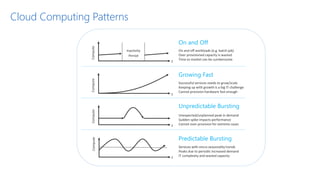
Cloud Computing Patterns
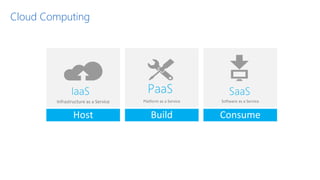
Cloud Computing
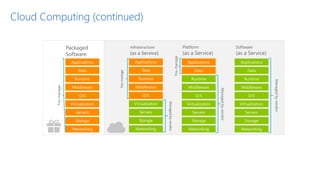
Cloud Computing (continued)
Module 1: Microsoft Azure Overview
Section 2: Microsoft Azure
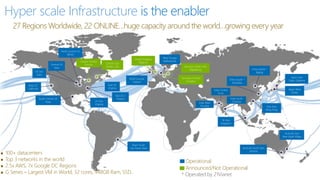
Hyper scale Infrastructure is the enabler
27 Regions Worldwide, 22 ONLINE…huge capacity around the world…growing every year
 100+ datacenters
 Top 3 networks in the world
 2.5x AWS, 7x Google DC Regions
 G Series – Largest VM in World, 32 cores, 448GB Ram, SSD…
Operational
Announced/Not Operational
Central US
Iowa
West US
California
East US
Virginia
US Gov
Virginia
North Central US
Illinois
US Gov
Iowa
South Central US
Texas
Brazil South
Sao Paulo State
West Europe
Netherlands
China North *
Beijing
China South *
Shanghai
Japan East
Tokyo, Saitama
Japan West
Osaka
India South
Chennai
East Asia
Hong Kong
SE Asia
Singapore
Australia South East
Victoria
Australia East
New South Wales
* Operated by 21Vianet
India Central
Pune
Canada East
Quebec City
Canada Central
Toronto
India West
Mumbai
Germany North East
Magdeburg
Germany Central
Frankfurt
United Kingdom
Regions
North Europe
Ireland
East US 2
Virginia
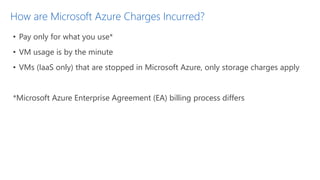
How are Microsoft Azure Charges Incurred?
• Pay only for what you use*
• VM usage is by the minute
• VMs (IaaS only) that are stopped in Microsoft Azure, only storage charges apply
*Microsoft Azure Enterprise Agreement (EA) billing process differs
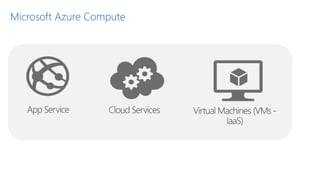
Microsoft Azure Compute
Microsoft Azure App Service
• App Service – fully managed platform in Azure for web, mobile and integration scenarios. This
includes
o Web Apps – Enterprise grade web applications
o API Apps – API apps in Azure App Service are used to develop, publish, manage, and monetize APIs.
o Mobile Apps - Build native and cross platform apps for iOS, Android, and Windows apps or cross-
platform Xamarin or Cordova (Phonegap) apps
o Logic Apps (preview) - Allows developers to design workflows that articulate intent via a trigger and
series of steps, each invoking an App Service API app
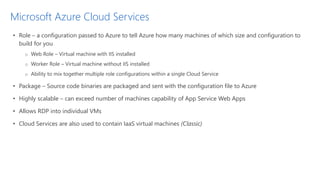
Microsoft Azure Cloud Services
• Role – a configuration passed to Azure to tell Azure how many machines of which size and configuration to
build for you
o Web Role – Virtual machine with IIS installed
o Worker Role – Virtual machine without IIS installed
o Ability to mix together multiple role configurations within a single Cloud Service
• Package – Source code binaries are packaged and sent with the configuration file to Azure
• Highly scalable – can exceed number of machines capability of App Service Web Apps
• Allows RDP into individual VMs
• Cloud Services are also used to contain IaaS virtual machines (Classic)
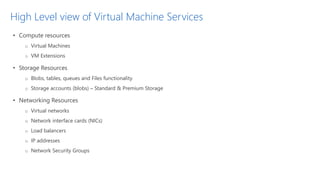
High Level view of Virtual Machine Services
• Compute resources
o Virtual Machines
o VM Extensions
• Storage Resources
o Blobs, tables, queues and Files functionality
o Storage accounts (blobs) – Standard & Premium Storage
• Networking Resources
o Virtual networks
o Network interface cards (NICs)
o Load balancers
o IP addresses
o Network Security Groups
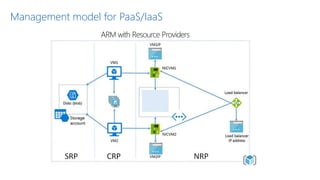
Management model for PaaS/IaaS
ARM with Resource Providers
Demo: Management Portals
17
Cloud computing

Cloud computing

  • 1.
  • 2.
    Module 1: MicrosoftAzure Overview Section 1: Cloud Computing Introduction
  • 3.
    Prerequisites • Windows 7- 10, Windows Server 2008 R2 and Windows Server 2012 (R2) • Microsoft Azure PowerShell • Microsoft Visual Studio 2015 Update 2 (for ARM labs) • Active Azure Subscription
  • 4.
  • 5.
  • 6.
  • 7.
    Module 1: MicrosoftAzure Overview Section 2: Microsoft Azure
  • 8.
    Hyper scale Infrastructureis the enabler 27 Regions Worldwide, 22 ONLINE…huge capacity around the world…growing every year  100+ datacenters  Top 3 networks in the world  2.5x AWS, 7x Google DC Regions  G Series – Largest VM in World, 32 cores, 448GB Ram, SSD… Operational Announced/Not Operational Central US Iowa West US California East US Virginia US Gov Virginia North Central US Illinois US Gov Iowa South Central US Texas Brazil South Sao Paulo State West Europe Netherlands China North * Beijing China South * Shanghai Japan East Tokyo, Saitama Japan West Osaka India South Chennai East Asia Hong Kong SE Asia Singapore Australia South East Victoria Australia East New South Wales * Operated by 21Vianet India Central Pune Canada East Quebec City Canada Central Toronto India West Mumbai Germany North East Magdeburg Germany Central Frankfurt United Kingdom Regions North Europe Ireland East US 2 Virginia
  • 9.
    How are MicrosoftAzure Charges Incurred? • Pay only for what you use* • VM usage is by the minute • VMs (IaaS only) that are stopped in Microsoft Azure, only storage charges apply *Microsoft Azure Enterprise Agreement (EA) billing process differs
  • 10.
  • 11.
    Microsoft Azure AppService • App Service – fully managed platform in Azure for web, mobile and integration scenarios. This includes o Web Apps – Enterprise grade web applications o API Apps – API apps in Azure App Service are used to develop, publish, manage, and monetize APIs. o Mobile Apps - Build native and cross platform apps for iOS, Android, and Windows apps or cross- platform Xamarin or Cordova (Phonegap) apps o Logic Apps (preview) - Allows developers to design workflows that articulate intent via a trigger and series of steps, each invoking an App Service API app
  • 12.
    Microsoft Azure CloudServices • Role – a configuration passed to Azure to tell Azure how many machines of which size and configuration to build for you o Web Role – Virtual machine with IIS installed o Worker Role – Virtual machine without IIS installed o Ability to mix together multiple role configurations within a single Cloud Service • Package – Source code binaries are packaged and sent with the configuration file to Azure • Highly scalable – can exceed number of machines capability of App Service Web Apps • Allows RDP into individual VMs • Cloud Services are also used to contain IaaS virtual machines (Classic)
  • 13.
    High Level viewof Virtual Machine Services • Compute resources o Virtual Machines o VM Extensions • Storage Resources o Blobs, tables, queues and Files functionality o Storage accounts (blobs) – Standard & Premium Storage • Networking Resources o Virtual networks o Network interface cards (NICs) o Load balancers o IP addresses o Network Security Groups
  • 14.
    Management model forPaaS/IaaS ARM with Resource Providers
  • 15.