CLOUD
COMPUTIN
    G
      SUNIL KUMAR
WHAT CLOUD
         COMPUTING IS?
• Cloud computing is a marketing term for
  technologies that provide computation, software,
  data access, and storage services that do not
  require end-user knowledge of the physical
  location and configuration of the system that
  delivers the services. A parallel to this concept
  can be drawn with the electricity grid, wherein
  end-users consume power without needing to
  understand the component devices or
  infrastructure required to provide the service.
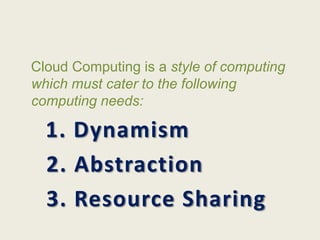
Cloud Computing is a style of computing
which must cater to the following
computing needs:

  1. Dynamism
  2. Abstraction
  3. Resource Sharing
Dynamism
• Your business is growing exponentially. Your computing
  need & usage is getting bigger with every passing day.
  Would you add servers & other hardwares to meet the new
  demand?
• Assume, Recession is back & your business is losing
  customers. The servers & hardwares you added during last
  quarter’s peak season is now idle. Will you sale them?
  Demand keeps on changing based on world/regional
  economy, sometimes seasonal traffic burst as well.
• That’s where Cloud Computing comes to your rescue! You
  just need to configure & your provider will take care of
  fluctuating demand.
Abstraction
• Your business should focus on your core
  competency & should not worry about
  security, OS, software platform , updates and
  patches etc. Leave these chores to your
  provider.
• From an end users perspective, you don’t
  need to care for the OS, the plug-ins, web
  security or the software platform. Everything
  should be in place without any worry.
Resource Sharing
Resource Sharing is the beauty of Cloud
Computing. This is the concept which helps
the cloud providers to attain optimum
utilization of resources. Say, a company
dealing in gifts may require more server
resources during festive season. A company
dealing in Payroll management may require
more resources during the end or beginning of
the month.
TYPES OF CLOUD
           COMPUTING
• Cloud Services can be mainly of three types:

  1.Infrastructure as a Service (IaaS)

  2. Platform as a Service (PaaS)

  3. Software as a Service (SaaS)
Infrastructure as a Service (IaaS)
• This is the base layer of the cloud stack.
• It serves as a foundation for the other two layers, for their
  execution. The keyword behind this stack is Virtualization.
• Let us try to understand this using Amazon EC2. In Amazon
  EC2 (Elastic Compute Cloud) your application will be
  executed on a virtual computer (instance). You have the
  choice of virtual computer, where you can select a
  configuration of CPU, memory & storage that is optimal for
  your application. The whole cloud infrastructure viz.
  servers, routers, hardware based load-balancing, firewalls,
  storage & other network equipments are provided by the
  IaaS provider. The customer buy these resources as a
  service on a need basis.
Platform as a Service (PaaS)
• Now you don’t need to invest millions of $$$ to
  get that development foundation ready for your
  developers. The PaaS provider will deliver the
  platform on the web, and in most of the cases
  you can consume the platform using your
  browser, i.e. no need to download any software.
  It has definitely empowered small & mid-size
  companies or even an individual developer to
  launch their own SaaS leveraging the power of
  these platform providers, without any initial
  investment.
Software as a Service (SaaS)
• This is the Top most layer of the cloud computing stack - directly
  consumed by end user – i.e. SaaS (Software as a Service).
• On-Premise applications are quite expensive, affordable only to big
  enterprises. Why?
• Cause On-Premise applications had a very high upfront
  CapEx(Capital Expenditure); which results in a high TCO (Total Cost
  of Ownership). On-Premise apps also require a higher number of
  skilled developers to maintain the application. In its current avatar
  SaaS is going to be the best bet for SMEs/SMBs (Small & Mid size
  businesses). Now, they can afford best software solution for their
  business without investing anything at all on the infrastructure or
  development platform or skilled manpower. The only requirement
  for SaaS is a computer with browser, quite basic. SaaS is a recurring
  subscription based model delivered to customer on demand
  – Pay as you use.
How big is Cloud Computing?


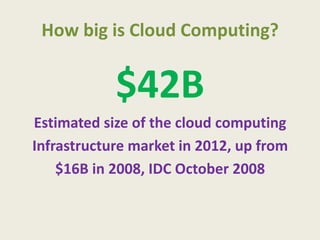
            $42B
Estimated size of the cloud computing
Infrastructure market in 2012, up from
    $16B in 2008, IDC October 2008
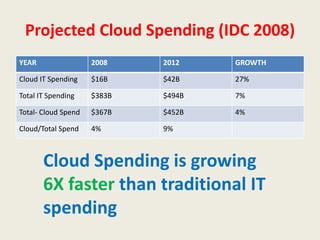
Projected Cloud Spending (IDC 2008)
YEAR                 2008    2012    GROWTH

Cloud IT Spending    $16B    $42B    27%

Total IT Spending    $383B   $494B   7%

Total- Cloud Spend   $367B   $452B   4%

Cloud/Total Spend    4%      9%


       Cloud Spending is growing
       6X faster than traditional IT
       spending
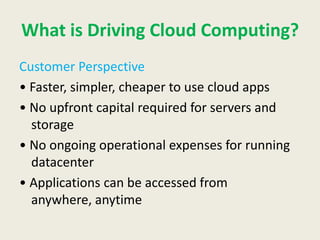
What is Driving Cloud Computing?
Customer Perspective
• Faster, simpler, cheaper to use cloud apps
• No upfront capital required for servers and
  storage
• No ongoing operational expenses for running
  datacenter
• Applications can be accessed from
  anywhere, anytime
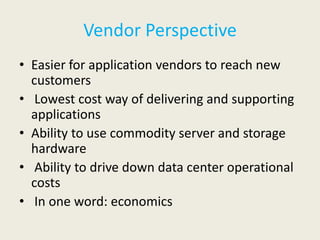
Vendor Perspective
• Easier for application vendors to reach new
  customers
• Lowest cost way of delivering and supporting
  applications
• Ability to use commodity server and storage
  hardware
• Ability to drive down data center operational
  costs
• In one word: economics
What are the Barriers to Cloud
              Computing?
Customer Perspective
• #1 Data Security
     Many customers don’t wish to trust their data to “the
  cloud”
      Data must be locally retained for regulatory reasons
• #2 Latency
      The cloud can be many milliseconds away
      Not suitable for real-time applications
• #3 Application Availability
      Cannot switch from existing legacy applications
      Equivalent cloud applications do not exist
Vendor Perspective
• #1 Service Level Agreements
  What if something goes wrong?
  What is the true cost of providing SLAs?
• #2 Business Models
  SaaS/PaaS models are challenging
  Much lower upfront revenue
• #3 Customer Lock-in
   Customers want open/standard APIs
   Need to continuously add value
Conclusions
• Cloud Computing is the fastest growing part of IT
• Tremendous benefits to customers of all sizes
• Cloud services are simpler to acquire and scale up or
  down
• Key opportunity for application and infrastructure
  vendors
• Public clouds work great for some but not all
  applications
• Private clouds offer many benefits for internal
  applications
• Public and private clouds can be used in combination
THANK
 YOU

Cloud computing

  • 1.
    CLOUD COMPUTIN G SUNIL KUMAR
  • 2.
    WHAT CLOUD COMPUTING IS? • Cloud computing is a marketing term for technologies that provide computation, software, data access, and storage services that do not require end-user knowledge of the physical location and configuration of the system that delivers the services. A parallel to this concept can be drawn with the electricity grid, wherein end-users consume power without needing to understand the component devices or infrastructure required to provide the service.
  • 3.
    Cloud Computing isa style of computing which must cater to the following computing needs: 1. Dynamism 2. Abstraction 3. Resource Sharing
  • 4.
    Dynamism • Your businessis growing exponentially. Your computing need & usage is getting bigger with every passing day. Would you add servers & other hardwares to meet the new demand? • Assume, Recession is back & your business is losing customers. The servers & hardwares you added during last quarter’s peak season is now idle. Will you sale them? Demand keeps on changing based on world/regional economy, sometimes seasonal traffic burst as well. • That’s where Cloud Computing comes to your rescue! You just need to configure & your provider will take care of fluctuating demand.
  • 5.
    Abstraction • Your businessshould focus on your core competency & should not worry about security, OS, software platform , updates and patches etc. Leave these chores to your provider. • From an end users perspective, you don’t need to care for the OS, the plug-ins, web security or the software platform. Everything should be in place without any worry.
  • 6.
    Resource Sharing Resource Sharingis the beauty of Cloud Computing. This is the concept which helps the cloud providers to attain optimum utilization of resources. Say, a company dealing in gifts may require more server resources during festive season. A company dealing in Payroll management may require more resources during the end or beginning of the month.
  • 7.
    TYPES OF CLOUD COMPUTING • Cloud Services can be mainly of three types: 1.Infrastructure as a Service (IaaS) 2. Platform as a Service (PaaS) 3. Software as a Service (SaaS)
  • 8.
    Infrastructure as aService (IaaS) • This is the base layer of the cloud stack. • It serves as a foundation for the other two layers, for their execution. The keyword behind this stack is Virtualization. • Let us try to understand this using Amazon EC2. In Amazon EC2 (Elastic Compute Cloud) your application will be executed on a virtual computer (instance). You have the choice of virtual computer, where you can select a configuration of CPU, memory & storage that is optimal for your application. The whole cloud infrastructure viz. servers, routers, hardware based load-balancing, firewalls, storage & other network equipments are provided by the IaaS provider. The customer buy these resources as a service on a need basis.
  • 9.
    Platform as aService (PaaS) • Now you don’t need to invest millions of $$$ to get that development foundation ready for your developers. The PaaS provider will deliver the platform on the web, and in most of the cases you can consume the platform using your browser, i.e. no need to download any software. It has definitely empowered small & mid-size companies or even an individual developer to launch their own SaaS leveraging the power of these platform providers, without any initial investment.
  • 10.
    Software as aService (SaaS) • This is the Top most layer of the cloud computing stack - directly consumed by end user – i.e. SaaS (Software as a Service). • On-Premise applications are quite expensive, affordable only to big enterprises. Why? • Cause On-Premise applications had a very high upfront CapEx(Capital Expenditure); which results in a high TCO (Total Cost of Ownership). On-Premise apps also require a higher number of skilled developers to maintain the application. In its current avatar SaaS is going to be the best bet for SMEs/SMBs (Small & Mid size businesses). Now, they can afford best software solution for their business without investing anything at all on the infrastructure or development platform or skilled manpower. The only requirement for SaaS is a computer with browser, quite basic. SaaS is a recurring subscription based model delivered to customer on demand – Pay as you use.
  • 11.
    How big isCloud Computing? $42B Estimated size of the cloud computing Infrastructure market in 2012, up from $16B in 2008, IDC October 2008
  • 12.
    Projected Cloud Spending(IDC 2008) YEAR 2008 2012 GROWTH Cloud IT Spending $16B $42B 27% Total IT Spending $383B $494B 7% Total- Cloud Spend $367B $452B 4% Cloud/Total Spend 4% 9% Cloud Spending is growing 6X faster than traditional IT spending
  • 14.
    What is DrivingCloud Computing? Customer Perspective • Faster, simpler, cheaper to use cloud apps • No upfront capital required for servers and storage • No ongoing operational expenses for running datacenter • Applications can be accessed from anywhere, anytime
  • 15.
    Vendor Perspective • Easierfor application vendors to reach new customers • Lowest cost way of delivering and supporting applications • Ability to use commodity server and storage hardware • Ability to drive down data center operational costs • In one word: economics
  • 16.
    What are theBarriers to Cloud Computing? Customer Perspective • #1 Data Security Many customers don’t wish to trust their data to “the cloud” Data must be locally retained for regulatory reasons • #2 Latency The cloud can be many milliseconds away Not suitable for real-time applications • #3 Application Availability Cannot switch from existing legacy applications Equivalent cloud applications do not exist
  • 17.
    Vendor Perspective • #1Service Level Agreements What if something goes wrong? What is the true cost of providing SLAs? • #2 Business Models SaaS/PaaS models are challenging Much lower upfront revenue • #3 Customer Lock-in Customers want open/standard APIs Need to continuously add value
  • 18.
    Conclusions • Cloud Computingis the fastest growing part of IT • Tremendous benefits to customers of all sizes • Cloud services are simpler to acquire and scale up or down • Key opportunity for application and infrastructure vendors • Public clouds work great for some but not all applications • Private clouds offer many benefits for internal applications • Public and private clouds can be used in combination
  • 19.