Cloud Abstraction Libraries:
Implementation and
Comparison
Udit Agarwal
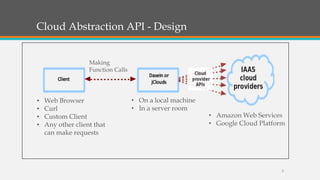
Cloud Abstraction API - Design
2
• Web Browser
• Curl
• Custom Client
• Any other client that
can make requests
• On a local machine
• In a server room
• Amazon Web Services
• Google Cloud Platform
Making
Function Calls
Cloud Abstraction API - Example
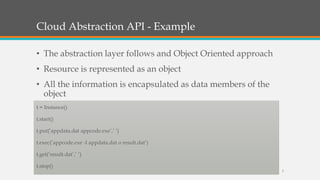
• The abstraction layer follows and Object Oriented approach
• Resource is represented as an object
• All the information is encapsulated as data members of the
object
t = Instance()
t.start()
t.put(’appdata.dat appcode.exe’,’ ’)
t.exec(’appcode.exe -I appdata.dat o result.dat’)
t.get(’result.dat’,’ ’)
t.stop()
3
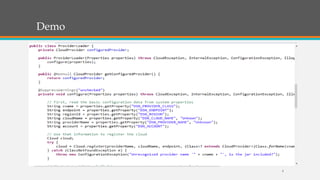
Demo
4
Demo
5
Demo
6
7
Thank you

Cloud Abstraction Libraries: Implementation and Comparison

  • 1.
  • 2.
    Cloud Abstraction API- Design 2 • Web Browser • Curl • Custom Client • Any other client that can make requests • On a local machine • In a server room • Amazon Web Services • Google Cloud Platform Making Function Calls
  • 3.
    Cloud Abstraction API- Example • The abstraction layer follows and Object Oriented approach • Resource is represented as an object • All the information is encapsulated as data members of the object t = Instance() t.start() t.put(’appdata.dat appcode.exe’,’ ’) t.exec(’appcode.exe -I appdata.dat o result.dat’) t.get(’result.dat’,’ ’) t.stop() 3
  • 4.
  • 5.
  • 6.
  • 7.

Editor's Notes

  • #2 Good morning everybody, Welcome to my Master’s thesis defense. The title for my presentation is: Cloud Abstraction Libraries: Implementation and Comparison. If you have any questions, please feel free to ask them during presentation.
  • #3 The following figure explains the design of a cloud abstraction layer, Talk about 1 to many relationship
  • #4 The abstraction layer relies on a object-oriented approach to abstract resources. The resource is represented as an object, where all the information related to the resource is encapsulated as data members of the object. In this way, we can handle the resources via member methods of the object I have a simplified version of the code that I will use to explain, how libraries follow object oriented approach The command in the first line will create an instance (a virtual machine) with default parameters (defined in configuration files or in the defaultInstance variable). The users can customize the instance by adding parameters e.g. t = Instance(type=large) or even more complex t = Instance (type=medium, image=myImage, keypair=myKeypair) As it is shown in the example above, users do not have to deal with detailed information like IP address, SSH commands connection to the virtual machines and so on. We can simply upload data, run application or download data with simple, command like t.put(), t.exec(), t.get() and so on.
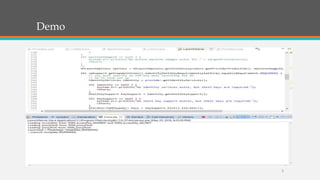
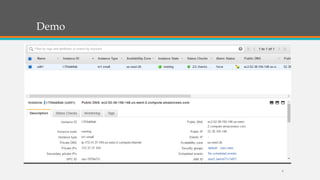
  • #5 This is the screen shot of a demo that would start a vm on AWS using Dasein. The name of the class is provider load and method called CloudProvider that returns a configured cloud provider.
  • #6 I am sorry this is little bit stretched, Next is a class that would start a virtual machine in AWS.
  • #8 The measured startup time for JVM was around 100 ms, Dasein 225 ms and jClouds 300 ms. The startup time was consistent across different programs and different runs. We observed the variation between startup time due to the run time consumed by Dasein or jClouds. the startup time for next larger configuration may not be twice as of the previous configuration. In case of Dasein with AWS EC2 and GCE, the startup time increases almost linearly as the configuration are doubled, while in case of jClouds the startup is consistent even when VM configurations are changed. Apart from the geographical distance that can increase the latency, we think the number of users on a particular data center will also affect the startup time. The startup time is highest in the Eastern region in AWS and Western region in GCE.