CLASS IX
ARTIFICIAL INTELLIGENCE
PYTHON– LISTS & TUPLES
https://cbseacademic.nic.in/web_material/Curriculum21/publication/se
condary/Python_Content_Manual.pdf
PYTHON – LISTS & TUPLES
(PART-2)
2.
Many operations canbe performed on lists:
•Slicing
•Adding elements
List operations
•Adding elements
•Removing elements
3.
ACCESSING ELEMENTS OFA LIST
• A list elements can be accessed in two ways they are:
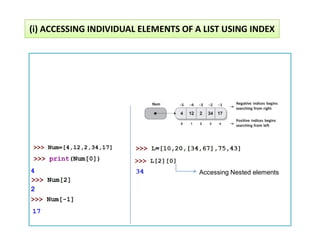
(i) Accessing individual elements of a list.
(i) Accessing individual elements of a list.
(ii) Accessing elements through loops.
4.
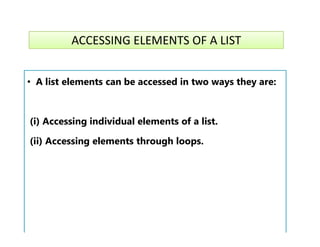
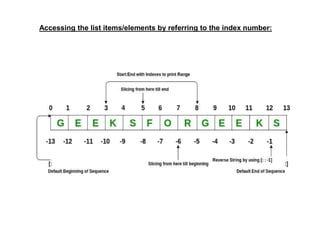
•The elements ina list are ordered (numbered), starting from 0. These numbers are
called indices of list elements.
•Every element has index that ranges from 0 to n-1
•It means that first element of the list is Indexed at 0, second is numbered 1, third is
numbered 2, and so on.
Accessing the list items/elements by referring to the index number:
numbered 2, and so on.
•Python supports negative indices also. In case of negative indices, -1 is the index for
the last element, -2 for the second last element, and so on.
To print thecolor Green, we can use both positive and negative indexes
Accessing the list items/elements by referring to the index number:
To print “Green” the commands are
Color[1] OR Color[-4]
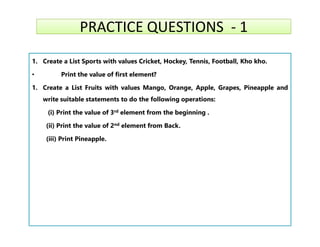
PRACTICE QUESTIONS -1
PRACTICE QUESTIONS - 1
1. Create a List Sports with values Cricket, Hockey, Tennis, Football, Kho kho.
• Print the value of first element?
1. Create a List Fruits with values Mango, Orange, Apple, Grapes, Pineapple and
write suitable statements to do the following operations:
(i) Print the value of 3rd element from the beginning .
(ii) Print the value of 2nd element from Back.
(ii) Print the value of 2nd element from Back.
(iii) Print Pineapple.
10.
• CREATING ALIST BY
• ACCEPTING DATA FROM THE USER
• ACCEPTING DATA FROM THE USER
11.
We can inputa complete list from the user using eval() function
with input() function. For example, if we run the following code:
A=eval(input("Enter list:” ))
print(A)
Method 1 : Accepting data from the user to create a list using eval()
print(A)
User can enter any appropriate list. (start with [ when you
enter the data and close in the end using ]
Eg. user enters [1, 2, 3]
If the list contains strings, then each string should be within
quotation marks.
For example:
["One", 2, "Three", 4]
12.
Method 2 :Acceptingdata in a list through a loop
l=[ ]
for i in range(5):
A=int(input("Enter a number:" ))
l.append(A)
print(l)
print(l)
Enter a number:10
Enter a number:20
Enter a number:30
Enter a number:40
Enter a number:50
[10, 20, 30, 40, 50]
Output
13.
= RESTART:
sum=0
a=eval(input("Enter listof 5 items" ))
for i in range(5):
Question : Create a list of 5 elements and printing the sum
= RESTART:
Enter list of 5 items [5, 6, 2, 10, 70]
the sum of the list elements is 93
sum=sum+a[i]
print("the sum of list elements is",sum)

![MEMORY REPRESENTATION OF LIST & NESTED LIST
L1=[10,20,33,44] 10 20 33 44
-4 -3 -2 -1
L2=[1,2,[30,45],50,60]
0 1 2 3
1 2 50 60
0 1 2 3 4
30 45
[2] (or) [-3] =
[0] [1]
-5 -4 -3 -2 -1](https://image.slidesharecdn.com/class9-pythonlists-part2-251210181419-85107a64/85/CLASS-9-PYTHON-LISTS-PART-2-pdf-by-soni-6-320.jpg)
![To print the color Green, we can use both positive and negative indexes
Accessing the list items/elements by referring to the index number:
To print “Green” the commands are
Color[1] OR Color[-4]](https://image.slidesharecdn.com/class9-pythonlists-part2-251210181419-85107a64/85/CLASS-9-PYTHON-LISTS-PART-2-pdf-by-soni-7-320.jpg)
![We can input a complete list from the user using eval() function
with input() function. For example, if we run the following code:
A=eval(input("Enter list:” ))
print(A)
Method 1 : Accepting data from the user to create a list using eval()
print(A)
User can enter any appropriate list. (start with [ when you
enter the data and close in the end using ]
Eg. user enters [1, 2, 3]
If the list contains strings, then each string should be within
quotation marks.
For example:
["One", 2, "Three", 4]](https://image.slidesharecdn.com/class9-pythonlists-part2-251210181419-85107a64/85/CLASS-9-PYTHON-LISTS-PART-2-pdf-by-soni-11-320.jpg)
![Method 2 :Accepting data in a list through a loop
l=[ ]
for i in range(5):
A=int(input("Enter a number:" ))
l.append(A)
print(l)
print(l)
Enter a number:10
Enter a number:20
Enter a number:30
Enter a number:40
Enter a number:50
[10, 20, 30, 40, 50]
Output](https://image.slidesharecdn.com/class9-pythonlists-part2-251210181419-85107a64/85/CLASS-9-PYTHON-LISTS-PART-2-pdf-by-soni-12-320.jpg)
![= RESTART:
sum=0
a=eval(input("Enter list of 5 items" ))
for i in range(5):
Question : Create a list of 5 elements and printing the sum
= RESTART:
Enter list of 5 items [5, 6, 2, 10, 70]
the sum of the list elements is 93
sum=sum+a[i]
print("the sum of list elements is",sum)](https://image.slidesharecdn.com/class9-pythonlists-part2-251210181419-85107a64/85/CLASS-9-PYTHON-LISTS-PART-2-pdf-by-soni-13-320.jpg)


