SharePoint Framework(SPFx) Intro
Demo
SharePoint Framework(SPFx) Intro
Agenda
SharePoint Framework(SPFx) Intro
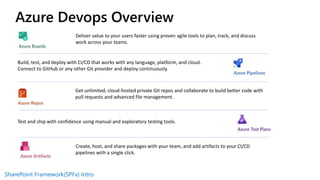
Deliver value to your users faster using proven agile tools to plan, track, and discuss
work across your teams.
Build, test, and deploy with CI/CD that works with any language, platform, and cloud.
Connect to GitHub or any other Git provider and deploy continuously.
Get unlimited, cloud-hosted private Git repos and collaborate to build better code with
pull requests and advanced file management.
Test and ship with confidence using manual and exploratory testing tools.
Create, host, and share packages with your team, and add artifacts to your CI/CD
pipelines with a single click.
Azure Devops Overview
SharePoint Framework(SPFx) Intro
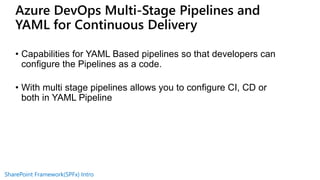
• Capabilities for YAML Based pipelines so that developers can
configure the Pipelines as a code.
• With multi stage pipelines allows you to configure CI, CD or
both in YAML Pipeline
Azure DevOps Multi-Stage Pipelines and
YAML for Continuous Delivery
SharePoint Framework(SPFx) Intro
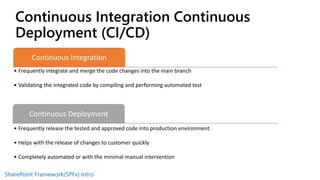
Continuous Integration
• Frequently integrate and merge the code changes into the main branch
• Validating the integrated code by compiling and performing automated test
Continuous Deployment
• Frequently release the tested and approved code into production environment
• Helps with the release of changes to customer quickly
• Completely automated or with the minimal manual intervention
Continuous Integration Continuous
Deployment (CI/CD)
SharePoint Framework(SPFx) Intro
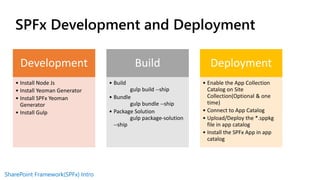
SPFx Development and Deployment
Development
• Install Node Js
• Install Yeoman Generator
• Install SPFx Yeoman
Generator
• Install Gulp
Build
• Build
gulp build --ship
• Bundle
gulp bundle --ship
• Package Solution
gulp package-solution
--ship
Deployment
• Enable the App Collection
Catalog on Site
Collection(Optional & one
time)
• Connect to App Catalog
• Upload/Deploy the *.sppkg
file in app catalog
• Install the SPFx App in app
catalog
SharePoint Framework(SPFx) Intro
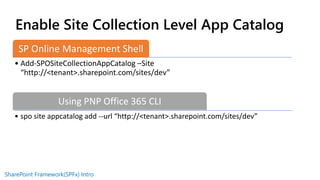
Enable Site Collection Level App Catalog
SP Online Management Shell
• Add-SPOSiteCollectionAppCatalog –Site
“http://<tenant>.sharepoint.com/sites/dev”
Using PNP Office 365 CLI
• spo site appcatalog add --url “http://<tenant>.sharepoint.com/sites/dev”
SharePoint Framework(SPFx) Intro
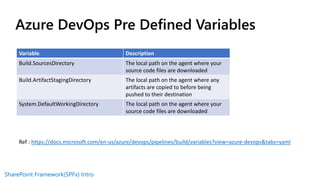
Azure DevOps Pre Defined Variables
Variable Description
Build.SourcesDirectory The local path on the agent where your
source code files are downloaded
Build.ArtifactStagingDirectory The local path on the agent where any
artifacts are copied to before being
pushed to their destination
System.DefaultWorkingDirectory The local path on the agent where your
source code files are downloaded
Ref : https://docs.microsoft.com/en-us/azure/devops/pipelines/build/variables?view=azure-devops&tabs=yaml
SharePoint Framework(SPFx) Intro
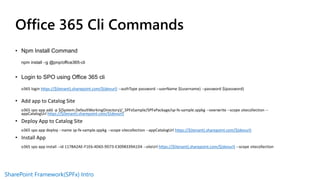
Office 365 Cli Commands
• Npm Install Command
npm install –g @pnp/office365-cli
• Login to SPO using Office 365 cli
o365 login https://$(tenant).sharepoint.com/$(devurl) --authType password --userName $(username) --password $(password)
• Add app to Catalog Site
o365 spo app add -p $(System.DefaultWorkingDirectory)/_SPFxSample/SPFxPackage/sp-fx-sample.sppkg --overwrite --scope sitecollection --
appCatalogUrl https://$(tenant).sharepoint.com/$(devurl)
• Deploy App to Catalog Site
o365 spo app deploy --name sp-fx-sample.sppkg --scope sitecollection --appCatalogUrl https://$(tenant).sharepoint.com/$(devurl)
• Install App
o365 spo app install --id 117BA2AE-F1E6-4D65-9D73-E3098339A1D4 --siteUrl https://$(tenant).sharepoint.com/$(devurl) --scope sitecollection

CICD with SharePoint SPFx A useful overview

  • 1.
  • 2.
  • 3.
  • 4.
    SharePoint Framework(SPFx) Intro Delivervalue to your users faster using proven agile tools to plan, track, and discuss work across your teams. Build, test, and deploy with CI/CD that works with any language, platform, and cloud. Connect to GitHub or any other Git provider and deploy continuously. Get unlimited, cloud-hosted private Git repos and collaborate to build better code with pull requests and advanced file management. Test and ship with confidence using manual and exploratory testing tools. Create, host, and share packages with your team, and add artifacts to your CI/CD pipelines with a single click. Azure Devops Overview
  • 5.
    SharePoint Framework(SPFx) Intro •Capabilities for YAML Based pipelines so that developers can configure the Pipelines as a code. • With multi stage pipelines allows you to configure CI, CD or both in YAML Pipeline Azure DevOps Multi-Stage Pipelines and YAML for Continuous Delivery
  • 6.
    SharePoint Framework(SPFx) Intro ContinuousIntegration • Frequently integrate and merge the code changes into the main branch • Validating the integrated code by compiling and performing automated test Continuous Deployment • Frequently release the tested and approved code into production environment • Helps with the release of changes to customer quickly • Completely automated or with the minimal manual intervention Continuous Integration Continuous Deployment (CI/CD)
  • 7.
    SharePoint Framework(SPFx) Intro SPFxDevelopment and Deployment Development • Install Node Js • Install Yeoman Generator • Install SPFx Yeoman Generator • Install Gulp Build • Build gulp build --ship • Bundle gulp bundle --ship • Package Solution gulp package-solution --ship Deployment • Enable the App Collection Catalog on Site Collection(Optional & one time) • Connect to App Catalog • Upload/Deploy the *.sppkg file in app catalog • Install the SPFx App in app catalog
  • 8.
    SharePoint Framework(SPFx) Intro EnableSite Collection Level App Catalog SP Online Management Shell • Add-SPOSiteCollectionAppCatalog –Site “http://<tenant>.sharepoint.com/sites/dev” Using PNP Office 365 CLI • spo site appcatalog add --url “http://<tenant>.sharepoint.com/sites/dev”
  • 9.
    SharePoint Framework(SPFx) Intro AzureDevOps Pre Defined Variables Variable Description Build.SourcesDirectory The local path on the agent where your source code files are downloaded Build.ArtifactStagingDirectory The local path on the agent where any artifacts are copied to before being pushed to their destination System.DefaultWorkingDirectory The local path on the agent where your source code files are downloaded Ref : https://docs.microsoft.com/en-us/azure/devops/pipelines/build/variables?view=azure-devops&tabs=yaml
  • 10.
    SharePoint Framework(SPFx) Intro Office365 Cli Commands • Npm Install Command npm install –g @pnp/office365-cli • Login to SPO using Office 365 cli o365 login https://$(tenant).sharepoint.com/$(devurl) --authType password --userName $(username) --password $(password) • Add app to Catalog Site o365 spo app add -p $(System.DefaultWorkingDirectory)/_SPFxSample/SPFxPackage/sp-fx-sample.sppkg --overwrite --scope sitecollection -- appCatalogUrl https://$(tenant).sharepoint.com/$(devurl) • Deploy App to Catalog Site o365 spo app deploy --name sp-fx-sample.sppkg --scope sitecollection --appCatalogUrl https://$(tenant).sharepoint.com/$(devurl) • Install App o365 spo app install --id 117BA2AE-F1E6-4D65-9D73-E3098339A1D4 --siteUrl https://$(tenant).sharepoint.com/$(devurl) --scope sitecollection