© 2016 Kumulus Technologies
Choosing a
Cloud Provider
© 2016 Kumulus Technologies
Who Am I?
Robert Starmer: @rstarmer
- CTO for Kumulus Technologies
- OpenStack operations contributor since 2012
- Supporting Cloud enablement and integration for Enterprise
- OpenStack, Kubernetes, BareMetal to App CD
Kumulus Technologies: @kumulustech
- Systems consultants supporting cloud migration
- Cloud technologies education services http://kumul.us/educate
Kumulus Tech Newsletter: https://kumul.us/newsletter/
Five Minutes of Cloud: youtube.com/fiveminutesofcloud
@rstarmer
http://kumul.us
© 2016 Kumulus Technologies
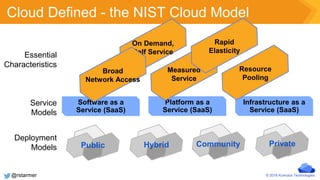
Cloud Defined - the NIST Cloud Model
Service
Models
Deployment
Models
Essential
Characteristics
Community PrivatePublic Hybrid
Software as a
Service (SaaS)
Platform as a
Service (SaaS)
Infrastructure as a
Service (SaaS)
On Demand,
Self Service
Measured
Service
Broad
Network Access
Resource
Pooling
Rapid
Elasticity
@rstarmer
© 2016 Kumulus Technologies
Step 1 - Determine User Needs
What are your users looking for?
Provisioning Speed
● Manual Interfaces (UI) vs. Automated Integration
● Container vs. VM vs. Bare Metal
Service Models
● IaaS vs. PaaS vs. SaaS
● CI integration
1
@rstarmer
© 2016 Kumulus Technologies
Step 2 - Determine Utilization Patterns
Automation vs. Manual provisioning
● Is there something driving the utilization
● Scale and performance of the app
● Development use cases
2
@rstarmer
© 2016 Kumulus Technologies
Step 3 - Cost management
Monitoring integration
●Third party (Splunk, Treasure Data, etc.)
●In-house (ELK, Sensu, etc.)
Resource reporting
●Chargeback
●Billing
3
@rstarmer
© 2016 Kumulus Technologies
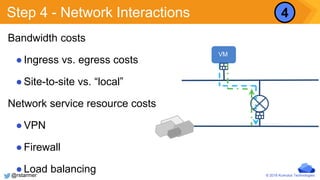
Step 4 - Network Interactions
Bandwidth costs
●Ingress vs. egress costs
●Site-to-site vs. “local”
Network service resource costs
●VPN
●Firewall
●Load balancing
VM
4
@rstarmer
© 2016 Kumulus Technologies
Step 5 - Storage
Data at rest
● Quantity defines costs
● Likely a constant drain on the overall cost structure
Instance storage
● Pricing included (public)
● Costs incurred if instances are “off”
How did the data get there?
5
@rstarmer
© 2016 Kumulus Technologies
Step 6 - Lock-in?
Application deployments leverage APIs
●Standards based?
Data migration
●Possible
●Costs ?
Other “services”
●Message bus, DNS, IP addresses
6
@rstarmer
© 2016 Kumulus Technologies
Step 7 - Hybrid Value
Costs of Migration
● Active migration
● Passive scale
● Storage
● Network
● Network Service (VPN, etc.)
Flexibility
7
@rstarmer
© 2016 Kumulus Technologies
Your End Users
Most people treat cloud as an endless resource pool
●Lack of awareness of ongoing service costs
●Just “use more” mentality
Old habits come with using new tools
●Educate the users on best practices for cloud service use
●Most effective way of managing costs regardless of service
target
@rstarmer
© 2016 Kumulus Technologies
Possible Progression Public -> Private
Start app dev/prod with a public provider
●Standard APIs
●Eyes open - data transition costs
●Network flexibility (DNS service discovery)
Migrate to private at scale/baseline utilization
●Public becomes a burst and remote resource
@rstarmer
© 2016 Kumulus Technologies
Possible Progression - Private -> Public
Application built on a private service
●Remote country reach
●Network tunnel back to core data
Continue to split front and back services
@rstarmer
© 2016 Kumulus Technologies
Possible Value - Hybrid (?)
Hybrid for “VM” based apps?
●Scale/burst with pre-positioned app elements
●Data in “public” or “private” environment
@rstarmer
© 2016 Kumulus Technologies
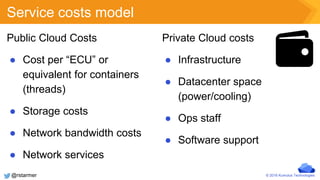
Service costs model
Private Cloud costs
● Infrastructure
● Datacenter space
(power/cooling)
● Ops staff
● Software support
Public Cloud Costs
● Cost per “ECU” or
equivalent for containers
(threads)
● Storage costs
● Network bandwidth costs
● Network services
@rstarmer
© 2016 Kumulus Technologies
Summary
Many factors go into a decision
Pricing may be a principal factor
● Network, storage, compute
● User Education is the most effective cost management strategy
Managing utilization applies to both service domains
Hybrid may provide value, likely more in a container focused
deployment (or PaaS service user)
@rstarmer

Choosing a Cloud Provider: Public-Private-Hybrid

  • 1.
    © 2016 KumulusTechnologies Choosing a Cloud Provider
  • 2.
    © 2016 KumulusTechnologies Who Am I? Robert Starmer: @rstarmer - CTO for Kumulus Technologies - OpenStack operations contributor since 2012 - Supporting Cloud enablement and integration for Enterprise - OpenStack, Kubernetes, BareMetal to App CD Kumulus Technologies: @kumulustech - Systems consultants supporting cloud migration - Cloud technologies education services http://kumul.us/educate Kumulus Tech Newsletter: https://kumul.us/newsletter/ Five Minutes of Cloud: youtube.com/fiveminutesofcloud @rstarmer http://kumul.us
  • 3.
    © 2016 KumulusTechnologies Cloud Defined - the NIST Cloud Model Service Models Deployment Models Essential Characteristics Community PrivatePublic Hybrid Software as a Service (SaaS) Platform as a Service (SaaS) Infrastructure as a Service (SaaS) On Demand, Self Service Measured Service Broad Network Access Resource Pooling Rapid Elasticity @rstarmer
  • 4.
    © 2016 KumulusTechnologies Step 1 - Determine User Needs What are your users looking for? Provisioning Speed ● Manual Interfaces (UI) vs. Automated Integration ● Container vs. VM vs. Bare Metal Service Models ● IaaS vs. PaaS vs. SaaS ● CI integration 1 @rstarmer
  • 5.
    © 2016 KumulusTechnologies Step 2 - Determine Utilization Patterns Automation vs. Manual provisioning ● Is there something driving the utilization ● Scale and performance of the app ● Development use cases 2 @rstarmer
  • 6.
    © 2016 KumulusTechnologies Step 3 - Cost management Monitoring integration ●Third party (Splunk, Treasure Data, etc.) ●In-house (ELK, Sensu, etc.) Resource reporting ●Chargeback ●Billing 3 @rstarmer
  • 7.
    © 2016 KumulusTechnologies Step 4 - Network Interactions Bandwidth costs ●Ingress vs. egress costs ●Site-to-site vs. “local” Network service resource costs ●VPN ●Firewall ●Load balancing VM 4 @rstarmer
  • 8.
    © 2016 KumulusTechnologies Step 5 - Storage Data at rest ● Quantity defines costs ● Likely a constant drain on the overall cost structure Instance storage ● Pricing included (public) ● Costs incurred if instances are “off” How did the data get there? 5 @rstarmer
  • 9.
    © 2016 KumulusTechnologies Step 6 - Lock-in? Application deployments leverage APIs ●Standards based? Data migration ●Possible ●Costs ? Other “services” ●Message bus, DNS, IP addresses 6 @rstarmer
  • 10.
    © 2016 KumulusTechnologies Step 7 - Hybrid Value Costs of Migration ● Active migration ● Passive scale ● Storage ● Network ● Network Service (VPN, etc.) Flexibility 7 @rstarmer
  • 11.
    © 2016 KumulusTechnologies Your End Users Most people treat cloud as an endless resource pool ●Lack of awareness of ongoing service costs ●Just “use more” mentality Old habits come with using new tools ●Educate the users on best practices for cloud service use ●Most effective way of managing costs regardless of service target @rstarmer
  • 12.
    © 2016 KumulusTechnologies Possible Progression Public -> Private Start app dev/prod with a public provider ●Standard APIs ●Eyes open - data transition costs ●Network flexibility (DNS service discovery) Migrate to private at scale/baseline utilization ●Public becomes a burst and remote resource @rstarmer
  • 13.
    © 2016 KumulusTechnologies Possible Progression - Private -> Public Application built on a private service ●Remote country reach ●Network tunnel back to core data Continue to split front and back services @rstarmer
  • 14.
    © 2016 KumulusTechnologies Possible Value - Hybrid (?) Hybrid for “VM” based apps? ●Scale/burst with pre-positioned app elements ●Data in “public” or “private” environment @rstarmer
  • 15.
    © 2016 KumulusTechnologies Service costs model Private Cloud costs ● Infrastructure ● Datacenter space (power/cooling) ● Ops staff ● Software support Public Cloud Costs ● Cost per “ECU” or equivalent for containers (threads) ● Storage costs ● Network bandwidth costs ● Network services @rstarmer
  • 16.
    © 2016 KumulusTechnologies Summary Many factors go into a decision Pricing may be a principal factor ● Network, storage, compute ● User Education is the most effective cost management strategy Managing utilization applies to both service domains Hybrid may provide value, likely more in a container focused deployment (or PaaS service user) @rstarmer

Editor's Notes

  • #4 - essential characteristics make a cloud a cloud. Self-service is key as without that, you have virtual data center management -service models are consumption abstractions -deployment models define access boundaries http://csrc.nist.gov/publications/nistpubs/800-145/SP800-145.pdf Cloud computing provides users with access to a shared collection of computing resources: networks for transfer, servers for storage, and applications or services for completing tasks. The compelling features of a cloud are: On-demand self-service: Users can automatically provision needed computing capabilities, such as server time and network storage, without requiring human interaction with each service provider. Network access: Any computing capabilities are available over the network. Many different devices are allowed access through standardized mechanisms. Resource pooling: Multiple users can access clouds that serve other consumers according to demand. Elasticity: Provisioning is rapid and scales out or is based on need. Metered or measured service: Cloud systems can optimize and control resource use at the level that is appropriate for the service. Services include storage, processing, bandwidth, and active user accounts. Monitoring and reporting of resource usage provides transparency for both the provider and consumer of the utilized service. Cloud computing offers different service models depending on the capabilities a consumer may require. SaaS: Software-as-a-Service. Provides the consumer the ability to use the software in a cloud environment, such as web-based email for example. PaaS: Platform-as-a-Service. Provides the consumer the ability to deploy applications through a programming language or tools supported by the cloud platform provider. An example of Platform-as-a-service is an Eclipse/Java programming platform provided with no downloads required. IaaS: Infrastructure-as-a-Service. Provides infrastructure such as computer instances, network connections, and storage so that people can run any software or operating system. This is OpenStack’s key function. Terms such as public cloud or private cloud refer to the deployment model for the cloud. A private cloud operates for a single organization, but can be managed on-premise or off-premise. A public cloud has an infrastructure that is available to the general public or a large industry group and is likely owned by a cloud services company. Clouds can also be described as hybrid. A hybrid cloud can be a deployment model, as a composition of both public and private clouds, or a hybrid model for cloud computing may involve both virtual and physical servers. Cloud computing can help with large-scale computing needs or can lead consolidation efforts by virtualizing servers to make more use of existing hardware and potentially release old hardware from service. Cloud computing is also used for collaboration because of its high availability through networked computers. Productivity suites for word processing, number crunching, and email communications, and more are also available through cloud computing. Cloud computing also avails additional storage to the cloud user, avoiding the need for additional hard drives on each user's desktop and enabling access to huge data storage capacity online in the cloud.