Computer Networking: A
Top-DownApproach
9th
edition
Jim Kurose, Keith Ross
Pearson, 2025
Chapter 8
Security
A note on the use of these PowerPoint slides:
We’re making these slides freely available to all (faculty, students,
readers). They’re in PowerPoint form so you see the animations; and
can add, modify, and delete slides (including this one) and slide content
to suit your needs. They obviously represent a lot of work on our part.
In return for use, we only ask the following:
If you use these slides (e.g., in a class) that you mention their source
(after all, we’d like people to use our book!)
If you post any slides on a www site, that you note that they are
adapted from (or perhaps identical to) our slides, and note our
copyright of this material.
For a revision history, see the slide note for this page.
Thanks and enjoy! JFK/KWR
All material copyright 1996-2025
J.F Kurose and K.W. Ross, All Rights Reserved
2.
Security: overview
Security: 8-2
Chapter goals:
understand principles of network security:
• cryptography and its many uses beyond “confidentiality”
• authentication
• message integrity
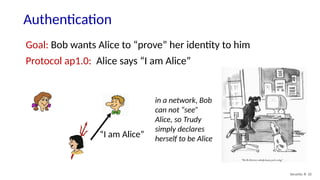
security in practice:
• firewalls and intrusion detection systems
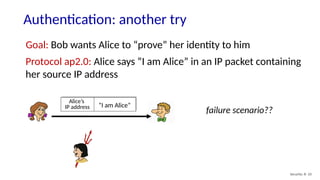
• security in application, transport, network, link layers
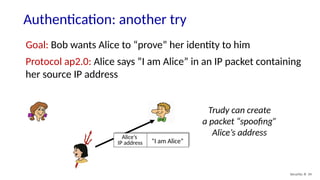
3.
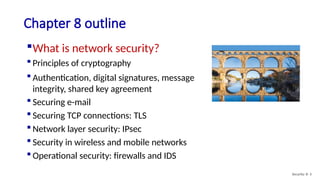
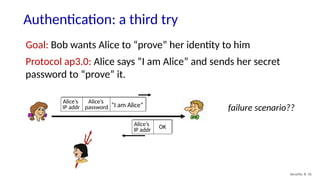
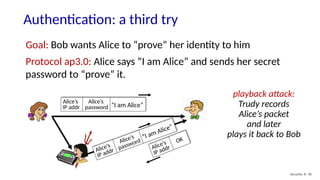
Chapter 8 outline
Whatis network security?
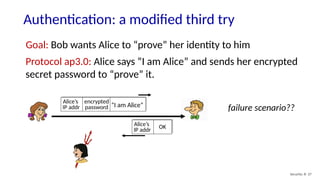
Principles of cryptography
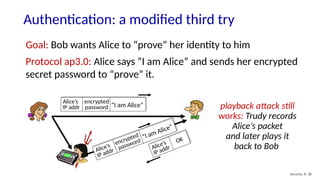
Authentication, digital signatures, message
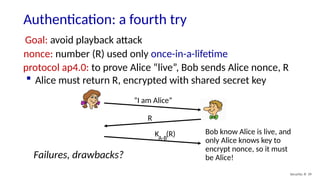
integrity, shared key agreement
Securing e-mail
Securing TCP connections: TLS
Network layer security: IPsec
Security in wireless and mobile networks
Operational security: firewalls and IDS
Security: 8- 3
4.
What is networksecurity?
Security: 8- 4
confidentiality: only sender, intended receiver should “understand”
message contents
• sender encrypts message
• receiver decrypts message
authentication: sender, receiver want to confirm identity of each
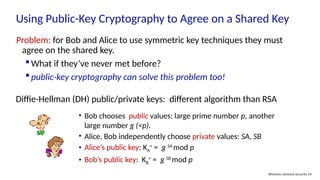
other
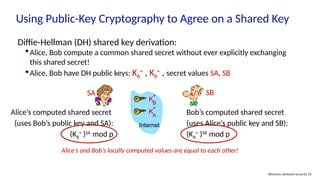
message integrity: sender, receiver want to ensure message not
altered (in transit, or afterwards) without detection
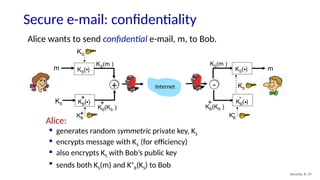
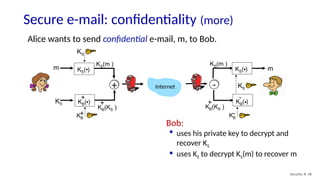
access and availability: services must be accessible and available to
users
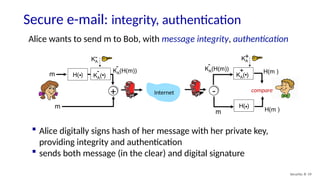
5.
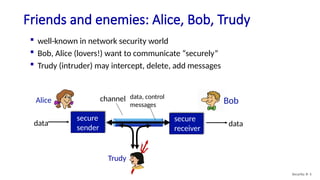
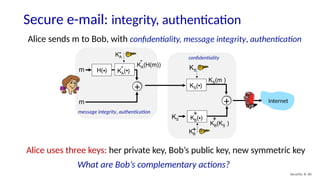
Friends and enemies:Alice, Bob, Trudy
Security: 8- 5
well-known in network security world
Bob, Alice (lovers!) want to communicate “securely”
Trudy (intruder) may intercept, delete, add messages
secure
sender
secure
receiver
channel data, control
messages
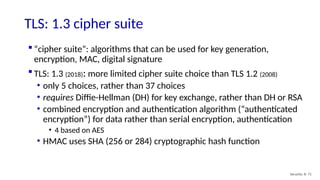
data data
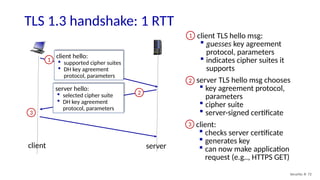
Alice Bob
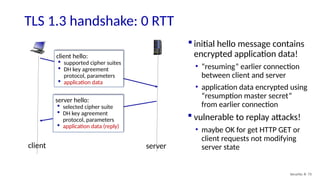
Trudy
6.
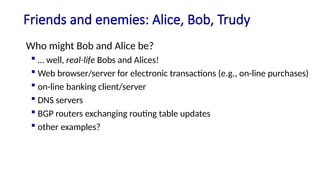
Friends and enemies:Alice, Bob, Trudy
Who might Bob and Alice be?
… well, real-life Bobs and Alices!
Web browser/server for electronic transactions (e.g., on-line purchases)
on-line banking client/server
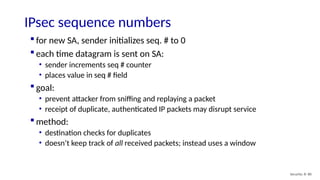
DNS servers
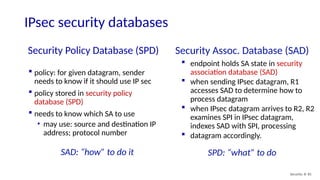
BGP routers exchanging routing table updates
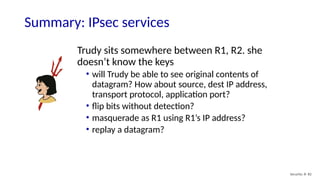
other examples?
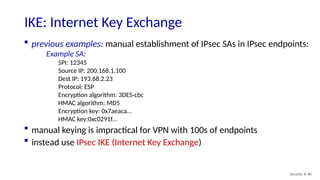
7.
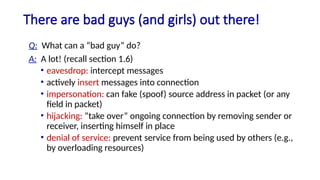
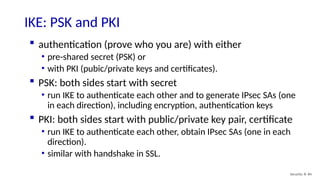
There are badguys (and girls) out there!
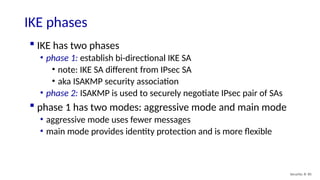
Q: What can a “bad guy” do?
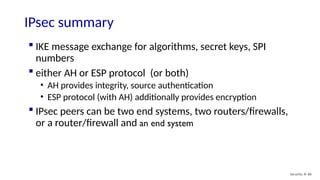
A: A lot! (recall section 1.6)
• eavesdrop: intercept messages
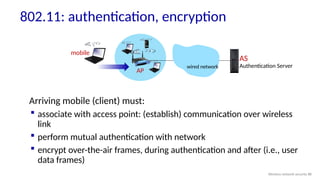
• actively insert messages into connection
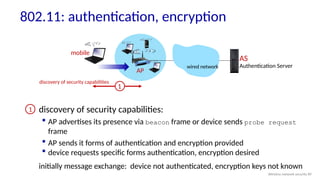
• impersonation: can fake (spoof) source address in packet (or any
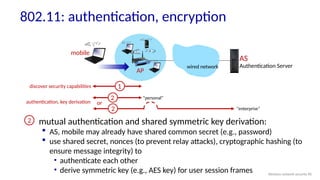
field in packet)
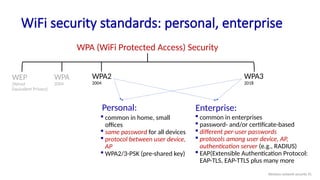
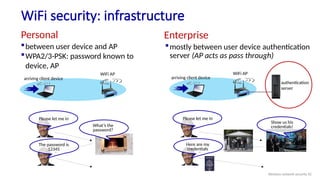
• hijacking: “take over” ongoing connection by removing sender or
receiver, inserting himself in place
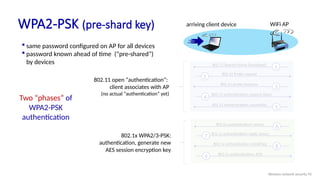
• denial of service: prevent service from being used by others (e.g.,
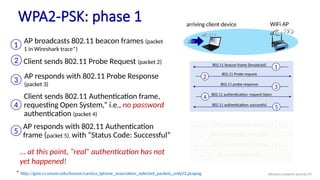
by overloading resources)
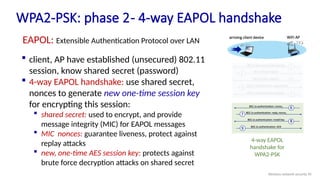
8.
Chapter 8 outline
What is network security?
Principles of cryptography
Authentication, digital signatures, message
integrity, shared key agreement
Securing e-mail
Securing TCP connections: TLS
Network layer security: IPsec
Security in wireless and mobile networks
Operational security: firewalls and IDS
Security: 8- 8
9.
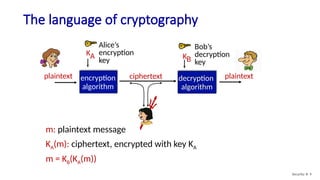
The language ofcryptography
m: plaintext message
KA(m): ciphertext, encrypted with key KA
m = KB(KA(m))
plaintext plaintext
ciphertext
KA
encryption
algorithm
decryption
algorithm
Alice’s
encryption
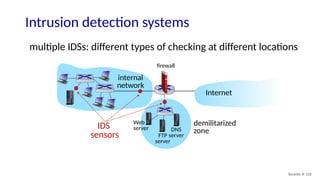
key
Bob’s
decryption
key
KB
Security: 8- 9
10.
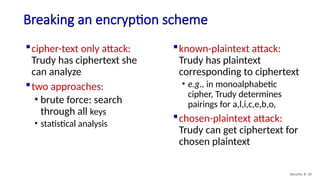
Breaking an encryptionscheme
cipher-text only attack:
Trudy has ciphertext she
can analyze
two approaches:
• brute force: search
through all keys
• statistical analysis
known-plaintext attack:
Trudy has plaintext
corresponding to ciphertext
• e.g., in monoalphabetic
cipher, Trudy determines
pairings for a,l,i,c,e,b,o,
chosen-plaintext attack:
Trudy can get ciphertext for
chosen plaintext
Security: 8- 10
11.
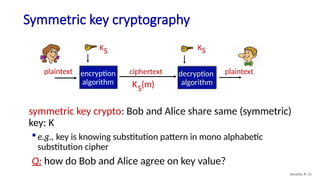
Symmetric key cryptography
plaintextplaintext
KS
encryption
algorithm
decryption
algorithm
KS
ciphertext
K (m)
S
symmetric key crypto: Bob and Alice share same (symmetric)
key: K
e.g., key is knowing substitution pattern in mono alphabetic
substitution cipher
Q: how do Bob and Alice agree on key value?
Security: 8- 11
12.
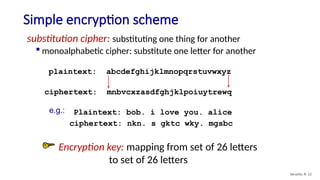
Simple encryption scheme
substitutioncipher: substituting one thing for another
monoalphabetic cipher: substitute one letter for another
plaintext: abcdefghijklmnopqrstuvwxyz
ciphertext: mnbvcxzasdfghjklpoiuytrewq
Plaintext: bob. i love you. alice
ciphertext: nkn. s gktc wky. mgsbc
e.g.:
Encryption key: mapping from set of 26 letters
to set of 26 letters
Security: 8- 12
13.
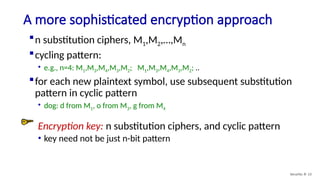
A more sophisticatedencryption approach
Security: 8- 13
n substitution ciphers, M1,M2,…,Mn
cycling pattern:
• e.g., n=4: M1,M3,M4,M3,M2; M1,M3,M4,M3,M2; ..
for each new plaintext symbol, use subsequent substitution
pattern in cyclic pattern
• dog: d from M1, o from M3, g from M4
Encryption key: n substitution ciphers, and cyclic pattern
• key need not be just n-bit pattern
14.
Symmetric key crypto:DES
Security: 8- 14
DES: Data Encryption Standard
US encryption standard [NIST 1993]
56-bit symmetric key, 64-bit plaintext input
block cipher with cipher block chaining
how secure is DES?
• DES Challenge: 56-bit-key-encrypted phrase decrypted (brute force) in
less than a day
• no known good analytic attack
making DES more secure:
• 3DES: encrypt 3 times with 3 different keys
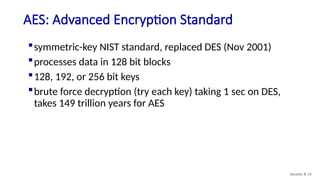
15.
AES: Advanced EncryptionStandard
Security: 8- 15
symmetric-key NIST standard, replaced DES (Nov 2001)
processes data in 128 bit blocks
128, 192, or 256 bit keys
brute force decryption (try each key) taking 1 sec on DES,
takes 149 trillion years for AES
16.
Public Key Cryptography
Security:8- 16
symmetric key crypto:
requires sender, receiver
know shared secret key
Q: how to agree on key in
first place (particularly if
never “met”)?
public key crypto
radically different approach
[Diffie-Hellman76, RSA78]
sender, receiver do not
share secret key
public encryption key
known to all
private decryption key
known only to receiver
17.
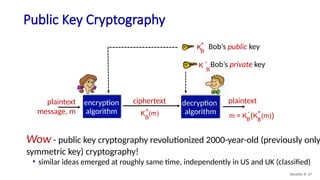
Public Key Cryptography
Security:8- 17
m = K (K (m))
B
+
B
-
plaintext
encryption
algorithm
decryption
algorithm
K (m)
B
+
ciphertext
plaintext
message, m
KB
+
Bob’s public key
Bob’s private key
K
B
-
Wow - public key cryptography revolutionized 2000-year-old (previously only
symmetric key) cryptography!
• similar ideas emerged at roughly same time, independently in US and UK (classified)
18.
Public key encryptionalgorithms
Security: 8- 18
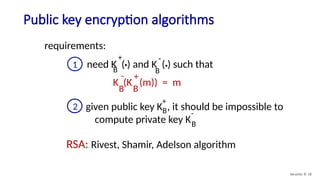
requirements:
RSA: Rivest, Shamir, Adelson algorithm
1 need K ( ) and K ( ) such that
B B
. .
+ -
K (K (m)) = m
B
B
- +
given public key K , it should be impossible to
compute private key KB
B
2
+
-
19.
Prerequisite: modular arithmetic
Security:8- 19
x mod n = remainder of x when divide by n
facts:
[(a mod n) + (b mod n)] mod n = (a+b) mod n
[(a mod n) - (b mod n)] mod n = (a-b) mod n
[(a mod n) * (b mod n)] mod n = (a*b) mod n
thus
(a mod n)d
mod n = ad
mod n
example: x=14, n=10, d=2:
(x mod n)d
mod n = 42
mod 10 = 6
xd
= 142
= 196 xd
mod 10 = 6
20.
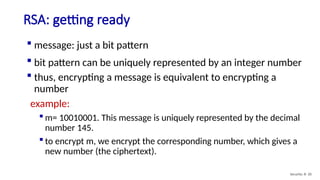
RSA: getting ready
Security:8- 20
message: just a bit pattern
bit pattern can be uniquely represented by an integer number
thus, encrypting a message is equivalent to encrypting a
number
example:
m= 10010001. This message is uniquely represented by the decimal
number 145.
to encrypt m, we encrypt the corresponding number, which gives a
new number (the ciphertext).
21.
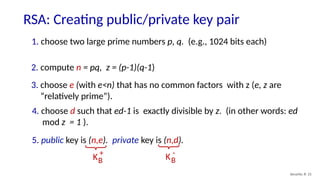
RSA: Creating public/privatekey pair
Security: 8- 21
1. choose two large prime numbers p, q. (e.g., 1024 bits each)
2. compute n = pq, z = (p-1)(q-1)
3. choose e (with e<n) that has no common factors with z (e, z are
“relatively prime”).
4. choose d such that ed-1 is exactly divisible by z. (in other words: ed
mod z = 1 ).
5. public key is (n,e). private key is (n,d).
KB
+
KB
-
22.
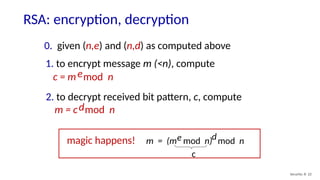
RSA: encryption, decryption
Security:8- 22
0. given (n,e) and (n,d) as computed above
1. to encrypt message m (<n), compute
c = m mod n
e
2. to decrypt received bit pattern, c, compute
m = c mod n
d
m = (m mod n)
e mod n
d
magic happens!
c
23.
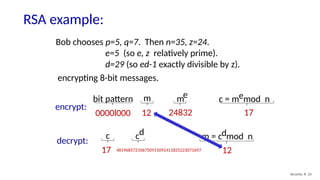
RSA example:
Security: 8-23
Bob chooses p=5, q=7. Then n=35, z=24.
e=5 (so e, z relatively prime).
d=29 (so ed-1 exactly divisible by z).
bit pattern m me c = m mod n
e
0000l000 12 24832 17
encrypt:
encrypting 8-bit messages.
c m = c mod n
d
17 481968572106750915091411825223071697 12
cd
decrypt:
24.
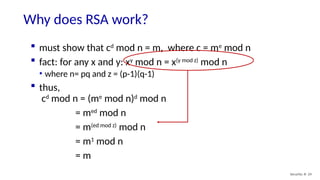
Why does RSAwork?
Security: 8- 24
must show that cd
mod n = m, where c = me
mod n
fact: for any x and y: xy
mod n = x(y mod z)
mod n
• where n= pq and z = (p-1)(q-1)
thus,
cd
mod n = (me
mod n)d
mod n
= med
mod n
= m(ed mod z)
mod n
= m1
mod n
= m
25.
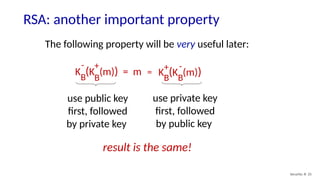
RSA: another importantproperty
Security: 8- 25
The following property will be very useful later:
K (K (m)) = m
B
B
- +
K (K (m))
B
B
+ -
=
use public key
first, followed
by private key
use private key
first, followed
by public key
result is the same!
26.
Security: 8- 26
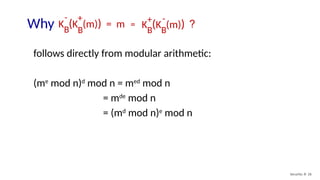
followsdirectly from modular arithmetic:
(me
mod n)d
mod n = med
mod n
= mde
mod n
= (md
mod n)e
mod n
Why ?
K (K (m)) = m
B
B
- +
K (K (m))
B
B
+ -
=
27.
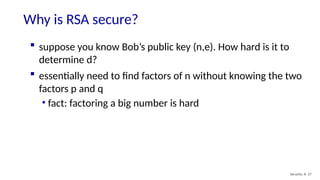
Why is RSAsecure?
Security: 8- 27
suppose you know Bob’s public key (n,e). How hard is it to
determine d?
essentially need to find factors of n without knowing the two
factors p and q
• fact: factoring a big number is hard
28.
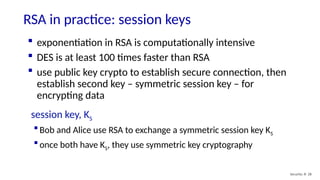
RSA in practice:session keys
Security: 8- 28
exponentiation in RSA is computationally intensive
DES is at least 100 times faster than RSA
use public key crypto to establish secure connection, then
establish second key – symmetric session key – for
encrypting data
session key, KS
Bob and Alice use RSA to exchange a symmetric session key KS
once both have KS, they use symmetric key cryptography
29.
Using Public-Key Cryptography
Wirelessnetwork security 29
Public-key
cryptography
We’ll (next) see lots of non-
confidentiality uses of public-key
cryptography!
authentication
digital signatures
message integrity
symmetric-key agreement
30.
Chapter 8 outline
What is network security?
Principles of cryptography
Use of public-key cryptography:
authentication, digital signatures, message
integrity, shared key agreement
Securing e-mail
Securing TCP connections: TLS
Network layer security: IPsec
Security in wireless and mobile networks
Operational security: firewalls and IDS
Security: 8- 30
31.
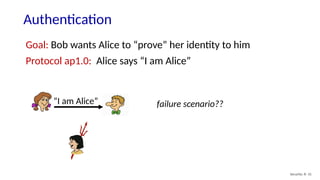
Authentication
Security: 8- 31
Goal:Bob wants Alice to “prove” her identity to him
Protocol ap1.0: Alice says “I am Alice”
failure scenario??
“I am Alice”
32.
Authentication
Security: 8- 32
Goal:Bob wants Alice to “prove” her identity to him
Protocol ap1.0: Alice says “I am Alice”
in a network, Bob
can not “see”
Alice, so Trudy
simply declares
herself to be Alice
“I am Alice”
33.
Authentication: another try
Security:8- 33
Goal: Bob wants Alice to “prove” her identity to him
Protocol ap2.0: Alice says “I am Alice” in an IP packet containing
her source IP address
“I am Alice”
Alice’s
IP address
failure scenario??
34.
Authentication: another try
Security:8- 34
Goal: Bob wants Alice to “prove” her identity to him
Protocol ap2.0: Alice says “I am Alice” in an IP packet containing
her source IP address
“I am Alice”
Alice’s
IP address
Trudy can create
a packet “spoofing”
Alice’s address
35.
Authentication: a thirdtry
Security: 8- 35
Goal: Bob wants Alice to “prove” her identity to him
Protocol ap3.0: Alice says “I am Alice” and sends her secret
password to “prove” it.
“I am Alice”
Alice’s
IP addr
Alice’s
password failure scenario??
Alice’s
IP addr OK
36.
Authentication: a thirdtry
Security: 8- 36
Goal: Bob wants Alice to “prove” her identity to him
Protocol ap3.0: Alice says “I am Alice” and sends her secret
password to “prove” it.
“I am Alice”
Alice’s
IP addr
Alice’s
password
Alice’s
IP addr
OK
“I am Alice”
Alice’s
IP addr
Alice’s
password
playback attack:
Trudy records
Alice’s packet
and later
plays it back to Bob
37.
Authentication: a modifiedthird try
Security: 8- 37
Goal: Bob wants Alice to “prove” her identity to him
Protocol ap3.0: Alice says “I am Alice” and sends her encrypted
secret password to “prove” it.
“I am Alice”
Alice’s
IP addr
encrypted
password failure scenario??
Alice’s
IP addr OK
38.
Authentication: a modifiedthird try
Security: 8- 38
Goal: Bob wants Alice to “prove” her identity to him
Protocol ap3.0: Alice says “I am Alice” and sends her encrypted
secret password to “prove” it.
“I am Alice”
Alice’s
IP addr
encrypted
password
Alice’s
IP addr
OK
“I am Alice”
Alice’s
IP addr
encrypted
password
playback attack still
works: Trudy records
Alice’s packet
and later plays it
back to Bob
39.
Authentication: a fourthtry
Security: 8- 39
Goal: avoid playback attack
protocol ap4.0: to prove Alice “live”, Bob sends Alice nonce, R
Alice must return R, encrypted with shared secret key
nonce: number (R) used only once-in-a-lifetime
Failures, drawbacks?
“I am Alice”
R
K (R)
A-B
Bob know Alice is live, and
only Alice knows key to
encrypt nonce, so it must
be Alice!
40.
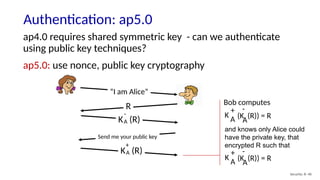
Authentication: ap5.0
Security: 8-40
ap4.0 requires shared symmetric key - can we authenticate
using public key techniques?
ap5.0: use nonce, public key cryptography
“I am Alice”
R
K (R)
A
-
Send me your public key
K (R)
A
+
Bob computes
and knows only Alice could
have the private key, that
encrypted R such that
(K (R)) = R
A
-
K
A
+
(K (R)) = R
A
-
K
A
+
41.
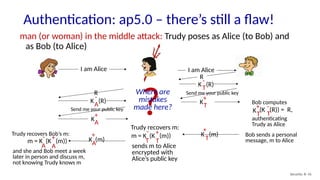
Authentication: ap5.0 –there’s still a flaw!
Security: 8- 41
man (or woman) in the middle attack: Trudy poses as Alice (to Bob) and
as Bob (to Alice)
I am Alice I am Alice
Send me your public key
Send me your public key
T
m = K (K (m))
+
T
-
Trudy recovers m:
sends m to Alice
encrypted with
Alice’s public key
T
K (R)
-
R
T
K
+
T
K
+(K (R)) = R,
T
-
Bob computes
authenticating
Trudy as Alice
R
A
K (R)
-
K
+
A
K (m)
+
T
Bob sends a personal
message, m to Alice
A
K (m)
+
A
m = K (K (m))
+
A
-
Trudy recovers Bob’s m:
and she and Bob meet a week
later in person and discuss m,
not knowing Trudy knows m
?
Where are
mistakes
made here?
42.
Chapter 8 outline
What is network security?
Principles of cryptography
Use of public-key cryptography:
authentication, digital signatures,
message integrity, shared key agreement
Securing e-mail
Securing TCP connections: TLS
Network layer security: IPsec
Security in wireless and mobile networks
Operational security: firewalls and IDS
Security: 8- 42
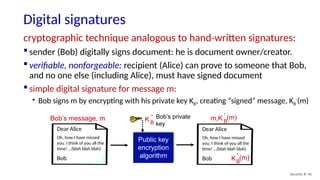
43.
Digital signatures
Security: 8-43
cryptographic technique analogous to hand-written signatures:
sender (Bob) digitally signs document: he is document owner/creator.
verifiable, nonforgeable: recipient (Alice) can prove to someone that Bob,
and no one else (including Alice), must have signed document
simple digital signature for message m:
• Bob signs m by encrypting with his private key KB, creating “signed” message, KB
-
(m)
Bob’s message, m
Public key
encryption
algorithm
Bob’s private
key
K B
-
m,K B
-
(m)
Dear Alice
Oh, how I have missed
you. I think of you all the
time! …(blah blah blah)
Bob
Dear Alice
Oh, how I have missed
you. I think of you all the
time! …(blah blah blah)
Bob KB
-
(m)
44.
Digital signatures
Security: 8-44
-
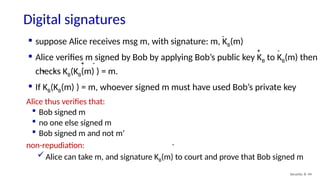
Alice thus verifies that:
Bob signed m
no one else signed m
Bob signed m and not m’
non-repudiation:
Alice can take m, and signature KB(m) to court and prove that Bob signed m
-
suppose Alice receives msg m, with signature: m, KB(m)
Alice verifies m signed by Bob by applying Bob’s public key KB to KB(m) then
checks KB(KB(m) ) = m.
If KB(KB(m) ) = m, whoever signed m must have used Bob’s private key
-
-
-
+
+
+
45.
Message digests
Security: 8-45
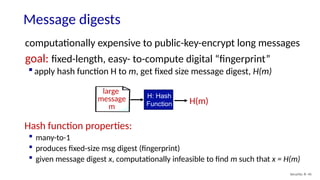
Hash function properties:
many-to-1
produces fixed-size msg digest (fingerprint)
given message digest x, computationally infeasible to find m such that x = H(m)
large
message
m
H: Hash
Function H(m)
computationally expensive to public-key-encrypt long messages
goal: fixed-length, easy- to-compute digital “fingerprint”
apply hash function H to m, get fixed size message digest, H(m)
46.
Internet checksum: poorcrypto hash function
Security: 8- 46
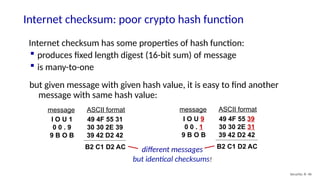
Internet checksum has some properties of hash function:
produces fixed length digest (16-bit sum) of message
is many-to-one
but given message with given hash value, it is easy to find another
message with same hash value:
I O U 1
0 0 . 9
9 B O B
49 4F 55 31
30 30 2E 39
39 42 D2 42
message ASCII format
B2 C1 D2 AC
I O U 9
0 0 . 1
9 B O B
49 4F 55 39
30 30 2E 31
39 42 D2 42
message ASCII format
B2 C1 D2 AC
different messages
but identical checksums!
47.
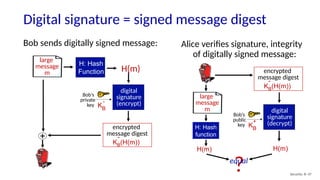
Digital signature =signed message digest
Security: 8- 47
digital
signature
(encrypt)
+
Bob sends digitally signed message:
large
message
m
H: Hash
Function H(m)
Alice verifies signature, integrity
of digitally signed message:
H: Hash
function
H(m) H(m)
large
message
m
Bob’s
private
key KB
-
KB(H(m))
-
encrypted
message digest
KB(H(m))
-
encrypted
message digest
digital
signature
(decrypt)
Bob’s
public
key KB
+
?
equal
48.
Hash function algorithms
Security:8- 48
MD5 hash function widely used (RFC 1321)
• computes 128-bit message digest in 4-step process.
• arbitrary 128-bit string x, appears difficult to construct msg m whose
MD5 hash is equal to x
SHA-1 is also used
• US standard [NIST, FIPS PUB 180-1]
• 160-bit message digest
49.
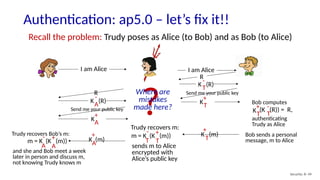
Authentication: ap5.0 –let’s fix it!!
Security: 8- 49
Recall the problem: Trudy poses as Alice (to Bob) and as Bob (to Alice)
I am Alice I am Alice
Send me your public key
Send me your public key
T
m = K (K (m))
+
T
-
Trudy recovers m:
sends m to Alice
encrypted with
Alice’s public key
T
K (R)
-
R
T
K
+
T
K
+(K (R)) = R,
T
-
Bob computes
authenticating
Trudy as Alice
R
A
K (R)
-
K
+
A
K (m)
+
T
Bob sends a personal
message, m to Alice
A
K (m)
+
A
m = K (K (m))
+
A
-
Trudy recovers Bob’s m:
and she and Bob meet a week
later in person and discuss m,
not knowing Trudy knows m
?
Where are
mistakes
made here?
50.
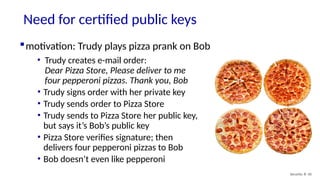
Need for certifiedpublic keys
Security: 8- 50
motivation: Trudy plays pizza prank on Bob
• Trudy creates e-mail order:
Dear Pizza Store, Please deliver to me
four pepperoni pizzas. Thank you, Bob
• Trudy signs order with her private key
• Trudy sends order to Pizza Store
• Trudy sends to Pizza Store her public key,
but says it’s Bob’s public key
• Pizza Store verifies signature; then
delivers four pepperoni pizzas to Bob
• Bob doesn’t even like pepperoni
51.
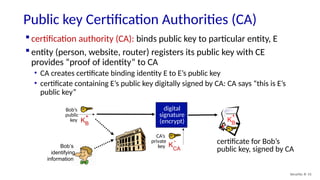
Public key CertificationAuthorities (CA)
Security: 8- 51
certification authority (CA): binds public key to particular entity, E
entity (person, website, router) registers its public key with CE
provides “proof of identity” to CA
• CA creates certificate binding identity E to E’s public key
• certificate containing E’s public key digitally signed by CA: CA says “this is E’s
public key”
Bob’s
identifying
information
KB
+
certificate for Bob’s
public key, signed by CA
Bob’s
public
key KB
+
digital
signature
(encrypt)
CA’s
private
key K
CA
-
52.
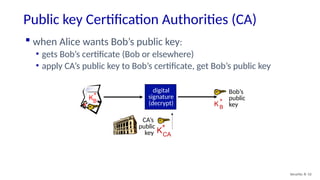
Public key CertificationAuthorities (CA)
Security: 8- 52
Bob’s
public
key
KB
+
KB
+
when Alice wants Bob’s public key:
• gets Bob’s certificate (Bob or elsewhere)
• apply CA’s public key to Bob’s certificate, get Bob’s public key
CA’s
public
key KCA
+
digital
signature
(decrypt)
53.
Chapter 8 outline
What is network security?
Principles of cryptography
Use of public-key cryptography:
authentication, digital signatures, message
integrity, shared key agreement
Securing e-mail
Securing TCP connections: TLS
Network layer security: IPsec
Security in wireless and mobile networks
Operational security: firewalls and IDS
Security: 8- 53
54.
Using Public-Key Cryptographyto Agree on a Shared Key
Wireless network security 54
Problem: for Bob and Alice to use symmetric key techniques they must
agree on the shared key.
What if they’ve never met before?
public-key cryptography can solve this problem too!
Diffie-Hellman (DH) public/private keys: different algorithm than RSA
• Bob chooses public values: large prime number p, another
large number g (<p).
• Alice, Bob independently choose private values: SA, SB
• Alice’s public key: KA
+
= g SA
mod p
• Bob’s public key: KB
+
= g SB
mod p
55.
Using Public-Key Cryptographyto Agree on a Shared Key
Wireless network security 55
Diffie-Hellman (DH) shared key derivation:
Alice, Bob compute a common shared secret without ever explicitly exchanging
this shared secret!
Alice, Bob have DH public keys: KA
+
, KB
+
, secret values SA, SB
Alice’s computed shared secret
(uses Bob’s public key and SA):
(KB
+
)SA
mod p
Bob’s computed shared secret
(uses Alice’s public key and SB):
(KA
+
)SB
mod p
Internet
K
B
+
K
A
+
Alice’s and Bob’s locally computed values are equal to each other!
SA SB
56.
Chapter 8 outline
What is network security?
Principles of cryptography
Authentication, digital signatures,
message integrity, shared key agreement
Securing e-mail
Securing TCP connections: TLS
Network layer security: IPsec
Security in wireless and mobile networks
Operational security: firewalls and IDS
Security: 8- 56
57.
Secure e-mail: confidentiality
Security:8- 57
Alice wants to send confidential e-mail, m, to Bob.
KS( )
.
KB( )
.
+
KS(m )
KB(KS )
+
m
KS
KS
KB
+
Internet
KS( )
.
KB( )
.
-
KB
-
KS
m
KS(m )
KB(KS )
+
Alice:
generates random symmetric private key, KS
encrypts message with KS (for efficiency)
also encrypts KS with Bob’s public key
sends both KS(m) and K+
B(KS) to Bob
+ -
58.
Secure e-mail: confidentiality(more)
Security: 8- 58
Alice wants to send confidential e-mail, m, to Bob.
KS( )
.
KB( )
.
+
KS(m )
KB(KS )
+
m
KS
KS
KB
+
Internet
KS( )
.
KB( )
.
-
KB
-
KS
m
KS(m )
KB(KS )
+
+ -
Bob:
uses his private key to decrypt and
recover KS
uses KS to decrypt KS(m) to recover m
59.
Secure e-mail: integrity,authentication
Security: 8- 59
Alice wants to send m to Bob, with message integrity, authentication
H( )
. KA( )
.
- H(m )
KA(H(m))
-
m
KA
-
m
KA( )
.
+
KA
+
KA(H(m))
-
m
H( )
. H(m )
compare
Internet
+ -
Alice digitally signs hash of her message with her private key,
providing integrity and authentication
sends both message (in the clear) and digital signature
60.
Secure e-mail: integrity,authentication
Security: 8- 60
Alice sends m to Bob, with confidentiality, message integrity, authentication
H( )
. KA( )
.
- KA(H(m))
-
m
KA
-
m Internet
+ KS( )
.
KB( )
.
+
KS(m )
KB(KS )
+
KS
KB
+
KS
+
message integrity, authentication
confidentiality
Alice uses three keys: her private key, Bob’s public key, new symmetric key
What are Bob’s complementary actions?
61.
Chapter 8 outline
What is network security?
Principles of cryptography
Authentication, digital signatures, message
integrity, shared key agreement
Securing e-mail
Securing TCP connections: TLS
Network layer security: IPsec
Security in wireless and mobile networks
Operational security: firewalls and IDS
Security: 8- 61
62.
Transport-layer security (TLS)
Security:8- 62
widely deployed security protocol above the transport layer
• supported by almost all browsers, web servers: https (port 443)
provides:
• confidentiality: via symmetric encryption
• integrity: via cryptographic hashing
• authentication: via public key cryptography
all techniques we
have studied!
history:
• early research, implementation: secure network programming, secure sockets
• secure socket layer (SSL) deprecated [2015]
• TLS 1.3: RFC 8846 [2018]
63.
Transport-layer security (TLS)
Security:8- 63
widely deployed security protocol above the transport layer
• supported by almost all browsers, web servers: https (port 443)
provides:
• confidentiality: via symmetric encryption
• integrity: via cryptographic hashing
• authentication: via public key cryptography
all techniques we
have studied!
history:
• early research, implementation: secure network programming, secure sockets
• secure socket layer (SSL) deprecated [2015]
• TLS 1.3: RFC 8846 [2018]
64.
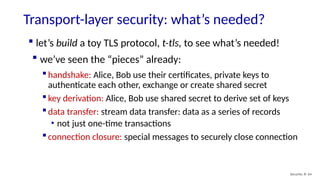
Transport-layer security: what’sneeded?
Security: 8- 64
handshake: Alice, Bob use their certificates, private keys to
authenticate each other, exchange or create shared secret
key derivation: Alice, Bob use shared secret to derive set of keys
data transfer: stream data transfer: data as a series of records
• not just one-time transactions
connection closure: special messages to securely close connection
let’s build a toy TLS protocol, t-tls, to see what’s needed!
we’ve seen the “pieces” already:
65.
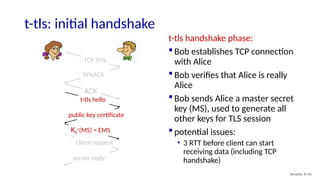
client request
server reply
t-tlshello
public key certificate
KB
+
(MS) = EMS
TCP SYN
SYNACK
ACK
t-tls: initial handshake
t-tls handshake phase:
Bob establishes TCP connection
with Alice
Bob verifies that Alice is really
Alice
Bob sends Alice a master secret
key (MS), used to generate all
other keys for TLS session
potential issues:
• 3 RTT before client can start
receiving data (including TCP
handshake)
Security: 8- 65
66.
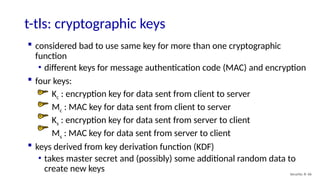
t-tls: cryptographic keys
Security:8- 66
considered bad to use same key for more than one cryptographic
function
• different keys for message authentication code (MAC) and encryption
four keys:
Kc : encryption key for data sent from client to server
Mc : MAC key for data sent from client to server
Ks : encryption key for data sent from server to client
Ms : MAC key for data sent from server to client
keys derived from key derivation function (KDF)
• takes master secret and (possibly) some additional random data to
create new keys
67.
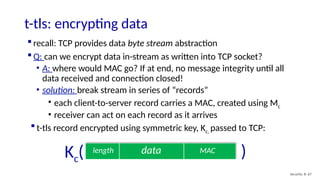
t-tls: encrypting data
Security:8- 67
recall: TCP provides data byte stream abstraction
Q: can we encrypt data in-stream as written into TCP socket?
• A: where would MAC go? If at end, no message integrity until all
data received and connection closed!
• solution: break stream in series of “records”
• each client-to-server record carries a MAC, created using Mc
• receiver can act on each record as it arrives
data MAC
length
t-tls record encrypted using symmetric key, Kc, passed to TCP:
Kc( )
68.
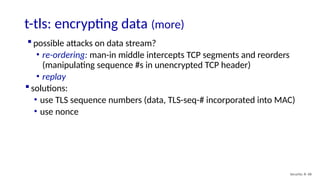
t-tls: encrypting data(more)
Security: 8- 68
possible attacks on data stream?
• re-ordering: man-in middle intercepts TCP segments and reorders
(manipulating sequence #s in unencrypted TCP header)
• replay
solutions:
• use TLS sequence numbers (data, TLS-seq-# incorporated into MAC)
• use nonce
69.
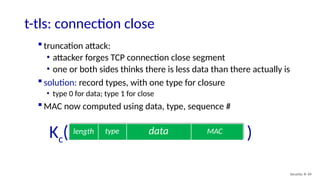
t-tls: connection close
Security:8- 69
data MAC
length type
Kc( )
truncation attack:
• attacker forges TCP connection close segment
• one or both sides thinks there is less data than there actually is
solution: record types, with one type for closure
• type 0 for data; type 1 for close
MAC now computed using data, type, sequence #
70.
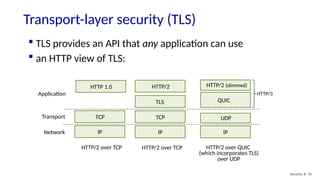
Transport-layer security (TLS)
Security:8- 70
IP
TCP
TLS
HTTP/2
IP
UDP
QUIC
HTTP/2 (slimmed)
Network
Transport
Application
HTTP/2 over TCP
HTTP/3
HTTP/2 over QUIC
(which incorporates TLS)
over UDP
IP
TCP
HTTP 1.0
HTTP/2 over TCP
TLS provides an API that any application can use
an HTTP view of TLS:
71.
“cipher suite”:algorithms that can be used for key generation,
encryption, MAC, digital signature
TLS: 1.3 (2018): more limited cipher suite choice than TLS 1.2 (2008)
• only 5 choices, rather than 37 choices
• requires Diffie-Hellman (DH) for key exchange, rather than DH or RSA
• combined encryption and authentication algorithm (“authenticated
encryption”) for data rather than serial encryption, authentication
• 4 based on AES
• HMAC uses SHA (256 or 284) cryptographic hash function
TLS: 1.3 cipher suite
Security: 8- 71
72.
TLS 1.3 handshake:1 RTT
Security: 8- 72
client hello:
supported cipher suites
DH key agreement
protocol, parameters
1
server hello:
selected cipher suite
DH key agreement
protocol, parameters
2
3
client server
client TLS hello msg:
guesses key agreement
protocol, parameters
indicates cipher suites it
supports
1
server TLS hello msg chooses
key agreement protocol,
parameters
cipher suite
server-signed certificate
2
client:
checks server certificate
generates key
can now make application
request (e.g.., HTTPS GET)
3
73.
TLS 1.3 handshake:0 RTT
Security: 8- 73
client hello:
supported cipher suites
DH key agreement
protocol, parameters
application data
server hello:
selected cipher suite
DH key agreement
protocol, parameters
application data (reply)
client server
initial hello message contains
encrypted application data!
• “resuming” earlier connection
between client and server
• application data encrypted using
“resumption master secret”
from earlier connection
vulnerable to replay attacks!
• maybe OK for get HTTP GET or
client requests not modifying
server state
74.
Chapter 8 outline
What is network security?
Principles of cryptography
Authentication, digital signatures, message
integrity, shared key agreement
Securing e-mail
Securing TCP connections: TLS
Network layer security: IPsec
Security in wireless and mobile networks
Operational security: firewalls and IDS
Security: 8- 74
75.
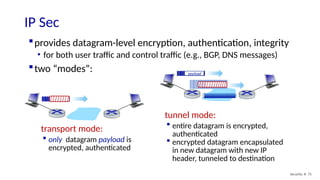
provides datagram-level encryption,authentication, integrity
• for both user traffic and control traffic (e.g., BGP, DNS messages)
two “modes”:
IP Sec
Security: 8- 75
transport mode:
only datagram payload is
encrypted, authenticated
tunnel mode:
entire datagram is encrypted,
authenticated
encrypted datagram encapsulated
in new datagram with new IP
header, tunneled to destination
payload
payload
payload
76.
Two IPsec protocols
Security:8- 76
Authentication Header (AH) protocol [RFC 4302]
• provides source authentication & data integrity but not confidentiality
Encapsulation Security Protocol (ESP) [RFC 4303]
• provides source authentication, data integrity, and confidentiality
• more widely used than AH
77.
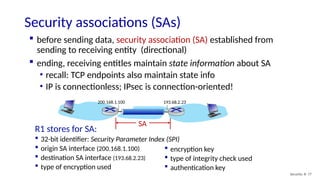
SA
Security associations (SAs)
Security:8- 77
before sending data, security association (SA) established from
sending to receiving entity (directional)
ending, receiving entitles maintain state information about SA
• recall: TCP endpoints also maintain state info
• IP is connectionless; IPsec is connection-oriented!
193.68.2.23
200.168.1.100
R1 stores for SA:
32-bit identifier: Security Parameter Index (SPI)
origin SA interface (200.168.1.100)
destination SA interface (193.68.2.23)
type of encryption used
encryption key
type of integrity check used
authentication key
78.
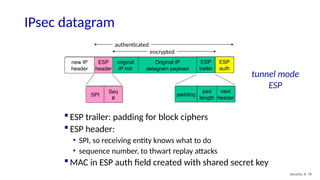
IPsec datagram
Security: 8-78
new IP
header
ESP
header
original
IP hdr
Original IP
datagram payload
ESP
trailer
ESP
auth
padding
pad
length
next
header
SPI
Seq
#
encrypted
authenticated
ESP trailer: padding for block ciphers
ESP header:
• SPI, so receiving entity knows what to do
• sequence number, to thwart replay attacks
MAC in ESP auth field created with shared secret key
tunnel mode
ESP
79.
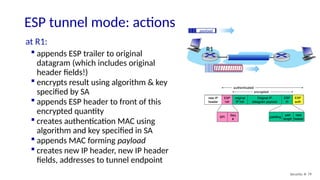
ESP tunnel mode:actions
Security: 8- 79
at R1:
appends ESP trailer to original
datagram (which includes original
header fields!)
encrypts result using algorithm & key
specified by SA
appends ESP header to front of this
encrypted quantity
creates authentication MAC using
algorithm and key specified in SA
appends MAC forming payload
creates new IP header, new IP header
fields, addresses to tunnel endpoint
payload
payload
R1
80.
IPsec sequence numbers
Security:8- 80
for new SA, sender initializes seq. # to 0
each time datagram is sent on SA:
• sender increments seq # counter
• places value in seq # field
goal:
• prevent attacker from sniffing and replaying a packet
• receipt of duplicate, authenticated IP packets may disrupt service
method:
• destination checks for duplicates
• doesn’t keep track of all received packets; instead uses a window
81.
Security Policy Database(SPD)
Security: 8- 81
policy: for given datagram, sender
needs to know if it should use IP sec
policy stored in security policy
database (SPD)
needs to know which SA to use
• may use: source and destination IP
address; protocol number
Security Assoc. Database (SAD)
endpoint holds SA state in security
association database (SAD)
when sending IPsec datagram, R1
accesses SAD to determine how to
process datagram
when IPsec datagram arrives to R2, R2
examines SPI in IPsec datagram,
indexes SAD with SPI, processing
datagram accordingly.
SPD: “what” to do
SAD: “how” to do it
IPsec security databases
82.
Security: 8- 82
Summary:IPsec services
Trudy sits somewhere between R1, R2. she
doesn’t know the keys
• will Trudy be able to see original contents of
datagram? How about source, dest IP address,
transport protocol, application port?
• flip bits without detection?
• masquerade as R1 using R1’s IP address?
• replay a datagram?
83.
Security: 8- 83
IKE:Internet Key Exchange
previous examples: manual establishment of IPsec SAs in IPsec endpoints:
Example SA:
SPI: 12345
Source IP: 200.168.1.100
Dest IP: 193.68.2.23
Protocol: ESP
Encryption algorithm: 3DES-cbc
HMAC algorithm: MD5
Encryption key: 0x7aeaca…
HMAC key:0xc0291f…
manual keying is impractical for VPN with 100s of endpoints
instead use IPsec IKE (Internet Key Exchange)
84.
Security: 8- 84
IKE:PSK and PKI
authentication (prove who you are) with either
• pre-shared secret (PSK) or
• with PKI (pubic/private keys and certificates).
PSK: both sides start with secret
• run IKE to authenticate each other and to generate IPsec SAs (one
in each direction), including encryption, authentication keys
PKI: both sides start with public/private key pair, certificate
• run IKE to authenticate each other, obtain IPsec SAs (one in each
direction).
• similar with handshake in SSL.
85.
Security: 8- 85
IKEphases
IKE has two phases
• phase 1: establish bi-directional IKE SA
• note: IKE SA different from IPsec SA
• aka ISAKMP security association
• phase 2: ISAKMP is used to securely negotiate IPsec pair of SAs
phase 1 has two modes: aggressive mode and main mode
• aggressive mode uses fewer messages
• main mode provides identity protection and is more flexible
86.
Security: 8- 86
IPsecsummary
IKE message exchange for algorithms, secret keys, SPI
numbers
either AH or ESP protocol (or both)
• AH provides integrity, source authentication
• ESP protocol (with AH) additionally provides encryption
IPsec peers can be two end systems, two routers/firewalls,
or a router/firewall and an end system
87.
Chapter 8 outline
What is network security?
Principles of cryptography
Authentication, digital signatures, message
integrity, shared key agreement
Securing e-mail
Securing TCP connections: TLS
Network layer security: IPsec
Security: 8- 87
Security in wireless and mobile networks
• 802.11 (WiFi)
• 4G/5G
Operational security: firewalls and IDS
88.
802.11: authentication, encryption
Arrivingmobile (client) must:
associate with access point: (establish) communication over wireless
link
perform mutual authentication with network
encrypt over-the-air frames, during authentication and after (i.e., user
data frames)
AP
AS
Authentication Server
wired network
mobile
Wireless network security 88
89.
AP
AS
Authentication Server
wired network
1
discoveryof security capabilities:
AP advertises its presence via beacon frame or device sends probe request
frame
AP sends it forms of authentication and encryption provided
device requests specific forms authentication, encryption desired
initially message exchange: device not authenticated, encryption keys not known
1
mobile
discovery of security capabilities
802.11: authentication, encryption
Wireless network security 89
90.
AP
AS
Authentication Server
mobile
wired network
1
mutualauthentication and shared symmetric key derivation:
AS, mobile may already have shared common secret (e.g., password)
use shared secret, nonces (to prevent relay attacks), cryptographic hashing (to
ensure message integrity) to
• authenticate each other
• derive symmetric key (e.g., AES key) for user session frames
discover security capabilities
2
2
authentication, key derivation
2
or
802.11: authentication, encryption
“personal”
“enterprise”
Wireless network security 90
91.
WiFi security standards:personal, enterprise
WPA (WiFi Protected Access) Security
WEP
(Wired
Equivalent Privacy)
WPA
2004
WPA2
2004
WPA3
2018
Personal:
common in home, small
offices
same password for all devices
protocol between user device,
AP
WPA2/3-PSK (pre-shared key)
Enterprise:
common in enterprises
password- and/or certificate-based
different per-user passwords
protocols among user device, AP,
authentication server (e.g., RADIUS)
EAP(Extensible Authentication Protocol:
EAP-TLS, EAP-TTLS plus many more
Wireless network security 91
92.
WiFi security: infrastructure
Personal
betweenuser device and AP
WPA2/3-PSK: password known to
device, AP
arriving client device
WiFi AP
mostly between user device authentication
server (AP acts as pass through)
Enterprise
The password is
12345
What’s the
password?
Please let me in
Here are my
credentials
Show us his
credentials!
Please let me in
authentication
server
arriving client device
WiFi AP
Wireless network security 92
93.
WPA2-PSK (pre-shard key)
same password configured on AP for all devices
password known ahead of time (“pre-shared”)
by devices
Two “phases” of
WPA2-PSK
authentication
arriving client device WiFi AP
802.11 open “authentication”:
client associates with AP
(no actual “authentication” yet)
1
802.11 beacon frame (broadcast)
2
802.11 Probe request
3
802.11 probe response
4
802.11 authentication: request Open
5
802.11 authentication: successful
802.1x WPA2/3-PSK:
authentication, generate new
AES session encryption key
6
802.1x authentication: nonce1
7 802.1x authentication: reply, nonce2
8
802.1x authentication: install key
9
802.1x authentication: ACK
Wireless network security 93
94.
WPA2-PSK: phase 1
*http://gaia.cs.umass.edu/kurose/carioca_Iphone_association_selected_packets_onlyV2.pcapng
... at this point, “real” authentication has not
yet happened!
arriving client device WiFi AP
1
802.11 beacon frame (broadcast)
2
802.11 Probe request
3
802.11 probe response
4
802.11 authentication: request Open
5
802.11 authentication: successful
6
802.1x authentication: nonce1
7 802.1x authentication: reply, nonce2
8
802.1x authentication: install key
9
802.1x authentication: ACK
AP broadcasts 802.11 beacon frames (packet
1 in Wireshark trace*)
1
Client sends 802.11 Probe Request (packet 2)
2
AP responds with 802.11 Probe Response
(packet 3)
3
Client sends 802.11 Authentication frame,
requesting Open System,” i.e., no password
authentication (packet 4)
4
AP responds with 802.11 Authentication
frame (packet 5), with “Status Code: Successful”
5
Wireless network security 94
95.
WPA2-PSK: phase 2-4-way EAPOL handshake
client, AP have established (unsecured) 802.11
session, know shared secret (password)
4-way EAPOL handshake: use shared secret,
nonces to generate new one-time session key
for encrypting this session:
shared secret: used to encrypt, and provide
message integrity (MIC) for EAPOL messages
MIC nonces: guarantee liveness, protect against
replay attacks
new, one-time AES session key: protects against
brute force decryption attacks on shared secret
4-way EAPOL
handshake for
WPA2-PSK
EAPOL: Extensible Authentication Protocol over LAN
Wireless network security 95
96.
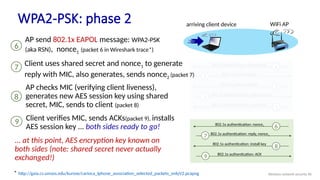
* http://gaia.cs.umass.edu/kurose/carioca_Iphone_association_selected_packets_onlyV2.pcapng
... atthis point, AES encryption key known on
both sides (note: shared secret never actually
exchanged!)
arriving client device WiFi AP
1
802.11 beacon frame (broadcast)
2
802.11 Probe request
3
802.11 probe response
4
802.11 authentication: request Open
5
802.11 authentication: successful
6
802.1x authentication: nonce1
7 802.1x authentication: reply, nonce2
8
802.1x authentication: install key
9 802.1x authentication: ACK
AP send 802.1x EAPOL message: WPA2-PSK
(aka RSN), nonce1 (packet 6 in Wireshark trace*)
6
AP checks MIC (verifying client liveness),
generates new AES session key using shared
secret, MIC, sends to client (packet 8)
8
Client verifies MIC, sends ACKs(packet 9), installs
AES session key ... both sides ready to go!
9
Client uses shared secret and nonce1 to generate
reply with MIC, also generates, sends nonce2 (packet 7)
7
WPA2-PSK: phase 2
Wireless network security 96
97.
Internet
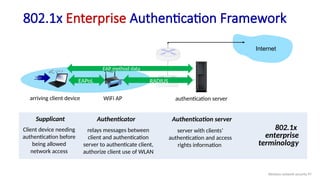
802.1x Enterprise AuthenticationFramework
arriving client device WiFi AP
802.1x
enterprise
terminology
Supplicant
Client device needing
authentication before
being allowed
network access
Authenticator
relays messages between
client and authentication
server to authenticate client,
authorize client use of WLAN
Authentication server
server with clients’
authentication and access
rights information
EAPoL RADIUS
EAP method data
authentication server
Wireless network security 97
98.
802.1x Enterprise: ExtensibleAuthentication Protocols: EAPs
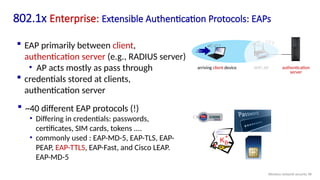
EAP primarily between client,
authentication server (e.g., RADIUS server)
• AP acts mostly as pass through
credentials stored at clients,
authentication server
~40 different EAP protocols (!)
• Differing in credentials: passwords,
certificates, SIM cards, tokens ....
• commonly used : EAP-MD-5, EAP-TLS, EAP-
PEAP, EAP-TTLS, EAP-Fast, and Cisco LEAP.
EAP-MD-5
KB
+
authentication
server
arriving client device WiFi AP
Wireless network security 98
99.
EAP-TTLS: Tunneled TransportLayer Security [RFC 5281]
Two “phases” of
EAP-TTLS
4-way EAPOL handshake to encrypt
local wireless channel (not for
authentication, which is already done
in phases 1,2 ) as in WPA2-PSK.
802.1x authentication: nonce1
802.1x authentication: reply, nonce2
802.1x authentication: install key
802.1x authentication: ACK
AS: authentication server (e.g., RADIUS)
arriving client device WiFi AP
Phase 1: client authenticates AS (e.g.,
via server public key), TLS tunnel
established between client, AS
Phase 2: AS authenticates client
(e.g., via client password) within
encrypted tunnel, tunnel torn down
EAPoL RADIUS
EAPoL Method data
Wireless network security 99
100.
set
up
TLS
tunnel
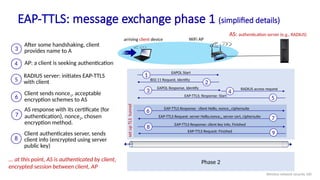
EAP-TTLS: message exchangephase 1 (simplified details)
AS: authentication server (e.g., RADIUS)
arriving client device WiFi AP
Phase 2
5
EAP-TTLS: Response: Start
6
EAP-TTLS Response: client Hello, nonce1,ciphersuite
1
EAPOL Start
2
802.11 Request, Identity
3
EAPOL Response, Identify
4
RADIUS access request
7
EAP-TTLS Request: server Hello,nonce2, server cert, ciphersuite
8
EAP-TTLS Response: client key info, Finished
9
EAP-TTLS Request: Finished
... at this point, AS is authenticated by client,
encrypted session between client, AP
After some handshaking, client
provides name to A
3
AP: a client is seeking authentication
4
RADIUS server: initiates EAP-TTLS
with client
5
Client sends nonce1, acceptable
encryption schemes to AS
6
AS response with its certificate (for
authentication), nonce2, chosen
encryption method.
7
Client authenticates server, sends
client info (encrypted using server
public key)
8
Wireless network security 100
101.
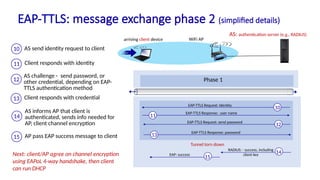
Tunnel torn down
EAP-TTLS:message exchange phase 2 (simplified details)
AS: authentication server (e.g., RADIUS)
arriving client device WiFi AP
10
EAP-TTLS Request: Identity
11
EAP-TTLS Response: user name
12
EAP-TTLS Request: send password
13
EAP-TTLS Response: password
14
RADIUS: - success, including
client key
Next: client/AP agree on channel encryption
using EAPoL 4-way handshake, then client
can run DHCP
AS send identity request to client
10
Client responds with identity
11
AS challenge - send password, or
other credential, depending on EAP-
TTLS authentication method
12
AS informs AP that client is
authenticated, sends info needed for
AP, client channel encryption
14
Phase 1
Phase 1
15
EAP: success
Client responds with credential
13
AP pass EAP success message to client
15
102.
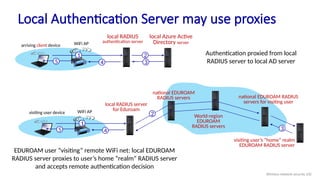
visiting user deviceWiFi AP
local RADIUS server
for Eduroam
national EDUROAM
RADIUS servers
World-region
EDUROAM
RADIUS servers
national EDUROAM RADIUS
servers for visiting user
visiting user’s “home” realm
EDUROAM RADIUS server
Local Authentication Server may use proxies
arriving client device WiFi AP
local RADIUS
authentication server
local Azure Active
Directory server
1 2
3
4
5
Authentication proxied from local
RADIUS server to local AD server
1
4
5
EDUROAM user “visiting” remote WiFi net: local EDUROAM
RADIUS server proxies to user’s home “realm” RADIUS server
and accepts remote authentication decision
2
3
Wireless network security 102
103.
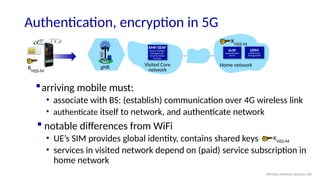
Authentication, encryption in5G
Visited Core
network
gNB Home network
arriving mobile must:
• associate with BS: (establish) communication over 4G wireless link
• authenticate itself to network, and authenticate network
notable differences from WiFi
• UE’s SIM provides global identity, contains shared keys
• services in visited network depend on (paid) service subscription in
home network
AMF/SEAF
Access, Mobility
Management/
Security Anchor
Function
UDM
Unified Data
Management
AUSF
Authentication
Server
KHSS-M
KHSS-M
KHSS-M
Wireless network security 103
104.
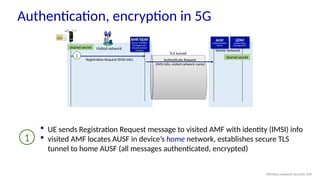
AMF/SEAF
Access, Mobility
Management/
Security Anchor
Function
Visitednetwork Home network
shared secret
shared secret
Registration Request (IMSI info) Authenticate Request
(IMSI info, visited network name)
TLS tunnel
1
Authentication, encryption in 5G
UDM
Unified Data
Management
AUSF
Authentication
Server
UE sends Registration Request message to visited AMF with identity (IMSI) info
visited AMF locates AUSF in device’s home network, establishes secure TLS
tunnel to home AUSF (all messages authenticated, encrypted)
1
Wireless network security 104
105.
AMF/SEAF
Access, Mobility
Management/
Security Anchor
Function
RegistrationRequest (IMSI info)
Visited network Home network
Authenticate Request
(IMSI info, visited network name)
TLS tunnel
shared secret
shared secret
1
authentication
request/response
2
XRES
Authentication, encryption in 5G
UDM
Unified Data
Management
AUSF
Authentication
Server
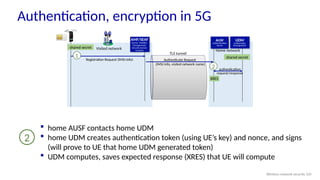
home AUSF contacts home UDM
home UDM creates authentication token (using UE’s key) and nonce, and signs
(will prove to UE that home UDM generated token)
UDM computes, saves expected response (XRES) that UE will compute
2
Wireless network security 105
106.
AMF/SEAF
Access, Mobility
Management/
Security Anchor
Function
RegistrationRequest (IMSI info)
Visited network Home network
Authenticate Request
(IMSI info, visited network name)
TLS tunnel
shared secret
shared secret
1
Authenticate Response
EAP-Request(nonce, auth_token)
3
EAP-Request (nonce, auth_token)
authentication
request/response
2
XRES
Authentication, encryption in 5G
UDM
Unified Data
Management
AUSF
Authentication
Server
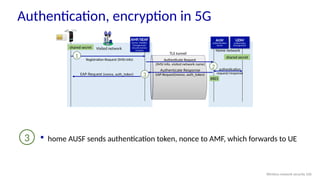
home AUSF sends authentication token, nonce to AMF, which forwards to UE
3
Wireless network security 106
107.
AMF/SEAF
Access, Mobility
Management/
Security Anchor
Function
RegistrationRequest (IMSI info)
Visited network Home network
Authenticate Request
(IMSI info, visited network name)
TLS tunnel
shared secret
shared secret
1
Authenticate Response
EAP-Request(nonce, auth_token)
3
EAP-Request (nonce, auth_token)
authentication
request/response
2
XRES
4 EAP-Response(XRESC) Authenticate Request
EAP-Response(XRESC)
Authentication, encryption in 5G
UDM
Unified Data
Management
AUSF
Authentication
Server
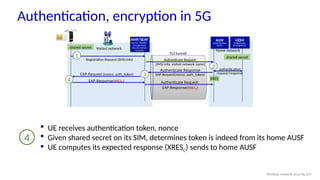
UE receives authentication token, nonce
Given shared secret on its SIM, determines token is indeed from its home AUSF
UE computes its expected response (XRESC) sends to home AUSF
4
Wireless network security 107
108.
AMF/SEAF
Access, Mobility
Management/
Security Anchor
Function
RegistrationRequest (IMSI info)
Visited network Home network
Authenticate Request
(IMSI info, visited network name)
TLS tunnel
shared secret
shared secret
1
Authenticate Response
EAP-Request(nonce, auth_token)
3
EAP-Request (nonce, auth_token)
4
authentication
request/response
2
EAP-Response(XRESC)
XRES
Authenticate Request
EAP-Response(XRESC)
5 authentication
success
Authentication, encryption in 5G
UDM
Unified Data
Management
AUSF
Authentication
Server
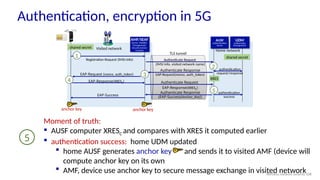
Moment of truth:
AUSF computer XRESC and compares with XRES it computed earlier
authentication success: home UDM updated
home AUSF generates anchor key and sends it to visited AMF (device will
compute anchor key on its own
AMF, device use anchor key to secure message exchange in visited network
5
Authenticate Response
(EAP-Success(Anchor_Key))
EAP-Success
anchor key anchor key
Wireless network security 108
109.
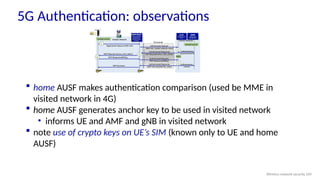
5G Authentication: observations
home AUSF makes authentication comparison (used be MME in
visited network in 4G)
home AUSF generates anchor key to be used in visited network
• informs UE and AMF and gNB in visited network
note use of crypto keys on UE’s SIM (known only to UE and home
AUSF)
Wireless network security 109
110.
Chapter 8 outline
What is network security?
Principles of cryptography
Authentication, message integrity
Securing e-mail
Securing TCP connections: TLS
Network layer security: IPsec
Security in wireless and mobile networks
Operational security: firewalls and IDS
Security: 8- 110
111.
Security: 8- 111
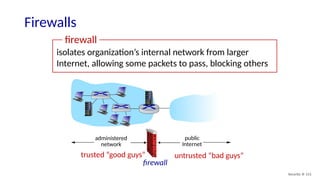
Firewalls
isolatesorganization’s internal network from larger
Internet, allowing some packets to pass, blocking others
administered
network
public
Internet
firewall
trusted “good guys” untrusted “bad guys”
firewall
112.
Security: 8- 112
Firewalls:why
prevent denial of service attacks:
SYN flooding: attacker establishes many bogus TCP connections, no
resources left for “real” connections
prevent illegal modification/access of internal data
e.g., attacker replaces CIA’s homepage with something else
allow only authorized access to inside network
set of authenticated users/hosts
three types of firewalls:
stateless packet filters
stateful packet filters
application gateways
113.
Security: 8- 113
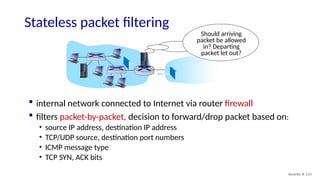
Statelesspacket filtering
Should arriving
packet be allowed
in? Departing
packet let out?
internal network connected to Internet via router firewall
filters packet-by-packet, decision to forward/drop packet based on:
• source IP address, destination IP address
• TCP/UDP source, destination port numbers
• ICMP message type
• TCP SYN, ACK bits
114.
Security: 8- 114
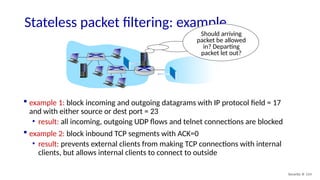
Statelesspacket filtering: example
Should arriving
packet be allowed
in? Departing
packet let out?
example 1: block incoming and outgoing datagrams with IP protocol field = 17
and with either source or dest port = 23
• result: all incoming, outgoing UDP flows and telnet connections are blocked
example 2: block inbound TCP segments with ACK=0
• result: prevents external clients from making TCP connections with internal
clients, but allows internal clients to connect to outside
115.
Security: 8- 115
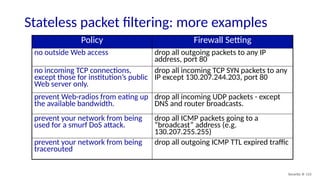
Statelesspacket filtering: more examples
Policy Firewall Setting
no outside Web access drop all outgoing packets to any IP
address, port 80
no incoming TCP connections,
except those for institution’s public
Web server only.
drop all incoming TCP SYN packets to any
IP except 130.207.244.203, port 80
prevent Web-radios from eating up
the available bandwidth.
drop all incoming UDP packets - except
DNS and router broadcasts.
prevent your network from being
used for a smurf DoS attack.
drop all ICMP packets going to a
“broadcast” address (e.g.
130.207.255.255)
prevent your network from being
tracerouted
drop all outgoing ICMP TTL expired traffic
116.
Security: 8- 116
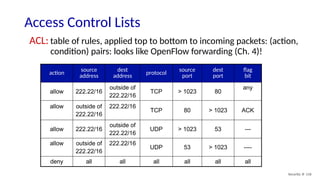
AccessControl Lists
action
source
address
dest
address
protocol
source
port
dest
port
flag
bit
allow 222.22/16
outside of
222.22/16
TCP > 1023 80
any
allow outside of
222.22/16
222.22/16
TCP 80 > 1023 ACK
allow 222.22/16
outside of
222.22/16
UDP > 1023 53 ---
allow outside of
222.22/16
222.22/16
UDP 53 > 1023 ----
deny all all all all all all
ACL: table of rules, applied top to bottom to incoming packets: (action,
condition) pairs: looks like OpenFlow forwarding (Ch. 4)!
117.
Security: 8- 117
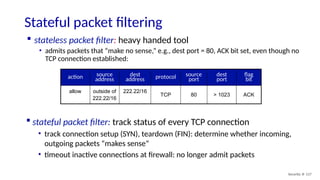
Statefulpacket filtering
stateless packet filter: heavy handed tool
• admits packets that “make no sense,” e.g., dest port = 80, ACK bit set, even though no
TCP connection established:
action source
address
dest
address protocol source
port
dest
port
flag
bit
allow outside of
222.22/16
222.22/16
TCP 80 > 1023 ACK
stateful packet filter: track status of every TCP connection
• track connection setup (SYN), teardown (FIN): determine whether incoming,
outgoing packets “makes sense”
• timeout inactive connections at firewall: no longer admit packets
118.
Security: 8- 118
Statefulpacket filtering
action source
address
dest
address proto source
port
dest
port
flag
bit
check
connection
allow 222.22/16
outside of
222.22/16
TCP > 1023 80
any
allow outside of
222.22/16
222.22/16
TCP 80 > 1023 ACK x
allow 222.22/16
outside of
222.22/16
UDP > 1023 53 ---
allow outside of
222.22/16
222.22/16
UDP 53 > 1023 ----
x
deny all all all all all all
ACL augmented to indicate need to check connection state table before
admitting packet
119.
Security: 8- 119
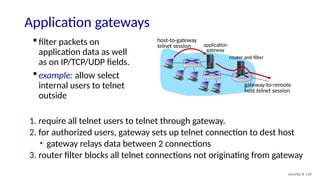
Applicationgateways
filter packets on
application data as well
as on IP/TCP/UDP fields.
example: allow select
internal users to telnet
outside
1. require all telnet users to telnet through gateway.
2. for authorized users, gateway sets up telnet connection to dest host
• gateway relays data between 2 connections
3. router filter blocks all telnet connections not originating from gateway
application
gateway
host-to-gateway
telnet session
router and filter
gateway-to-remote
host telnet session
120.
Security: 8- 120
Limitationsof firewalls, gateways
IP spoofing: router can’t know
if data “really” comes from
claimed source
if multiple apps need special
treatment, each has own app.
gateway
client software must know
how to contact gateway
• e.g., must set IP address of
proxy in Web browser
filters often use all or nothing
policy for UDP
tradeoff: degree of
communication with outside
world, level of security
many highly protected sites
still suffer from attacks
121.
Security: 8- 121
Intrusiondetection systems
packet filtering:
• operates on TCP/IP headers only
• no correlation check among sessions
IDS: intrusion detection system
• deep packet inspection: look at packet contents (e.g., check character
strings in packet against database of known virus, attack strings)
• examine correlation among multiple packets
• port scanning
• network mapping
• DoS attack
122.
Security: 8- 122
Intrusiondetection systems
Web
server
FTP
server
DNS
server
Internet
demilitarized
zone
firewall
IDS
sensors
multiple IDSs: different types of checking at different locations
internal
network
123.
Security: 8- 123
NetworkSecurity (summary)
basic techniques…...
cryptography (symmetric and public key)
message integrity
end-point authentication
…. used in many different security scenarios
secure email
secure transport (TLS)
IP sec
802.11, 4G/5G
operational security: firewalls and IDS
Editor's Notes
#1 Version History
V9.0. July 2025 (updated from V8.1)
#92 Left side: Here’s a nice “whats the password” video: https://www.youtube.com/watch?v=w7JFSLu8OHI
Right side: White house security gage in middle. Scene from “White House Down”

![Symmetric key crypto: DES
Security: 8- 14
DES: Data Encryption Standard
US encryption standard [NIST 1993]
56-bit symmetric key, 64-bit plaintext input
block cipher with cipher block chaining
how secure is DES?
• DES Challenge: 56-bit-key-encrypted phrase decrypted (brute force) in
less than a day
• no known good analytic attack
making DES more secure:
• 3DES: encrypt 3 times with 3 different keys](https://image.slidesharecdn.com/chapter8v9-250813081100-c08119e4/85/Chapter_8_v9-999999999999999999999990-pptx-14-320.jpg)
![Public Key Cryptography
Security: 8- 16
symmetric key crypto:
requires sender, receiver
know shared secret key
Q: how to agree on key in
first place (particularly if
never “met”)?
public key crypto
radically different approach
[Diffie-Hellman76, RSA78]
sender, receiver do not
share secret key
public encryption key
known to all
private decryption key
known only to receiver](https://image.slidesharecdn.com/chapter8v9-250813081100-c08119e4/85/Chapter_8_v9-999999999999999999999990-pptx-16-320.jpg)
![Prerequisite: modular arithmetic
Security: 8- 19
x mod n = remainder of x when divide by n
facts:
[(a mod n) + (b mod n)] mod n = (a+b) mod n
[(a mod n) - (b mod n)] mod n = (a-b) mod n
[(a mod n) * (b mod n)] mod n = (a*b) mod n
thus
(a mod n)d
mod n = ad
mod n
example: x=14, n=10, d=2:
(x mod n)d
mod n = 42
mod 10 = 6
xd
= 142
= 196 xd
mod 10 = 6](https://image.slidesharecdn.com/chapter8v9-250813081100-c08119e4/85/Chapter_8_v9-999999999999999999999990-pptx-19-320.jpg)
![Hash function algorithms
Security: 8- 48
MD5 hash function widely used (RFC 1321)
• computes 128-bit message digest in 4-step process.
• arbitrary 128-bit string x, appears difficult to construct msg m whose
MD5 hash is equal to x
SHA-1 is also used
• US standard [NIST, FIPS PUB 180-1]
• 160-bit message digest](https://image.slidesharecdn.com/chapter8v9-250813081100-c08119e4/85/Chapter_8_v9-999999999999999999999990-pptx-48-320.jpg)
![Transport-layer security (TLS)
Security: 8- 62
widely deployed security protocol above the transport layer
• supported by almost all browsers, web servers: https (port 443)
provides:
• confidentiality: via symmetric encryption
• integrity: via cryptographic hashing
• authentication: via public key cryptography
all techniques we
have studied!
history:
• early research, implementation: secure network programming, secure sockets
• secure socket layer (SSL) deprecated [2015]
• TLS 1.3: RFC 8846 [2018]](https://image.slidesharecdn.com/chapter8v9-250813081100-c08119e4/85/Chapter_8_v9-999999999999999999999990-pptx-62-320.jpg)
![Transport-layer security (TLS)
Security: 8- 63
widely deployed security protocol above the transport layer
• supported by almost all browsers, web servers: https (port 443)
provides:
• confidentiality: via symmetric encryption
• integrity: via cryptographic hashing
• authentication: via public key cryptography
all techniques we
have studied!
history:
• early research, implementation: secure network programming, secure sockets
• secure socket layer (SSL) deprecated [2015]
• TLS 1.3: RFC 8846 [2018]](https://image.slidesharecdn.com/chapter8v9-250813081100-c08119e4/85/Chapter_8_v9-999999999999999999999990-pptx-63-320.jpg)
![Two IPsec protocols
Security: 8- 76
Authentication Header (AH) protocol [RFC 4302]
• provides source authentication & data integrity but not confidentiality
Encapsulation Security Protocol (ESP) [RFC 4303]
• provides source authentication, data integrity, and confidentiality
• more widely used than AH](https://image.slidesharecdn.com/chapter8v9-250813081100-c08119e4/85/Chapter_8_v9-999999999999999999999990-pptx-76-320.jpg)
![EAP-TTLS: Tunneled Transport Layer Security [RFC 5281]
Two “phases” of
EAP-TTLS
4-way EAPOL handshake to encrypt
local wireless channel (not for
authentication, which is already done
in phases 1,2 ) as in WPA2-PSK.
802.1x authentication: nonce1
802.1x authentication: reply, nonce2
802.1x authentication: install key
802.1x authentication: ACK
AS: authentication server (e.g., RADIUS)
arriving client device WiFi AP
Phase 1: client authenticates AS (e.g.,
via server public key), TLS tunnel
established between client, AS
Phase 2: AS authenticates client
(e.g., via client password) within
encrypted tunnel, tunnel torn down
EAPoL RADIUS
EAPoL Method data
Wireless network security 99](https://image.slidesharecdn.com/chapter8v9-250813081100-c08119e4/85/Chapter_8_v9-999999999999999999999990-pptx-99-320.jpg)



![Chapter8 nov 29_05[one.]](https://cdn.slidesharecdn.com/ss_thumbnails/chapter8nov2905one-110822150623-phpapp01-thumbnail.jpg?width=640&height=640&fit=bounds)


