An array is a data structure that stores a fixed-size sequential collection of elements of the same type. Arrays are used to store multiple values in a single variable, instead of declaring separate variables for each value.
Prepared by DawitT.
ITec 2042
Fundamentals of Programming II
Chapter one
Arrays and Strings
2.
Prepared by DawitT.
Arrays
Array
- Structures of related data items
- Static entity – same size throughout program
- Group of consecutive memory locations
- Same name and type
Referring to an element, specify
- Array name
- Position number
Format
type arrayName [integer value];
3.
Prepared by DawitT.
Name of array (Note that
all elements of this array
have the same name, c)
Position number of the
element within array c
c[6]
-45
6
0
72
1543
-89
0
62
-3
1
6453
78
c[0]
c[1]
c[2]
c[3]
c[11
]
c[10
]
c[9]
c[8]
c[7]
c[5]
c[4]
int c[11]={-45,6,0,72,1543,-89,0,62,-3,1,6453,78}
array c
- First element at position 0
- n element array named c:
o c[0], c[1],…c[n-1]
- Array elements are like
normal variables
c [8] = -3
4.
Prepared by DawitT.
DeclaringArrays
When declaring arrays, specify
- Types of array
- Name of array
- Number of elements
arrayType arrayName[ numberOfElements ];
- Examples:
- int c[ 10 ];
- float myArray[ 3284 ];
Declaring multiple arrays of same type
- Format similar to regular variables
- Example:
int b[ 100 ], x[ 27 ]
5.
Prepared by DawitT.
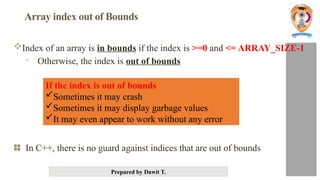
Array index out of Bounds
Index of an array is in bounds if the index is >=0 and <= ARRAY_SIZE-1
- Otherwise, the index is out of bounds
In C++, there is no guard against indices that are out of bounds
If the index is out of bounds
Sometimes it may crash
Sometimes it may display garbage values
It may even appear to work without any error
6.
Prepared by DawitT.
InitializingArrays
Elements in array may be initialized in two ways:
- Explicitly (using an assignment statement for each element)
- Using a list a list is denoted using braces, with element in the list
separated by a comma.
Initializing arrays explicitly Easily accomplished using a for loop.
- Example: Explicitly initialize all elements in an array to 5.0
const int Asize = 100;
int A[Asize];
for (int i = 0; i < Asize; i++)
A[i] = 5.0;
7.
Prepared by DawitT.
Initializing arrays using a list
Elements in array may be initialized using a list of values in braces.
- If not enough initializers, rightmost elements become 0.
int n[ 5 ] = { 0 } // All elements 0
- If array size omitted, array size is set to the number of elements in the list.
Example:
double X[4] = {1.1, 2.2, 3.3, 4.4}; // initialize array X with a list
Using the list above is equivalent to:
double X[4];
X[0] = 1.1;
X[1] = 2.2; initializing array X with explicitly
X[2] = 3.3;
X[3] = 4.4;
8.
Prepared by DawitT.
1. Initializing a Fixed-Size
Integer Array
You can initialize an integer
array at the time of declaration
by explicitly listing its elements:
int arr[5] = {10, 20, 30, 40, 50};
2. Partially Initializing Arrays
If you don’t provide enough
initial values, the remaining
elements will be automatically
initialized to 0 (for numeric
arrays).
int arr[5] = {10, 20};
3. Fully Initializing Arrays with Fewer
Elements Than Size
If you don’t specify the size of the array
but provide the elements, C++ will
automatically determine the size of the
array based on the number of elements
you provide.
int arr[] = {5, 10, 15, 20};
4. Initializing Multidimensional Arrays
For multidimensional arrays, each row
(or higher dimension) can also be
initialized explicitly.
int matrix[2][3] = {{1, 2, 3}, {4, 5, 6}};
9.
Prepared by DawitT.
Example: Initializing arrays using a list
int A[5] = {11,22}; // initializes array values to 11,22,0,0,0
double Sum[7] = {0.0};// initializes all 7 sums to 0.0
int B[ ] = {2,4,6,8}; // array B is assigned an array size of 4
char Vowels[8] = “aeiou”;// Vowels[0] = ‘a’, Vowels[1] = ‘e’, etc
Array
B
2
4
6
8
10.
Prepared by DawitT.
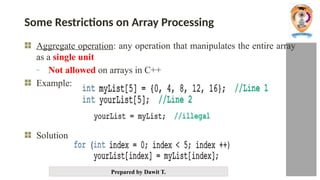
Some Restrictions on Array Processing
Aggregate operation: any operation that manipulates the entire array
as a single unit
- Not allowed on arrays in C++
Example:
Solution
11.
Prepared by DawitT.
Printing Arrays
Arrays are easily printed using
for loops.
Example 1:
int Grades[12] = {78,80,82,84,86,
88,90,92,94,96,98,100};
for (int j = 0; j < 12; j++)
cout << Grades[ j ] <<
endl;
Example 2:
for (int Row = 0; Row <= 2; Row+
+)
{
for (int Col = 0; Col <=3;
Col++)
cout <<
Grades[ 4*Row+Col ];
cout << endl;
}
12.
Prepared by DawitT.
Printing example 1
//For loop to fill & print a 10-int array
#include <iostream>
using namespace std;
int main ( ) {
int index, ar[10]; // array for 10 integers
// Read in 10 elements.
cout << "Enter 10 integers: ";
for(index = 0; index < 10; index ++)
cin >> ar[index];
cout << endl;
cout << "The integers are ";
for(index = 0; index < 10; index ++)
cout << ar[index] << " ";
cout << endl;
return 0;
}
13.
Prepared by DawitT.
A string is a sequence of characters used to represent text. C++ provides two main ways to work with strings:
C-style string
• These are arrays of characters
ending with a null character ('
0’).
• Declared using char arrays, like
char str[] = "Hello";.
• They have limited functionality
and require manual memory
management when dynamically
allocated.
C++ Standard library std::string
• Defined in the <string> library,
std::string is a more powerful
and flexible string type.
• It automatically manages
memory and provides many
built-in functions for easy string
manipulation,
like .length(), .substr(), .find(),
and .append().
String
14.
Prepared by DawitT.
Initializing a string
To initialize a string during declaration:
char my_message[20] = "Hi there.";
- The null character '0' is added
Another alternative:
char short_string[ ] = "abc";
but not this:
char short_string[ ] = {'a', 'b', 'c'};
This attempt to initialize a string does not cause the 0 to be inserted in
the array
• char short_string[]= {'a', 'b', 'c’,’0’};
15.
Prepared by DawitT.
Using Double Quotes (String Literal)
• This is the simplest and most common way to
initialize a string. The null terminator (0) is
automatically added at the end of the string.
char myString[] = "Hello, World!";
• Here, the array myString is automatically
sized to accommodate all characters of the
string, plus the null terminator. In this case,
the size would be 14 (including 0).
Initializing Character by Character
You can manually specify each character of the
string and explicitly include the null
terminator:
char myString[] = {'H', 'e', 'l', 'l', 'o', '0’};
This method requires you to remember to
include '0' at the end;
Specifying the Size of the Array
You can also specify the size of the
character array manually. The size must
be enough to hold the string, including
the null terminator.
char myString[14] = "Hello, World!";
• If the array size is larger than
needed, the remaining elements will
be set to zero:
char myString[20] = "Hello!";
In this case, the remaining elements
from index 6 to 19 will be initialized to
0.
16.
Prepared by DawitT.
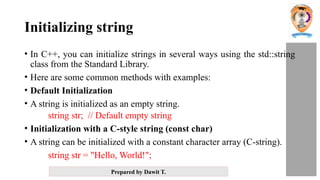
Initializing string
• In C++, you can initialize strings in several ways using the std::string
class from the Standard Library.
• Here are some common methods with examples:
• Default Initialization
• A string is initialized as an empty string.
string str; // Default empty string
• Initialization with a C-style string (const char)
• A string can be initialized with a constant character array (C-string).
string str = "Hello, World!";
17.
Prepared by DawitT.
Initializing string
Using a String Literal:
std::string str = "Hello";
Using a Character
Array:
char arr[] = {'H', 'e', 'l',
'l', 'o', '0’};
std::string str(arr);
Using std::string Constructor
with std::initializer_list<char>
std::string str({'H', 'e', 'l', 'l', 'o'});
Using Direct Initialization
with Parentheses:
std::string str("Hello");
18.
Prepared by DawitT.
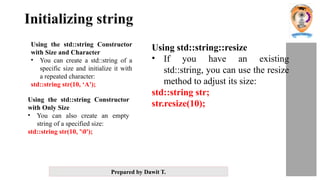
Initializing string
Using the std::string Constructor
with Size and Character
• You can create a std::string of a
specific size and initialize it with
a repeated character:
std::string str(10, ‘A');
Using the std::string Constructor
with Only Size
• You can also create an empty
string of a specified size:
std::string str(10, '0');
Using std::string::resize
• If you have an existing
std::string, you can use the resize
method to adjust its size:
std::string str;
str.resize(10);
19.
Prepared by DawitT.
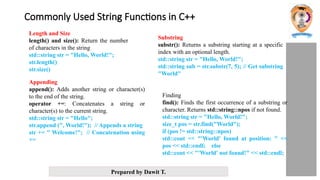
Commonly Used String Functions in C++
Length and Size
length() and size(): Return the number
of characters in the string
std::string str = "Hello, World!";
str.length()
str.size()
Appending
append(): Adds another string or character(s)
to the end of the string.
operator +=: Concatenates a string or
character(s) to the current string.
std::string str = "Hello";
str.append (", World!"); // Appends a string
str += " Welcome!"; // Concatenation using
+=
Substring
substr(): Returns a substring starting at a specific
index with an optional length.
std::string str = "Hello, World!";
std::string sub = str.substr(7, 5); // Get substring
"World"
Finding
find(): Finds the first occurrence of a substring or
character. Returns std::string::npos if not found.
std::string str = "Hello, World!";
size_t pos = str.find("World");
if (pos != std::string::npos)
std::cout << "'World' found at position: " <<
pos << std::endl; else
std::cout << "'World' not found!" << std::endl;
20.
Prepared by DawitT.
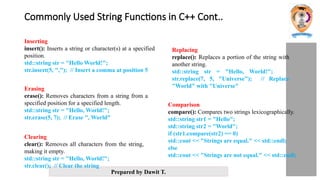
Commonly Used String Functions in C++ Cont..
Inserting
insert(): Inserts a string or character(s) at a specified
position.
std::string str = "Hello World!";
str.insert(5, ","); // Insert a comma at position 5
Erasing
erase(): Removes characters from a string from a
specified position for a specified length.
std::string str = "Hello, World!";
str.erase(5, 7); // Erase ", World"
Replacing
replace(): Replaces a portion of the string with
another string.
std::string str = "Hello, World!";
str.replace(7, 5, "Universe"); // Replace
"World" with "Universe"
Comparison
compare(): Compares two strings lexicographically.
std::string str1 = "Hello";
std::string str2 = "World";
if (str1.compare(str2) == 0)
std::cout << "Strings are equal." << std::endl;
else
std::cout << "Strings are not equal." << std::endl;
Clearing
clear(): Removes all characters from the string,
making it empty.
std::string str = "Hello, World!";
str.clear(); // Clear the string
21.
Prepared by DawitT.
Commonly Used String Functions in C++ Cont..
Checking if Empty
empty(): Checks if the string is empty.
std::string str;
if (str.empty())
std::cout << "String is empty." << std::endl;
Accessing Characters
operator[] and at(): Access individual
characters in the string.
std::string str = "Hello“;
str[0];
str.at(1)
C-String Conversion
c_str(): Returns a pointer to a null-terminated
C-style string.
std::string str = "Hello, World!";
const char* cstr = str.c_str(); // Convert to C-
string
Capacity
capacity(): Returns the current capacity of the
string (the size of allocated memory).
reserve(): Requests a change in capacity.
std::string str = "Hello";
str.capacity()
str.reserve(50);
str.capacity()
Use strcmp() to compare C-style
const char* string1 = "Hello";
const char* string2 = "World";
const char* string3 = "Hello";
int result1 = strcmp(string1, string2);
Prepared by DawitT.
Types of Array
• In C++, arrays can be categorized based on their dimensions as:
One-Dimensional Array (1D Array)
Two-Dimensional Array (2D Array)
Multi-Dimensional Array (3D and higher)
• One-Dimensional Array (1D Array)
• A one-dimensional array is a list of elements stored in a single row. It
represents a simple sequence of elements of the same type.
• Syntax
data_type array_name[size];
24.
Prepared by DawitT.
Types of Array [Cont]
• Two-Dimensional Array (2D Array)
• A two-dimensional array is like a table or matrix where data is stored in rows and
columns. It’s essentially an array of arrays.
• Syntax
data_type array_name[rows][columns];
• Multi-Dimensional Array (3D and higher)
• A multi-dimensional array can have three or more dimensions. A common example
is a 3D array, which represents data in the form of a cube or a collection of matrices.
• Syntax
data_type array_name[x][y][z];
25.
Prepared by DawitT.
Two-dimensional array
- Tables with rows and columns (m by n array)
- A 2D array is typically represented as a matrix
Example:
int a[3][3]; // 2D array (matrix) with 3 rows and 3 columns
Row 0
Row 1
Row 2
Column 0 Column 1 Column 2 Column 3
a[ 0 ][ 0 ]
a[ 1 ][ 0 ]
a[ 2 ][ 0 ]
a[ 0 ][ 1 ]
a[ 1 ][ 1 ]
a[ 2 ][ 1 ]
a[ 0 ][ 2 ]
a[ 1 ][ 2 ]
a[ 2 ][ 2 ]
a[ 0 ][ 3 ]
a[ 1 ][ 3 ]
a[ 2 ][ 3 ]
Row subscript
(index)
Array name
Column subscript
(index)
26.
Prepared by DawitT.
Initialization
- int b[ 2 ][ 2 ] = { { 1, 2 }, { 3, 4 } };
- Initializers grouped by row in braces
- If not enough, unspecified elements set to zero
int b[ 2 ][ 2 ] = { { 1 }, { 3, 4 } };
Referencing elements
- Specify row, then column
cout << b[ 0 ][ 1 ];
1 2
3 4
1 0
3 4
27.
Prepared by DawitT.
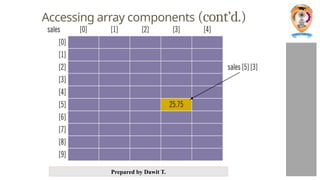
Accessing components in a two-dimensional array:
- Where indexExp1 and indexExp2 are expressions with
positive integer values, and specify the row and column
position
Example:
sales[5][3] = 25.75;
Prepared by DawitT.
Examples of array
Examples:
int A; // single variable
int B[6]; // 1D array
int C[3][4]; // 2D array (matrix)
int D[3][4][5]; // 3D array
int E[3][4][5][3]; // 4D array
//etc
30.
Prepared by DawitT.
1D – single row or column
2D – matrix
3D – cube of cells
4D – row or column of cubes
Example:
int A, B1[6], B2[6], C[3][4], D[3][4][5], E[3][4][5][3]; E
A B1
C D
B2
Visualizing multi-dimensional arrays
31.
Prepared by DawitT.
Reading and Writing String
String Input:
- cin>>name; stores the next input string in name
- String that contain blanks cannot be read using the extraction
operator >>
- Whitespace ends reading of data
- Example:
char a[80], b[80];
cout << "Enter input: " << endl;
cin >> a >> b;
cout << a << b << "End of Output";
32.
Prepared by DawitT.
Reading and Writing String
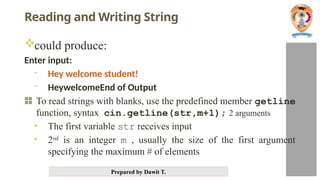
could produce:
Enter input:
- Hey welcome student!
- HeywelcomeEnd of Output
To read strings with blanks, use the predefined member getline
function, syntax cin.getline(str,m+1); 2 arguments
• The first variable str receives input
• 2nd
is an integer m , usually the size of the first argument
specifying the maximum # of elements
33.
Prepared by DawitT.
Reading and Writing String
The following code is used to read an entire line including spaces into
a single variable
char a[80];
cout<<"Enter input:n";
cin.getline(a, 80);
cout << a << “End Of Outputn";
and could produce:
Enter some input:
Do be do to you!
Do be do to you!End of Output
34.
Prepared by DawitT.
Reading and Writing String (continued)
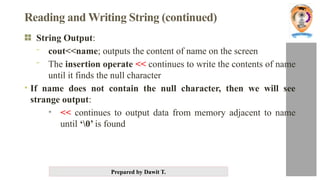
String Output:
- cout<<name; outputs the content of name on the screen
- The insertion operate << continues to write the contents of name
until it finds the null character
• If name does not contain the null character, then we will see
strange output:
• << continues to output data from memory adjacent to name
until ‘0’ is found
35.
Prepared by DawitT.
Summary
• An array is a variable that can store multiple values of the same type.
• The array indices start with 0. Meaning x[0] is the first element stored
at index 0.
• If the size of an array is n, the last element is stored at index (n-1).
When passing an array as an actual parameter, use only its
name
- Passed by reference only
A function cannot return an array type value
Strings are null terminated and are stored in character arrays

![Prepared by Dawit T.
Arrays
Array
- Structures of related data items
- Static entity – same size throughout program
- Group of consecutive memory locations
- Same name and type
Referring to an element, specify
- Array name
- Position number
Format
type arrayName [integer value];](https://image.slidesharecdn.com/ch1arrayandstring-250406164509-541b58e9/85/Introduction-to-Arrays-and-Strings-pptx-2-320.jpg)
![Prepared by Dawit T.
Name of array (Note that
all elements of this array
have the same name, c)
Position number of the
element within array c
c[6]
-45
6
0
72
1543
-89
0
62
-3
1
6453
78
c[0]
c[1]
c[2]
c[3]
c[11
]
c[10
]
c[9]
c[8]
c[7]
c[5]
c[4]
int c[11]={-45,6,0,72,1543,-89,0,62,-3,1,6453,78}
array c
- First element at position 0
- n element array named c:
o c[0], c[1],…c[n-1]
- Array elements are like
normal variables
c [8] = -3](https://image.slidesharecdn.com/ch1arrayandstring-250406164509-541b58e9/85/Introduction-to-Arrays-and-Strings-pptx-3-320.jpg)
![Prepared by Dawit T.
DeclaringArrays
When declaring arrays, specify
- Types of array
- Name of array
- Number of elements
arrayType arrayName[ numberOfElements ];
- Examples:
- int c[ 10 ];
- float myArray[ 3284 ];
Declaring multiple arrays of same type
- Format similar to regular variables
- Example:
int b[ 100 ], x[ 27 ]](https://image.slidesharecdn.com/ch1arrayandstring-250406164509-541b58e9/85/Introduction-to-Arrays-and-Strings-pptx-4-320.jpg)
![Prepared by Dawit T.
InitializingArrays
Elements in array may be initialized in two ways:
- Explicitly (using an assignment statement for each element)
- Using a list a list is denoted using braces, with element in the list
separated by a comma.
Initializing arrays explicitly Easily accomplished using a for loop.
- Example: Explicitly initialize all elements in an array to 5.0
const int Asize = 100;
int A[Asize];
for (int i = 0; i < Asize; i++)
A[i] = 5.0;](https://image.slidesharecdn.com/ch1arrayandstring-250406164509-541b58e9/85/Introduction-to-Arrays-and-Strings-pptx-6-320.jpg)
![Prepared by Dawit T.
Initializing arrays using a list
Elements in array may be initialized using a list of values in braces.
- If not enough initializers, rightmost elements become 0.
int n[ 5 ] = { 0 } // All elements 0
- If array size omitted, array size is set to the number of elements in the list.
Example:
double X[4] = {1.1, 2.2, 3.3, 4.4}; // initialize array X with a list
Using the list above is equivalent to:
double X[4];
X[0] = 1.1;
X[1] = 2.2; initializing array X with explicitly
X[2] = 3.3;
X[3] = 4.4;](https://image.slidesharecdn.com/ch1arrayandstring-250406164509-541b58e9/85/Introduction-to-Arrays-and-Strings-pptx-7-320.jpg)
![Prepared by Dawit T.
1. Initializing a Fixed-Size
Integer Array
You can initialize an integer
array at the time of declaration
by explicitly listing its elements:
int arr[5] = {10, 20, 30, 40, 50};
2. Partially Initializing Arrays
If you don’t provide enough
initial values, the remaining
elements will be automatically
initialized to 0 (for numeric
arrays).
int arr[5] = {10, 20};
3. Fully Initializing Arrays with Fewer
Elements Than Size
If you don’t specify the size of the array
but provide the elements, C++ will
automatically determine the size of the
array based on the number of elements
you provide.
int arr[] = {5, 10, 15, 20};
4. Initializing Multidimensional Arrays
For multidimensional arrays, each row
(or higher dimension) can also be
initialized explicitly.
int matrix[2][3] = {{1, 2, 3}, {4, 5, 6}};](https://image.slidesharecdn.com/ch1arrayandstring-250406164509-541b58e9/85/Introduction-to-Arrays-and-Strings-pptx-8-320.jpg)
![Prepared by Dawit T.
Example: Initializing arrays using a list
int A[5] = {11,22}; // initializes array values to 11,22,0,0,0
double Sum[7] = {0.0};// initializes all 7 sums to 0.0
int B[ ] = {2,4,6,8}; // array B is assigned an array size of 4
char Vowels[8] = “aeiou”;// Vowels[0] = ‘a’, Vowels[1] = ‘e’, etc
Array
B
2
4
6
8](https://image.slidesharecdn.com/ch1arrayandstring-250406164509-541b58e9/85/Introduction-to-Arrays-and-Strings-pptx-9-320.jpg)
![Prepared by Dawit T.
Printing Arrays
Arrays are easily printed using
for loops.
Example 1:
int Grades[12] = {78,80,82,84,86,
88,90,92,94,96,98,100};
for (int j = 0; j < 12; j++)
cout << Grades[ j ] <<
endl;
Example 2:
for (int Row = 0; Row <= 2; Row+
+)
{
for (int Col = 0; Col <=3;
Col++)
cout <<
Grades[ 4*Row+Col ];
cout << endl;
}](https://image.slidesharecdn.com/ch1arrayandstring-250406164509-541b58e9/85/Introduction-to-Arrays-and-Strings-pptx-11-320.jpg)
![Prepared by Dawit T.
Printing example 1
//For loop to fill & print a 10-int array
#include <iostream>
using namespace std;
int main ( ) {
int index, ar[10]; // array for 10 integers
// Read in 10 elements.
cout << "Enter 10 integers: ";
for(index = 0; index < 10; index ++)
cin >> ar[index];
cout << endl;
cout << "The integers are ";
for(index = 0; index < 10; index ++)
cout << ar[index] << " ";
cout << endl;
return 0;
}](https://image.slidesharecdn.com/ch1arrayandstring-250406164509-541b58e9/85/Introduction-to-Arrays-and-Strings-pptx-12-320.jpg)
![Prepared by Dawit T.
A string is a sequence of characters used to represent text. C++ provides two main ways to work with strings:
C-style string
• These are arrays of characters
ending with a null character ('
0’).
• Declared using char arrays, like
char str[] = "Hello";.
• They have limited functionality
and require manual memory
management when dynamically
allocated.
C++ Standard library std::string
• Defined in the <string> library,
std::string is a more powerful
and flexible string type.
• It automatically manages
memory and provides many
built-in functions for easy string
manipulation,
like .length(), .substr(), .find(),
and .append().
String](https://image.slidesharecdn.com/ch1arrayandstring-250406164509-541b58e9/85/Introduction-to-Arrays-and-Strings-pptx-13-320.jpg)
![Prepared by Dawit T.
Initializing a string
To initialize a string during declaration:
char my_message[20] = "Hi there.";
- The null character '0' is added
Another alternative:
char short_string[ ] = "abc";
but not this:
char short_string[ ] = {'a', 'b', 'c'};
This attempt to initialize a string does not cause the 0 to be inserted in
the array
• char short_string[]= {'a', 'b', 'c’,’0’};](https://image.slidesharecdn.com/ch1arrayandstring-250406164509-541b58e9/85/Introduction-to-Arrays-and-Strings-pptx-14-320.jpg)
![Prepared by Dawit T.
Using Double Quotes (String Literal)
• This is the simplest and most common way to
initialize a string. The null terminator (0) is
automatically added at the end of the string.
char myString[] = "Hello, World!";
• Here, the array myString is automatically
sized to accommodate all characters of the
string, plus the null terminator. In this case,
the size would be 14 (including 0).
Initializing Character by Character
You can manually specify each character of the
string and explicitly include the null
terminator:
char myString[] = {'H', 'e', 'l', 'l', 'o', '0’};
This method requires you to remember to
include '0' at the end;
Specifying the Size of the Array
You can also specify the size of the
character array manually. The size must
be enough to hold the string, including
the null terminator.
char myString[14] = "Hello, World!";
• If the array size is larger than
needed, the remaining elements will
be set to zero:
char myString[20] = "Hello!";
In this case, the remaining elements
from index 6 to 19 will be initialized to
0.](https://image.slidesharecdn.com/ch1arrayandstring-250406164509-541b58e9/85/Introduction-to-Arrays-and-Strings-pptx-15-320.jpg)
![Prepared by Dawit T.
Initializing string
Using a String Literal:
std::string str = "Hello";
Using a Character
Array:
char arr[] = {'H', 'e', 'l',
'l', 'o', '0’};
std::string str(arr);
Using std::string Constructor
with std::initializer_list<char>
std::string str({'H', 'e', 'l', 'l', 'o'});
Using Direct Initialization
with Parentheses:
std::string str("Hello");](https://image.slidesharecdn.com/ch1arrayandstring-250406164509-541b58e9/85/Introduction-to-Arrays-and-Strings-pptx-17-320.jpg)
![Prepared by Dawit T.
Commonly Used String Functions in C++ Cont..
Checking if Empty
empty(): Checks if the string is empty.
std::string str;
if (str.empty())
std::cout << "String is empty." << std::endl;
Accessing Characters
operator[] and at(): Access individual
characters in the string.
std::string str = "Hello“;
str[0];
str.at(1)
C-String Conversion
c_str(): Returns a pointer to a null-terminated
C-style string.
std::string str = "Hello, World!";
const char* cstr = str.c_str(); // Convert to C-
string
Capacity
capacity(): Returns the current capacity of the
string (the size of allocated memory).
reserve(): Requests a change in capacity.
std::string str = "Hello";
str.capacity()
str.reserve(50);
str.capacity()
Use strcmp() to compare C-style
const char* string1 = "Hello";
const char* string2 = "World";
const char* string3 = "Hello";
int result1 = strcmp(string1, string2);](https://image.slidesharecdn.com/ch1arrayandstring-250406164509-541b58e9/85/Introduction-to-Arrays-and-Strings-pptx-21-320.jpg)
![Prepared by Dawit T.
Types of Array
• In C++, arrays can be categorized based on their dimensions as:
One-Dimensional Array (1D Array)
Two-Dimensional Array (2D Array)
Multi-Dimensional Array (3D and higher)
• One-Dimensional Array (1D Array)
• A one-dimensional array is a list of elements stored in a single row. It
represents a simple sequence of elements of the same type.
• Syntax
data_type array_name[size];](https://image.slidesharecdn.com/ch1arrayandstring-250406164509-541b58e9/85/Introduction-to-Arrays-and-Strings-pptx-23-320.jpg)
![Prepared by Dawit T.
Types of Array [Cont]
• Two-Dimensional Array (2D Array)
• A two-dimensional array is like a table or matrix where data is stored in rows and
columns. It’s essentially an array of arrays.
• Syntax
data_type array_name[rows][columns];
• Multi-Dimensional Array (3D and higher)
• A multi-dimensional array can have three or more dimensions. A common example
is a 3D array, which represents data in the form of a cube or a collection of matrices.
• Syntax
data_type array_name[x][y][z];](https://image.slidesharecdn.com/ch1arrayandstring-250406164509-541b58e9/85/Introduction-to-Arrays-and-Strings-pptx-24-320.jpg)
![Prepared by Dawit T.
Two-dimensional array
- Tables with rows and columns (m by n array)
- A 2D array is typically represented as a matrix
Example:
int a[3][3]; // 2D array (matrix) with 3 rows and 3 columns
Row 0
Row 1
Row 2
Column 0 Column 1 Column 2 Column 3
a[ 0 ][ 0 ]
a[ 1 ][ 0 ]
a[ 2 ][ 0 ]
a[ 0 ][ 1 ]
a[ 1 ][ 1 ]
a[ 2 ][ 1 ]
a[ 0 ][ 2 ]
a[ 1 ][ 2 ]
a[ 2 ][ 2 ]
a[ 0 ][ 3 ]
a[ 1 ][ 3 ]
a[ 2 ][ 3 ]
Row subscript
(index)
Array name
Column subscript
(index)](https://image.slidesharecdn.com/ch1arrayandstring-250406164509-541b58e9/85/Introduction-to-Arrays-and-Strings-pptx-25-320.jpg)
![Prepared by Dawit T.
Initialization
- int b[ 2 ][ 2 ] = { { 1, 2 }, { 3, 4 } };
- Initializers grouped by row in braces
- If not enough, unspecified elements set to zero
int b[ 2 ][ 2 ] = { { 1 }, { 3, 4 } };
Referencing elements
- Specify row, then column
cout << b[ 0 ][ 1 ];
1 2
3 4
1 0
3 4](https://image.slidesharecdn.com/ch1arrayandstring-250406164509-541b58e9/85/Introduction-to-Arrays-and-Strings-pptx-26-320.jpg)
![Prepared by Dawit T.
Accessing components in a two-dimensional array:
- Where indexExp1 and indexExp2 are expressions with
positive integer values, and specify the row and column
position
Example:
sales[5][3] = 25.75;](https://image.slidesharecdn.com/ch1arrayandstring-250406164509-541b58e9/85/Introduction-to-Arrays-and-Strings-pptx-27-320.jpg)
![Prepared by Dawit T.
Examples of array
Examples:
int A; // single variable
int B[6]; // 1D array
int C[3][4]; // 2D array (matrix)
int D[3][4][5]; // 3D array
int E[3][4][5][3]; // 4D array
//etc](https://image.slidesharecdn.com/ch1arrayandstring-250406164509-541b58e9/85/Introduction-to-Arrays-and-Strings-pptx-29-320.jpg)
![Prepared by Dawit T.
1D – single row or column
2D – matrix
3D – cube of cells
4D – row or column of cubes
Example:
int A, B1[6], B2[6], C[3][4], D[3][4][5], E[3][4][5][3]; E
A B1
C D
B2
Visualizing multi-dimensional arrays](https://image.slidesharecdn.com/ch1arrayandstring-250406164509-541b58e9/85/Introduction-to-Arrays-and-Strings-pptx-30-320.jpg)
![Prepared by Dawit T.
Reading and Writing String
String Input:
- cin>>name; stores the next input string in name
- String that contain blanks cannot be read using the extraction
operator >>
- Whitespace ends reading of data
- Example:
char a[80], b[80];
cout << "Enter input: " << endl;
cin >> a >> b;
cout << a << b << "End of Output";](https://image.slidesharecdn.com/ch1arrayandstring-250406164509-541b58e9/85/Introduction-to-Arrays-and-Strings-pptx-31-320.jpg)
![Prepared by Dawit T.
Reading and Writing String
The following code is used to read an entire line including spaces into
a single variable
char a[80];
cout<<"Enter input:n";
cin.getline(a, 80);
cout << a << “End Of Outputn";
and could produce:
Enter some input:
Do be do to you!
Do be do to you!End of Output](https://image.slidesharecdn.com/ch1arrayandstring-250406164509-541b58e9/85/Introduction-to-Arrays-and-Strings-pptx-33-320.jpg)
![Prepared by Dawit T.
Summary
• An array is a variable that can store multiple values of the same type.
• The array indices start with 0. Meaning x[0] is the first element stored
at index 0.
• If the size of an array is n, the last element is stored at index (n-1).
When passing an array as an actual parameter, use only its
name
- Passed by reference only
A function cannot return an array type value
Strings are null terminated and are stored in character arrays](https://image.slidesharecdn.com/ch1arrayandstring-250406164509-541b58e9/85/Introduction-to-Arrays-and-Strings-pptx-35-320.jpg)