Guide to Computer Forensics
and Investigations
Fourth Edition
Chapter 1
Computer Forensics and Investigations
as a Profession
Guide to Computer Forensics and Investigations 2
Objectives
• Define Digital forensics and computer forensics
• Describe how to prepare for computer investigations
and explain the difference between law enforcement
agency and corporate investigations
• Explain the importance of maintaining professional
conduct
Understanding Digital Forensics
• A collection of specialized techniques, processes,
and procedures used to preserve, extract, analyze,
and present electronic evidence
• A methodology for computer investigation and
analysis techniques in the interest of determining
potential legal evidence
• Investigation that takes place after an incident has
happened
• Try to answer questions: who, what, when, where,
why, and how
Guide to Computer Forensics and Investigations 3
Investigative Process
• Preservation
• Collection
• Examination
• Analysis
Guide to Computer Forensics and Investigations 4
Typical Investigative Phases
• Acquisition
• Recovery
• Analysis
• Presentation
Guide to Computer Forensics and Investigations 5
Sub-discipline within Digital Forensics
• Computer Forensics
• Network Forensics
• Data recovery
Guide to Computer Forensics and Investigations 6
Guide to Computer Forensics and Investigations 7
Understanding Computer Forensics
• Computer forensics
– Involves obtaining and analyzing digital information
• As evidence in civil, criminal, or administrative cases
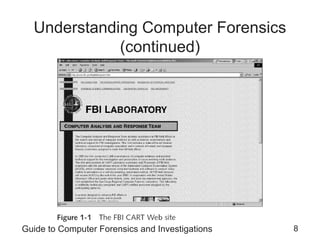
• FBI Computer Analysis and Response Team
(CART)
– Formed in 1984 to handle the increasing number of
cases involving digital evidence
Guide to Computer Forensics and Investigations 8
Understanding Computer Forensics
(continued)
Guide to Computer Forensics and Investigations 9
Understanding Computer Forensics
(continued)
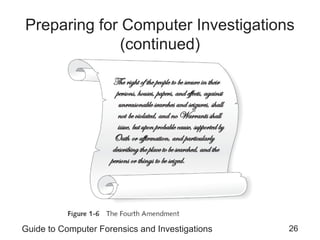
• Fourth Amendment to the U.S. Constitution
– Protects everyone’s rights to be secure in their
person, residence, and property
• From search and seizure
– Search warrants are needed
Guide to Computer Forensics and Investigations 10
Computer Forensics Versus Other
Related Disciplines
• Computer forensics
– Investigates data that can be retrieved from a
computer’s hard disk or other storage media
• Network forensics
– Yields information about how a perpetrator or an
attacker gained access to a network
• Data recovery
– Recovering information that was deleted by mistake
• Or lost during a power surge or server crash
– Typically you know what you’re looking for
Guide to Computer Forensics and Investigations 11
Computer Forensics Versus Other
Related Disciplines (continued)
• Computer forensics
– Task of recovering data that users have hidden or
deleted and using it as evidence
– Evidence can be inculpatory (“incriminating”) or
exculpatory
• Disaster recovery
– Uses computer forensics techniques to retrieve
information their clients have lost
• Investigators often work as a team to make
computers and networks secure in an organization
Guide to Computer Forensics and Investigations 12
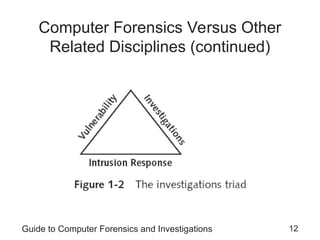
Computer Forensics Versus Other
Related Disciplines (continued)
Guide to Computer Forensics and Investigations 13
Computer Forensics Versus Other
Related Disciplines (continued)
• Enterprise network environment
– Large corporate computing systems that might include
disparate or formerly independent systems
• Vulnerability assessment and risk management
group
– Tests and verifies the integrity of standalone
workstations and network servers
– Professionals in this group have skills in network
intrusion detection and incident response
Guide to Computer Forensics and Investigations 14
Computer Forensics Versus Other
Related Disciplines (continued)
• Litigation
– Legal process of proving guilt or innocence in court
• Computer investigations group
– Manages investigations and conducts forensic
analysis of systems suspected of containing evidence
related to an incident or a crime
Guide to Computer Forensics and Investigations 15
A Brief History of Computer Forensics
• By the 1970s, electronic crimes were increasing,
especially in the financial sector
– Most law enforcement officers didn’t know enough
about computers to ask the right questions
• Or to preserve evidence for trial
• 1980s
– PCs gained popularity and different OSs emerged
– Disk Operating System (DOS) was available
– Forensics tools were simple, and most were
generated by government agencies
Guide to Computer Forensics and Investigations 16
A Brief History of Computer Forensics
(continued)
• Mid-1980s
– Xtree Gold appeared on the market
• Recognized file types and retrieved lost or deleted files
– Norton DiskEdit soon followed
• And became the best tool for finding deleted file
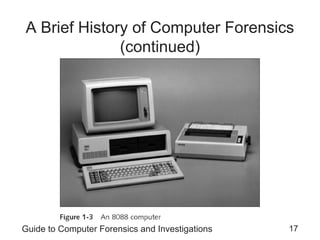
• 1987
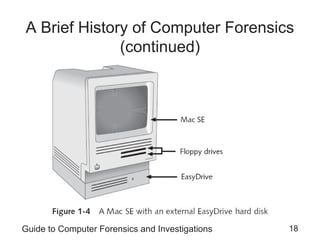
– Apple produced the Mac SE
• A Macintosh with an external EasyDrive hard disk with
60 MB of storage
Guide to Computer Forensics and Investigations 17
A Brief History of Computer Forensics
(continued)
Guide to Computer Forensics and Investigations 18
A Brief History of Computer Forensics
(continued)
Guide to Computer Forensics and Investigations 19
A Brief History of Computer Forensics
(continued)
• Early 1990s
– Tools for computer forensics were available
– International Association of Computer
Investigative Specialists (IACIS)
• Training on software for forensics investigations
– IRS created search-warrant programs
– ExpertWitness for the Macintosh
• First commercial GUI software for computer forensics
• Created by ASR Data
Guide to Computer Forensics and Investigations 20
A Brief History of Computer Forensics
(continued)
• Early 1990s (continued)
– ExpertWitness for the Macintosh
• Recovers deleted files and fragments of deleted files
• Large hard disks posed problems for investigators
• Other software
– iLook
– AccessData Forensic Toolkit (FTK)
Guide to Computer Forensics and Investigations 21
Understanding Case Law
• Technology is evolving at an exponential pace
– Existing laws and statutes can’t keep up change
• Case law used when statutes or regulations don’t
exist
• Case law allows legal counsel to use previous cases
similar to the current one
– Because the laws don’t yet exist
• Each case is evaluated on its own merit and issues
Guide to Computer Forensics and Investigations 22
Developing Computer Forensics
Resources
• You must know more than one computing platform
– Such as DOS, Windows 9x, Linux, Macintosh, and
current Windows platforms
• Join as many computer user groups as you can
• Computer Technology Investigators Network
(CTIN)
– Meets monthly to discuss problems that law
enforcement and corporations face
Guide to Computer Forensics and Investigations 23
Developing Computer Forensics
Resources (continued)
• High Technology Crime Investigation
Association (HTCIA)
– Exchanges information about techniques related to
computer investigations and security
• User groups can be helpful
• Build a network of computer forensics experts and
other professionals
– And keep in touch through e-mail
• Outside experts can provide detailed information
you need to retrieve digital evidence
Guide to Computer Forensics and Investigations 24
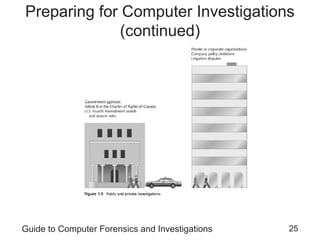
Preparing for Computer Investigations
• Computer investigations and forensics falls into two
distinct categories
– Public investigations
– Private or corporate investigations
• Public investigations
– Involve government agencies responsible for criminal
investigations and prosecution
– Organizations must observe legal guidelines
• Law of search and seizure
– Protects rights of all people, including suspects
Guide to Computer Forensics and Investigations 25
Preparing for Computer Investigations
(continued)
Guide to Computer Forensics and Investigations 26
Preparing for Computer Investigations
(continued)
Guide to Computer Forensics and Investigations 27
Preparing for Computer Investigations
(continued)
• Private or corporate investigations
– Deal with private companies, non-law-enforcement
government agencies, and lawyers
– Aren’t governed directly by criminal law or Fourth
Amendment issues
– Governed by internal policies that define expected
employee behavior and conduct in the workplace
• Private corporate investigations also involve
litigation disputes
• Investigations are usually conducted in civil cases
Guide to Computer Forensics and Investigations 28
Understanding Law Enforcements
Agency Investigations
• In a criminal case, a suspect is tried for a criminal
offense
– Such as burglary, murder, or molestation
• Computers and networks are only tools that can be
used to commit crimes
– Many states have added specific language to
criminal codes to define crimes involving computers
• Following the legal process
– Legal processes depend on local custom, legislative
standards, and rules of evidence
Guide to Computer Forensics and Investigations 29
Understanding Law Enforcements
Agency Investigations (continued)
• Following the legal process (continued)
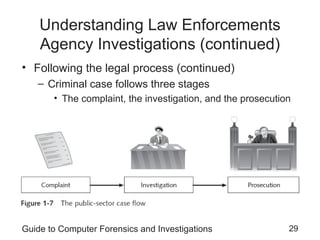
– Criminal case follows three stages
• The complaint, the investigation, and the prosecution
Guide to Computer Forensics and Investigations 30
Understanding Law Enforcements
Agency Investigations (continued)
• Following the legal process (continued)
– A criminal case begins when someone finds
evidence of an illegal act
– Complainant makes an allegation, an accusation or
supposition of fact
– A police officer interviews the complainant and writes
a report about the crime
• Police blotter provides a record of clues to crimes
that have been committed previously
– Investigators delegate, collect, and process the
information related to the complaint
Guide to Computer Forensics and Investigations 31
Understanding Law Enforcements
Agency Investigations (continued)
• Following the legal process (continued)
– After you build a case, the information is turned over
to the prosecutor
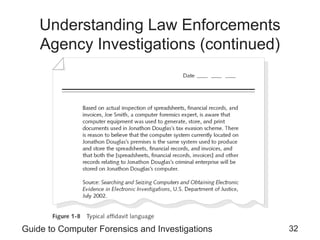
– Affidavit
• Sworn statement of support of facts about or evidence
of a crime
– Submitted to a judge to request a search warrant
• Have the affidavit notarized under sworn oath
– Judge must approve and sign a search warrant
• Before you can use it to collect evidence
Guide to Computer Forensics and Investigations 32
Understanding Law Enforcements
Agency Investigations (continued)
Guide to Computer Forensics and Investigations 33
Understanding Corporate
Investigations
• Private or corporate investigations
– Involve private companies and lawyers who address
company policy violations and litigation disputes
• Corporate computer crimes can involve:
– E-mail harassment
– Falsification of data
– Gender and age discrimination
– Embezzlement
– Sabotage
– Industrial espionage
Guide to Computer Forensics and Investigations 34
Understanding Corporate
Investigations (continued)
• Establishing company policies
– One way to avoid litigation is to publish and maintain
policies that employees find easy to read and follow
– Published company policies provide a line of authority
• For a business to conduct internal investigations
– Well-defined policies
• Give computer investigators and forensic examiners the
authority to conduct an investigation
• Displaying Warning Banners
– Another way to avoid litigation
Guide to Computer Forensics and Investigations 35
Understanding Corporate
Investigations (continued)
• Displaying Warning Banners (continued)
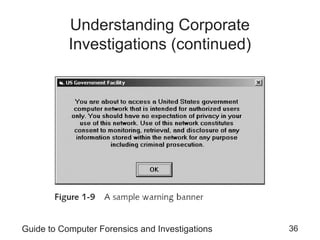
– Warning banner
• Usually appears when a computer starts or connects to
the company intranet, network, or virtual private network
• Informs end users that the organization reserves the right
to inspect computer systems and network traffic at will
• Establishes the right to conduct an investigation
– As a corporate computer investigator
• Make sure company displays well-defined warning banner
Guide to Computer Forensics and Investigations 36
Understanding Corporate
Investigations (continued)
Guide to Computer Forensics and Investigations 37
Understanding Corporate
Investigations (continued)
• Designating an authorized requester
– Authorized requester has the power to conduct
investigations
– Policy should be defined by executive management
– Groups that should have direct authority to request
computer investigations
• Corporate Security Investigations
• Corporate Ethics Office
• Corporate Equal Employment Opportunity Office
• Internal Auditing
• The general counsel or Legal Department
Guide to Computer Forensics and Investigations 38
Understanding Corporate
Investigations (continued)
• Conducting security investigations
– Types of situations
• Abuse or misuse of corporate assets
• E-mail abuse
• Internet abuse
– Be sure to distinguish between a company’s abuse
problems and potential criminal problems
– Corporations often follow the silver-platter doctrine
• What happens when a civilian or corporate investigative
agent delivers evidence to a law enforcement officer
Guide to Computer Forensics and Investigations 39
Understanding Corporate
Investigations (continued)
• Distinguishing personal and company property
– Many company policies distinguish between personal
and company computer property
– One area that’s difficult to distinguish involves PDAs,
cell phones, and personal notebook computers
– The safe policy is to not allow any personally owned
devices to be connected to company-owned resources
• Limiting the possibility of commingling personal and
company data
Guide to Computer Forensics and Investigations 40
Maintaining Professional Conduct
• Professional conduct
– Determines your credibility
– Includes ethics, morals, and standards of behavior
• Maintaining objectivity means you must form and
sustain unbiased opinions of your cases
• Maintain an investigation’s credibility by keeping the
case confidential
– In the corporate environment, confidentiality is critical
• In rare instances, your corporate case might become
a criminal case as serious as murder
Guide to Computer Forensics and Investigations 41
Maintaining Professional Conduct
(continued)
• Enhance your professional conduct by continuing
your training
• Record your fact-finding methods in a journal
• Attend workshops, conferences, and vendor courses
• Membership in professional organizations adds to
your credentials
• Achieve a high public and private standing and
maintain honesty and integrity
Guide to Computer Forensics and Investigations 42
Summary
• Computer forensics applies forensics procedures to
digital evidence
• Laws about digital evidence established in the 1970s
• To be a successful computer forensics investigator,
you must know more than one computing platform
• Public and private computer investigations are
different
Guide to Computer Forensics and Investigations 43
Summary (continued)
• Use warning banners to remind employees and
visitors of policy on computer and Internet use
• Companies should define and limit the number of
authorized requesters who can start an investigation
• Silver-platter doctrine refers to handing the results of
private investigations over to law enforcement
because of indications of criminal activity
• Computer forensics investigators must maintain
professional conduct to protect their credibility

Chapter 1 - Computer Forensics and Investigations as a Profession.ppt

  • 1.
    Guide to ComputerForensics and Investigations Fourth Edition Chapter 1 Computer Forensics and Investigations as a Profession
  • 2.
    Guide to ComputerForensics and Investigations 2 Objectives • Define Digital forensics and computer forensics • Describe how to prepare for computer investigations and explain the difference between law enforcement agency and corporate investigations • Explain the importance of maintaining professional conduct
  • 3.
    Understanding Digital Forensics •A collection of specialized techniques, processes, and procedures used to preserve, extract, analyze, and present electronic evidence • A methodology for computer investigation and analysis techniques in the interest of determining potential legal evidence • Investigation that takes place after an incident has happened • Try to answer questions: who, what, when, where, why, and how Guide to Computer Forensics and Investigations 3
  • 4.
    Investigative Process • Preservation •Collection • Examination • Analysis Guide to Computer Forensics and Investigations 4
  • 5.
    Typical Investigative Phases •Acquisition • Recovery • Analysis • Presentation Guide to Computer Forensics and Investigations 5
  • 6.
    Sub-discipline within DigitalForensics • Computer Forensics • Network Forensics • Data recovery Guide to Computer Forensics and Investigations 6
  • 7.
    Guide to ComputerForensics and Investigations 7 Understanding Computer Forensics • Computer forensics – Involves obtaining and analyzing digital information • As evidence in civil, criminal, or administrative cases • FBI Computer Analysis and Response Team (CART) – Formed in 1984 to handle the increasing number of cases involving digital evidence
  • 8.
    Guide to ComputerForensics and Investigations 8 Understanding Computer Forensics (continued)
  • 9.
    Guide to ComputerForensics and Investigations 9 Understanding Computer Forensics (continued) • Fourth Amendment to the U.S. Constitution – Protects everyone’s rights to be secure in their person, residence, and property • From search and seizure – Search warrants are needed
  • 10.
    Guide to ComputerForensics and Investigations 10 Computer Forensics Versus Other Related Disciplines • Computer forensics – Investigates data that can be retrieved from a computer’s hard disk or other storage media • Network forensics – Yields information about how a perpetrator or an attacker gained access to a network • Data recovery – Recovering information that was deleted by mistake • Or lost during a power surge or server crash – Typically you know what you’re looking for
  • 11.
    Guide to ComputerForensics and Investigations 11 Computer Forensics Versus Other Related Disciplines (continued) • Computer forensics – Task of recovering data that users have hidden or deleted and using it as evidence – Evidence can be inculpatory (“incriminating”) or exculpatory • Disaster recovery – Uses computer forensics techniques to retrieve information their clients have lost • Investigators often work as a team to make computers and networks secure in an organization
  • 12.
    Guide to ComputerForensics and Investigations 12 Computer Forensics Versus Other Related Disciplines (continued)
  • 13.
    Guide to ComputerForensics and Investigations 13 Computer Forensics Versus Other Related Disciplines (continued) • Enterprise network environment – Large corporate computing systems that might include disparate or formerly independent systems • Vulnerability assessment and risk management group – Tests and verifies the integrity of standalone workstations and network servers – Professionals in this group have skills in network intrusion detection and incident response
  • 14.
    Guide to ComputerForensics and Investigations 14 Computer Forensics Versus Other Related Disciplines (continued) • Litigation – Legal process of proving guilt or innocence in court • Computer investigations group – Manages investigations and conducts forensic analysis of systems suspected of containing evidence related to an incident or a crime
  • 15.
    Guide to ComputerForensics and Investigations 15 A Brief History of Computer Forensics • By the 1970s, electronic crimes were increasing, especially in the financial sector – Most law enforcement officers didn’t know enough about computers to ask the right questions • Or to preserve evidence for trial • 1980s – PCs gained popularity and different OSs emerged – Disk Operating System (DOS) was available – Forensics tools were simple, and most were generated by government agencies
  • 16.
    Guide to ComputerForensics and Investigations 16 A Brief History of Computer Forensics (continued) • Mid-1980s – Xtree Gold appeared on the market • Recognized file types and retrieved lost or deleted files – Norton DiskEdit soon followed • And became the best tool for finding deleted file • 1987 – Apple produced the Mac SE • A Macintosh with an external EasyDrive hard disk with 60 MB of storage
  • 17.
    Guide to ComputerForensics and Investigations 17 A Brief History of Computer Forensics (continued)
  • 18.
    Guide to ComputerForensics and Investigations 18 A Brief History of Computer Forensics (continued)
  • 19.
    Guide to ComputerForensics and Investigations 19 A Brief History of Computer Forensics (continued) • Early 1990s – Tools for computer forensics were available – International Association of Computer Investigative Specialists (IACIS) • Training on software for forensics investigations – IRS created search-warrant programs – ExpertWitness for the Macintosh • First commercial GUI software for computer forensics • Created by ASR Data
  • 20.
    Guide to ComputerForensics and Investigations 20 A Brief History of Computer Forensics (continued) • Early 1990s (continued) – ExpertWitness for the Macintosh • Recovers deleted files and fragments of deleted files • Large hard disks posed problems for investigators • Other software – iLook – AccessData Forensic Toolkit (FTK)
  • 21.
    Guide to ComputerForensics and Investigations 21 Understanding Case Law • Technology is evolving at an exponential pace – Existing laws and statutes can’t keep up change • Case law used when statutes or regulations don’t exist • Case law allows legal counsel to use previous cases similar to the current one – Because the laws don’t yet exist • Each case is evaluated on its own merit and issues
  • 22.
    Guide to ComputerForensics and Investigations 22 Developing Computer Forensics Resources • You must know more than one computing platform – Such as DOS, Windows 9x, Linux, Macintosh, and current Windows platforms • Join as many computer user groups as you can • Computer Technology Investigators Network (CTIN) – Meets monthly to discuss problems that law enforcement and corporations face
  • 23.
    Guide to ComputerForensics and Investigations 23 Developing Computer Forensics Resources (continued) • High Technology Crime Investigation Association (HTCIA) – Exchanges information about techniques related to computer investigations and security • User groups can be helpful • Build a network of computer forensics experts and other professionals – And keep in touch through e-mail • Outside experts can provide detailed information you need to retrieve digital evidence
  • 24.
    Guide to ComputerForensics and Investigations 24 Preparing for Computer Investigations • Computer investigations and forensics falls into two distinct categories – Public investigations – Private or corporate investigations • Public investigations – Involve government agencies responsible for criminal investigations and prosecution – Organizations must observe legal guidelines • Law of search and seizure – Protects rights of all people, including suspects
  • 25.
    Guide to ComputerForensics and Investigations 25 Preparing for Computer Investigations (continued)
  • 26.
    Guide to ComputerForensics and Investigations 26 Preparing for Computer Investigations (continued)
  • 27.
    Guide to ComputerForensics and Investigations 27 Preparing for Computer Investigations (continued) • Private or corporate investigations – Deal with private companies, non-law-enforcement government agencies, and lawyers – Aren’t governed directly by criminal law or Fourth Amendment issues – Governed by internal policies that define expected employee behavior and conduct in the workplace • Private corporate investigations also involve litigation disputes • Investigations are usually conducted in civil cases
  • 28.
    Guide to ComputerForensics and Investigations 28 Understanding Law Enforcements Agency Investigations • In a criminal case, a suspect is tried for a criminal offense – Such as burglary, murder, or molestation • Computers and networks are only tools that can be used to commit crimes – Many states have added specific language to criminal codes to define crimes involving computers • Following the legal process – Legal processes depend on local custom, legislative standards, and rules of evidence
  • 29.
    Guide to ComputerForensics and Investigations 29 Understanding Law Enforcements Agency Investigations (continued) • Following the legal process (continued) – Criminal case follows three stages • The complaint, the investigation, and the prosecution
  • 30.
    Guide to ComputerForensics and Investigations 30 Understanding Law Enforcements Agency Investigations (continued) • Following the legal process (continued) – A criminal case begins when someone finds evidence of an illegal act – Complainant makes an allegation, an accusation or supposition of fact – A police officer interviews the complainant and writes a report about the crime • Police blotter provides a record of clues to crimes that have been committed previously – Investigators delegate, collect, and process the information related to the complaint
  • 31.
    Guide to ComputerForensics and Investigations 31 Understanding Law Enforcements Agency Investigations (continued) • Following the legal process (continued) – After you build a case, the information is turned over to the prosecutor – Affidavit • Sworn statement of support of facts about or evidence of a crime – Submitted to a judge to request a search warrant • Have the affidavit notarized under sworn oath – Judge must approve and sign a search warrant • Before you can use it to collect evidence
  • 32.
    Guide to ComputerForensics and Investigations 32 Understanding Law Enforcements Agency Investigations (continued)
  • 33.
    Guide to ComputerForensics and Investigations 33 Understanding Corporate Investigations • Private or corporate investigations – Involve private companies and lawyers who address company policy violations and litigation disputes • Corporate computer crimes can involve: – E-mail harassment – Falsification of data – Gender and age discrimination – Embezzlement – Sabotage – Industrial espionage
  • 34.
    Guide to ComputerForensics and Investigations 34 Understanding Corporate Investigations (continued) • Establishing company policies – One way to avoid litigation is to publish and maintain policies that employees find easy to read and follow – Published company policies provide a line of authority • For a business to conduct internal investigations – Well-defined policies • Give computer investigators and forensic examiners the authority to conduct an investigation • Displaying Warning Banners – Another way to avoid litigation
  • 35.
    Guide to ComputerForensics and Investigations 35 Understanding Corporate Investigations (continued) • Displaying Warning Banners (continued) – Warning banner • Usually appears when a computer starts or connects to the company intranet, network, or virtual private network • Informs end users that the organization reserves the right to inspect computer systems and network traffic at will • Establishes the right to conduct an investigation – As a corporate computer investigator • Make sure company displays well-defined warning banner
  • 36.
    Guide to ComputerForensics and Investigations 36 Understanding Corporate Investigations (continued)
  • 37.
    Guide to ComputerForensics and Investigations 37 Understanding Corporate Investigations (continued) • Designating an authorized requester – Authorized requester has the power to conduct investigations – Policy should be defined by executive management – Groups that should have direct authority to request computer investigations • Corporate Security Investigations • Corporate Ethics Office • Corporate Equal Employment Opportunity Office • Internal Auditing • The general counsel or Legal Department
  • 38.
    Guide to ComputerForensics and Investigations 38 Understanding Corporate Investigations (continued) • Conducting security investigations – Types of situations • Abuse or misuse of corporate assets • E-mail abuse • Internet abuse – Be sure to distinguish between a company’s abuse problems and potential criminal problems – Corporations often follow the silver-platter doctrine • What happens when a civilian or corporate investigative agent delivers evidence to a law enforcement officer
  • 39.
    Guide to ComputerForensics and Investigations 39 Understanding Corporate Investigations (continued) • Distinguishing personal and company property – Many company policies distinguish between personal and company computer property – One area that’s difficult to distinguish involves PDAs, cell phones, and personal notebook computers – The safe policy is to not allow any personally owned devices to be connected to company-owned resources • Limiting the possibility of commingling personal and company data
  • 40.
    Guide to ComputerForensics and Investigations 40 Maintaining Professional Conduct • Professional conduct – Determines your credibility – Includes ethics, morals, and standards of behavior • Maintaining objectivity means you must form and sustain unbiased opinions of your cases • Maintain an investigation’s credibility by keeping the case confidential – In the corporate environment, confidentiality is critical • In rare instances, your corporate case might become a criminal case as serious as murder
  • 41.
    Guide to ComputerForensics and Investigations 41 Maintaining Professional Conduct (continued) • Enhance your professional conduct by continuing your training • Record your fact-finding methods in a journal • Attend workshops, conferences, and vendor courses • Membership in professional organizations adds to your credentials • Achieve a high public and private standing and maintain honesty and integrity
  • 42.
    Guide to ComputerForensics and Investigations 42 Summary • Computer forensics applies forensics procedures to digital evidence • Laws about digital evidence established in the 1970s • To be a successful computer forensics investigator, you must know more than one computing platform • Public and private computer investigations are different
  • 43.
    Guide to ComputerForensics and Investigations 43 Summary (continued) • Use warning banners to remind employees and visitors of policy on computer and Internet use • Companies should define and limit the number of authorized requesters who can start an investigation • Silver-platter doctrine refers to handing the results of private investigations over to law enforcement because of indications of criminal activity • Computer forensics investigators must maintain professional conduct to protect their credibility