1
Dr Yasir Awais Butt Digital Logic Design
DIGITAL SYSTEMS AND BINARY
NUMBERS
Chapter 1
2
Dr Yasir Awais Butt Digital Logic Design
System
 The term system comes from the Latin word systēma, "whole concept made of
several parts or members, system", literary "composition“
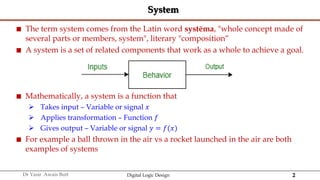
 A system is a set of related components that work as a whole to achieve a goal.
 Mathematically, a system is a function that
 Takes input – Variable or signal 𝑥
 Applies transformation – Function 𝑓
 Gives output – Variable or signal 𝑦 = 𝑓(𝑥)
 For example a ball thrown in the air vs a rocket launched in the air are both
examples of systems
3
Dr Yasir Awais Butt Digital Logic Design
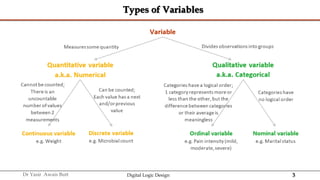
Types of Variables
4
Dr Yasir Awais Butt Digital Logic Design
Continuous vs Discrete Variable
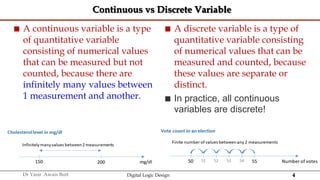
 A continuous variable is a type
of quantitative variable
consisting of numerical values
that can be measured but not
counted, because there are
infinitely many values between
1 measurement and another.
 A discrete variable is a type of
quantitative variable consisting
of numerical values that can be
measured and counted, because
these values are separate or
distinct.
 In practice, all continuous
variables are discrete!
5
Dr Yasir Awais Butt Digital Logic Design
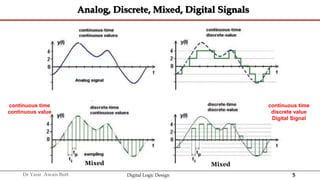
Analog, Discrete, Mixed, Digital Signals
continuous time
continuous value
continuous time
discrete value
Digital Signal
Mixed
Mixed
6
Dr Yasir Awais Butt Digital Logic Design
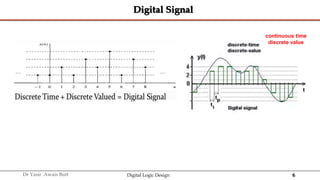
Digital Signal
continuous time
discrete value
7
Dr Yasir Awais Butt Digital Logic Design
Analog, Discrete, Mixed, Digital Systems
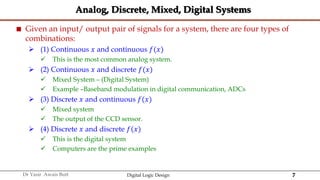
 Given an input/ output pair of signals for a system, there are four types of
combinations:
 (1) Continuous 𝑥 and continuous 𝑓(𝑥)
 This is the most common analog system.
 (2) Continuous 𝑥 and discrete 𝑓(𝑥)
 Mixed System – (Digital System)
 Example –Baseband modulation in digital communication, ADCs
 (3) Discrete 𝑥 and continuous 𝑓(𝑥)
 Mixed system
 The output of the CCD sensor.
 (4) Discrete 𝑥 and discrete 𝑓(𝑥)
 This is the digital system
 Computers are the prime examples
8
Dr Yasir Awais Butt Digital Logic Design
Digital Systems
 Digital systems are designed to store, process, and communicate information in
digital form
 A digital system refers to a system that processes, stores, and communicates
information using digital signals.
9
Dr Yasir Awais Butt Digital Logic Design
Digital Systems
 Digital System play a prominent role in this digital age
 Communication, medical treatment, internet, DVD, CD, etc…
 Digital Computer follow a sequence of instructions, called programs, that
operate on given data
 User can specify and change program or data according to needs
 Digital Systems have the ability to Manipulate discrete elements of information.
 Any set that is restricted to a finite number of elements contains discrete
information
 10 Decimal digits
 26 Alphabet letters
 52 Playing cards
 64 squares of a chessboard
Lec 1
10
Dr Yasir Awais Butt Digital Logic Design
Merits of Digital Systems
 Occupy minimum space
 Most digital devices are programmable
 Accuracy
 Cost reduction
 Efficient Processing & Data Storage
 Efficient & Reliable Transmission
 Detection and Correction of Errors
 Precise & Accurate Reproduction
 Easy Design and Implementation
11
Dr Yasir Awais Butt Digital Logic Design
Digital Systems
 A Digital System is interconnection of digital modules
 To understand Digital module, we need to know about digital circuits and their
logical functions
 Hardware Description Language (HDL) is a programming language that is
suitable for describing digital circuit in a textual form
 Simulate a digital system to verify operation before it is built
12
Dr Yasir Awais Butt Digital Logic Design
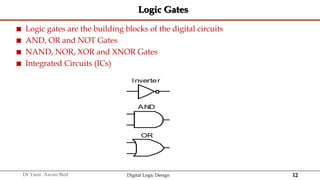
Logic Gates
 Logic gates are the building blocks of the digital circuits
 AND, OR and NOT Gates
 NAND, NOR, XOR and XNOR Gates
 Integrated Circuits (ICs)
Inverter
AND
OR
13
Dr Yasir Awais Butt Digital Logic Design
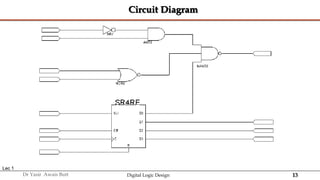
Circuit Diagram
Lec 1
14
Dr Yasir Awais Butt Digital Logic Design
1.2 BINARY NUMBER SYSTEM
15
Dr Yasir Awais Butt Digital Logic Design
Definition
 A Number system is a system of mathematical notation for representing
numbers of a given set, using digits or other symbols.
 Example
 Roman number system – Symbolic System
 decimal system – numbers 0-9
 The first recorded zero appeared in Mesopotamia around 3 B.C.
 The Mayans invented it independently circa 4 A.D.
 It was later devised in India in the mid-fifth century, spread to Cambodia near the end
of the seventh century, and into China and the Islamic countries at the end of the
eighth.
 Indian Claim - The first modern equivalent of the numeral zero comes from a Hindu
astronomer and mathematician Brahmagupta in 628
 Numbers of distinct symbols is known as radix or base denoted as 𝑟
 In decimal system base is 10
16
Dr Yasir Awais Butt Digital Logic Design
Place Value System
 Also called Positional Numeral System
 Place value is the basis of our entire number system.
 The position of a digit in a number determines its value.
 The number 42,316 is different from 61,432 because the digits are in different
positions
17
Dr Yasir Awais Butt Digital Logic Design
Place Value System Characteristics
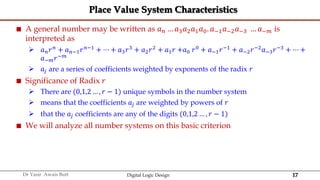
 A general number may be written as 𝑎𝑛 … 𝑎3𝑎2𝑎1𝑎0. 𝑎−1𝑎−2𝑎−3 … 𝑎−𝑚 is
interpreted as
 𝑎𝑛𝑟𝑛
+ 𝑎𝑛−1𝑟𝑛−1
+ ⋯ + 𝑎3𝑟3
+ 𝑎2𝑟2
+ 𝑎1𝑟 +𝑎0 𝑟0
+ 𝑎−1𝑟−1
+ 𝑎−2𝑟−2
𝑎−3𝑟−3
+ ⋯ +
𝑎−𝑚𝑟−𝑚
 𝑎𝑗 are a series of coefficients weighted by exponents of the radix 𝑟
 Significance of Radix 𝑟
 There are (0,1,2 … , 𝑟 − 1) unique symbols in the number system
 means that the coefficients 𝑎𝑗 are weighted by powers of 𝑟
 that the 𝑎𝑗 coefficients are any of the digits (0,1,2 … , 𝑟 − 1)
 We will analyze all number systems on this basic criterion
18
Dr Yasir Awais Butt Digital Logic Design
Decimal Number System
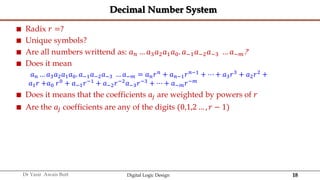
 Radix 𝑟 =?
 Unique symbols?
 Are all numbers writtend as: 𝑎𝑛 … 𝑎3𝑎2𝑎1𝑎0. 𝑎−1𝑎−2𝑎−3 … 𝑎−𝑚?
 Does it mean
𝑎𝑛 … 𝑎3𝑎2𝑎1𝑎0. 𝑎−1𝑎−2𝑎−3 … 𝑎−𝑚 = 𝑎𝑛𝑟𝑛 + 𝑎𝑛−1𝑟𝑛−1 + ⋯ + 𝑎3𝑟3 + 𝑎2𝑟2 +
𝑎1𝑟 +𝑎0 𝑟0
+ 𝑎−1𝑟−1
+ 𝑎−2𝑟−2
𝑎−3𝑟−3
+ ⋯ + 𝑎−𝑚𝑟−𝑚
 Does it means that the coefficients 𝑎𝑗 are weighted by powers of 𝑟
 Are the 𝑎𝑗 coefficients are any of the digits (0,1,2 … , 𝑟 − 1)
19
Dr Yasir Awais Butt Digital Logic Design
Decimal Number System - Example
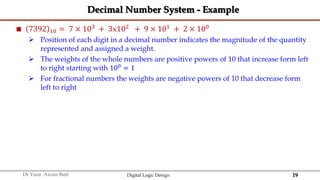
 7392 10 = 7 × 10³ + 3x10² + 9 × 101 + 2 × 100
 Position of each digit in a decimal number indicates the magnitude of the quantity
represented and assigned a weight.
 The weights of the whole numbers are positive powers of 10 that increase form left
to right starting with 100 = 1
 For fractional numbers the weights are negative powers of 10 that decrease form
left to right
20
Dr Yasir Awais Butt Digital Logic Design
Examples
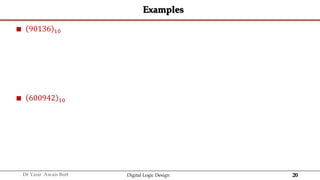
 90136 10
 600942 10
21
Dr Yasir Awais Butt Digital Logic Design
Fractions in Decimal System
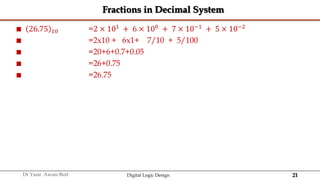
 26.75 10 =2 × 101 + 6 × 100 + 7 × 10⁻¹ + 5 × 10⁻²
 =2x10 + 6x1+ 7/10 + 5/100
 =20+6+0.7+0.05
 =26+0.75
 =26.75
22
Dr Yasir Awais Butt Digital Logic Design
Digital Systems and Binary Numbers
 Digitization got its start as far back as 1679 when Gottfried Wilhelm Leibniz
developed the first-ever binary system
 He then authored a remarkable and well-crafted book known as the
Explanation of Binary Systems in 1703 to help other people understand the
binary system
 In 1847, Boolean algebra was introduced by George Boole.
 This unique algebra was used in the mathematical analysis of and has played a
massive role in discovering mathematical logic used in digitization today.
 Claude Shannon, an MIT tech student, compiled his master’s thesis that
exhaustively centered on developing and using digital circuits.
 Shannon studied Boolean algebra law, which he incorporated to show how digital
circuits can be made and used in the telecommunication industry.
23
Dr Yasir Awais Butt Digital Logic Design
Digital Systems and Binary Numbers
 The advantage of the binary system is that it can be used to represent numbers
in systems which are capable of being in two mutually exclusive states.
 The Frenchman Raymond Louis André Valtat from Paris patented in 1932 in
Germany a calculator that worked on the binary system.
 In his paper he advocated the usage of the binary system in a calculating
apparatus in comparison to the decimal system, for instance that the computation
of a square root is especially simple in this system.
 In 1936 Alan Turing designed an electromechanical multiplier.
 In 1938, the American George Stibitz built an binary adder using
electromechanical relays.
 In 1946 A. W. Burks, H. H. Goldstine and J. von Neumann published a
memorandum in which they advocated abandoning the decimal representation
in favor of the binary system.
24
Dr Yasir Awais Butt Digital Logic Design
Binary Number
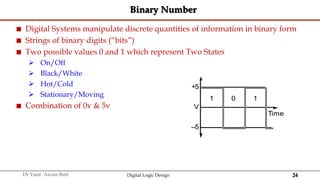
 Digital Systems manipulate discrete quantities of information in binary form
 Strings of binary digits (“bits”)
 Two possible values 0 and 1 which represent Two States
 On/Off
 Black/White
 Hot/Cold
 Stationary/Moving
 Combination of 0v & 5v
+5
V
–5
1 0 1
Time
25
Dr Yasir Awais Butt Digital Logic Design
Binary Number System
 Each digit represents a power of 2
 Coefficient have two possible values 0 and 1
 𝑛 bits can store numbers from 0 to 2𝑛−1
 If 𝑛=5
 =25−1
 =32 − 1
 =31
 𝑛 bits can store 2𝑛
distinct combinations( permutations to be exact) of 1’s and 0’s
 Each coefficient 𝑎𝑗 is multiplied by 2𝑗
 So 101 binary is
 1 x 22 + 0 x 21 + 1 x 20
 Or
 1 x 4 + 0 x 2 + 1 x 1 = 5
26
Dr Yasir Awais Butt Digital Logic Design
Binary Numbers
 Each digit represents a power of 2
 Coefficient have two possible values 0 and 1
 𝑛 bits can store numbers from 0 to 2𝑛−1
 If 𝑛=5
 =25−1
 =32 − 1
 =31
 𝑛 bits can store 2𝑛
distinct combinations( permutations to be exact) of 1’s and 0’s
 Each coefficient aj is multiplied by 2𝑗
 So 101 2 binary is
 1 × 22
+ 0 × 21
+ 1 × 20
 Or
 1 × 4 + 0 × 2 + 1 × 1 = 5 10
27
Dr Yasir Awais Butt Digital Logic Design
1.3 NUMBER BASE CONVERSIONS
28
Dr Yasir Awais Butt Digital Logic Design
Number Base Conversions
 Representations of a number in a different radix are said to be equivalent if they
have the same decimal representation.
 For example, 0011 8 and 1001 2 are equivalent—both have decimal value 9.
 The conversion of a number in base 𝑟 to decimal is done by expanding the
number in a power series and adding all the terms as shown previously.
 We now present a general procedure for the reverse operation of converting a
decimal number to a number in base 𝑟.
 If the number includes a radix point, it is necessary to separate the number into
an integer part and a fraction part, since each part must be converted differently
29
Dr Yasir Awais Butt Digital Logic Design
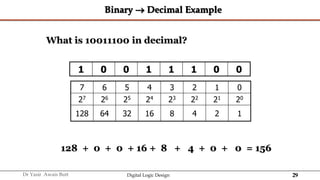
Binary  Decimal Example
1 0 0 1 1 1 0 0
7 6 5 4 3 2 1 0
27 26 25 24 23 22 21 20
128 64 32 16 8 4 2 1
128 + 0 + 0 + 16 + 8 + 4 + 0 + 0 = 156
What is 10011100 in decimal?
30
Dr Yasir Awais Butt Digital Logic Design
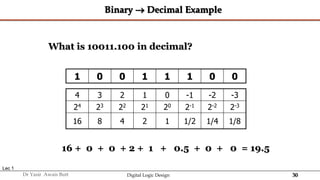
Binary  Decimal Example
1 0 0 1 1 1 0 0
Lec 1
4 3 2 1 0 -1 -2 -3
24 23 22 21 20 2-1 2-2 2-3
16 8 4 2 1 1/2 1/4 1/8
16 + 0 + 0 + 2 + 1 + 0.5 + 0 + 0 = 19.5
What is 10011.100 in decimal?
31
Dr Yasir Awais Butt Digital Logic Design
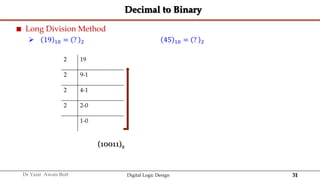
Decimal to Binary
 Long Division Method
 19 10 = ? 2 45 10 = ? 2
2 19
2 9-1
2 4-1
2 2-0
1-0
(10011)2
32
Dr Yasir Awais Butt Digital Logic Design
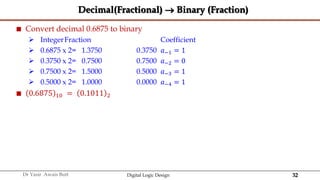
Decimal(Fractional)  Binary (Fraction)
 Convert decimal 0.6875 to binary
 IntegerFraction Coefficient
 0.6875 x 2= 1.3750 0.3750 𝑎−1 = 1
 0.3750 x 2= 0.7500 0.7500 𝑎−2 = 0
 0.7500 x 2= 1.5000 0.5000 𝑎−3 = 1
 0.5000 x 2= 1.0000 0.0000 𝑎−4 = 1
 0.6875 10 = 0.1011 2
33
Dr Yasir Awais Butt Digital Logic Design
RULES
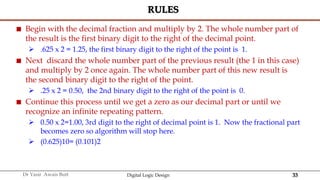
 Begin with the decimal fraction and multiply by 2. The whole number part of
the result is the first binary digit to the right of the decimal point.
 .625 x 2 = 1.25, the first binary digit to the right of the point is 1.
 Next discard the whole number part of the previous result (the 1 in this case)
and multiply by 2 once again. The whole number part of this new result is
the second binary digit to the right of the point.
 .25 x 2 = 0.50, the 2nd binary digit to the right of the point is 0.
 Continue this process until we get a zero as our decimal part or until we
recognize an infinite repeating pattern.
 0.50 x 2=1.00, 3rd digit to the right of decimal point is 1. Now the fractional part
becomes zero so algorithm will stop here.
 (0.625)10= (0.101)2
34
Dr Yasir Awais Butt Digital Logic Design
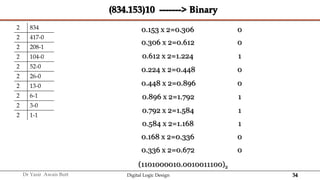
(834.153)10 -------> Binary
2 834
2 417-0
2 208-1
2 104-0
2 52-0
2 26-0
2 13-0
2 6-1
2 3-0
2 1-1
0.153 x 2=0.306 0
0.306 x 2=0.612 0
0.612 x 2=1.224 1
0.224 x 2=0.448 0
0.448 x 2=0.896 0
0.896 x 2=1.792 1
0.792 x 2=1.584 1
0.584 x 2=1.168 1
0.168 x 2=0.336 0
0.336 x 2=0.672 0
(1101000010.0010011100)2
35
Dr Yasir Awais Butt Digital Logic Design
1.4 OCTAL/ HEXADECIMAL SYSTEMS
36
Dr Yasir Awais Butt Digital Logic Design
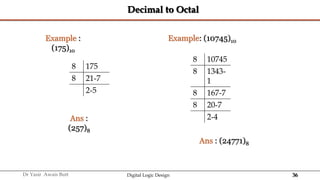
Decimal to Octal
8 175
8 21-7
2-5
Example :
(175)10
Ans :
(257)8
8 10745
8 1343-
1
8 167-7
8 20-7
2-4
Example: (10745)10
Ans : (24771)8
37
Dr Yasir Awais Butt Digital Logic Design
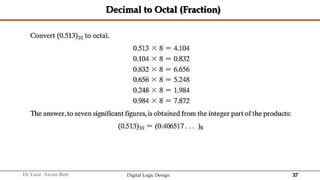
Decimal to Octal (Fraction)
38
Dr Yasir Awais Butt Digital Logic Design
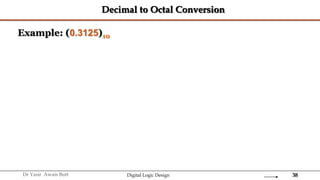
Decimal to Octal Conversion
Example: (0.3125)10
39
Dr Yasir Awais Butt Digital Logic Design
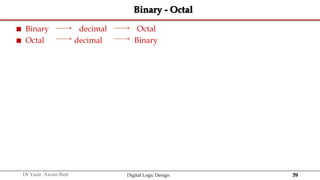
Binary - Octal
 Binary decimal Octal
 Octal decimal Binary
40
Dr Yasir Awais Butt Digital Logic Design
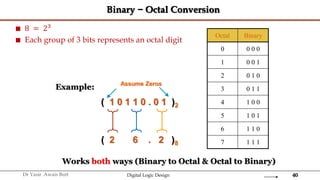
Binary − Octal Conversion
 8 = 23
 Each group of 3 bits represents an octal digit
Octal Binary
0 0 0 0
1 0 0 1
2 0 1 0
3 0 1 1
4 1 0 0
5 1 0 1
6 1 1 0
7 1 1 1
Example:
( 1 0 1 1 0 . 0 1 )2
( 2 6 . 2 )8
Assume Zeros
Works both ways (Binary to Octal & Octal to Binary)
41
Dr Yasir Awais Butt Digital Logic Design
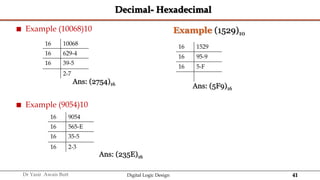
Decimal- Hexadecimal
 Example (10068)10
 Example (9054)10
16 10068
16 629-4
16 39-5
2-7
16 1529
16 95-9
16 5-F
16 9054
16 565-E
16 35-5
16 2-3
Ans: (2754)16
Ans: (5F9)16
Ans: (235E)16
Example (1529)10
42
Dr Yasir Awais Butt Digital Logic Design
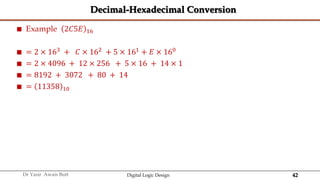
Decimal-Hexadecimal Conversion
 Example 2𝐶5𝐸 16
 = 2 × 163 + 𝐶 × 162 + 5 × 161 + 𝐸 × 160
 = 2 × 4096 + 12 × 256 + 5 × 16 + 14 × 1
 = 8192 + 3072 + 80 + 14
 = 11358 10
43
Dr Yasir Awais Butt Digital Logic Design
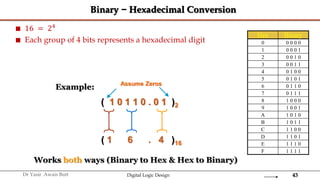
Binary − Hexadecimal Conversion
 16 = 24
 Each group of 4 bits represents a hexadecimal digit
Hex Binary
0 0 0 0 0
1 0 0 0 1
2 0 0 1 0
3 0 0 1 1
4 0 1 0 0
5 0 1 0 1
6 0 1 1 0
7 0 1 1 1
8 1 0 0 0
9 1 0 0 1
A 1 0 1 0
B 1 0 1 1
C 1 1 0 0
D 1 1 0 1
E 1 1 1 0
F 1 1 1 1
Example:
( 1 0 1 1 0 . 0 1 )2
( 1 6 . 4 )16
Assume Zeros
Works both ways (Binary to Hex & Hex to Binary)
44
Dr Yasir Awais Butt Digital Logic Design
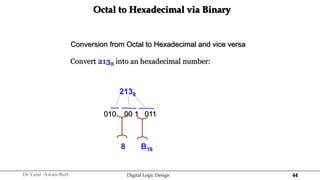
Octal to Hexadecimal via Binary
Conversion from Octal to Hexadecimal and vice versa
2138
010 00 1 011
8 B16
Convert 2138 into an hexadecimal number:
45
Dr Yasir Awais Butt Digital Logic Design
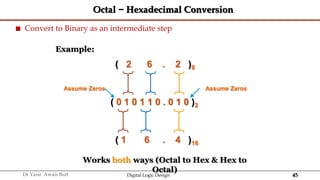
Octal − Hexadecimal Conversion
 Convert to Binary as an intermediate step
Example:
( 0 1 0 1 1 0 . 0 1 0 )2
( 1 6 . 4 )16
Assume Zeros
Works both ways (Octal to Hex & Hex to
Octal)
( 2 6 . 2 )8
Assume Zeros
46
Dr Yasir Awais Butt Digital Logic Design
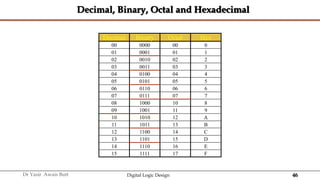
Decimal, Binary, Octal and Hexadecimal
Decimal Binary Octal Hex
00 0000 00 0
01 0001 01 1
02 0010 02 2
03 0011 03 3
04 0100 04 4
05 0101 05 5
06 0110 06 6
07 0111 07 7
08 1000 10 8
09 1001 11 9
10 1010 12 A
11 1011 13 B
12 1100 14 C
13 1101 15 D
14 1110 16 E
15 1111 17 F
47
Dr Yasir Awais Butt Digital Logic Design
1.5 BINARY ARITHMATIC
48
Dr Yasir Awais Butt Digital Logic Design
Arithmetic Addition
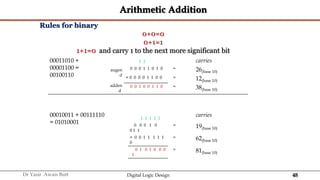
Rules for binary
0+0=0
0+1=1
1+1=0 and carry 1 to the next more significant bit
00011010 +
00001100 =
00100110
augen
d
adden
d
1 1 carries
0 0 0 1 1 0 1 0 = 26(base 10)
+ 0 0 0 0 1 1 0 0 = 12(base 10)
0 0 1 0 0 1 1 0 = 38(base 10)
00010011 + 00111110
= 01010001
1 1 1 1 1
carries
0 0 0 1 0
0 1 1
= 19(base 10)
+ 0 0 1 1 1 1 1
0
= 62(base 10)
0 1 0 1 0 0 0
1
= 81(base 10)
49
Dr Yasir Awais Butt Digital Logic Design
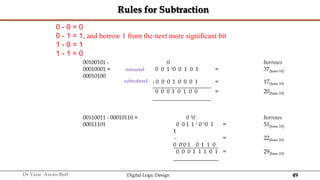
Rules for Subtraction
00100101 -
00010001 =
00010100
minuend
subtrahend
0 borrows
0 0 1 10 0 1 0 1 = 37(base 10)
- 0 0 0 1 0 0 0 1 = 17(base 10)
0 0 0 1 0 1 0 0 = 20(base 10)
00110011 - 00010110 =
00011101
0 10 borrows
0 0 1 1 1 0 10 1
1
= 51(base 10)
-
0 0 0 1 0 1 1 0
= 22(base 10)
0 0 0 1 1 1 0 1 = 29(base 10)
0 - 0 = 0
0 - 1 = 1, and borrow 1 from the next more significant bit
1 - 0 = 1
1 - 1 = 0
50
Dr Yasir Awais Butt Digital Logic Design
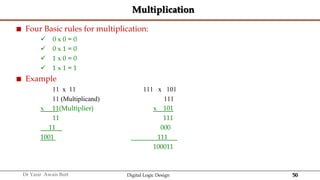
Multiplication
 Four Basic rules for multiplication:
 0 x 0 = 0
 0 x 1 = 0
 1 x 0 = 0
 1 x 1 = 1
 Example
11 x 11 111 x 101
11 (Multiplicand) 111
x 11(Multiplier) x 101
11 111
11 000
1001 111
100011
51
Dr Yasir Awais Butt Digital Logic Design
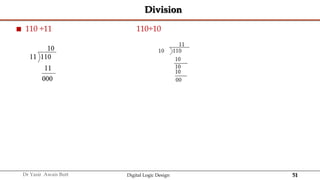
Division
 110 ÷11 110÷10

52
Dr Yasir Awais Butt Digital Logic Design
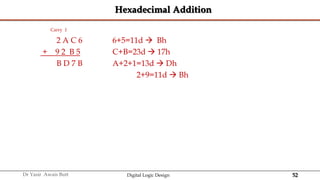
Hexadecimal Addition
Carry 1
2 A C 6 6+5=11d  Bh
+ 9 2 B 5 C+B=23d  17h
B D 7 B A+2+1=13d  Dh
2+9=11d  Bh
53
Dr Yasir Awais Butt Digital Logic Design
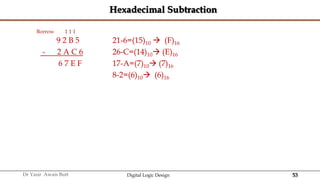
Hexadecimal Subtraction
Borrow 1 1 1
9 2 B 5 21-6=(15)10  (F)16
- 2 A C 6 26-C=(14)10 (E)16
6 7 E F 17-A=(7)10 (7)16
8-2=(6)10 (6)16
54
Dr Yasir Awais Butt Digital Logic Design
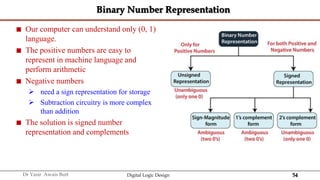
Binary Number Representation
 Our computer can understand only (0, 1)
language.
 The positive numbers are easy to
represent in machine language and
perform arithmetic
 Negative numbers
 need a sign representation for storage
 Subtraction circuitry is more complex
than addition
 The solution is signed number
representation and complements
55
Dr Yasir Awais Butt Digital Logic Design
Signed Binary Number Representation
 Sign-Magnitude form
 A binary number has a bit for a sign symbol.
 If this bit is set to 1, the number will be negative else the number will be positive if it is set
to 0. Apart from this sign-bit, the n-1 bits represent the magnitude of the number.
 1's Complement – Primarily used for subtraction
 Invert each bit of a number
 The negative numbers can also be represented in the form of 1's complement.
 In this form, the binary number also has an extra bit for sign representation as a sign-
magnitude form.
 2's Complement – Primarily used for subtraction
 Invert each bit of a number and add 1 to its least significant bit
 The negative numbers can also be represented in the form of 2's complement.
 In this form, the binary number also has an extra bit for sign representation as a sign-
magnitude form.
56
Dr Yasir Awais Butt Digital Logic Design
Complements
 Complementation in mathematics and computing is a technique for encoding symmetric
ranges of positive and negative integers in such a way that the same algorithm (or
mechanism) can be used for addition over the entire range
 For a given number of digits, half of the possible number representations encode
positive numbers and the other half represent their additive reciprocals.
 A pair of mutually additive reciprocals is called a complement.
 Therefore, subtraction of any number is implemented by adding its complement.
 A change of sign of any number is encoded by generating its complement.
 Among other things, it is used by most digital computers to perform subtraction,
represent negative numbers in base-2 or binary arithmetic, and test computations for
underflow and overflow.
57
Dr Yasir Awais Butt Digital Logic Design
Complements
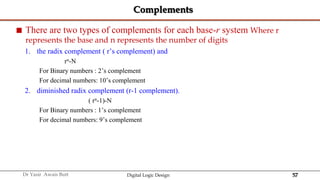
 There are two types of complements for each base-r system Where r
represents the base and n represents the number of digits
1. the radix complement ( r’s complement) and
rn-N
For Binary numbers : 2’s complement
For decimal numbers: 10’s complement
2. diminished radix complement (r-1 complement).
( rn-1)-N
For Binary numbers : 1’s complement
For decimal numbers: 9’s complement
58
Dr Yasir Awais Butt Digital Logic Design
r and (r-1)’s Complement with r = 2
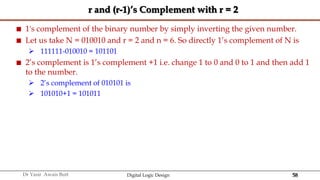
 1's complement of the binary number by simply inverting the given number.
 Let us take N = 010010 and r = 2 and n = 6. So directly 1’s complement of N is
 111111-010010 = 101101
 2’s complement is 1’s complement +1 i.e. change 1 to 0 and 0 to 1 and then add 1
to the number.
 2’s complement of 010101 is
 101010+1 = 101011
59
Dr Yasir Awais Butt Digital Logic Design
r and (r-1)’s Complement with r = 10
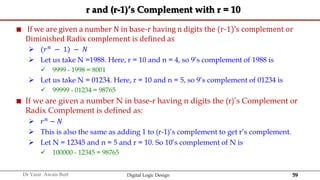
 If we are given a number N in base-r having n digits the (r-1)’s complement or
Diminished Radix complement is defined as
 (𝑟𝑛 − 1) − 𝑁
 Let us take N =1988. Here, r = 10 and n = 4, so 9’s complement of 1988 is
 9999 - 1998 = 8001
 Let us take N = 01234. Here, r = 10 and n = 5, so 9’s complement of 01234 is
 99999 - 01234 = 98765
 If we are given a number N in base-r having n digits the (r)’s Complement or
Radix Complement is defined as:
 𝑟𝑛
− 𝑁
 This is also the same as adding 1 to (r-1)’s complement to get r’s complement.
 Let N = 12345 and n = 5 and r = 10. So 10’s complement of N is
 100000 - 12345 = 98765
60
Dr Yasir Awais Butt Digital Logic Design
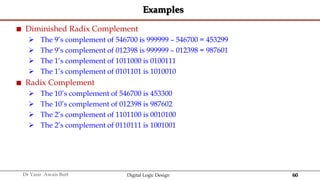
Examples
 Diminished Radix Complement
 The 9’s complement of 546700 is 999999 – 546700 = 453299
 The 9’s complement of 012398 is 999999 – 012398 = 987601
 The 1’s complement of 1011000 is 0100111
 The 1’s complement of 0101101 is 1010010
 Radix Complement
 The 10’s complement of 546700 is 453300
 The 10’s complement of 012398 is 987602
 The 2’s complement of 1101100 is 0010100
 The 2’s complement of 0110111 is 1001001
64
Dr Yasir Awais Butt Digital Logic Design
Complements
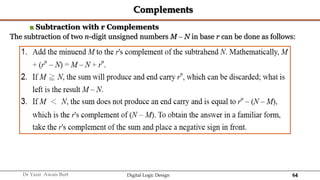
■ Subtraction with r Complements
The subtraction of two n-digit unsigned numbers M – N in base r can be done as follows:
65
Dr Yasir Awais Butt Digital Logic Design
Complements
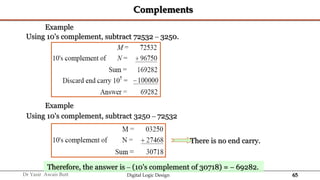
Example
Using 10's complement, subtract 72532 – 3250.
Example
Using 10's complement, subtract 3250 – 72532
There is no end carry.
Therefore, the answer is – (10's complement of 30718) =  69282.
66
Dr Yasir Awais Butt Digital Logic Design
Subtraction Using 2’s Complement
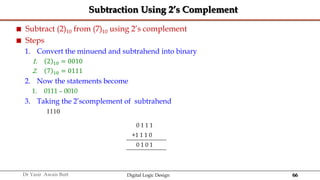
 Subtract (2)10 from (7)10 using 2’s complement
 Steps
1. Convert the minuend and subtrahend into binary
1. 2 10 = 0010
2. 7 10 = 0111
2. Now the statements become
1. 0111 – 0010
3. Taking the 2’scomplement of subtrahend
1110
0 1 1 1
+1 1 1 0
0 1 0 1
67
Dr Yasir Awais Butt Digital Logic Design
Complements
Example
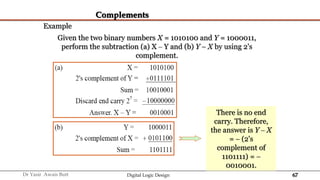
Given the two binary numbers X = 1010100 and Y = 1000011,
perform the subtraction (a) X – Y and (b) Y  X by using 2's
complement.
There is no end
carry. Therefore,
the answer is Y – X
=  (2's
complement of
1101111) = 
0010001.
68
Dr Yasir Awais Butt Digital Logic Design
Complements
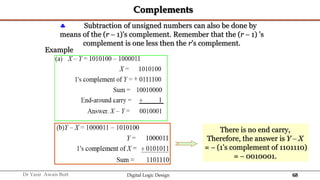
 Subtraction of unsigned numbers can also be done by
means of the (r  1)'s complement. Remember that the (r  1) 's
complement is one less then the r's complement.
Example
There is no end carry,
Therefore, the answer is Y – X
=  (1's complement of 1101110)
=  0010001.
69
Dr Yasir Awais Butt Digital Logic Design
1.6 SIGNED BINARY NUMBERS
70
Dr Yasir Awais Butt Digital Logic Design
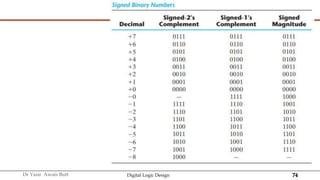
Signed Binary Numbers
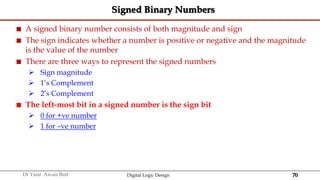
 A signed binary number consists of both magnitude and sign
 The sign indicates whether a number is positive or negative and the magnitude
is the value of the number
 There are three ways to represent the signed numbers
 Sign magnitude
 1’s Complement
 2’s Complement
 The left-most bit in a signed number is the sign bit
 0 for +ve number
 1 for –ve number
71
Dr Yasir Awais Butt Digital Logic Design
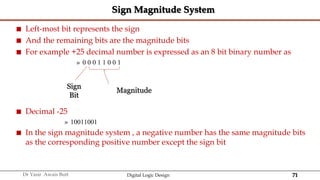
Sign Magnitude System
 Left-most bit represents the sign
 And the remaining bits are the magnitude bits
 For example +25 decimal number is expressed as an 8 bit binary number as
» 0 0 0 1 1 0 0 1
 Decimal -25
» 10011001
 In the sign magnitude system , a negative number has the same magnitude bits
as the corresponding positive number except the sign bit
Magnitude
Sign
Bit
72
Dr Yasir Awais Butt Digital Logic Design
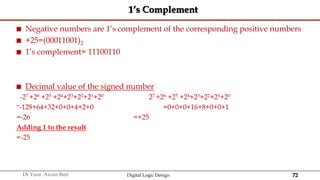
1’s Complement
 Negative numbers are 1’s complement of the corresponding positive numbers
 +25=(00011001)2
 1’s complement= 11100110
 Decimal value of the signed number
-27 +26 +25 +24+23+22+21+20 27 +26 +25 +24+23+22+21+20
=-128+64+32+0+0+4+2+0 =0+0+0+16+8+0+0+1
=-26 =+25
Adding 1 to the result
=-25
73
Dr Yasir Awais Butt Digital Logic Design
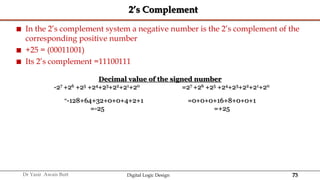
2’s Complement
 In the 2’s complement system a negative number is the 2’s complement of the
corresponding positive number
 +25 = (00011001)
 Its 2’s complement =11100111
Decimal value of the signed number
-27 +26 +25 +24+23+22+21+20 =27 +26 +25 +24+23+22+21+20
=-128+64+32+0+0+4+2+1 =0+0+0+16+8+0+0+1
=-25 =+25
74
Dr Yasir Awais Butt Digital Logic Design
75
Dr Yasir Awais Butt Digital Logic Design
Range of Signed Integer Numbers
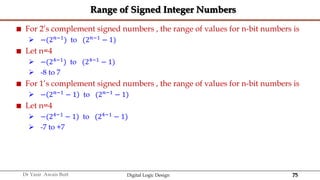
 For 2’s complement signed numbers , the range of values for n-bit numbers is
 −(2𝑛−1
) to (2𝑛−1
− 1)
 Let n=4
 −(24−1) to (24−1 − 1)
 -8 to 7
 For 1’s complement signed numbers , the range of values for n-bit numbers is
 − 2𝑛−1 − 1 to (2𝑛−1 − 1)
 Let n=4
 −(24−1 − 1) to (24−1 − 1)
 -7 to +7
76
Dr Yasir Awais Butt Digital Logic Design
Signed Binary Numbers
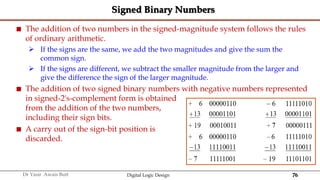
 The addition of two numbers in the signed-magnitude system follows the rules
of ordinary arithmetic.
 If the signs are the same, we add the two magnitudes and give the sum the
common sign.
 If the signs are different, we subtract the smaller magnitude from the larger and
give the difference the sign of the larger magnitude.
 The addition of two signed binary numbers with negative numbers represented
in signed-2's-complement form is obtained
from the addition of the two numbers,
including their sign bits.
 A carry out of the sign-bit position is
discarded.
77
Dr Yasir Awais Butt Digital Logic Design
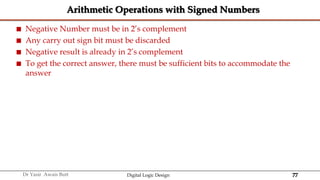
Arithmetic Operations with Signed Numbers
 Negative Number must be in 2’s complement
 Any carry out sign bit must be discarded
 Negative result is already in 2’s complement
 To get the correct answer, there must be sufficient bits to accommodate the
answer
78
Dr Yasir Awais Butt Digital Logic Design
Overflow
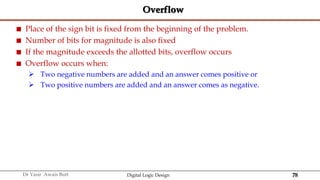
 Place of the sign bit is fixed from the beginning of the problem.
 Number of bits for magnitude is also fixed
 If the magnitude exceeds the allotted bits, overflow occurs
 Overflow occurs when:
 Two negative numbers are added and an answer comes positive or
 Two positive numbers are added and an answer comes as negative.
79
Dr Yasir Awais Butt Digital Logic Design
Overflow Example
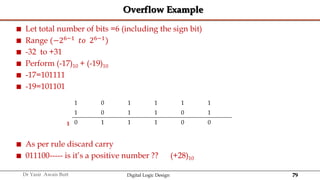
 Let total number of bits =6 (including the sign bit)
 Range (−26−1 𝑡𝑜 26−1)
 -32 to +31
 Perform (-17)10 + (-19)10
 -17=101111
 -19=101101
 As per rule discard carry
 011100----- is it’s a positive number ?? (+28)10
1 0 1 1 1 1
1 0 1 1 0 1
0 1 1 1 0 0
1
80
Dr Yasir Awais Butt Digital Logic Design
Overflow Example
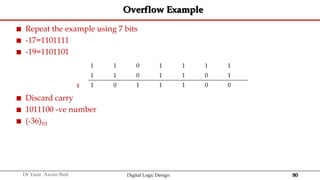
 Repeat the example using 7 bits
 -17=1101111
 -19=1101101
 Discard carry
 1011100 -ve number
 (-36)10
1 1 0 1 1 1 1
1 1 0 1 1 0 1
1 0 1 1 1 0 0
1
81
Dr Yasir Awais Butt Digital Logic Design
Overflow Detection
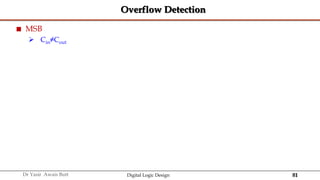
 MSB
 Cin≠Cout
82
Dr Yasir Awais Butt Digital Logic Design
BCD
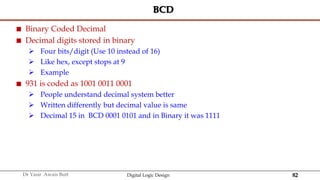
 Binary Coded Decimal
 Decimal digits stored in binary
 Four bits/digit (Use 10 instead of 16)
 Like hex, except stops at 9
 Example
 931 is coded as 1001 0011 0001
 People understand decimal system better
 Written differently but decimal value is same
 Decimal 15 in BCD 0001 0101 and in Binary it was 1111
83
Dr Yasir Awais Butt Digital Logic Design
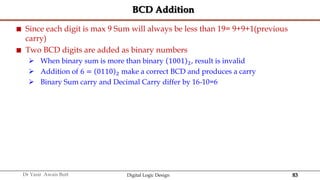
BCD Addition
 Since each digit is max 9 Sum will always be less than 19= 9+9+1(previous
carry)
 Two BCD digits are added as binary numbers
 When binary sum is more than binary 1001 2, result is invalid
 Addition of 6 = 0110 2 make a correct BCD and produces a carry
 Binary Sum carry and Decimal Carry differ by 16-10=6
84
Dr Yasir Awais Butt Digital Logic Design
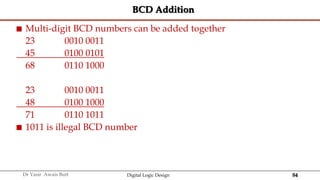
BCD Addition
 Multi-digit BCD numbers can be added together
23 0010 0011
45 0100 0101
68 0110 1000
23 0010 0011
48 0100 1000
71 0110 1011
 1011 is illegal BCD number
85
Dr Yasir Awais Butt Digital Logic Design
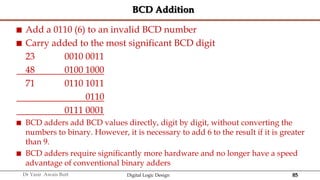
BCD Addition
 Add a 0110 (6) to an invalid BCD number
 Carry added to the most significant BCD digit
23 0010 0011
48 0100 1000
71 0110 1011
0110
0111 0001
 BCD adders add BCD values directly, digit by digit, without converting the
numbers to binary. However, it is necessary to add 6 to the result if it is greater
than 9.
 BCD adders require significantly more hardware and no longer have a speed
advantage of conventional binary adders
86
Dr Yasir Awais Butt Digital Logic Design
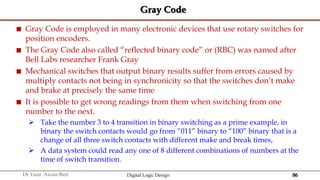
Gray Code
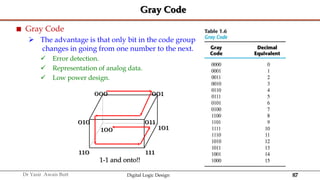
 Gray Code is employed in many electronic devices that use rotary switches for
position encoders.
 The Gray Code also called “reflected binary code” or (RBC) was named after
Bell Labs researcher Frank Gray
 Mechanical switches that output binary results suffer from errors caused by
multiply contacts not being in synchronicity so that the switches don’t make
and brake at precisely the same time
 It is possible to get wrong readings from them when switching from one
number to the next.
 Take the number 3 to 4 transition in binary switching as a prime example, in
binary the switch contacts would go from “011” binary to “100” binary that is a
change of all three switch contacts with different make and break times,
 A data system could read any one of 8 different combinations of numbers at the
time of switch transition.
87
Dr Yasir Awais Butt Digital Logic Design
Gray Code
 Gray Code
 The advantage is that only bit in the code group
changes in going from one number to the next.
 Error detection.
 Representation of analog data.
 Low power design.
000 001
010
100
110 111
101
011
1-1 and onto!!
88
Dr Yasir Awais Butt Digital Logic Design
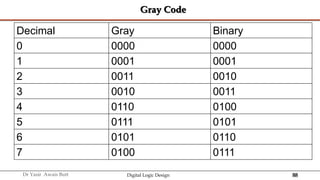
Gray Code
Decimal Gray Binary
0 0000 0000
1 0001 0001
2 0011 0010
3 0010 0011
4 0110 0100
5 0111 0101
6 0101 0110
7 0100 0111
90
Dr Yasir Awais Butt Digital Logic Design
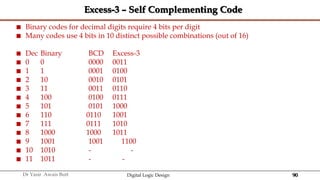
Excess-3 – Self Complementing Code
 Binary codes for decimal digits require 4 bits per digit
 Many codes use 4 bits in 10 distinct possible combinations (out of 16)
 Dec Binary BCD Excess-3
 0 0 0000 0011
 1 1 0001 0100
 2 10 0010 0101
 3 11 0011 0110
 4 100 0100 0111
 5 101 0101 1000
 6 110 0110 1001
 7 111 0111 1010
 8 1000 1000 1011
 9 1001 1001 1100
 10 1010 - -
 11 1011 - -
91
Dr Yasir Awais Butt Digital Logic Design
ALPHANUMERIC CODES - ASCII Character Codes
 American Standard Code for Information Interchange
 This code is a popular code used to represent information sent as character-
based data. It uses 7-bits to represent:
 94 Graphic printing characters.
 34 Non-printing characters
 Some non-printing characters are used for text format (e.g. BS = Backspace, CR
= carriage return)
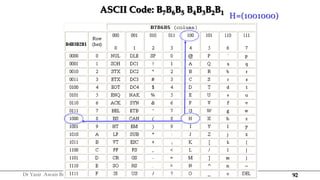
92
Dr Yasir Awais Butt Digital Logic Design
ASCII Code: B7B6B5 B4B3B2B1
H=(1001000)
93
Dr Yasir Awais Butt Digital Logic Design
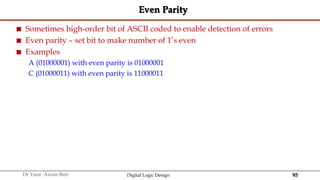
Even Parity
 Sometimes high-order bit of ASCII coded to enable detection of errors
 Even parity – set bit to make number of 1’s even
 Examples
A (01000001) with even parity is 01000001
C (01000011) with even parity is 11000011
94
Dr Yasir Awais Butt Digital Logic Design
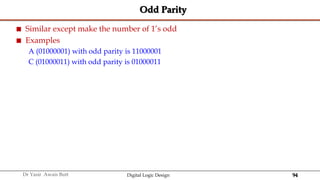
Odd Parity
 Similar except make the number of 1’s odd
 Examples
A (01000001) with odd parity is 11000001
C (01000011) with odd parity is 01000011
95
Dr Yasir Awais Butt Digital Logic Design
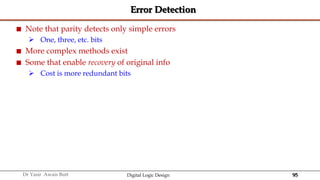
Error Detection
 Note that parity detects only simple errors
 One, three, etc. bits
 More complex methods exist
 Some that enable recovery of original info
 Cost is more redundant bits
96
Dr Yasir Awais Butt Digital Logic Design
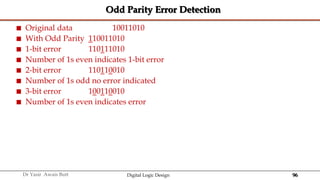
Odd Parity Error Detection
 Original data 10011010
 With Odd Parity 110011010
 1-bit error 110111010
 Number of 1s even indicates 1-bit error
 2-bit error 110110010
 Number of 1s odd no error indicated
 3-bit error 100110010
 Number of 1s even indicates error
97
Dr Yasir Awais Butt Digital Logic Design
1.8 BINARY STORAGE AND REGISTERS
98
Dr Yasir Awais Butt Digital Logic Design
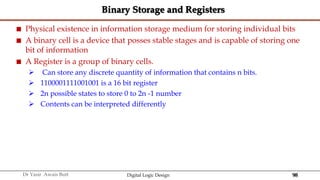
Binary Storage and Registers
 Physical existence in information storage medium for storing individual bits
 A binary cell is a device that posses stable stages and is capable of storing one
bit of information
 A Register is a group of binary cells.
 Can store any discrete quantity of information that contains n bits.
 1100001111001001 is a 16 bit register
 2n possible states to store 0 to 2n -1 number
 Contents can be interpreted differently
99
Dr Yasir Awais Butt Digital Logic Design
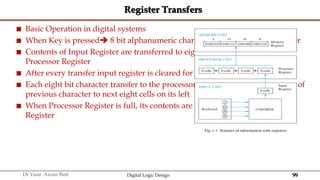
Register Transfers
 Basic Operation in digital systems
 When Key is pressed 8 bit alphanumeric character code in to Input Register
 Contents of Input Register are transferred to eight least significant cells of a
Processor Register
 After every transfer input register is cleared for new keystroke
 Each eight bit character transfer to the processor register is preceded by shift of
previous character to next eight cells on its left
 When Processor Register is full, its contents are transferred to the Memory
Register
100
Dr Yasir Awais Butt Digital Logic Design
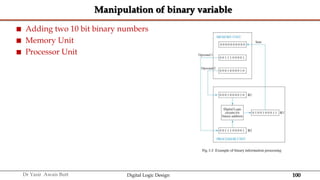
Manipulation of binary variable
 Adding two 10 bit binary numbers
 Memory Unit
 Processor Unit
101
Dr Yasir Awais Butt Digital Logic Design
1.9 Binary Logic
 Definition of Binary Logic
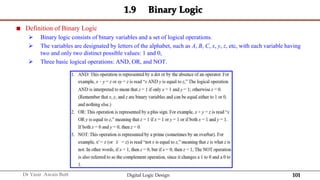
 Binary logic consists of binary variables and a set of logical operations.
 The variables are designated by letters of the alphabet, such as A, B, C, x, y, z, etc, with each variable having
two and only two distinct possible values: 1 and 0,
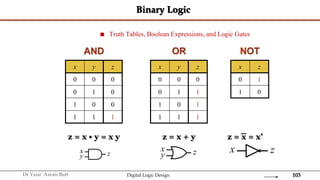
 Three basic logical operations: AND, OR, and NOT.
102
Dr Yasir Awais Butt Digital Logic Design
1.9 BINARY LOGIC
103
Dr Yasir Awais Butt Digital Logic Design
Binary Logic
x
y z
 Truth Tables, Boolean Expressions, and Logic Gates
x y z
0 0 0
0 1 0
1 0 0
1 1 1
x y z
0 0 0
0 1 1
1 0 1
1 1 1
x z
0 1
1 0
AND OR NOT
x
y z
z = x • y = x y z = x + y z = x = x’
x z
104
Dr Yasir Awais Butt Digital Logic Design
‫ه‬‫للا‬ ‫جزاك‬
https://drive.google.com/drive/folders/15yKbWIADv2-
9j7CPvBNVoeU53ncASLYH?usp=sharing

Chap01 - Number Systems in Digital Logic.pptx

  • 1.
    1 Dr Yasir AwaisButt Digital Logic Design DIGITAL SYSTEMS AND BINARY NUMBERS Chapter 1
  • 2.
    2 Dr Yasir AwaisButt Digital Logic Design System  The term system comes from the Latin word systēma, "whole concept made of several parts or members, system", literary "composition“  A system is a set of related components that work as a whole to achieve a goal.  Mathematically, a system is a function that  Takes input – Variable or signal 𝑥  Applies transformation – Function 𝑓  Gives output – Variable or signal 𝑦 = 𝑓(𝑥)  For example a ball thrown in the air vs a rocket launched in the air are both examples of systems
  • 3.
    3 Dr Yasir AwaisButt Digital Logic Design Types of Variables
  • 4.
    4 Dr Yasir AwaisButt Digital Logic Design Continuous vs Discrete Variable  A continuous variable is a type of quantitative variable consisting of numerical values that can be measured but not counted, because there are infinitely many values between 1 measurement and another.  A discrete variable is a type of quantitative variable consisting of numerical values that can be measured and counted, because these values are separate or distinct.  In practice, all continuous variables are discrete!
  • 5.
    5 Dr Yasir AwaisButt Digital Logic Design Analog, Discrete, Mixed, Digital Signals continuous time continuous value continuous time discrete value Digital Signal Mixed Mixed
  • 6.
    6 Dr Yasir AwaisButt Digital Logic Design Digital Signal continuous time discrete value
  • 7.
    7 Dr Yasir AwaisButt Digital Logic Design Analog, Discrete, Mixed, Digital Systems  Given an input/ output pair of signals for a system, there are four types of combinations:  (1) Continuous 𝑥 and continuous 𝑓(𝑥)  This is the most common analog system.  (2) Continuous 𝑥 and discrete 𝑓(𝑥)  Mixed System – (Digital System)  Example –Baseband modulation in digital communication, ADCs  (3) Discrete 𝑥 and continuous 𝑓(𝑥)  Mixed system  The output of the CCD sensor.  (4) Discrete 𝑥 and discrete 𝑓(𝑥)  This is the digital system  Computers are the prime examples
  • 8.
    8 Dr Yasir AwaisButt Digital Logic Design Digital Systems  Digital systems are designed to store, process, and communicate information in digital form  A digital system refers to a system that processes, stores, and communicates information using digital signals.
  • 9.
    9 Dr Yasir AwaisButt Digital Logic Design Digital Systems  Digital System play a prominent role in this digital age  Communication, medical treatment, internet, DVD, CD, etc…  Digital Computer follow a sequence of instructions, called programs, that operate on given data  User can specify and change program or data according to needs  Digital Systems have the ability to Manipulate discrete elements of information.  Any set that is restricted to a finite number of elements contains discrete information  10 Decimal digits  26 Alphabet letters  52 Playing cards  64 squares of a chessboard Lec 1
  • 10.
    10 Dr Yasir AwaisButt Digital Logic Design Merits of Digital Systems  Occupy minimum space  Most digital devices are programmable  Accuracy  Cost reduction  Efficient Processing & Data Storage  Efficient & Reliable Transmission  Detection and Correction of Errors  Precise & Accurate Reproduction  Easy Design and Implementation
  • 11.
    11 Dr Yasir AwaisButt Digital Logic Design Digital Systems  A Digital System is interconnection of digital modules  To understand Digital module, we need to know about digital circuits and their logical functions  Hardware Description Language (HDL) is a programming language that is suitable for describing digital circuit in a textual form  Simulate a digital system to verify operation before it is built
  • 12.
    12 Dr Yasir AwaisButt Digital Logic Design Logic Gates  Logic gates are the building blocks of the digital circuits  AND, OR and NOT Gates  NAND, NOR, XOR and XNOR Gates  Integrated Circuits (ICs) Inverter AND OR
  • 13.
    13 Dr Yasir AwaisButt Digital Logic Design Circuit Diagram Lec 1
  • 14.
    14 Dr Yasir AwaisButt Digital Logic Design 1.2 BINARY NUMBER SYSTEM
  • 15.
    15 Dr Yasir AwaisButt Digital Logic Design Definition  A Number system is a system of mathematical notation for representing numbers of a given set, using digits or other symbols.  Example  Roman number system – Symbolic System  decimal system – numbers 0-9  The first recorded zero appeared in Mesopotamia around 3 B.C.  The Mayans invented it independently circa 4 A.D.  It was later devised in India in the mid-fifth century, spread to Cambodia near the end of the seventh century, and into China and the Islamic countries at the end of the eighth.  Indian Claim - The first modern equivalent of the numeral zero comes from a Hindu astronomer and mathematician Brahmagupta in 628  Numbers of distinct symbols is known as radix or base denoted as 𝑟  In decimal system base is 10
  • 16.
    16 Dr Yasir AwaisButt Digital Logic Design Place Value System  Also called Positional Numeral System  Place value is the basis of our entire number system.  The position of a digit in a number determines its value.  The number 42,316 is different from 61,432 because the digits are in different positions
  • 17.
    17 Dr Yasir AwaisButt Digital Logic Design Place Value System Characteristics  A general number may be written as 𝑎𝑛 … 𝑎3𝑎2𝑎1𝑎0. 𝑎−1𝑎−2𝑎−3 … 𝑎−𝑚 is interpreted as  𝑎𝑛𝑟𝑛 + 𝑎𝑛−1𝑟𝑛−1 + ⋯ + 𝑎3𝑟3 + 𝑎2𝑟2 + 𝑎1𝑟 +𝑎0 𝑟0 + 𝑎−1𝑟−1 + 𝑎−2𝑟−2 𝑎−3𝑟−3 + ⋯ + 𝑎−𝑚𝑟−𝑚  𝑎𝑗 are a series of coefficients weighted by exponents of the radix 𝑟  Significance of Radix 𝑟  There are (0,1,2 … , 𝑟 − 1) unique symbols in the number system  means that the coefficients 𝑎𝑗 are weighted by powers of 𝑟  that the 𝑎𝑗 coefficients are any of the digits (0,1,2 … , 𝑟 − 1)  We will analyze all number systems on this basic criterion
  • 18.
    18 Dr Yasir AwaisButt Digital Logic Design Decimal Number System  Radix 𝑟 =?  Unique symbols?  Are all numbers writtend as: 𝑎𝑛 … 𝑎3𝑎2𝑎1𝑎0. 𝑎−1𝑎−2𝑎−3 … 𝑎−𝑚?  Does it mean 𝑎𝑛 … 𝑎3𝑎2𝑎1𝑎0. 𝑎−1𝑎−2𝑎−3 … 𝑎−𝑚 = 𝑎𝑛𝑟𝑛 + 𝑎𝑛−1𝑟𝑛−1 + ⋯ + 𝑎3𝑟3 + 𝑎2𝑟2 + 𝑎1𝑟 +𝑎0 𝑟0 + 𝑎−1𝑟−1 + 𝑎−2𝑟−2 𝑎−3𝑟−3 + ⋯ + 𝑎−𝑚𝑟−𝑚  Does it means that the coefficients 𝑎𝑗 are weighted by powers of 𝑟  Are the 𝑎𝑗 coefficients are any of the digits (0,1,2 … , 𝑟 − 1)
  • 19.
    19 Dr Yasir AwaisButt Digital Logic Design Decimal Number System - Example  7392 10 = 7 × 10³ + 3x10² + 9 × 101 + 2 × 100  Position of each digit in a decimal number indicates the magnitude of the quantity represented and assigned a weight.  The weights of the whole numbers are positive powers of 10 that increase form left to right starting with 100 = 1  For fractional numbers the weights are negative powers of 10 that decrease form left to right
  • 20.
    20 Dr Yasir AwaisButt Digital Logic Design Examples  90136 10  600942 10
  • 21.
    21 Dr Yasir AwaisButt Digital Logic Design Fractions in Decimal System  26.75 10 =2 × 101 + 6 × 100 + 7 × 10⁻¹ + 5 × 10⁻²  =2x10 + 6x1+ 7/10 + 5/100  =20+6+0.7+0.05  =26+0.75  =26.75
  • 22.
    22 Dr Yasir AwaisButt Digital Logic Design Digital Systems and Binary Numbers  Digitization got its start as far back as 1679 when Gottfried Wilhelm Leibniz developed the first-ever binary system  He then authored a remarkable and well-crafted book known as the Explanation of Binary Systems in 1703 to help other people understand the binary system  In 1847, Boolean algebra was introduced by George Boole.  This unique algebra was used in the mathematical analysis of and has played a massive role in discovering mathematical logic used in digitization today.  Claude Shannon, an MIT tech student, compiled his master’s thesis that exhaustively centered on developing and using digital circuits.  Shannon studied Boolean algebra law, which he incorporated to show how digital circuits can be made and used in the telecommunication industry.
  • 23.
    23 Dr Yasir AwaisButt Digital Logic Design Digital Systems and Binary Numbers  The advantage of the binary system is that it can be used to represent numbers in systems which are capable of being in two mutually exclusive states.  The Frenchman Raymond Louis André Valtat from Paris patented in 1932 in Germany a calculator that worked on the binary system.  In his paper he advocated the usage of the binary system in a calculating apparatus in comparison to the decimal system, for instance that the computation of a square root is especially simple in this system.  In 1936 Alan Turing designed an electromechanical multiplier.  In 1938, the American George Stibitz built an binary adder using electromechanical relays.  In 1946 A. W. Burks, H. H. Goldstine and J. von Neumann published a memorandum in which they advocated abandoning the decimal representation in favor of the binary system.
  • 24.
    24 Dr Yasir AwaisButt Digital Logic Design Binary Number  Digital Systems manipulate discrete quantities of information in binary form  Strings of binary digits (“bits”)  Two possible values 0 and 1 which represent Two States  On/Off  Black/White  Hot/Cold  Stationary/Moving  Combination of 0v & 5v +5 V –5 1 0 1 Time
  • 25.
    25 Dr Yasir AwaisButt Digital Logic Design Binary Number System  Each digit represents a power of 2  Coefficient have two possible values 0 and 1  𝑛 bits can store numbers from 0 to 2𝑛−1  If 𝑛=5  =25−1  =32 − 1  =31  𝑛 bits can store 2𝑛 distinct combinations( permutations to be exact) of 1’s and 0’s  Each coefficient 𝑎𝑗 is multiplied by 2𝑗  So 101 binary is  1 x 22 + 0 x 21 + 1 x 20  Or  1 x 4 + 0 x 2 + 1 x 1 = 5
  • 26.
    26 Dr Yasir AwaisButt Digital Logic Design Binary Numbers  Each digit represents a power of 2  Coefficient have two possible values 0 and 1  𝑛 bits can store numbers from 0 to 2𝑛−1  If 𝑛=5  =25−1  =32 − 1  =31  𝑛 bits can store 2𝑛 distinct combinations( permutations to be exact) of 1’s and 0’s  Each coefficient aj is multiplied by 2𝑗  So 101 2 binary is  1 × 22 + 0 × 21 + 1 × 20  Or  1 × 4 + 0 × 2 + 1 × 1 = 5 10
  • 27.
    27 Dr Yasir AwaisButt Digital Logic Design 1.3 NUMBER BASE CONVERSIONS
  • 28.
    28 Dr Yasir AwaisButt Digital Logic Design Number Base Conversions  Representations of a number in a different radix are said to be equivalent if they have the same decimal representation.  For example, 0011 8 and 1001 2 are equivalent—both have decimal value 9.  The conversion of a number in base 𝑟 to decimal is done by expanding the number in a power series and adding all the terms as shown previously.  We now present a general procedure for the reverse operation of converting a decimal number to a number in base 𝑟.  If the number includes a radix point, it is necessary to separate the number into an integer part and a fraction part, since each part must be converted differently
  • 29.
    29 Dr Yasir AwaisButt Digital Logic Design Binary  Decimal Example 1 0 0 1 1 1 0 0 7 6 5 4 3 2 1 0 27 26 25 24 23 22 21 20 128 64 32 16 8 4 2 1 128 + 0 + 0 + 16 + 8 + 4 + 0 + 0 = 156 What is 10011100 in decimal?
  • 30.
    30 Dr Yasir AwaisButt Digital Logic Design Binary  Decimal Example 1 0 0 1 1 1 0 0 Lec 1 4 3 2 1 0 -1 -2 -3 24 23 22 21 20 2-1 2-2 2-3 16 8 4 2 1 1/2 1/4 1/8 16 + 0 + 0 + 2 + 1 + 0.5 + 0 + 0 = 19.5 What is 10011.100 in decimal?
  • 31.
    31 Dr Yasir AwaisButt Digital Logic Design Decimal to Binary  Long Division Method  19 10 = ? 2 45 10 = ? 2 2 19 2 9-1 2 4-1 2 2-0 1-0 (10011)2
  • 32.
    32 Dr Yasir AwaisButt Digital Logic Design Decimal(Fractional)  Binary (Fraction)  Convert decimal 0.6875 to binary  IntegerFraction Coefficient  0.6875 x 2= 1.3750 0.3750 𝑎−1 = 1  0.3750 x 2= 0.7500 0.7500 𝑎−2 = 0  0.7500 x 2= 1.5000 0.5000 𝑎−3 = 1  0.5000 x 2= 1.0000 0.0000 𝑎−4 = 1  0.6875 10 = 0.1011 2
  • 33.
    33 Dr Yasir AwaisButt Digital Logic Design RULES  Begin with the decimal fraction and multiply by 2. The whole number part of the result is the first binary digit to the right of the decimal point.  .625 x 2 = 1.25, the first binary digit to the right of the point is 1.  Next discard the whole number part of the previous result (the 1 in this case) and multiply by 2 once again. The whole number part of this new result is the second binary digit to the right of the point.  .25 x 2 = 0.50, the 2nd binary digit to the right of the point is 0.  Continue this process until we get a zero as our decimal part or until we recognize an infinite repeating pattern.  0.50 x 2=1.00, 3rd digit to the right of decimal point is 1. Now the fractional part becomes zero so algorithm will stop here.  (0.625)10= (0.101)2
  • 34.
    34 Dr Yasir AwaisButt Digital Logic Design (834.153)10 -------> Binary 2 834 2 417-0 2 208-1 2 104-0 2 52-0 2 26-0 2 13-0 2 6-1 2 3-0 2 1-1 0.153 x 2=0.306 0 0.306 x 2=0.612 0 0.612 x 2=1.224 1 0.224 x 2=0.448 0 0.448 x 2=0.896 0 0.896 x 2=1.792 1 0.792 x 2=1.584 1 0.584 x 2=1.168 1 0.168 x 2=0.336 0 0.336 x 2=0.672 0 (1101000010.0010011100)2
  • 35.
    35 Dr Yasir AwaisButt Digital Logic Design 1.4 OCTAL/ HEXADECIMAL SYSTEMS
  • 36.
    36 Dr Yasir AwaisButt Digital Logic Design Decimal to Octal 8 175 8 21-7 2-5 Example : (175)10 Ans : (257)8 8 10745 8 1343- 1 8 167-7 8 20-7 2-4 Example: (10745)10 Ans : (24771)8
  • 37.
    37 Dr Yasir AwaisButt Digital Logic Design Decimal to Octal (Fraction)
  • 38.
    38 Dr Yasir AwaisButt Digital Logic Design Decimal to Octal Conversion Example: (0.3125)10
  • 39.
    39 Dr Yasir AwaisButt Digital Logic Design Binary - Octal  Binary decimal Octal  Octal decimal Binary
  • 40.
    40 Dr Yasir AwaisButt Digital Logic Design Binary − Octal Conversion  8 = 23  Each group of 3 bits represents an octal digit Octal Binary 0 0 0 0 1 0 0 1 2 0 1 0 3 0 1 1 4 1 0 0 5 1 0 1 6 1 1 0 7 1 1 1 Example: ( 1 0 1 1 0 . 0 1 )2 ( 2 6 . 2 )8 Assume Zeros Works both ways (Binary to Octal & Octal to Binary)
  • 41.
    41 Dr Yasir AwaisButt Digital Logic Design Decimal- Hexadecimal  Example (10068)10  Example (9054)10 16 10068 16 629-4 16 39-5 2-7 16 1529 16 95-9 16 5-F 16 9054 16 565-E 16 35-5 16 2-3 Ans: (2754)16 Ans: (5F9)16 Ans: (235E)16 Example (1529)10
  • 42.
    42 Dr Yasir AwaisButt Digital Logic Design Decimal-Hexadecimal Conversion  Example 2𝐶5𝐸 16  = 2 × 163 + 𝐶 × 162 + 5 × 161 + 𝐸 × 160  = 2 × 4096 + 12 × 256 + 5 × 16 + 14 × 1  = 8192 + 3072 + 80 + 14  = 11358 10
  • 43.
    43 Dr Yasir AwaisButt Digital Logic Design Binary − Hexadecimal Conversion  16 = 24  Each group of 4 bits represents a hexadecimal digit Hex Binary 0 0 0 0 0 1 0 0 0 1 2 0 0 1 0 3 0 0 1 1 4 0 1 0 0 5 0 1 0 1 6 0 1 1 0 7 0 1 1 1 8 1 0 0 0 9 1 0 0 1 A 1 0 1 0 B 1 0 1 1 C 1 1 0 0 D 1 1 0 1 E 1 1 1 0 F 1 1 1 1 Example: ( 1 0 1 1 0 . 0 1 )2 ( 1 6 . 4 )16 Assume Zeros Works both ways (Binary to Hex & Hex to Binary)
  • 44.
    44 Dr Yasir AwaisButt Digital Logic Design Octal to Hexadecimal via Binary Conversion from Octal to Hexadecimal and vice versa 2138 010 00 1 011 8 B16 Convert 2138 into an hexadecimal number:
  • 45.
    45 Dr Yasir AwaisButt Digital Logic Design Octal − Hexadecimal Conversion  Convert to Binary as an intermediate step Example: ( 0 1 0 1 1 0 . 0 1 0 )2 ( 1 6 . 4 )16 Assume Zeros Works both ways (Octal to Hex & Hex to Octal) ( 2 6 . 2 )8 Assume Zeros
  • 46.
    46 Dr Yasir AwaisButt Digital Logic Design Decimal, Binary, Octal and Hexadecimal Decimal Binary Octal Hex 00 0000 00 0 01 0001 01 1 02 0010 02 2 03 0011 03 3 04 0100 04 4 05 0101 05 5 06 0110 06 6 07 0111 07 7 08 1000 10 8 09 1001 11 9 10 1010 12 A 11 1011 13 B 12 1100 14 C 13 1101 15 D 14 1110 16 E 15 1111 17 F
  • 47.
    47 Dr Yasir AwaisButt Digital Logic Design 1.5 BINARY ARITHMATIC
  • 48.
    48 Dr Yasir AwaisButt Digital Logic Design Arithmetic Addition Rules for binary 0+0=0 0+1=1 1+1=0 and carry 1 to the next more significant bit 00011010 + 00001100 = 00100110 augen d adden d 1 1 carries 0 0 0 1 1 0 1 0 = 26(base 10) + 0 0 0 0 1 1 0 0 = 12(base 10) 0 0 1 0 0 1 1 0 = 38(base 10) 00010011 + 00111110 = 01010001 1 1 1 1 1 carries 0 0 0 1 0 0 1 1 = 19(base 10) + 0 0 1 1 1 1 1 0 = 62(base 10) 0 1 0 1 0 0 0 1 = 81(base 10)
  • 49.
    49 Dr Yasir AwaisButt Digital Logic Design Rules for Subtraction 00100101 - 00010001 = 00010100 minuend subtrahend 0 borrows 0 0 1 10 0 1 0 1 = 37(base 10) - 0 0 0 1 0 0 0 1 = 17(base 10) 0 0 0 1 0 1 0 0 = 20(base 10) 00110011 - 00010110 = 00011101 0 10 borrows 0 0 1 1 1 0 10 1 1 = 51(base 10) - 0 0 0 1 0 1 1 0 = 22(base 10) 0 0 0 1 1 1 0 1 = 29(base 10) 0 - 0 = 0 0 - 1 = 1, and borrow 1 from the next more significant bit 1 - 0 = 1 1 - 1 = 0
  • 50.
    50 Dr Yasir AwaisButt Digital Logic Design Multiplication  Four Basic rules for multiplication:  0 x 0 = 0  0 x 1 = 0  1 x 0 = 0  1 x 1 = 1  Example 11 x 11 111 x 101 11 (Multiplicand) 111 x 11(Multiplier) x 101 11 111 11 000 1001 111 100011
  • 51.
    51 Dr Yasir AwaisButt Digital Logic Design Division  110 ÷11 110÷10 
  • 52.
    52 Dr Yasir AwaisButt Digital Logic Design Hexadecimal Addition Carry 1 2 A C 6 6+5=11d  Bh + 9 2 B 5 C+B=23d  17h B D 7 B A+2+1=13d  Dh 2+9=11d  Bh
  • 53.
    53 Dr Yasir AwaisButt Digital Logic Design Hexadecimal Subtraction Borrow 1 1 1 9 2 B 5 21-6=(15)10  (F)16 - 2 A C 6 26-C=(14)10 (E)16 6 7 E F 17-A=(7)10 (7)16 8-2=(6)10 (6)16
  • 54.
    54 Dr Yasir AwaisButt Digital Logic Design Binary Number Representation  Our computer can understand only (0, 1) language.  The positive numbers are easy to represent in machine language and perform arithmetic  Negative numbers  need a sign representation for storage  Subtraction circuitry is more complex than addition  The solution is signed number representation and complements
  • 55.
    55 Dr Yasir AwaisButt Digital Logic Design Signed Binary Number Representation  Sign-Magnitude form  A binary number has a bit for a sign symbol.  If this bit is set to 1, the number will be negative else the number will be positive if it is set to 0. Apart from this sign-bit, the n-1 bits represent the magnitude of the number.  1's Complement – Primarily used for subtraction  Invert each bit of a number  The negative numbers can also be represented in the form of 1's complement.  In this form, the binary number also has an extra bit for sign representation as a sign- magnitude form.  2's Complement – Primarily used for subtraction  Invert each bit of a number and add 1 to its least significant bit  The negative numbers can also be represented in the form of 2's complement.  In this form, the binary number also has an extra bit for sign representation as a sign- magnitude form.
  • 56.
    56 Dr Yasir AwaisButt Digital Logic Design Complements  Complementation in mathematics and computing is a technique for encoding symmetric ranges of positive and negative integers in such a way that the same algorithm (or mechanism) can be used for addition over the entire range  For a given number of digits, half of the possible number representations encode positive numbers and the other half represent their additive reciprocals.  A pair of mutually additive reciprocals is called a complement.  Therefore, subtraction of any number is implemented by adding its complement.  A change of sign of any number is encoded by generating its complement.  Among other things, it is used by most digital computers to perform subtraction, represent negative numbers in base-2 or binary arithmetic, and test computations for underflow and overflow.
  • 57.
    57 Dr Yasir AwaisButt Digital Logic Design Complements  There are two types of complements for each base-r system Where r represents the base and n represents the number of digits 1. the radix complement ( r’s complement) and rn-N For Binary numbers : 2’s complement For decimal numbers: 10’s complement 2. diminished radix complement (r-1 complement). ( rn-1)-N For Binary numbers : 1’s complement For decimal numbers: 9’s complement
  • 58.
    58 Dr Yasir AwaisButt Digital Logic Design r and (r-1)’s Complement with r = 2  1's complement of the binary number by simply inverting the given number.  Let us take N = 010010 and r = 2 and n = 6. So directly 1’s complement of N is  111111-010010 = 101101  2’s complement is 1’s complement +1 i.e. change 1 to 0 and 0 to 1 and then add 1 to the number.  2’s complement of 010101 is  101010+1 = 101011
  • 59.
    59 Dr Yasir AwaisButt Digital Logic Design r and (r-1)’s Complement with r = 10  If we are given a number N in base-r having n digits the (r-1)’s complement or Diminished Radix complement is defined as  (𝑟𝑛 − 1) − 𝑁  Let us take N =1988. Here, r = 10 and n = 4, so 9’s complement of 1988 is  9999 - 1998 = 8001  Let us take N = 01234. Here, r = 10 and n = 5, so 9’s complement of 01234 is  99999 - 01234 = 98765  If we are given a number N in base-r having n digits the (r)’s Complement or Radix Complement is defined as:  𝑟𝑛 − 𝑁  This is also the same as adding 1 to (r-1)’s complement to get r’s complement.  Let N = 12345 and n = 5 and r = 10. So 10’s complement of N is  100000 - 12345 = 98765
  • 60.
    60 Dr Yasir AwaisButt Digital Logic Design Examples  Diminished Radix Complement  The 9’s complement of 546700 is 999999 – 546700 = 453299  The 9’s complement of 012398 is 999999 – 012398 = 987601  The 1’s complement of 1011000 is 0100111  The 1’s complement of 0101101 is 1010010  Radix Complement  The 10’s complement of 546700 is 453300  The 10’s complement of 012398 is 987602  The 2’s complement of 1101100 is 0010100  The 2’s complement of 0110111 is 1001001
  • 61.
    64 Dr Yasir AwaisButt Digital Logic Design Complements ■ Subtraction with r Complements The subtraction of two n-digit unsigned numbers M – N in base r can be done as follows:
  • 62.
    65 Dr Yasir AwaisButt Digital Logic Design Complements Example Using 10's complement, subtract 72532 – 3250. Example Using 10's complement, subtract 3250 – 72532 There is no end carry. Therefore, the answer is – (10's complement of 30718) =  69282.
  • 63.
    66 Dr Yasir AwaisButt Digital Logic Design Subtraction Using 2’s Complement  Subtract (2)10 from (7)10 using 2’s complement  Steps 1. Convert the minuend and subtrahend into binary 1. 2 10 = 0010 2. 7 10 = 0111 2. Now the statements become 1. 0111 – 0010 3. Taking the 2’scomplement of subtrahend 1110 0 1 1 1 +1 1 1 0 0 1 0 1
  • 64.
    67 Dr Yasir AwaisButt Digital Logic Design Complements Example Given the two binary numbers X = 1010100 and Y = 1000011, perform the subtraction (a) X – Y and (b) Y  X by using 2's complement. There is no end carry. Therefore, the answer is Y – X =  (2's complement of 1101111) =  0010001.
  • 65.
    68 Dr Yasir AwaisButt Digital Logic Design Complements  Subtraction of unsigned numbers can also be done by means of the (r  1)'s complement. Remember that the (r  1) 's complement is one less then the r's complement. Example There is no end carry, Therefore, the answer is Y – X =  (1's complement of 1101110) =  0010001.
  • 66.
    69 Dr Yasir AwaisButt Digital Logic Design 1.6 SIGNED BINARY NUMBERS
  • 67.
    70 Dr Yasir AwaisButt Digital Logic Design Signed Binary Numbers  A signed binary number consists of both magnitude and sign  The sign indicates whether a number is positive or negative and the magnitude is the value of the number  There are three ways to represent the signed numbers  Sign magnitude  1’s Complement  2’s Complement  The left-most bit in a signed number is the sign bit  0 for +ve number  1 for –ve number
  • 68.
    71 Dr Yasir AwaisButt Digital Logic Design Sign Magnitude System  Left-most bit represents the sign  And the remaining bits are the magnitude bits  For example +25 decimal number is expressed as an 8 bit binary number as » 0 0 0 1 1 0 0 1  Decimal -25 » 10011001  In the sign magnitude system , a negative number has the same magnitude bits as the corresponding positive number except the sign bit Magnitude Sign Bit
  • 69.
    72 Dr Yasir AwaisButt Digital Logic Design 1’s Complement  Negative numbers are 1’s complement of the corresponding positive numbers  +25=(00011001)2  1’s complement= 11100110  Decimal value of the signed number -27 +26 +25 +24+23+22+21+20 27 +26 +25 +24+23+22+21+20 =-128+64+32+0+0+4+2+0 =0+0+0+16+8+0+0+1 =-26 =+25 Adding 1 to the result =-25
  • 70.
    73 Dr Yasir AwaisButt Digital Logic Design 2’s Complement  In the 2’s complement system a negative number is the 2’s complement of the corresponding positive number  +25 = (00011001)  Its 2’s complement =11100111 Decimal value of the signed number -27 +26 +25 +24+23+22+21+20 =27 +26 +25 +24+23+22+21+20 =-128+64+32+0+0+4+2+1 =0+0+0+16+8+0+0+1 =-25 =+25
  • 71.
    74 Dr Yasir AwaisButt Digital Logic Design
  • 72.
    75 Dr Yasir AwaisButt Digital Logic Design Range of Signed Integer Numbers  For 2’s complement signed numbers , the range of values for n-bit numbers is  −(2𝑛−1 ) to (2𝑛−1 − 1)  Let n=4  −(24−1) to (24−1 − 1)  -8 to 7  For 1’s complement signed numbers , the range of values for n-bit numbers is  − 2𝑛−1 − 1 to (2𝑛−1 − 1)  Let n=4  −(24−1 − 1) to (24−1 − 1)  -7 to +7
  • 73.
    76 Dr Yasir AwaisButt Digital Logic Design Signed Binary Numbers  The addition of two numbers in the signed-magnitude system follows the rules of ordinary arithmetic.  If the signs are the same, we add the two magnitudes and give the sum the common sign.  If the signs are different, we subtract the smaller magnitude from the larger and give the difference the sign of the larger magnitude.  The addition of two signed binary numbers with negative numbers represented in signed-2's-complement form is obtained from the addition of the two numbers, including their sign bits.  A carry out of the sign-bit position is discarded.
  • 74.
    77 Dr Yasir AwaisButt Digital Logic Design Arithmetic Operations with Signed Numbers  Negative Number must be in 2’s complement  Any carry out sign bit must be discarded  Negative result is already in 2’s complement  To get the correct answer, there must be sufficient bits to accommodate the answer
  • 75.
    78 Dr Yasir AwaisButt Digital Logic Design Overflow  Place of the sign bit is fixed from the beginning of the problem.  Number of bits for magnitude is also fixed  If the magnitude exceeds the allotted bits, overflow occurs  Overflow occurs when:  Two negative numbers are added and an answer comes positive or  Two positive numbers are added and an answer comes as negative.
  • 76.
    79 Dr Yasir AwaisButt Digital Logic Design Overflow Example  Let total number of bits =6 (including the sign bit)  Range (−26−1 𝑡𝑜 26−1)  -32 to +31  Perform (-17)10 + (-19)10  -17=101111  -19=101101  As per rule discard carry  011100----- is it’s a positive number ?? (+28)10 1 0 1 1 1 1 1 0 1 1 0 1 0 1 1 1 0 0 1
  • 77.
    80 Dr Yasir AwaisButt Digital Logic Design Overflow Example  Repeat the example using 7 bits  -17=1101111  -19=1101101  Discard carry  1011100 -ve number  (-36)10 1 1 0 1 1 1 1 1 1 0 1 1 0 1 1 0 1 1 1 0 0 1
  • 78.
    81 Dr Yasir AwaisButt Digital Logic Design Overflow Detection  MSB  Cin≠Cout
  • 79.
    82 Dr Yasir AwaisButt Digital Logic Design BCD  Binary Coded Decimal  Decimal digits stored in binary  Four bits/digit (Use 10 instead of 16)  Like hex, except stops at 9  Example  931 is coded as 1001 0011 0001  People understand decimal system better  Written differently but decimal value is same  Decimal 15 in BCD 0001 0101 and in Binary it was 1111
  • 80.
    83 Dr Yasir AwaisButt Digital Logic Design BCD Addition  Since each digit is max 9 Sum will always be less than 19= 9+9+1(previous carry)  Two BCD digits are added as binary numbers  When binary sum is more than binary 1001 2, result is invalid  Addition of 6 = 0110 2 make a correct BCD and produces a carry  Binary Sum carry and Decimal Carry differ by 16-10=6
  • 81.
    84 Dr Yasir AwaisButt Digital Logic Design BCD Addition  Multi-digit BCD numbers can be added together 23 0010 0011 45 0100 0101 68 0110 1000 23 0010 0011 48 0100 1000 71 0110 1011  1011 is illegal BCD number
  • 82.
    85 Dr Yasir AwaisButt Digital Logic Design BCD Addition  Add a 0110 (6) to an invalid BCD number  Carry added to the most significant BCD digit 23 0010 0011 48 0100 1000 71 0110 1011 0110 0111 0001  BCD adders add BCD values directly, digit by digit, without converting the numbers to binary. However, it is necessary to add 6 to the result if it is greater than 9.  BCD adders require significantly more hardware and no longer have a speed advantage of conventional binary adders
  • 83.
    86 Dr Yasir AwaisButt Digital Logic Design Gray Code  Gray Code is employed in many electronic devices that use rotary switches for position encoders.  The Gray Code also called “reflected binary code” or (RBC) was named after Bell Labs researcher Frank Gray  Mechanical switches that output binary results suffer from errors caused by multiply contacts not being in synchronicity so that the switches don’t make and brake at precisely the same time  It is possible to get wrong readings from them when switching from one number to the next.  Take the number 3 to 4 transition in binary switching as a prime example, in binary the switch contacts would go from “011” binary to “100” binary that is a change of all three switch contacts with different make and break times,  A data system could read any one of 8 different combinations of numbers at the time of switch transition.
  • 84.
    87 Dr Yasir AwaisButt Digital Logic Design Gray Code  Gray Code  The advantage is that only bit in the code group changes in going from one number to the next.  Error detection.  Representation of analog data.  Low power design. 000 001 010 100 110 111 101 011 1-1 and onto!!
  • 85.
    88 Dr Yasir AwaisButt Digital Logic Design Gray Code Decimal Gray Binary 0 0000 0000 1 0001 0001 2 0011 0010 3 0010 0011 4 0110 0100 5 0111 0101 6 0101 0110 7 0100 0111
  • 86.
    90 Dr Yasir AwaisButt Digital Logic Design Excess-3 – Self Complementing Code  Binary codes for decimal digits require 4 bits per digit  Many codes use 4 bits in 10 distinct possible combinations (out of 16)  Dec Binary BCD Excess-3  0 0 0000 0011  1 1 0001 0100  2 10 0010 0101  3 11 0011 0110  4 100 0100 0111  5 101 0101 1000  6 110 0110 1001  7 111 0111 1010  8 1000 1000 1011  9 1001 1001 1100  10 1010 - -  11 1011 - -
  • 87.
    91 Dr Yasir AwaisButt Digital Logic Design ALPHANUMERIC CODES - ASCII Character Codes  American Standard Code for Information Interchange  This code is a popular code used to represent information sent as character- based data. It uses 7-bits to represent:  94 Graphic printing characters.  34 Non-printing characters  Some non-printing characters are used for text format (e.g. BS = Backspace, CR = carriage return)
  • 88.
    92 Dr Yasir AwaisButt Digital Logic Design ASCII Code: B7B6B5 B4B3B2B1 H=(1001000)
  • 89.
    93 Dr Yasir AwaisButt Digital Logic Design Even Parity  Sometimes high-order bit of ASCII coded to enable detection of errors  Even parity – set bit to make number of 1’s even  Examples A (01000001) with even parity is 01000001 C (01000011) with even parity is 11000011
  • 90.
    94 Dr Yasir AwaisButt Digital Logic Design Odd Parity  Similar except make the number of 1’s odd  Examples A (01000001) with odd parity is 11000001 C (01000011) with odd parity is 01000011
  • 91.
    95 Dr Yasir AwaisButt Digital Logic Design Error Detection  Note that parity detects only simple errors  One, three, etc. bits  More complex methods exist  Some that enable recovery of original info  Cost is more redundant bits
  • 92.
    96 Dr Yasir AwaisButt Digital Logic Design Odd Parity Error Detection  Original data 10011010  With Odd Parity 110011010  1-bit error 110111010  Number of 1s even indicates 1-bit error  2-bit error 110110010  Number of 1s odd no error indicated  3-bit error 100110010  Number of 1s even indicates error
  • 93.
    97 Dr Yasir AwaisButt Digital Logic Design 1.8 BINARY STORAGE AND REGISTERS
  • 94.
    98 Dr Yasir AwaisButt Digital Logic Design Binary Storage and Registers  Physical existence in information storage medium for storing individual bits  A binary cell is a device that posses stable stages and is capable of storing one bit of information  A Register is a group of binary cells.  Can store any discrete quantity of information that contains n bits.  1100001111001001 is a 16 bit register  2n possible states to store 0 to 2n -1 number  Contents can be interpreted differently
  • 95.
    99 Dr Yasir AwaisButt Digital Logic Design Register Transfers  Basic Operation in digital systems  When Key is pressed 8 bit alphanumeric character code in to Input Register  Contents of Input Register are transferred to eight least significant cells of a Processor Register  After every transfer input register is cleared for new keystroke  Each eight bit character transfer to the processor register is preceded by shift of previous character to next eight cells on its left  When Processor Register is full, its contents are transferred to the Memory Register
  • 96.
    100 Dr Yasir AwaisButt Digital Logic Design Manipulation of binary variable  Adding two 10 bit binary numbers  Memory Unit  Processor Unit
  • 97.
    101 Dr Yasir AwaisButt Digital Logic Design 1.9 Binary Logic  Definition of Binary Logic  Binary logic consists of binary variables and a set of logical operations.  The variables are designated by letters of the alphabet, such as A, B, C, x, y, z, etc, with each variable having two and only two distinct possible values: 1 and 0,  Three basic logical operations: AND, OR, and NOT.
  • 98.
    102 Dr Yasir AwaisButt Digital Logic Design 1.9 BINARY LOGIC
  • 99.
    103 Dr Yasir AwaisButt Digital Logic Design Binary Logic x y z  Truth Tables, Boolean Expressions, and Logic Gates x y z 0 0 0 0 1 0 1 0 0 1 1 1 x y z 0 0 0 0 1 1 1 0 1 1 1 1 x z 0 1 1 0 AND OR NOT x y z z = x • y = x y z = x + y z = x = x’ x z
  • 100.
    104 Dr Yasir AwaisButt Digital Logic Design ‫ه‬‫للا‬ ‫جزاك‬ https://drive.google.com/drive/folders/15yKbWIADv2- 9j7CPvBNVoeU53ncASLYH?usp=sharing