Chapter (2)
Operating System Overview
Dr. Hnin Lai Nyo
Lecturer
Faculty of Computer Science
Lecture Contents
 Lecture 1: Operating System Objectives and Functions
 Lecture 2: The Evolution of Operating System
 Lecture 3: Major Achievements
 Lecture 4: Developments Leading to Modern Operating Systems
FACULTY OF COMPUTER SCIENCE, UNIVERSITY OF COMPUTER STUDIES
Lecture 2: The Evolution of an Operating System
FACULTY OF COMPUTER SCIENCE, UNIVERSITY OF COMPUTER STUDIES
 Serial Processing
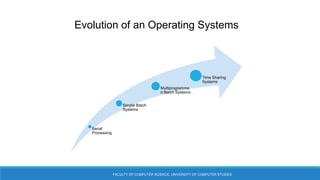
 Simple Batch Systems
 Multiprogrammed Batch Systems
 Time Sharing Systems
Learning Objectives
FACULTY OF COMPUTER SCIENCE, UNIVERSITY OF COMPUTER STUDIES
 To discuss the evolution of operating system for early simple batch system to
modern complex system
 To understand the simple batch system, multiprogrammed batch system for
processing of their work
 To know the time sharing system, parallel and distributed system
FACULTY OF COMPUTER SCIENCE, UNIVERSITY OF COMPUTER STUDIES
 A major OS will evolve over time for a number of reasons:
 Hardware upgrades plus new types of hardware
 New services
 Fixes
Evolution of an Operating Systems
FACULTY OF COMPUTER SCIENCE, UNIVERSITY OF COMPUTER STUDIES
Evolution of an Operating Systems
Serial
Processing
Simple Batch
Systems
Multiprogramme
d Batch Systems
Time Sharing
Systems
FACULTY OF COMPUTER SCIENCE, UNIVERSITY OF COMPUTER STUDIES
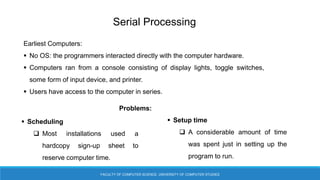
Serial Processing
Earliest Computers:
 No OS: the programmers interacted directly with the computer hardware.
 Computers ran from a console consisting of display lights, toggle switches,
some form of input device, and printer.
 Users have access to the computer in series.
 Scheduling
 Most installations used a
hardcopy sign-up sheet to
reserve computer time.
 Setup time
 A considerable amount of time
was spent just in setting up the
program to run.
Problems:
FACULTY OF COMPUTER SCIENCE, UNIVERSITY OF COMPUTER STUDIES
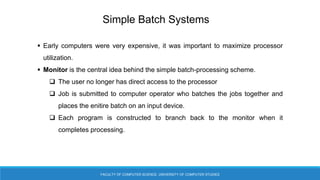
Simple Batch Systems
 Early computers were very expensive, it was important to maximize processor
utilization.
 Monitor is the central idea behind the simple batch-processing scheme.
 The user no longer has direct access to the processor
 Job is submitted to computer operator who batches the jobs together and
places the enitire batch on an input device.
 Each program is constructed to branch back to the monitor when it
completes processing.
FACULTY OF COMPUTER SCIENCE, UNIVERSITY OF COMPUTER STUDIES
Simple Batch Systems
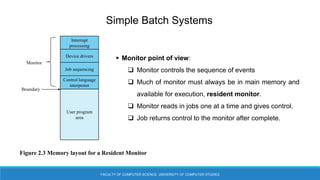
 Monitor point of view:
 Monitor controls the sequence of events
 Much of monitor must always be in main memory and
available for execution, resident monitor.
 Monitor reads in jobs one at a time and gives control.
 Job returns control to the monitor after complete.
Interrupt
processing
Device drivers
Job sequencing
Control language
interpreter
User program
area
Monitor
Boundary
Figure 2.3 Memory layout for a Resident Monitor
FACULTY OF COMPUTER SCIENCE, UNIVERSITY OF COMPUTER STUDIES
Simple Batch Systems
 Processor point of view:
 Processor executes instruction from the memory containing the monitor
 Executes the instructions in the user program until it encounters an ending or
error condition
 Control is passed to a job means processor is fetching and executing
instructions in a user program
 Control is returned to the monitor means that the processor is fetching
and executing instructions from the monitor program
FACULTY OF COMPUTER SCIENCE, UNIVERSITY OF COMPUTER STUDIES
Simple Batch Systems
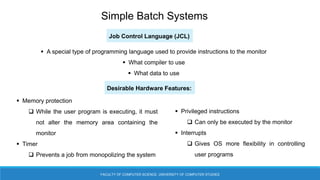
 A special type of programming language used to provide instructions to the monitor
 What compiler to use
 What data to use
 Memory protection
 While the user program is executing, it must
not alter the memory area containing the
monitor
 Timer
 Prevents a job from monopolizing the system
 Privileged instructions
 Can only be executed by the monitor
 Interrupts
 Gives OS more flexibility in controlling
user programs
Desirable Hardware Features:
Job Control Language (JCL)
FACULTY OF COMPUTER SCIENCE, UNIVERSITY OF COMPUTER STUDIES
Simple Batch Systems
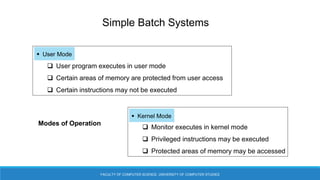
Modes of Operation
 User program executes in user mode
 Certain areas of memory are protected from user access
 Certain instructions may not be executed
 User Mode
 Monitor executes in kernel mode
 Privileged instructions may be executed
 Protected areas of memory may be accessed
 Kernel Mode
FACULTY OF COMPUTER SCIENCE, UNIVERSITY OF COMPUTER STUDIES
Multiprogrammed Batch Systems
 Processor is often idle
 Even with automatic job sequencing
 I/O devices are slow compared to processor
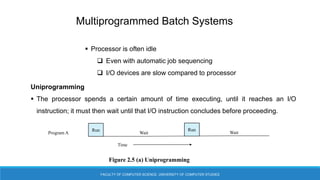
Uniprogramming
 The processor spends a certain amount of time executing, until it reaches an I/O
instruction; it must then wait until that I/O instruction concludes before proceeding.
Run Run
Wait Wait
Program A
Time
Figure 2.5 (a) Uniprogramming
FACULTY OF COMPUTER SCIENCE, UNIVERSITY OF COMPUTER STUDIES
Multiprogrammed Batch Systems
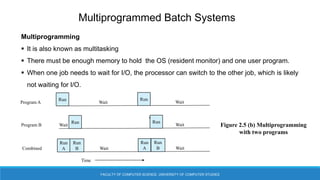
Multiprogramming
 It is also known as multitasking
 There must be enough memory to hold the OS (resident monitor) and one user program.
 When one job needs to wait for I/O, the processor can switch to the other job, which is likely
not waiting for I/O.
Figure 2.5 (b) Multiprogramming
with two programs
Wait
Run Run
Wait Wait
Program B
Run Run
Wait Wait
Program A
Run
A
Run
A
Wait Wait
Combined
Time
Run
B
Run
B
FACULTY OF COMPUTER SCIENCE, UNIVERSITY OF COMPUTER STUDIES
Multiprogrammed Batch Systems
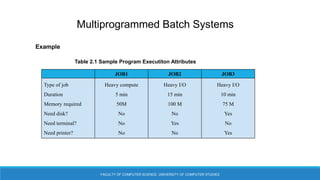
Example
Table 2.1 Sample Program Executiton Attributes
JOB1 JOB2 JOB3
Type of job
Duration
Memory required
Need disk?
Need terminal?
Need printer?
Heavy compute
5 min
50M
No
No
No
Heavy I/O
15 min
100 M
No
Yes
No
Heavy I/O
10 min
75 M
Yes
No
Yes
FACULTY OF COMPUTER SCIENCE, UNIVERSITY OF COMPUTER STUDIES
Multiprogrammed Batch Systems
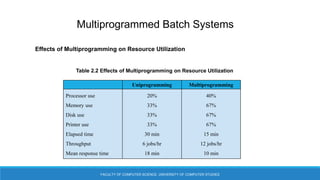
Effects of Multiprogramming on Resource Utilization
Table 2.2 Effects of Multiprogramming on Resource Utilization
Uniprogramming Multiprogramming
Processor use
Memory use
Disk use
Printer use
Elapsed time
Throughput
Mean response time
20%
33%
33%
33%
30 min
6 jobs/hr
18 min
40%
67%
67%
67%
15 min
12 jobs/hr
10 min
FACULTY OF COMPUTER SCIENCE, UNIVERSITY OF COMPUTER STUDIES
Time Sharing Systems
 It can be used to handle multiple interactive jobs
 Processor time is shared among multiple users
 Multiple users simultaneously access the system through terminals, with the OS
interleaving the execution of each user program in a short burst or quantum of
computation.
FACULTY OF COMPUTER SCIENCE, UNIVERSITY OF COMPUTER STUDIES
Time Sharing Systems
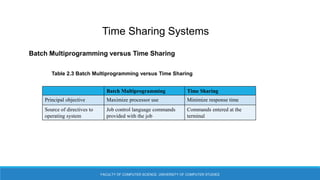
Batch Multiprogramming versus Time Sharing
Table 2.3 Batch Multiprogramming versus Time Sharing
Batch Multiprogramming Time Sharing
Principal objective Maximize processor use Minimize response time
Source of directives to
operating system
Job control language commands
provided with the job
Commands entered at the
terminal
FACULTY OF COMPUTER SCIENCE, UNIVERSITY OF COMPUTER STUDIES
Time Sharing Systems
Compatible Time-Sharing System
Time Slicing
 System clock generates interrupts at a rate of
approximately one every 0.2 second
 At each interrupt OS regained control and could assign
processor to another user
 At regular time intervals the curent user would be
preempted and another user loaded in
 Old user programs and data were written out to disk
 Old user program code and data were restored in main
memory when that program was next given a turn.
CTSS
 One of the first time sharing OS
 Developed at MIT by a group know as Project MAC
 Ran on a computer with 32,000 36 bit words of
main memory, with the resident monitor consuming
5000 of that
 To simplify both the monitor and memory
management a program was always loaded to start
at the location of the 5000th word
FACULTY OF COMPUTER SCIENCE, UNIVERSITY OF COMPUTER STUDIES
Summary
In this lecture, you learned about
 Serial processing, simple batch system, multiprogrammed batch system, time
sharing system
 The difference between multiprogramming and time sharing
Learning Outcomes
FACULTY OF COMPUTER SCIENCE, UNIVERSITY OF COMPUTER STUDIES
After the end of the lecture, the students will be able to:
 know advantages and disadvantages of serial processing, simple batch
system, multiprogrammed batch systems, and time sharing systems
 Understand the monitor point of view and the processor point of view in
simple batch system
 Know the Uniprogramming and Multiprogramming in Multiprogrammed
Batch system
References
FACULTY OF COMPUTER SCIENCE, UNIVERSITY OF COMPUTER STUDIES
1. “Operating Systems, internal and Design Principles” by William
Stallings, 7th Edition, ISBN 13: 978-13-230998-1.

Ch2_OS_Lecture 2.pptx

  • 1.
    Chapter (2) Operating SystemOverview Dr. Hnin Lai Nyo Lecturer Faculty of Computer Science
  • 2.
    Lecture Contents  Lecture1: Operating System Objectives and Functions  Lecture 2: The Evolution of Operating System  Lecture 3: Major Achievements  Lecture 4: Developments Leading to Modern Operating Systems FACULTY OF COMPUTER SCIENCE, UNIVERSITY OF COMPUTER STUDIES
  • 3.
    Lecture 2: TheEvolution of an Operating System FACULTY OF COMPUTER SCIENCE, UNIVERSITY OF COMPUTER STUDIES  Serial Processing  Simple Batch Systems  Multiprogrammed Batch Systems  Time Sharing Systems
  • 4.
    Learning Objectives FACULTY OFCOMPUTER SCIENCE, UNIVERSITY OF COMPUTER STUDIES  To discuss the evolution of operating system for early simple batch system to modern complex system  To understand the simple batch system, multiprogrammed batch system for processing of their work  To know the time sharing system, parallel and distributed system
  • 5.
    FACULTY OF COMPUTERSCIENCE, UNIVERSITY OF COMPUTER STUDIES  A major OS will evolve over time for a number of reasons:  Hardware upgrades plus new types of hardware  New services  Fixes Evolution of an Operating Systems
  • 6.
    FACULTY OF COMPUTERSCIENCE, UNIVERSITY OF COMPUTER STUDIES Evolution of an Operating Systems Serial Processing Simple Batch Systems Multiprogramme d Batch Systems Time Sharing Systems
  • 7.
    FACULTY OF COMPUTERSCIENCE, UNIVERSITY OF COMPUTER STUDIES Serial Processing Earliest Computers:  No OS: the programmers interacted directly with the computer hardware.  Computers ran from a console consisting of display lights, toggle switches, some form of input device, and printer.  Users have access to the computer in series.  Scheduling  Most installations used a hardcopy sign-up sheet to reserve computer time.  Setup time  A considerable amount of time was spent just in setting up the program to run. Problems:
  • 8.
    FACULTY OF COMPUTERSCIENCE, UNIVERSITY OF COMPUTER STUDIES Simple Batch Systems  Early computers were very expensive, it was important to maximize processor utilization.  Monitor is the central idea behind the simple batch-processing scheme.  The user no longer has direct access to the processor  Job is submitted to computer operator who batches the jobs together and places the enitire batch on an input device.  Each program is constructed to branch back to the monitor when it completes processing.
  • 9.
    FACULTY OF COMPUTERSCIENCE, UNIVERSITY OF COMPUTER STUDIES Simple Batch Systems  Monitor point of view:  Monitor controls the sequence of events  Much of monitor must always be in main memory and available for execution, resident monitor.  Monitor reads in jobs one at a time and gives control.  Job returns control to the monitor after complete. Interrupt processing Device drivers Job sequencing Control language interpreter User program area Monitor Boundary Figure 2.3 Memory layout for a Resident Monitor
  • 10.
    FACULTY OF COMPUTERSCIENCE, UNIVERSITY OF COMPUTER STUDIES Simple Batch Systems  Processor point of view:  Processor executes instruction from the memory containing the monitor  Executes the instructions in the user program until it encounters an ending or error condition  Control is passed to a job means processor is fetching and executing instructions in a user program  Control is returned to the monitor means that the processor is fetching and executing instructions from the monitor program
  • 11.
    FACULTY OF COMPUTERSCIENCE, UNIVERSITY OF COMPUTER STUDIES Simple Batch Systems  A special type of programming language used to provide instructions to the monitor  What compiler to use  What data to use  Memory protection  While the user program is executing, it must not alter the memory area containing the monitor  Timer  Prevents a job from monopolizing the system  Privileged instructions  Can only be executed by the monitor  Interrupts  Gives OS more flexibility in controlling user programs Desirable Hardware Features: Job Control Language (JCL)
  • 12.
    FACULTY OF COMPUTERSCIENCE, UNIVERSITY OF COMPUTER STUDIES Simple Batch Systems Modes of Operation  User program executes in user mode  Certain areas of memory are protected from user access  Certain instructions may not be executed  User Mode  Monitor executes in kernel mode  Privileged instructions may be executed  Protected areas of memory may be accessed  Kernel Mode
  • 13.
    FACULTY OF COMPUTERSCIENCE, UNIVERSITY OF COMPUTER STUDIES Multiprogrammed Batch Systems  Processor is often idle  Even with automatic job sequencing  I/O devices are slow compared to processor Uniprogramming  The processor spends a certain amount of time executing, until it reaches an I/O instruction; it must then wait until that I/O instruction concludes before proceeding. Run Run Wait Wait Program A Time Figure 2.5 (a) Uniprogramming
  • 14.
    FACULTY OF COMPUTERSCIENCE, UNIVERSITY OF COMPUTER STUDIES Multiprogrammed Batch Systems Multiprogramming  It is also known as multitasking  There must be enough memory to hold the OS (resident monitor) and one user program.  When one job needs to wait for I/O, the processor can switch to the other job, which is likely not waiting for I/O. Figure 2.5 (b) Multiprogramming with two programs Wait Run Run Wait Wait Program B Run Run Wait Wait Program A Run A Run A Wait Wait Combined Time Run B Run B
  • 15.
    FACULTY OF COMPUTERSCIENCE, UNIVERSITY OF COMPUTER STUDIES Multiprogrammed Batch Systems Example Table 2.1 Sample Program Executiton Attributes JOB1 JOB2 JOB3 Type of job Duration Memory required Need disk? Need terminal? Need printer? Heavy compute 5 min 50M No No No Heavy I/O 15 min 100 M No Yes No Heavy I/O 10 min 75 M Yes No Yes
  • 16.
    FACULTY OF COMPUTERSCIENCE, UNIVERSITY OF COMPUTER STUDIES Multiprogrammed Batch Systems Effects of Multiprogramming on Resource Utilization Table 2.2 Effects of Multiprogramming on Resource Utilization Uniprogramming Multiprogramming Processor use Memory use Disk use Printer use Elapsed time Throughput Mean response time 20% 33% 33% 33% 30 min 6 jobs/hr 18 min 40% 67% 67% 67% 15 min 12 jobs/hr 10 min
  • 17.
    FACULTY OF COMPUTERSCIENCE, UNIVERSITY OF COMPUTER STUDIES Time Sharing Systems  It can be used to handle multiple interactive jobs  Processor time is shared among multiple users  Multiple users simultaneously access the system through terminals, with the OS interleaving the execution of each user program in a short burst or quantum of computation.
  • 18.
    FACULTY OF COMPUTERSCIENCE, UNIVERSITY OF COMPUTER STUDIES Time Sharing Systems Batch Multiprogramming versus Time Sharing Table 2.3 Batch Multiprogramming versus Time Sharing Batch Multiprogramming Time Sharing Principal objective Maximize processor use Minimize response time Source of directives to operating system Job control language commands provided with the job Commands entered at the terminal
  • 19.
    FACULTY OF COMPUTERSCIENCE, UNIVERSITY OF COMPUTER STUDIES Time Sharing Systems Compatible Time-Sharing System Time Slicing  System clock generates interrupts at a rate of approximately one every 0.2 second  At each interrupt OS regained control and could assign processor to another user  At regular time intervals the curent user would be preempted and another user loaded in  Old user programs and data were written out to disk  Old user program code and data were restored in main memory when that program was next given a turn. CTSS  One of the first time sharing OS  Developed at MIT by a group know as Project MAC  Ran on a computer with 32,000 36 bit words of main memory, with the resident monitor consuming 5000 of that  To simplify both the monitor and memory management a program was always loaded to start at the location of the 5000th word
  • 20.
    FACULTY OF COMPUTERSCIENCE, UNIVERSITY OF COMPUTER STUDIES Summary In this lecture, you learned about  Serial processing, simple batch system, multiprogrammed batch system, time sharing system  The difference between multiprogramming and time sharing
  • 21.
    Learning Outcomes FACULTY OFCOMPUTER SCIENCE, UNIVERSITY OF COMPUTER STUDIES After the end of the lecture, the students will be able to:  know advantages and disadvantages of serial processing, simple batch system, multiprogrammed batch systems, and time sharing systems  Understand the monitor point of view and the processor point of view in simple batch system  Know the Uniprogramming and Multiprogramming in Multiprogrammed Batch system
  • 22.
    References FACULTY OF COMPUTERSCIENCE, UNIVERSITY OF COMPUTER STUDIES 1. “Operating Systems, internal and Design Principles” by William Stallings, 7th Edition, ISBN 13: 978-13-230998-1.