FILE MANAGEMENT
PROGRAMMING IN C
SUBMITTED BY,
MS. K. BANUPRIYA
ASSISTANT PROFESSOR OF INFORMATION TECHNOLOGY
BON SECOURS COLLEGE FOR WOMEN, THANJAVUR.
WHAT IS FILE?
A collection of data (or) Information stores in a system memory is
called file.
Eg: system memory (hard disk)
TYPES OF FILE
TEXT FILE
• .txt file
• Contents will be like
alphabets,digits & special
character
• Easily understand by human
being
• It provides less security
BINARY FILE
• .bin file
• Contents will be like(0’s&1’s)
• Easily understandable by
computer
• Its provide better security with
compared to text file
o When a program is terminated ; entrie data will be
lost; so, storing in a file will perserve your data even if
the program terminates
o You can easily move your data from one computer to
another computer without make.
Why file is required?
 Creating a new file
 Opening an existing file
 Reading from the file
 Writing to the file
 Deleting to the file
 Closing the file
File Operation in C
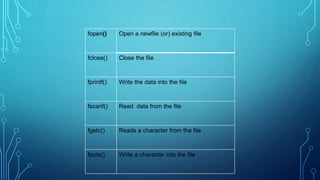
fopen() Open a newfile (or) existing file
fclose() Close the file
fprintf() Write the data into the file
fscanf() Read data from the file
fgetc() Reads a character from the file
fputs() Write a character into the file
Declaring & opening file
FILE * fptr; declaration of file
fptr= fopen (“Filename”,”Mode”);
r - open the file reading only
w - open the file for writing only
Type of mode of file in c:
Declaring of file
FILE * P1,*P2;
P1=fopen(“data”,”r”);
P2=fopen(“result”,”w”);
Fprintf() & fscanf() function
#include <stdio.h>
Void main()
{
FILE*f;
f= fopen(“f1.txt”,”w”);
Fprintf(f,”Welcome”);
Fclose(f);
}
Reading file fscanf() function
#include <stdio.h>
Void main()
{
FILE*f;
Char buff [255];
f=fopen(“f1.txt”,”r”);
While (fscanf (f,”%s”,buff)1=EOF)
{
Printf(“%s”,buff);
}
fclose(f);
}
Output:
Welcome
Program:
#include<stdio.h>
#include<conio.h>
Void main()
int age;
char name[20];
clrscr();
printf(“enter the name & age:”);
Scanf(“%sn”,&name);
Scanf(“%dn”,&age);
fp = fopen(“Demo.txt”,”w”);
fprintf(fp,”name:%sn age:%d”,name ,age);
fclose(fp);
getch();
}
Output:
Enter the name & age : Abi
23
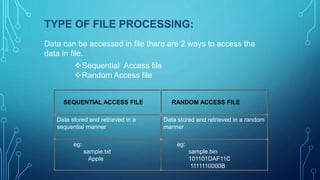
TYPE OF FILE PROCESSING:
Data can be accessed in file there are 2 ways to access the
data in file.
Sequential Access file
Random Access file
SEQUENTIAL ACCESS FILE RANDOM ACCESS FILE
Data stored and retrieved in a
sequential manner
Data stored and retrieved in a random
manner
eg:
sample.txt
Apple
eg:
sample.bin
101101DAF11C
1111110000B
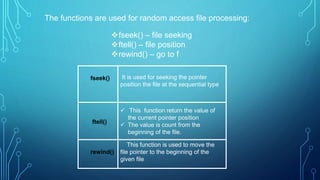
The functions are used for random access file processing:
fseek() – file seeking
ftell() – file position
rewind() – go to f
fseek() It is used for seeking the pointer
position the file at the sequential type
ftell()
 This function return the value of
the current pointer position
 The value is count from the
beginning of the file.
rewind()
This function is used to move the
file pointer to the beginning of the
given file
Thank You

C-FILE MANAGEMENT.pptx

  • 1.
    FILE MANAGEMENT PROGRAMMING INC SUBMITTED BY, MS. K. BANUPRIYA ASSISTANT PROFESSOR OF INFORMATION TECHNOLOGY BON SECOURS COLLEGE FOR WOMEN, THANJAVUR.
  • 2.
    WHAT IS FILE? Acollection of data (or) Information stores in a system memory is called file. Eg: system memory (hard disk)
  • 3.
    TYPES OF FILE TEXTFILE • .txt file • Contents will be like alphabets,digits & special character • Easily understand by human being • It provides less security BINARY FILE • .bin file • Contents will be like(0’s&1’s) • Easily understandable by computer • Its provide better security with compared to text file
  • 4.
    o When aprogram is terminated ; entrie data will be lost; so, storing in a file will perserve your data even if the program terminates o You can easily move your data from one computer to another computer without make. Why file is required?
  • 5.
     Creating anew file  Opening an existing file  Reading from the file  Writing to the file  Deleting to the file  Closing the file File Operation in C
  • 6.
    fopen() Open anewfile (or) existing file fclose() Close the file fprintf() Write the data into the file fscanf() Read data from the file fgetc() Reads a character from the file fputs() Write a character into the file
  • 7.
    Declaring & openingfile FILE * fptr; declaration of file fptr= fopen (“Filename”,”Mode”); r - open the file reading only w - open the file for writing only Type of mode of file in c:
  • 8.
    Declaring of file FILE* P1,*P2; P1=fopen(“data”,”r”); P2=fopen(“result”,”w”);
  • 9.
    Fprintf() & fscanf()function #include <stdio.h> Void main() { FILE*f; f= fopen(“f1.txt”,”w”); Fprintf(f,”Welcome”); Fclose(f); }
  • 10.
    Reading file fscanf()function #include <stdio.h> Void main() { FILE*f; Char buff [255]; f=fopen(“f1.txt”,”r”); While (fscanf (f,”%s”,buff)1=EOF) { Printf(“%s”,buff); } fclose(f); } Output: Welcome
  • 11.
    Program: #include<stdio.h> #include<conio.h> Void main() int age; charname[20]; clrscr(); printf(“enter the name & age:”); Scanf(“%sn”,&name); Scanf(“%dn”,&age); fp = fopen(“Demo.txt”,”w”); fprintf(fp,”name:%sn age:%d”,name ,age); fclose(fp); getch(); } Output: Enter the name & age : Abi 23
  • 12.
    TYPE OF FILEPROCESSING: Data can be accessed in file there are 2 ways to access the data in file. Sequential Access file Random Access file SEQUENTIAL ACCESS FILE RANDOM ACCESS FILE Data stored and retrieved in a sequential manner Data stored and retrieved in a random manner eg: sample.txt Apple eg: sample.bin 101101DAF11C 1111110000B
  • 13.
    The functions areused for random access file processing: fseek() – file seeking ftell() – file position rewind() – go to f fseek() It is used for seeking the pointer position the file at the sequential type ftell()  This function return the value of the current pointer position  The value is count from the beginning of the file. rewind() This function is used to move the file pointer to the beginning of the given file
  • 14.