CECS 5020 Course Overview
CECS 5020 Computers in Education Professor of Record Dr. Jim Poirot Associate Dean College of Education University of North Texas Be sure and listen to Dr. Poirot’s  personal profile .
CECS 5020 Computers in Education Course Overview Course Resources Class Structure Expectations Prerequisites
Course Overview Computer/Technology Use in K-12 Classrooms Teaching With Technology Technology is the tool Teaching About Technology Constantly changing Teachers must be comfortable  learning new skills
Issues Surrounding Educational Technology Societal Equity Educational Technical Teacher Education Course Overview
Educational Technology Tools Multimedia Resources Simulation Games Drill and Practice Internet  Course Overview
Productivity Software Word Processor Spreadsheet Database Desktop Publishing Group Communication Integrated Grade book and Attendance Course Overview
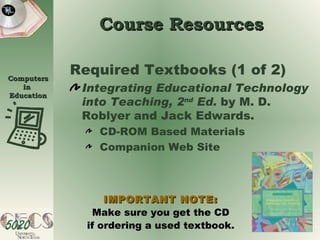
Required Textbooks (1 of 2) Integrating Educational Technology into Teaching, 2 nd  Ed.  by M. D. Roblyer and Jack Edwards. CD-ROM Based Materials Companion Web Site Course Resources IMPORTANT NOTE: Make sure you get the CD if ordering a used textbook.
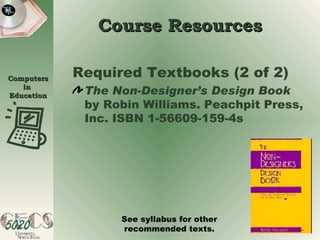
Course Resources Required Textbooks (2 of 2) The Non-Designer’s Design Book  by Robin Williams. Peachpit Press, Inc. ISBN 1-56609-159-4s See syllabus for other recommended texts.
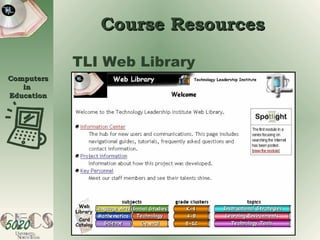
Course Resources TLI Web Library
Course Resources Faculty and student colleagues See syllabus for faculty and assistants email links. Email is a primary communication device in a distance learning environment. Every student is expected to have and know how to use email. See syllabus for setting up UNT email accounts. Whole group and small group discussion boards will also be established.
Course Resources State and National Competencies Texas Education Agency (TEA) U. S. Department of Education International Society for Technology in Education (ISTE) The World and Our Society UNT Library Some books available in electronic format.
Class Structure Fifteen Classes with Common Components Performance Objectives Essential Questions Class Competencies and Skills Class Activities Class Communication
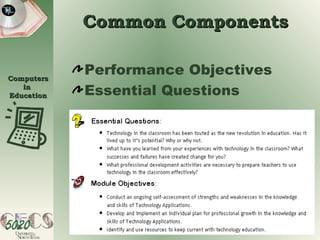
Common Components Performance Objectives Essential Questions
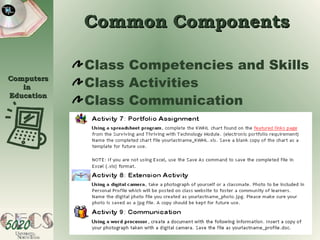
Common Components Class Competencies and Skills Class Activities Class Communication
Common Components Class Activities  Number from 6 to 12 Key Activities are noted
Common Components Key Activities   Class Overview Performance Objectives Glossary Before Continuing Readings Portfolio Additions Others Identified per Class
Key Activities Class Overview is the first activity  in every class is a Key Activity or required viewing Is approximately 10 minutes long contains outline of the class Is delivered as an ADAM
Key Activities Objectives Class Objectives What you will accomplish from the week’s activities? Performance Objectives   Generally pertain to technology skills.
Key Activities Glossary Key terms in educational technology and technology terminology Some may be assigned Others will be self selected Stored in database Collected from required readings
Key Activities Electronic Portfolio Course is primarily project-based. Required assignments will comprise an electronic portfolio. Each assignment has specific criteria and due date. Electronic portfolio is majority of course grade.
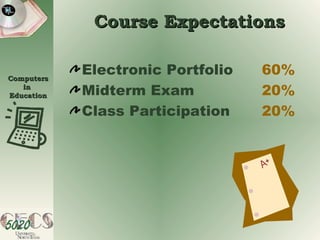
Course Expectations Electronic Portfolio 60% Midterm Exam 20% Class Participation 20%
Course Prerequisites Experiences of Classroom Instruction Skills in Tools Word Processing Spreadsheets Databases Presentation Software Internet and Web Browsers
Course Prerequisites Knowledge of software tools essential for success in this class. Instruction in these software tools is offered in CECS 5010. CECS 5020 offers direct instruction in: Desktop publishing skills  Strategies for integrating technology applications in K-12 classrooms

Cecs5020

  • 1.
  • 2.
    CECS 5020 Computersin Education Professor of Record Dr. Jim Poirot Associate Dean College of Education University of North Texas Be sure and listen to Dr. Poirot’s personal profile .
  • 3.
    CECS 5020 Computersin Education Course Overview Course Resources Class Structure Expectations Prerequisites
  • 4.
    Course Overview Computer/TechnologyUse in K-12 Classrooms Teaching With Technology Technology is the tool Teaching About Technology Constantly changing Teachers must be comfortable learning new skills
  • 5.
    Issues Surrounding EducationalTechnology Societal Equity Educational Technical Teacher Education Course Overview
  • 6.
    Educational Technology ToolsMultimedia Resources Simulation Games Drill and Practice Internet Course Overview
  • 7.
    Productivity Software WordProcessor Spreadsheet Database Desktop Publishing Group Communication Integrated Grade book and Attendance Course Overview
  • 8.
    Required Textbooks (1of 2) Integrating Educational Technology into Teaching, 2 nd Ed. by M. D. Roblyer and Jack Edwards. CD-ROM Based Materials Companion Web Site Course Resources IMPORTANT NOTE: Make sure you get the CD if ordering a used textbook.
  • 9.
    Course Resources RequiredTextbooks (2 of 2) The Non-Designer’s Design Book by Robin Williams. Peachpit Press, Inc. ISBN 1-56609-159-4s See syllabus for other recommended texts.
  • 10.
  • 11.
    Course Resources Facultyand student colleagues See syllabus for faculty and assistants email links. Email is a primary communication device in a distance learning environment. Every student is expected to have and know how to use email. See syllabus for setting up UNT email accounts. Whole group and small group discussion boards will also be established.
  • 12.
    Course Resources Stateand National Competencies Texas Education Agency (TEA) U. S. Department of Education International Society for Technology in Education (ISTE) The World and Our Society UNT Library Some books available in electronic format.
  • 13.
    Class Structure FifteenClasses with Common Components Performance Objectives Essential Questions Class Competencies and Skills Class Activities Class Communication
  • 14.
    Common Components PerformanceObjectives Essential Questions
  • 15.
    Common Components ClassCompetencies and Skills Class Activities Class Communication
  • 16.
    Common Components ClassActivities Number from 6 to 12 Key Activities are noted
  • 17.
    Common Components KeyActivities Class Overview Performance Objectives Glossary Before Continuing Readings Portfolio Additions Others Identified per Class
  • 18.
    Key Activities ClassOverview is the first activity in every class is a Key Activity or required viewing Is approximately 10 minutes long contains outline of the class Is delivered as an ADAM
  • 19.
    Key Activities ObjectivesClass Objectives What you will accomplish from the week’s activities? Performance Objectives Generally pertain to technology skills.
  • 20.
    Key Activities GlossaryKey terms in educational technology and technology terminology Some may be assigned Others will be self selected Stored in database Collected from required readings
  • 21.
    Key Activities ElectronicPortfolio Course is primarily project-based. Required assignments will comprise an electronic portfolio. Each assignment has specific criteria and due date. Electronic portfolio is majority of course grade.
  • 22.
    Course Expectations ElectronicPortfolio 60% Midterm Exam 20% Class Participation 20%
  • 23.
    Course Prerequisites Experiencesof Classroom Instruction Skills in Tools Word Processing Spreadsheets Databases Presentation Software Internet and Web Browsers
  • 24.
    Course Prerequisites Knowledgeof software tools essential for success in this class. Instruction in these software tools is offered in CECS 5010. CECS 5020 offers direct instruction in: Desktop publishing skills Strategies for integrating technology applications in K-12 classrooms